AWS Kinesis Data Streams – KDS
- Amazon Kinesis Data Streams is a streaming data service that enables real-time processing of streaming data at a massive scale.
- Kinesis Streams enables building of custom applications that process or analyze streaming data for specialized needs.
- Kinesis Streams features
- handles provisioning, deployment, ongoing-maintenance of hardware, software, or other services for the data streams.
- manages the infrastructure, storage, networking, and configuration needed to stream the data at the level of required data throughput.
- synchronously replicates data across three AZs in an AWS Region, providing high availability and data durability.
- stores records of a stream for up to 24 hours, by default, from the time they are added to the stream. The limit can be raised to up to 365 days by enabling extended data retention.
- Data such as clickstreams, application logs, social media, etc can be added from multiple sources and within seconds is available for processing to the Kinesis Applications.
- Kinesis provides the ordering of records, as well as the ability to read and/or replay records in the same order to multiple applications.
- Kinesis is designed to process streaming big data and the pricing model allows heavy PUTs rate.
- Multiple Kinesis Data Streams applications can consume data from a stream, so that multiple actions, like archiving and processing, can take place concurrently and independently.
- Kinesis Data Streams application can start consuming the data from the stream almost immediately after the data is added and
put-to-get delayis typically less than 1 second. - Kinesis Streams is useful for rapidly moving data off data producers and then continuously processing the data, be it to transform the data before emitting to a data store, run real-time metrics and analytics, or derive more complex data streams for further processing
- Accelerated log and data feed intake: Data producers can push data to Kinesis stream as soon as it is produced, preventing any data loss and making it available for processing within seconds.
- Real-time metrics and reporting: Metrics can be extracted and used to generate reports from data in real-time.
- Real-time data analytics: Run real-time streaming data analytics.
- Complex stream processing: Create Directed Acyclic Graphs (DAGs) of Kinesis Applications and data streams, with Kinesis applications adding to another Amazon Kinesis stream for further processing, enabling successive stages of stream processing.
- Kinesis limits
- stores records of a stream for up to 24 hours, by default, which can be extended to max 365 days
- maximum size of a data blob (the data payload before Base64-encoding) within one record is 1 MB by default, configurable up to 10 MB
- Each shard can support up to 1000 PUT records per second.
- S3 is a cost-effective way to store the data, but not designed to handle a stream of data in real-time
Kinesis Data Streams Terminology
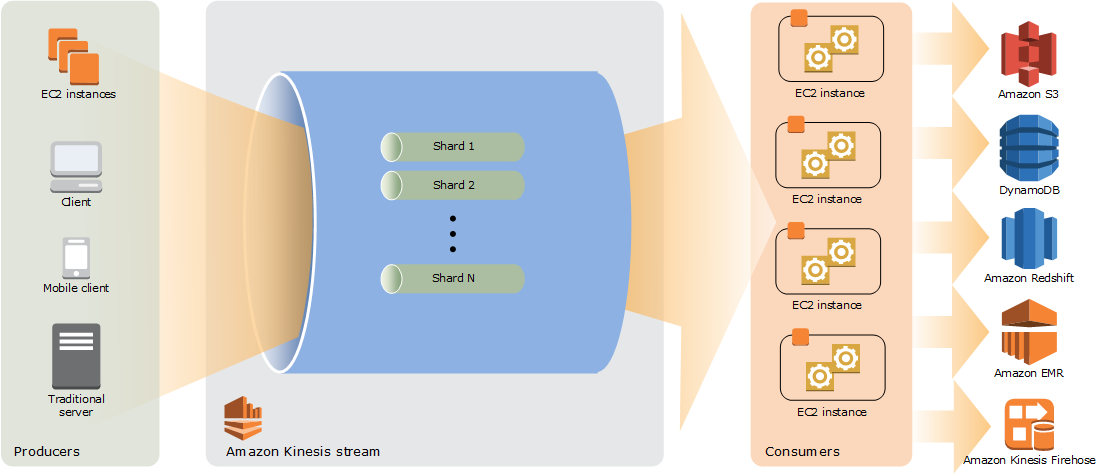
- Data Record
- A record is the unit of data stored in a Kinesis data stream.
- A record is composed of a sequence number, partition key, and data blob, which is an immutable sequence of bytes.
- Maximum size of a data blob is 1 MB by default, configurable up to 10 MB (announced Oct 2025).
- Partition key
- Partition key is used to segregate and route records to different shards of a stream.
- A partition key is specified by the data producer while adding data to a Kinesis stream.
- Sequence number
- A sequence number is a unique identifier for each record.
- Kinesis assigns a Sequence number, when a data producer calls PutRecord or PutRecords operation to add data to a stream.
- Sequence numbers for the same partition key generally increase over time; the longer the time period between PutRecord or PutRecords requests, the larger the sequence numbers become.
- Data Stream
- Data stream represents a group of data records.
- Data records in a data stream are distributed into shards.
- Shard
- A shard is a uniquely identified sequence of data records in a stream.
- Streams are made of shards and are the base throughput unit of a Kinesis stream, as pricing is per shard basis.
- Each shard supports up to 5 transactions per second for reads, up to a maximum total data read rate of 2 MB per second, and up to 1,000 records per second for writes, up to a maximum total data write rate of 1 MB per second (including partition keys)
- Each shard provides a fixed unit of capacity. If the limits are exceeded, either by data throughput or the number of PUT records, the put data call will be rejected with a ProvisionedThroughputExceeded exception.
- This can be handled by
- Implementing a retry on the data producer side, if this is due to a temporary rise of the stream’s input data rate
- Dynamically scaling the number of shared (resharding) to provide enough capacity for the put data calls to consistently succeed
- Capacity Mode
- A data stream capacity mode determines the pricing and how the capacity is managed
- Kinesis Data Streams currently supports three capacity modes:
- On-demand Standard
- KDS automatically manages the shards in order to provide the necessary throughput.
- You are charged only for the actual throughput used and KDS automatically accommodates the workloads’ throughput needs as they ramp up or down.
- On-demand Advantage (launched Nov 2025)
- Enables on-demand streams to handle instant throughput increases up to 10GB/s or 10 million events per second using warm throughput capability.
- Offers 60% lower data pricing compared to On-demand Standard (ingest at $0.032/GB, retrieval at $0.016/GB).
- Supports up to 50 enhanced fan-out consumers per stream (vs 20 for Standard/Provisioned).
- Best suited for use cases ingesting at least 10 MiB/s in aggregate or having hundreds of data streams in a Region.
- Provisioned mode
- Number of shards for the data stream must be specified.
- Total capacity of a data stream is the sum of the capacities of its shards.
- Shards can be increased or decreased in a data stream as needed and you are charged for the number of shards at an hourly rate.
- On-demand Standard
- Retention Period
- All data is stored for 24 hours, by default, and can be increased to 8760 hours (365 days) maximum.
- Producers
- A producer puts data records into Kinesis data streams.
- To put data into the stream, the name of the stream, a partition key, and the data blob to be added to the stream should be specified.
- Partition key is used to determine which shard in the stream the data record is added to.
- Consumers
- A consumer is an application built to read and process data records from Kinesis data streams.
Kinesis Data Streams Large Record Support
- Kinesis Data Streams supports record sizes up to 10 MiB – a tenfold increase from the previous 1 MiB limit (announced Oct 2025).
- Maximum
PutRecordsrequest size increased from 5 MiB to 10 MiB. - Large record support can be configured per stream by updating the
maxRecordSizesetting via Console, CLI, or SDK. - Individual shard throughput limits (1 MiB/s write, 2 MiB/s read) remain unchanged; large records use burst capacity (up to 10 MiB/s per shard) that refills at the standard rate.
- Best practices:
- Maintain large records at 1-2% of total record count for optimal performance.
- Use random/uniformly distributed partition keys to spread large records across shards.
- Implement backoff and retry logic in producer applications.
- For continuous large record streams, store payloads in S3 and send metadata references through the stream.
- Supported by KCL 2.x+, Amazon Data Firehose (S3 delivery), and AWS Lambda consumers.
Kinesis Security
- supports Server-side encryption using Key Management Service (KMS) for encrypting the data at rest.
- supports writing encrypted data to a data stream by encrypting and decrypting on the client side.
- supports encryption in transit using HTTPS endpoints.
- supports Interface VPC endpoint to keep traffic between VPC and Kinesis Data Streams from leaving the Amazon network. Interface VPC endpoints don’t require an IGW, NAT device, VPN connection, or Direct Connect.
- integrated with IAM to control access to Kinesis Data Streams resources.
- supports Attribute-Based Access Control (ABAC) using stream tags and consumer tags, enabling fine-grained access control based on tag key-value pairs attached to IAM users, roles, and resources (Sep 2024 for streams, Apr 2025 for consumers).
- supports resource-based policies for cross-account access, enabling processing data ingested in one account with consumers (e.g., Lambda) in another account without assuming IAM roles.
- integrated with CloudTrail, which provides a record of actions taken by a user, role, or an AWS service in Kinesis Data Streams.
- supports AWS Fault Injection Service (FIS) integration (Oct 2025) to test application resilience against common API errors (e.g., ProvisionedThroughputExceeded, expired iterators) in a controlled environment.
Kinesis Producer
Data to Kinesis Data Streams can be added via API/SDK (PutRecord and PutRecords) operations, Kinesis Producer Library (KPL), or Kinesis Agent.
- API
PutRecord&PutRecordsoperations are synchronous operation that sends single/multiple records to the stream per HTTP request.- use
PutRecordsto achieve a higher throughput per data producer - helps manage many aspects of Kinesis Data Streams (including creating streams, resharding, and putting and getting records)
- Kinesis Agent
- is a pre-built Java application that offers an easy way to collect and send data to the Kinesis stream.
- can be installed on Linux-based server environments such as web servers, log servers, and database servers
- can be configured to monitor certain files on the disk and then continuously send new data to the Kinesis stream
- Kinesis Producer Library (KPL)
- is an easy-to-use and highly configurable library that helps to put data into a Kinesis stream.
- provides a layer of abstraction specifically for ingesting data
- presents a simple, asynchronous, and reliable interface that helps achieve high producer throughput with minimal client resources.
- batches messages, as it aggregates records to increase payload size and improve throughput.
- Collects records and uses
PutRecordsto write multiple records to multiple shards per request - Writes to one or more Kinesis data streams with an automatic and configurable retry mechanism.
- Integrates seamlessly with the Kinesis Client Library (KCL) to de-aggregate batched records on the consumer
- Submits CloudWatch metrics to provide visibility into performance
- ⚠️ KPL 0.x reached end-of-support on January 30, 2026. Migrate to KPL 1.x. The upgrade requires no changes to data processing logic.
- Third Party and Open source
- Log4j appender
- Apache Kafka
- Flume, fluentd, etc.
Kinesis Consumers
- Kinesis Application is a data consumer that reads and processes data from a Kinesis Data Stream and can be built using either Kinesis API or Kinesis Client Library (KCL)
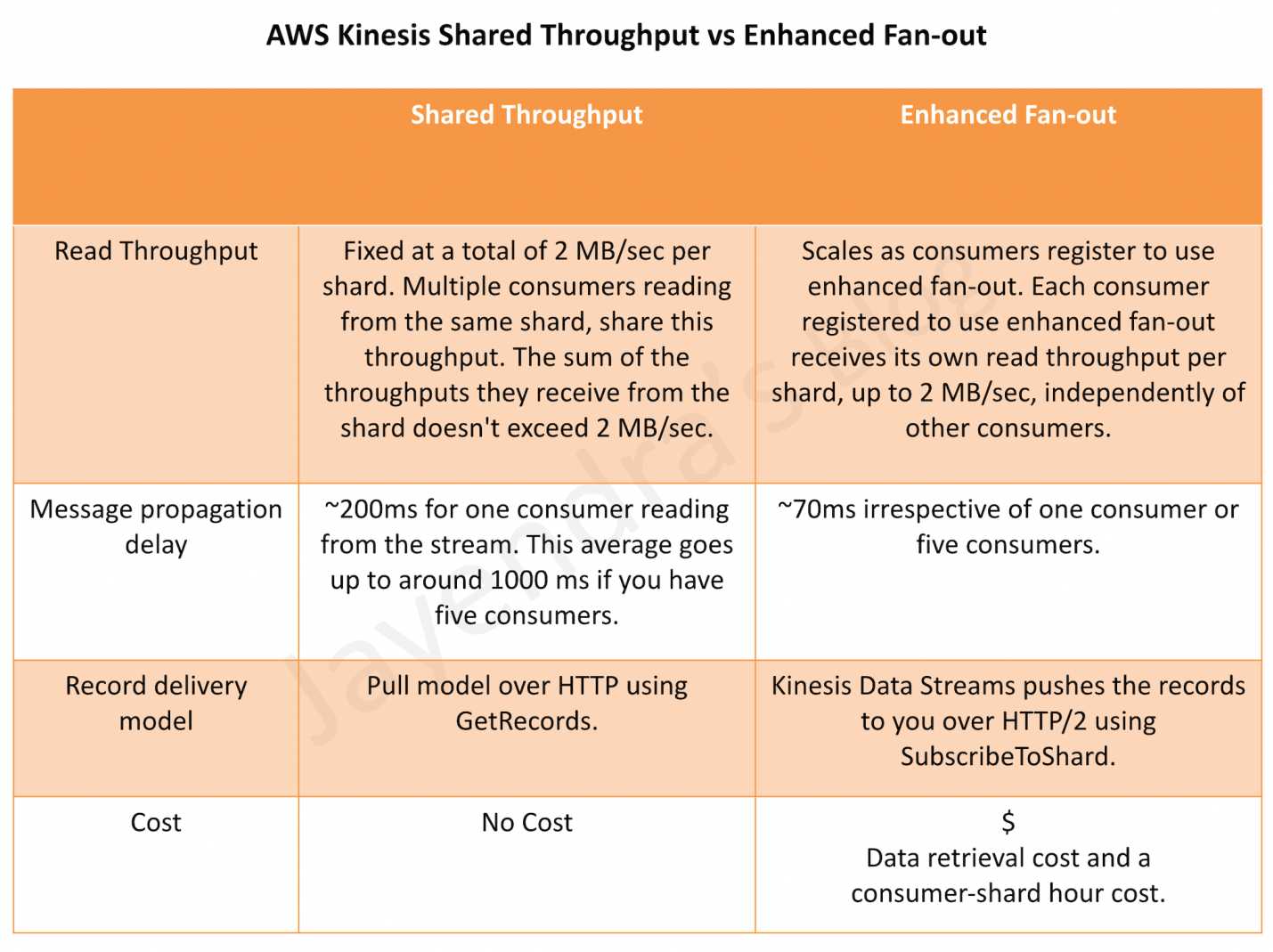
- Shards in a stream provide 2 MB/sec of read throughput per shard, by default, which is shared by all the consumers reading from a given shard.
- Kinesis Client Library (KCL)
- is a pre-built library with multiple language support
- delivers all records for a given partition key to same record processor
- makes it easier to build multiple applications reading from the same stream for e.g. to perform counting, aggregation, and filtering
- handles complex issues such as adapting to changes in stream volume, load-balancing streaming data, coordinating distributed services, and processing data with fault-tolerance
- uses a unique DynamoDB table to keep track of the application’s state, so if the Kinesis Data Streams application receives provisioned-throughput exceptions, increase the provisioned throughput for the DynamoDB table
- KCL 3.0 (launched Nov 2024) introduces an enhanced load balancing algorithm that continuously monitors resource utilization and redistributes load from over-utilized workers to underutilized workers, reducing stream processing compute costs by up to 33%.
- ⚠️ KCL 1.x reached end-of-support on January 30, 2026. Migrate to KCL 3.x. Migration requires updating interfaces and security credential providers.
- Kinesis Connector Library
- is a pre-built library that helps you easily integrate Kinesis Streams with other AWS services and third-party tools.
- Kinesis Client Library is required for Kinesis Connector Library
- is legacy and can be replaced by Lambda or Kinesis Data Firehose
- Kinesis Storm Spout is a pre-built library that helps you easily integrate Kinesis Streams with Apache Storm
- AWS Lambda, Amazon Data Firehose, and Amazon Managed Service for Apache Flink also act as consumers for Kinesis Data Streams
Kinesis Enhanced Fan-Out
- allows customers to scale the number of consumers reading from a data stream in parallel, while maintaining high performance and without contending for read throughput with other consumers.
- provides logical 2 MB/sec throughput pipes between consumers and shards for Kinesis Data Streams Consumers.
- supports up to 20 enhanced fan-out consumers per stream with On-demand Standard and Provisioned modes.
- supports up to 50 enhanced fan-out consumers per stream with On-demand Advantage mode (Nov 2025).
- supports consumer tagging and ABAC for fine-grained access control and cost allocation (Apr 2025).
Kinesis Data Streams Sharding
- Resharding helps to increase or decrease the number of shards in a stream in order to adapt to changes in the rate of data flowing through the stream.
- Resharding operations support shard split and shard merge.
- Shard split helps divide a single shard into two shards. It increases the capacity and the cost.
- Shard merge helps combine two shards into a single shard. It reduces the capacity and the cost.
- Resharding is always pairwise and always involves two shards.
- The shard or pair of shards that the resharding operation acts on are referred to as parent shards. The shard or pair of shards that result from the resharding operation are referred to as child shards.
- Kinesis Client Library tracks the shards in the stream using a DynamoDB table and discovers the new shards and populates new rows in the table.
- KCL ensures that any data that existed in shards prior to the resharding is processed before the data from the new shards, thereby, preserving the order in which data records were added to the stream for a particular partition key.
- Data records in the parent shard are accessible from the time they are added to the stream to the current retention period.
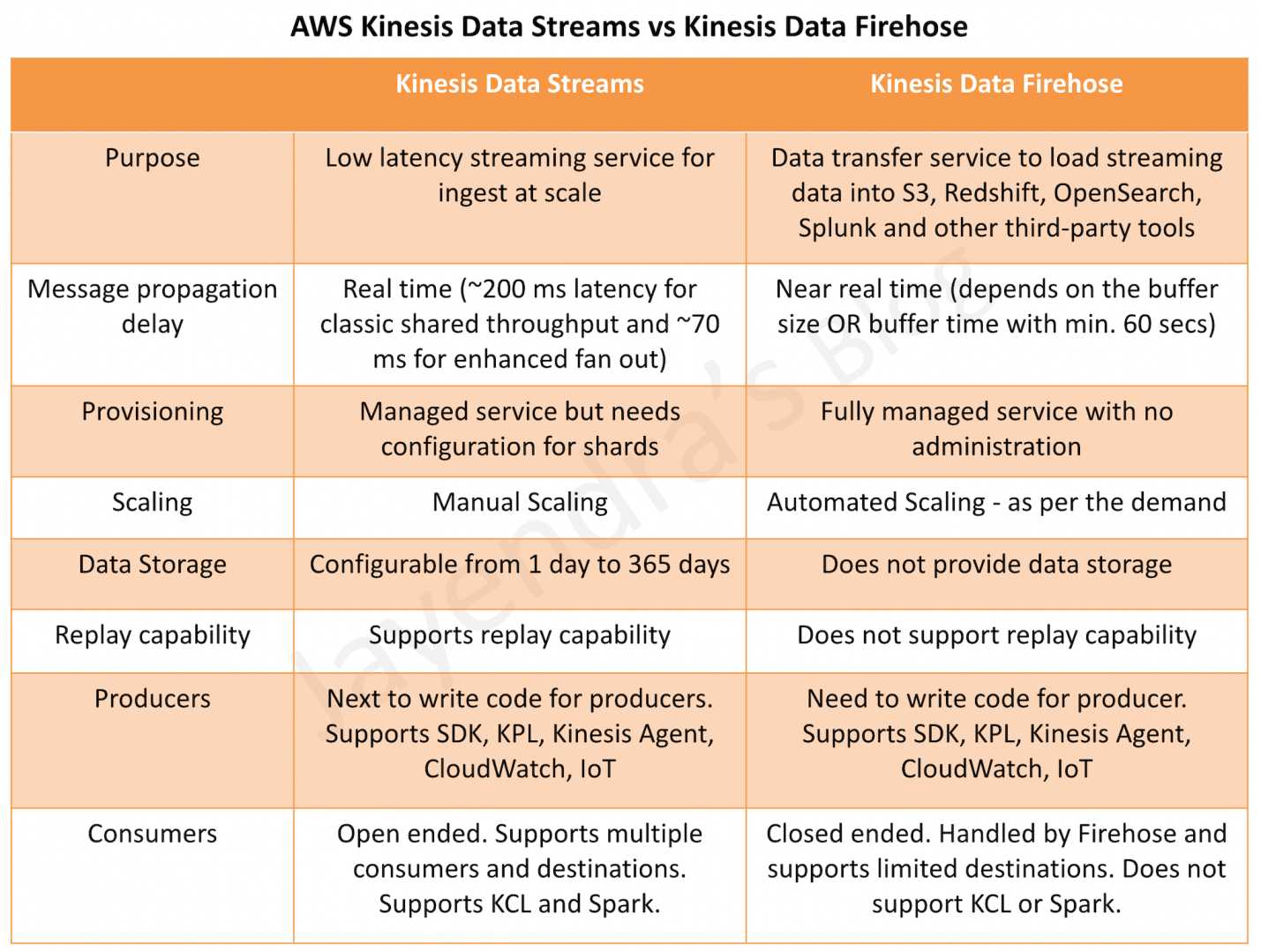
Kinesis Data Streams vs Kinesis Firehose
Refer post @ Kinesis Data Streams vs Kinesis Firehose
Kinesis Data Streams vs SQS
Refer post @ Kinesis Data Streams vs SQS
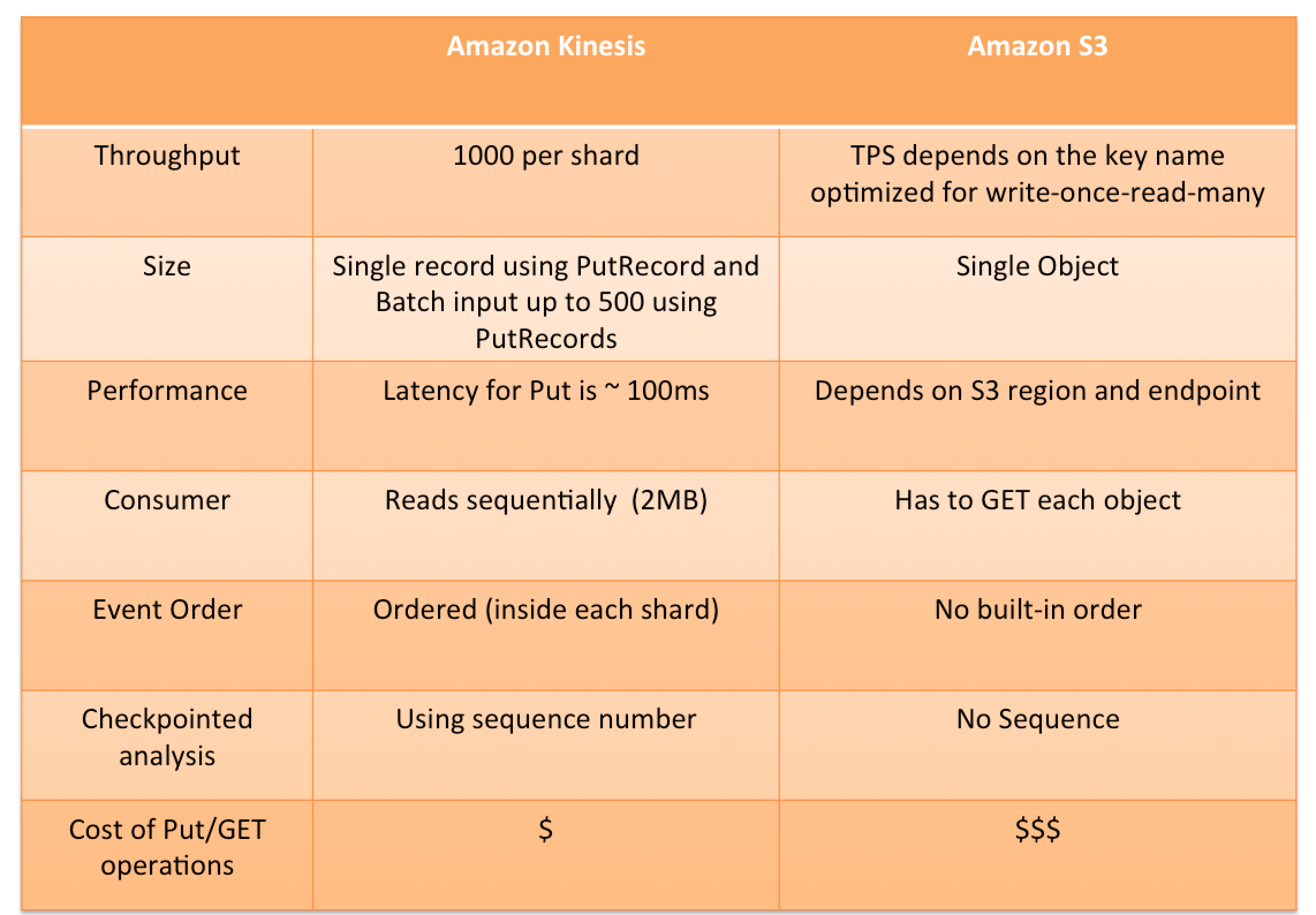
Kinesis vs S3
Kinesis Data Analytics for SQL – Discontinued
⚠️ Amazon Kinesis Data Analytics for SQL was discontinued on January 27, 2026.
AWS deleted all existing SQL applications. Customers should migrate to:
- Amazon Managed Service for Apache Flink – for complex stream processing
- Amazon Managed Service for Apache Flink Studio – for interactive SQL-based analytics
AWS Certification Exam Practice Questions
- Questions are collected from Internet and the answers are marked as per my knowledge and understanding (which might differ with yours).
- AWS services are updated everyday and both the answers and questions might be outdated soon, so research accordingly.
- AWS exam questions are not updated to keep up the pace with AWS updates, so even if the underlying feature has changed the question might not be updated
- Open to further feedback, discussion and correction.
- Questions are collected from Internet and the answers are marked as per my knowledge and understanding (which might differ with yours).
- AWS services are updated everyday and both the answers and questions might be outdated soon, so research accordingly.
- AWS exam questions are not updated to keep up the pace with AWS updates, so even if the underlying feature has changed the question might not be updated
- Open to further feedback, discussion and correction.
- You are deploying an application to track GPS coordinates of delivery trucks in the United States. Coordinates are transmitted from each delivery truck once every three seconds. You need to design an architecture that will enable real-time processing of these coordinates from multiple consumers. Which service should you use to implement data ingestion?
- Amazon Kinesis
- AWS Data Pipeline
- Amazon AppStream
- Amazon Simple Queue Service
- You are deploying an application to collect votes for a very popular television show. Millions of users will submit votes using mobile devices. The votes must be collected into a durable, scalable, and highly available data store for real-time public tabulation. Which service should you use?
- Amazon DynamoDB
- Amazon Redshift
- Amazon Kinesis
- Amazon Simple Queue Service
- Your company is in the process of developing a next generation pet collar that collects biometric information to assist families with promoting healthy lifestyles for their pets. Each collar will push 30kb of biometric data In JSON format every 2 seconds to a collection platform that will process and analyze the data providing health trending information back to the pet owners and veterinarians via a web portal Management has tasked you to architect the collection platform ensuring the following requirements are met. Provide the ability for real-time analytics of the inbound biometric data Ensure processing of the biometric data is highly durable, elastic and parallel. The results of the analytic processing should be persisted for data mining. Which architecture outlined below will meet the initial requirements for the collection platform?
- Utilize S3 to collect the inbound sensor data analyze the data from S3 with a daily scheduled Data Pipeline and save the results to a Redshift Cluster.
- Utilize Amazon Kinesis to collect the inbound sensor data, analyze the data with Kinesis clients and save the results to a Redshift cluster using EMR. (refer link)
- Utilize SQS to collect the inbound sensor data analyze the data from SQS with Amazon Kinesis and save the results to a Microsoft SQL Server RDS instance.
- Utilize EMR to collect the inbound sensor data, analyze the data from EUR with Amazon Kinesis and save me results to DynamoDB.
- Your customer is willing to consolidate their log streams (access logs, application logs, security logs etc.) in one single system. Once consolidated, the customer wants to analyze these logs in real time based on heuristics. From time to time, the customer needs to validate heuristics, which requires going back to data samples extracted from the last 12 hours? What is the best approach to meet your customer’s requirements?
- Send all the log events to Amazon SQS. Setup an Auto Scaling group of EC2 servers to consume the logs and apply the heuristics.
- Send all the log events to Amazon Kinesis develop a client process to apply heuristics on the logs (Can perform real time analysis and stores data for 24 hours which can be extended to 365 days)
- Configure Amazon CloudTrail to receive custom logs, use EMR to apply heuristics the logs (CloudTrail is only for auditing)
- Setup an Auto Scaling group of EC2 syslogd servers, store the logs on S3 use EMR to apply heuristics on the logs (EMR is for batch analysis)
- You require the ability to analyze a customer’s clickstream data on a website so they can do behavioral analysis. Your customer needs to know what sequence of pages and ads their customer clicked on. This data will be used in real time to modify the page layouts as customers click through the site to increase stickiness and advertising click-through. Which option meets the requirements for captioning and analyzing this data?
- Log clicks in weblogs by URL store to Amazon S3, and then analyze with Elastic MapReduce
- Push web clicks by session to Amazon Kinesis and analyze behavior using Kinesis workers
- Write click events directly to Amazon Redshift and then analyze with SQL
- Publish web clicks by session to an Amazon SQS queue men periodically drain these events to Amazon RDS and analyze with SQL
- Your social media monitoring application uses a Python app running on AWS Elastic Beanstalk to inject tweets, Facebook updates and RSS feeds into an Amazon Kinesis stream. A second AWS Elastic Beanstalk app generates key performance indicators into an Amazon DynamoDB table and powers a dashboard application. What is the most efficient option to prevent any data loss for this application?
- Use AWS Data Pipeline to replicate your DynamoDB tables into another region.
- Use the second AWS Elastic Beanstalk app to store a backup of Kinesis data onto Amazon Elastic Block Store (EBS), and then create snapshots from your Amazon EBS volumes.
- Add a second Amazon Kinesis stream in another Availability Zone and use AWS data pipeline to replicate data across Kinesis streams.
- Add a third AWS Elastic Beanstalk app that uses the Amazon Kinesis S3 connector to archive data from Amazon Kinesis into Amazon S3.
- You need to replicate API calls across two systems in real time. What tool should you use as a buffer and transport mechanism for API call events?
- AWS SQS
- AWS Lambda
- AWS Kinesis (AWS Kinesis is an event stream service. Streams can act as buffers and transport across systems for in-order programmatic events, making it ideal for replicating API calls across systems)
- AWS SNS
- You need to perform ad-hoc business analytics queries on well-structured data. Data comes in constantly at a high velocity. Your business intelligence team can understand SQL. What AWS service(s) should you look to first?
- Kinesis Firehose + RDS
- Kinesis Firehose + RedShift (Kinesis Firehose provides a managed service for aggregating streaming data and inserting it into RedShift. RedShift also supports ad-hoc queries over well-structured data using a SQL-compliant wire protocol, so the business team should be able to adopt this system easily. Refer link)
- EMR using Hive
- EMR running Apache Spark
- A company streams IoT sensor data into Kinesis Data Streams using provisioned mode. They have 10 consumers reading from the same stream and experience latency issues. Which solution provides dedicated throughput to each consumer without increasing shards?
- Switch to On-demand Standard mode
- Use Kinesis Data Firehose instead
- Enable Enhanced Fan-Out for each consumer (Enhanced fan-out provides a dedicated 2 MB/sec pipe per consumer per shard, eliminating shared throughput contention)
- Increase the number of shards
- A development team needs to process records that are occasionally 5 MB in size from their Kinesis Data Stream. What must they do to support this? (Choose 2)
- Update the stream’s maxRecordSize setting to allow records up to 5 MiB or larger
- Split records into smaller chunks before ingestion
- Ensure downstream consumers (KCL 2.x+, Lambda, or Firehose) can handle larger records
- Upgrade to a provisioned mode stream with more shards
- Store the records in S3 and send only metadata to Kinesis