Google Cloud Network Endpoint Groups – NEG
- Network Endpoint Groups (NEG) is a configuration object that specifies a group of backend endpoints or services.
- Network Endpoint Groups provides a logical grouping of IP addresses and ports for software services instead of entire VMs.
- NEGs let you distribute traffic to your load balancer’s backends at a more granular level (for example, load balancing traffic at the Pod level instead of at the VM-level for GKE workloads).
- NEGs can be used as backends for Application Load Balancers (HTTP/HTTPS), Proxy Network Load Balancers (TCP/SSL), Passthrough Network Load Balancers, and with Cloud Service Mesh (formerly Traffic Director).
- Google Cloud supports six types of NEGs: Zonal, Internet, Serverless, Hybrid connectivity, Private Service Connect, and Port mapping.
Zonal NEG
- contains one or more endpoints that can be Compute Engine VMs or services running on the VMs.
- are zonal resources that represent collections of either IP addresses or IP address/port combinations for Google Cloud resources within a single subnet.
- Supports two endpoint types:
GCE_VM_IP– IP only: resolves to the primary internal IPv4 address of a VM’s network interface.GCE_VM_IP_PORT– IP:Port: resolves to either the primary internal IPv4 address or an internal IPv4 address from an alias IP range (e.g., Pod IPv4 addresses in VPC-native GKE clusters).
- Only
GCE_VM_IP_PORTtype endpoints support IPv4 and IPv6 (dual-stack) zonal NEGs. - All other backends in that backend service must also be zonal NEGs.
- Zonal NEG can be used as a backend for more than one backend service.
- Backend services using zonal NEGs for backends only support balancing modes of RATE or CONNECTION. UTILIZATION is not supported.
- Supports centralized health checks for NEGs with
GCE_VM_IP_PORTandGCE_VM_IPendpoints. - Supported by:
- Internal and External Passthrough Network Load Balancers (
GCE_VM_IPendpoints) - Regional/Cross-region Internal and External Proxy Network Load Balancers (
GCE_VM_IP_PORTendpoints) - Internal, External, and Classic Application Load Balancers (
GCE_VM_IP_PORTendpoints) - Global external Proxy Network Load Balancer (
GCE_VM_IP_PORTendpoints) - Cloud Service Mesh (
GCE_VM_IP_PORTendpoints)
- Internal and External Passthrough Network Load Balancers (
Internet NEG
- contains endpoints that are hosted outside of Google Cloud, specified by hostname
FQDN:portorIP:port. - Supports two endpoint types:
INTERNET_IP_PORT– IP:Port, where IP must not be an RFC 1918 address.INTERNET_FQDN_PORT– FQDN:Port.
- Can be global or regional in scope:
- Global internet NEGs – contain a single endpoint; health checks not supported.
- Regional internet NEGs – support up to 256 endpoints; use distributed Envoy health checks.
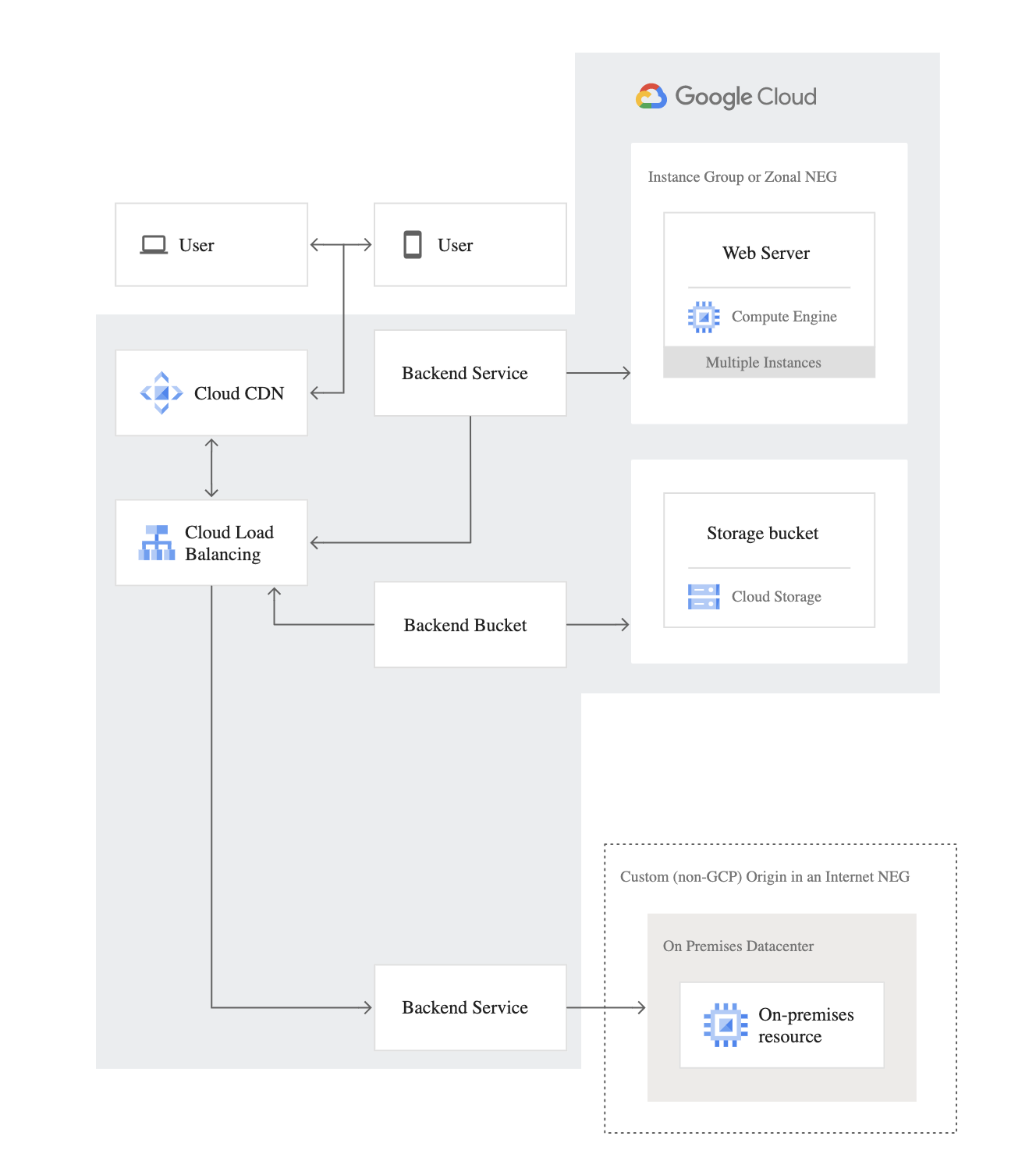
- Ideal to serve content from an origin hosted outside of Google Cloud that needs to be fronted by an external Application Load Balancer.
- Allows you to:
- Use Google Edge infrastructure for terminating the user connection.
- Direct the connections to your custom origin.
- Use Cloud CDN for your custom origin.
- Deliver traffic to the public endpoint across Google’s private backbone, improving reliability and decreasing latency.
- Supported by:
- Global internet NEGs: Cloud CDN, Global/Classic external Application Load Balancer, Cloud Service Mesh
- Regional internet NEGs: Regional external/internal Application Load Balancer, Regional external/internal Proxy Network Load Balancer
Serverless NEG
- points to Cloud Run, App Engine, Cloud Run functions (formerly Cloud Functions), or API Gateway services residing in the same region as the NEG.
- Endpoint type is
SERVERLESS. - Serverless NEGs don’t contain traditional endpoints – they reference FQDN belonging to the serverless resource.
- Contains a single endpoint and is regional in scope.
- Health checks are not applicable (managed by the serverless platform).
- Supported by:
- Global/Classic/Regional external Application Load Balancers
- Regional/Cross-region internal Application Load Balancers (Cloud Run and Cloud Run functions 2nd gen only)
Hybrid Connectivity NEG
- contains one or more endpoints that resolve to on-premises services, server applications in another cloud, or other internet-reachable services outside Google Cloud.
- Endpoint type is
NON_GCP_PRIVATE_IP_PORT– IP:Port belonging to a VM that is not in Compute Engine and must be routable using hybrid connectivity (Cloud Interconnect, Cloud VPN, or Router appliance). - Zonal in scope with one or more endpoints.
- Health checks:
- Centralized health checks – when used with Global/Classic external Application Load Balancer, Global external/Classic Proxy Network Load Balancer.
- Distributed Envoy health checks – when used with Regional external/internal Application Load Balancer, Regional external/internal Proxy Network Load Balancer, Cross-region internal Application/Proxy Network Load Balancer.
- Supported by:
- External Application Load Balancers (Global, Classic, Regional)
- Internal Application Load Balancers (Regional, Cross-region)
- External Proxy Network Load Balancers (Global, Classic, Regional)
- Internal Proxy Network Load Balancers (Regional, Cross-region)
- Cloud Service Mesh
Private Service Connect NEG
- resolves to a Google-managed regional or global API endpoint, or a managed service published using Private Service Connect.
- Endpoint type is
PRIVATE_SERVICE_CONNECT. - Contains a single endpoint and is regional in scope.
- Health checks are not applicable.
- Enables consumers to access managed services privately from inside their VPC network through a load balancer.
- Supported by:
- Global external Application Load Balancer (not supported by Classic Application Load Balancer)
- Regional external Application Load Balancer
- Regional/Cross-region internal Application Load Balancer
- Global external Proxy Network Load Balancer (not supported by Classic Proxy Network Load Balancer)
- Regional external/internal Proxy Network Load Balancer
- Cross-region internal Proxy Network Load Balancer
Port Mapping NEG
- provides a mapping from a client port of a Private Service Connect endpoint to a combination of service port and service producer VM.
- Endpoint type is
GCE_VM_IP_PORTMAP. - Contains one or more endpoints and is regional in scope.
- Health checks are not applicable.
- Routes traffic to a service producer VPC network through a connection between a Private Service Connect endpoint and a service attachment.
- Used with Private Service Connect port mapping services.
NEG Comparison Summary
- Zonal and Internet NEGs define how endpoints should be reached, whether they are reachable, and where they are located.
- Serverless and Private Service Connect NEGs don’t contain traditional IP endpoints.
- Hybrid connectivity NEGs point to services running outside Google Cloud, reachable via Cloud Interconnect or Cloud VPN.
- Port Mapping NEGs are specifically for Private Service Connect port mapping use cases.
GCP Certification Exam Practice Questions
- Questions are collected from Internet and the answers are marked as per my knowledge and understanding (which might differ with yours).
- GCP services are updated everyday and both the answers and questions might be outdated soon, so research accordingly.
- GCP exam questions are not updated to keep up the pace with GCP updates, so even if the underlying feature has changed the question might not be updated
- Open to further feedback, discussion and correction.
- A company needs to route traffic from their external HTTP(S) load balancer to an application running on-premises, connected via Cloud Interconnect. Which type of NEG should they use?
- Zonal NEG
- Internet NEG
- Hybrid connectivity NEG
- Private Service Connect NEG
Show Answer
Answer: c. Hybrid connectivity NEG – Hybrid connectivity NEGs use NON_GCP_PRIVATE_IP_PORT endpoints for on-premises or multi-cloud backends reachable via Cloud Interconnect or Cloud VPN.
- Which NEG type allows you to access a managed service published via Private Service Connect through a load balancer?
- Serverless NEG
- Internet NEG
- Private Service Connect NEG
- Zonal NEG
Show Answer
Answer: c. Private Service Connect NEG – PSC NEGs resolve to Google-managed API endpoints or managed services published using Private Service Connect.
- A team wants to load balance traffic to their Cloud Run service using an external Application Load Balancer. Which NEG type should they configure?
- Zonal NEG with GCE_VM_IP_PORT
- Serverless NEG
- Internet NEG
- Hybrid connectivity NEG
Show Answer
Answer: b. Serverless NEG – Serverless NEGs point to Cloud Run, App Engine, Cloud Run functions, or API Gateway services.
- Which balancing modes are supported by backend services that use zonal NEGs? (Choose 2)
- UTILIZATION
- RATE
- CONNECTION
- BANDWIDTH
Show Answer
Answer: b, c – Backend services using zonal NEGs only support RATE or CONNECTION balancing modes. UTILIZATION is not supported.
- Which of the following NEG types supports distributed Envoy health checks for regional load balancers? (Choose 2)
- Serverless NEG
- Regional Internet NEG
- Hybrid connectivity NEG
- Private Service Connect NEG
Show Answer
Answer: b, c – Regional Internet NEGs and Hybrid connectivity NEGs (when used with regional load balancers) support distributed Envoy health checks.