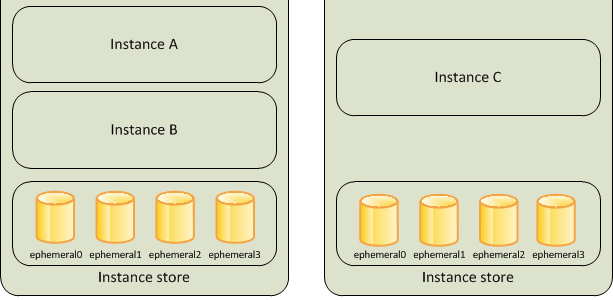
EC2 Instance Store
- An instance store provides temporary or Ephemeral block-level storage for an Elastic Cloud Compute – EC2 instance.
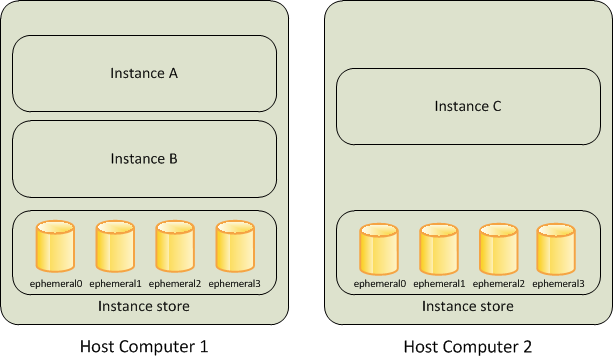
- is located on the disks that are physically attached to the host computer.
- consists of one or more instance store volumes exposed as block devices.
- The size of an instance store varies by instance type.
- Virtual devices for instance store volumes are named ephemeral[0-23], starting the first one as ephemeral0 and so on.
- While an instance store is dedicated to a particular instance, the disk subsystem is shared among instances on a host computer.
- is ideal for temporary storage of information that changes frequently, such as buffers, caches, scratch data, and other temporary content, or for data that is replicated across a fleet of instances, such as a load-balanced pool of web servers.
- delivers very high random I/O performance and is a good option for storage with very low latency requirements, but you don’t need the data to persist when the instance terminates or you can take advantage of fault-tolerant architectures.
- Instance store volumes are included as part of the usage cost of the instance. There is no additional charge.
Instance Store Volume Types
- Instance store volumes use either NVMe-based solid state drives (SSD), SATA-based SSDs, or SATA-based hard disk drives (HDD).
- NVMe SSD – Used by most current-generation instances (e.g., C8gd, M8gd, R8gd, C8id, M8id, R8id, I7i, I8g, I8ge, M9gd). Provides the highest performance.
- Non-NVMe SSD – Used by older instance types such as C3, I2, M3, R3, and X1.
- HDD – Used by dense storage instances such as D2 and H1.
- For instance types with NVMe instance store volumes, all supported instance store volumes are automatically attached at launch.
- For instance types with non-NVMe instance store volumes (C1, C3, M1, M2, M3, R3, D2, H1, I2, X1, X1e), block device mappings must be manually specified at launch.
Instance Store Lifecycle
- Instance store data lifetime is dependent on the lifecycle of the Instance to which it is attached.
- Data on the Instance store persists when an instance is rebooted.
- However, the data on the instance store does not persist if the
- underlying disk drive fails
- instance terminates
- instance hibernates
- instance stops i.e. if the EBS-backed instance with instance store volumes attached is stopped
- Stopping, hibernating, or terminating an instance causes every block of storage in the instance store to be reset.
- You can’t stop or hibernate instance store-backed instances.
- If an AMI is created from an Instance with an Instance store volume, the data on its instance store volume isn’t preserved.
- Do not rely on instance store volumes for valuable, long-term data.
Instance Store Volumes
- Instance type of an instance determines the size of the instance store available for the instance and the type of hardware used for the instance store volumes.
- Instance store volumes are included as part of the instance’s usage cost.
- Some instance types use solid-state drives (SSD) to deliver very high random I/O performance, which is a good option when storage with very low latency is needed, but the data does not need to be persisted when the instance terminates or architecture is fault tolerant.
- Instance store volume capacity varies widely by instance type:
- General purpose (M8gd, M9gd): up to 11.4 TB NVMe SSD
- Compute optimized (C8gd, C8id): up to 11.4–22.8 TB NVMe SSD
- Memory optimized (R8gd, R8id): up to 11.4–22.8 TB NVMe SSD
- Storage optimized (I7i): up to 45 TB NVMe SSD
- Storage optimized (I8g): up to 45 TB NVMe SSD (3rd gen Nitro SSDs)
- Storage optimized (I8ge): up to 120 TB NVMe SSD (3rd gen Nitro SSDs)
Instance Store Volumes with EC2 instances
- EBS volumes and instance store volumes for an instance are specified using a block device mapping.
- Instance store volume
- can only be attached to an EC2 instance when the instance is launched.
- cannot be detached and reattached to a different instance.
- After an instance is launched, the instance store volumes for the instance should be formatted and mounted before it can be used.
- Root volume of an instance store-backed instance is mounted automatically.
- For NVMe-based instance store volumes, all volumes are automatically attached at launch — no block device mapping specification is needed.
Instance Store Encryption
- Data on NVMe instance store volumes is encrypted at rest using an XTS-AES-256 block cipher implemented in a hardware module on the instance.
- Encryption keys are generated using the hardware module and are unique to each NVMe instance storage device.
- All encryption keys are destroyed when the instance is stopped or terminated and cannot be recovered.
- You cannot disable this encryption and you cannot provide your own encryption key.
- Some HDD instance store volumes also support encryption at rest.
- AWS Nitro SSDs (used in I4i, I7i, I8g, I8ge, and other storage-optimized instances) provide always-on encryption as part of the hardware design.
Instance Store TRIM Support
- Some instance types support SSD volumes with TRIM.
- Instance store volumes that support TRIM are fully trimmed before they are allocated to the instance.
- These volumes are not formatted with a file system when an instance launches, so you must format them before they can be mounted and used.
- For faster access, skip the TRIM operation when initially formatting the volumes.
- Use the TRIM command to notify the SSD controller when data is no longer needed, which provides more free space, reduces write amplification, and increases performance.
- On Linux, use the
fstrimcommand to enable periodic TRIM. - On Windows, use
fsutil behavior set DisableDeleteNotify 0to ensure TRIM support is enabled.
Instance Store Optimizing Writes
- Because of the way that EC2 virtualizes disks, the first write to any location on an instance store volume performs more slowly than subsequent writes.
- Amortizing (gradually writing off) this cost over the lifetime of the instance might be acceptable.
- However, if high disk performance is required, AWS recommends initializing the drives by writing once to every drive location before production use.
- To reduce write amplification on SSD-based instance store volumes, leave 10 percent of the volume unpartitioned for over-provisioning. This decreases usable storage but increases performance even when the disk is close to full capacity.
Detailed NVMe Performance Statistics
- EC2 provides real-time, high-resolution performance statistics for NVMe instance store volumes attached to Nitro-based instances (launched September 2025).
- Statistics include 11 comprehensive metrics at 1-second granularity:
- Total read/write operations and bytes
- Total read/write time (microseconds)
- Volume queue length
- Volume performance exceeded IOPS/throughput counters
- Read/Write I/O latency histograms (broken down by I/O size)
- Statistics are available at no additional cost.
- Can be accessed via
nvme-clitool directly on the instance or via Amazon CloudWatch agent for monitoring and alarms. - Counters are not persistent across instance stops and restarts.
- Helps identify performance bottlenecks and optimize latency-sensitive workloads.
Latest Instance Types with Instance Store (2025-2026)
- Graviton5 (M9gd) – General purpose instances with local NVMe SSD storage, powered by AWS Graviton5 processors (June 2026). Ideal for data logging, media processing, and batch/log processing.
- Graviton4 (C8gd, M8gd, R8gd) – Compute, general purpose, and memory optimized instances with up to 11.4 TB NVMe SSD storage, powered by AWS Graviton4 (April 2025). 30% better performance vs. Graviton3-based predecessors.
- Intel Xeon 6 (C8id, M8id, R8id) – Up to 22.8 TB NVMe SSD storage with up to 384 vCPUs (February 2026). 43% higher performance and 3x more local storage vs. 6th generation.
- Storage Optimized I7i – Up to 45 TB NVMe storage with PCIe Gen5-based Nitro SSDs. 50% better real-time storage performance and 50% lower I/O latency vs. I4i.
- Storage Optimized I7ie – Up to 120 TB NVMe storage (highest density in the cloud). Up to 2x vCPUs and memory vs. prior generation.
- Storage Optimized I8g – Graviton4-powered with 3rd generation Nitro SSDs, up to 45 TB. 65% better performance per TB and 60% lower latency variability vs. I4g (December 2024).
- Storage Optimized I8ge – Up to 120 TB NVMe with 3rd gen Nitro SSDs. 55% better performance per TB and 75% lower I/O latency variability vs. Im4gn (August 2025).
AWS Nitro SSDs
- AWS Nitro SSDs are custom-built by AWS specifically for cloud-scale storage workloads.
- Provide high I/O performance, low latency, minimal latency variability, and security with always-on encryption.
- Currently in 3rd generation, used in I8g and I8ge instance types.
- PCIe Gen5-based Nitro SSDs are used in I7i and I7ie instances.
- Combined with the AWS Nitro System (6th generation Nitro Cards), these offload CPU virtualization, storage, and networking functions to dedicated hardware.
EBS vs Instance Store
Refer blog post @ EBS vs Instance Store
AWS Certification Exam Practice Questions
- Questions are collected from Internet and the answers are marked as per my knowledge and understanding (which might differ with yours).
- AWS services are updated everyday and both the answers and questions might be outdated soon, so research accordingly.
- AWS exam questions are not updated to keep up the pace with AWS updates, so even if the underlying feature has changed the question might not be updated
- Open to further feedback, discussion and correction.
- Please select the most correct answer regarding the persistence of the Amazon Instance Store
- The data on an instance store volume persists only during the life of the associated Amazon EC2 instance
- The data on an instance store volume is lost when the security group rule of the associated instance is changed.
- The data on an instance store volume persists even after associated Amazon EC2 instance is deleted
- A user has launched an EC2 instance from an instance store backed AMI. The user has attached an additional instance store volume to the instance. The user wants to create an AMI from the running instance. Will the AMI have the additional instance store volume data?
- Yes, the block device mapping will have information about the additional instance store volume
- No, since the instance store backed AMI can have only the root volume bundled
- It is not possible to attach an additional instance store volume to the existing instance store backed AMI instance
- No, since this is ephemeral storage it will not be a part of the AMI
- When an EC2 instance that is backed by an S3-based AMI Is terminated, what happens to the data on the root volume?
- Data is automatically saved as an EBS volume.
- Data is automatically saved as an EBS snapshot.
- Data is automatically deleted
- Data is unavailable until the instance is restarted.
- A user has launched an EC2 instance from an instance store backed AMI. If the user restarts the instance, what will happen to the ephemeral storage data?
- All the data will be erased but the ephemeral storage will stay connected
- All data will be erased and the ephemeral storage is released
- It is not possible to restart an instance launched from an instance store backed AMI
- The data is preserved
- When an EC2 EBS-backed instance is stopped, what happens to the data on any ephemeral store volumes?
- Data will be deleted and will no longer be accessible
- Data is automatically saved in an EBS volume.
- Data is automatically saved as an EBS snapshot
- Data is unavailable until the instance is restarted
- A user has launched an EC2 Windows instance from an instance store backed AMI. The user has also set the Instance initiated shutdown behavior to stop. What will happen when the user shuts down the OS?
- It will not allow the user to shutdown the OS when the shutdown behavior is set to Stop
- It is not possible to set the termination behavior to Stop for an Instance store backed AMI instance
- The instance will stay running but the OS will be shutdown
- The instance will be terminated
- Which of the following will occur when an EC2 instance in a VPC (Virtual Private Cloud) with an associated Elastic IP is stopped and started? (Choose 2 answers)
- The Elastic IP will be dissociated from the instance
- All data on instance-store devices will be lost
- All data on EBS (Elastic Block Store) devices will be lost
- The ENI (Elastic Network Interface) is detached
- The underlying host for the instance is changed
- Which of the following statements about EC2 instance store NVMe encryption is correct? (Choose 2 answers)
- You can provide your own encryption key for instance store NVMe volumes
- Data on NVMe instance store volumes is encrypted using XTS-AES-256 cipher in hardware
- Encryption keys persist after the instance is terminated for data recovery
- Encryption keys are unique per device and destroyed when the instance stops or terminates
- Instance store encryption must be enabled manually via the AWS Console
- A company needs temporary high-performance storage with up to 120 TB capacity and the lowest possible I/O latency for a real-time analytics workload on AWS. Which EC2 instance family should they choose?
- R8gd instances with up to 11.4 TB NVMe storage
- I7i instances with up to 45 TB NVMe storage
- I8ge instances with up to 120 TB NVMe storage and 3rd gen Nitro SSDs
- C8id instances with up to 22.8 TB NVMe storage
- Which feature allows you to monitor NVMe instance store volume performance at 1-second granularity on Nitro-based EC2 instances?
- Amazon EBS CloudWatch Metrics
- EC2 Detailed NVMe Performance Statistics
- AWS CloudTrail storage events
- Amazon Inspector performance assessment