Google Cloud Resource Manager
Google Cloud Resource Manager helps manage resource containers such as organizations, folders, and projects that allow you to group and hierarchically organize Google Cloud resources. It provides centralized visibility, ownership, and control over your cloud resources.
Resource Hierarchy
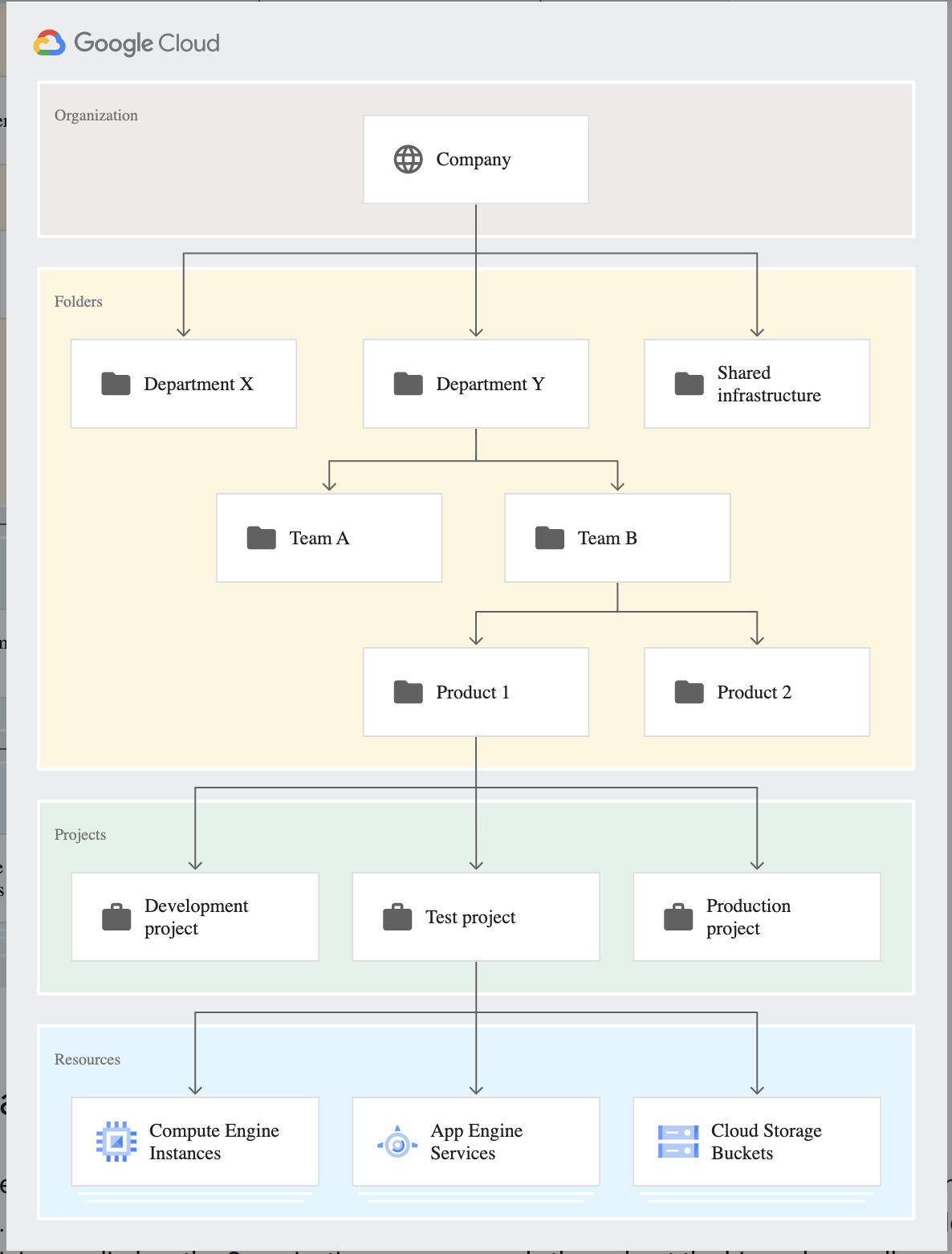
Organizations
- Organization resource is the root node in the Google Cloud resource hierarchy and is the hierarchical supernode and ancestor of project resources and folders.
- Organization is at the top of the hierarchy and does not have a parent.
- Organization provides central visibility and control over every resource that belongs to an organization
- With an Organization resource, projects belong to the organization instead of the employee who created the project, which means that the projects are no longer deleted when an employee leaves the company; instead, they will follow the organization’s lifecycle on Google Cloud.
- Organization administrators have central control of all resources and can view and manage all of the company’s projects
- IAM access control policies applied to the Organization resource apply throughout the hierarchy on all resources in the organization.
- Roles granted at the organization level are inherited by all projects and folders under the Organization resource
- Organization is not applicable for personal (e.g. Gmail) accounts
- Google Workspace or Cloud Identity account represents a company and is a prerequisite to having access to the Organization resource. It provides identity management, recovery mechanism, ownership, and lifecycle management
- Google Workspace super admin is the individual responsible for domain ownership verification and the contact in cases of recovery.
- Standalone Organizations (introduced in 2024) allow creating an organization resource without requiring a Google Workspace or Cloud Identity domain. This enables:
- Users with federated identities to be added as organization owners
- Multiple organizations for testing different features
- Multiple organization owners to avoid single points of failure
- Google Cloud now automatically creates an organization resource for new Free Trial customers
Folders
- Folders are an additional optional grouping mechanism on top of projects and provide isolation boundaries between projects
- Organization resource is a prerequisite to use folders.
- Folders can be used to model different legal entities, departments, teams, and environments within a company
- Folders allow delegation of administration rights as well as control or limit access to resources within the folder
Projects
- Project resource is the base-level organizing entity
- Organizations and folders may contain multiple projects
- Projects are a core organizational component of Google Cloud
- A project is required to use Google Cloud and forms the basis for creating, enabling, and using all Google Cloud services, managing APIs, enabling billing, adding and removing collaborators, and managing permissions.
- Each project has a name and a unique project ID across Google Cloud
- Project ID cannot be reused even if the project is deleted
- Each project is associated with a billing account.
- Multiple projects can have their usage billed to the same billing account
- Project deletion has a 30-day recovery period during which the project can be restored
- Projects can be protected from accidental deletion using liens
- Project Environment Tags (2025) – Tags can be used to visually distinguish projects based on their environment (production, staging, development) directly within the Google Cloud console, helping prevent errors when working in sensitive environments
IAM Policy Inheritance
- Identity and Access Management helps control who (users) has what access (roles) to which resources by setting IAM policies on the resources.
- Resources inherit the policies of the parent node i.e. policy set at the Organization level is inherited by all its child folders and projects, and if a policy set at the project level, it is inherited by all its child resources.
- Most permissive parent policy always overrules more restrictive child policy i.e. There is no way to explicitly remove permission for a lower-level resource that is granted at a higher level in the resource hierarchy.
- The effective policy for a resource is the union of the policy set on the resource and the policy inherited from its ancestors.
- Permission inheritance is transitive i.e. resources inherit policies from the project, which inherit policies from the organization.
- IAM policy hierarchy follows the same path as the Google Cloud resource hierarchy i.e. if the resource hierarchy is changed for e.g. moving a project from one folder to the other, the policy hierarchy changes as well.
Tags
- Tags are key-value pairs that can be attached to Google Cloud resources for fine-grained access control, organization, and policy enforcement.
- Tags provide a way to create annotations for resources, and conditionally allow or deny policies based on whether a resource has a specific tag.
- Tags are different from labels:
- Tags support conditional IAM and organization policy enforcement; labels do not
- Tags are inherited by children of the resource in the hierarchy; labels are not
- Tags support allow and deny policy conditions; labels do not
- Tag key/value names can be up to 256 characters; labels are limited to 63 characters
- Tags are created at the organization or project level and managed through Resource Manager
- Tag bindings are inherited by children of the resource in the Google Cloud hierarchy
- Conditional IAM with Tags – Tags can be referenced in IAM policy bindings to conditionally grant or deny access to resources based on tag values
- Organization Policy with Tags – Tags can be used to scope organization policies, enabling conditional enforcement based on resource tags
- Tags can be added at the time of creating folders and projects (Preview, March 2024)
- Dynamic tag values can be created using the Google Cloud console with a unified API for adding or updating tags on a resource (April 2026)
- Tags support over 80+ Google Cloud services including Compute Engine, Cloud Storage, BigQuery, Cloud SQL, and more
Organization Policy Service
- Organization Policy Service gives centralized and programmatic control over the organization’s cloud resources
- Organization Policy Service benefits
- Centralize control to configure restrictions on how the organization’s resources can be used.
- Define and establish guardrails for the development teams to stay within compliance boundaries.
- Help project owners and their teams move quickly without the worry of breaking compliance.
- Organization policy is set on a resource hierarchy node, all descendants of that node inherit the organization policy by default. i.e. organization policy set at the root organization node will pass down the defined restriction through all descendant folders, projects, and service resources.
Managed Constraints (Built-in)
- Organization Policy provides built-in managed constraints for various Google Cloud services
- Managed constraints are predefined restrictions that can be enforced across the resource hierarchy
- Examples include restricting VM external IPs, enforcing uniform bucket-level access, disabling service account key creation, etc.
Custom Organization Policies
- Custom organization policies allow more granular, customizable control over the specific fields restricted in organization policies
- Custom constraints use Common Expression Language (CEL) to define conditions
- Custom constraints for Resource Manager (Preview, March 2025) support:
- Projects – Constrain
resource.parentandresource.projectIdfields - Folders – Constrain
resource.displayNameandresource.parentfields
- Projects – Constrain
- Use cases include:
- Govern project naming patterns (e.g., require project IDs to start with “staging-“)
- Restrict mutation of secure projects and folders
- Disable creation of folders within other folders to control hierarchy depth
- Custom constraints can be enforced on CREATE, UPDATE, or both methods
- Policy changes don’t apply retroactively to existing resources
Dry-Run Mode and Policy Simulator
- Dry-run mode allows organization policies to be created and enforced without denying violating actions — violations are audit logged but not blocked
- Policy Simulator for Organization Policy lets you preview the impact of a new custom constraint or organization policy before enforcement on production
- These tools support safe rollout of policy changes without impacting production workloads
Restricting Identities by Domain
- Resource Manager provides a domain restriction constraint that can be used in organization policies to limit resource sharing based on domain.
- This constraint allows restricting the set of identities allowed to be used in Identity and Access Management policies
- Organization policies can use this constraint to limit resource sharing to a specified set of one or more Google Workspace domains, and exceptions can be granted on a per-folder or per-project basis.
- Domain restriction constraint is not retroactive. Once a domain restriction is set, this limitation will apply to IAM policy changes made from that point forward, and not to any previous changes.
Security Baseline Constraints (Secure-by-Default)
- Google Cloud security baseline constraints are automatically enforced for all organizations created on or after May 3, 2024
- These secure-by-default policies address potentially insecure postures with a bundle of organization policies enforced at organization creation time
- Existing organization resources are NOT impacted by this change
- The following constraints are enforced by default:
constraints/iam.managed.disableServiceAccountKeyCreation— Prevents service account key creationconstraints/iam.managed.disableServiceAccountKeyUpload— Prevents service account key uploadconstraints/iam.automaticIamGrantsForDefaultServiceAccounts— Prevents automatic IAM grants for default service accountsconstraints/iam.allowedPolicyMemberDomains— Restricts policy members to allowed domainsconstraints/essentialcontacts.managed.allowedContactDomains— Restricts essential contacts to allowed domainsconstraints/compute.managed.restrictProtocolForwardingCreationForTypes— Restricts protocol forwardingconstraints/storage.uniformBucketLevelAccess— Enforces uniform bucket-level access
- These constraints can be overridden by organization administrators if needed, but provide a secure starting posture
Organization Restrictions
- Organization Restrictions (GA, February 2023) help security administrators prevent data exfiltration due to phishing or insider attacks
- Restricts access only to resources in authorized Google Cloud organizations
- Mitigates the risk of data exfiltration by setting guardrails on what resources principals are allowed to interact with, regardless of IAM permissions
- Works by adding organization restriction headers to outbound requests, ensuring users can only access resources in approved organizations
- Supported by multiple Google Cloud services
Google Cloud Certification Exam Practice Questions
- Questions are collected from Internet and the answers are marked as per my knowledge and understanding (which might differ with yours).
- Google Cloud services are updated everyday and both the answers and questions might be outdated soon, so research accordingly.
- Google Cloud exam questions are not updated to keep up the pace with Google Cloud updates, so even if the underlying feature has changed the question might not be updated
- Open to further feedback, discussion and correction.
- Google Cloud Platform resources are managed hierarchically using organization, folders, and projects. When Cloud Identity and Access Management (IAM) policies exist at these different levels, what is the
effective policy at a particular node of the hierarchy?- The effective policy is determined only by the policy set at the node
- The effective policy is the union of the policy set at the node and policies inherited from its ancestors
- The effective policy is the policy set at the node and restricted by the policies of its ancestors
- The effective policy is the intersection of the policy set at the node and policies inherited from its ancestors
- An Organization has setup an IAM policy at the organization level, the folder level, the project level, and on the resource level. They want to understand what policy takes effect on the entity. What would be the
correct option?- Effective policy for a resource is the Intersection of the policy set on the resource and the policy inherited from its ancestors
- Effective policy for a resource is the policy inherited from its ancestors overriding the policy defined on the resource
- Effective policy for a resource is the union of the policy set on the resource and the policy inherited from its ancestors
- Effective policy for a resource is the policy defined overriding the policy inherited from its ancestors
- Several employees at your company have been creating projects with Cloud Platform and paying for it with their personal credit
cards, which the company reimburses. The company wants to centralize all these projects under a single, new billing account.
What should you do?- Contact cloud-billing@google.com with your bank account details and request a corporate billing account for your company.
- Create a ticket with Google Support and wait for their call to share your credit card details over the phone.
- In the Google Platform Console, go to the Resource Manager and move all projects to the root Organization.
- In the Google Cloud Platform Console, create a new billing account and set up a payment method.
- A company wants to ensure that all new projects created in their Google Cloud organization follow a specific naming convention starting with “prod-” for production projects. What should they use?
- IAM deny policies on project creation
- VPC Service Controls perimeter
- Custom organization policy with a constraint on resource.projectId
- Cloud Audit Logs with alerting
- An organization was created in Google Cloud in June 2024. The security team notices that service account key creation is being denied even though no explicit organization policies were configured. What is the most likely reason?
- IAM deny policies are blocking the operation
- The project has reached its quota for service account keys
- Google Cloud security baseline constraints are automatically enforced for organizations created after May 2024
- Cloud Armor is blocking the API calls
- A company wants to conditionally grant IAM roles to resources based on whether the resource belongs to a production or development environment. What is the recommended approach?
- Create separate organizations for production and development
- Use labels on resources and reference them in IAM policies
- Use tags on resources and reference them in IAM Conditions
- Create separate billing accounts for each environment
- A security administrator wants to test the impact of a new organization policy before enforcing it in production. What Google Cloud feature should they use?
- Cloud Audit Logs
- Organization Policy dry-run mode
- VPC Service Controls dry-run mode
- IAM Policy Analyzer
- Which of the following statements about Google Cloud Tags is INCORRECT?
- Tags can be used to conditionally grant IAM roles
- Tag bindings are inherited by children of the resource in the hierarchy
- Tags and labels are the same thing and can be used interchangeably
- Tags can be used to scope organization policies