AWS ECS – Elastic Container Service
- AWS Elastic Container Service (ECS) is a fully managed, highly scalable container orchestration service that supports Docker containers and allows running applications on a managed cluster of EC2 instances, serverless with AWS Fargate, or on-premises with ECS Anywhere.
- ECS
- is a regional service that simplifies running application containers in a highly available manner across multiple AZs within a region.
- eliminates the need to install, operate, and scale the cluster management infrastructure.
- helps schedule the placement of containers across the cluster based on the resource needs and availability requirements.
- allows the integration of your own custom scheduler or third-party schedulers to meet business or application specific requirements.
- provides a serverless option with AWS Fargate.
- provides a fully managed EC2 option with ECS Managed Instances (launched Sept 2025).
- supports running containers on on-premises infrastructure with ECS Anywhere.
- integrates with Service Connect for simplified service-to-service communication.
ECS Launch Types & Capacity Providers
- ECS supports four launch types/capacity providers: EC2, Fargate, ECS Managed Instances, and External (ECS Anywhere).
EC2 Launch Type
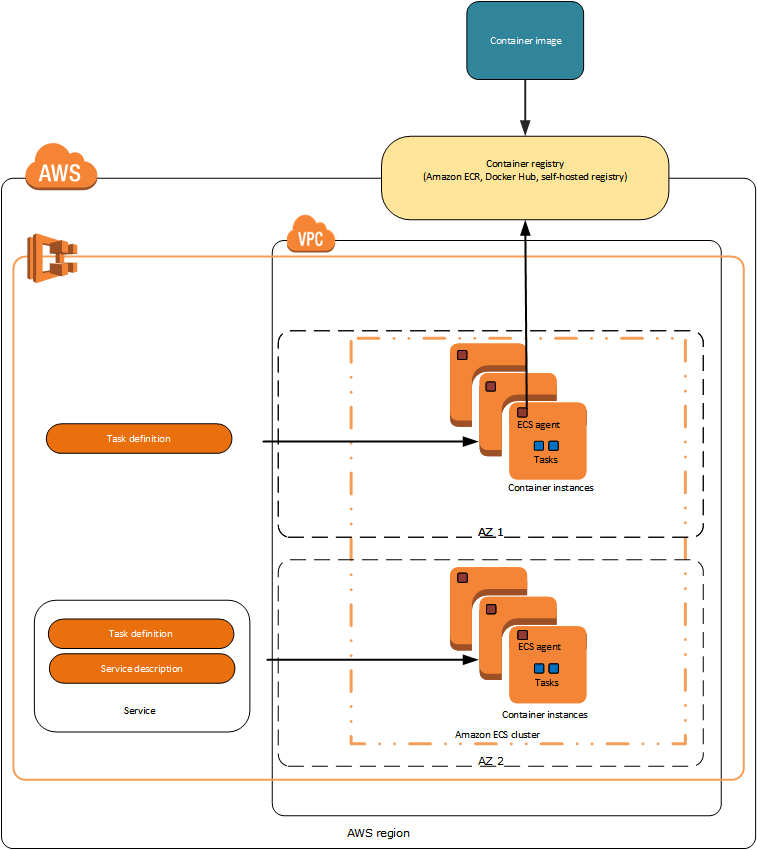
- EC2 launch type – Configure and deploy EC2 instances in your cluster to run your containers.
- Provides full control over instance types, placement, scaling, and patching.
- EC2 launch type is suitable for the following workloads:
- Workloads that require consistently high CPU core and memory usage
- Large workloads that need to be optimized for price
- Applications need to access persistent storage
- You must directly manage your infrastructure
- Workloads requiring GPU or specialized instance types
- Uses Capacity Providers with Auto Scaling Groups for automatic scaling.
- Supports managed instance draining (2024) to safely drain tasks from EC2 instances being terminated.
AWS Fargate Launch Type
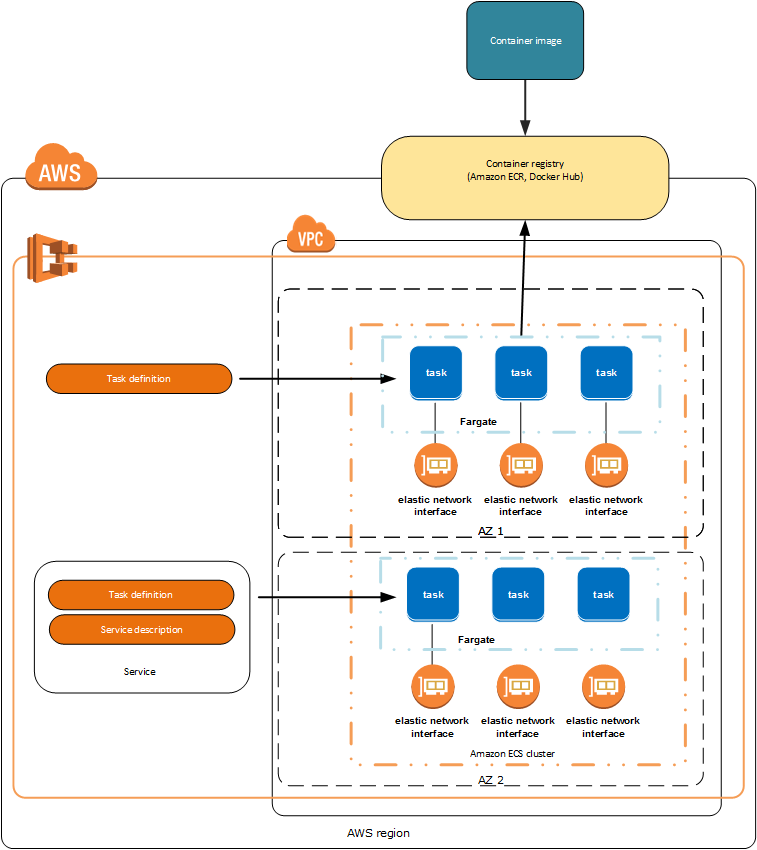
- AWS Fargate is a technology that provides a serverless pay-as-you-go option with Amazon ECS to run containers without having to manage servers or clusters of Amazon EC2 instances.
- With AWS Fargate, there is no need to provision, configure, or scale clusters of virtual machines to run containers and also removes the need to choose server types, decide when to scale the clusters or optimize cluster packing.
- Fargate now supports up to 32 vCPUs and 244 GiB of memory per task (June 2026), significantly expanding from the previous 16 vCPU limit.
- Supports ephemeral storage up to 200 GiB per task (20 GiB free by default).
- Supports Amazon EBS volume attachments for high-throughput and data-intensive workloads (2024).
- Supports ARM-based AWS Graviton processors for better price-performance.
- Fargate launch type is suitable for the following workloads:
- Large workloads that need to be optimized for low overhead
- Small workloads that have an occasional burst
- Tiny workloads
- Batch workloads
- Workloads where you want zero infrastructure management
- Fargate Platform Version 1.3.0 retired as of June 15, 2026. New tasks cannot use this version. Platform version 1.4.0 or LATEST should be used.
- Supports weekly event windows to schedule task retirements during non-peak hours (Dec 2025).
ECS Managed Instances (New – Sept 2025)
- ECS Managed Instances is a fully managed compute option that combines the operational simplicity of Fargate with the flexibility and control of Amazon EC2.
- ECS provisions, patches, and replaces instances automatically while providing visibility and control over instance type selection.
- Key features:
- Fully managed: AWS handles provisioning, patching, and replacement of EC2 instances.
- Instance type flexibility: Choose specific instance types or let ECS select optimal types.
- Visibility: Instances are visible in your AWS account.
- Cost optimization: Pay for the entire instance plus a management fee (can be more cost-effective than Fargate for steady workloads).
- Supports EC2 Spot Instances for up to 90% discount (Dec 2025).
- Supports AWS Trainium and Inferentia accelerators for AI/ML workloads (June 2026).
- Suitable for workloads that:
- Need GPU or specialized hardware not available on Fargate
- Require privileged containers
- Need more than Fargate’s memory ceiling
- Want managed infrastructure but need EC2-level flexibility
External Launch Type (ECS Anywhere)
- ECS Anywhere allows running and managing containers on on-premises servers or virtual machines using the same ECS APIs and tooling.
- Register external instances to your ECS cluster using AWS Systems Manager (SSM).
- Uses the EXTERNAL launch type for tasks and services.
- Suitable for:
- Hybrid cloud deployments
- Workloads with data residency requirements
- Edge computing and latency-sensitive applications
- Consistent container management across cloud and on-premises
ECS Express Mode (New – Nov 2025)
- ECS Express Mode enables developers to rapidly launch containerized applications with minimal configuration.
- Automates infrastructure setup including domains, networking, load balancing, and auto scaling using AWS best practices.
- Requires only three inputs: a container image, a task execution role, and an infrastructure role.
- Automatically consolidates up to 25 services behind a single Application Load Balancer using intelligent rule-based routing.
- All provisioned resources remain fully accessible in your account for complete control and flexibility.
- No additional charge for using Express Mode (only pay for underlying AWS resources).
- Available in AWS GovCloud (US) Regions (June 2026).
ECS Components
Containers and Images
- Applications deployed on ECS must be architected to run in Docker containers, which is a standardized unit of software development, containing everything that the software application needs to run: code, runtime, system tools, system libraries, etc.
- Containers are created from a read-only template called an image.
- Images are typically built from a Dockerfile and stored in a registry from which they can be downloaded and run on the container instances.
- ECS can be configured to access a private Docker image registry within a VPC, Docker Hub, or is integrated with Amazon Elastic Container Registry (ECR).
- ECR supports up to 100,000 images per repository and 100,000 repositories per region.
- ECR supports pull through cache to automatically sync images from upstream registries (Docker Hub, GitHub, etc.).
- ECR supports automatic repository creation on push (Dec 2025).
Clusters
- An ECS cluster is a logical grouping of tasks and services, and the infrastructure capacity (EC2 instances, Fargate, Managed Instances, or External instances).
- ECS downloads the container images from the specified registry and runs those images within your cluster.
- A cluster can use a mix of capacity providers (e.g., Fargate for some services, Managed Instances for others).
Task Definitions
- Task definition is a description of an application that contains one or more docker containers.
- Task definition is needed to prepare an application to run on ECS.
- Task definition is a text file in JSON format that describes one or more containers that form your application.
- Task definitions specify various parameters for the application, such as containers to use, their repositories, ports to be opened, and data volumes.
- Task Execution Role is used by the ECS agent and container runtime to prepare the containers to run (e.g., pull images from ECR, manage logs). It is not used by the task itself.
- Task Role grants additional AWS permissions that are assumed by the containers running in the task.
- Network mode specifies the Docker networking mode:
none,bridge,awsvpc, andhost.awsvpcmode is required for Fargate and gives each task its own ENI and private IP.
- Task definitions support specifying Amazon EBS volumes for persistent, high-performance block storage.
- Task definitions support specifying Amazon EFS volumes for shared, scalable file storage across tasks.
Tasks and Scheduling
- A task is the instantiation of a task definition on a container instance within the cluster.
- After a task definition is created for the application within ECS, you can specify the number of tasks that will run on the cluster.
- ECS task scheduler is responsible for placing tasks on container instances, with several different scheduling options available.
Services
- ECS Service helps to run and maintain a specified number of instances of a task definition simultaneously.
- Service can optionally be configured to use Elastic Load Balancing to distribute traffic evenly across the tasks in the service.
- EC2 Launch Type supports ALB, NLB, and Classic Load Balancer.
- Fargate Launch Type supports ALB and NLB.
- ALBs are recommended as they offer several features:
- Each service can serve traffic from multiple load balancers and expose multiple load-balanced ports by specifying multiple target groups.
- Supported by tasks hosted on both Fargate and EC2 instances.
- Allow containers to use dynamic host port mapping (so that multiple tasks from the same service are allowed per container instance).
- Support path-based routing and priority rules (so that multiple services can use the same listener port on a single ALB).
ECS Deployment Strategies
- ECS supports four deployment strategies:
- Rolling Update (default) – New tasks are created as old ones are stopped, keeping capacity roughly constant.
- Blue/Green Deployment – Runs two full sets of tasks in parallel. Production traffic is shifted to the new (green) revision after validation.
- Canary Deployment (Oct 2025) – Routes a small percentage of traffic (typically 5-10%) to the new revision with a bake time for monitoring before shifting remaining traffic.
- Linear Deployment (Oct 2025) – Shifts traffic in equal increments with a bake time between each shift.
- Blue/green, canary, and linear strategies require ALB, NLB, or Service Connect.
- Built-in canary and linear deployments achieve feature parity with AWS CodeDeploy, eliminating the need for an external deployment controller.
ECS Service Connect
- Service Connect provides simplified service-to-service communication with built-in service discovery and service mesh capabilities.
- Uses a managed Envoy sidecar proxy automatically injected into ECS tasks.
- Proxies handle routing decisions, retries, and metrics collection, while AWS Cloud Map provides the service registry backend.
- Allows services to use short names and standard ports to connect across clusters and VPCs in the same Region.
- Provides standardized metrics and logs for all service-to-service traffic without code changes.
- Integrates with blue/green, linear, and canary deployment strategies for traffic management during deployments.
Container Agent
- Container agent runs on each EC2 instance within an ECS cluster.
- Container Agent sends information about the instance’s current running tasks and resource utilization to ECS, and starts and stops tasks whenever it receives a request from ECS.
- Not required for Fargate tasks (managed by AWS).
ECS Security
- GuardDuty Runtime Monitoring – Uses a lightweight security agent to monitor ECS workloads for unauthorized activity, process execution, and network connections.
- GuardDuty Extended Threat Detection (Dec 2025) – Analyzes multiple security signals across network, runtime behavior, and API activity to detect sophisticated attack patterns for EC2 and ECS.
- ECS Exec – Allows interactive shell access to running containers for debugging (uses AWS Systems Manager Session Manager).
- Task-level IAM roles – Each task can have its own IAM role following least privilege principles.
- Secrets management – Integration with AWS Secrets Manager and SSM Parameter Store for injecting secrets into containers.
ECS Auto Scaling
- Service Auto Scaling – Automatically adjusts the desired task count based on CloudWatch metrics (target tracking, step scaling).
- Predictive Scaling (2024) – Uses machine learning to predict future traffic and pre-scales tasks before demand increases.
- Cluster Auto Scaling – Automatically manages EC2 instance capacity using capacity providers.
- Supports updating capacity provider configuration for existing services without recreating them (May 2025).
ECS Storage Options
- Ephemeral Storage – Up to 200 GiB per Fargate task (20 GiB free). Non-persistent, deleted when task stops.
- Amazon EBS Volumes (2024) – Attach EBS volumes to ECS tasks for high-throughput, data-intensive workloads. One volume per task, configurable size/type/IOPS. Supports creating from snapshots.
- Amazon EFS Volumes – Shared, persistent file storage accessible by multiple tasks simultaneously. Supports encryption in transit and at rest.
- Bind Mounts – Share data between containers within the same task.
- Docker Volumes – EC2 launch type supports Docker volume drivers for third-party storage plugins.
ECS vs Elastic Beanstalk
- ECS helps in having a more fine-grained control for custom application architectures.
- Elastic Beanstalk is ideal to leverage the benefits of containers but just want the simplicity of deploying applications from development to production by uploading a container image.
- Elastic Beanstalk is more of an application management platform that helps customers easily deploy and scale web applications and services.
- With Elastic Beanstalk, specify container images to be deployed, with the CPU & memory requirements, port mappings and container links.
- Elastic Beanstalk abstracts the finer details and automatically handles all the details such as provisioning an ECS cluster, balancing load, auto-scaling, monitoring, and placing the containers across the cluster.
ECS vs Lambda
- ECS is a fully managed container orchestration service that allows running and managing distributed applications in Docker containers with multiple compute options (Fargate, EC2, Managed Instances).
- AWS Lambda is an event-driven task compute service that runs code (Lambda functions) in response to “events” from event sources like SES, SNS, DynamoDB & Kinesis Streams, CloudWatch etc.
- ECS is better suited for long-running applications, microservices with consistent traffic, and workloads requiring more than 15 minutes execution time.
- Lambda is better for short-lived, event-driven workloads with unpredictable traffic patterns.
ECS vs EKS
- Both ECS and EKS are container orchestration services, but use different orchestration engines.
- ECS uses AWS-native orchestration, making it simpler to operate with deep AWS integration.
- EKS uses Kubernetes, providing portability across cloud providers and on-premises environments.
- Both support Fargate as a serverless compute option.
- Choose ECS for simpler AWS-native workloads; choose EKS for Kubernetes ecosystem compatibility or multi-cloud portability.
AWS Certification Exam Practice Questions
- Questions are collected from Internet and the answers are marked as per my knowledge and understanding (which might differ with yours).
- AWS services are updated everyday and both the answers and questions might be outdated soon, so research accordingly.
- AWS exam questions are not updated to keep up the pace with AWS updates, so even if the underlying feature has changed the question might not be updated
- Open to further feedback, discussion and correction.
- You need a solution to distribute traffic evenly across all of the containers for a task running on Amazon ECS. Your task definitions define dynamic host port mapping for your containers. What AWS feature provides this functionality?
- Application Load Balancers support dynamic host port mapping.
- CloudFront custom origins support dynamic host port mapping.
- All Elastic Load Balancing instances support dynamic host port mapping.
- Classic Load Balancers support dynamic host port mapping.
- Your security team requires each Amazon ECS task to have an IAM policy that limits the task’s privileges to only those required for its use of AWS services. How can you achieve this?
- Use IAM roles for Amazon ECS tasks to associate a specific IAM role with each ECS task definition
- Use IAM roles on the Amazon ECS container instances to associate IAM role with each ECS task on that instance
- Connect to each running amazon ECS container instance and add discrete credentials
- Reboot each Amazon ECS task programmatically to generate new instance metadata for each task
- A company wants to run containers on AWS without managing servers but needs to select specific instance types for GPU workloads. Which ECS compute option provides fully managed infrastructure with instance type selection?
- EC2 Launch Type with Auto Scaling
- AWS Fargate
- ECS Managed Instances
- ECS Anywhere
- A development team wants to deploy a containerized web application on ECS with minimal configuration. They only want to provide a container image and have AWS handle networking, load balancing, and auto scaling. Which ECS feature should they use?
- ECS Service with Fargate
- ECS Express Mode
- ECS Managed Instances
- AWS App Runner
- A company is deploying a critical microservices update on ECS and wants to route only 5% of traffic to the new version initially, monitor it, then shift remaining traffic. Which deployment strategy should they use?
- Rolling update
- Blue/Green deployment
- Canary deployment
- Linear deployment
- An organization needs to run ECS tasks on their on-premises servers while managing them from the AWS console. Which ECS feature supports this? [Select TWO]
- ECS Anywhere
- AWS Fargate
- ECS Managed Instances
- External launch type
- EC2 launch type
- A data engineering team needs to attach high-performance block storage to their ECS Fargate tasks for an ETL workload that processes large datasets. Which storage option should they choose?
- Increase ephemeral storage to 200 GiB
- Attach Amazon EBS volumes to ECS tasks
- Use Amazon EFS volumes
- Use Docker volumes with a storage plugin
- Which ECS feature provides service-to-service communication with built-in service discovery, traffic management during deployments, and standardized metrics without code changes?
- AWS Cloud Map
- Application Load Balancer
- ECS Service Connect
- AWS App Mesh