Global Accelerator vs CloudFront – When to Use Each

AWS Global Accelerator vs CloudFront

AWS Global Accelerator and Amazon CloudFront both leverage the AWS global edge network to improve application performance for distributed users, but they solve fundamentally different problems. Understanding when to use each — or both together — is critical for AWS certification exams and real-world architecture decisions.

  • CloudFront is a Content Delivery Network (CDN) that caches content at edge locations and serves it directly to users, reducing latency and origin load for HTTP/HTTPS workloads.
  • Global Accelerator is a network-layer traffic accelerator that uses anycast static IP addresses to route TCP/UDP traffic over the AWS backbone to the optimal regional endpoint — without caching.

The critical distinction: CloudFront optimizes what is delivered (content caching and edge compute). Global Accelerator optimizes how packets travel (network path optimization via the AWS backbone).

CloudFront (CDN)
User Request (HTTP/S)
750+ Edge Locations
↓ Cache HIT → Response
↓ Cache MISS ↓
Regional Edge Cache
Origin (ALB/S3/EC2)
Layer 7 | Caches content | HTTP/S only
Global Accelerator
User Request (TCP/UDP)
Anycast Static IPs
Nearest AWS Edge
↓ AWS Private Backbone
Endpoint (ALB/NLB/EC2)
↕ Health checks → Failover
Layer 4 | No caching | TCP/UDP/HTTP

Architecture Comparison

CloudFront Architecture: Edge Caching

  • Uses 750+ Points of Presence (PoPs) in 100+ cities across 50+ countries, plus 1,140+ Embedded PoPs within ISP networks.
  • Operates at Layer 7 (Application layer) — understands HTTP/HTTPS, headers, cookies, query strings.
  • Multi-tier caching: Edge Locations → Regional Edge Caches (RECs) → Origin Shield → Origin.
  • Users connect to the nearest edge location via DNS-based routing (anycast DNS). CloudFront resolves to the optimal edge IP.
  • If content is cached (cache hit), it’s served directly from the edge — origin is never contacted.
  • If content is not cached (cache miss), CloudFront fetches from origin over the AWS backbone, caches it, then serves it.
  • Supports edge compute via CloudFront Functions (lightweight, sub-ms) and Lambda@Edge (full Node.js/Python).
  • Since November 2024, supports Anycast Static IPs for allowlisting and apex domain support (up to 21 IPs).

Global Accelerator Architecture: Anycast IP + AWS Backbone

  • Uses 130 PoPs in 95 cities across 53 countries.
  • Operates at Layer 4 (Transport layer) — works with TCP and UDP packets regardless of application protocol.
  • Provides two static anycast IPv4 addresses (optionally two IPv6 for dual-stack) per accelerator, serviced by independent network zones.
  • Users connect to the nearest edge location via anycast IP routing — traffic enters the AWS global network at the closest PoP.
  • Traffic then travels over the AWS private backbone (not the public internet) to the optimal endpoint in the target AWS Region.
  • No caching — every request is proxied to the backend endpoint.
  • Supports Custom Routing accelerators for deterministic routing to specific EC2 instances (e.g., gaming matchmaking).
  • Health checks continuously monitor endpoints and failover happens in under 30 seconds without DNS changes.

Detailed Feature Comparison Table

Feature Amazon CloudFront AWS Global Accelerator
Service Type Content Delivery Network (CDN) Network traffic accelerator (anycast routing)
OSI Layer Layer 7 (Application) Layer 4 (Transport)
Protocol Support HTTP, HTTPS (TLSv1.3), WebSocket, gRPC TCP, UDP (any application protocol)
Caching Yes — Edge + Regional Edge Caches + Origin Shield No — proxies all requests to endpoint
Edge Locations 750+ PoPs + 1,140+ Embedded PoPs 130 PoPs in 95 cities
Static IP Addresses Yes — Anycast Static IPs (Nov 2024), up to 21 IPs; BYOIP via IPAM Yes — 2 anycast IPv4 + 2 IPv6 (dual-stack); BYOIP supported
Performance Approach Serve cached content from edge (eliminate round-trips to origin) Route traffic over AWS backbone (reduce internet hops and congestion)
Health Checks Origin failover (GET/HEAD only) via origin groups Continuous TCP/HTTP/HTTPS health checks with configurable thresholds
Failover DNS-based; origin failover for GET/HEAD; subject to DNS TTL Instant (<30 seconds); no DNS change needed (same static IPs)
DDoS Protection AWS Shield Standard (auto); Shield Advanced optional; built-in bot management AWS Shield Standard (auto); Shield Advanced optional; rate-limit mitigations based on endpoint capacity
WAF Integration Yes — AWS WAF with managed rules, rate limiting, bot control No — WAF not supported
Client Affinity No (stateless edge caching); sticky sessions via cookies at ALB origin Yes — Source IP affinity (NONE or SOURCE_IP) to maintain endpoint stickiness
Origins/Endpoints S3, ALB, NLB, EC2, API Gateway, MediaStore, custom HTTP origins; VPC Origins (private ALB/NLB/EC2) ALB, NLB, EC2 instances, Elastic IP addresses (in any Region)
Multi-Region Single origin or origin group (primary + secondary) Multiple endpoint groups across Regions with traffic dials (0-100%)
Edge Compute CloudFront Functions + Lambda@Edge No
Custom Routing No Yes — deterministic routing to specific EC2 instances (port mapping)
IPv6 Support Yes (dual-stack distributions); Anycast Static IPs IPv6 (Nov 2025) Yes (dual-stack accelerators with NLB endpoints)

Pricing Comparison

Pricing Component Amazon CloudFront AWS Global Accelerator
Fixed Cost No fixed fee (pay-as-you-go); Flat-rate plans available from Nov 2025 $0.025/hour per accelerator (~$18/month)
Data Transfer $0.085/GB (first 10TB, US/EU); tiered pricing down to $0.020/GB at 5PB+ Standard EC2 data transfer out + DT-Premium fee ($0.015–$0.105/GB depending on source/destination)
Request Charges $0.0075–$0.016 per 10,000 HTTP requests (varies by region) No per-request charges
Free Tier 1 TB data transfer out + 10M requests/month (always free) No free tier
Billing Model Charged on all outbound data + requests; or flat-rate plan Charged only on dominant direction (inbound OR outbound, whichever is higher per hour)
Public IPv4 Charges N/A (DNS-based routing by default) Standard public IPv4 address charges apply
Cost Optimization Caching reduces origin fetches; Price Class selection limits expensive regions; Flat-rate plans for predictability Traffic dials to shift traffic between regions; dominant-direction billing saves on bidirectional traffic

Use Cases — When to Use Each

Choose CloudFront When:

  • Serving static content globally — images, CSS, JavaScript, video, software downloads. Caching at 750+ edge locations dramatically reduces latency and origin load.
  • API acceleration with caching — cacheable API responses (GET requests), dynamic site delivery, and personalization at the edge.
  • Video streaming — live and on-demand streaming with Embedded PoPs in ISP networks for large-scale delivery.
  • Web application security — need AWS WAF integration for rate limiting, geo-blocking, bot management, or SQL injection/XSS protection.
  • Edge compute requirements — A/B testing, URL rewrites, header manipulation, authentication at edge via CloudFront Functions or Lambda@Edge.
  • Cost-sensitive workloads — free tier (1TB/month), and caching eliminates repeated origin fetches, reducing overall data transfer costs.
  • S3 origin delivery — serving S3 content with Origin Access Control (OAC) for security.

Choose Global Accelerator When:

  • Non-HTTP protocols — gaming (UDP), IoT (MQTT over TCP), VoIP (SIP/RTP over UDP), custom TCP protocols.
  • Static IP addresses required — firewall allowlisting, DNS-independent addressing, compliance requirements for fixed IPs.
  • Instant failover needed — multi-region active-active or active-passive with <30 second failover, no DNS propagation delay.
  • Dynamic, uncacheable content — every request must reach the origin (financial transactions, real-time data).
  • Client affinity (session stickiness) — route the same client to the same endpoint for stateful connections.
  • Multi-region traffic management — traffic dials to gradually shift traffic between regions (blue/green deployments, disaster recovery).
  • Custom routing to specific instances — gaming matchmaking, multiplayer session routing to specific EC2 instances.
  • Consistent performance for TCP workloads — eliminate internet congestion and variable routing for any TCP/UDP application.

Use Both Together When:

  • You need cacheable content delivery (CloudFront) AND fixed IPs with instant failover for the origin infrastructure (Global Accelerator as the origin for CloudFront).
  • A multi-region application where CloudFront caches static assets and Global Accelerator handles the dynamic API layer requiring TCP-level optimization.
  • Gaming platforms: CloudFront delivers game patches/updates while Global Accelerator handles real-time multiplayer (UDP).

Decision Flowchart Guidance

Step-by-Step Decision Process

Step 1: What protocol does your application use?

  • → If UDP (gaming, VoIP, IoT) → Global Accelerator
  • → If TCP (non-HTTP) (custom protocols, MQTT, database proxying) → Global Accelerator
  • → If HTTP/HTTPS → Continue to Step 2

Step 2: Is your content cacheable?

  • → If Yes (static assets, cacheable API responses, video) → CloudFront
  • → If No (fully dynamic, uncacheable) → Continue to Step 3

Step 3: Do you need static IP addresses for firewall allowlisting?

  • → If YesGlobal Accelerator (or CloudFront Anycast Static IPs if HTTP-only)
  • → If No → Continue to Step 4

Step 4: Do you need instant failover without DNS propagation delay?

  • → If YesGlobal Accelerator (failover <30 seconds, no DNS change)
  • → If No → Continue to Step 5

Step 5: Do you need WAF, edge compute, or bot management?

  • → If YesCloudFront
  • → If No → Continue to Step 6

Step 6: Do you need client affinity (same client → same endpoint)?

  • → If YesGlobal Accelerator
  • → If NoCloudFront (better global coverage with 750+ PoPs, lower cost with free tier)

Integration with ALB, NLB, and EC2

Integration CloudFront Global Accelerator
ALB Yes — as custom origin (public or private via VPC Origins). Full Layer 7 features (path-based routing, host-based routing). Yes — as endpoint in an endpoint group. Supports multiple ALBs across regions with weighted traffic.
NLB Yes — as custom origin (public or private via VPC Origins). Useful for TCP/TLS passthrough to origin. Yes — as endpoint. Supports dual-stack NLB endpoints. Ideal for TCP/UDP workloads behind NLB.
EC2 Yes — as custom origin (public IP or private via VPC Origins). Must run a web server (HTTP/HTTPS). Yes — as endpoint (via Elastic IP). Custom Routing accelerators can map to specific EC2 instance ports.
S3 Yes — native S3 origin with Origin Access Control (OAC). No — S3 is not a supported endpoint type.
API Gateway Yes — as custom origin for caching API responses. No — API Gateway is not a supported endpoint.
Multi-Region Origin groups (primary + secondary) in different regions; failover for GET/HEAD only. Multiple endpoint groups across any number of regions with traffic dials and automatic health-check failover for all traffic types.

DDoS Protection Deep Dive

  • Both services automatically include AWS Shield Standard at no additional cost, protecting against common Layer 3/4 DDoS attacks.
  • Both support AWS Shield Advanced ($3,000/month + DRT support) for enhanced detection, mitigation, and cost protection against DDoS-related scaling costs.
  • CloudFront additionally provides:
    • AWS WAF integration for Layer 7 (application-layer) DDoS mitigation (HTTP flood protection, rate limiting).
    • Built-in bot management and geographic restrictions.
    • Distributed architecture with 750+ PoPs absorbs volumetric attacks closer to the source.
  • Global Accelerator provides:
    • Shield mitigations enforce rate limits based on endpoint capacity — only valid traffic reaches listeners.
    • Anycast distribution across 130 PoPs absorbs DDoS traffic at the edge.
    • Particularly effective for TCP/UDP DDoS attacks (SYN floods, UDP reflection) targeting non-HTTP workloads.
    • Shield Advanced health check integration enables proactive DDoS response.

Performance Optimization Approaches

Optimization CloudFront Global Accelerator
Latency Reduction Eliminates round-trip to origin via cached content; persistent connections to origin for cache misses Routes traffic off public internet at nearest PoP; AWS backbone provides consistent low-latency path (up to 60% improvement)
Throughput High throughput via distributed caching; TCP optimizations (congestion window tuning) AWS backbone provides higher, more consistent throughput than public internet paths
Connection Optimization TLS termination at edge; persistent connections to origin; HTTP/2 and HTTP/3 (QUIC) support TCP termination at edge PoP; optimized TCP connections to endpoints over AWS backbone
Availability Origin failover (GET/HEAD); cached content continues serving during origin outages Instant multi-region failover (<30s); traffic dials for gradual migration; health checks on all traffic types

AWS Certification Exam Practice Questions

Question 1:

A gaming company runs a multiplayer online game that communicates via UDP. Players are distributed globally and experience high latency due to internet routing inefficiencies. The company needs static IP addresses for players to configure in their game clients. Which AWS service should be used to improve performance?

  1. Amazon CloudFront
  2. AWS Global Accelerator
  3. Amazon Route 53 with latency-based routing
  4. Application Load Balancer with cross-zone load balancing
Show Answer

Answer: B –

Explanation: Global Accelerator is the correct choice for UDP workloads requiring static IP addresses. CloudFront only supports HTTP/HTTPS/WebSocket/gRPC (not UDP). Global Accelerator provides two static anycast IPs and routes UDP traffic over the AWS backbone to the nearest healthy regional endpoint, reducing latency. Route 53 provides DNS-based routing but doesn’t optimize the network path or provide static IPs for non-DNS traffic.

Question 2:

A media streaming company serves video content to millions of viewers globally. During peak events, origin servers experience heavy load. The company wants to reduce origin load and serve content with minimal latency. They also need AWS WAF to block malicious requests. Which solution meets these requirements?

  1. AWS Global Accelerator with ALB endpoints and AWS WAF on the ALB
  2. Amazon CloudFront with S3 origin and AWS WAF associated with the distribution
  3. AWS Global Accelerator with CloudFront as an endpoint
  4. Amazon Route 53 with geolocation routing to regional ALBs
Show Answer

Answer: B –

Explanation: CloudFront is designed for content delivery with edge caching, which reduces origin load during peak events. It natively integrates with AWS WAF at the distribution level for Layer 7 protection. Global Accelerator doesn’t cache content (wouldn’t reduce origin load) and doesn’t support WAF integration. Option A places WAF on ALB but doesn’t solve the origin load problem since every request reaches the ALB.

Question 3:

A financial services company runs a trading application across us-east-1 and eu-west-1. The application handles real-time transactions over HTTPS that cannot be cached. They require failover between regions in under 30 seconds without DNS propagation delay, and the application needs fixed IP addresses for partner firewall rules. Which architecture meets these requirements?

  1. Amazon CloudFront with origin groups configured for both regions
  2. AWS Global Accelerator with endpoint groups in both regions and health checks
  3. Amazon Route 53 failover routing with health checks and low TTL
  4. Amazon CloudFront with Anycast Static IPs and Lambda@Edge for routing
Show Answer

Answer: B –

Explanation: Global Accelerator provides static anycast IPs (for firewall rules), instant failover under 30 seconds (no DNS change needed since the same IPs are used), and works well with uncacheable HTTPS content. CloudFront origin failover only works for GET/HEAD requests (not suitable for financial transactions using POST). Route 53 failover depends on DNS TTL propagation. While CloudFront now offers Anycast Static IPs, it cannot provide deterministic sub-30-second failover for POST requests.

Question 4:

A company wants to deploy a global web application that serves both static assets (images, CSS, JS) and dynamic API requests. Static assets are cacheable, but API responses are personalized and uncacheable. They need the lowest possible latency for both content types and instant multi-region failover for the API layer. Which combination of services should be used?

  1. CloudFront for everything with cache behaviors (cache static, bypass cache for API)
  2. Global Accelerator for everything with ALB endpoints in multiple regions
  3. CloudFront for static assets + Global Accelerator for the dynamic API endpoints
  4. CloudFront for static assets + Route 53 latency-based routing for API
Show Answer

Answer: C –

Explanation: Using both services together provides the best of both worlds. CloudFront caches static assets at 750+ edge locations for lowest latency delivery. Global Accelerator handles the dynamic API layer by routing traffic over the AWS backbone with instant failover across regions. Option A would work for caching but doesn’t provide instant failover for the API. Option B doesn’t cache static content, increasing origin load and latency. Option D depends on DNS TTL for failover.

Question 5:

A company operates an IoT platform that receives MQTT messages (over TCP) from 500,000 devices worldwide. They need to ensure devices always connect to the nearest healthy regional endpoint, with automatic failover if a region becomes unavailable. Devices have hardcoded IP addresses and cannot resolve DNS. Which solution is most appropriate?

  1. Amazon CloudFront with WebSocket support for MQTT
  2. Network Load Balancer with Elastic IPs in each region
  3. AWS Global Accelerator with Custom Routing to endpoint groups across regions
  4. AWS Global Accelerator with standard routing and NLB endpoints in multiple regions
Show Answer

Answer: D –

Explanation: Global Accelerator is ideal because: (1) it provides static anycast IPs that devices can hardcode without DNS dependency, (2) it routes TCP traffic (MQTT) to the nearest healthy regional endpoint, (3) it provides automatic failover when a region’s health check fails. CloudFront doesn’t support raw TCP/MQTT (only HTTP/HTTPS/WebSocket). Option B requires devices to know which regional IP to use and doesn’t provide cross-region failover. Custom Routing (Option C) is for deterministic routing to specific instances, not for nearest-region routing.

Key Takeaways for AWS Certification Exams

  • CloudFront = CDN = Caching = HTTP/HTTPS = Layer 7. Think web content, APIs, video streaming, edge compute.
  • Global Accelerator = Network Optimization = No Caching = TCP/UDP = Layer 4 = Static IPs. Think gaming, IoT, VoIP, instant failover.
  • If the question mentions UDP or non-HTTP protocols → Global Accelerator.
  • If the question mentions static IPs for firewall allowlisting + instant failover → Global Accelerator (though CloudFront now has Anycast Static IPs for HTTP workloads).
  • If the question mentions caching, WAF, edge compute, or reducing origin load → CloudFront.
  • If the question mentions both cached content AND non-HTTP/instant failover needs → Use both together.
  • Global Accelerator failover is instant (no DNS); CloudFront/Route 53 failover depends on DNS TTL propagation.

Frequently Asked Questions

What is the difference between Global Accelerator and CloudFront?

CloudFront is a CDN that caches content at 750+ edge locations for HTTP/HTTPS traffic. Global Accelerator uses anycast IPs to route TCP/UDP traffic over AWS’s private backbone to the nearest healthy endpoint, without caching.

When should I use Global Accelerator instead of CloudFront?

Use Global Accelerator for non-HTTP protocols (TCP/UDP gaming, IoT, VoIP), when you need static IP addresses, instant failover between regions, or for applications that can’t benefit from caching like real-time APIs.

Can I use Global Accelerator and CloudFront together?

Yes, you can place CloudFront behind Global Accelerator to get both static IPs and edge caching. This is useful when you need deterministic IPs for firewall allowlisting plus CDN benefits.
Related Posts

References

AWS Content Delivery – Cheat Sheet

CloudFront

  • provides low latency and high data transfer speeds for distribution of static, dynamic web or streaming content to web users
  • delivers the content through a worldwide network of data centers called Edge Locations — over 600+ Points of Presence (PoPs) and 13 regional edge caches in 100+ cities across 50+ countries
  • supports Embedded POPs deployed directly within ISP/telco networks for highly scaled capacity during peak traffic events
  • keeps persistent connections with the origin servers so that the files can be fetched from the origin servers as quickly as possible.
  • dramatically reduces the number of network hops that users’ requests must pass through
  • supports multiple origin server options, like AWS hosted service for e.g. S3, EC2, ELB or an on premise server, which stores the original, definitive version of the objects
  • single distribution can have multiple origins and Path pattern in a cache behavior determines which requests are routed to the origin
  • supports Web distribution only (RTMP Streaming distribution was deprecated on Dec 31, 2020)
    • Web distribution supports static, dynamic web content, on demand using progressive download & HLS and live streaming video content
    • RTMP distribution was discontinued on December 31, 2020. Use HTTP-based streaming protocols (HLS, DASH) instead.
  • supports HTTP/1.0, HTTP/1.1, HTTP/2, and HTTP/3 (QUIC)
    • HTTP/3 uses QUIC, a UDP-based, stream-multiplexed, secure transport protocol that improves upon TCP and TLS
    • HTTP/2 and HTTP/3 can be enabled per distribution
  • supports gRPC delivery (launched Nov 2024) for lightweight, high-performance remote procedure calls over HTTP/2, ideal for microservices architectures
  • supports WebSocket connections automatically with any distribution, including through VPC origins (May 2026)
  • supports HTTPS using either
    • dedicated IP address, which is expensive as dedicated IP address is assigned to each CloudFront edge location
    • Server Name Indication (SNI), which is free but supported by modern browsers only with the domain name available in the request header
  • For E2E HTTPS connection,
    • Viewers -> CloudFront needs either self signed certificate, or certificate issued by CA or ACM
    • CloudFront -> Origin needs certificate issued by ACM for ELB and by CA for other origins
  • Security
    • Origin Access Control (OAC) is the recommended way to restrict S3 origin content to be accessible from CloudFront only
      • OAC supports SigV4, SSE-KMS, POST method in all regions, and granular policy configurations
      • OAC replaced the legacy Origin Access Identity (OAI) which is deprecated — new distributions since March 2026 can only use OAC
      • Migration from OAI to OAC is recommended for all existing distributions
    • VPC Origins (launched Nov 2024) allow CloudFront to point directly to ALBs, NLBs, or EC2 instances in private subnets, eliminating the need for public internet exposure
      • Supports cross-account VPC origins (Nov 2025)
      • CloudFront becomes the single entry point, enhancing security posture
    • supports Geo restriction (Geo-Blocking) to whitelist or blacklist countries that can access the content
    • Signed URLs
      • to restrict access to individual files, for e.g., an installation download for your application.
      • users using a client, for e.g. a custom HTTP client, that doesn’t support cookies
    • Signed Cookies
      • provide access to multiple restricted files, for e.g., video part files in HLS format or all of the files in the subscribers’ area of a website.
      • don’t want to change the current URLs
    • integrates with AWS WAF, a web application firewall that helps protect web applications from attacks by allowing rules configured based on IP addresses, HTTP headers, and custom URI strings
    • Security Dashboard (launched Nov 2023) provides a unified CDN and security experience with one-click WAF protections against common web threats (OWASP Top 10, IP reputation, scanners/probes)
    • integrates with AWS Shield Standard automatically for DDoS protection at no extra cost
  • supports GET, HEAD, OPTIONS, PUT, POST, PATCH, DELETE to get object & object headers, add, update, and delete objects
    • only caches responses to GET and HEAD requests and, optionally, OPTIONS requests
    • does not cache responses to PUT, POST, PATCH, DELETE request methods and these requests are proxied back to the origin
  • object removal from cache
    • would be removed upon expiry (TTL) from the cache, by default 24 hrs
    • can be invalidated explicitly, but has a cost associated, however might continue to see the old version until it expires from those caches
    • change object name, versioning, to serve different version
  • Cache Policies and Origin Request Policies
    • Cache Policies control what is included in the cache key (headers, cookies, query strings) and TTL settings
    • Origin Request Policies specify what information to forward to the origin (independent of cache key)
    • Managed policies are provided for common use cases (CachingOptimized, CachingDisabled, etc.)
    • Managed cache policies for web applications added July 2024
  • Response Headers Policies
    • Add HTTP headers (security, CORS, custom) to responses without modifying origin
    • Managed policies include security headers (Strict-Transport-Security, X-Frame-Options, Content-Security-Policy) and CORS configurations
  • supports adding or modifying custom headers before the request is sent to origin which can be used to
    • validate if user is accessing the content from CDN
    • identifying CDN from which the request was forwarded from, in case of multiple CloudFront distribution
    • for viewers not supporting CORS to return the Access-Control-Allow-Origin header for every request
  • supports Partial GET requests using range header to download object in smaller units improving the efficiency of partial downloads and recovery from partially failed transfers
  • supports compression to compress and serve compressed files when viewer requests include Accept-Encoding: gzip in the request header
  • supports different price class to include all regions, to include only least expensive regions and other regions to exclude most expensive regions
  • Flat-rate pricing plans (launched Nov 2025) combine CloudFront CDN, WAF, DDoS protection, bot management, Route 53 DNS, CloudWatch Logs, serverless edge compute, and S3 storage credits into a single monthly price with no overage charges
  • Origin Shield
    • additional centralized caching layer between regional edge caches and the origin
    • helps increase cache hit ratio by collapsing requests across regions into a single origin request per object
    • reduces origin load and operating costs, particularly beneficial for multi-CDN deployments
  • Edge Compute — CloudFront Functions and Lambda@Edge
    • CloudFront Functions — lightweight JavaScript functions running at edge locations for viewer request/response manipulation (URL rewrites, header manipulation, redirects, JWT validation)
      • Sub-millisecond startup, millions of requests/second
      • KeyValueStore (launched Nov 2023) — globally distributed, low-latency data store for CloudFront Functions enabling dynamic routing, feature flags, A/B testing, and tenant routing without code redeployment
    • Lambda@Edge — Node.js/Python functions running at regional edge caches for more complex processing (origin request/response events, network calls, larger compute)
  • Continuous Deployment
    • Test and validate configuration changes with a staging distribution using a percentage of live production traffic (up to 15%)
    • Supports header-based or weight-based traffic routing for safe blue/green deployments
    • Promote changes to primary distribution when validated
  • Access Logs
    • Standard logs (v2) — delivered via CloudWatch vended logs to S3, CloudWatch Logs, or Data Firehose (Nov 2024)
    • Real-time logs — delivered within seconds to Amazon Kinesis Data Streams for real-time monitoring
    • Legacy standard logs delivered to S3 with up to several minutes delay

AWS CloudFront

CloudFront

  • CloudFront is a fully managed, fast content delivery network (CDN) service that speeds up the distribution of static, dynamic web, or streaming content to end-users.
  • CloudFront delivers the content through a worldwide network of over 600 Points of Presence (POPs), including 400+ Edge Locations, 13 Regional Edge Caches, and Embedded POPs within ISP networks.
  • CloudFront securely delivers data, videos, applications, and APIs to customers globally with low latency, and high transfer speeds, all within a developer-friendly environment.
  • CloudFront gives businesses and web application developers an easy and cost-effective way to distribute content with low latency and high data transfer speeds.
  • CloudFront speeds up the distribution of the content by routing each user request to the edge location that can best serve the content thus providing the lowest latency (time delay).
  • CloudFront uses the AWS backbone network that dramatically reduces the number of network hops that users’ requests must pass through and helps improve performance, provide lower latency and higher data transfer rate
  • CloudFront is a good choice for the distribution of frequently accessed static content that benefits from edge delivery – like popular website images, videos, media files, or software downloads
  • CloudFront supports HTTP/3 powered by QUIC protocol for improved performance, with up to 10% improvement in time to first byte and 15% improvement in page load times.
  • CloudFront supports gRPC delivery (launched Nov 2024), enabling bidirectional communication between clients and servers over HTTP/2 connections for modern microservices architectures.

CloudFront Benefits

  • CloudFront eliminates the expense and complexity of operating a network of cache servers in multiple sites across the internet and eliminates the need to over-provision capacity in order to serve potential spikes in traffic.
  • CloudFront also provides increased reliability and availability because copies of objects are held in multiple edge locations around the world.
  • CloudFront keeps persistent connections with the origin servers so that those files can be fetched from the origin servers as quickly as possible.
  • CloudFront also uses techniques such as collapsing simultaneous viewer requests at an edge location for the same file into a single request to the origin server reducing the load on the origin.
  • CloudFront offers the most advanced security capabilities, including field-level encryption, HTTPS support, and mutual TLS (mTLS) authentication.
  • CloudFront seamlessly integrates with AWS Shield, AWS Web Application Firewall – WAF, and Route 53 to protect against multiple types of attacks including network and application layer DDoS attacks.
  • CloudFront provides one-click WAF security protections and a unified Security Dashboard for observability, investigation, and contextual configuration.
  • CloudFront offers flat-rate pricing plans (Free, Pro at $15/month, Business at $200/month, Premium at $1,000/month) that bundle CDN, WAF, DDoS protection, bot management, Route 53 DNS, CloudWatch Logs, and edge compute into a single monthly price with no overage charges.

Edge Locations & Regional Edge Caches

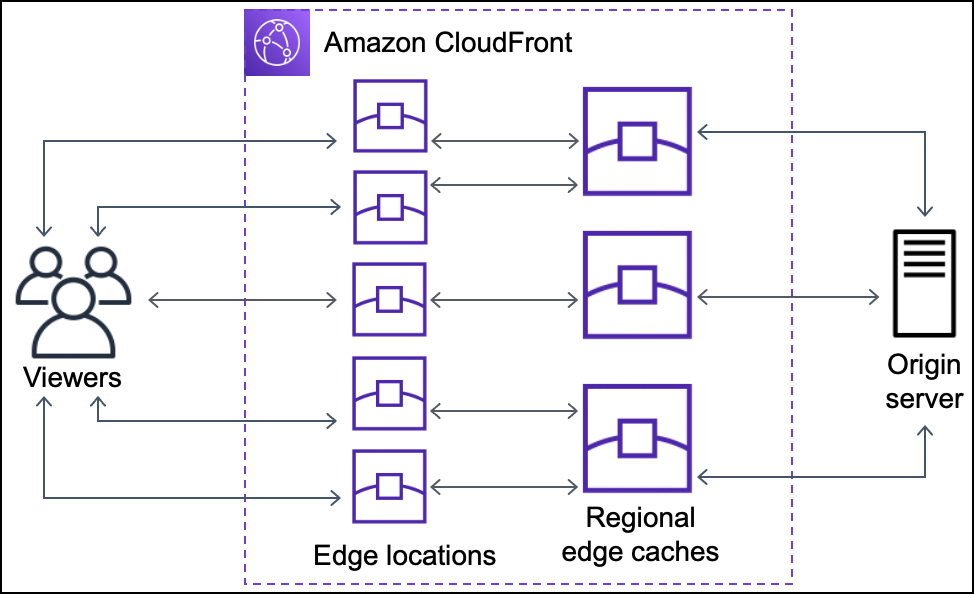
  • CloudFront Edge Locations or POPs make sure that popular content can be served quickly to the viewers.
  • CloudFront also has Regional Edge Caches that help bring more content closer to the viewers, even when the content is not popular enough to stay at a POP, to help improve performance for that content.
  • Regional Edge Caches are deployed globally, close to the viewers, and are located between the origin servers and the Edge Locations.
  • Regional edge caches support multiple Edge Locations and support a larger cache size so objects remain in the cache longer at the nearest regional edge cache location.
  • Regional edge caches help with all types of content, particularly content that tends to become less popular over time.
  • CloudFront Embedded POPs (launched 2024) are deployed within Internet Service Provider (ISP) networks to bring content even closer to end users, reducing latency for high-demand cacheable content like large file downloads and video streaming.

Configuration & Content Delivery

CloudFront Configuration and Content Delivery

Configuration

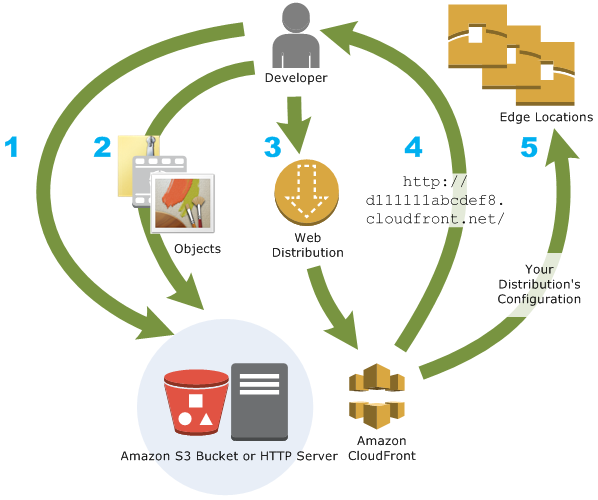
  1. Origin servers need to be configured to get the files for distribution. An origin server stores the original, definitive version of the objects and can be an AWS hosted service for e.g. S3, EC2, or an on-premise server
  2. Files or objects can be added/uploaded to the Origin servers with public read permissions or permissions restricted to Origin Access Control (OAC).
  3. Create a CloudFront distribution, which tells CloudFront which origin servers to get the files from when users request the files.
  4. CloudFront sends the distribution configuration to all the edge locations.
  5. The website can be used with the CloudFront provided domain name or a custom alternate domain name.
  6. An origin server can be configured to limit access protocols, caching behaviour, add headers to the files to add TTL, or the expiration time.

Content delivery to Users

  1. When a user accesses the website, file, or object – the DNS routes the request to the CloudFront edge location that can best serve the user’s request with the lowest latency.
  2. CloudFront returns the object immediately if the requested object is present in the cache at the Edge location.
  3. If the requested object does not exist in the cache at the edge location, the POP typically goes to the nearest regional edge cache to fetch it.
  4. If the object is in the regional edge cache, CloudFront forwards it to the POP that requested it.
  5. For objects not cached at either the POP or the regional edge cache location, the objects are requested from the origin server and returned it to the user via the regional edge cache and POP
  6. CloudFront begins to forward the object to the user as soon as the first byte arrives from the regional edge cache location.
  7. CloudFront also adds the object to the cache in the regional edge cache location in addition to the POP for the next time a viewer requests it.
  8. When the object reaches its expiration time, for any new request CloudFront checks with the Origin server for any latest versions, if it has the latest it uses the same object. If the Origin server has the latest version the same is retrieved, served to the user, and cached as well

CloudFront Origins

  • Each origin is either an S3 bucket, a MediaStore container, a MediaPackage channel, an AWS Lambda function URL, a VPC origin, or a custom origin like an EC2 instance or an HTTP server
  • For the S3 bucket, use the bucket URL or the static website endpoint URL, and the files either need to be publicly readable or secured using Origin Access Control (OAC).
  • Origin restrict access, for S3, Lambda function URLs, and MediaPackage origins, can be configured using Origin Access Control (OAC) to prevent direct access to the origin.
  • For the HTTP server as the origin, the domain name of the resource needs to be mapped and files must be publicly readable.
  • Distribution can have multiple origins for each bucket with one or more cache behaviors that route requests to each origin. Path pattern in a cache behavior determines which requests are routed to the origin (S3 bucket) that is associated with that cache behavior.

Origin Access Control (OAC)

⚠️ Origin Access Identity (OAI) Deprecated: AWS deprecated OAI creation in 2024. As of March 2026, new distributions can only use Origin Access Control (OAC). Existing OAI-based policies still work but cannot be attached to new distributions. AWS recommends migrating to OAC.

  • Origin Access Control (OAC) is the recommended method to restrict access to origins from CloudFront distributions, replacing the legacy Origin Access Identity (OAI).
  • OAC uses AWS Signature Version 4 (SigV4) for robust cryptographic authentication.
  • OAC supports granular policy configurations, HTTP/HTTPS POST method requests in all regions, and integration with SSE-KMS encrypted S3 objects.
  • OAC supports multiple origin types:
    • Amazon S3 – restricts bucket access to designated CloudFront distributions
    • Lambda Function URLs (April 2024) – blocks unintended users from directly accessing function URLs
    • AWS Elemental MediaPackage (April 2024) – permits origin access only from designated distributions
    • AWS Elemental MediaStore – secures media container access
  • When using OAC with S3, Amazon S3 Object Ownership must be set to “Bucket owner enforced” (default for new buckets).
  • OAC cannot be used with S3 buckets configured as website endpoints; use custom origin configuration instead.

CloudFront VPC Origins

  • CloudFront VPC Origins (launched November 2024) allows CloudFront to deliver content from applications hosted in private VPC subnets without requiring public internet access.
  • VPC Origins supports pointing distributions directly to Application Load Balancers (ALBs), Network Load Balancers (NLBs), or EC2 instances inside private subnets.
  • VPC Origins removes the need for complex security configurations like security groups, AWS WAF on origin, or custom header validation to restrict origin access.
  • Applications can be made fully private with CloudFront as the single entry point, preventing direct internet access to origin infrastructure.
  • Cross-account support (launched 2025) allows VPC Origins to work with resources in different AWS accounts.
  • VPC Origins is available at no additional cost.

CloudFront Origin Groups

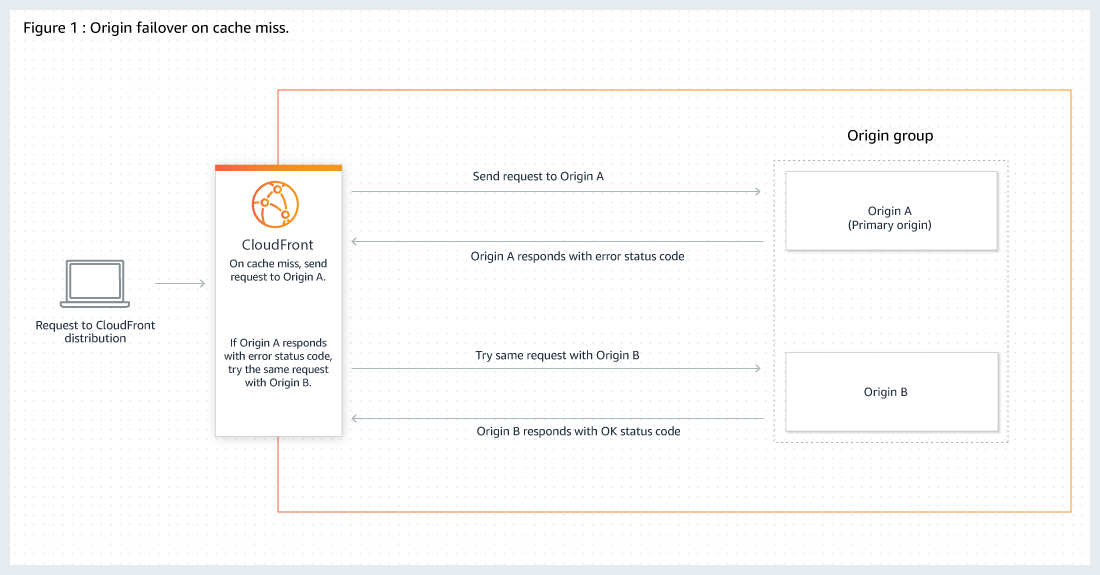
  • Origin Groups can be used to specify two origins to configure origin failover for high availability.
  • Origin failover can be used to designate a primary origin plus a second origin that CloudFront automatically switches to when the primary origin returns specific HTTP status code failure responses.
  • An origin group includes two origins (a primary origin and a second origin to failover to) and specified failover criteria.
  • CloudFront routes all incoming requests to the primary origin, even when a previous request has failed over to the secondary origin. CloudFront only sends requests to the secondary origin after a request fails to the primary origin.
  • CloudFront fails over to a secondary origin only when the HTTP method of the consumer request is GET, HEAD, or OPTIONS and does not fail over when the consumer sends a different HTTP method (for example POST, PUT, etc.).

CloudFront Origin Group

CloudFront Delivery Methods

Web distributions

  • supports both static and dynamic content for e.g. HTML, CSS, js, images, etc using HTTP or HTTPS.
  • supports multimedia content on-demand using progressive download and Apple HTTP Live Streaming (HLS).
  • supports a live event, such as a meeting, conference, or concert, in real-time. For live streaming, distribution can be created automatically using an AWS CloudFormation stack.
  • origin servers can be either an S3 bucket or an HTTP server, for e.g., a web server or an AWS ELB, etc.
  • supports gRPC delivery for modern microservices communication over HTTP/2 connections.

RTMP distributions (Discontinued)

  • RTMP distribution support was fully discontinued by AWS. CloudFront no longer supports Adobe RTMP protocol.
  • For streaming use cases, use Web distributions with HLS, DASH, or CMAF protocols instead.

Cache Behavior Settings

Path Patterns

  • Path Patterns help define which path the Cache behaviour would apply to.
  • A default (*) pattern is created and multiple cache distributions can be added with patterns to take priority over the default path.

Viewer Protocol Policy (Viewer -> CloudFront)

  • Viewer Protocol policy can be configured to define the allowed access protocol.
  • Between CloudFront & Viewers, cache distribution can be configured to either allow
    • HTTPS only – supports HTTPS only
    • HTTP and HTTPS – supports both
    • HTTP redirected to HTTPS – HTTP is automatically redirected to HTTPS

Origin Protocol Policy (CloudFront -> Origin)

  • Between CloudFront & Origin, cache distribution can be configured with
    • HTTP only (for S3 static website).
    • HTTPS only – CloudFront fetches objects from the origin by using HTTPS.
    • Match Viewer – CloudFront uses the protocol that the viewer used to request the objects.
  • For S3 as origin,
    • For the website, the protocol has to be HTTP as HTTPS is not supported.
    • For the S3 bucket, the default Origin protocol policy is Match Viewer and cannot be changed. So When CloudFront is configured to require HTTPS between the viewer and CloudFront, it automatically uses HTTPS to communicate with S3.

HTTPS Connection

  • CloudFront can also be configured to work with HTTPS for alternate domain names by using:-
    • Serving HTTPS Requests Using Dedicated IP Addresses
      • CloudFront associates the alternate domain name with a dedicated IP address, and the certificate is associated with the IP address when a request is received from a DNS server for the IP address.
      • This method works for every HTTPS request, regardless of the browser or other viewer that the user is using.
      • An additional monthly charge (of about $600/month) is incurred for using a dedicated IP address.
    • Serving HTTPS Requests Using Server Name Indication – SNI (Recommended)
      • SNI Custom SSL relies on the SNI extension of the TLS protocol, which allows multiple domains to be served over the same IP address by including the hostname, viewers are trying to connect to
      • SNI Custom SSL is available at no additional cost beyond standard CloudFront data transfer and request fees
      • Most modern browsers support SNI.
    • For End-to-End HTTPS connections certificate needs to be applied both between the Viewers and CloudFront & CloudFront and Origin, with the following requirements
      • HTTPS between viewers and CloudFront
        • A certificate issued by a trusted certificate authority (CA);
        • Certificate provided by AWS Certificate Manager (ACM);
      • HTTPS between CloudFront and the Custom Origin
        • If the origin is not an ELB load balancer, the certificate must be issued by a trusted CA.
        • For load balancer, a certificate provided by ACM can be used
        • Self-signed certificates CAN NOT be used.
      • ACM certificate for CloudFront must be requested or imported in the US East (N. Virginia) region. ACM certificates in this region that are associated with a CloudFront distribution are distributed to all the geographic locations configured for that distribution.

Mutual TLS (mTLS) Authentication

  • CloudFront supports viewer mutual TLS (mTLS) authentication, requiring both client and server to present and verify digital certificates for two-way authentication.
  • Viewer mTLS provides strong client authentication at the edge before traffic reaches the origin infrastructure.
  • CloudFront also supports mTLS authentication to origins (launched 2025), preserving cryptographic identity and trust across the full request path from viewer to CloudFront to origin.
  • CloudFront Connection Functions can be used to write lightweight JavaScript functions for custom mTLS certificate validation and authentication logic at edge locations.
  • mTLS requires HTTPS connections; it cannot be enabled on distributions with HTTP-supporting cache behaviors.

Allowed HTTP methods

  • CloudFront supports GET, HEAD, OPTIONS, PUT, POST, PATCH, DELETE to get, add, update, and delete objects, and to get object headers.
    • GET, HEAD methods to use to get objects, object headers
    • GET, HEAD, OPTIONS methods to use to get objects, object headers or retrieve a list of the options supported from the origin
    • GET, HEAD, OPTIONS, PUT, POST, PATCH, DELETE operations can also be performed for e.g. submitting data from a web form, which are directly proxied back to the Origin server
  • CloudFront only caches responses to GET and HEAD requests and, optionally, OPTIONS requests. CloudFront does not cache responses to PUT, POST, PATCH, DELETE request methods and these requests are directed to the origin.
  • PUT, POST HTTP methods also help for accelerated content uploads, as these operations will be sent to the origin e.g. S3 via the CloudFront edge location, improving efficiency, reducing latency, and allowing the application to benefit from the monitored, persistent connections that CloudFront maintains from the edge locations to the origin servers.

CloudFront Edge Caches

  • Control the cache max-age
    • To increase the cache hit ratio, the origin can be configured to add a Cache-Control: max-age directive to the objects.
    • Longer the interval less frequently it would be retrieved from the origin
  • Caching Based on Query String Parameters
    • CloudFront can be configured to cache based on the query parameters
      • None (Improves Caching) – if the origin returns the same version of an object regardless of the values of query string parameters.
      • Forward all, cache based on whitelist – if the origin server returns different versions of the objects based on one or more query string parameters.
      • Forward all, cache based on all – if the origin server returns different versions of the objects for all query string parameters.
    • Caching performance can be improved by
      • Configure CloudFront to forward only the query strings for which the origin will return unique objects.
      • Using the same case for the parameters’ values for e.g. parameter value A or a, CloudFront would cache the same request twice even if the response or object returned is identical
      • Using the same parameter order for e.g. for request a=x&b=y and b=y&a=x, CloudFront would cache the same request twice even though the response or object returned is identical
  • Caching Based on Cookie Values
    • CloudFront can be configured to cache based on cookie values.
    • By default, it doesn’t consider cookies while caching on edge locations
    • Caching performance can be improved by
      • Configure CloudFront to forward only specified cookies instead of forwarding all cookies
      • Cookie names and values are both case sensitive so better to stick with the same case
      • Create separate cache behaviors for static and dynamic content, and configure CloudFront to forward cookies to the origin only for dynamic content
      • If possible, create separate cache behaviors for dynamic content for which cookie values are unique for each user (such as a user ID) and dynamic content that varies based on a smaller number of unique values
  • Caching Based on Request Headers
    • CloudFront can be configured to cache based on request headers
    • By default, CloudFront doesn’t consider headers when caching the objects in edge locations.
    • Caching performance can be improved by
      • Configure CloudFront to forward and cache based only on specified headers instead of forwarding and caching based on all headers.
      • Try to avoid caching based on request headers that have large numbers of unique values.
      • CloudFront configured to forward all headers to the origin doesn’t cache the objects associated with this cache behaviour. Instead, it sends every request to the origin
      • CloudFront caches based on header values, it doesn’t consider the case of the header name but considers the case of the header value

Object Caching & Expiration

  • Object expiration determines how long the objects stay in a CloudFront cache before it fetches it again from Origin.
  • Low expiration time helps serve content that changes frequently and high expiration time helps improve performance and reduce the origin load.
  • By default, each object automatically expires after 24 hours
  • After expiration time, CloudFront checks if it still has the latest version
    • If the cache already has the latest version, the origin returns a 304 status code (Not Modified).
    • If the CloudFront cache does not have the latest version, the origin returns a 200 status code (OK), and the latest version of the object
  • If an object in an edge location isn’t frequently requested, CloudFront might evict the object before its expiration date to make room for objects that have been requested more recently.
  • The default behaviour can be changed by
    • for the entire path pattern, cache behaviour can be configured by the setting Minimum TTL, Maximum TTL, and Default TTL values
    • for individual objects, the origin can be configured to add a Cache-Control max-age or Cache-Control s-maxage directive, or an Expires header field to the object.
    • AWS recommends using Cache-Control max-age directive over Expires header to control object caching behaviour.
    • CloudFront uses only the value of Cache-Control max-age , if both the Cache-Control max-age directive and Expires header is specified
    • HTTP Cache-Control or Pragma header fields in a GET request from a viewer can’t be used to force CloudFront to go back to the origin server for the object
    • By default, when the origin returns an HTTP 4xx or 5xx status code, CloudFront caches these error responses for five minutes and then submits the next request for the object to the origin

Cache Invalidation

  • CloudFront supports URL path-based invalidation to remove cached objects from edge locations before they expire.
  • Invalidation by Cache Tag (launched April 2026) – allows invalidating groups of related cached objects using a single request based on semantic tags rather than URL paths.
    • Origins include cache tags via a response header with comma-separated tag values when objects are cached.
    • Objects can be invalidated by tag directly through the CloudFront API.
    • Useful for updating product catalogs, managing compliance requirements, and refreshing multi-tenant content.
    • Tag invalidation paths count toward the same 1,000 free invalidation paths per month allowance.
  • AWS recommends using file versioning (versioned file names) over invalidation for content updates when possible.

CloudFront Origin Shield

  • CloudFront Origin Shield provides an additional layer in the CloudFront caching infrastructure that helps to minimize the origin’s load, improve its availability, and reduce its operating costs.
  • Origin Shield provides a centralized caching layer that helps increase the cache hit ratio to reduce the load on your origin.
  • Origin Shield decreases the origin operating costs by collapsing requests across regions so as few as one request goes to the origin per object.
  • Origin Shield can be configured by choosing the Regional Edge Cache closest to the origin to become the Origin Shield Region
  • CloudFront Origin Shield is beneficial for many use cases like
    • Viewers that are spread across different geographical regions
    • Origins that provide just-in-time packaging for live streaming or on-the-fly image processing
    • On-premises origins with capacity or bandwidth constraints
    • Workloads that use multiple content delivery networks (CDNs)

Serving Compressed Files

  • CloudFront can be configured to automatically compress files of certain types and serve the compressed files when viewer requests include Accept-Encoding in the request header
  • Compressing content, downloads are faster because the files are smaller as well as less expensive as the cost of CloudFront data transfer is based on the total amount of data served.
  • CloudFront can compress objects using the Gzip and Brotli compression formats.
  • If serving from a custom origin, it can be used to
    • configure to compress files with or without CloudFront compression
    • compress file types that CloudFront doesn’t compress.
  • If the origin returns a compressed file, CloudFront detects compression by the Content-Encoding header value and doesn’t compress the file again.
  • CloudFront compresses files between 1,000 and 10,000,000 bytes in size, and the response must include a Content-Length header.

Distribution Details

Price Class

  • CloudFront has edge locations all over the world and the cost for each edge location varies and the price charged for serving the requests also varies
  • CloudFront edge locations are grouped into geographic regions, and regions have been grouped into price classes
    • Price Class All – includes all the regions
    • Price Class 200 – Includes All regions except South America and Australia and New Zealand.
    • Price Class 100 – Includes only the least-expensive regions (North America and Europe regions)
  • Price class can be selected to lower the cost but this would come only at the expense of performance (higher latency), as CloudFront would serve requests only from the selected price class edge locations
  • CloudFront may, sometimes, service requests from a region not included within the price class, however, you would be charged the rate for the least-expensive region in your selected price class

WAF Web ACL

  • AWS WAF can be used to allow or block requests based on specified criteria, choose the web ACL to associate with this distribution.
  • One-click WAF security protection is available directly from the CloudFront console to quickly enable common protections including bot control.
  • CloudFront Security Dashboard provides a unified view for monitoring, investigating, and configuring WAF security protections.

Alternate Domain Names (CNAMEs)

  • CloudFront by default assigns a domain name for the distribution for e.g. d111111abcdef8.cloudfront.net
  • An alternate domain name, also known as a CNAME, can be used to use own custom domain name for links to objects
  • Web distributions support alternate domain names.
  • CloudFront supports * wildcard at the beginning of a domain name instead of specifying subdomains individually.
  • However, a wildcard cannot replace part of a subdomain name for e.g. *domain.example.com, or cannot replace a subdomain in the middle of a domain name for e.g. subdomain.*.example.com.

Anycast Static IPs

  • CloudFront Anycast Static IPs (launched November 2024) provides a dedicated list of static IP addresses for CloudFront distributions.
  • Useful for allowlisting in network firewalls, zero-rating traffic with network carriers, and simplifying IP address management.
  • Supports apex domains (April 2025), allowing A records for apex domains without requiring Route 53 alias records.
  • Integrates with VPC IPAM for Bring Your Own IP (BYOIP) support, allowing use of both IPv4 and IPv6 addresses.

Distribution State

  • Distribution state indicates whether you want the distribution to be enabled or disabled once it’s deployed.

CloudFront Continuous Deployment

  • CloudFront Continuous Deployment allows safely testing and validating configuration changes using a portion of production traffic before committing the entire workload.
  • Creates a staging distribution linked to the primary distribution to test changes with real traffic.
  • Supports blue/green and canary deployment strategies for CDN configuration changes.
  • Enables zero-downtime deployments with easy rollback if issues are detected.
  • Can be integrated with CI/CD pipelines for automated testing and promotion of changes.

Geo-Restriction – Geoblocking

  • Geo restriction can help allow or prevent users in selected countries from accessing the content,
  • CloudFront distribution can be configured either to allow users in
    • whitelist of specified countries to access the content or to
    • deny users in a blacklist of specified countries to access the content
  • Geo restriction can be used to restrict access to all of the files that are associated with distribution and to restrict access at the country level
  • CloudFront responds to a request from a viewer in a restricted country with an HTTP status code 403 (Forbidden)
  • Use a third-party geolocation service, if access is to be restricted to a subset of the files that are associated with a distribution or to restrict access at a finer granularity than the country level.

CloudFront Edge Functions

Refer blog post @ CloudFront Edge Functions

CloudFront Functions

  • CloudFront Functions execute in 700+ Edge Locations with sub-millisecond execution times.
  • Suitable for lightweight, high-scale request/response transformations such as URL rewrites, header manipulation, and access control.
  • CloudFront KeyValueStore (launched November 2023) – a low-latency edge datastore for CloudFront Functions, enabling data updates without redeploying function code.
  • New capabilities (2025): edge location metadata, raw query string retrieval, and advanced origin overrides.
  • Supports CBOR Web Tokens (CWT) and Common Access Tokens (CAT) for token validation, generation, and refresh logic.

CloudFront Connection Functions

  • CloudFront Connection Functions enable lightweight JavaScript functions for mTLS certificate validation and custom authentication logic at the TLS connection layer.
  • Can validate client certificates, implement device-specific authentication rules, and handle certificate revocation scenarios.
  • Execute at CloudFront edge locations worldwide for low-latency connection-time decisions.

Lambda@Edge

  • Lambda@Edge executes at 13 Regional Edge Cache locations for more complex compute operations.
  • Suitable for operations requiring external network calls, longer execution times, or larger function packages.

CloudFront SaaS Manager

  • CloudFront SaaS Manager (launched May 2025) simplifies scaling and managing multi-tenant web applications that deliver content to end users.
  • Introduces multi-tenant distributions that serve content across multiple domains while sharing configuration and infrastructure.
  • Reduces operational overhead with reusable configuration templates and parameters for tenant onboarding.
  • Each tenant can have custom domain names, TLS certificates, and cache behaviors while sharing the underlying distribution infrastructure.
  • Ideal for SaaS providers needing to manage hundreds or thousands of customer domains efficiently.

CloudFront with S3

AWS CloudFront with S3

CloudFront Security

  • CloudFront provides Encryption in Transit and can be configured to require that viewers use HTTPS to request the files so that connections are encrypted when CloudFront communicates with viewers.
  • CloudFront provides Encryption at Rest
    • uses SSDs which are encrypted for edge location points of presence (POPs), and encrypted EBS volumes for Regional Edge Caches (RECs).
    • Function code and configuration are always stored in an encrypted format on the encrypted SSDs on the edge location POPs, and in other storage locations used by CloudFront.
  • Restricting access to content
    • Configure HTTPS connections
    • Use signed URLs or cookies to restrict access for selected users
    • Restrict access to content in S3 buckets using Origin Access Control (OAC) to prevent users from using the direct URL of the file.
    • Restrict access to Lambda function URLs using OAC.
    • Restrict direct access to load balancer using custom headers or VPC Origins.
    • Set up field-level encryption for specific content fields
    • Use AWS WAF web ACLs to create a web access control list (web ACL) to restrict access to your content.
    • Use geo-restriction, also known as geoblocking, to prevent users in specific geographic locations from accessing content served through a CloudFront distribution.
    • Use mutual TLS (mTLS) for strong two-way client/server authentication at the edge.

AWS CloudFront Security

Access Logs

  • CloudFront can be configured to create log files that contain detailed information about every user request that CloudFront receives.
  • With logging enabled, an S3 bucket can be specified where CloudFront would save the files
  • CloudFront delivers access logs for a distribution periodically, up to several times an hour
  • CloudFront usually delivers the log file for that time period to the S3 bucket within an hour of the events that appear in the log. Note, however, that some or all log file entries for a time period can sometimes be delayed by up to 24 hours
  • CloudFront also supports real-time logs delivery to Amazon Kinesis Data Streams for immediate processing and analysis.

CloudFront Cost

  • CloudFront charges are based on actual usage of the service in four areas:
    • Data Transfer Out to Internet
      • charges are applied for the volume of data transferred out of the CloudFront edge locations, measured in GB
      • Data transfer out from AWS origin (e.g., S3, EC2, etc.) to CloudFront are no longer charged. This applies to data transfer from all AWS regions to all global CloudFront edge locations
    • HTTP/HTTPS Requests
      • number of HTTP/HTTPS requests made for the content
    • Invalidation Requests
      • per path in the invalidation request (first 1,000 paths free per month)
      • Tag-based invalidation paths count toward the same free allowance
    • Dedicated IP Custom SSL certificates associated with a CloudFront distribution
      • $600 per month for each custom SSL certificate using the Dedicated IP version (SNI is free)
  • Flat-Rate Pricing Plans (2025): CloudFront offers bundled plans combining CDN, WAF, DDoS protection, bot management, Route 53, CloudWatch Logs, edge compute, and S3 storage credits:
    • Free – $0/month with basic usage allowances
    • Pro – $15/month for small-to-medium sites
    • Business – $200/month for larger applications
    • Premium – $1,000/month with configurable usage allowances and all features

CloudFront vs Global Accelerator

Refer blog post @ CloudFront vs Global Accelerator

AWS Certification Exam Practice Questions

  • Questions are collected from Internet and the answers are marked as per my knowledge and understanding (which might differ with yours).
  • AWS services are updated everyday and both the answers and questions might be outdated soon, so research accordingly.
  • AWS exam questions are not updated to keep up the pace with AWS updates, so even if the underlying feature has changed the question might not be updated
  • Open to further feedback, discussion and correction.
  1. Your company Is moving towards tracking web page users with a small tracking Image loaded on each page Currently you are serving this image out of US-East, but are starting to get concerned about the time It takes to load the image for users on the west coast. What are the two best ways to speed up serving this image? Choose 2 answers
    1. Use Route 53’s Latency Based Routing and serve the image out of US-West-2 as well as US-East-1
    2. Serve the image out through CloudFront
    3. Serve the image out of S3 so that it isn’t being served oft of your web application tier
    4. Use EBS PIOPs to serve the image faster out of your EC2 instances
  2. You deployed your company website using Elastic Beanstalk and you enabled log file rotation to S3. An Elastic Map Reduce job is periodically analyzing the logs on S3 to build a usage dashboard that you share with your CIO. You recently improved overall performance of the website using Cloud Front for dynamic content delivery and your website as the origin. After this architectural change, the usage dashboard shows that the traffic on your website dropped by an order of magnitude. How do you fix your usage dashboard’? [PROFESSIONAL]
    1. Enable CloudFront to deliver access logs to S3 and use them as input of the Elastic Map Reduce job
    2. Turn on Cloud Trail and use trail log tiles on S3 as input of the Elastic Map Reduce job
    3. Change your log collection process to use Cloud Watch ELB metrics as input of the Elastic Map Reduce job
    4. Use Elastic Beanstalk “Rebuild Environment” option to update log delivery to the Elastic Map Reduce job.
    5. Use Elastic Beanstalk ‘Restart App server(s)” option to update log delivery to the Elastic Map Reduce job.
  3. An AWS customer runs a public blogging website. The site users upload two million blog entries a month. The average blog entry size is 200 KB. The access rate to blog entries drops to negligible 6 months after publication and users rarely access a blog entry 1 year after publication. Additionally, blog entries have a high update rate during the first 3 months following publication; this drops to no updates after 6 months. The customer wants to use CloudFront to improve his user’s load times. Which of the following recommendations would you make to the customer? [PROFESSIONAL]
    1. Duplicate entries into two different buckets and create two separate CloudFront distributions where S3 access is restricted only to Cloud Front identity
    2. Create a CloudFront distribution with “US & Europe” price class for US/Europe users and a different CloudFront distribution with All Edge Locations for the remaining users.
    3. Create a CloudFront distribution with S3 access restricted only to the CloudFront identity and partition the blog entry’s location in S3 according to the month it was uploaded to be used with CloudFront behaviors
    4. Create a CloudFront distribution with Restrict Viewer Access Forward Query string set to true and minimum TTL of 0.
  4. Your company has on-premises multi-tier PHP web application, which recently experienced downtime due to a large burst in web traffic due to a company announcement. Over the coming days, you are expecting similar announcements to drive similar unpredictable bursts, and are looking to find ways to quickly improve your infrastructures ability to handle unexpected increases in traffic. The application currently consists of 2 tiers a web tier, which consists of a load balancer, and several Linux Apache web servers as well as a database tier which hosts a Linux server hosting a MySQL database. Which scenario below will provide full site functionality, while helping to improve the ability of your application in the short timeframe required? [PROFESSIONAL]
    1. Offload traffic from on-premises environment Setup a CloudFront distribution and configure CloudFront to cache objects from a custom origin Choose to customize your object cache behavior, and select a TTL that objects should exist in cache.
    2. Migrate to AWS Use VM Import/Export to quickly convert an on-premises web server to an AMI create an Auto Scaling group, which uses the imported AMI to scale the web tier based on incoming traffic Create an RDS read replica and setup replication between the RDS instance and on-premises MySQL server to migrate the database.
    3. Failover environment: Create an S3 bucket and configure it tor website hosting Migrate your DNS to Route53 using zone (lie import and leverage Route53 DNS failover to failover to the S3 hosted website.
    4. Hybrid environment Create an AMI which can be used of launch web serfers in EC2 Create an Auto Scaling group which uses the * AMI to scale the web tier based on incoming traffic Leverage Elastic Load Balancing to balance traffic between on-premises web servers and those hosted in AWS.
  5. You are building a system to distribute confidential training videos to employees. Using CloudFront, what method could be used to serve content that is stored in S3, but not publically accessible from S3 directly?
    1. Create an Origin Access Control (OAC) for CloudFront and grant access to the objects in your S3 bucket to that OAC. (Note: Previously this was Origin Access Identity/OAI which is now deprecated. OAC is the current recommended approach.)
    2. Add the CloudFront account security group “amazon-cf/amazon-cf-sg” to the appropriate S3 bucket policy.
    3. Create an Identity and Access Management (IAM) User for CloudFront and grant access to the objects in your S3 bucket to that IAM User.
    4. Create a S3 bucket policy that lists the CloudFront distribution ID as the Principal and the target bucket as the Amazon Resource Name (ARN).
  6. A media production company wants to deliver high-definition raw video for preproduction and dubbing to customer all around the world. They would like to use Amazon CloudFront for their scenario, and they require the ability to limit downloads per customer and video file to a configurable number. A CloudFront download distribution with TTL=0 was already setup to make sure all client HTTP requests hit an authentication backend on Amazon Elastic Compute Cloud (EC2)/Amazon RDS first, which is responsible for restricting the number of downloads. Content is stored in S3 and configured to be accessible only via CloudFront. What else needs to be done to achieve an architecture that meets the requirements? Choose 2 answers [PROFESSIONAL]
    1. Enable URL parameter forwarding, let the authentication backend count the number of downloads per customer in RDS, and return the content S3 URL unless the download limit is reached.
    2. Enable CloudFront logging into an S3 bucket, leverage EMR to analyze CloudFront logs to determine the number of downloads per customer, and return the content S3 URL unless the download limit is reached. (CloudFront logs are logged periodically and EMR not being real time, hence not suitable)
    3. Enable URL parameter forwarding, let the authentication backend count the number of downloads per customer in RDS, and invalidate the CloudFront distribution as soon as the download limit is reached. (Distribution are not invalidated but Objects)
    4. Enable CloudFront logging into the S3 bucket, let the authentication backend determine the number of downloads per customer by parsing those logs, and return the content S3 URL unless the download limit is reached. (CloudFront logs are logged periodically and EMR not being real time, hence not suitable)
    5. Configure a list of trusted signers, let the authentication backend count the number of download requests per customer in RDS, and return a dynamically signed URL unless the download limit is reached.
  7. Your customer is implementing a video on-demand streaming platform on AWS. The requirements are to support for multiple devices such as iOS, Android, and PC as client devices, using a standard client player, using streaming technology (not download) and scalable architecture with cost effectiveness [PROFESSIONAL]
    1. Store the video contents to Amazon Simple Storage Service (S3) as an origin server. Configure the Amazon CloudFront distribution with a streaming option to stream the video contents
    2. Store the video contents to Amazon S3 as an origin server. Configure the Amazon CloudFront distribution with a download option to stream the video contents (Refer link)
    3. Launch a streaming server on Amazon Elastic Compute Cloud (EC2) (for example, Adobe Media Server), and store the video contents as an origin server. Configure the Amazon CloudFront distribution with a download option to stream the video contents
    4. Launch a streaming server on Amazon Elastic Compute Cloud (EC2) (for example, Adobe Media Server), and store the video contents as an origin server. Launch and configure the required amount of streaming servers on Amazon EC2 as an edge server to stream the video contents
  8. You are an architect for a news -sharing mobile application. Anywhere in the world, your users can see local news on of topics they choose. They can post pictures and videos from inside the application. Since the application is being used on a mobile phone, connection stability is required for uploading content, and delivery should be quick. Content is accessed a lot in the first minutes after it has been posted, but is quickly replaced by new content before disappearing. The local nature of the news means that 90 percent of the uploaded content is then read locally (less than a hundred kilometers from where it was posted). What solution will optimize the user experience when users upload and view content (by minimizing page load times and minimizing upload times)? [PROFESSIONAL]
    1. Upload and store the content in a central Amazon Simple Storage Service (S3) bucket, and use an Amazon Cloud Front Distribution for content delivery.
    2. Upload and store the content in an Amazon Simple Storage Service (S3) bucket in the region closest to the user, and use multiple Amazon Cloud Front distributions for content delivery.
    3. Upload the content to an Amazon Elastic Compute Cloud (EC2) instance in the region closest to the user, send the content to a central Amazon Simple Storage Service (S3) bucket, and use an Amazon Cloud Front distribution for content delivery.
    4. Use an Amazon Cloud Front distribution for uploading the content to a central Amazon Simple Storage Service (S3) bucket and for content delivery.
  9. To enable end-to-end HTTPS connections from the user’s browser to the origin via CloudFront, which of the following options are valid? Choose 2 answers [PROFESSIONAL]
    1. Use self signed certificate in the origin and CloudFront default certificate in CloudFront. (Origin cannot be self signed)
    2. Use the CloudFront default certificate in both origin and CloudFront (CloudFront cert cannot be applied to origin)
    3. Use 3rd-party CA certificate in the origin and CloudFront default certificate in CloudFront
    4. Use 3rd-party CA certificate in both origin and CloudFront
    5. Use a self signed certificate in both the origin and CloudFront (Origin cannot be self signed)
  10. Your application consists of 10% writes and 90% reads. You currently service all requests through a Route53 Alias Record directed towards an AWS ELB, which sits in front of an EC2 Auto Scaling Group. Your system is getting very expensive when there are large traffic spikes during certain news events, during which many more people request to read similar data all at the same time. What is the simplest and cheapest way to reduce costs and scale with spikes like this? [PROFESSIONAL]
    1. Create an S3 bucket and asynchronously replicate common requests responses into S3 objects. When a request comes in for a precomputed response, redirect to AWS S3
    2. Create another ELB and Auto Scaling Group layer mounted on top of the other system, adding a tier to the system. Serve most read requests out of the top layer
    3. Create a CloudFront Distribution and direct Route53 to the Distribution. Use the ELB as an Origin and specify Cache Behaviors to proxy cache requests, which can be served late. (CloudFront can server request from cache and multiple cache behavior can be defined based on rules for a given URL pattern based on file extensions, file names, or any portion of a URL. Each cache behavior can include the CloudFront configuration values: origin server name, viewer connection protocol, minimum expiration period, query string parameters, cookies, and trusted signers for private content.)
    4. Create a Memcached cluster in AWS ElastiCache. Create cache logic to serve requests, which can be served late from the in-memory cache for increased performance.
  11. You are designing a service that aggregates clickstream data in batch and delivers reports to subscribers via email only once per week. Data is extremely spikey, geographically distributed, high-scale, and unpredictable. How should you design this system?
    1. Use a large RedShift cluster to perform the analysis, and a fleet of Lambdas to perform record inserts into the RedShift tables. Lambda will scale rapidly enough for the traffic spikes.
    2. Use a CloudFront distribution with access log delivery to S3. Clicks should be recorded as query string GETs to the distribution. Reports are built and sent by periodically running EMR jobs over the access logs in S3. (CloudFront is a Gigabit-Scale HTTP(S) global request distribution service and works fine with peaks higher than 10 Gbps or 15,000 RPS. It can handle scale, geo-spread, spikes, and unpredictability. Access Logs will contain the GET data and work just fine for batch analysis and email using EMR. Other streaming options are expensive as not required as the need is to batch analyze)
    3. Use API Gateway invoking Lambdas which PutRecords into Kinesis, and EMR running Spark performing GetRecords on Kinesis to scale with spikes. Spark on EMR outputs the analysis to S3, which are sent out via email.
    4. Use AWS Elasticsearch service and EC2 Auto Scaling groups. The Autoscaling groups scale based on click throughput and stream into the Elasticsearch domain, which is also scalable. Use Kibana to generate reports periodically.
  12. Your website is serving on-demand training videos to your workforce. Videos are uploaded monthly in high resolution MP4 format. Your workforce is distributed globally often on the move and using company-provided tablets that require the HTTP Live Streaming (HLS) protocol to watch a video. Your company has no video transcoding expertise and it required you might need to pay for a consultant. How do you implement the most cost-efficient architecture without compromising high availability and quality of video delivery? [PROFESSIONAL]
    1. Elastic Transcoder to transcode original high-resolution MP4 videos to HLS. S3 to host videos with lifecycle Management to archive original flies to Glacier after a few days. CloudFront to serve HLS transcoded videos from S3
    2. A video transcoding pipeline running on EC2 using SQS to distribute tasks and Auto Scaling to adjust the number or nodes depending on the length of the queue S3 to host videos with Lifecycle Management to archive all files to Glacier after a few days CloudFront to serve HLS transcoding videos from Glacier
    3. Elastic Transcoder to transcode original high-resolution MP4 videos to HLS EBS volumes to host videos and EBS snapshots to incrementally backup original rues after a few days. CloudFront to serve HLS transcoded videos from EC2.
    4. A video transcoding pipeline running on EC2 using SQS to distribute tasks and Auto Scaling to adjust the number of nodes depending on the length of the queue. EBS volumes to host videos and EBS snapshots to incrementally backup original files after a few days. CloudFront to serve HLS transcoded videos from EC2
  13. A company wants to restrict access to its CloudFront-distributed content to only authenticated IoT devices using certificate-based authentication. Which CloudFront feature should they use?
    1. CloudFront signed URLs with custom policy
    2. AWS WAF with IP-based rules
    3. CloudFront viewer mutual TLS (mTLS) with Connection Functions for certificate validation
    4. Origin Access Control with IAM authentication
  14. A SaaS company needs to deliver content for 500+ customer domains through CloudFront while sharing infrastructure configuration. Which feature best addresses this requirement?
    1. Create 500 separate CloudFront distributions with identical configurations
    2. Use a single distribution with 500 alternate domain names (CNAMEs)
    3. Use CloudFront SaaS Manager with multi-tenant distributions and distribution tenants
    4. Use CloudFront Functions with KeyValueStore for tenant routing
  15. An organization wants to ensure their application load balancer is only accessible through CloudFront and not directly from the internet. Which is the recommended approach?
    1. Add CloudFront IP ranges to the ALB security group
    2. Use a custom HTTP header shared between CloudFront and ALB
    3. Use CloudFront VPC Origins to place the ALB in a private subnet accessible only via CloudFront
    4. Configure AWS WAF on the ALB to block non-CloudFront traffic

See also: Global Accelerator vs CloudFront – When to Use Each

References