AWS S3 Data Durability

AWS S3 Data Durability

  • Amazon S3 provides a highly durable storage infrastructure designed for mission-critical and primary data storage.
  • S3 is designed to provide 99.999999999% (11 nines) durability of objects over a given year.
  • S3 Standard, S3 Intelligent-Tiering, S3 Standard-IA, S3 Glacier Instant Retrieval, S3 Glacier Flexible Retrieval, and S3 Glacier Deep Archive redundantly store objects on multiple devices across a minimum of three Availability Zones in an AWS Region.
  • S3 One Zone-IA stores data redundantly across multiple devices within a single Availability Zone. It still offers 11 nines of durability but may be susceptible to data loss in the unlikely case of the loss or damage to all or part of an AWS Availability Zone.
  • S3 Express One Zone stores data within a single Availability Zone for high-performance, single-digit millisecond latency access. It is designed for 99.95% availability.
  • To help ensure data durability, Amazon S3 PUT and PUT Object copy operations synchronously store data across multiple facilities before returning SUCCESS.
  • Once the objects are stored, Amazon S3 maintains their durability by quickly detecting and repairing any lost redundancy.
  • Amazon S3 regularly verifies the integrity of data stored using checksums and provides auto-healing capability.
  • S3 is designed to sustain data in the event of the loss of an entire Availability Zone.

S3 Data Integrity Protections

  • As of December 2024, Amazon S3 provides default data integrity protections for all new object uploads.
  • AWS SDKs automatically calculate CRC-based checksums (CRC64NVME by default) for uploads as data is transmitted over the network.
  • S3 independently verifies these checksums and accepts objects only after confirming data integrity was maintained in transit.
  • If no checksum is provided on upload, S3 automatically calculates and applies a CRC64NVME checksum as default integrity protection.
  • S3 continually monitors data durability over time with periodic integrity checks of data at rest.

S3 Storage Classes – Durability & Availability Comparison

Storage Class Durability Availability AZs
S3 Standard 99.999999999% (11 nines) 99.99% ≥ 3
S3 Intelligent-Tiering 99.999999999% (11 nines) 99.9% ≥ 3
S3 Express One Zone 99.999999999% (11 nines) 99.95% 1
S3 Standard-IA 99.999999999% (11 nines) 99.9% ≥ 3
S3 One Zone-IA 99.999999999% (11 nines) 99.5% 1
S3 Glacier Instant Retrieval 99.999999999% (11 nines) 99.9% ≥ 3
S3 Glacier Flexible Retrieval 99.999999999% (11 nines) 99.99% ≥ 3
S3 Glacier Deep Archive 99.999999999% (11 nines) 99.99% ≥ 3

Additional Data Protection Features

  • S3 Versioning – Preserves, retrieves, and restores every version of every object stored in a bucket, allowing easy recovery from unintended user actions and application failures.
  • S3 Object Lock – Provides Write Once Read Many (WORM) capability, preventing object deletion or overwriting for a specified retention period.
  • S3 Replication – Enables automatic, asynchronous copying of objects across S3 buckets in same or different AWS Regions for additional redundancy and compliance.
  • S3 Multi-Region Access Points – Provides a global endpoint to route requests to the nearest replicated bucket, improving availability across regions.

Key Points for Certification Exams

  • All S3 storage classes are designed for 99.999999999% (11 nines) durability.
  • S3 Standard stores data across a minimum of 3 AZs – NOT across regions, NOT in a single facility.
  • S3 One Zone-IA and S3 Express One Zone store data in a single AZ but still provide 11 nines durability.
  • One Zone classes may lose data if the entire AZ is lost (fire, flood, etc.) – use for re-creatable data only.
  • S3 provides both durability (data not lost) and availability (data accessible) – these are different metrics.
  • S3 automatically detects and repairs lost redundancy (auto-healing).

AWS Certification Exam Practice Questions

Question 1:
A customer is leveraging Amazon Simple Storage Service in eu-west-1 to store static content for a web-based property. The customer is storing objects using the Standard Storage class. Where are the customer’s objects replicated?
  1. Single facility in eu-west-1 and a single facility in eu-central-1
  2. Single facility in eu-west-1 and a single facility in us-east-1
  3. Multiple facilities across a minimum of 3 Availability Zones in eu-west-1
  4. A single facility in eu-west-1
Answer: 3
S3 Standard stores objects redundantly across a minimum of three Availability Zones within the same AWS Region. Objects are NOT replicated across regions by default.


Question 2:
A company wants to store infrequently accessed backup data at the lowest possible cost. The data can be re-created if lost. Which S3 storage class should they use?
  1. S3 Standard
  2. S3 Standard-IA
  3. S3 One Zone-IA
  4. S3 Glacier Deep Archive
Answer: 3
S3 One Zone-IA is the best choice for infrequently accessed, re-creatable data as it costs 20% less than S3 Standard-IA. While it stores data in a single AZ (susceptible to AZ-level disasters), it still provides 11 nines durability and the data can be re-created if lost.


Question 3:
What is the designed durability of Amazon S3?
  1. 99.99%
  2. 99.999%
  3. 99.9999999%
  4. 99.999999999%
Answer: 4
Amazon S3 is designed for 99.999999999% (11 nines) durability. This applies to all S3 storage classes. Note that durability (data not lost) is different from availability (data accessible when requested).


Question 4:
Which of the following statements about S3 data integrity are correct? (Choose 2)
  1. S3 automatically calculates and verifies checksums for uploaded objects
  2. S3 encrypts data at rest by default using customer-managed keys
  3. S3 regularly performs integrity checks on stored data and automatically repairs any lost redundancy
  4. S3 replicates data across multiple AWS Regions by default
Answer: 1, 3
S3 provides default data integrity protections with automatic CRC-based checksums on upload (since Dec 2024) and performs periodic integrity checks of data at rest with auto-healing. S3 encrypts at rest with SSE-S3 (AWS-managed keys) by default, not customer-managed keys. Cross-region replication must be explicitly configured.

References

AWS Disaster Recovery – Whitepaper

AWS Disaster Recovery Whitepaper

📋 Content Update Notice (June 2026)

This post has been updated to reflect the latest AWS DR whitepaper “Disaster Recovery of Workloads on AWS: Recovery in the Cloud” which replaces the original AWS Disaster Recovery whitepaper. Key updates include AWS Elastic Disaster Recovery (DRS), AWS Backup, AWS Resilience Hub, deprecation of OpsWorks and AWS Import/Export, and rebranding of Amazon Glacier to S3 Glacier storage classes.

AWS Disaster Recovery Whitepaper is one of the very important Whitepaper for both the Associate & Professional AWS Certification exam

Disaster Recovery Overview

  • AWS Disaster Recovery whitepaper “Disaster Recovery of Workloads on AWS: Recovery in the Cloud” highlights AWS services and features that can be leveraged for disaster recovery (DR) processes to significantly minimize the impact on data, system, and overall business operations.
  • It outlines best practices to improve your DR processes, from minimal investments to full-scale availability and fault tolerance, and describes how AWS services can be used to reduce cost and ensure business continuity during a DR event
  • Disaster recovery (DR) is about preparing for and recovering from a disaster. Any event that has a negative impact on a company’s business continuity or finances could be termed a disaster. One of the AWS best practice is to always design your systems for failures
  • Resiliency is a shared responsibility between AWS and the customer. AWS is responsible for “Resiliency of the Cloud” (infrastructure), while customers are responsible for “Resiliency in the Cloud” (workload architecture)

Disaster Recovery Key AWS services

  1. Region
    • AWS services are available in multiple regions around the globe, and the DR site location can be selected as appropriate, in addition to the primary site location
    • Each AWS Region is fully isolated and consists of multiple Availability Zones, which are physically isolated partitions of infrastructure
    • All traffic between AZs is encrypted and interconnected with high-bandwidth, low-latency networking
  2. Storage
    • Amazon S3
      • provides a highly durable (99.999999999%) storage infrastructure designed for mission-critical and primary data storage.
      • stores Objects redundantly on multiple devices across multiple facilities within a region
      • supports cross-region replication for DR scenarios
    • Amazon S3 Glacier Storage Classes (formerly Amazon Glacier)
      • S3 Glacier Instant Retrieval – millisecond retrieval for archives that need immediate access
      • S3 Glacier Flexible Retrieval (formerly S3 Glacier) – retrieval times of minutes to hours, suitable for backup data
      • S3 Glacier Deep Archive – lowest cost storage, retrieval time of 12-48 hours for long-term archive
      • Note: Amazon Glacier (original standalone vault-based service) no longer accepts new customers as of December 15, 2025. Use S3 Glacier storage classes instead.
    • Amazon EBS
      • provides the ability to create point-in-time snapshots of data volumes.
      • Snapshots can then be used to create volumes and attached to running instances
      • Snapshots can be copied across regions for cross-region DR
    • AWS Storage Gateway
      • a service that provides seamless and highly secure integration between on-premises IT environment and the storage infrastructure of AWS.
      • Supports File Gateway (S3 File Gateway, FSx File Gateway), Volume Gateway (cached and stored), and Tape Gateway
    • AWS Snow Family (formerly AWS Import/Export)
      • accelerates moving large amounts of data into and out of AWS by using portable storage devices for transport bypassing the Internet
      • ⚠️ Important: Effective November 7, 2025, AWS Snowball Edge devices are only available to existing customers. New customers should explore:
        • AWS DataSync – for online data transfers
        • AWS Data Transfer Terminal – secure physical locations for high-speed data upload using 100 GbE connections
        • AWS Partner solutions – for specialized transfer needs
    • AWS Backup
      • Fully managed service that centralizes and automates data protection across AWS services and hybrid workloads
      • Define central backup policies (backup plans) that work across compute, storage, and database services
      • Supports cross-region and cross-account backup for DR
      • Provides ransomware detection and recovery capabilities
      • Includes compliance insights and analytics for data protection policies
  3. Compute
    • Amazon EC2
      • provides resizable compute capacity in the cloud which can be easily created and scaled.
      • EC2 instance creation using Preconfigured AMIs
      • EC2 instances can be launched in multiple AZs, which are engineered to be insulated from failures in other AZs
  4. Networking
    • Amazon Route 53
      • is a highly available and scalable DNS web service
      • includes a number of global load-balancing capabilities that can be effective when dealing with DR scenarios for e.g. DNS endpoint health checks and the ability to failover between multiple endpoints
    • Amazon Route 53 Application Recovery Controller (ARC)
      • Provides readiness checks and routing controls to manage application failover across AZs and Regions
      • Zonal Shift – temporarily moves traffic away from an impaired Availability Zone within minutes
      • Zonal Autoshift – AWS automatically shifts traffic away from an AZ when a potential failure is detected
      • No additional charge for zonal autoshift
    • Elastic IP
      • addresses enables masking of instance or Availability Zone failures by programmatically remapping
      • addresses are static IP addresses designed for dynamic cloud computing.
    • Elastic Load Balancing (ELB)
      • performs health checks and automatically distributes incoming application traffic across multiple EC2 instances
    • Amazon Virtual Private Cloud (Amazon VPC)
      • allows provisioning of a private, isolated section of the AWS cloud where resources can be launched in a defined virtual network
    • Amazon Direct Connect
      • makes it easy to set up a dedicated network connection from on-premises environment to AWS
  5. Databases
    • RDS, DynamoDB, Redshift provided as a fully managed RDBMS, NoSQL and data warehouse solutions which can scale up easily
    • DynamoDB offers global tables with multi-region, active-active replication
    • RDS provides Multi-AZ and Read Replicas and also ability to snapshot data from one region to other
    • Amazon Aurora Global Database provides cross-region replication with RPO typically measured in seconds and RTO in under a minute for failover
  6. Deployment Orchestration
    • CloudFormation
      • gives developers and systems administrators an easy way to create a collection of related AWS resources and provision them in an orderly and predictable fashion
      • Infrastructure as Code (IaC) enables rapid re-creation of environments in DR regions
    • Elastic Beanstalk
      • is an easy-to-use service for deploying and scaling web applications and services
    • OpsWorks (EOL – May 26, 2024)
      • ⚠️ AWS OpsWorks reached End of Life on May 26, 2024 and has been disabled for both new and existing customers.
      • The OpsWorks console, API, CLI, and CloudFormation resources have been discontinued in all AWS Regions.
      • Migration alternatives: AWS Systems Manager, AWS CloudFormation, AWS CDK, or third-party tools like Ansible, Puppet, or Chef directly.
  7. Disaster Recovery Services
    • AWS Elastic Disaster Recovery (AWS DRS)
      • Minimizes downtime and data loss with fast, reliable recovery of on-premises and cloud-based applications
      • Achieves RPOs in seconds and RTOs in minutes (typically 5-20 minutes)
      • Uses lightweight staging environment with minimal resources to keep costs down
      • Supports automated failover and failback
      • Supports physical, VMware vSphere, Microsoft Hyper-V, and cloud infrastructure sources
      • Provides point-in-time recovery capability for ransomware protection
      • Supports servers with up to 60 volumes
      • Supports AWS Outposts for on-premises recovery
      • Note: AWS DRS replaced CloudEndure Disaster Recovery (CEDR), which was discontinued on March 31, 2024
    • AWS Resilience Hub
      • Central location to define resilience goals, assess resilience posture, and implement recommendations
      • Continuously validates and tracks the resilience of AWS workloads
      • Assesses whether RTO and RPO targets can be met
      • Provides automated DR testing and compliance reporting
      • Integrates with AWS Well-Architected Framework for improvement recommendations
      • Next generation (GA May 2026) includes generative AI-based SRE resilience journey

Key factors for Disaster Planning

Disaster Recovery RTO RPO Defination

Recovery Time Objective (RTO) – The time it takes after a disruption to restore a business process to its service level, as defined by the operational level agreement (OLA) for e.g. if the RTO is 1 hour and disaster occurs @ 12:00 p.m (noon), then the DR process should restore the systems to an acceptable service level within an hour i.e. by 1:00 p.m

Recovery Point Objective (RPO) – The acceptable amount of data loss measured in time before the disaster occurs. for e.g., if a disaster occurs at 12:00 p.m (noon) and the RPO is one hour, the system should recover all data that was in the system before 11:00 a.m.

Disaster Recovery Scenarios

  • Disaster Recovery scenarios can be implemented with the Primary infrastructure running in your data center in conjunction with the AWS
  • Disaster Recovery Scenarios still apply if Primary site is running in AWS using AWS multi region feature.
  • Combination and variation of the below is always possible.
  • Use AWS Resilience Hub to continuously validate and track the resilience of your workloads, including whether you are likely to meet your RTO and RPO targets.

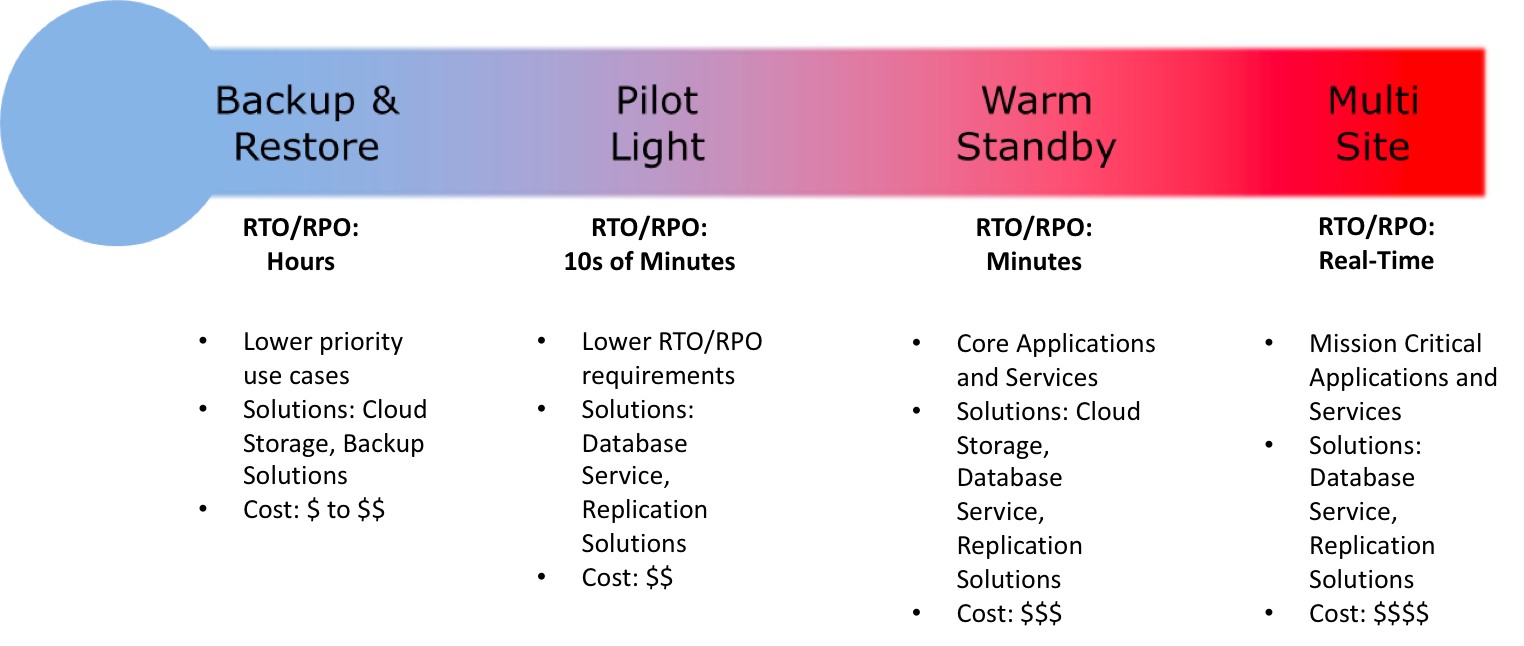
Disaster Recovery Scenarios Options

  1. Backup & Restore (Data backed up and restored)
  2. Pilot Light (Only Minimal critical functionalities)
  3. Warm Standby (Fully Functional Scaled down version)
  4. Multi-Site Active/Active

For the DR scenarios options, RTO and RPO reduces with an increase in Cost as you move from Backup & Restore option (left) to Multi-Site option (right)

Note: For a disaster event based on disruption or loss of one physical data center for a well-architected, highly available workload, you may only require a backup and restore approach. If your definition of a disaster goes beyond the disruption of a physical data center to that of a Region or if you are subject to regulatory requirements, then consider Pilot Light, Warm Standby, or Multi-Site Active/Active.

Backup & Restore

AWS can be used to backup the data in a cost effective, durable and secure manner as well as recover the data quickly and reliably.

Backup phase

In most traditional environments, data is backed up to tape and sent off-site regularly taking longer time to restore the system in the event of a disruption or disasterBackup Restore - Backup Phase
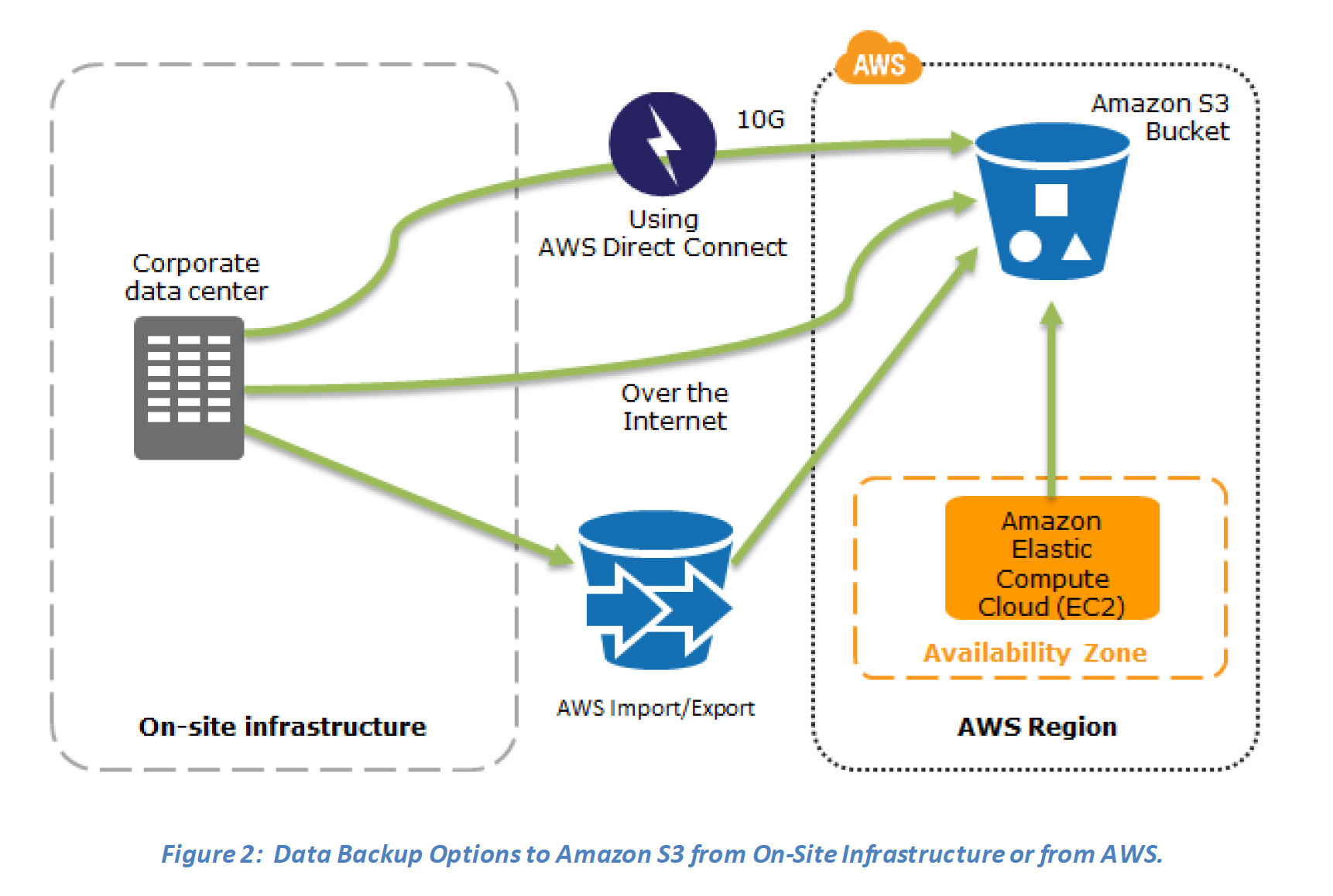
  1. Amazon S3 can be used to backup the data and perform a quick restore and is also available from any location
  2. AWS Snow Family (for existing customers) or AWS Data Transfer Terminal (for new customers) can be used to transfer large data sets bypassing the Internet
  3. Amazon S3 Glacier storage classes can be used for archiving data – use S3 Glacier Flexible Retrieval for hours or S3 Glacier Instant Retrieval for millisecond access
  4. AWS Storage Gateway enables snapshots (used to created EBS volumes) of the on-premises data volumes to be transparently copied into S3 for backup. It can be used either as a backup solution (Volume Gateway – stored volumes) or as a primary data store (Volume Gateway – cached volumes)
  5. AWS Direct Connect can be used to transfer data directly from On-Premise to Amazon consistently and at high speed
  6. Snapshots of Amazon EBS volumes, Amazon RDS databases, and Amazon Redshift data warehouses can be stored in Amazon S3
  7. AWS Backup can centrally manage backup policies across all AWS services with automated scheduling, retention management, and cross-region/cross-account copying

Restore phase

Data backed up then can be used to quickly restore and create Compute and Database instances
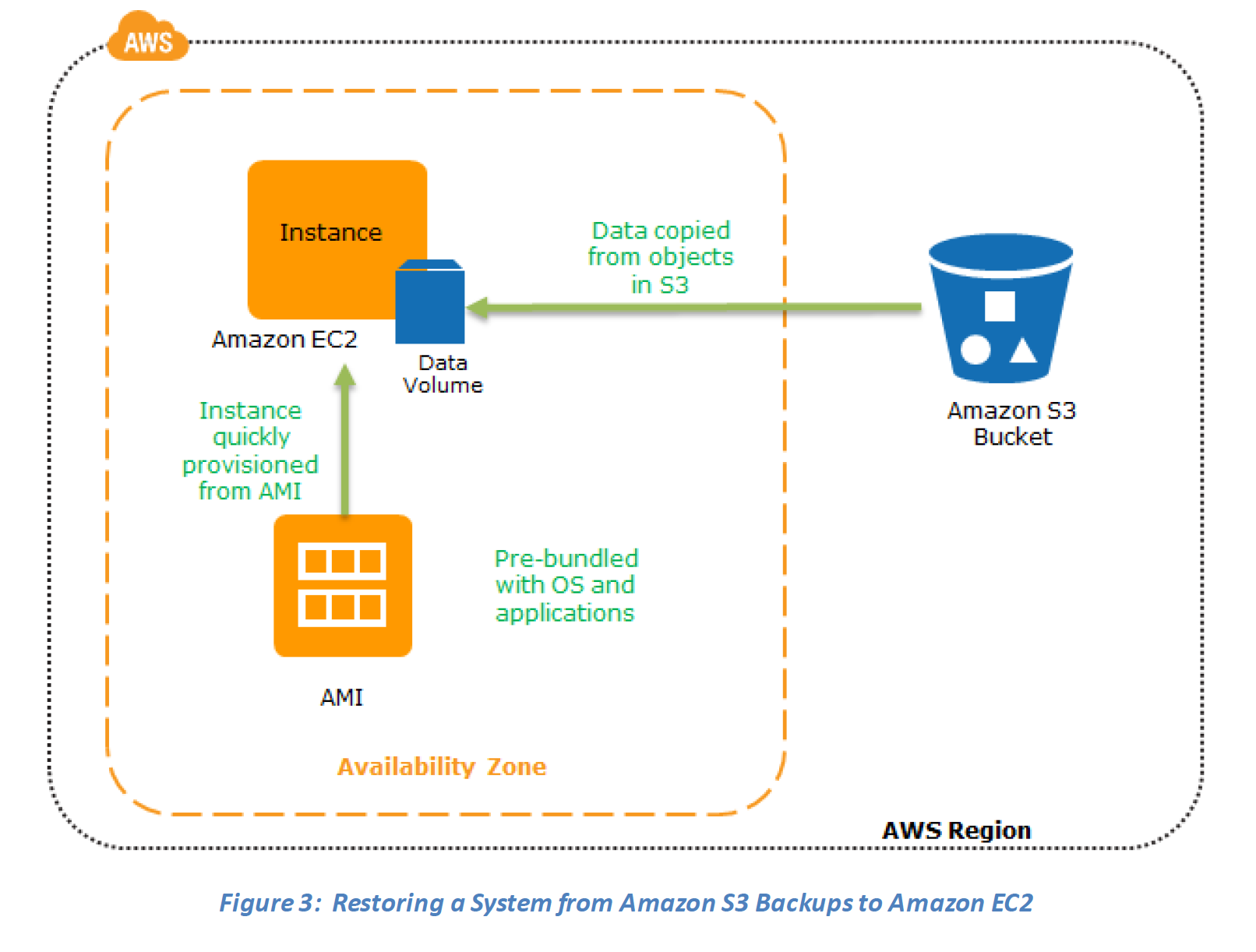
Backup Restore - Recovery PhaseKey steps for Backup and Restore:
1. Select an appropriate tool or method to back up the data into AWS.
2. Ensure an appropriate retention policy for this data.
3. Ensure appropriate security measures are in place for this data, including encryption and access policies.
4. Regularly test the recovery of this data and the restoration of the system.

Pilot Light

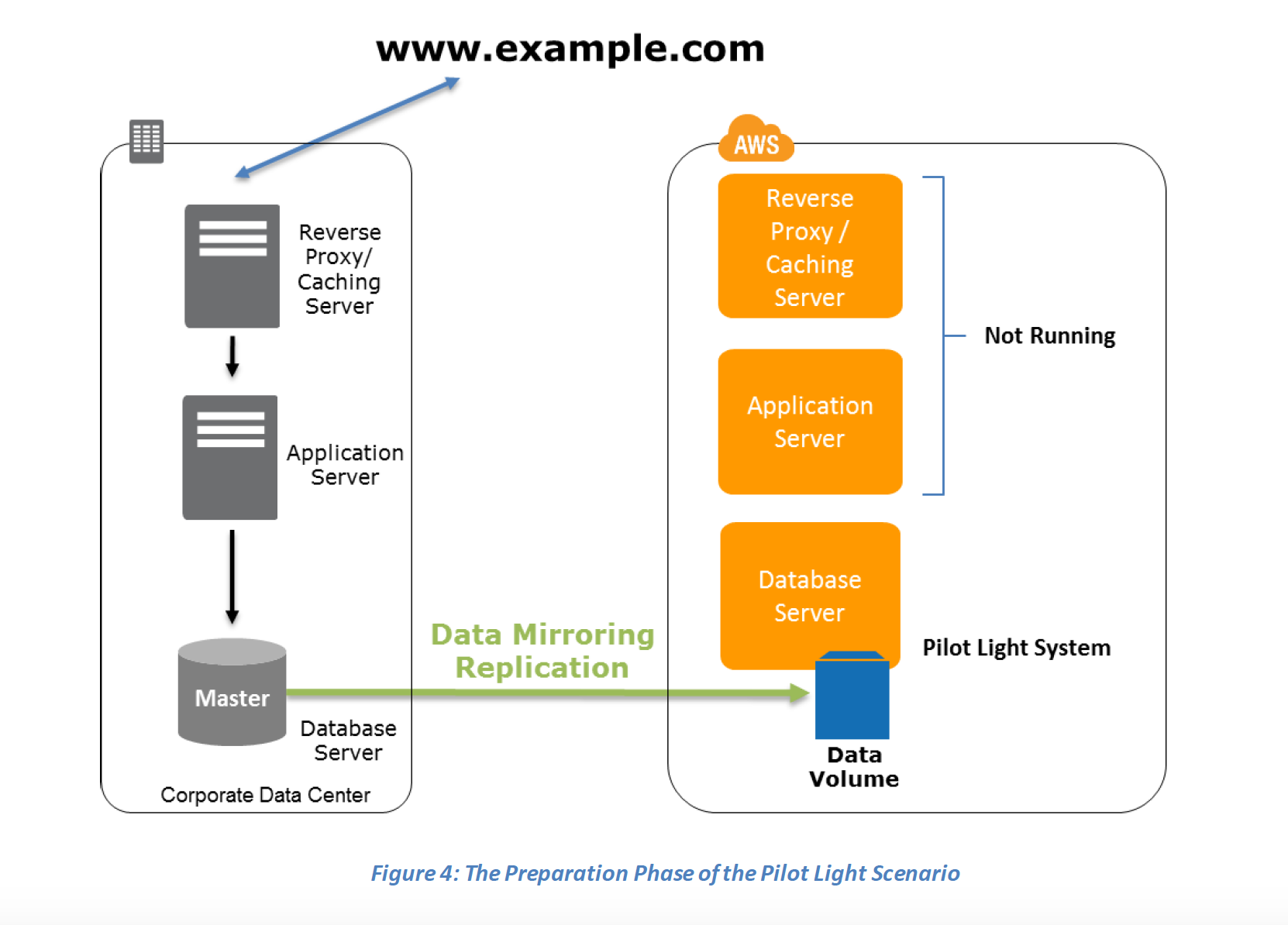
In a Pilot Light Disaster Recovery scenario option a minimal version of an environment is always running in the cloud, which basically host the critical functionalities of the application for e.g. databases

In this approach :-

  1. Maintain a pilot light by configuring and running the most critical core elements of your system in AWS for e.g. Databases where the data needs to be replicated and kept updated.
  2. During recovery, a full-scale production environment, for e.g. application and web servers, can be rapidly provisioned (using preconfigured AMIs and EBS volume snapshots) around the critical core
  3. For Networking, either a ELB to distribute traffic to multiple instances and have DNS point to the load balancer or preallocated Elastic IP address with instances associated can be used
  4. AWS Elastic Disaster Recovery (DRS) can automate the pilot light approach with continuous replication and rapid failover capabilities
Preparation phase steps :
  1. Set up Amazon EC2 instances or RDS instances to replicate or mirror data critical data
  2. Ensure that all supporting custom software packages available in AWS.
  3. Create and maintain AMIs of key servers where fast recovery is required.
  4. Regularly run these servers, test them, and apply any software updates and configuration changes.
  5. Consider automating the provisioning of AWS resources.
  6. Use AWS Resilience Hub to validate your DR posture and ensure RTO/RPO targets can be met.
Pilot Light Scenario - Preparation Phase

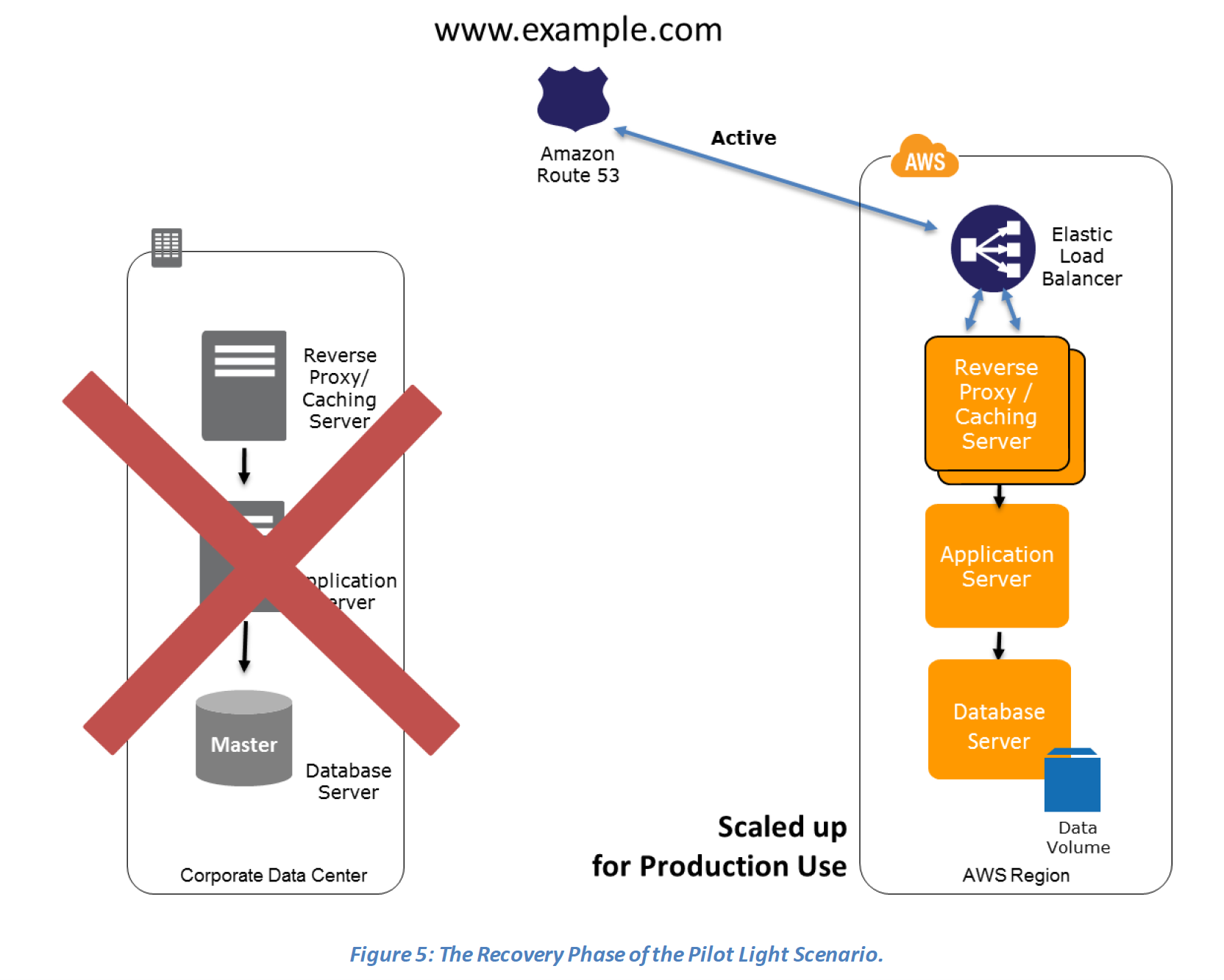
Recovery Phase steps :

  1. Start the application EC2 instances from your custom AMIs.
  2. Resize existing database/data store instances to process the increased traffic for e.g. If using RDS, it can be easily scaled vertically while EC2 instances can be easily scaled horizontally
  3. Add additional database/data store instances to give the DR site resilience in the data tier for e.g. turn on Multi-AZ for RDS to improve resilience.
  4. Change DNS to point at the Amazon EC2 servers.
  5. Install and configure any non-AMI based systems, ideally in an automated way.

Pilot Light Scenario - Recovery Phase

Warm Standby

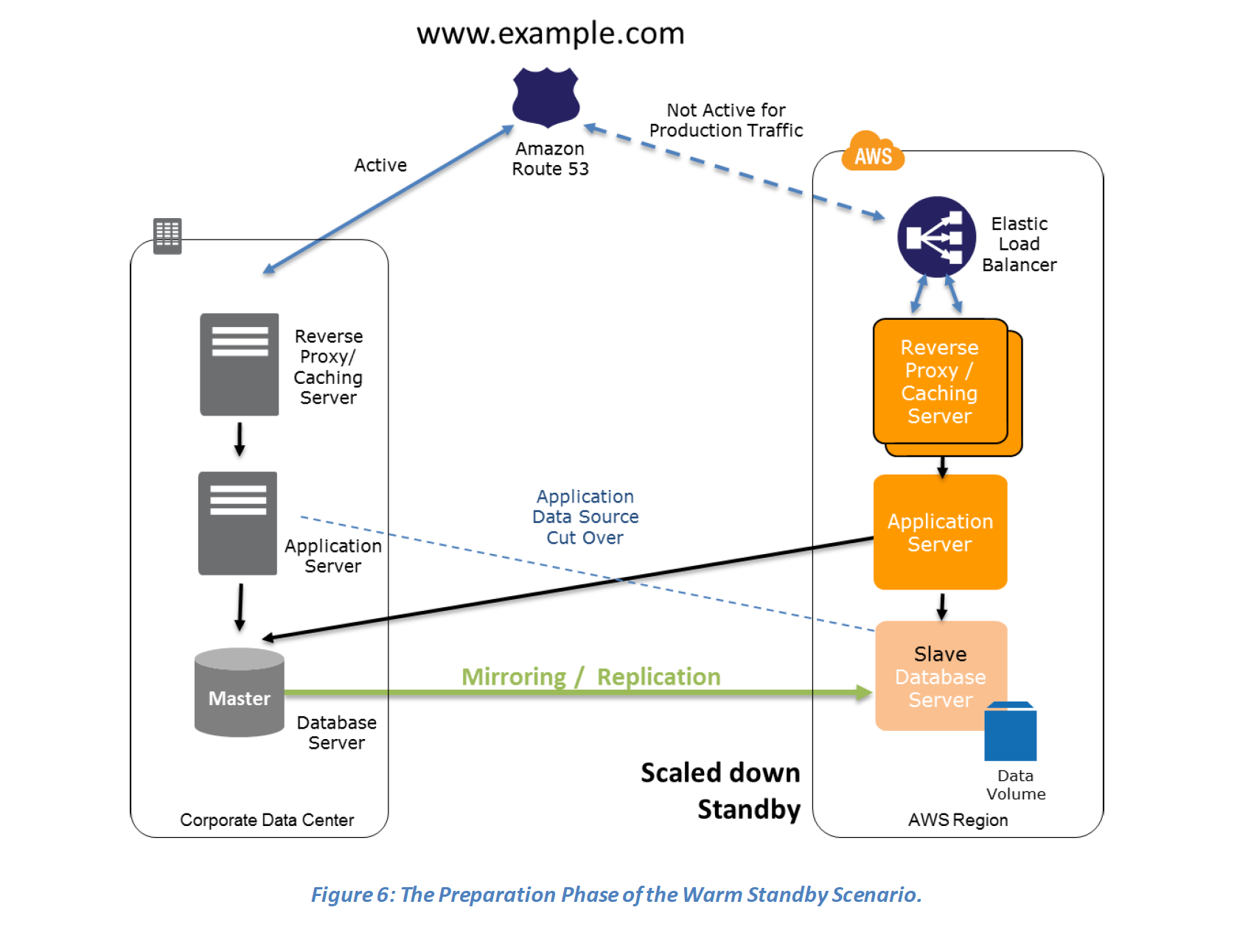
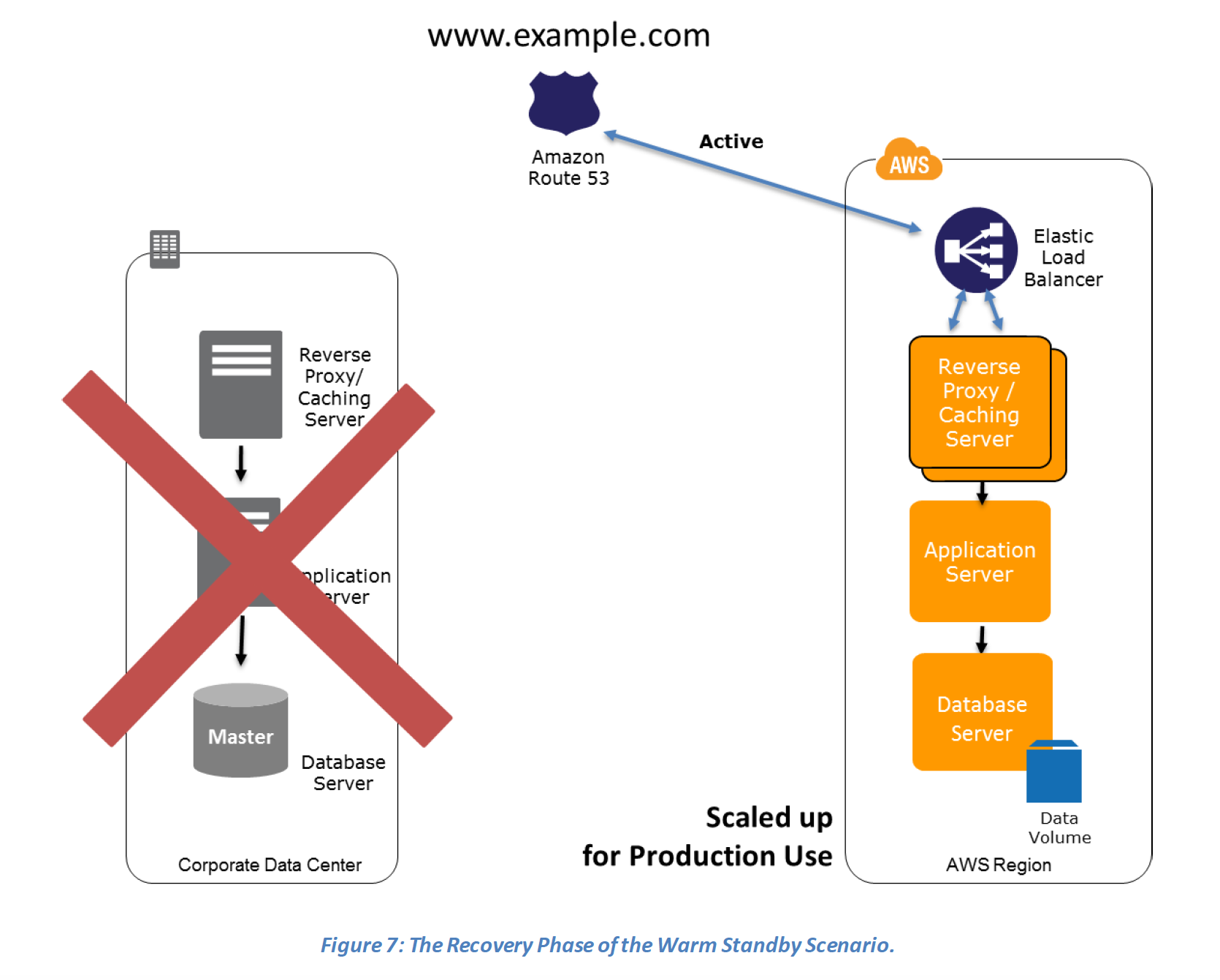
  • In a Warm standby DR scenario a scaled-down version of a fully functional environment identical to the business critical systems is always running in the cloud
  • This setup can be used for testing, quality assurances or for internal use.
  • In case of an disaster, the system can be easily scaled up or out to handle production load.

Preparation phase steps :

  1. Set up Amazon EC2 instances to replicate or mirror data.
  2. Create and maintain AMIs for faster provisioning
  3. Run the application using a minimal footprint of EC2 instances or AWS infrastructure.
  4. Patch and update software and configuration files in line with your live environment.

Warm Standby - Preparation PhaseRecovery phase Steps:

  1. Increase the size of the Amazon EC2 fleets in service with the load balancer (horizontal scaling).
  2. Start applications on larger Amazon EC2 instance types as needed (vertical scaling).
  3. Either manually change the DNS records, or use Route 53 automated health checks to route all the traffic to the AWS environment.
  4. Consider using Auto Scaling to right-size the fleet or accommodate the increased load.
  5. Add resilience or scale up your database to guard against DR going down

Warm Standby - Recovery Phase

Multi-Site Active/Active

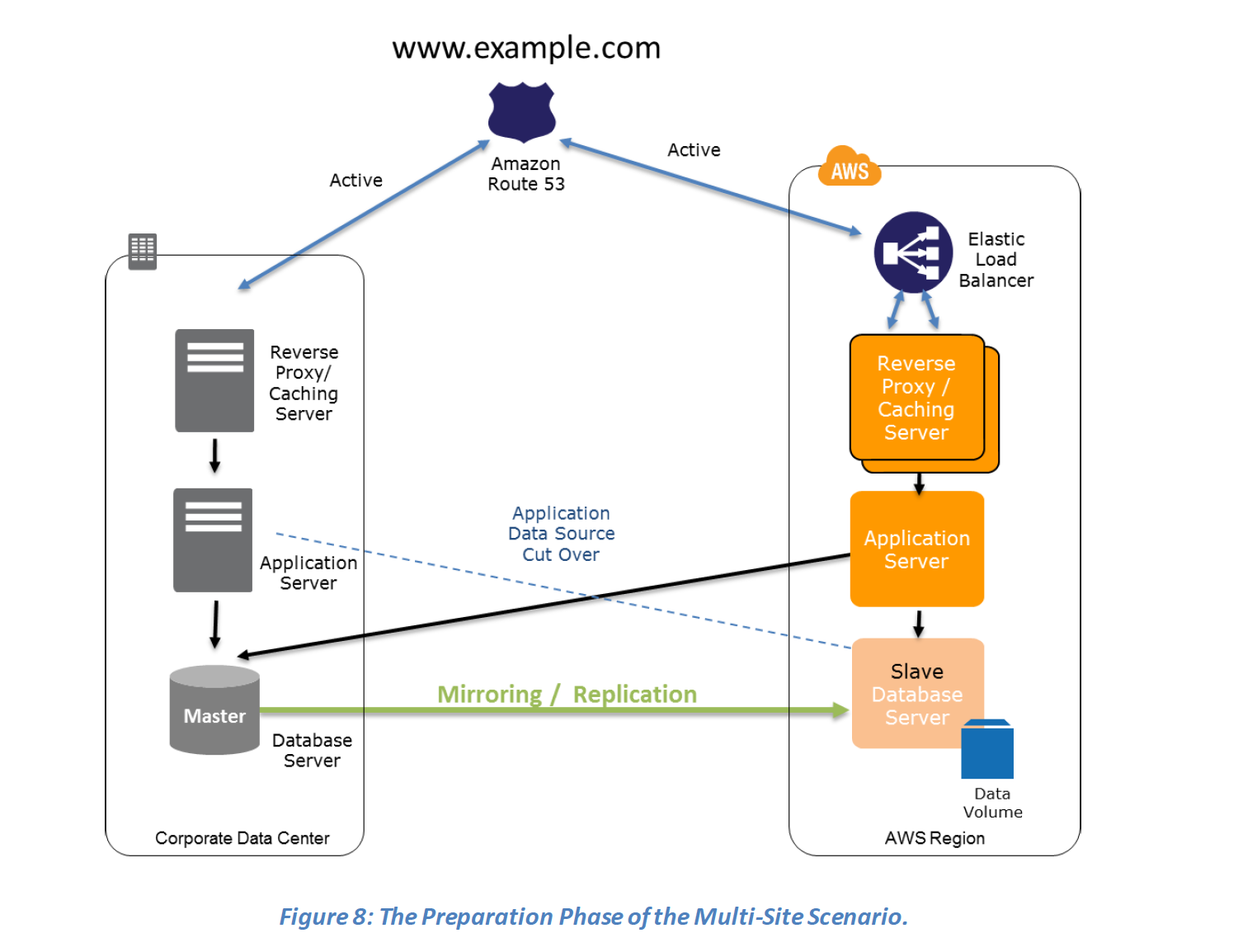
  • Multi-Site is an active-active configuration DR approach, where in an identical solution runs on AWS as your on-site infrastructure.
  • Traffic can be equally distributed to both the infrastructure as needed by using DNS service weighted routing approach.
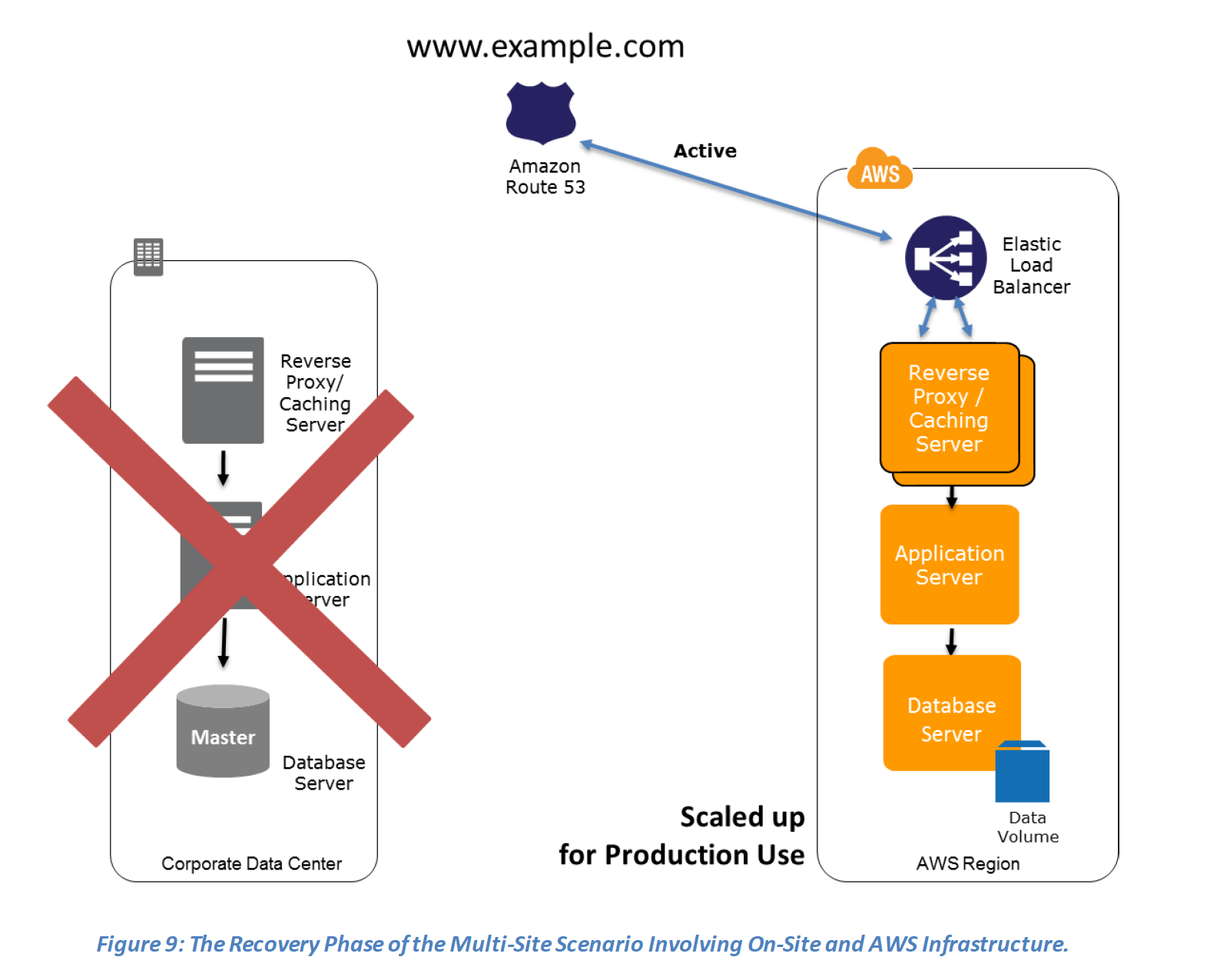
  • In case of a disaster the DNS can be tuned to send all the traffic to the AWS environment and the AWS infrastructure scaled accordingly.
  • Route 53 Application Recovery Controller (ARC) can manage failover with readiness checks and routing controls for multi-site architectures.

Preparation phase steps :

  1. Set up your AWS environment to duplicate the production environment.
  2. Set up DNS weighting, or similar traffic routing technology, to distribute incoming requests to both sites.
  3. Configure automated failover to re-route traffic away from the affected site. for e.g. application to check if primary DB is available if not then redirect to the AWS DB
Multi-Site - Preparation Phase

Recovery phase steps :

  1. Either manually or by using DNS failover, change the DNS weighting so that all requests are sent to the AWS site.
  2. Have application logic for failover to use the local AWS database servers for all queries.
  3. Consider using Auto Scaling to automatically right-size the AWS fleet.Multi-Site - Recovery Phase

AWS Elastic Disaster Recovery (AWS DRS)

  • AWS Elastic Disaster Recovery (DRS) is the primary AWS service for disaster recovery, replacing CloudEndure Disaster Recovery which was discontinued in March 2024.
  • Provides continuous block-level replication of source servers to a lightweight staging area in the target AWS Region
  • Achieves RPOs in seconds and RTOs in minutes (typically 5-20 minutes)
  • Uses cost-effective AWS resources – you only pay for the full recovery site during drills or actual recovery
  • Supports recovery from:
    • Physical infrastructure (on-premises)
    • VMware vSphere environments
    • Microsoft Hyper-V workloads
    • Other cloud providers (e.g., Azure to AWS)
    • AWS EC2 instances (cross-region DR)
  • Point-in-time recovery – launch previous versions of servers from before a ransomware attack without paying ransom
  • Automated failover and failback – reduces RTO and eliminates manual intervention
  • Supports source servers with up to 60 volumes
  • Supports AWS Outposts for on-premises DR targets
  • Integrates with AWS CloudTrail, IAM, and CloudWatch for security and monitoring
  • Can be used alongside any DR scenario (Pilot Light, Warm Standby, Multi-Site) for automated recovery

AWS Resilience Hub

  • Central service for defining resilience goals, assessing resilience posture, and implementing improvements
  • Continuously validates and tracks whether workloads can meet defined RTO and RPO targets
  • Provides automated resilience assessments based on the AWS Well-Architected Framework
  • Generates compliance evidence for auditors without manually spinning up DR environments
  • Detects drift in infrastructure and triggers remediation
  • Sends notifications to operators to launch recovery processes during outages
  • Available at no additional charge in the AWS Management Console
  • Supports multi-account application resilience assessment
  • Next Generation (GA May 2026): Includes generative AI-based SRE resilience journey for structured alignment on resilience policy expectations

AWS Certification Exam Practice Questions

  • Questions are collected from Internet and the answers are marked as per my knowledge and understanding (which might differ with yours).
  • AWS services are updated everyday and both the answers and questions might be outdated soon, so research accordingly.
  • AWS exam questions are not updated to keep up the pace with AWS updates, so even if the underlying feature has changed the question might not be updated
  • Open to further feedback, discussion and correction.
  1. Which of these Disaster Recovery options costs the least?
    1. Pilot Light (most systems are down and brought up only after disaster)
    2. Fully Working Low capacity Warm standby
    3. Multi site Active-Active
  2. Your company currently has a 2-tier web application running in an on-premises data center. You have experienced several infrastructure failures in the past two months resulting in significant financial losses. Your CIO is strongly agreeing to move the application to AWS. While working on achieving buy-in from the other company executives, he asks you to develop a disaster recovery plan to help improve Business continuity in the short term. He specifies a target Recovery Time Objective (RTO) of 4 hours and a Recovery Point Objective (RPO) of 1 hour or less. He also asks you to implement the solution within 2 weeks. Your database is 200GB in size and you have a 20Mbps Internet connection. How would you do this while minimizing costs?
    1. Create an EBS backed private AMI which includes a fresh install or your application. Setup a script in your data center to backup the local database every 1 hour and to encrypt and copy the resulting file to an S3 bucket using multi-part upload (while AMI is a right approach to keep cost down, Upload to S3 very Slow)
    2. Install your application on a compute-optimized EC2 instance capable of supporting the application’s average load synchronously replicate transactions from your on-premises database to a database instance in AWS across a secure Direct Connect connection. (EC2 running in Compute Optimized as well as Direct Connect is expensive to start with also Direct Connect cannot be implemented in 2 weeks)
    3. Deploy your application on EC2 instances within an Auto Scaling group across multiple availability zones asynchronously replicate transactions from your on-premises database to a database instance in AWS across a secure VPN connection. (While VPN can be setup quickly asynchronous replication using VPN would work, running instances in DR is expensive)
    4. Create an EBS backed private AMI that includes a fresh install of your application. Develop a CloudFormation template which includes your AMI and the required EC2. Auto-Scaling and ELB resources to support deploying the application across Multiple Availability Zones. Asynchronously replicate transactions from your on-premises database to a database instance in AWS across a secure VPN connection. (Pilot Light approach with only DB running and replicate while you have preconfigured AMI and autoscaling config. Note: Today, AWS Elastic Disaster Recovery (DRS) could also achieve this more easily with automated failover.)
  3. You are designing an architecture that can recover from a disaster very quickly with minimum down time to the end users. Which of the following approaches is best?
    1. Leverage Route 53 health checks to automatically fail over to backup site when the primary site becomes unreachable
    2. Implement the Pilot Light DR architecture so that traffic can be processed seamlessly in case the primary site becomes unreachable
    3. Implement either Fully Working Low Capacity Standby or Multi-site Active-Active architecture so that the end users will not experience any delay even if the primary site becomes unreachable
    4. Implement multi-region architecture to ensure high availability
  4. Your customer wishes to deploy an enterprise application to AWS that will consist of several web servers, several application servers and a small (50GB) Oracle database. Information is stored, both in the database and the file systems of the various servers. The backup system must support database recovery, whole server and whole disk restores, and individual file restores with a recovery time of no more than two hours. They have chosen to use RDS Oracle as the database. Which backup architecture will meet these requirements?
    1. Backup RDS using automated daily DB backups. Backup the EC2 instances using AMIs and supplement with file-level backup to S3 using traditional enterprise backup software to provide file level restore (RDS automated backups with file-level backups can be used. Note: AWS Backup can now centrally manage all of these backups.)
    2. Backup RDS using a Multi-AZ Deployment Backup the EC2 instances using AMIs, and supplement by copying file system data to S3 to provide file level restore (Multi-AZ is more of a High Availability solution, not a backup solution)
    3. Backup RDS using automated daily DB backups. Backup the EC2 instances using EBS snapshots and supplement with file-level backups to Amazon S3 Glacier using traditional enterprise backup software to provide file level restore (S3 Glacier Flexible Retrieval (formerly Glacier) retrieval time may not meet the 2 hours RTO depending on retrieval option selected)
    4. Backup RDS database to S3 using Oracle RMAN. Backup the EC2 instances using AMIs, and supplement with EBS snapshots for individual volume restore. (Will use RMAN only if Database hosted on EC2 and not when using RDS)
  5. Which statements are true about the Pilot Light Disaster recovery architecture pattern?
    1. Pilot Light is a hot standby (Cold Standby)
    2. Enables replication of all critical data to AWS
    3. Very cost-effective DR pattern
    4. Can scale the system as needed to handle current production load
  6. An ERP application is deployed across multiple AZs in a single region. In the event of failure, the Recovery Time Objective (RTO) must be less than 3 hours, and the Recovery Point Objective (RPO) must be 15 minutes. The customer realizes that data corruption occurred roughly 1.5 hours ago. What DR strategy could be used to achieve this RTO and RPO in the event of this kind of failure?
    1. Take hourly DB backups to S3, with transaction logs stored in S3 every 5 minutes
    2. Use synchronous database master-slave replication between two availability zones. (Replication won’t help to backtrack and would be sync always)
    3. Take hourly DB backups to EC2 Instance store volumes with transaction logs stored In S3 every 5 minutes. (Instance store not a preferred storage)
    4. Take 15 minute DB backups stored in S3 Glacier with transaction logs stored in S3 every 5 minutes. (S3 Glacier Flexible Retrieval does not meet the RTO)
  7. Your company’s on-premises content management system has the following architecture:
    – Application Tier – Java code on a JBoss application server
    – Database Tier – Oracle database regularly backed up to Amazon Simple Storage Service (S3) using the Oracle RMAN backup utility
    – Static Content – stored on a 512GB gateway stored Storage Gateway volume attached to the application server via the iSCSI interface

    Which AWS based disaster recovery strategy will give you the best RTO?

    1. Deploy the Oracle database and the JBoss app server on EC2. Restore the RMAN Oracle backups from Amazon S3. Generate an EBS volume of static content from the Storage Gateway and attach it to the JBoss EC2 server.
    2. Deploy the Oracle database on RDS. Deploy the JBoss app server on EC2. Restore the RMAN Oracle backups from Amazon S3 Glacier. Generate an EBS volume of static content from the Storage Gateway and attach it to the JBoss EC2 server. (S3 Glacier retrieval does not help to give best RTO)
    3. Deploy the Oracle database and the JBoss app server on EC2. Restore the RMAN Oracle backups from Amazon S3. Restore the static content by attaching an AWS Storage Gateway running on Amazon EC2 as an iSCSI volume to the JBoss EC2 server. (No need to attach the Storage Gateway as an iSCSI volume can just create an EBS volume)
    4. Deploy the Oracle database and the JBoss app server on EC2. Restore the RMAN Oracle backups from Amazon S3. Restore the static content from an AWS Storage Gateway-VTL running on Amazon EC2 (VTL is Virtual Tape library and doesn’t fit the RTO)
  8. [New] A company wants to implement disaster recovery for their on-premises application with an RPO of seconds and RTO of minutes. They want to minimize idle DR resources and costs. Which AWS service should they use?
    1. AWS Backup with cross-region copy (AWS Backup provides RPO in hours, not seconds)
    2. AWS Elastic Disaster Recovery (DRS) (DRS provides RPO in seconds and RTO in minutes using continuous replication with minimal staging resources)
    3. Amazon S3 Cross-Region Replication with CloudFormation templates (This is a Backup & Restore approach, not suitable for seconds RPO)
    4. Multi-Site Active-Active with Route 53 failover (Achieves the RPO/RTO but does not minimize costs – full duplicate environment runs at all times)
  9. [New] Which AWS service provides a centralized way to define resilience goals, assess whether applications can meet their RTO and RPO targets, and provides recommendations for improvement?
    1. AWS CloudWatch
    2. AWS Config
    3. AWS Resilience Hub (Resilience Hub provides centralized resilience assessment, RTO/RPO validation, and improvement recommendations based on the Well-Architected Framework)
    4. AWS Systems Manager
  10. [New] A company wants to automatically shift traffic away from an impaired Availability Zone without manual intervention. Which AWS service provides this capability?
    1. Amazon Route 53 weighted routing
    2. AWS Global Accelerator
    3. Amazon Route 53 Application Recovery Controller (ARC) with Zonal Autoshift (ARC Zonal Autoshift automatically moves traffic away from an AZ when AWS detects a potential failure, at no additional charge)
    4. Elastic Load Balancing cross-zone load balancing

References

AWS Services with Root Privileges

⚠️ Important Update (2024): AWS OpsWorks Stacks reached End of Life (EOL) on May 26, 2024 and has been disabled for both new and existing customers. The recommended migration path is AWS Systems Manager. OpsWorks is retained below for historical/exam reference only.

AWS Services with Root/OS-Level Access

  • AWS provides root or system (OS-level) privileges only for services where the customer manages the underlying EC2 instances. These include:
    • Amazon EC2 (Elastic Compute Cloud)
    • Amazon EMR (Elastic MapReduce) – EMR on EC2 clusters provide SSH access to cluster nodes
    • AWS Elastic Beanstalk – provides SSH/RDP access to underlying EC2 instances
    • AWS OpsWorksEOL May 26, 2024 (see note above)
  • Additional services that provide OS-level access to underlying EC2 instances:
    • Amazon ECS (EC2 launch type) – full access to container instances; note: Fargate and ECS Managed Instances do NOT provide OS access
    • Amazon EKS (self-managed or managed node groups) – SSH access to worker nodes; note: EKS Auto Mode managed instances do NOT provide administrative access
    • AWS Batch (EC2 launch type) – access to compute environment instances
  • AWS does not provide root/OS privileges for fully managed services like RDS, DynamoDB, S3, Glacier, ElastiCache, Redshift, etc.
  • For RDS, if you need OS-level admin privileges or want to use features not supported by RDS, you should run a self-managed database on EC2 instead
  • This distinction aligns with the AWS Shared Responsibility Model: for services where AWS manages the infrastructure, the customer does not get OS access

Serverless and Managed Alternatives (No Root Access)

  • EMR Serverless – no underlying instances to manage; AWS handles infrastructure
  • ECS on Fargate – serverless containers; no access to host OS
  • EKS on Fargate / EKS Auto Mode – no SSH or administrative access to nodes
  • AWS Lambda – fully serverless; no OS access
  • Amazon RDS / Aurora – managed databases; no OS access

AWS OpsWorks – End of Life

  • AWS OpsWorks Stacks reached End of Life on May 26, 2024
  • The OpsWorks console, API, CLI, and CloudFormation resources have been discontinued in all AWS Regions
  • Migration alternatives:
    • AWS Systems Manager – recommended replacement for configuration management and automation
    • AWS CloudFormation – infrastructure as code
    • Direct EC2 management – instances detached from OpsWorks remain in the AWS account
    • Puppet Enterprise / Chef – third-party configuration management tools

Sample Exam Questions

  1. Which services allow the customer to retain full administrative privileges of the underlying EC2 instances? Choose 2 answers
    1. Amazon Elastic MapReduce
    2. Elastic Load Balancing
    3. AWS Elastic Beanstalk
    4. Amazon ElastiCache
    5. Amazon Relational Database Service
  2. Which of the following services provide root/OS-level access to the underlying instances? (Choose 3)
    1. Elastic Beanstalk
    2. EC2
    3. Amazon EMR
    4. DynamoDB
    5. RDS
    6. S3
  3. A client application requires operating system privileges on a relational database server. What is an appropriate configuration for highly available database architecture?
    1. A standalone Amazon EC2 instance
    2. Amazon RDS in a Multi-AZ configuration
    3. Amazon EC2 instances in a replication configuration utilizing a single Availability Zone
    4. Amazon EC2 instances in a replication configuration utilizing two different Availability Zones
  4. A company needs to run containers with full administrative access to the underlying host operating system. Which AWS service and launch type should they use?
    1. Amazon ECS with Fargate launch type
    2. Amazon ECS with EC2 launch type
    3. AWS Lambda with container image support
    4. Amazon EKS with EKS Auto Mode
  5. Which of the following is the recommended migration path for workloads previously managed by AWS OpsWorks Stacks?
    1. AWS CloudTrail
    2. AWS Systems Manager
    3. Amazon Inspector
    4. AWS Config

AWS Autoscaling Troubleshooting

AWS EC2 Auto Scaling Troubleshooting

⚠️ Important: Launch Configurations Deprecated

AWS has deprecated Launch Configurations. As of October 1, 2024, new AWS accounts cannot create launch configurations using any method (Console, API, CLI, or CloudFormation). Existing accounts can still use them but should migrate to Launch Templates, which support all new EC2 features.

This post has been updated to reflect Launch Templates as the current standard. References to launch configurations are maintained for existing deployments.

Exam Question Scenario

EC2 instances fail to launch with Auto Scaling configuration

Auto Scaling Configuration Overview

  • Auto Scaling configuration requires the following:
    • Launch Template (recommended) or Launch Configuration (deprecated) which allows you to specify:
      • AMI
      • Instance type (or multiple instance types with mixed instances policy)
      • IAM role (optional)
      • Security group(s)
      • Key pair (optional)
      • Network interfaces and subnet settings
      • EBS volume configuration
      • User data scripts
    • Auto Scaling Group (ASG) configuration specifies:
      • VPC and Subnets (Availability Zones) for instance placement
      • Desired, minimum, and maximum capacity
      • Health check type and grace period
      • Scaling policies (target tracking, step, simple, predictive)
      • Instance maintenance policy
      • Load balancer / target group attachments

EC2 Instance Launch Failure Troubleshooting

  • AMI Issues
    • AMI ID does not exist or has been deregistered
    • AMI is still in a pending state and cannot be used to launch instances
    • AMI is in a different region than the Auto Scaling group
    • AMI permissions do not allow the account to launch from it (private/shared AMI)
  • Security Group Issues
    • Security group specified in the launch template does not exist or has been deleted
    • Security group belongs to a different VPC than the one specified in the ASG subnets
  • Key Pair Issues
    • Key pair associated with the launch template does not exist or has been deleted
  • Auto Scaling Group Configuration Issues
    • Auto Scaling group not found or is incorrectly configured
    • Subnet specified in the ASG does not exist or is invalid
    • AZ configured with the Auto Scaling group is no longer supported or unavailable
  • EBS Volume Issues
    • Invalid EBS block device mappings
    • EBS snapshot specified does not exist
    • EBS volume type not supported in the AZ
    • Encrypted EBS volumes require proper KMS key permissions for the service-linked role
  • Instance Type & Capacity Issues
    • Instance type is not supported in the specified AZ
    • InsufficientInstanceCapacity – AWS does not have enough capacity for the requested instance type in the AZ
    • Account-level service limits (vCPU limits) for instance types reached in the region
    • Spot Instance capacity unavailable or Spot price exceeds the maximum price specified
  • Launch Template Issues
    • Launch template version specified does not exist
    • Launch template contains invalid parameters (e.g., unsupported instance type for a region)
    • IAM instance profile specified does not exist or the ASG service role lacks iam:PassRole permission
  • Networking Issues
    • VPC/Subnet has no available IP addresses
    • Placement group constraints cannot be satisfied
    • Network interface configuration conflicts with subnet settings
  • Permission Issues
    • Auto Scaling service-linked role (AWSServiceRoleForAutoScaling) lacks required EC2 permissions
    • Custom service-linked role does not have permissions for encrypted volumes, specific VPCs, or EC2 actions
    • SCP (Service Control Policy) blocking required ec2:RunInstances action

Health Check Failure Troubleshooting

  • Auto Scaling supports multiple health check sources:
    • EC2 Status Checks – Default; checks instance system and instance status
    • ELB Health Checks – Target group health checks when integrated with ALB/NLB
    • VPC Lattice Health Checks – Health checks from VPC Lattice target groups
    • Amazon EBS Health Checks – Monitors attached EBS volume status
    • Custom Health Checks – User-defined via set-instance-health API
  • Common Health Check Issues:
    • Instances marked unhealthy immediately after launch – health check grace period may be too short
    • Application not ready before grace period expires – increase the grace period or fix slow startup
    • ELB health check failing – verify security group allows health check traffic from LB
    • Instances stuck in a launch/terminate loop – check application health and startup scripts
    • Instances failing system status checks – may indicate underlying hardware issues

Scaling Policy Troubleshooting

  • Scaling Not Triggering:
    • CloudWatch alarm not in ALARM state – verify metric and threshold
    • Scaling processes suspended (AlarmNotification, Launch, or Terminate processes)
    • Cooldown period active – scaling actions wait until cooldown expires
    • ASG already at maximum (scale-out) or minimum (scale-in) capacity
  • Predictive Scaling Issues:
    • Insufficient historical data (requires at least 24 hours of load data)
    • Metrics not available in CloudWatch for the prediction
    • Policy in forecast-only mode will not actually scale
  • Target Tracking Issues:
    • Metric math expression errors in custom metrics
    • Scale-in disabled unintentionally
    • Conflicting scaling policies (scale-out and scale-in triggering simultaneously – scale-out takes precedence)

Instance Refresh Troubleshooting

  • Instance refresh allows rolling updates to replace instances with new launch template versions
  • Common Issues:
    • Refresh stuck or slow – minimum healthy percentage too high, leaving no room for replacement
    • New instances failing health checks – launch template changes may have introduced issues
    • Checkpoint failure – application not ready within checkpoint delay period
    • Rollback triggered – instances launched with new configuration failing health checks
    • Cannot start refresh – another refresh or operation already in progress

Warm Pool Troubleshooting

  • Warm pools maintain pre-initialized instances for faster scale-out
  • Common Issues:
    • Instances not entering warm pool – lifecycle hook actions completing with ABANDON result
    • Warm pool instances not transitioning to InService – health check failures during transition
    • Warm pool size not maintained – check MaxGroupPreparedCapacity and min pool size settings
    • Hibernated instances failing to resume – instance type or AMI may not support hibernation

Capacity Rebalancing (Spot) Troubleshooting

  • Capacity Rebalancing proactively replaces Spot Instances at risk of interruption
  • Common Issues:
    • Frequent instance replacements – diversify instance types (recommend 10+ types) across multiple AZs
    • Replacement instances also getting rebalance recommendations – enable attribute-based instance type selection (ABS) for broader diversification
    • Capacity not maintained during rebalancing – ASG temporarily exceeds desired capacity (by design) to launch replacements before terminating at-risk instances

Zonal Shift Troubleshooting

  • Zonal shift (Amazon ARC) allows shifting traffic away from an impaired AZ
  • Common Issues:
    • Zonal shift not available – ensure ASG has zonal shift enabled (AvailabilityZoneImpairmentPolicy)
    • Instances still terminating in shifted zone – check health check behavior setting (IgnoreUnhealthy vs ReplaceUnhealthy)
    • Insufficient capacity after shift – remaining AZs must have capacity to handle full load; consider cross-AZ pre-provisioning

Troubleshooting Commands

  • Use describe-scaling-activities to retrieve error messages:
  • Scaling activities log is retained for 6 weeks
  • Check the StatusCode (Successful, Failed, Cancelled) and StatusMessage fields for details
  • Use --include-deleted-groups to view activities for deleted ASGs

Best Practices to Avoid Launch Failures

  • Use Launch Templates (not launch configurations) for access to all new features
  • Specify multiple instance types (10+) using mixed instances policy or attribute-based instance type selection
  • Configure instances across multiple Availability Zones
  • Use attribute-based instance type selection (ABS) to automatically select instance types matching compute requirements
  • Enable Capacity Rebalancing for Spot Instance workloads
  • Set appropriate health check grace period based on application startup time
  • Monitor ASG activities via CloudWatch metrics and scaling activity history
  • Use instance maintenance policy to control replacement behavior (launch-before-terminate vs terminate-before-launch)

Certification Exam Tips

  • Know the difference between launch templates and launch configurations and that launch configurations are deprecated
  • Understand InsufficientInstanceCapacity errors and the recommendation to use multiple instance types
  • Know health check types (EC2, ELB, VPC Lattice, EBS, Custom) and grace period behavior
  • Understand that scaling activities can be viewed with describe-scaling-activities API
  • Know that conflicting scaling policies resolve in favor of scale-out for availability
  • Understand instance refresh rollback behavior and checkpoint mechanisms

References

AWS – EC2 Troubleshooting Connecting to an Instance

AWS – EC2 Troubleshooting Connecting to an Instance

EC2 Connection Methods

AWS provides multiple methods to connect to EC2 instances. Understanding these helps choose the right approach and troubleshoot connection issues effectively.

  • SSH/RDP (Traditional) – Requires open inbound ports (22/3389), key pairs, and a public IP or VPN connectivity.
  • EC2 Instance Connect – Browser-based SSH using temporary keys pushed via IAM. Requires the EC2 Instance Connect agent installed and port 22 open from EC2 Instance Connect service IP ranges.
  • EC2 Instance Connect Endpoint (EIC Endpoint) – Launched June 2023, allows SSH/RDP to instances in private subnets without a public IP, bastion host, or internet gateway. Creates a private tunnel through an endpoint in the VPC. No additional cost.
  • AWS Systems Manager Session Manager – Provides shell access without opening inbound ports, managing SSH keys, or requiring a public IP. Uses the SSM Agent and IAM for authentication. All sessions are logged and auditable. AWS recommends this as the preferred method for EC2 access.
  • EC2 Serial Console – Provides low-level serial port access for troubleshooting boot, network, and OS configuration issues even when SSH/RDP is unavailable. Does not require network connectivity to the instance.

Common Causes for Connection Issues

  1. Security Group misconfiguration – Inbound rules must allow SSH (port 22) or RDP (port 3389) traffic from your IP address. The default VPC security group does not allow inbound SSH by default.
  2. Network ACL (NACL) misconfiguration – NACLs are stateless. Both inbound rules (allow traffic on port 22 from source IP) and outbound rules (allow response traffic on ephemeral ports 1024-65535) must be configured.
  3. Missing or incorrect key pair – Verify the private key (.pem) file corresponds to the key pair selected when the instance was launched.
  4. Incorrect username – The default username varies by AMI/OS:
    AMI Default Username
    Amazon Linux ec2-user
    Ubuntu ubuntu
    Debian admin
    CentOS centos or ec2-user
    RHEL ec2-user or root
    SUSE ec2-user or root
    Fedora fedora or ec2-user
    FreeBSD ec2-user
    Oracle ec2-user
    Bitnami bitnami
    Rocky Linux rocky
  5. No public IP address – Instance must have a public IPv4 address (or Elastic IP) to connect via SSH over the internet. Alternatively, use Session Manager or EC2 Instance Connect Endpoint for private instances.
  6. Missing route to Internet Gateway – The subnet’s route table must have a route for 0.0.0.0/0 pointing to an Internet Gateway for internet-facing instances.
  7. Instance not in running state or failed status checks – Verify the instance is running and passes both system and instance status checks.
  8. Key file permissions too open – Private key file must have restrictive permissions (chmod 400 on Linux/macOS). SSH ignores keys with permissions broader than 0400.
  9. Corporate firewall blocking port 22 – Internal firewalls may block outbound SSH. Use Session Manager (HTTPS-based) as an alternative.
  10. CPU overload on instance – High CPU utilization can make the instance unresponsive. Check CloudWatch metrics and consider resizing or using Auto Scaling.

Connection Error Messages and Solutions

“Connection timed out” Error

Indicates network-level connectivity issues. Troubleshoot:

  1. Verify security group allows inbound SSH from your current public IP (IP may change with dynamic addressing)
  2. Verify route table has a route to an Internet Gateway (0.0.0.0/0 → igw-xxx)
  3. Verify Network ACL allows inbound on port 22 AND outbound on ephemeral ports (1024-65535)
  4. Verify instance has a public IPv4 address or Elastic IP
  5. Check for corporate firewall blocking outbound port 22
  6. Use VPC Reachability Analyzer to diagnose the network path

“Permission denied (publickey)” Error

Indicates authentication failure. Troubleshoot:

  1. Verify you are using the correct private key for the instance’s key pair
  2. Verify you are connecting with the correct username for the AMI
  3. Verify key file permissions are 0400 (Linux/macOS) or properly restricted (Windows)
  4. Check if permissions on ~/.ssh/authorized_keys or home directory were changed on the instance

“Unprotected Private Key File” Warning

SSH ignores keys with overly permissive file permissions.

  • Linux/macOS: chmod 0400 my_private_key.pem
  • Windows: Remove inherited permissions and grant Read access only to your user account via file Properties → Security → Advanced

“Host key verification failed” Error

Occurs when the host key stored in ~/.ssh/known_hosts doesn’t match the instance. Common after stopping/starting instances (which may change the public IP) or associating/removing an Elastic IP. Remove the old host key entry and reconnect.

“Server refused our key” Error (PuTTY)

  • Verify the .pem file was converted to .ppk format using PuTTYgen
  • Verify correct username is entered in the PuTTY configuration
  • Verify the latest version of PuTTY is installed

Troubleshooting Tools

VPC Reachability Analyzer

A configuration analysis tool that checks network reachability between a source and destination resource in your VPC. For EC2 connectivity troubleshooting:

  • Set Source type to Internet Gateway and Destination to your EC2 instance
  • Analyzes security groups, NACLs, route tables, and other network components
  • Provides hop-by-hop path details when reachable or identifies the blocking component when not reachable
  • Amazon Q network troubleshooting (2024) integrates with Reachability Analyzer to help diagnose connectivity issues using natural language

AWSSupport-TroubleshootSSH Automation Runbook

An AWS Systems Manager Automation document that automatically diagnoses and repairs common SSH connection issues:

  • Installs EC2Rescue for Linux on the instance
  • Checks and attempts to fix SSH daemon configuration, file permissions, and firewall rules
  • Can be run with Action: FixAll to automatically repair identified issues
  • Creates a temporary VPC and uses Lambda functions to perform the analysis

EC2 Serial Console

Provides serial port access for troubleshooting when SSH/RDP is unavailable:

  • Does not require network connectivity to the instance
  • Useful for troubleshooting boot failures, network misconfigurations, and OS-level issues
  • Must be enabled at the account level; requires IAM permissions and a password-based OS user
  • Supported on Nitro-based instance types

SSH Verbose Mode

Use ssh -vvv for detailed debugging output to identify where the connection fails in the SSH handshake process.

Modern Alternatives to Traditional SSH

AWS Systems Manager Session Manager

AWS recommends Session Manager as the preferred access method because it:

  • Eliminates the need to open inbound port 22
  • Removes the need to manage SSH keys
  • Does not require bastion hosts or public IP addresses
  • Provides centralized access control through IAM policies
  • Logs all sessions to CloudWatch Logs and/or S3 for audit
  • Supports port forwarding for accessing remote services
  • Encrypts all traffic using TLS 1.2
  • Available at no additional charge for EC2 instances

Requirements: SSM Agent installed (pre-installed on Amazon Linux 2/2023, Ubuntu 16.04+), instance profile with AmazonSSMManagedInstanceCore policy, and outbound HTTPS connectivity (or VPC endpoints for private subnets).

EC2 Instance Connect Endpoint

For instances in private subnets without Session Manager configured:

  • Create an EIC Endpoint in your VPC (no additional cost)
  • Connect via AWS CLI: aws ec2-instance-connect ssh --instance-id i-xxx
  • No need for public IP, IGW, or bastion hosts
  • Uses IAM for authorization
  • Security group on the endpoint controls which instances can be accessed

Lost Private Key Recovery

If the private key for an EBS-backed instance is lost:

  1. Create a new key pair
  2. Stop the instance (not terminate)
  3. Detach the root EBS volume
  4. Attach the volume to a temporary instance
  5. Mount the volume and update ~/.ssh/authorized_keys with the new public key
  6. Detach the volume and reattach to the original instance as the root volume
  7. Start the instance and connect with the new key pair

Note: This procedure only works for EBS-backed instances. Instance store-backed instances cannot be recovered without the original key. Alternatively, use Session Manager if SSM Agent is running, or use EC2 Serial Console if a password-based user is configured.

AWS Certification Exam Tips

  • “Connection timed out” typically indicates network-level issues (security groups, NACLs, route tables, no public IP)
  • “Permission denied” typically indicates authentication issues (wrong key, wrong username, key file permissions)
  • Session Manager is the recommended approach for secure, auditable access without open ports
  • EC2 Instance Connect Endpoint enables access to private instances without bastion hosts
  • EC2 Serial Console is the last-resort tool when all network-based access fails
  • VPC Reachability Analyzer is used to diagnose network path issues

Exam Scenario Questions

  1. You try to connect via SSH to a newly created Amazon EC2 instance and get one of the following error messages: “Network error: Connection timed out” or “Error connecting to [instance], reason: → Connection timed out: connect.” You have confirmed that the network and security group rules are configured correctly and the instance is passing status checks. What steps should you take to identify the source of the behavior? Choose 2 answers
    • Verify that the private key file corresponds to the Amazon EC2 key pair assigned at launch.
    • Verify that your IAM user policy has permission to launch Amazon EC2 instances.
    • Verify that you are connecting with the appropriate user name for your AMI.
    • Verify that the Amazon EC2 Instance was launched with the proper IAM role.
    • Verify that your federation trust to AWS has been established.
  2. A developer is unable to SSH into an EC2 instance in a private subnet. The instance has no public IP address and no internet gateway is attached to the VPC. The instance has the SSM Agent installed with an appropriate instance profile. What is the MOST operationally efficient way to connect?
    • Attach an Elastic IP address to the instance and connect via SSH.
    • Deploy a bastion host in a public subnet and use it to SSH into the private instance.
    • Use AWS Systems Manager Session Manager to establish a session to the instance.
    • Create a VPN connection to the VPC and connect via the private IP.
  3. An administrator receives “Permission denied (publickey)” when connecting via SSH to an EC2 instance running Amazon Linux. The administrator confirmed the correct key pair was used. What should be checked NEXT?
    • Verify the security group allows inbound traffic on port 22.
    • Verify the username is ec2-user (not root) and the key file permissions are chmod 400.
    • Verify the instance has an IAM role attached.
    • Verify the instance is in a public subnet.
  4. A security team wants to provide developers access to EC2 instances without opening any inbound ports and with full session logging. Which AWS service should they implement?
    • EC2 Instance Connect
    • AWS Systems Manager Session Manager
    • AWS Direct Connect
    • Amazon WorkSpaces
  5. An EC2 instance has become unresponsive and all network-based connection methods (SSH, Session Manager) are failing. The instance is running on a Nitro-based instance type. Which AWS feature can provide access for troubleshooting?
    • VPC Flow Logs
    • AWS CloudTrail
    • EC2 Serial Console
    • AWS X-Ray
  6. A solutions architect needs to diagnose why SSH connections to an EC2 instance are timing out. Which AWS tool can analyze the network path between an internet gateway and the instance to identify the blocking component?
    • AWS CloudTrail
    • VPC Reachability Analyzer
    • Amazon Inspector
    • AWS Trusted Advisor

References

AWS Security Groups vs NACLs – Stateful vs Stateless

Security Groups vs NACLs

AWS VPC Security Group vs NACLs

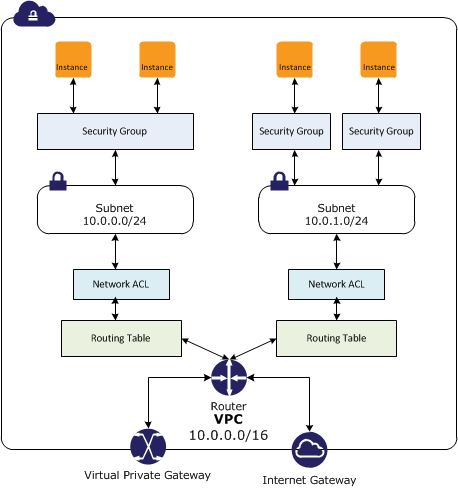
  • In a VPC, both Security Groups and Network ACLs (NACLS) together help to build a layered network defence.
  • Security groups – Act as a virtual firewall for associated instances, controlling both inbound and outbound traffic at the instance level
  • Network access control lists (NACLs) – Act as a firewall for associated subnets, controlling both inbound and outbound traffic at the subnet level

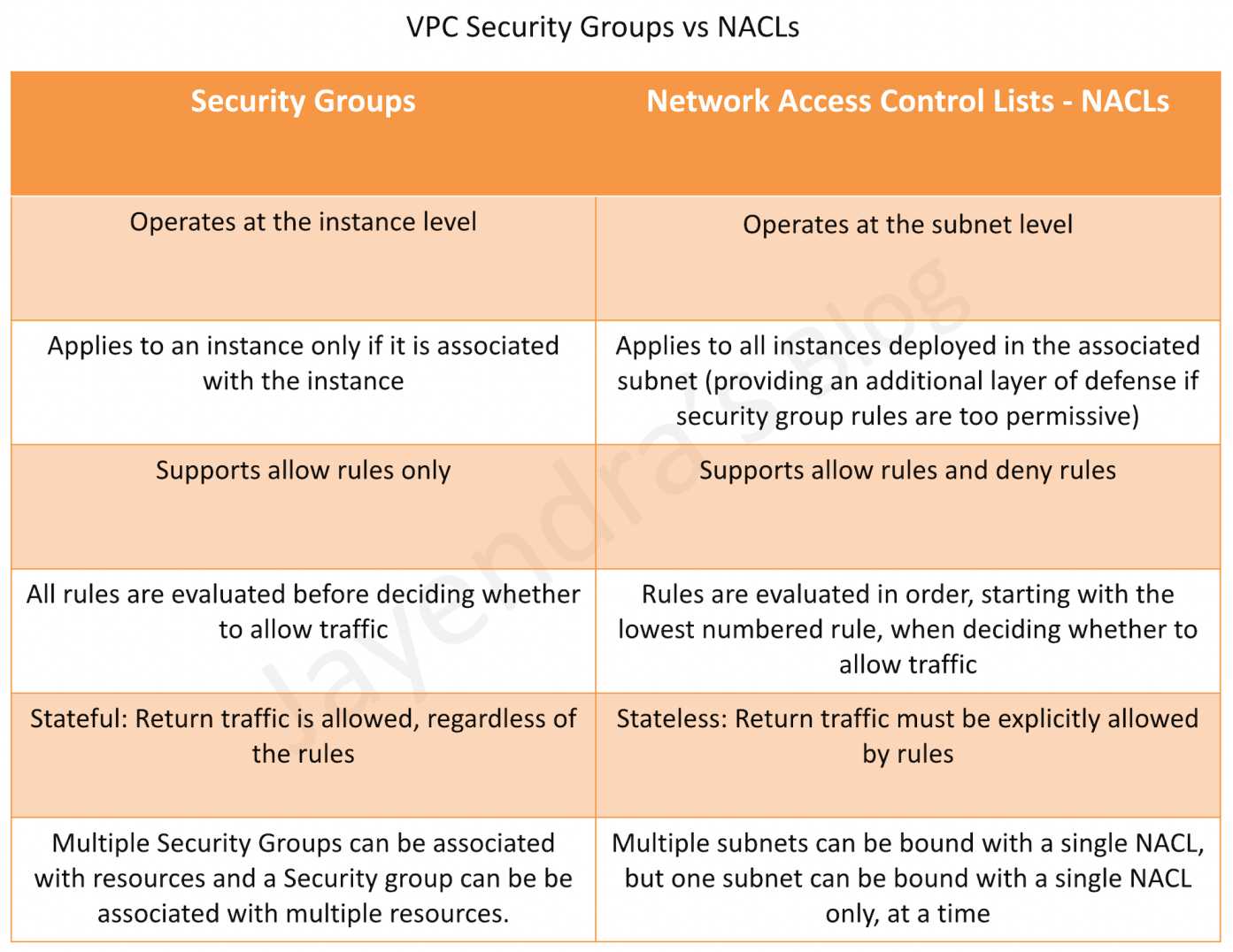
Security Groups vs NACLs

Security Groups

  • Acts at an Instance level and not at the subnet level.
  • Each instance within a subnet can be assigned a different set of Security groups
  • An instance can be assigned up to 5 security groups (default, can be increased up to 16) with each security group having up to 60 rules (inbound and outbound separately).
  • allows separate rules for inbound and outbound traffic.
  • allows adding or removing rules (authorizing or revoking access) for both Inbound (ingress) and Outbound (egress) traffic to the instance
    • Default Security group allows no external inbound traffic but allows inbound traffic from instances with the same security group
    • Default Security group allows all outbound traffic
    • New Security groups start with only an outbound rule that allows all traffic to leave the instances.
  • can specify only Allow rules, but not deny rules
  • can grant access to a specific IP, CIDR range, or to another security group in the VPC or in a peer VPC (requires a VPC peering connection)
  • are evaluated as a Whole or Cumulative bunch of rules with the most permissive rule taking precedence for e.g. if you have a rule that allows access to TCP port 22 (SSH) from IP address 203.0.113.1 and another rule that allows access to TCP port 22 from everyone, everyone has access to TCP port 22.
  • are Stateful – responses to allowed inbound traffic are allowed to flow outbound regardless of outbound rules, and vice versa. Hence an Outbound rule for the response is not needed
  • Instances associated with a security group can’t talk to each other unless rules allowing the traffic are added.
  • are associated with ENI (network interfaces).
  • are associated with the instance and can be changed, which changes the security groups associated with the primary network interface (eth0) and the changes would be applicable immediately to all the instances associated with the Security Group.

Security Group Quotas

  • VPC security groups per Region: 2,500 (adjustable)
  • Inbound or outbound rules per security group: 60 (adjustable, enforced separately for IPv4 and IPv6)
  • Security groups per network interface: 5 (default, adjustable up to 16)
  • Total rules per network interface: Maximum of 1,000 rules across all attached security groups (hard limit)
  • The quota for rules per security group multiplied by security groups per network interface cannot exceed 1,000

Security Group VPC Associations and Sharing (New – 2024)

  • Security Group VPC Associations allow associating a security group with multiple VPCs in the same account and Region, enabling consistent security rules across workloads in different VPCs without duplicating security groups.
  • Shared Security Groups allow the VPC owner to share security groups with participant accounts in a shared VPC using AWS Resource Access Manager (RAM).
    • Participant accounts can use the shared security groups but cannot modify them.
    • Shared security groups can only be used with resources in shared subnets of the owner’s VPC.
  • Cannot be used with default security groups or default VPCs.
  • These features complement security group referencing across VPC peering and Transit Gateway.
  • Can be managed centrally using AWS Firewall Manager security group policies.

Security Group Referencing (Cross-VPC)

  • VPC Peering: Can reference security groups in a peer VPC within the same Region.
  • Transit Gateway (Sep 2024): Can reference security groups from other VPCs attached to the same Transit Gateway within the same Region, eliminating the need to hard-code IP address ranges.
  • Cloud WAN (Jun 2025): Can reference security groups defined in other VPCs within the same Region attached to the same Cloud WAN core network.
  • Security group referencing allows rules to dynamically adapt as instances scale up/down without updating IP-based rules.

Connection Tracking

  • Security groups are Stateful as they use Connection tracking to track information about traffic to and from the instance.
  • Responses to inbound traffic are allowed to flow out of the instance regardless of outbound security group rules, and vice versa.
  • Connection Tracking is maintained only if there is no explicit Outbound rule for an Inbound request (and vice versa)
  • However, if there is an explicit Outbound rule for an Inbound request, the response traffic is allowed on the basis of the Outbound rule and not on the Tracking information
  • Tracking flow e.g.
    • If an instance (host A) initiates traffic to host B and uses a protocol other than TCP, UDP, or ICMP, the instance’s firewall only tracks the IP address & protocol number for the purpose of allowing response traffic from host B.
    • If host B initiates traffic to the instance in a separate request within 600 seconds of the original request or response, the instance accepts it regardless of inbound security group rules, because it’s regarded as response traffic.
  • This can be controlled by modifying the security group’s outbound rules to permit only certain types of outbound traffic. Alternatively, Network ACLs (NACLs) can be used for the subnet, network ACLs are stateless and therefore do not automatically allow response traffic.

Connection Tracking Idle Timeouts (Configurable)

  • Connection tracking idle timeouts are configurable per Elastic Network Interface (ENI) since Nov 2023.
  • TCP Established timeout:
    • Default: 432,000 seconds (5 days) for most instance types
    • Default: 350 seconds for Nitro V6 instance types (since Jun 2025)
    • Recommended: Less than 432,000 seconds to prevent connection tracking table exhaustion
  • UDP Stream timeout (bidirectional traffic): Min 60s, Max 180s, Default 180s
  • UDP Unidirectional timeout: Min 30s, Max 60s, Default 30s
  • Configurable timeouts help prevent connection tracking exhaustion for high-throughput workloads, DNS-heavy UDP workloads, and long-lived idle connections.

Network Access Control Lists – NACLs

  • A Network ACLs (NACLs) is an optional layer of security for the VPC that acts as a firewall for controlling traffic in and out of one or more subnets.
  • are not for granular control and are assigned at a Subnet level and are applicable to all the instances in that Subnet
  • has separate inbound and outbound rules, and each rule can either allow or deny traffic
    • Default ACL allows all inbound and outbound traffic.
    • The newly created ACL denies all inbound and outbound traffic.
  • A Subnet can be assigned only 1 NACL and if not associated explicitly would be associated implicitly with the default NACL
  • can associate a network ACL with multiple subnets
  • is a numbered list of rules that are evaluated in order starting with the lowest numbered rule, to determine whether traffic is allowed in or out of any subnet associated with the network ACL e.g. if you have a Rule No. 100 with Allow All and 110 with Deny All, the Allow All would take precedence and all the traffic will be allowed.
  • are Stateless; responses to allowed inbound traffic are subject to the rules for outbound traffic (and vice versa) for e.g. if you enable Inbound SSH on port 22 from the specific IP address, you would need to add an Outbound rule for the response as well.

Network ACL Quotas

  • Network ACLs per VPC: 200 (adjustable)
  • Rules per network ACL: 20 (adjustable up to 40 inbound and 40 outbound, total 80 rules)
  • Note: Increasing rules beyond 40 per direction may impact network performance

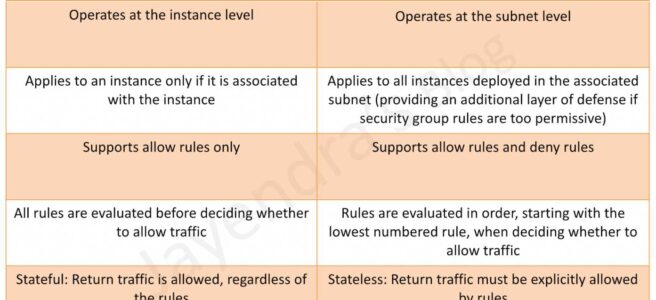
Security Group vs NACLs

Security Groups vs NACLs

AWS Certification Exam Practice Questions

  • Questions are collected from Internet and the answers are marked as per my knowledge and understanding (which might differ with yours).
  • AWS services are updated everyday and both the answers and questions might be outdated soon, so research accordingly.
  • AWS exam questions are not updated to keep up the pace with AWS updates, so even if the underlying feature has changed the question might not be updated
  • Open to further feedback, discussion and correction.
  1. Instance A and instance B are running in two different subnets A and B of a VPC. Instance A is not able to ping instance B. What are two possible reasons for this? (Pick 2 correct answers)
    1. The routing table of subnet A has no target route to subnet B
    2. The security group attached to instance B does not allow inbound ICMP traffic
    3. The policy linked to the IAM role on instance A is not configured correctly
    4. The NACL on subnet B does not allow outbound ICMP traffic
  2. An instance is launched into a VPC subnet with the network ACL configured to allow all inbound traffic and deny all outbound traffic. The instance’s security group is configured to allow SSH from any IP address and deny all outbound traffic. What changes need to be made to allow SSH access to the instance?
    1. The outbound security group needs to be modified to allow outbound traffic.
    2. The outbound network ACL needs to be modified to allow outbound traffic.
    3. Nothing, it can be accessed from any IP address using SSH.
    4. Both the outbound security group and outbound network ACL need to be modified to allow outbound traffic.
  3. From what services I can block incoming/outgoing IPs?
    1. Security Groups
    2. DNS
    3. ELB
    4. VPC subnet
    5. IGW
    6. NACL
  4. What is the difference between a security group in VPC and a network ACL in VPC (chose 3 correct answers)
    1. Security group restricts access to a Subnet while ACL restricts traffic to EC2
    2. Security group restricts access to EC2 while ACL restricts traffic to a subnet
    3. Security group can work outside the VPC also while ACL only works within a VPC
    4. Network ACL performs stateless filtering and Security group provides stateful filtering
    5. Security group can only set Allow rule, while ACL can set Deny rule also
  5. You are currently hosting multiple applications in a VPC and have logged numerous port scans coming in from a specific IP address block. Your security team has requested that all access from the offending IP address block be denied for the next 24 hours. Which of the following is the best method to quickly and temporarily deny access from the specified IP address block?
    1. Create an AD policy to modify Windows Firewall settings on all hosts in the VPC to deny access from the IP address block
    2. Modify the Network ACLs associated with all public subnets in the VPC to deny access from the IP address block
    3. Add a rule to all of the VPC 5 Security Groups to deny access from the IP address block
    4. Modify the Windows Firewall settings on all Amazon Machine Images (AMIs) that your organization uses in that VPC to deny access from the IP address block
  6. You have two Elastic Compute Cloud (EC2) instances inside a Virtual Private Cloud (VPC) in the same Availability Zone (AZ) but in different subnets. One instance is running a database and the other instance an application that will interface with the database. You want to confirm that they can talk to each other for your application to work properly. Which two things do we need to confirm in the VPC settings so that these EC2 instances can communicate inside the VPC? Choose 2 answers
    1. A network ACL that allows communication between the two subnets.
    2. Both instances are the same instance class and using the same Key-pair.
    3. That the default route is set to a NAT instance or Internet Gateway (IGW) for them to communicate.
    4. Security groups are set to allow the application host to talk to the database on the right port/protocol
  7. A benefits enrollment company is hosting a 3-tier web application running in a VPC on AWS, which includes a NAT (Network Address Translation) instance in the public Web tier. There is enough provisioned capacity for the expected workload tor the new fiscal year benefit enrollment period plus some extra overhead Enrollment proceeds nicely for two days and then the web tier becomes unresponsive, upon investigation using CloudWatch and other monitoring tools it is discovered that there is an extremely large and unanticipated amount of inbound traffic coming from a set of 15 specific IP addresses over port 80 from a country where the benefits company has no customers. The web tier instances are so overloaded that benefit enrollment administrators cannot even SSH into them. Which activity would be useful in defending against this attack?
    1. Create a custom route table associated with the web tier and block the attacking IP addresses from the IGW (internet Gateway)
    2. Change the EIP (Elastic IP Address) of the NAT instance in the web tier subnet and update the Main Route Table with the new EIP
    3. Create 15 Security Group rules to block the attacking IP addresses over port 80
    4. Create an inbound NACL (Network Access control list) associated with the web tier subnet with deny rules to block the attacking IP addresses
  8. Which of the following statements describes network ACLs? (Choose 2 answers)
    1. Responses to allowed inbound traffic are allowed to flow outbound regardless of outbound rules, and vice versa (are stateless)
    2. Using network ACLs, you can deny access from a specific IP range
    3. Keep network ACL rules simple and use a security group to restrict application level access
    4. NACLs are associated with a single Availability Zone (associated with Subnet)
  9. You are designing security inside your VPC. You are considering the options for establishing separate security zones and enforcing network traffic rules across different zone to limit Instances can communications. How would you accomplish these requirements? Choose 2 answers
    1. Configure a security group for every zone. Configure a default allow all rule. Configure explicit deny rules for the zones that shouldn’t be able to communicate with one another (Security group does not allow deny rules)
    2. Configure you instances to use pre-set IP addresses with an IP address range every security zone. Configure NACL to explicitly allow or deny communication between the different IP address ranges, as required for interzone communication
    3. Configure a security group for every zone. Configure allow rules only between zone that need to be able to communicate with one another. Use implicit deny all rule to block any other traffic
    4. Configure multiple subnets in your VPC, one for each zone. Configure routing within your VPC in such a way that each subnet only has routes to other subnets with which it needs to communicate, and doesn’t have routes to subnets with which it shouldn’t be able to communicate. (default routes are unmodifiable)
  10. Your entire AWS infrastructure lives inside of one Amazon VPC. You have an Infrastructure monitoring application running on an Amazon instance in Availability Zone (AZ) A of the region, and another application instance running in AZ B. The monitoring application needs to make use of ICMP ping to confirm network reachability of the instance hosting the application. Can you configure the security groups for these instances to only allow the ICMP ping to pass from the monitoring instance to the application instance and nothing else” If so how?
    1. No Two instances in two different AZ’s can’t talk directly to each other via ICMP ping as that protocol is not allowed across subnet (i.e. broadcast) boundaries (Can communicate)
    2. Yes Both the monitoring instance and the application instance have to be a part of the same security group, and that security group needs to allow inbound ICMP (Need not have to be part of same security group)
    3. Yes, The security group for the monitoring instance needs to allow outbound ICMP and the application instance’s security group needs to allow Inbound ICMP (is stateful, so just allow outbound ICMP from monitoring and inbound ICMP on monitored instance)
    4. Yes, Both the monitoring instance’s security group and the application instance’s security group need to allow both inbound and outbound ICMP ping packets since ICMP is not a connection-oriented protocol (Security groups are stateful)
  11. A user has configured a VPC with a new subnet. The user has created a security group. The user wants to configure that instances of the same subnet communicate with each other. How can the user configure this with the security group?
    1. There is no need for a security group modification as all the instances can communicate with each other inside the same subnet
    2. Configure the subnet as the source in the security group and allow traffic on all the protocols and ports
    3. Configure the security group itself as the source and allow traffic on all the protocols and ports
    4. The user has to use VPC peering to configure this
  12. You are designing a data leak prevention solution for your VPC environment. You want your VPC Instances to be able to access software depots and distributions on the Internet for product updates. The depots and distributions are accessible via third party CDNs by their URLs. You want to explicitly deny any other outbound connections from your VPC instances to hosts on the Internet. Which of the following options would you consider?
    1. Configure a web proxy server in your VPC and enforce URL-based rules for outbound access Remove default routes. (Security group and NACL cannot have URLs in the rules nor does the route)
    2. Implement security groups and configure outbound rules to only permit traffic to software depots.
    3. Move all your instances into private VPC subnets remove default routes from all routing tables and add specific routes to the software depots and distributions only.
    4. Implement network access control lists to all specific destinations, with an Implicit deny as a rule.
  13. You have an EC2 Security Group with several running EC2 instances. You change the Security Group rules to allow inbound traffic on a new port and protocol, and launch several new instances in the same Security Group. The new rules apply:
    1. Immediately to all instances in the security group.
    2. Immediately to the new instances only.
    3. Immediately to the new instances, but old instances must be stopped and restarted before the new rules apply.
    4. To all instances, but it may take several minutes for old instances to see the changes.
  14. A company has multiple VPCs in the same AWS account and Region. They want to apply the same security group rules consistently across all VPCs without duplicating security groups. Which feature should they use?
    1. VPC Peering with security group referencing
    2. Security Group VPC Associations
    3. AWS Transit Gateway security group referencing
    4. AWS Firewall Manager common security group policy
  15. An organization uses VPC sharing with multiple participant accounts. The VPC owner wants to enforce consistent security group rules on all participant workloads while preventing participants from modifying the rules. Which approach meets this requirement?
    1. Create security groups in each participant account and use AWS Config rules for compliance
    2. Use AWS Firewall Manager to create audit security group policies
    3. Share security groups from the VPC owner account to participant accounts using AWS RAM
    4. Create identical security groups in each participant account using CloudFormation StackSets
  16. An application running on Nitro V6 instances is experiencing dropped connections after being idle for about 6 minutes. The security groups allow all required traffic. What is the most likely cause?
    1. The NACL outbound rules are blocking the return traffic
    2. The security group inbound rules need to be updated
    3. The TCP established idle timeout on Nitro V6 instances defaults to 350 seconds, and the connection is being dropped by connection tracking
    4. The VPC flow logs are consuming network resources

References