Google Cloud Compute Options – VMs, GKE & Cloud Run

Google Cloud Compute Options

📌 Updated June 2026: This post has been updated to reflect major Google Cloud compute changes including Cloud Functions rebranding to Cloud Run functions (Aug 2024), Cloud Run worker pools (GA 2026), GPU support on Cloud Run, GKE Autopilot as default mode, new Axion-based machine types, and App Engine legacy runtime deprecations.

Compute Engine

  • provides Infrastructure as a Service (IaaS) in the Google Cloud
  • offers scalable, high performance virtual machines (VMs) on Google’s infrastructure.
  • provides full control/flexibility on the choice of OS, resources like CPU and memory
  • supports a wide range of machine families:
    • General-purpose: E2, N2, N2D, N4, N4A (Axion/Arm-based), C4, C4A (Axion/Arm-based), C4D
    • Compute-optimized: C2, C2D, H3
    • Memory-optimized: M1, M2, M3
    • Accelerator-optimized: A2, A3, G2 (with NVIDIA GPUs)
  • New (2024-2026):
    • Google Axion Processors – custom Arm-based processors powering C4A and N4A instances, delivering up to 65% better price-performance and 60% greater energy efficiency than comparable x86 systems
    • C4 VMs – latest Intel-based general-purpose VMs with Google Titanium system offload
    • C4D VMs – AMD-based with confidential computing support, up to 384 vCPUs and 3TB DDR5 memory
    • N4A VMs – most cost-effective N-series VM, up to 2x better price-performance than comparable x86 VMs (GA 2025)
  • Usage patterns
    • lift and shift migrations of existing systems
    • existing VM images to move to the cloud
    • need low-level access to or fine-grained control of the operating system, network, and other operational characteristics
    • require custom kernel or arbitrary OS
    • software that can’t be easily containerized
    • using a third party licensed software
    • AI/ML training workloads requiring GPU accelerators
  • Usage anti-patterns
    • containerized applications – Choose GKE or Cloud Run
    • stateless event-driven applications – Choose Cloud Run functions
    • simple web applications – Choose App Engine or Cloud Run

App Engine

  • is a platform as a service (PaaS) for developing and hosting web applications.
  • helps build highly scalable web and mobile backend applications on a fully managed serverless platform
  • developers can focus on writing code without having to manage the underlying infrastructure.
  • offers two environments:
    • Standard environment – applications run in a sandbox, supports specific runtimes, faster scaling including scale to zero
    • Flexible environment – applications run in Docker containers on Compute Engine VMs, supports any runtime
  • Runtime Updates (2024-2026):
    • Legacy runtimes (Python 2.7, Java 8, Go 1.11, PHP 5.5) reached end of support on January 30, 2024 – existing apps continue to run but re-deployment may be blocked
    • Go 1.11 and PHP 5.5 runtimes deprecated on January 31, 2026
    • Migration to second-generation runtimes is recommended
    • Latest supported runtimes include Python 3.12+, Java 21+, Node.js 20+, Go 1.22+, PHP 8.3+, Ruby 3.3+
  • Usage patterns
    • Rapidly developing CRUD-heavy applications
    • HTTP/S based applications
    • Deploying complex APIs
    • Applications needing automatic scaling without container management
  • Usage anti-patterns
    • Stateful applications requiring lots of in-memory states to meet the performance or functional requirements
    • Systems that require protocols other than HTTP
    • Applications requiring container-level customization – Choose Cloud Run
  • Note: For new projects, Google recommends evaluating Cloud Run as a more flexible alternative to App Engine, with an official migration guide available.

Google Kubernetes Engine – GKE

  • provides a managed environment for deploying, managing, and scaling containerized applications using Google infrastructure.
  • available in two modes:
    • Autopilot (recommended, default since 2023) – fully managed, Google configures and manages nodes, node pools, and in-cluster policy. Pay per pod resource requests.
    • Standard – user manages nodes and node configuration. More flexibility but more operational overhead.
  • GKE Updates (2024-2026):
    • Autopilot is now default mode for new cluster creation (30% of active GKE clusters used Autopilot in 2024)
    • Autopilot compute classes now available for Standard clusters – turn on Autopilot per-workload basis (KubeCon EU 2026)
    • GKE Enterprise (formerly Anthos) – enterprise tier for governing, managing, and operating workloads at scale across hybrid/multi-cloud
    • AI/ML workload support – 66% of organizations rely on Kubernetes for generative AI apps and agents (2026)
    • Multi-agent AI workflows surged 327% in early 2026
  • Usage patterns
    • containerized applications or those that can be easily containerized
    • Hybrid or multi-cloud environments (with GKE Enterprise)
    • Systems leveraging stateful and stateless services
    • Strong CI/CD Pipelines
    • AI/ML workloads requiring GPU orchestration at scale
    • Microservices architectures requiring service mesh
  • Usage anti-patterns
    • non-containerized applications – Choose Compute Engine or App Engine
    • applications requiring very low-level access to the underlying hardware like custom kernel, networking, etc. – Choose Compute Engine
    • stateless event-driven applications – Choose Cloud Run functions
    • simple stateless containerized apps not requiring Kubernetes features – Choose Cloud Run

Cloud Run

  • is a fully managed application platform for running code, functions, or containers on Google’s highly scalable infrastructure.
  • allows developers to build applications in any programming language and deploy them in seconds.
  • abstracts away all infrastructure management allowing users to focus on building applications.
  • is built from Knative.
  • Three resource types (2024-2026):
    • Services – responds to HTTP requests using stateless instances that autoscale (including scale to zero). Also handles events and functions.
    • Jobs – executes parallelizable tasks manually or on a schedule that run to completion.
    • Worker Pools (GA 2026) – handles always-on background workloads such as pull-based workloads (e.g., Kafka consumers, Pub/Sub pull queues, RabbitMQ consumers). Does NOT have a load-balanced endpoint or autoscale automatically.
  • Key Features (2024-2026):
    • GPU support – on-demand access to NVIDIA L4 GPUs for AI inference workloads, instances start in 5 seconds and scale to zero
    • Cloud Run functions – Cloud Functions rebranded and merged into Cloud Run (August 2024), same event-driven model with Cloud Run’s configurability
    • Sidecars – multi-container deployments with independent sidecar containers alongside main container
    • Always-on CPU allocation – CPU available even between requests for background processing
    • Volume mounts – Cloud Storage, NFS, in-memory, CIFS/SMB, and Ephemeral Disk support
    • Manual scaling option – override automatic scaling for predictable workloads
    • WebSocket and gRPC support – full support for real-time communication
    • Source-based deployment – deploy directly from source code without building containers
    • AI/ML workloads – run LLM inference (Ollama, Gemma), AI agents (ADK, A2A), and MCP servers
  • Usage patterns
    • Stateless services that are easily containerized
    • Event-driven applications and systems
    • Applications that require custom system and language dependencies
    • AI inference workloads (with GPU support)
    • Background processing (worker pools for Kafka consumers, message queues)
    • Batch processing (jobs with parallelism)
    • Websites, APIs, and microservices
  • Usage anti-patterns
    • Applications requiring persistent VMs with custom kernels – Choose Compute Engine
    • Complex container orchestration requiring Kubernetes features – Choose GKE
    • Applications requiring strict low-level infrastructure control

Cloud Run Functions (formerly Cloud Functions)

⚠️ Rebranding Notice (August 2024): Google Cloud Functions has been renamed to Cloud Run functions and merged under the Cloud Run platform. The event-driven programming model remains the same, but functions now run on Cloud Run infrastructure with its full configurability. The gcloud functions CLI and APIs continue to work.
  • offers scalable pay-as-you-go Functions as a Service (FaaS) to run code with zero server management.
  • provides a serverless execution environment for building and connecting Cloud services.
  • provides serverless compute for event-driven apps.
  • developers can focus on writing code without having to manage the underlying infrastructure.
  • Two generations:
    • Cloud Run functions (formerly 2nd gen / Cloud Functions 2nd gen) – runs on Cloud Run infrastructure, supports longer timeouts (up to 60 min), larger instances (up to 32 GB RAM, 8 vCPUs), concurrency, traffic splitting, and Direct VPC egress
    • Cloud Run functions (1st gen) (formerly Cloud Functions 1st gen) – original version with limited event triggers and configurability, limited to 9 min timeout and 8 GB RAM
  • Usage patterns
    • ephemeral and event-driven applications and functions
    • fully managed environment
    • pay only for what you use
    • quick data transformations (ETL)
    • Webhooks and lightweight APIs
    • Responding to Cloud Storage, Pub/Sub, Firestore, or Firebase events
  • Usage anti-patterns
    • continuous stateful application – Choose Compute Engine, App Engine, or GKE
    • long-running background processing – Choose Cloud Run worker pools
    • applications requiring multiple containers or sidecars – Choose Cloud Run services

Google Cloud Compute Options Comparison

Feature Compute Engine GKE App Engine Cloud Run Cloud Run Functions
Type IaaS CaaS (Container) PaaS Serverless Containers FaaS
Abstraction Level VMs Containers/Pods Application Container/Source Function
Scaling Autoscaler (MIGs) Pod/Node Autoscaler Automatic Automatic (0 to N) Automatic (0 to N)
Scale to Zero No No (pods stay) Yes (Standard) Yes Yes
GPU Support Yes Yes No Yes (NVIDIA L4) No
Max Timeout Unlimited Unlimited 60 min 60 min (services) 60 min (2nd gen)
Pricing Per VM (sec) Per node + mgmt fee Per instance-hour Per request/instance Per invocation + time
Google Cloud Compute Options Comparison
Credit @ https://thecloudgirl.dev/

Google Cloud Compute Options Decision Tree
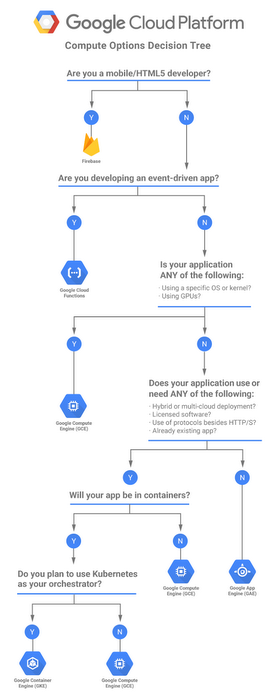
Google Cloud Compute Options Decision Tree

Key Decision Criteria

  • Need full VM control? → Compute Engine
  • Containerized app needing Kubernetes features (service mesh, complex networking, stateful sets)? → GKE
  • Simple containerized app, HTTP-driven? → Cloud Run (services)
  • Background pull-based processing (Kafka, queues)? → Cloud Run (worker pools)
  • Batch/parallel tasks running to completion? → Cloud Run (jobs)
  • Event-driven single-purpose functions? → Cloud Run functions
  • Quick PaaS web app without container knowledge? → App Engine
  • AI inference with serverless GPU? → Cloud Run with GPU
  • AI training at scale with GPU orchestration? → GKE or Compute Engine

GCP Certification Exam Practice Questions

  • Questions are collected from Internet and the answers are marked as per my knowledge and understanding (which might differ with yours).
  • GCP services are updated everyday and both the answers and questions might be outdated soon, so research accordingly.
  • GCP exam questions are not updated to keep up the pace with GCP updates, so even if the underlying feature has changed the question might not be updated
  • Open to further feedback, discussion and correction.
  1. Your organization is developing a new application. This application responds to events created by already running applications. The business goal for the new application is to scale to handle spikes in the flow of incoming events while minimizing administrative work for the team. Which Google Cloud product or feature should you choose?
    1. Cloud Run
    2. Cloud Run for Anthos (Note: Cloud Run for Anthos has been deprecated and archived. It is now referred to as Knative serving on GKE.)
    3. App Engine standard environment
    4. Compute Engine
  2. A company wants to build an application that stores images in a Cloud Storage bucket and wants to generate thumbnails as well as resize the images. They want to use managed service which will help them scale automatically from zero to scale and back to zero. Which GCP service satisfies the requirement?
    1. Google Compute Engine
    2. Google Kubernetes Engine
    3. Google App Engine
    4. Cloud Run functions (formerly Cloud Functions)
  3. A startup needs to deploy a containerized machine learning inference model that requires GPU access, should scale to zero when not in use, and needs to start serving requests within seconds. Which compute option is most suitable?
    1. Compute Engine with GPU attached
    2. GKE with GPU node pool
    3. Cloud Run with GPU (NVIDIA L4)
    4. App Engine flexible environment
  4. Your team has a Kafka consumer application that needs to continuously process messages from a topic. The application does not serve HTTP requests. You want to use a serverless managed platform. Which Cloud Run resource type should you use?
    1. Cloud Run service
    2. Cloud Run job
    3. Cloud Run worker pool
    4. Cloud Run functions
  5. A company is running multiple microservices across on-premises data centers and Google Cloud. They need a consistent container orchestration platform with centralized policy management across all environments. Which solution should they use?
    1. Cloud Run
    2. App Engine flexible
    3. GKE Enterprise (formerly Anthos)
    4. Compute Engine managed instance groups
  6. You are designing a new serverless application that processes files uploaded to Cloud Storage. The processing takes about 30 seconds per file and you want minimal operational overhead. Which option is most appropriate?
    1. Compute Engine with a cron job
    2. Cloud Run functions triggered by Cloud Storage event
    3. GKE CronJob
    4. App Engine Standard with task queue
  7. Your team needs to run a data migration script that processes 10,000 records in parallel and should complete execution. The script does not need to serve HTTP traffic. Which Cloud Run resource type is best suited?
    1. Cloud Run service with always-on CPU
    2. Cloud Run job with parallelism
    3. Cloud Run worker pool
    4. Cloud Run functions
  8. A company wants to use Google’s custom Arm-based processors for their web servers to optimize cost and energy efficiency. Which instance family should they choose?
    1. N2 instances
    2. C2 instances
    3. C4A instances (Google Axion)
    4. E2 instances

See also: Google Cloud Compute Services Cheat Sheet

Cloud Run Functions – Serverless Event Processing

Google Cloud Run Functions (formerly Cloud Functions)

📢 Important Rebranding (August 2024): Google Cloud Functions has been renamed to Cloud Run functions. Cloud Functions (2nd gen) is now “Cloud Run functions” and is deployed as a service on Cloud Run. Cloud Functions (1st gen) is now “Cloud Run functions (1st gen).” All new functions should use Cloud Run functions (the latest version).

  • Cloud Run functions (formerly Cloud Functions) is a serverless execution environment for building and connecting cloud services.
  • Cloud Run functions provide scalable pay-as-you-go functions as a service (FaaS) to run code with zero server management.
  • Cloud Run functions are attached to events emitted from cloud services and infrastructure and are triggered when an event being watched is fired.
  • Cloud Run functions supports multiple language runtimes including Node.js, Python, Go, Java, .NET, Ruby, and PHP.
  • Cloud Run functions features include
    • Zero server management
      • No servers to provision, manage, or upgrade
      • Google Cloud handles the operational infrastructure including managing servers, configuring software, updating frameworks, and patching operating systems
      • Provisioning of resources happens automatically in response to events
    • Automatically scale based on the load
      • Cloud Run functions can scale from a few invocations a day to many millions of invocations without any work from you.
    • Integrated monitoring, logging, and debugging capability
    • Built-in security at role and per function level based on the principle of least privilege
      • Cloud Run functions uses Google Service Account credentials to seamlessly authenticate with the majority of Google Cloud services
      • Supports Secret Manager integration for securely accessing API keys and credentials
      • Supports Customer-Managed Encryption Keys (CMEK) for encrypting function source code and container images
    • Key networking capabilities for hybrid and multi-cloud scenarios
      • Direct VPC egress support for connecting to VPC networks
      • Shared VPC support
      • Static outbound IP address configuration

Cloud Run Functions Versions

  • There are two versions of Cloud Run functions:
    • Cloud Run functions (formerly Cloud Functions 2nd gen) — the latest version, deployed as a service on Cloud Run
      • Can be created using the Cloud Run Admin API (recommended) or the Cloud Functions v2 API
      • Built on Cloud Run infrastructure for better performance, scalability, and configurability
      • Uses run.app URL endpoint
    • Cloud Run functions (1st gen) (formerly Cloud Functions 1st gen) — the original version with limited event triggers, runtimes, and configurability
      • Uses cloudfunctions.net URL endpoint
      • Google plans to continue supporting 1st gen but recommends 2nd gen for new functions
  • Key differences between versions:
    Feature Cloud Run functions (Latest) Cloud Run functions (1st gen)
    Request Timeout Up to 60 minutes (HTTP), 9 minutes (event-driven via v2 API) Up to 9 minutes
    Instance Size Up to 16 GiB RAM with 4 vCPU Up to 8 GB RAM with 2 vCPU
    Concurrency Up to 1000 concurrent requests per instance 1 concurrent request per instance
    Traffic Splitting Supported Not supported
    Event Types 90+ event sources via Eventarc 7 direct event sources
    Minimum Instances Supported (reduces cold starts) Supported
    Infrastructure Cloud Run Google internal

Cloud Run Functions Execution Environment

  • Cloud Run functions handles incoming requests by assigning them to instances of the function and based on the volume or existing functions, it can assign it to an existing one or spawn a new instance.
  • Cloud Run functions (latest) supports up to 1000 concurrent requests per instance, allowing a single instance to handle multiple requests simultaneously, reducing costs and cold starts.
  • Cloud Run functions (1st gen) handles only one concurrent request at a time per instance.
  • Cloud Run functions may start multiple new instances to handle requests, thus providing auto-scaling and parallelism.
  • Cloud Run functions must be stateless i.e. one function invocation should not rely on an in-memory state set by a previous invocation, to allow Google to automatically manage and scale the functions.
  • Every deployed function is isolated from all other functions — even those deployed from the same source file. In particular, they don’t share memory, global variables, file systems, or other state.
  • Cloud Run functions allows you to set a limit on the total number of function instances that can co-exist at any given time (maximum instances).
  • Minimum instances can be configured to keep instances warm and reduce cold starts.
  • Cloud Function instance is created when it’s deployed or the function needs to be scaled.
  • Cloud Run functions can have a Cold Start, which is the time involved in loading the runtime and the code.
  • Function execution time is limited by the timeout duration:
    • Cloud Run functions (latest): Up to 60 minutes for HTTP-triggered functions, up to 9 minutes for event-driven functions (via v2 API)
    • Cloud Run functions (1st gen): Default 1 minute, maximum 9 minutes
  • Cloud Run functions provides a writable filesystem i.e. /tmp directory only, which can be used to store temporary files in a function instance. The rest of the file system is read-only and accessible to the function.
  • Cloud Run functions has 2 scopes
    • Global Scope
      • contains the function definition
      • is executed on every cold start, but not if the instance has already been initialized
      • can be used for initialization like database connections etc.
    • Function Scope
      • only the body of the function declared as the entry point
      • is executed for each request and should include the actual logic
  • Cloud Run Functions Execution Guarantees
    • Functions are typically invoked once for each incoming event. However, Cloud Run functions does not guarantee a single invocation in all cases.
    • HTTP functions are invoked at most once as they are synchronous and the execution is not retried in an event of a failure.
    • Event-driven functions are invoked at least once as they are asynchronous and can be retried.

Cloud Run Functions Events and Triggers

  • Events are things that happen within the cloud environment that you might want to take action on.
  • Trigger is creating a response to that event. Trigger type determines how and when the function executes.
  • Cloud Run functions (latest) uses Eventarc for event routing, supporting any event type supported by Eventarc, including 90+ event sources through Cloud Audit Logs and using the standard CloudEvents format.
  • Cloud Run functions supports the following trigger mechanisms:
    • HTTP Triggers
      • Cloud Run functions can be invoked with an HTTP request using the POST, PUT, GET, DELETE, and OPTIONS HTTP methods.
      • HTTP invocations are synchronous and the result of the function execution will be returned in the response to the HTTP request.
    • Eventarc Triggers (Cloud Run functions – latest)
      • Eventarc is Google Cloud’s universal event routing service that delivers events from 90+ sources to Cloud Run functions.
      • Supports Cloud Audit Logs events from virtually any Google Cloud service.
      • Uses the standard CloudEvents format in all language runtimes.
      • Supports dead-letter topics for failed event delivery.
    • Cloud Pub/Sub Triggers
      • Cloud Run functions can be triggered by messages published to Pub/Sub topics in the same Cloud project as the function.
      • Pub/Sub is a globally distributed message bus that automatically scales as needed and provides a foundation for building robust, global services.
    • Cloud Storage Triggers
      • Cloud Run functions can respond to change notifications emerging from Google Cloud Storage.
      • Notifications can be configured to trigger in response to various events inside a bucket — object creation, deletion, archiving, and metadata updates.
    • Cloud Firestore Triggers
      • Cloud Run functions can handle events in Cloud Firestore in the same Cloud project as the function.
      • Cloud Firestore can be read or updated in response to these events using the Firestore APIs and client libraries.
    • Firebase Triggers
      • Analytics for Firebase
      • Firebase Realtime Database
      • Firebase Authentication — Can be triggered by events from Firebase Authentication in the same Cloud project.
    • Direct Triggers
      • Cloud Run functions provides a call command in the CLI and testing functionality in the Cloud Console UI to support quick iteration and debugging.
      • Function can be directly invoked to ensure it is behaving as expected.
  • Cloud Run functions can also be integrated with any other Google service that supports Cloud Pub/Sub (e.g., Cloud Scheduler) or any service that provides HTTP callbacks (webhooks).
  • Google Cloud Logging events can be exported to a Cloud Pub/Sub topic from which they can then be consumed by Cloud Run functions.

Cloud Run Functions Networking

  • Direct VPC Egress — allows functions to send traffic directly to a VPC network without a Serverless VPC Access connector, reducing latency and cost.
  • VPC Service Controls — supports VPC SC for data exfiltration protection.
  • Ingress Controls — restrict incoming traffic to internal-only, internal-and-cloud-load-balancing, or all traffic.
  • Static Outbound IP — configure a static IP for outbound traffic when connecting to external services that require IP allowlisting.
  • Shared VPC — supports deploying functions that connect to resources in a Shared VPC network.

Cloud Run Functions Security

  • IAM-based Access Control — fine-grained permissions using IAM roles (Cloud Run Source Developer, Service Usage Consumer, Service Account User).
  • Secret Manager Integration — securely access API keys, database credentials, and other secrets without hardcoding them. Secrets can be mounted as volumes or exposed as environment variables.
  • Customer-Managed Encryption Keys (CMEK) — encrypt function source code and container images with your own keys from Cloud KMS.
  • Binary Authorization — enforce deploy-time security policies to ensure only trusted container images are deployed.
  • Cloud Armor — protect functions from DDoS attacks and apply WAF rules.
  • Identity-Aware Proxy (IAP) — add authentication layer for functions.

Cloud Run Functions Best Practices

  • Write Idempotent functions — produce same results when invoked multiple times with the same parameters.
  • Do not start background activities i.e. activity after function has terminated. Any code run after graceful termination cannot access the CPU and will not make any progress.
  • Always delete temporary files — As files can persist between invocations, failing to delete files may lead to memory issues.
  • Use dependencies wisely — Import only what is required as it would affect the cold starts due to invocation latency.
  • Use global variables to reuse objects in future invocations, e.g., database connections.
  • Do lazy initialization of global variables.
  • Use retry to handle only transient and retryable errors, with the handling being idempotent.
  • Configure minimum instances to reduce cold starts for latency-sensitive workloads.
  • Use concurrency (latest version) to handle multiple requests per instance, reducing costs for high-traffic functions.
  • Use Secret Manager instead of environment variables for sensitive configuration data.
  • Configure dead-letter topics for event-driven functions to capture failed events for later processing.

GCP Certification Exam Practice Questions

  • Questions are collected from Internet and the answers are marked as per my knowledge and understanding (which might differ with yours).
  • GCP services are updated everyday and both the answers and questions might be outdated soon, so research accordingly.
  • GCP exam questions are not updated to keep up the pace with GCP updates, so even if the underlying feature has changed the question might not be updated
  • Open to further feedback, discussion and correction.
  1. A company needs a serverless function that processes large files from Cloud Storage and may take up to 30 minutes. Which version should they use?
    1. Cloud Run functions (1st gen) with HTTP trigger
    2. Cloud Run functions (latest) with HTTP trigger
    3. Cloud Run functions (1st gen) with Cloud Storage trigger
    4. Cloud Run functions (latest) with Cloud Storage event trigger via Eventarc
    Show Answer

    Answer: b – Only the latest version supports up to 60 minutes timeout for HTTP-triggered functions. 1st gen is limited to 9 minutes.

  2. What is the maximum number of concurrent requests a single Cloud Run functions (latest) instance can handle?
    1. 1
    2. 100
    3. 1000
    4. Unlimited

    Answer: c — Cloud Run functions (latest) supports up to 1000 concurrent requests per function instance.

  3. Which event routing service does Cloud Run functions (latest) use to support 90+ event sources?
    1. Cloud Pub/Sub directly
    2. Eventarc
    3. Cloud Scheduler
    4. Cloud Tasks

    Answer: b — Cloud Run functions (latest) uses Eventarc for event routing, supporting 90+ event sources through Cloud Audit Logs.

  4. Which feature helps reduce cold starts in Cloud Run functions?
    1. Maximum instances
    2. Minimum instances
    3. Concurrency
    4. Traffic splitting

    Answer: b — Configuring minimum instances keeps pre-warmed instances ready to serve requests, reducing cold starts.

  5. A team needs to gradually roll out a new version of their function with 10% of traffic first. Which feature should they use?
    1. Cloud Run functions (1st gen) with multiple deployments
    2. Cloud Run functions (latest) with traffic splitting
    3. Cloud Pub/Sub with message filtering
    4. Cloud Load Balancer with URL maps

    Answer: b — Cloud Run functions (latest) supports traffic splitting between revisions, allowing gradual rollouts. 1st gen does not support this feature.

  6. What was the rebranding change announced for Cloud Functions in August 2024?
    1. Cloud Functions was deprecated and replaced by Cloud Run
    2. Cloud Functions (2nd gen) was renamed to Cloud Run functions
    3. Cloud Functions was merged with App Engine
    4. Cloud Functions was moved to Firebase only

    Answer: b — In August 2024, Google renamed Cloud Functions (2nd gen) to Cloud Run functions and folded it under the Cloud Run umbrella.

See also: Google Cloud Compute Services Cheat Sheet

References