⚠️ AWS CloudSearch — No Longer Available to New Customers
As of July 25, 2024, AWS closed new customer access to Amazon CloudSearch. Existing customers can continue using the service, but AWS will not introduce new features — only security, availability, and performance improvements.
Recommended Alternatives:
- Amazon OpenSearch Service (managed clusters) — Full-featured search and analytics engine with fine-grained access control, dashboards, alerting, and vector/semantic search.
- Amazon OpenSearch Serverless — Hands-free, auto-scaling serverless option (closest to CloudSearch’s ease of use). Next-gen version (GA May 2026) scales from zero to thousands of RPS.
- Amazon Kendra — ML-powered intelligent enterprise search with natural language understanding and FAQ matching.
For migration guidance, see: Transition from Amazon CloudSearch to Amazon OpenSearch Service
AWS CloudSearch
- CloudSearch is a fully-managed, full-featured search service in the AWS Cloud that makes it easy to set up, manage, and scale a search solution
- CloudSearch
- automatically provisions the required resources
- deploys a highly tuned search index
- easy configuration and can be up & running in less than one hour
- search and ability to upload searchable data
- automatically scales for data and traffic
- self-healing clusters, and
- high availability with Multi-AZ
- CloudSearch uses Apache Solr as the underlying text search engine and
- can be used to index and search both structured and unstructured data.
- content can come from multiple sources and can include database fields along with files in a variety of formats, web pages, and so on.
- supports indexing features like algorithmic stemming, dictionary stemming, stopword dictionary
- can support customizable result ranking i.e. relevancy
- supports search features for text search, different query types (range, boolean etc), sorting, facets for filtering, grouping etc
- supports enhanced features for auto suggestions, highlighting, spatial search, fuzzy search etc
- CloudSearch supports Multi-AZ option and it deploys additional instances in a second AZ in the same region.
- CloudSearch can offer significantly lower total cost of ownership compared to operating and managing your own search environment
- CloudSearch supports 34 languages and popular search features such as highlighting, autocomplete, and geospatial search
CloudSearch Search Domains, Data & Indexing

- Search domain is a data container and a set of services that make the data searchable
- Document service that allows data uploading to domain for indexing
- Search service that enables search requests against the indexed data
- Configuration service for controlling the domains behavior (include relevance ranking)
- Search domain can’t be automatically migrated from one region to another. New domain in the target region needs to be created, configured and data uploaded, and then the original domain deleted
- Indexed data to be made searchable
- can be submitted through a REST based web service url
- has to be in JSON or XML format
- is represented as a document with a unique document ID and multiple fields either to be search on to needed to be just retrieved
- CloudSearch generates a search index from the document data according to the index fields configured for the domain
- Data updates can be submitted by to add, update and delete documents
- Data can be uploaded using secure and encrypted SSL HTTPS connection
- All requests to CloudSearch domains can be required to arrive over HTTPS (enforced via domain configuration)
CloudSearch Auto Scaling
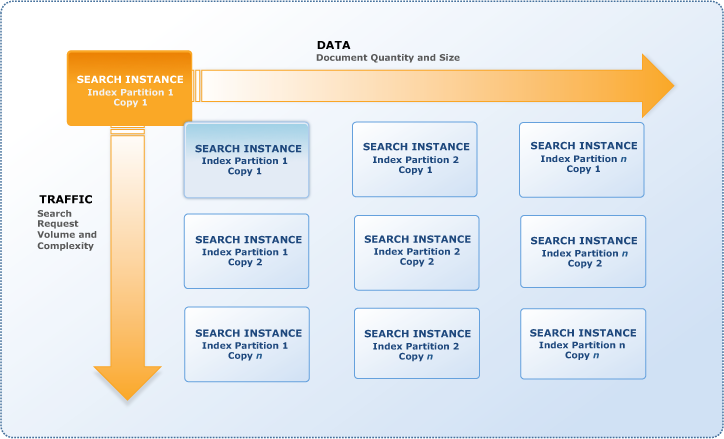
- Search domains scale in two dimensions: data and traffic
- A search instance is a single search engine in the cloud that indexes documents and responds to search requests with a finite amount of RAM and CPU resources for indexing data and processing requests.
- Search domain can have one or more search partitions, portion of the data which fits on a single search instance, and the number of search partitions can change as the documents are indexed
- CloudSearch can determine the size and number of search instances required to deliver low latency, high throughput search performance
- When a search domain is created , a single instance is deployed
- CloudSearch automatically scales the domain by adding instances as the volume of data or traffic increases
- Scaling for data
- CloudSearch handles scaling for data by
- Vertical scaling by increasing the size of the instance, when the amount of data exceeds a single search instance
- Horizontal scaling using search partitions, when the amount of data exceeds the capacity of the largest search instance type
- Number of search instances required to hold the index partitions is sometimes referred to as the domain’s width.
- CloudSearch reduces the number of partitions and size of search instances if the amount of data reduces
- CloudSearch handles scaling for data by
- Scaling for traffic
- CloudSearch handles Scaling for traffic by
- Vertical scaling by increasing the size of the instance, when the amount of traffic exceeds a single search instance
- Horizontal scaling by deploying a duplicate search instance to provide additional processing power i.e. the complete number of partitions are duplicated
- CloudSearch reduces the number of partitions and size of search instances if the traffic reduces
- Number of duplicate search instances is sometimes referred to as the domain’s depth.
- CloudSearch handles Scaling for traffic by
CloudSearch Search Features
- CloudSearch provides features to index and search both structured data and plain text as well as unstructured data like pdf, word documents
- CloudSearch provides near real-time indexing for document updates
- Indexing features include
- tokenization,
- stopwords,
- stemming and
- synonyms
- Search features include
- faceted search, free text search, Boolean search expressions,
- customizable relevance ranking, query time rank expressions,
- grouping
- field weighting, searching and sorting
- Other features like
- Autocomplete suggestions
- Highlighting
- Geospatial search
- New data types: date, double, 64 bit signed int, LatLon
- Dynamic fields
- Index field statistics
- Sloppy phrase search
- Term boosting
- Enhanced range searching for all field types
- Search filters that don’t affect relevance
- Support for multiple query parsers: simple, structured, lucene, dismax
- Query parser configuration options
CloudSearch vs. OpenSearch Service
- Both are fully managed AWS search services, but OpenSearch Service is the recommended path forward
- CloudSearch — simpler setup, auto-scaling, Apache Solr-based, no new features being added
- OpenSearch Service (Managed Clusters) — full control over instances, sharding strategy, and cost optimization; supports vector/semantic search, fine-grained access control, dashboards, alerting, and observability
- OpenSearch Serverless — hands-free operation similar to CloudSearch, scales automatically (including scale-to-zero with next-gen), REST API-based indexing and search
- OpenSearch Service provides all CloudSearch search capabilities plus:
- Vector search engine supporting semantic search with dense and sparse vectors
- Hybrid search combining lexical and vector approaches
- Fine-grained access control and advanced security
- Log analytics and observability features
- OpenSearch Dashboards for visualization
- Alerting and anomaly detection
- ML-powered auto-optimization (OpenSearch 3.x)
- Agentic search for multi-step retrieval workflows
- Migration from CloudSearch to OpenSearch requires re-ingesting and indexing data
- Amazon OpenSearch Ingestion is recommended for data migration — serverless data pipeline that auto-scales
- CloudSearch uses Solr query syntax; OpenSearch uses JSON Query DSL — query translation is required
- AWS provides guidance for migrating from Apache Solr to OpenSearch
AWS Certification Exam Practice Questions
- Questions are collected from Internet and the answers are marked as per my knowledge and understanding (which might differ with yours).
- AWS services are updated everyday and both the answers and questions might be outdated soon, so research accordingly.
- AWS exam questions are not updated to keep up the pace with AWS updates, so even if the underlying feature has changed the question might not be updated
- Open to further feedback, discussion and correction.
- A newspaper organization has an on-premises application which allows the public to search its back catalogue and retrieve individual newspaper pages via a website written in Java. They have scanned the old newspapers into JPEGs (approx. 17TB) and used Optical Character Recognition (OCR) to populate a commercial search product. The hosting platform and software is now end of life and the organization wants to migrate its archive to AWS and produce a cost efficient architecture and still be designed for availability and durability. Which is the most appropriate?
- Use S3 with reduced redundancy to store and serve the scanned files, install the commercial search application on EC2 Instances and configure with auto-scaling and an Elastic Load Balancer. (Reusing Commercial search application which is nearing end of life not a good option for cost)
- Model the environment using CloudFormation. Use an EC2 instance running Apache webserver and an open source search application, stripe multiple standard EBS volumes together to store the JPEGs and search index. (storing JPEGs on EBS volumes not cost effective also answer does not address Open source solution availability)
- Use S3 with standard redundancy to store and serve the scanned files, use CloudSearch for query processing, and use Elastic Beanstalk to host the website across multiple availability zones. (Cost effective S3 storage, CloudSearch for Search and Highly available and durable web application. Note: For new implementations, Amazon OpenSearch Service or OpenSearch Serverless would be the recommended choice as CloudSearch is no longer available to new customers.)
- Use a single-AZ RDS MySQL instance to store the search index and the JPEG images use an EC2 instance to serve the website and translate user queries into SQL. (MySQL not an ideal solution to sore index and JPEG images for cost and performance)
- Use a CloudFront download distribution to serve the JPEGs to the end users and Install the current commercial search product, along with a Java Container for the website on EC2 instances and use Route53 with DNS round-robin. (Web Application not scalable, whats the source for JPEGs files through CloudFront)
- A company needs to implement a full-text search solution for their e-commerce product catalog with auto-complete suggestions, faceted navigation, and geospatial search capabilities. The solution must scale automatically and require minimal operational overhead. Which combination of AWS services best meets these requirements? [Select TWO]
- Amazon OpenSearch Serverless with a search collection type (Correct — OpenSearch Serverless provides auto-scaling, minimal operational overhead, and supports full-text search, facets, and geospatial queries)
- Amazon RDS with full-text indexing enabled
- Amazon OpenSearch Service managed cluster with UltraWarm and Auto-Tune enabled (Correct — Managed clusters with Auto-Tune reduce operational overhead while providing full search capabilities)
- Amazon DynamoDB with Global Secondary Indexes
- Amazon Kendra with custom data sources (Kendra is designed for enterprise document/knowledge search with NLU, not product catalog search with faceted navigation)
- A solutions architect is planning the migration of a legacy search application that currently uses Amazon CloudSearch. The application processes 500 search queries per second during peak hours but has near-zero traffic during off-hours. Cost optimization is a priority. What is the recommended migration approach?
- Continue using Amazon CloudSearch since it auto-scales for traffic
- Migrate to Amazon OpenSearch Serverless, which scales from zero to thousands of requests per second and back to zero when idle (Correct — Next-gen OpenSearch Serverless (GA 2026) offers scale-to-zero capability, providing up to 60% cost savings compared to provisioned clusters and ideal for variable traffic patterns)
- Migrate to an Amazon OpenSearch Service managed cluster with a single data node
- Migrate to Amazon Kendra for intelligent search (Kendra is designed for enterprise document search with NLU, not necessarily a replacement for general search workloads)