provides a centralized, single place to discover the existing servers, plan migrations, and track the status of each application migration.
provides visibility into the application portfolio and streamlines planning and tracking.
helps visualize the connections and the status of the migrating servers and databases, regardless of which migration tool is used.
stores all the data in the selected Home Region and provides a single repository of discovery and migration planning information for the entire portfolio and a single view of migrations into multiple AWS Regions.
helps track the status of the migrations in all AWS Regions, provided the migration tools are available in that Region.
helps understand the environment by letting you explore information collected by AWS discovery tools and stored in the AWS Application Discovery Service’s repository.
supports migration status updates from the following tools:
AWS Application Discovery Service helps plan migration to the AWS cloud by collecting usage and configuration data about the on-premises servers.
helps enterprises obtain a snapshot of the current state of their data center servers by collecting server specification information, hardware configuration, performance data, details of running processes, and network connections
which simplifies migration tracking as it aggregates migration status information into a single console.
can help view the discovered servers, group them into applications, and then track the migration status of each application.
discovered data for all the regions is stored in the AWS Migration Hub home Region.
The data can be exported for analysis in Microsoft Excel or AWS analysis tools such as Amazon Athena and Amazon QuickSight.
supports both agent and agentless-based on-premises tooling, in addition to file-based import for performing discovery and collecting data about the on-premises servers.
AWS Server Migration Service (SMS)
is an agentless service that makes it easier and faster to migrate thousands of on-premises workloads to AWS.
helps automate, schedule, and track incremental replications of live server volumes, making it easier to coordinate large-scale server migrations.
currently supports migration of virtual machines from VMware vSphere, Windows Hyper-V and Azure VM to AWS
supports migrating Windows Server 2003, 2008, 2012, and 2016, and Windows 7, 8, and 10; Red Hat Enterprise Linux (RHEL), SUSE/SLES, CentOS, Ubuntu, Oracle Linux, Fedora, and Debian Linux OS
replicates each server volume, which is saved as a new AMI, which can be launched as an EC2 instance
is a significant enhancement of EC2 VM Import/Export service
helps migrate databases to AWS quickly and securely.
source database remains fully operational during the migration, minimizing downtime to applications that rely on the database.
supports homogeneous migrations such as Oracle to Oracle, as well as heterogeneous migrations between different database platforms, such as Oracle or Microsoft SQL Server to Amazon Aurora.
monitors for replication tasks, network or host failures, and automatically provisions a host replacement in case of failures that can’t be repaired
supports both one-time data migration into RDS and EC2-based databases as well as for continuous data replication
supports continuous replication of the data with high availability and consolidate databases into a petabyte-scale data warehouse by streaming data to Amazon Redshift and Amazon S3
provides free AWS Schema Conversion Tool (SCT) that automates the conversion of Oracle PL/SQL and SQL Server T-SQL code to equivalent code in the Amazon Aurora / MySQL dialect of SQL or the equivalent PL/pgSQL code in PostgreSQL
AWS EC2 VM Import/Export
allows easy import of virtual machine images from existing environment to EC2 instances and export them back to on-premises environment
allows leveraging of existing investments in the virtual machines, built to meet compliance requirements, configuration management and IT security by bringing those virtual machines into EC2 as ready-to-use instances
Common usages include
Migrate Existing Applications and Workloads to EC2, allowing preserving of the software and settings configured in the existing VMs.
Copy Your VM Image Catalog to EC2
Create a Disaster Recovery Repository for your VM images
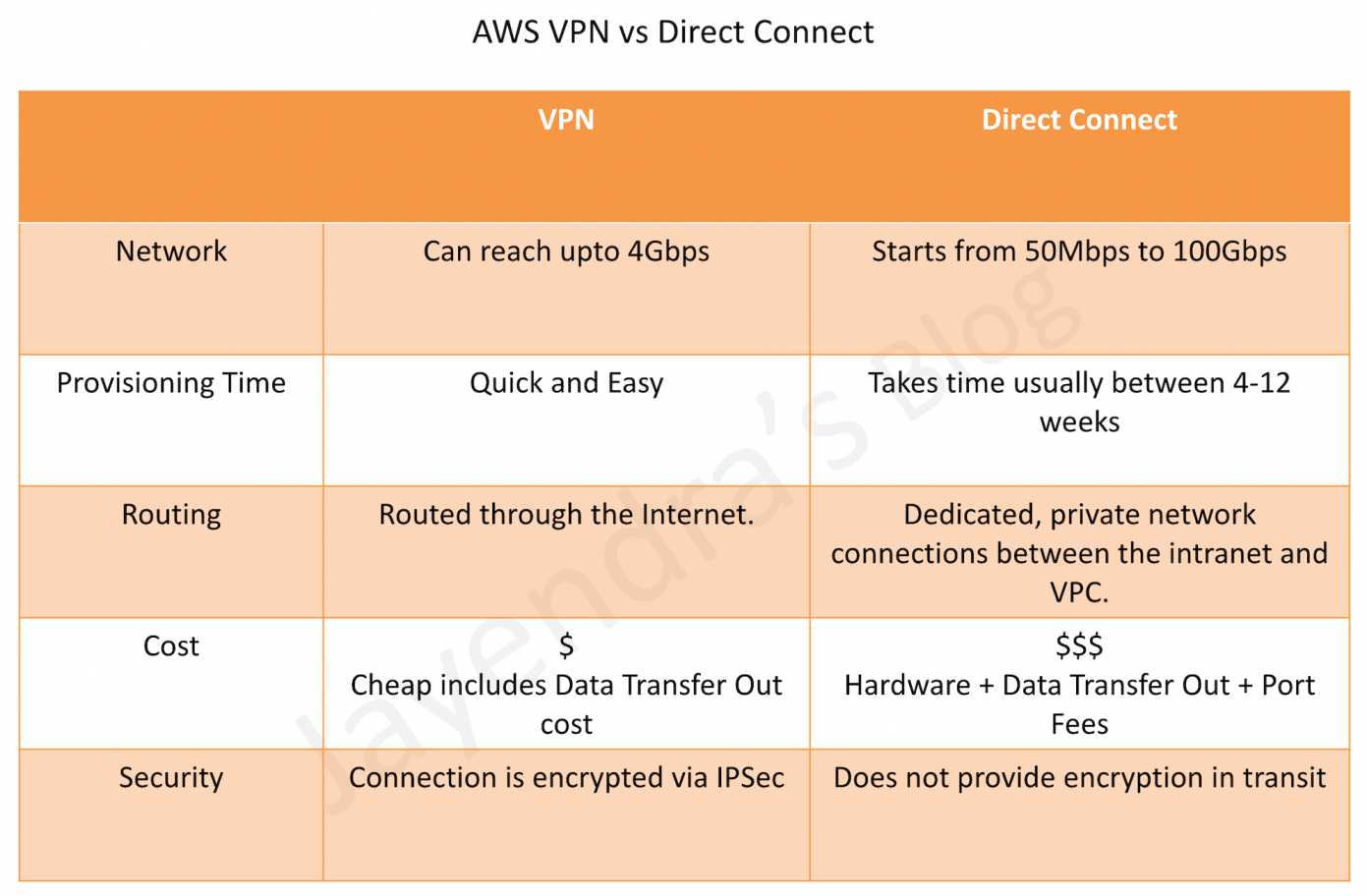
connection utilizes IPSec to establish encrypted network connectivity between on-premises network and VPC over the Internet.
connections can be configured in minutes and a good solution for an immediate need, have low to modest bandwidth requirements, and can tolerate the inherent variability in Internet-based connectivity.
still requires internet and be configured using VGW and CGW
provides a dedicated physical connection between the corporate network and AWS Direct Connect location with no data transfer over the Internet.
helps bypass Internet service providers (ISPs) in the network path
helps reduce network costs, increase bandwidth throughput, and provide a more consistent network experience than with Internet-based connection
takes time to setup and involves third parties
are not redundant and would need another direct connect connection or a VPN connection
Security
provides a dedicated physical connection without internet
For additional security can be used with VPN
AWS Import/Export (upgraded to Snowball)
accelerates moving large amounts of data into and out of AWS using secure Snowball appliances
AWS transfers the data directly onto and off of the storage devices using Amazon’s high-speed internal network, bypassing the Internet
Data Migration
for significant data size, AWS Import/Export is faster than Internet transfer is and more cost-effective than upgrading the connectivity
if loading the data over the Internet would take a week or more, AWS Import/Export should be considered
data from appliances can be imported to S3, Glacier and EBS volumes and exported from S3
not suitable for applications that cannot tolerate offline transfer time
Security
Snowball uses an industry-standard Trusted Platform Module (TPM) that has a dedicated processor designed to detect any unauthorized modifications to the hardware, firmware, or software to physically secure the AWS Snowball device.
is a petabyte-scale data transfer service built around a secure suitcase-sized device that moves data into and out of the AWS Cloud quickly and efficiently.
transfers the data to S3 bucket
transfer times are about a week from start to finish.
are commonly used to ship terabytes or petabytes of analytics data, healthcare and life sciences data, video libraries, image repositories, backups, and archives as part of data center shutdown, tape replacement, or application migration projects.
AWS Snowball Edge devices
contain slightly larger capacity and an embedded computing platform that helps perform simple processing tasks.
can be rack shelved and may also be clustered together, making it simpler to collect and store data in extremely remote locations.
commonly used in environments with intermittent connectivity (such as manufacturing, industrial, and transportation); or in extremely remote locations (such as military or maritime operations) before shipping them back to AWS data centers.
delivers serverless computing applications at the network edge using AWS Greengrass and Lambda functions.
common use cases include capturing IoT sensor streams, on-the-fly media transcoding, image compression, metrics aggregation and industrial control signaling and alarming.
AWS Snowmobile
moves up to 100PB of data (equivalent to 1,250 AWS Snowball devices) in a 45-foot long ruggedized shipping container and is ideal for multi-petabyte or Exabyte-scale digital media migrations and datacenter shutdowns.
arrives at the customer site and appears as a network-attached data store for more secure, high-speed data transfer. After data is transferred to Snowmobile, it is driven back to an AWS Region where the data is loaded into S3.
is tamper-resistant, waterproof, and temperature controlled with multiple layers of logical and physical security — including encryption, fire suppression, dedicated security personnel, GPS tracking, alarm monitoring, 24/7 video surveillance, and an escort security vehicle during transit.
connects an on-premises software appliance with cloud-based storage to provide seamless and secure integration between an organization’s on-premises IT environment and the AWS storage infrastructure
provides low-latency performance by maintaining frequently accessed data on-premises while securely storing all of the data encrypted in S3 or Glacier.
for disaster recovery scenarios, Storage Gateway, together with EC2, can serve as a cloud-hosted solution that mirrors the entire production environment
Data Migration
with gateway-cached volumes, S3 can be used to hold primary data while frequently accessed data is cached locally for faster access reducing the need to scale on premises storage infrastructure
with gateway-stored volumes, entire data is stored locally while asynchronously backing up data to S3
with gateway-VTL, offline data archiving can be performed by presenting existing backup application with an iSCSI-based VTL consisting of a virtual media changer and virtual tape drives
Security
Encrypts all data in transit to and from AWS by using SSL/TLS.
All data in AWS Storage Gateway is encrypted at rest using AES-256.
Authentication between the gateway and iSCSI initiators can be secured by using Challenge-Handshake Authentication Protocol (CHAP).
Files up to 5GB can be transferred using single operation
Multipart uploads can be used to upload files up to 5 TB and speed up data uploads by dividing the file into multiple parts
transfer rate still limited by the network speed
Security
Data in transit can be secured by using SSL/TLS or client-side encryption.
Encrypt data at-rest by performing server-side encryption using Amazon S3-Managed Keys (SSE-S3), AWS Key Management Service (KMS)-Managed Keys (SSE-KMS), or Customer Provided Keys (SSE-C). Or by performing client-side encryption using AWS KMS–Managed Customer Master Key (CMK) or Client-Side Master Key.
AWS Certification Exam Practice Questions
Questions are collected from Internet and the answers are marked as per my knowledge and understanding (which might differ with yours).
AWS services are updated everyday and both the answers and questions might be outdated soon, so research accordingly.
AWS exam questions are not updated to keep up the pace with AWS updates, so even if the underlying feature has changed the question might not be updated
Open to further feedback, discussion and correction.
Questions are collected from Internet and the answers are marked as per my knowledge and understanding (which might differ with yours).
AWS services are updated everyday and both the answers and questions might be outdated soon, so research accordingly.
AWS exam questions are not updated to keep up the pace with AWS updates, so even if the underlying feature has changed the question might not be updated
Open to further feedback, discussion and correction.
Your must architect the migration of a web application to AWS. The application consists of Linux web servers running a custom web server. You are required to save the logs generated from the application to a durable location. What options could you select to migrate the application to AWS? (Choose 2)
Create an AWS Elastic Beanstalk application using the custom web server platform. Specify the web server executable and the application project and source files. Enable log file rotation to Amazon Simple Storage Service (S3). (EB does not work with Custom server executable)
Create Dockerfile for the application. Create an AWS OpsWorks stack consisting of a custom layer. Create custom recipes to install Docker and to deploy your Docker container using the Dockerfile. Create custom recipes to install and configure the application to publish the logs to Amazon CloudWatch Logs (although this is one of the option, the last sentence mentions configure the application to push the logs to S3, which would need changes to application as it needs to use SDK or CLI)
Create Dockerfile for the application. Create an AWS OpsWorks stack consisting of a Docker layer that uses the Dockerfile. Create custom recipes to install and configure Amazon Kinesis to publish the logs into Amazon CloudWatch. (Kinesis not needed)
Create a Dockerfile for the application. Create an AWS Elastic Beanstalk application using the Docker platform and the Dockerfile. Enable logging the Docker configuration to automatically publish the application logs. Enable log file rotation to Amazon S3. (Use Docker configuration with awslogs and EB with Docker)
Use VM import/Export to import a virtual machine image of the server into AWS as an AMI. Create an Amazon Elastic Compute Cloud (EC2) instance from AMI, and install and configure the Amazon CloudWatch Logs agent. Create a new AMI from the instance. Create an AWS Elastic Beanstalk application using the AMI platform and the new AMI. (Use VM Import/Export to create AMI and CloudWatch logs agent to log)
Your company hosts an on-premises legacy engineering application with 900GB of data shared via a central file server. The engineering data consists of thousands of individual files ranging in size from megabytes to multiple gigabytes. Engineers typically modify 5-10 percent of the files a day. Your CTO would like to migrate this application to AWS, but only if the application can be migrated over the weekend to minimize user downtime. You calculate that it will take a minimum of 48 hours to transfer 900GB of data using your company’s existing 45-Mbps Internet connection. After replicating the application’s environment in AWS, which option will allow you to move the application’s data to AWS without losing any data and within the given timeframe?
Copy the data to Amazon S3 using multiple threads and multi-part upload for large files over the weekend, and work in parallel with your developers to reconfigure the replicated application environment to leverage Amazon S3 to serve the engineering files. (Still limited by 45 Mbps speed with minimum 48 hours when utilized to max)
Sync the application data to Amazon S3 starting a week before the migration, on Friday morning perform a final sync, and copy the entire data set to your AWS file server after the sync completes. (Works best as the data changes can be propagated over the week and are fractional and downtime would be know)
Copy the application data to a 1-TB USB drive on Friday and immediately send overnight, with Saturday delivery, the USB drive to AWS Import/Export to be imported as an EBS volume, mount the resulting EBS volume to your AWS file server on Sunday. (Downtime is not known when the data upload would be done, although Amazon says the same day the package is received)
Leverage the AWS Storage Gateway to create a Gateway-Stored volume. On Friday copy the application data to the Storage Gateway volume. After the data has been copied, perform a snapshot of the volume and restore the volume as an EBS volume to be attached to your AWS file server on Sunday. (Still uses the internet)
You are tasked with moving a legacy application from a virtual machine running inside your datacenter to an Amazon VPC. Unfortunately this app requires access to a number of on-premises services and no one who configured the app still works for your company. Even worse there’s no documentation for it. What will allow the application running inside the VPC to reach back and access its internal dependencies without being reconfigured? (Choose 3 answers)
An AWS Direct Connect link between the VPC and the network housing the internal services
An Internet Gateway to allow a VPN connection. (Virtual and Customer gateway is needed)
An Elastic IP address on the VPC instance
An IP address space that does not conflict with the one on-premises
Entries in Amazon Route 53 that allow the Instance to resolve its dependencies’ IP addresses
A VM Import of the current virtual machine
An enterprise runs 103 line-of-business applications on virtual machines in an on-premises data center. Many of the applications are simple PHP, Java, or Ruby web applications, are no longer actively developed, and serve little traffic. Which approach should be used to migrate these applications to AWS with the LOWEST infrastructure costs?
Deploy the applications to single-instance AWS Elastic Beanstalk environments without a load balancer.
Use AWS SMS to create AMIs for each virtual machine and run them in Amazon EC2.
Convert each application to a Docker image and deploy to a small Amazon ECS cluster behind an Application Load Balancer.
Use VM Import/Export to create AMIs for each virtual machine and run them in single-instance AWS Elastic Beanstalk environments by configuring a custom image.
AWS VPN connections are used to extend on-premises data centers to AWS.
VPN connections provide secure IPSec connections between the data center or branch office and the AWS resources.
AWS Site-to-Site VPN or AWS Hardware VPN or AWS Managed VPN
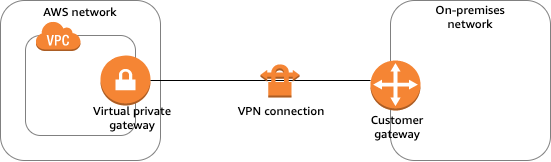
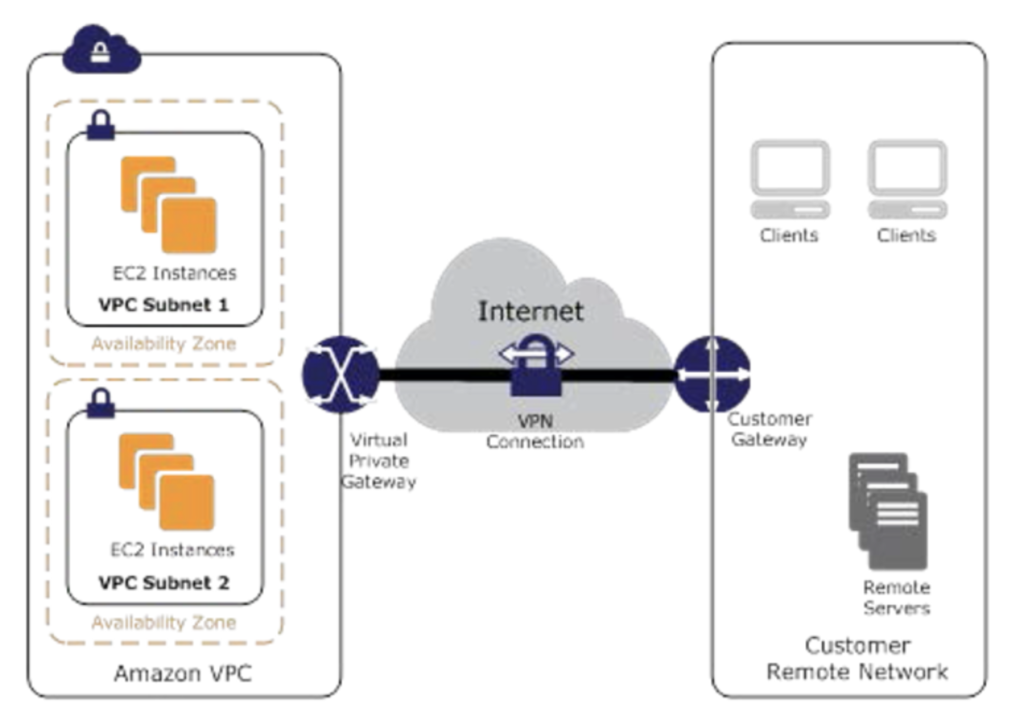
Connectivity can be established by creating an IPSec, hardware VPN connection between the VPC and the remote network.
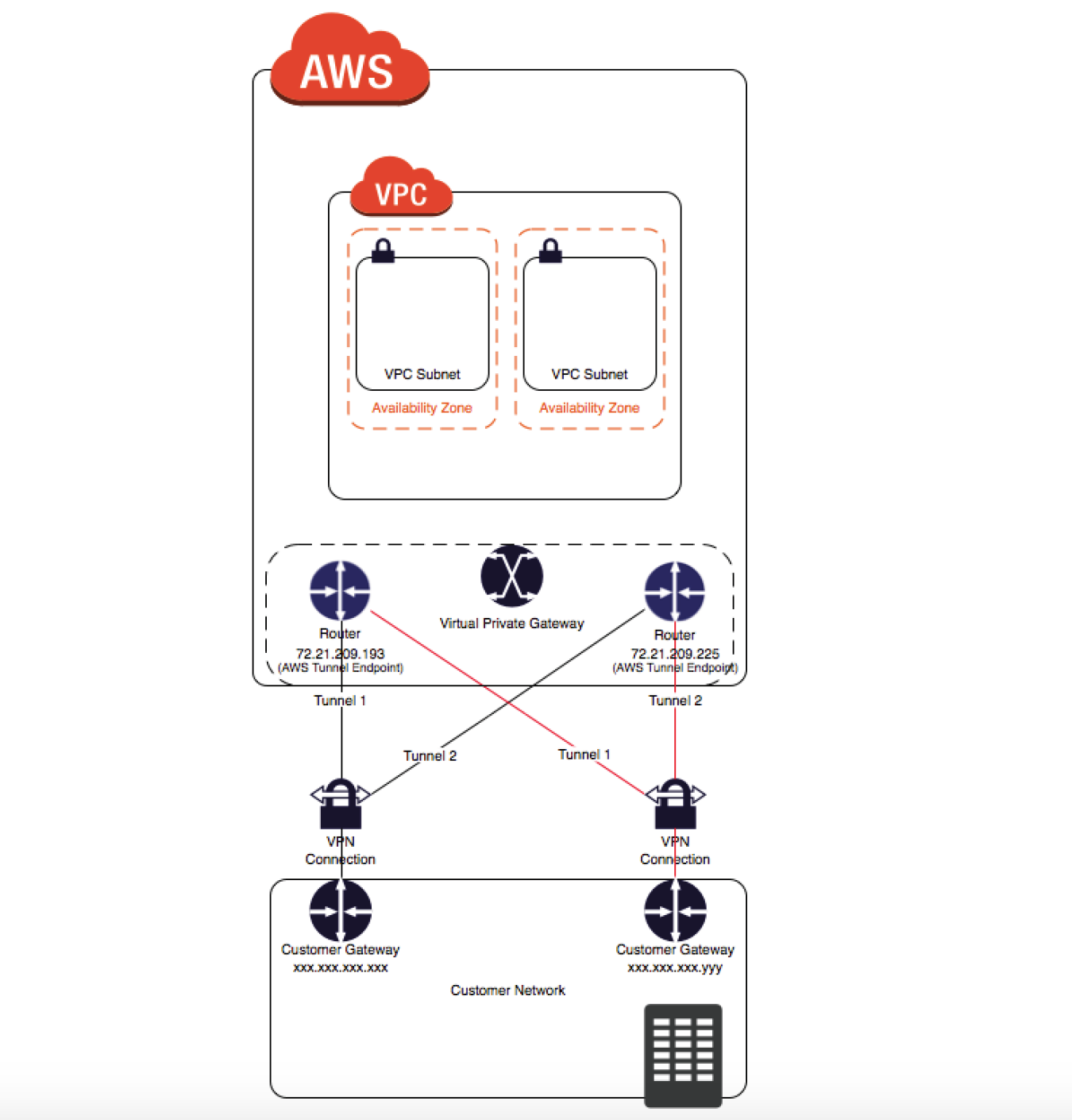
On the AWS side of the VPN connection, a Virtual Private Gateway (VGW) or Transit Gateway provides two VPN endpoints for automatic failover.
On the customer side, a customer gateway (CGW) needs to be configured, which is the physical device or software application on the remote side of the VPN connection
AWS Client VPN is a managed client-based VPN service that enables secure access to AWS resources and resources in the on-premises network.
AWS VPN CloudHub
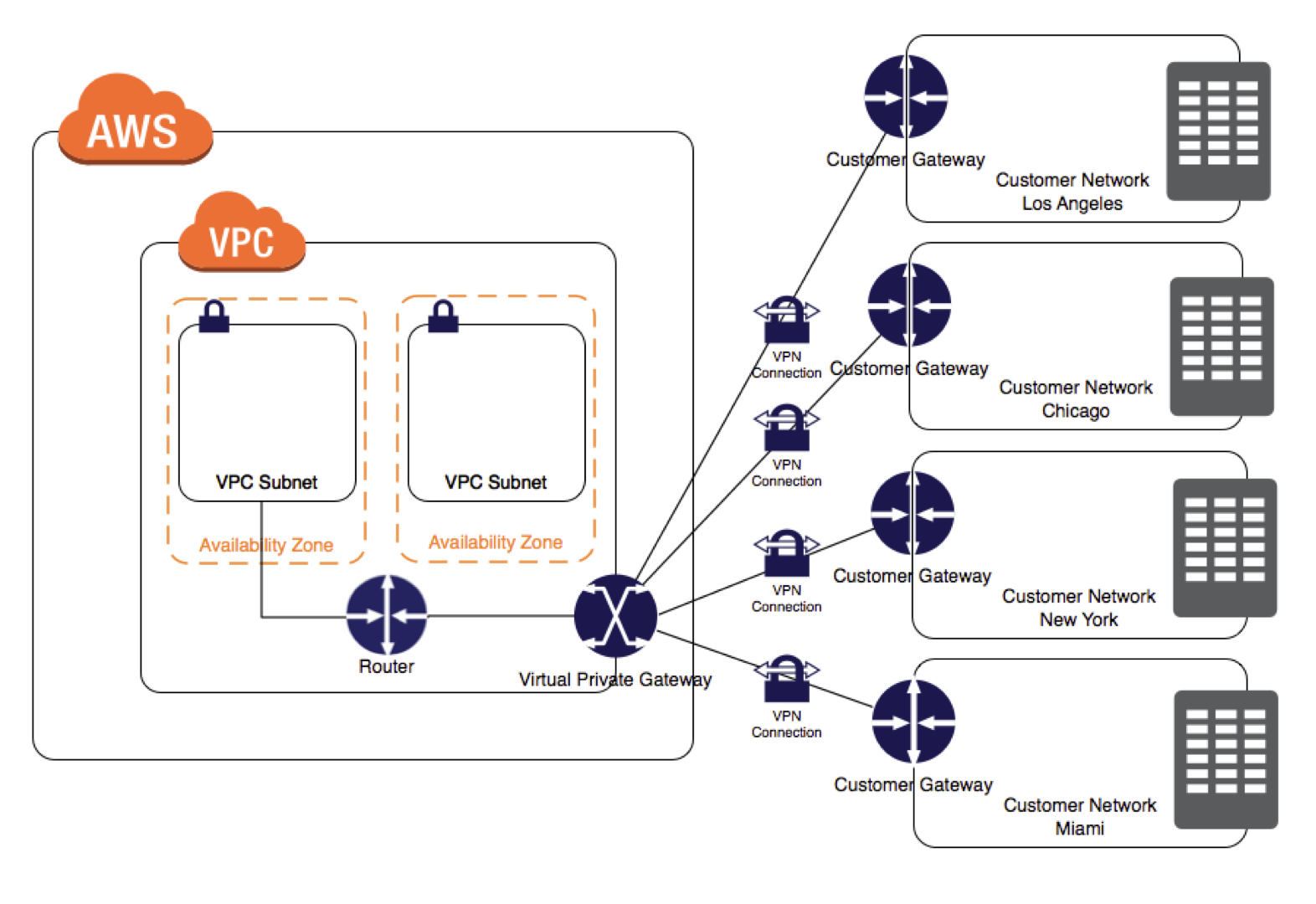
For more than one remote network e.g. multiple branch offices, multiple AWS hardware VPN connections can be created via the VPC to enable communication between these networks
AWS Software VPN
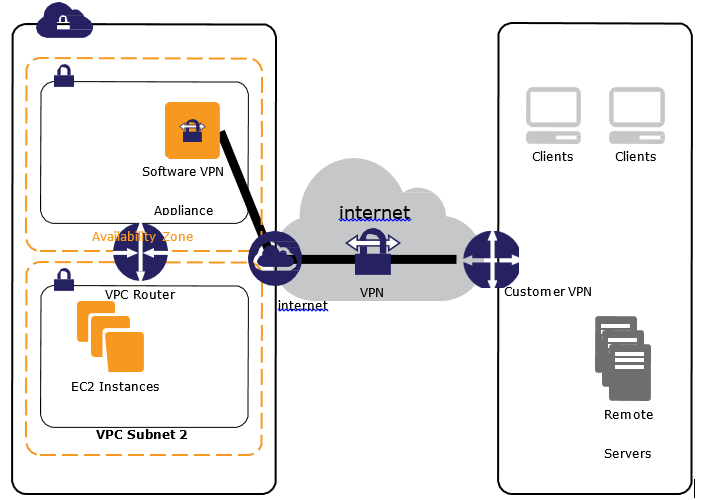
A VPN connection can be created to the remote network by using an EC2 instance in the VPC that’s running a third-party software VPN appliance.
AWS does not provide or maintain third-party software VPN appliances; however, there is a range of products provided by partners and open source communities.
AWS Direct Connect provides a dedicated private connection from a remote network to the VPC. Direct Connect can be combined with an AWS hardware VPN connection to create an IPsec-encrypted connection
AWS Site-to-Site VPN Options (2025)
As of November 2025, AWS Site-to-Site VPN includes five distinct options:
Standard VPN with VGW – Up to 1.25 Gbps per tunnel; terminates on a Virtual Private Gateway.
Standard VPN with TGW or Cloud WAN – Up to 1.25 Gbps per tunnel; terminates on a Transit Gateway or AWS Cloud WAN. Supports ECMP for higher aggregate bandwidth.
Large Bandwidth Tunnel with TGW – Up to 5 Gbps per tunnel (launched November 2025); a 4x improvement over the standard 1.25 Gbps limit. Ideal for bandwidth-intensive hybrid applications, big data migrations, and disaster recovery.
VPN Concentrator – Simplifies multi-site connectivity for distributed enterprises (launched November 2025). Supports up to 100 low-bandwidth remote sites (under 100 Mbps each) through a single Transit Gateway attachment with 5 Gbps aggregate bandwidth.
Accelerated VPN – Uses AWS Global Accelerator to route traffic through the nearest AWS edge location, reducing internet distance and improving performance. Supported on Transit Gateway.
Private IP VPN – Enables Site-to-Site VPN connections over AWS Direct Connect using private IP addresses. Encrypts DX traffic between on-premises networks and AWS without traversing the public internet. Requires Transit Gateway.
VPN Components
Virtual Private Gateway – VGW
A virtual private gateway is the VPN concentrator on the AWS side of the VPN connection
Supports standard bandwidth (up to 1.25 Gbps per tunnel)
Does not support IPv6 for Site-to-Site VPN connections
Does not support ECMP
Customer Gateway – CGW
A customer gateway is a physical device or software application on the customer side of the VPN connection.
When a VPN connection is created, the VPN tunnel comes up when traffic is generated from the remote side of the VPN connection.
By default, VGW is not the initiator; CGW must bring up the tunnels for the Site-to-Site VPN connection by generating traffic and initiating the Internet Key Exchange (IKE) negotiation process.
If the VPN connection experiences a period of idle time, usually 10 seconds, depending on the configuration, the tunnel may go down. To prevent this, a network monitoring tool to generate keepalive pings; for e.g. by using IP SLA.
Transit Gateway
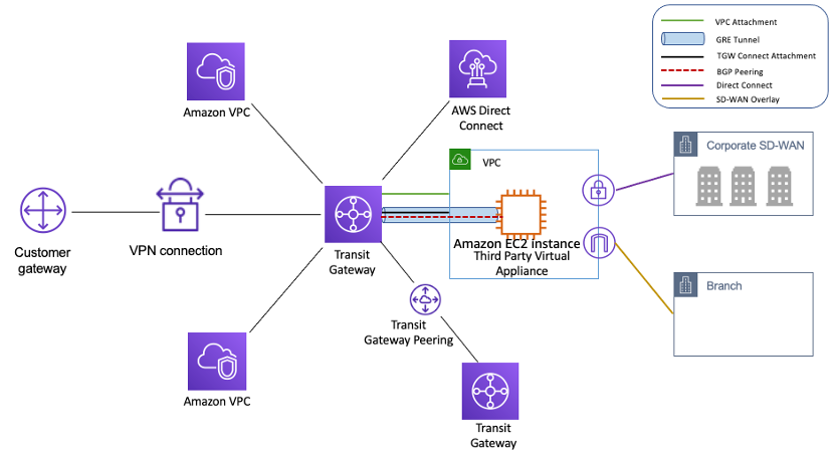
A transit gateway is a transit hub that can be used to interconnect VPCs and on-premises networks.
A Site-to-Site VPN connection on a transit gateway can support either IPv4 traffic or IPv6 traffic inside the VPN tunnels.
Supports ECMP (Equal Cost Multi-Path) routing for aggregating bandwidth across multiple VPN tunnels (up to 50 Gbps).
Supports large bandwidth tunnels (up to 5 Gbps per tunnel).
Supports IPv6 addresses for outer tunnel IPs (announced July 2025), enabling full IPv6 migration (IPv6-in-IPv6) and IPv4-in-IPv6 configurations.
Supports VPN Concentrator attachments for multi-site connectivity.
Supports Private IP VPN connections over Direct Connect.
AWS Cloud WAN
AWS Cloud WAN is a managed wide area networking service for building and managing global networks.
Site-to-Site VPN connections can be attached to Cloud WAN core networks for global hybrid connectivity.
Supports IPv6 outer tunnel IPs (same as Transit Gateway).
A Site-to-Site VPN connection offers two VPN tunnels between a VGW or a transit gateway on the AWS side, and a CGW (which represents a VPN device) on the remote (on-premises) side.
VPN Routing Options
For a VPN connection, the route table for the subnets should be updated with the type of routing (static or dynamic) that you plan to use.
Route tables determine where network traffic is directed. Traffic destined for the VPN connections must be routed to the virtual private gateway.
The type of routing can depend on the make and model of the CGW device
Static Routing
If your device does not support BGP, specify static routing.
Using static routing, the routes (IP prefixes) can be specified that should be communicated to the virtual private gateway.
Devices that don’t support BGP may also perform health checks to assist failover to the second tunnel when needed.
BGP Dynamic Routing
If the VPN device supports Border Gateway Protocol (BGP), specify dynamic routing with the VPN connection.
When using a BGP device, static routes need not be specified to the VPN connection because the device uses BGP for auto-discovery and to advertise its routes to the virtual private gateway.
BGP-capable devices are recommended as the BGP protocol offers robust liveness detection checks that can assist failover to the second VPN tunnel if the first tunnel goes down.
Only IP prefixes known to the virtual private gateway, either through BGP advertisement or static route entry, can receive traffic from the VPC.
Virtual private gateway does not route any other traffic destined outside of the advertised BGP, static route entries, or its attached VPC CIDR.
VPN Route Priority
Longest prefix match applies.
If the prefixes are the same, then the VGW prioritizes routes as follows, from most preferred to least preferred:
BGP propagated routes from an AWS Direct Connect connection
Manually added static routes for a Site-to-Site VPN connection
BGP propagated routes from a Site-to-Site VPN connection
Prefix with the shortest AS PATH is preferred for matching prefixes where each Site-to-Site VPN connection uses BGP
Path with the lowest multi-exit discriminators (MEDs) value is preferred when the AS PATHs are the same length and if the first AS in the AS_SEQUENCE is the same across multiple paths.
VPN Bandwidth and Throughput
Standard VPN Tunnel: Up to 1.25 Gbps per tunnel (default)
Large Bandwidth VPN Tunnel: Up to 5 Gbps per tunnel (available on Transit Gateway, launched November 2025)
Supports modifying tunnel bandwidth on existing VPN connections (announced May 2026) without changing IP addresses, CIDR blocks, or pre-shared keys
VPN Concentrator Tunnel: Up to 100 Mbps per tunnel, 5 Gbps aggregate per concentrator
ECMP (Transit Gateway): Up to 50 Gbps aggregate bandwidth using multiple VPN tunnels with ECMP configured (each flow limited to max bandwidth per tunnel)
Many factors affect realized bandwidth including packet size, traffic mix (TCP/UDP), shaping or throttling policies on intermediate networks, internet weather, and specific application requirements.
VPN Limitations
supports only IPSec tunnel mode. Transport mode is currently not supported.
supports only one VGW can be attached to a VPC at a time.
does not support IPv6 traffic on a virtual private gateway. (IPv6 is supported on Transit Gateway and Cloud WAN.)
does not support Path MTU Discovery.
does not support overlapping CIDR blocks for the networks. It is recommended to use non-overlapping CIDR blocks.
does not support transitive routing. So for traffic from on-premises to AWS via a virtual private gateway, it
does not support Internet connectivity through Internet Gateway
does not support Internet connectivity through NAT Gateway
does not support VPC Peered resources access through VPC Peering
However, Internet connectivity through NAT instance and VPC Interface Endpoint or PrivateLink services are accessible.
provides a bandwidth of 1.25 Gbps per tunnel for standard VPN connections. Large bandwidth tunnels support up to 5 Gbps per tunnel on Transit Gateway.
MTU is 1446 bytes and MSS is 1406 bytes. Jumbo frames are not supported.
VPN Tunnel Endpoint Lifecycle Control
The VPN Tunnel Endpoint Lifecycle Control feature enables scheduling endpoint replacements at a time that aligns with business and operational needs, prior to the service-mandated deadline.
Provides advanced notice of upcoming maintenance updates to help plan and minimize service disruptions.
When enabled, AWS notifies before performing tunnel endpoint replacements.
Users can accept the maintenance update at a convenient time or let it apply automatically by the deadline.
During a tunnel endpoint update, AWS applies replacement to one tunnel at a time to ensure continuous connectivity.
Available in most AWS commercial and GovCloud regions.
VPN Monitoring
AWS Site-to-Site VPN automatically sends notifications to the AWS Health Dashboard
AWS Site-to-Site VPN is integrated with CloudWatch with the following metrics available
TunnelState
The state of the tunnels.
For static VPNs, 0 indicates DOWN and 1 indicates UP.
For BGP VPNs, 1 indicates ESTABLISHED and 0 is used for all other states.
For both types of VPNs, values between 0 and 1 indicate at least one tunnel is not UP.
TunnelDataIn
The bytes received on the AWS side of the connection through the VPN tunnel from a customer gateway.
This metric counts the data after decryption.
TunnelDataOut
The bytes sent from the AWS side of the connection through the VPN tunnel to the customer gateway.
This metric counts the data before encryption.
ConcentratorBandwidthUsage
The bandwidth usage for a Site-to-Site VPN Concentrator connection.
Available only for VPN connections using a VPN Concentrator.
Units: Bits per second
Site-to-Site VPN Logs
VPN logs can be published to Amazon CloudWatch Logs for detailed analysis of VPN connection activity.
Provides tunnel activity logs for troubleshooting connectivity issues.
Amazon CloudWatch Network Synthetic Monitor
Supports hybrid monitors for networking built with AWS Direct Connect and AWS Site-to-Site VPN.
Provides proactive monitoring of hybrid connectivity health.
IPv6 Support for Site-to-Site VPN
Inner Tunnel IPv6: Supported on Transit Gateway and Cloud WAN. Allows IPv4 or IPv6 traffic inside VPN tunnels.
Outer Tunnel IPv6 (July 2025): Site-to-Site VPN now supports IPv6 addresses for outer tunnel IPs on Transit Gateway and Cloud WAN connections.
Enables full IPv6 migration with IPv6 addresses for both outer tunnel IPs and inner packet IPs (IPv6-in-IPv6).
Helps customers with IPv6-only network mandates meet regulatory and compliance needs.
IPv6 VPNs support the same throughput (Gbps and PPS), MTU, and route limits as IPv4 VPNs.
Note: Virtual private gateways do NOT support IPv6 for Site-to-Site VPN connections. IPv6 requires Transit Gateway or Cloud WAN.
VPN Concentrator (November 2025)
AWS Site-to-Site VPN Concentrator simplifies multi-site connectivity for distributed enterprises with many low-bandwidth remote sites.
Suitable for customers needing to connect 25+ remote sites to AWS, with each site needing low bandwidth (under 100 Mbps).
Allows up to 100 remote sites to connect through a single VPN Concentrator attachment to AWS Transit Gateway.
Provides 5 Gbps aggregate bandwidth shared across all connected sites.
Eliminates the need to deploy and manage multiple virtual appliances for HA and connectivity.
AWS manages high availability across multiple Availability Zones.
Can be used with eero integration for simplified remote site connectivity without manual tunnel configuration.
Quotas:
Up to 50 VPN Concentrators per Region
Up to 5 VPN Concentrators per Transit Gateway or Cloud WAN
Up to 100 remote sites per VPN Concentrator
VPN Connection Redundancy
A VPN connection is used to connect the customer network to a VPC.
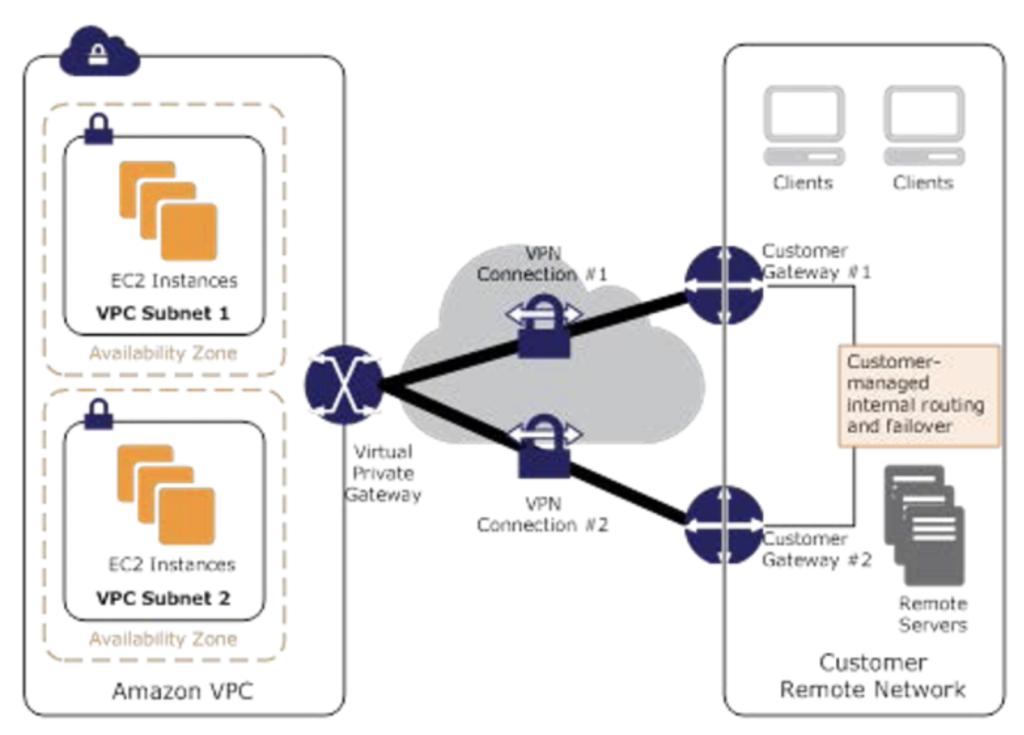
Each VPN connection has two tunnels to help ensure connectivity in case one of the VPN connections becomes unavailable, with each tunnel using a unique virtual private gateway public IP address.
Both tunnels should be configured for redundancy.
When one tunnel becomes unavailable, for e.g. down for maintenance, network traffic is automatically routed to the available tunnel for that specific VPN connection.
To protect against a loss of connectivity in case the customer gateway becomes unavailable, a second VPN connection can be set up to the VPC and virtual private gateway by using a second customer gateway.
Customer gateway IP address for the second VPN connection must be publicly accessible.
By using redundant VPN connections and CGWs, maintenance on one of the customer gateways can be performed while traffic continues to flow over the second customer gateway’s VPN connection.
Dynamically routed VPN connections using the Border Gateway Protocol (BGP) are recommended, if available, to exchange routing information between the customer gateways and the virtual private gateways.
Statically routed VPN connections require static routes for the network to be entered on the customer gateway side.
BGP-advertised and statically entered route information allows gateways on both sides to determine which tunnels are available and reroute traffic if a failure occurs.
Multiple Site-to-Site VPN Connections
VPC has an attached virtual private gateway, and the remote network includes a customer gateway, which must be configured to enable the
VPN connection.
Routing must be set up so that any traffic from the VPC bound for the remote network is routed to the virtual private gateway.
Each VPN has two tunnels associated with it that can be configured on the customer router, as is not a single point of failure
Multiple VPN connections to a single VPC can be created, and a second CGW can be configured to create a redundant connection to the same external location or to create VPN connections to multiple geographic locations.
VPN CloudHub
VPN CloudHub can be used to provide secure communication between multiple on-premises sites if you have multiple VPN connections
VPN CloudHub operates on a simple hub-and-spoke model using a Virtual Private gateway in a detached mode that can be used without a VPC.
Design is suitable for customers with multiple branch offices and existing
Internet connections who’d like to implement a convenient, potentially low-cost hub-and-spoke model for primary or backup connectivity between these remote offices
Note: For large-scale multi-site connectivity (25+ sites), consider using the newer VPN Concentrator feature with Transit Gateway, which provides a managed, scalable alternative.
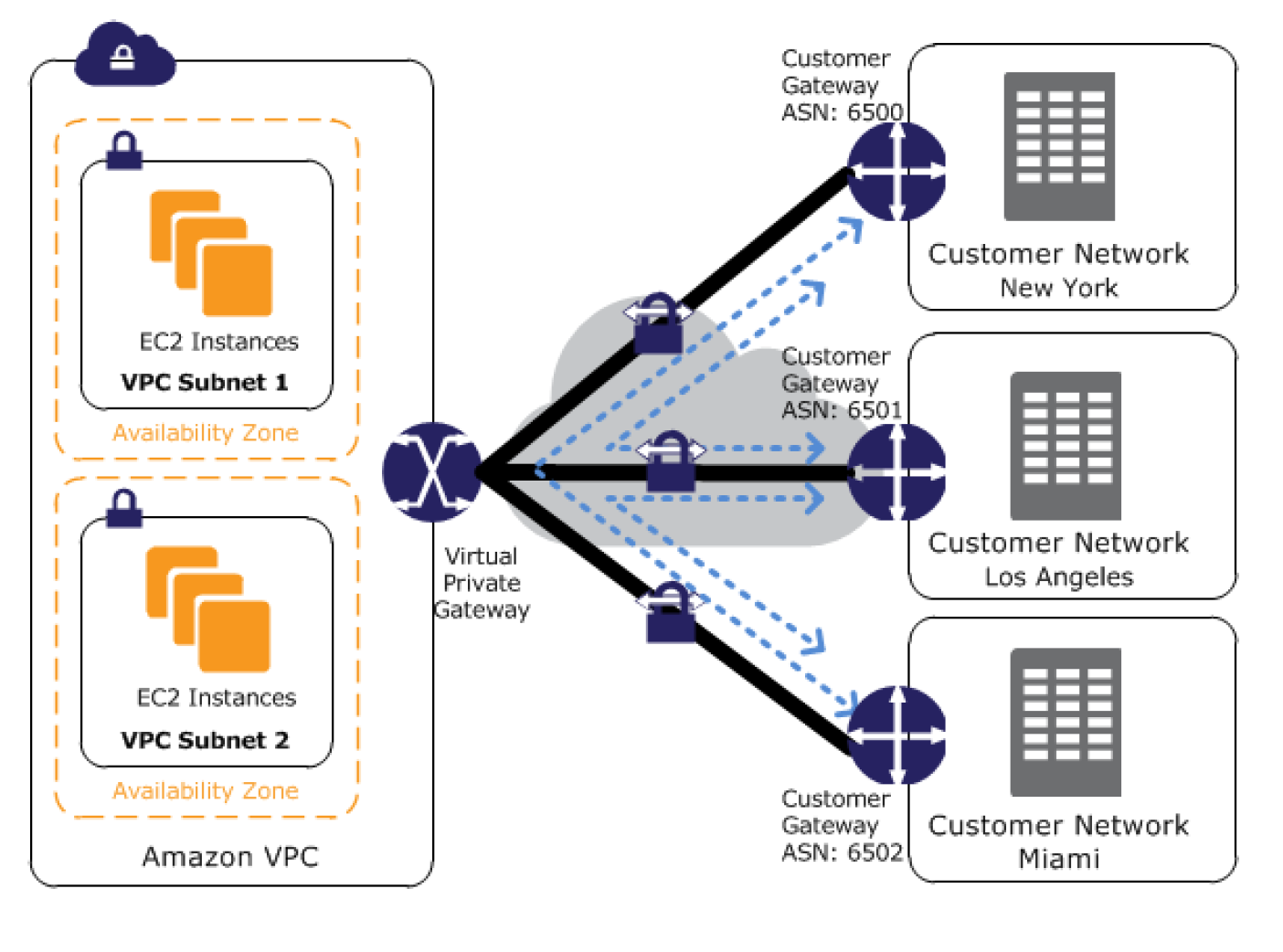
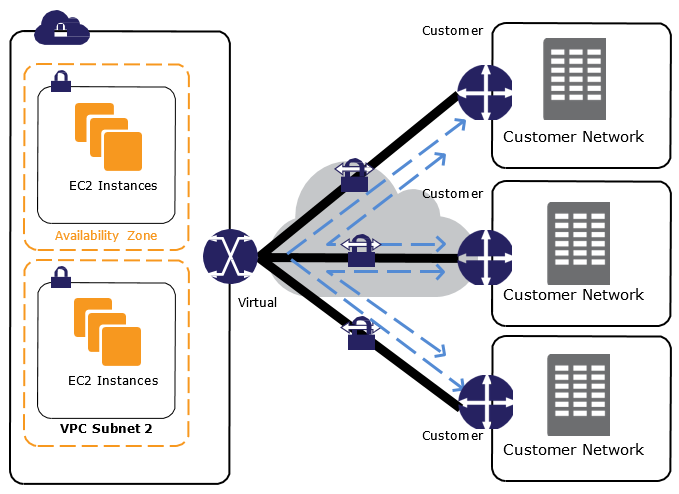
VPN CloudHub architecture with blue dashed lines indicates network
traffic between remote sites being routed over their VPN connections.
AWS VPN CloudHub requires a virtual private gateway with multiple customer gateways.
Each customer gateway must use a unique Border Gateway Protocol (BGP) Autonomous System Number (ASN)
Customer gateways advertise the appropriate routes (BGP prefixes) over their VPN connections.
Routing advertisements are received and re-advertised to each BGP peer, enabling each site to send data to and receive data from the other sites.
Routes for each spoke must have unique ASNs and the sites must not have overlapping IP ranges.
Each site can also send and receive data from the VPC as if they were using a standard VPN connection.
Sites that use AWS Direct Connect connections to the virtual private gateway can also be part of the AWS VPN CloudHub.
To configure the AWS VPN CloudHub,
multiple customer gateways can be created, each with the unique public IP address of the gateway and the ASN.
a VPN connection can be created from each customer gateway to a common virtual private gateway.
each VPN connection must advertise its specific BGP routes. This is done using the network statements in the VPN configuration files for the VPN connection.
Private IP VPN over Direct Connect
AWS Site-to-Site VPN Private IP VPN enables deploying VPN connections over Direct Connect using private IP addresses.
Direct Connect provides a private, dedicated connection but is not encrypted. Private IP VPN adds IPSec encryption to DX traffic.
Requires a Transit Gateway with a Direct Connect Gateway attachment.
Traffic stays on the AWS private network and never traverses the public internet.
Satisfies security and compliance regulations requiring encryption at layer 3 for dedicated connections.
Configuration:
Create or use an existing Transit Gateway with a private IP CIDR block.
Establish a Direct Connect connection and Transit VIF to a Direct Connect Gateway.
Create a Private IP VPN connection specifying private outside IP address type.
Accelerated Site-to-Site VPN
An accelerated VPN connection uses AWS Global Accelerator to route traffic from the on-premises network to the nearest AWS edge location.
Reduces the distance over which data is shared on the internet by leveraging the AWS global fiber network.
Improves performance for VPN connections where the customer gateway is geographically distant from the AWS Region.
Requires a Transit Gateway (not supported on VGW).
Each accelerated VPN connection uses two Global Accelerator resources (one per tunnel).
Default quota: 10 accelerated Site-to-Site VPN connections per Region (adjustable).
Virtual private gateways per Region: 5 (adjustable)
Site-to-Site VPN connections per Region: 50 (adjustable)
Site-to-Site VPN connections per virtual private gateway: 10 (adjustable)
Accelerated VPN connections per Region: 10 (adjustable)
Large Bandwidth Tunnel connections per Region: 50 (adjustable)
VPN Concentrators per Region: 50 (adjustable)
VPN Concentrators per Transit Gateway or Cloud WAN: 5 (adjustable)
Remote sites per VPN Concentrator: 100 (adjustable)
Dynamic routes advertised from CGW to VPN on VGW: 100 (not adjustable)
Routes advertised from VPN on VGW to CGW: 1,000 (not adjustable)
Dynamic routes advertised from CGW to VPN on Transit Gateway: 1,000 (not adjustable)
Routes advertised from VPN on Transit Gateway to CGW: 5,000 (not adjustable)
AWS Certification Exam Practice Questions
Questions are collected from Internet and the answers are marked as per my knowledge and understanding (which might differ with yours).
AWS services are updated everyday and both the answers and questions might be outdated soon, so research accordingly.
AWS exam questions are not updated to keep up the pace with AWS updates, so even if the underlying feature has changed the question might not be updated
Open to further feedback, discussion and correction.
You have in total 5 offices, and the entire employee-related information is stored under AWS VPC instances. Now all the offices want to connect the instances in VPC using VPN. Which of the below help you to implement this?
you can have redundant customer gateways between your data center and your VPC
you can have multiple locations connected to the AWS VPN CloudHub
You have to define 5 different static IP addresses in route table.
1 and 2
1,2 and 3
You have in total of 15 offices, and the entire employee-related information is stored under AWS VPC instances. Now all the offices want to connect the instances in VPC using VPN. What problem do you see in this scenario?
You can not create more than 1 VPN connections with single VPC (Can be created)
You can not create more than 10 VPN connections with single VPC (soft limit can be extended)
When you create multiple VPN connections, the virtual private gateway can not sends network traffic to the appropriate VPN connection using statically assigned routes. (Can route the traffic to correct connection)
Statically assigned routes cannot be configured in case of more than 1 VPN with the virtual private gateway. (can be configured)
None of above
You have been asked to virtually extend two existing data centers into AWS to support a highly available application that depends on existing, on-premises resources located in multiple data centers and static content that is served from an Amazon Simple Storage Service (S3) bucket. Your design currently includes a dual-tunnel VPN connection between your CGW and VGW. Which component of your architecture represents a potential single point of failure that you should consider changing to make the solution more highly available?
Add another VGW in a different Availability Zone and create another dual-tunnel VPN connection.
Add another CGW in a different data center and create another dual-tunnel VPN connection. (Refer link)
Add a second VGW in a different Availability Zone, and a CGW in a different data center, and create another dual-tunnel.
No changes are necessary: the network architecture is currently highly available.
You are designing network connectivity for your fat client application. The application is designed for business travelers who must be able to connect to it from their hotel rooms, cafes, public Wi-Fi hotspots, and elsewhere on the Internet. You do not want to publish the application on the Internet. Which network design meets the above requirements while minimizing deployment and operational costs? [PROFESSIONAL]
Implement AWS Direct Connect, and create a private interface to your VPC. Create a public subnet and place your application servers in it. (High Cost and does not minimize deployment)
Implement Elastic Load Balancing with an SSL listener that terminates the back-end connection to the application. (Needs to be published to internet)
Configure an IPsec VPN connection, and provide the users with the configuration details. Create a public subnet in your VPC, and place your application servers in it. (Instances still in public subnet are internet accessible)
Configure an SSL VPN solution in a public subnet of your VPC, then install and configure SSL VPN client software on all user computers. Create a private subnet in your VPC and place your application servers in it. (Cost effective and can be in private subnet as well. Note: AWS Client VPN is the managed alternative for this use case.)
You are designing a connectivity solution between on-premises infrastructure and Amazon VPC Your server’s on-premises will De communicating with your VPC instances You will De establishing IPSec tunnels over the internet You will be using VPN gateways and terminating the IPsec tunnels on AWS-supported customer gateways. Which of the following objectives would you achieve by implementing an IPSec tunnel as outlined above? (Choose 4 answers) [PROFESSIONAL]
End-to-end protection of data in transit
End-to-end Identity authentication
Data encryption across the Internet
Protection of data in transit over the Internet
Peer identity authentication between VPN gateway and customer gateway
Data integrity protection across the Internet
A development team that is currently doing a nightly six-hour build which is lengthening over time on-premises with a large and mostly under utilized server would like to transition to a continuous integration model of development on AWS with multiple builds triggered within the same day. However, they are concerned about cost, security and how to integrate with existing on-premises applications such as their LDAP and email servers, which cannot move off-premises. The development environment needs a source code repository; a project management system with a MySQL database resources for performing the builds and a storage location for QA to pick up builds from. What AWS services combination would you recommend to meet the development team’s requirements? [PROFESSIONAL]
A Bastion host Amazon EC2 instance running a VPN server for access from on-premises, Amazon EC2 for the source code repository with attached Amazon EBS volumes, Amazon EC2 and Amazon RDS MySQL for the project management system, EIP for the source code repository and project management system, Amazon SQL for a build queue, An Amazon Auto Scaling group of Amazon EC2 instances for performing builds and Amazon Simple Email Service for sending the build output. (Bastion is not for VPN connectivity also SES should not be used)
An AWS Storage Gateway for connecting on-premises software applications with cloud-based storage securely, Amazon EC2 for the resource code repository with attached Amazon EBS volumes, Amazon EC2 and Amazon RDS MySQL for the project management system, EIPs for the source code repository and project management system, Amazon Simple Notification Service for a notification initiated build, An Auto Scaling group of Amazon EC2 instances for performing builds and Amazon S3 for the build output. (Storage Gateway does provide secure connectivity but still needs VPN. SNS alone cannot handle builds)
An AWS Storage Gateway for connecting on-premises software applications with cloud-based storage securely, Amazon EC2 for the resource code repository with attached Amazon EBS volumes, Amazon EC2 and Amazon RDS MySQL for the project management system, EIPs for the source code repository and project management system, Amazon SQS for a build queue, An Amazon Elastic Map Reduce (EMR) cluster of Amazon EC2 instances for performing builds and Amazon CloudFront for the build output. (Storage Gateway does not provide secure connectivity, still needs VPN. EMR is not ideal for performing builds as it needs normal EC2 instances)
A VPC with a VPN Gateway back to their on-premises servers, Amazon EC2 for the source-code repository with attached Amazon EBS volumes, Amazon EC2 and Amazon RDS MySQL for the project management system, EIPs for the source code repository and project management system, SQS for a build queue, An Auto Scaling group of EC2 instances for performing builds and S3 for the build output. (VPN gateway is required for secure connectivity. SQS for build queue and EC2 for builds)
A company has 50 branch offices and wants to connect all of them to AWS. Each branch has bandwidth requirements under 50 Mbps. Which AWS VPN solution is most cost-effective and operationally simple?
Create 50 individual Site-to-Site VPN connections to a Transit Gateway (Works but higher cost and operational overhead with 50 separate VPN connections)
Use a VPN Concentrator on Transit Gateway to connect all branches through a single attachment (VPN Concentrator supports up to 100 sites with under 100 Mbps each, single TGW attachment simplifies management)
Use VPN CloudHub with a Virtual Private Gateway (VPN CloudHub works but limited to VGW capabilities and doesn’t scale as easily)
A company requires encrypted connectivity between their on-premises data center and AWS over their existing Direct Connect connection. The traffic must not traverse the public internet. Which solution meets these requirements?
Configure a standard Site-to-Site VPN over the internet as backup to Direct Connect (Traffic traverses the public internet)
Configure a Private IP VPN connection over Direct Connect using Transit Gateway (Private IP VPN encrypts DX traffic using private IP addresses without internet traversal)
Enable MACsec on Direct Connect and use VGW for VPN termination (MACsec provides L2 encryption but VGW doesn’t support Private IP VPN)
Use AWS Client VPN over Direct Connect (Client VPN is for remote user access, not site-to-site connectivity)
A company needs to migrate large datasets to AWS and requires more than 1.25 Gbps of VPN bandwidth per tunnel. What should they configure?
Create multiple standard VPN connections and enable ECMP on a VGW (VGW does not support ECMP)
Use Accelerated VPN with Global Accelerator to increase per-tunnel bandwidth (Accelerated VPN improves latency but does not increase per-tunnel bandwidth beyond standard limits)
Configure a Large Bandwidth Tunnel VPN connection on Transit Gateway for up to 5 Gbps per tunnel (Large Bandwidth Tunnels support up to 5 Gbps per tunnel on TGW)
Configure Direct Connect with 10 Gbps dedicated connection (Meets bandwidth needs but is not a VPN solution and takes longer to provision)
An organization has VPN connections from multiple branch offices to AWS. The VPN performance is poor because the branches are far from the AWS Region. What can improve VPN performance without changing the on-premises equipment? (Choose 2)
Enable Accelerated VPN using AWS Global Accelerator on Transit Gateway (Routes traffic to the nearest AWS edge location to reduce internet distance)
Enable VPN CloudHub on a Virtual Private Gateway (VPN CloudHub is for inter-site communication, not for improving performance)
Use Large Bandwidth Tunnels (5 Gbps) on Transit Gateway (Higher per-tunnel bandwidth can improve throughput for bandwidth-constrained connections)
Configure Private IP VPN over Direct Connect (Requires Direct Connect infrastructure, changes the connectivity model)
Add more VPN tunnels with ECMP on VGW (VGW does not support ECMP)
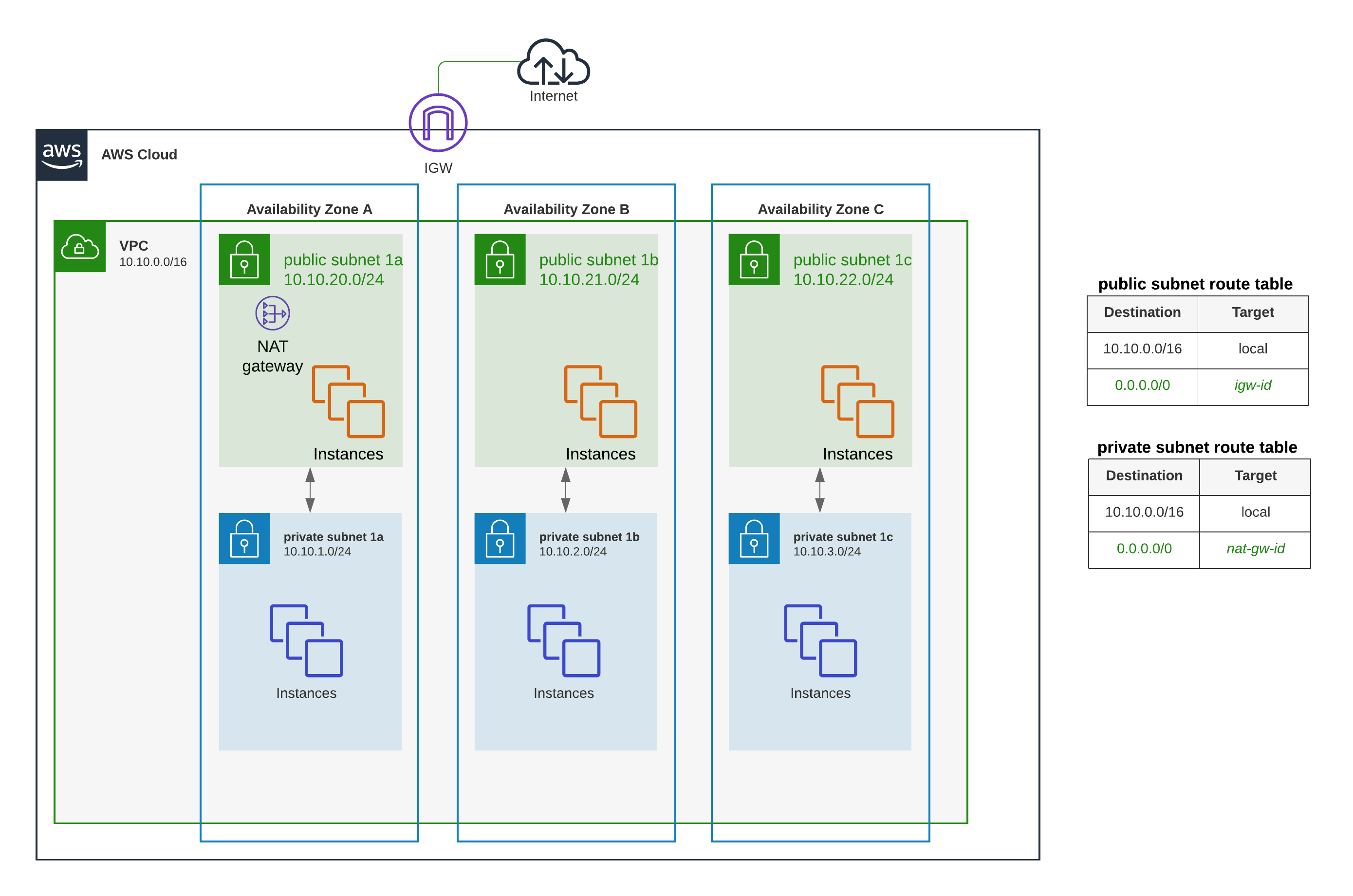
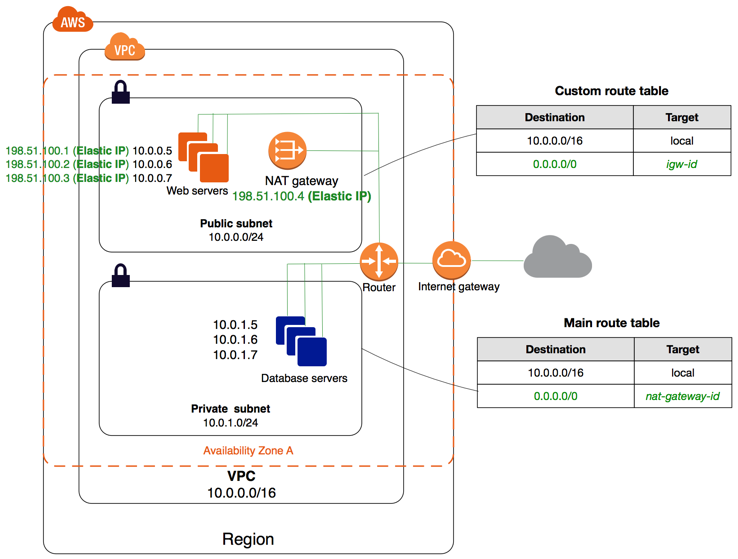
AWS NAT – Network Address Translation devices, launched in the public subnet, enables instances in a private subnet to connect to the Internet but prevents the Internet from initiating connections with the instances.
Instances in private subnets would need an internet connection for performing software updates or trying to access external services.
NAT device performs the function of both address translation and port address translation (PAT)
NAT instance prevents instances to be directly exposed to the Internet and having to be launched in a Public subnet and assigning of the Elastic IP address to all, which are limited.
NAT device routes the traffic, from the private subnet to the Internet, by replacing the source IP address with its address and it translates the address back to the instances’ private IP addresses for the response traffic.
AWS allows NAT configuration in 2 ways
NAT Gateway, managed service by AWS (recommended)
NAT Instance (legacy, not recommended)
NAT Gateway
NAT gateway is an AWS managed NAT service that provides better availability, higher bandwidth, and requires less administrative effort.
A NAT gateway supports 5 Gbps of bandwidth and automatically scales up to 100 Gbps. For higher bursts requirements, the workload can be distributed by splitting the resources into multiple subnets and creating a NAT gateway in each subnet.
A NAT gateway can process one million packets per second and automatically scales up to ten million packets per second. Beyond this limit, a NAT gateway will drop packets.
Each NAT gateway is created in a specific Availability Zone and implemented with redundancy in that zone (for zonal NAT gateways).
A NAT gateway supports the TCP, UDP, and ICMP protocols.
NAT gateways are supported for IPv4 or IPv6 traffic. For IPv6 traffic, NAT gateway performs NAT64. By using this in conjunction with DNS64 (available on Route 53 Resolver), IPv6 workloads in a subnet can communicate with IPv4 resources.
NAT gateway cannot be associated with a security group. Security can be configured for the instances in the private subnets to control the traffic.
Network ACL can be used to control the traffic to and from the subnet. NACL applies to the NAT gateway’s traffic, which uses ports 1024-65535
NAT gateway when created receives an elastic network interface that’s automatically assigned a private IP address from the IP address range of the subnet. Attributes of this network interface cannot be modified.
NAT gateway cannot send traffic over VPC endpoints, VPN connections, AWS Direct Connect, or VPC peering connections. The private subnet’s route table should be modified to route the traffic directly to these devices.
NAT gateway can route traffic to Transit Gateways and virtual private gateways (for private NAT gateways) or through Transit Gateway for Site-to-Site VPN/Direct Connect traffic.
NAT gateway times out the connection if it is idle for 350 seconds or more. To prevent the connection from being dropped, initiate more traffic over the connection or enable TCP keepalive on the instance with a value of less than 350 seconds.
NAT gateways currently do not support the IPsec protocol.
NAT gateways support traffic with a maximum transmission unit (MTU) of 8500 bytes.
Each IPv4 address can support up to 55,000 simultaneous connections to each unique destination. You can increase this limit by associating up to 8 IPv4 addresses to your NAT gateways (1 primary IPv4 address and 7 secondary IPv4 addresses). By default, you can associate up to 2 Elastic IP addresses per public NAT gateway (quota increase available).
NAT Gateway Types
Public NAT Gateway
Enables instances in private subnets to connect to the internet
Requires an Elastic IP address
Must be created in a public subnet (for zonal mode)
Supports up to 8 IPv4 addresses (1 primary + 7 secondary)
Private NAT Gateway
Enables instances in private subnets to connect to other VPCs or on-premises networks via Transit Gateway or virtual private gateway
Does not require an Elastic IP address
Uses private IP address for source NAT
Cannot be used for internet connectivity
Useful for communication between VPCs with overlapping CIDR ranges
Regional NAT Gateway (Announced November 2025)
A regional NAT gateway automatically expands across Availability Zones based on workload presence, unlike standard zonal NAT gateways which operate in a single AZ.
Does not require a public subnet – creates its own route table with a pre-configured route to the internet gateway.
Provides automatic high availability without manual multi-AZ configuration.
Simplifies setup – no need to create/delete NAT Gateways or edit route tables when workloads expand to new AZs.
Supports up to 32 IP addresses per Availability Zone (compared to 8 for zonal NAT gateways).
May take up to 60 minutes to expand to a new AZ after a resource is launched there.
Supports two modes:
Automatic mode – AWS manages IP addresses and AZ expansion (recommended)
Manual mode – You manually manage IP addresses and control AZ expansion/contraction
Supports AWS Transit Gateway as a valid route in the regional NAT gateway route table.
Does not support private NAT connectivity (use zonal NAT gateways for private NAT use cases).
Available in all commercial AWS Regions (except AWS GovCloud and China Regions).
Regional NAT Gateway vs Zonal NAT Gateway
Zonal NAT Gateway (Traditional)
Created in a specific Availability Zone
Requires a public subnet in each AZ for high availability
Requires manual creation of NAT Gateway in each AZ
Requires route table updates for each AZ
Supports up to 8 IP addresses
Supports both public and private connectivity types
Best for: Predictable, static workloads; private NAT use cases
Regional NAT Gateway
Automatically spans all AZs based on workload presence
No public subnet required
Single NAT Gateway resource to manage
Automatic routing across AZs
Supports up to 32 IP addresses per AZ
Public connectivity only (no private NAT support)
Best for: Dynamic workloads that scale across AZs, simplified management, new deployments
NAT Instance
⚠️ NAT Instance – Legacy (Not Recommended)
The NAT AMI is built on the last version of Amazon Linux AMI, 2018.03, which reached end of standard support on December 31, 2020 and end of maintenance support on December 31, 2023.
AWS recommends migrating to a NAT Gateway for better availability, higher bandwidth, and less administrative effort.
If NAT instances are required for your use case (e.g., cost optimization for non-production environments), you can create your own NAT AMI from a current version of Amazon Linux.
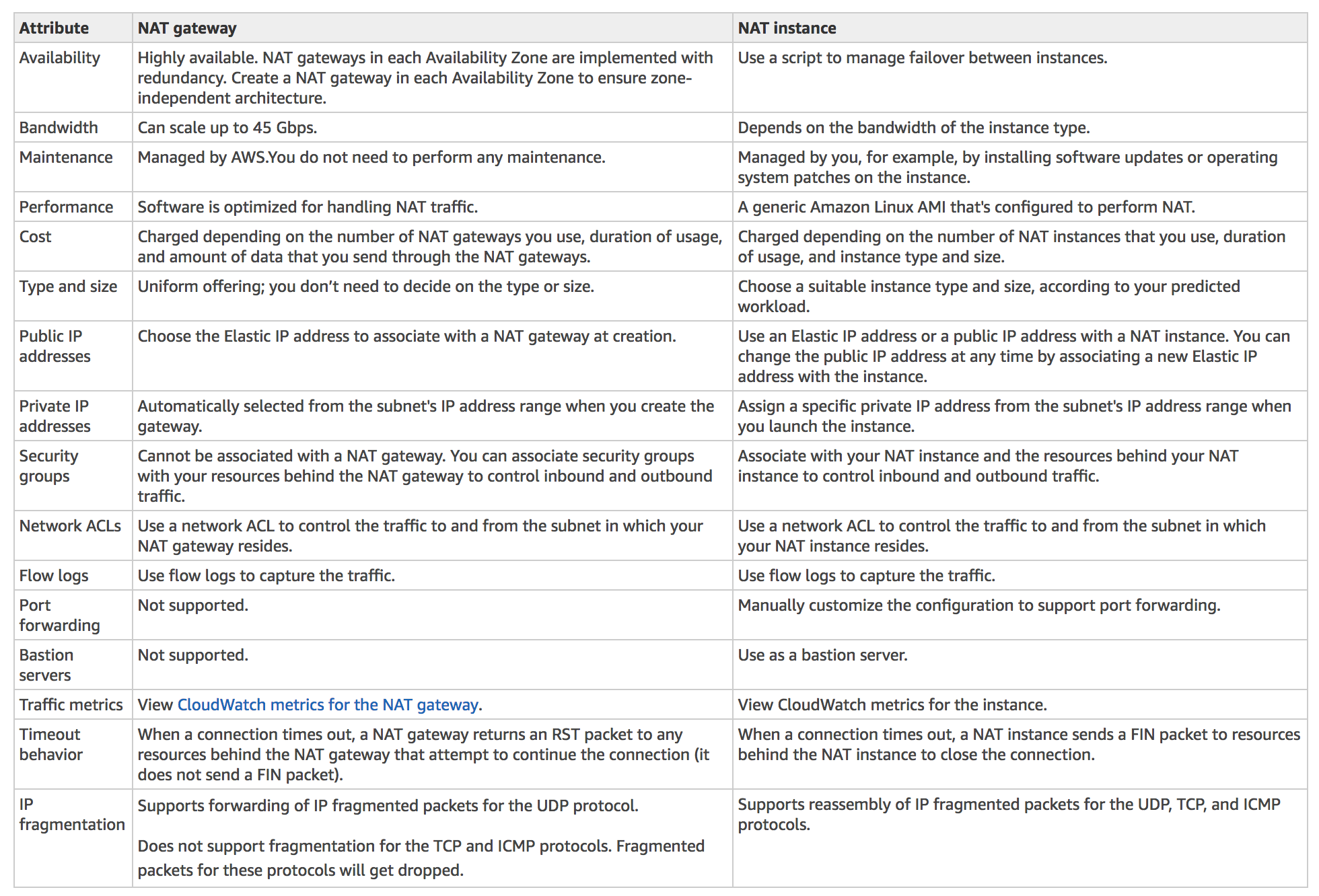
NAT Gateway vs NAT Instance
AWS Certification Exam Practice Questions
Questions are collected from Internet and the answers are marked as per my knowledge and understanding (which might differ with yours).
AWS services are updated everyday and both the answers and questions might be outdated soon, so research accordingly.
AWS exam questions are not updated to keep up the pace with AWS updates, so even if the underlying feature has changed the question might not be updated
Open to further feedback, discussion and correction.
After launching an instance that you intend to serve as a NAT (Network Address Translation) device in a public subnet you modify your route tables to have the NAT device be the target of internet bound traffic of your private subnet. When you try and make an outbound connection to the Internet from an instance in the private subnet, you are not successful. Which of the following steps could resolve the issue?
Attaching a second Elastic Network interface (ENI) to the NAT instance, and placing it in the private subnet
Attaching an Elastic IP address to the instance in the private subnet
Attaching a second Elastic Network Interface (ENI) to the instance in the private subnet, and placing it in the public subnet
Disabling the Source/Destination Check attribute on the NAT instance
You manually launch a NAT AMI in a public subnet. The network is properly configured. Security groups and network access control lists are property configured. Instances in a private subnet can access the NAT. The NAT can access the Internet. However, private instances cannot access the Internet. What additional step is required to allow access from the private instances?
Enable Source/Destination Check on the private Instances.
Enable Source/Destination Check on the NAT instance.
Disable Source/Destination Check on the private instances
Disable Source/Destination Check on the NAT instance
A user has created a VPC with public and private subnets. The VPC has CIDR 20.0.0.0/16. The private subnet uses CIDR 20.0.1.0/24 and the public subnet uses CIDR 20.0.0.0/24. The user is planning to host a web server in the public subnet (port 80. and a DB server in the private subnet (port 3306.. The user is configuring a security group of the NAT instance. Which of the below mentioned entries is not required for the NAT security group?
For Inbound allow Source: 20.0.1.0/24 on port 80
For Outbound allow Destination: 0.0.0.0/0 on port 80
For Outbound allow Destination: 0.0.0.0/0 on port 443
A web company is looking to implement an external payment service into their highly available application deployed in a VPC. Their application EC2 instances are behind a public facing ELB. Auto scaling is used to add additional instances as traffic increases. Under normal load the application runs 2 instances in the Auto Scaling group but at peak it can scale 3x in size. The application instances need to communicate with the payment service over the Internet, which requires whitelisting of all public IP addresses used to communicate with it. A maximum of 4 whitelisting IP addresses are allowed at a time and can be added through an API. How should they architect their solution?
Route payment requests through two NAT instances setup for High Availability and whitelist the Elastic IP addresses attached to the NAT instances
Whitelist the VPC Internet Gateway Public IP and route payment requests through the Internet Gateway. (Internet gateway is only to route traffic)
Whitelist the ELB IP addresses and route payment requests from the Application servers through the ELB. (ELB does not have a fixed IP address)
Automatically assign public IP addresses to the application instances in the Auto Scaling group and run a script on boot that adds each instances public IP address to the payment validation whitelist API. (would exceed the allowed 4 IP addresses)
A company needs to provide internet access to instances in private subnets across multiple Availability Zones with automatic high availability and simplified management. Which NAT Gateway option should they use?
Create a public NAT Gateway in each Availability Zone
Create a Regional NAT Gateway that automatically spans all Availability Zones
Create a private NAT Gateway in each Availability Zone
Use NAT instances with Auto Scaling
An organization has two VPCs with overlapping CIDR ranges that need to communicate with each other through a Transit Gateway. Which NAT Gateway type should be used to enable this communication?
Public NAT Gateway with Elastic IP addresses
Regional NAT Gateway in automatic mode
Private NAT Gateway connected to a Transit Gateway
NAT Instance with Source/Destination Check disabled
A company’s NAT Gateway is experiencing port exhaustion when communicating with a popular third-party API endpoint. What is the most effective solution to increase the number of simultaneous connections?
Create multiple NAT Gateways in the same subnet
Associate secondary IPv4 addresses with the NAT Gateway to increase the connection limit
Increase the NAT Gateway bandwidth allocation
Replace the NAT Gateway with a NAT Instance using a larger instance type
is a horizontally scaled, redundant, and highly available component that allows communication between instances in your VPC and the internet.
imposes no availability risks or bandwidth constraints on your network traffic.
serves two purposes: to provide a target in the VPC route tables for internet-routable traffic and to perform NAT for instances that have not been assigned public IPv4 addresses.
enables instances in a private subnet to connect to the internet or other AWS services, but prevents the Internet from initiating connections with the instances.
Private NAT gateway allows instances in private subnets to connect to other VPCs or the on-premises network.
Egress Only Internet Gateway
NAT devices are not supported for IPv6 traffic, use an Egress-only Internet gateway instead
Egress-only Internet gateway is a horizontally scaled, redundant, and highly available VPC component that
Egress-only Internet gateway allows outbound communication over IPv6 from instances in the VPC to the Internet and prevents the Internet from initiating an IPv6 connection with your instances.
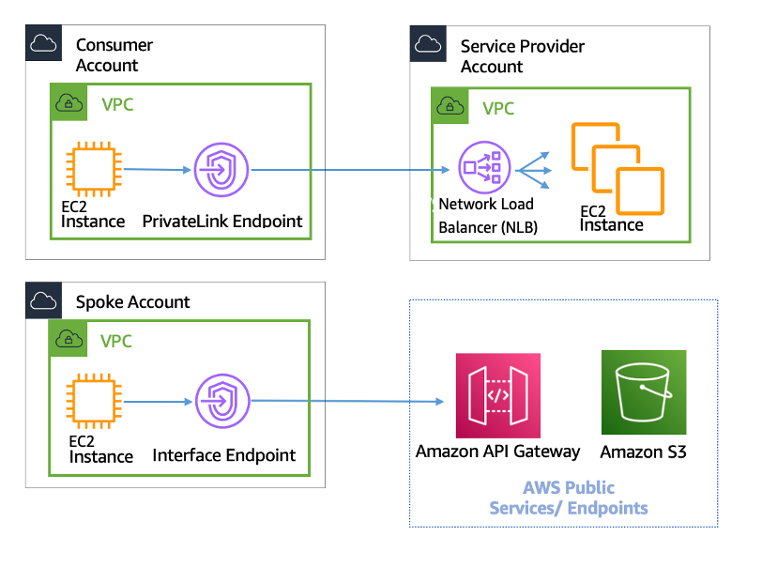
VPC endpoint provides a private connection from VPC to supported AWS services and VPC endpoint services powered by PrivateLink without requiring an internet gateway, NAT device, VPN connection, or AWS Direct Connect connection.
Instances in the VPC do not require public IP addresses to communicate with resources in the service. Traffic between the VPC and the other service does not leave the Amazon network.
VPC Endpoints are virtual devices and are horizontally scaled, redundant, and highly available VPC components that allow communication between instances in the VPC and services without imposing availability risks or bandwidth constraints on the network traffic.
VPC Endpoints are of two types
Interface Endpoints – is an elastic network interface with a private IP address that serves as an entry point for traffic destined to supported services.
Gateway Endpoints – is a gateway that is a target for a specified route in your route table, used for traffic destined to a supported AWS service. Currently only Amazon S3 and DynamoDB.
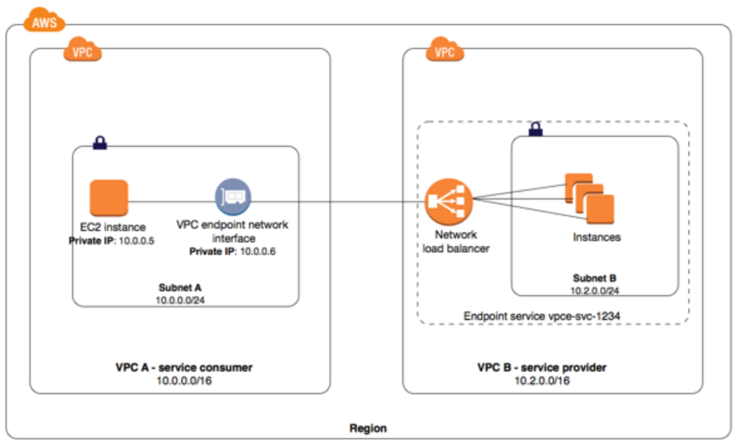
provides private connectivity between VPCs, AWS services, and your on-premises networks without exposing your traffic to the public internet.
helps privately expose a service/application residing in one VPC (service provider) to other VPCs (consumer) within an AWS Region in a way that only consumer VPCs initiate connections to the service provider VPC.
With ALB as a target of NLB, ALB’s advanced routing capabilities can be combined with AWS PrivateLink.
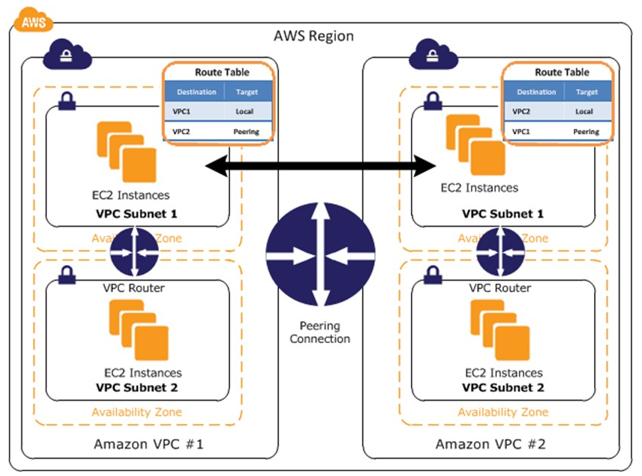
enables networking connection between two VPCs to route traffic between them using private IPv4 addresses or IPv6 addresses
connections can be created between your own VPCs, or with a VPC in another AWS account.
enables full bidirectional connectivity between the VPCs
supports inter-region VPC peering connection
uses existing underlying AWS infrastructure
does not have a single point of failure for communication or a bandwidth bottleneck.
VPC Peering connections have limitations
cannot be used with Overlapping CIDR blocks
does not provide Transitive peering
does not support Edge to Edge routing through Gateway or private connection
is best used when resources in one VPC must communicate with resources in another VPC, the environment of both VPCs is controlled and secured, and the number of VPCs to be connected is less than 10
VPN CloudHub
AWS VPN CloudHub allows you to securely communicate from one site to another using AWS Managed VPN or Direct Connect
AWS VPN CloudHub operates on a simple hub-and-spoke model that can be used with or without a VPC
AWS VPN CloudHub can be used if you have multiple branch offices and existing internet connections and would like to implement a convenient, potentially low cost hub-and-spoke model for primary or backup connectivity between these remote offices.
AWS VPN CloudHub leverages VPC virtual private gateway with multiple gateways, each using unique BGP autonomous system numbers (ASNs).
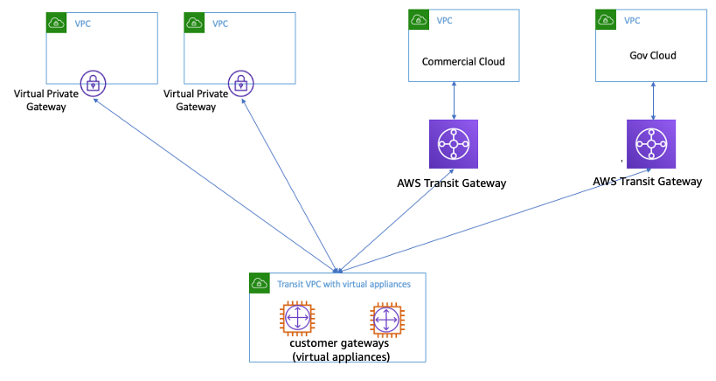
A transit VPC is a common strategy for connecting multiple, geographically disperse VPCs and remote networks in order to create a global network transit center.
A transit VPC simplifies network management and minimizes the number of connections required to connect multiple VPCs and remote networks
Transit VPC can be used to support important use cases
Private Networking – You can build a private network that spans two or more AWS Regions.
Shared Connectivity – Multiple VPCs can share connections to data centers, partner networks, and other clouds.
Cross-Account AWS Usage – The VPCs and the AWS resources within them can reside in multiple AWS accounts.
Transit VPC design helps implement more complex routing rules, such as network address translation between overlapping network ranges, or to add additional network-level packet filtering or inspection.
Transit VPC
supports Transitive routing using the overlay VPN network — allowing for a simpler hub and spoke design. Can be used to provide shared services for VPC Endpoints, Direct Connect connection, etc.
supports network address translation between overlapping network ranges.
supports vendor functionality around advanced security (layer 7 firewall/Intrusion Prevention System (IPS)/Intrusion Detection System (IDS) ) using third-party software on EC2
leverages instance-based routing that increases costs while lowering availability and limiting the bandwidth.
Customers are responsible for managing the HA and redundancy of EC2 instances running the third-party vendor virtual appliance
VPC provides the option of creating an IPsec VPN connection between remote customer networks and their VPC over the internet
AWS managed VPN endpoint includes automated multi–data center redundancy & failover built into the AWS side of the VPN connection
AWS managed VPN consists of two parts
Virtual Private Gateway (VPG) on AWS side
Customer Gateway (CGW) on the on-premises data center
AWS Managed VPN only provides Site-to-Site VPN connectivity. It does not provide Point-to-Site VPC connectivity for e.g. from Mobile
Virtual Private Gateway are Highly Available as it represents two distinct VPN endpoints, physically located in separate data centers to increase the availability of the VPN connection.
High Availability on the on-premises data center must be handled by creating additional Customer Gateway.
AWS Managed VPN connections are low cost, quick to setup and start with compared to Direct Connect. However, they are not reliable as they traverse through Internet.
Software VPN
VPC offers the flexibility to fully manage both sides of the VPC connectivity by creating a VPN connection between your remote network and a software VPN appliance running in your VPC network.
Software VPNs help manage both ends of the VPN connection either for compliance purposes or for leveraging gateway devices that are not currently supported by Amazon VPC’s VPN solution.
Software VPNs allows you to handle Point-to-Site connectivity
Software VPNs, with the above design, introduces a single point of failure and needs to be handled.
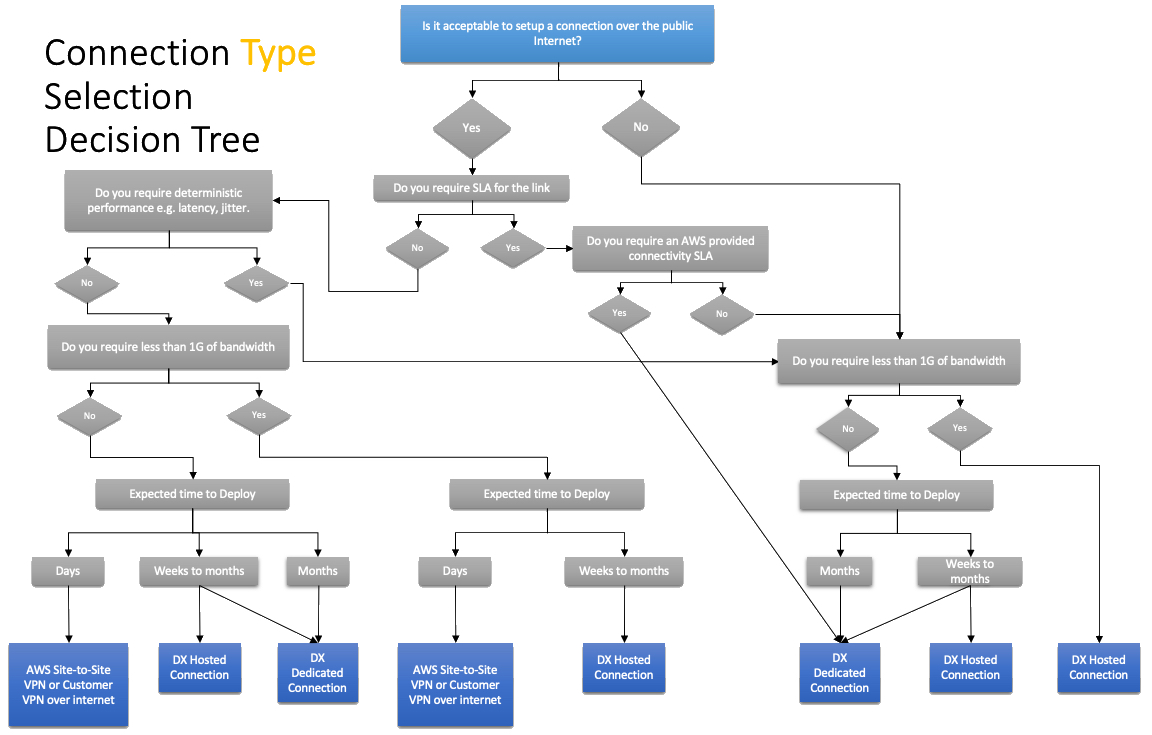
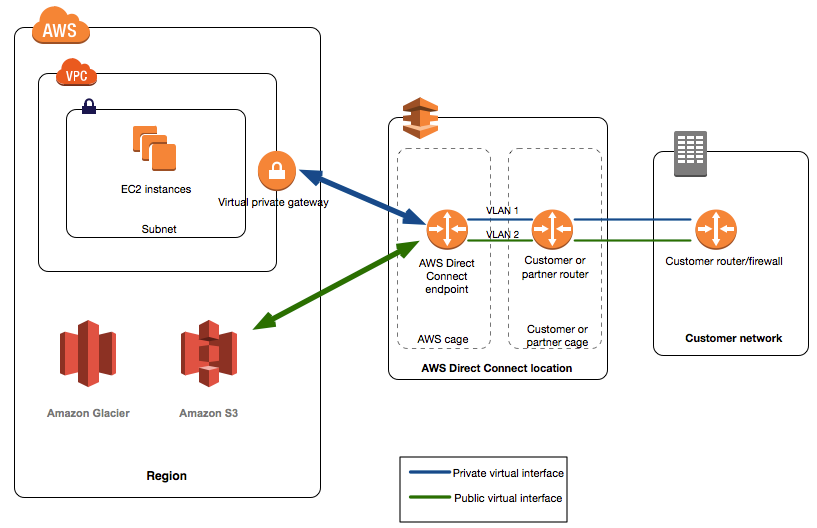
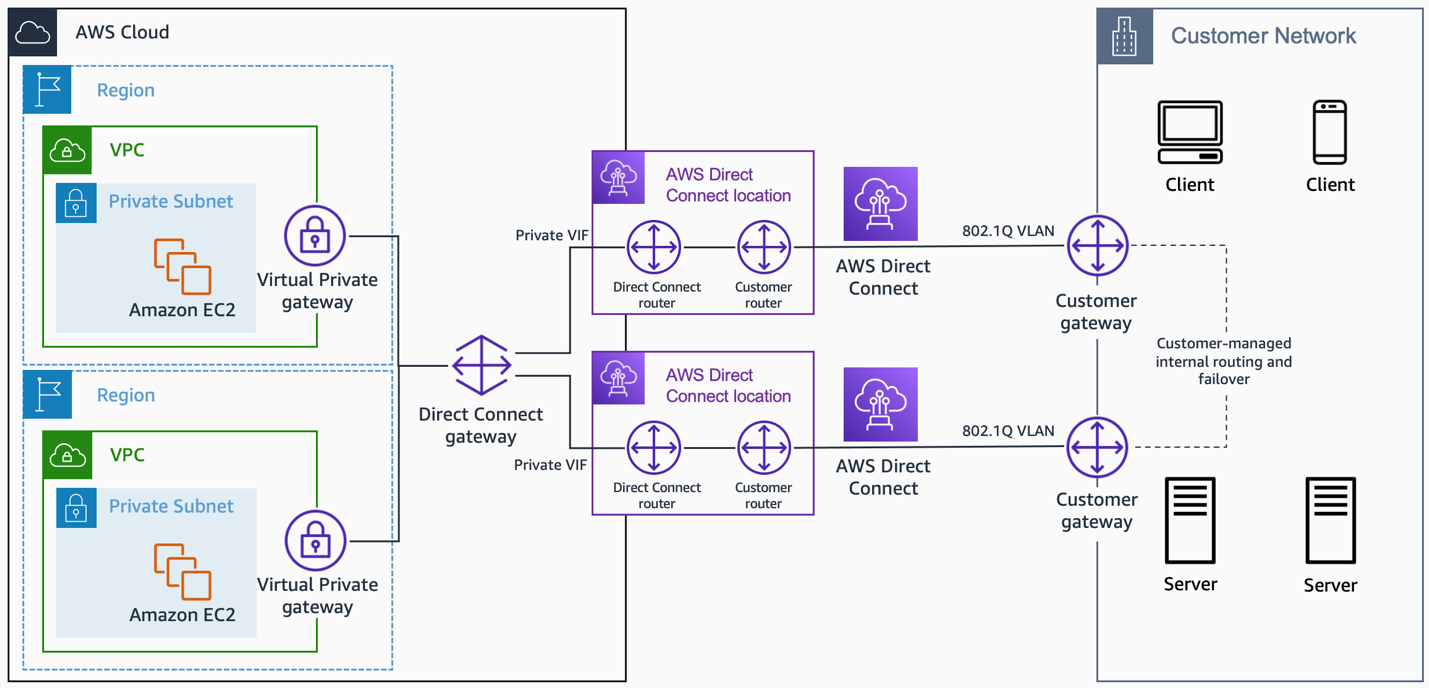
AWS Direct Connect helps establish a dedicated private connection between an on-premises network and AWS.
Direct Connect can reduce network costs, increase bandwidth throughput, and provide a more consistent network experience than internet-based or VPN connections
Direct Connect uses industry-standard VLANs to access EC2 instances running within a VPC using private IP addresses
Direct Connect lets you establish
Dedicated Connection: A 1G, 10G, or 100G physical Ethernet connection associated with a single customer through AWS.
Hosted Connection: A 1G or 10G physical Ethernet connection that an AWS Direct Connect Partner provisions on behalf of a customer.
Direct Connect provides the following Virtual Interfaces
Private virtual interface – to access a VPC using private IP addresses.
Public virtual interface – to access all AWS public services using public IP addresses.
Transit virtual interface – to access one or more transit gateways associated with Direct Connect gateways.
Direct Connect connections are not redundant as each connection consists of a single dedicated connection between ports on your router and an Amazon router
Direct Connect High Availability can be configured using
Multiple Direct Connect connections
Back-up IPSec VPN connection
LAGs
Direct Connect link aggregation group (LAG) is a logical interface that uses the Link Aggregation Control Protocol (LACP) to aggregate multiple connections at a single AWS Direct Connect endpoint, allowing you to treat them as a single, managed connection.
LAGs need the following
All connections in the LAG must use the same bandwidth.
A maximum of four connections in a LAG. Each connection in the LAG counts toward the overall connection limit for the Region.
All connections in the LAG must terminate at the same AWS Direct Connect endpoint.