RDS creates a storage volume snapshot of the DB instance, backing up the entire DB instance and not just individual databases.
RDS provides two different methods Automated and Manual for backing up the DB instances.
RDS backups are stored securely in Amazon S3.
Automated backups
Backups of the DB instance are automatically created and retained.
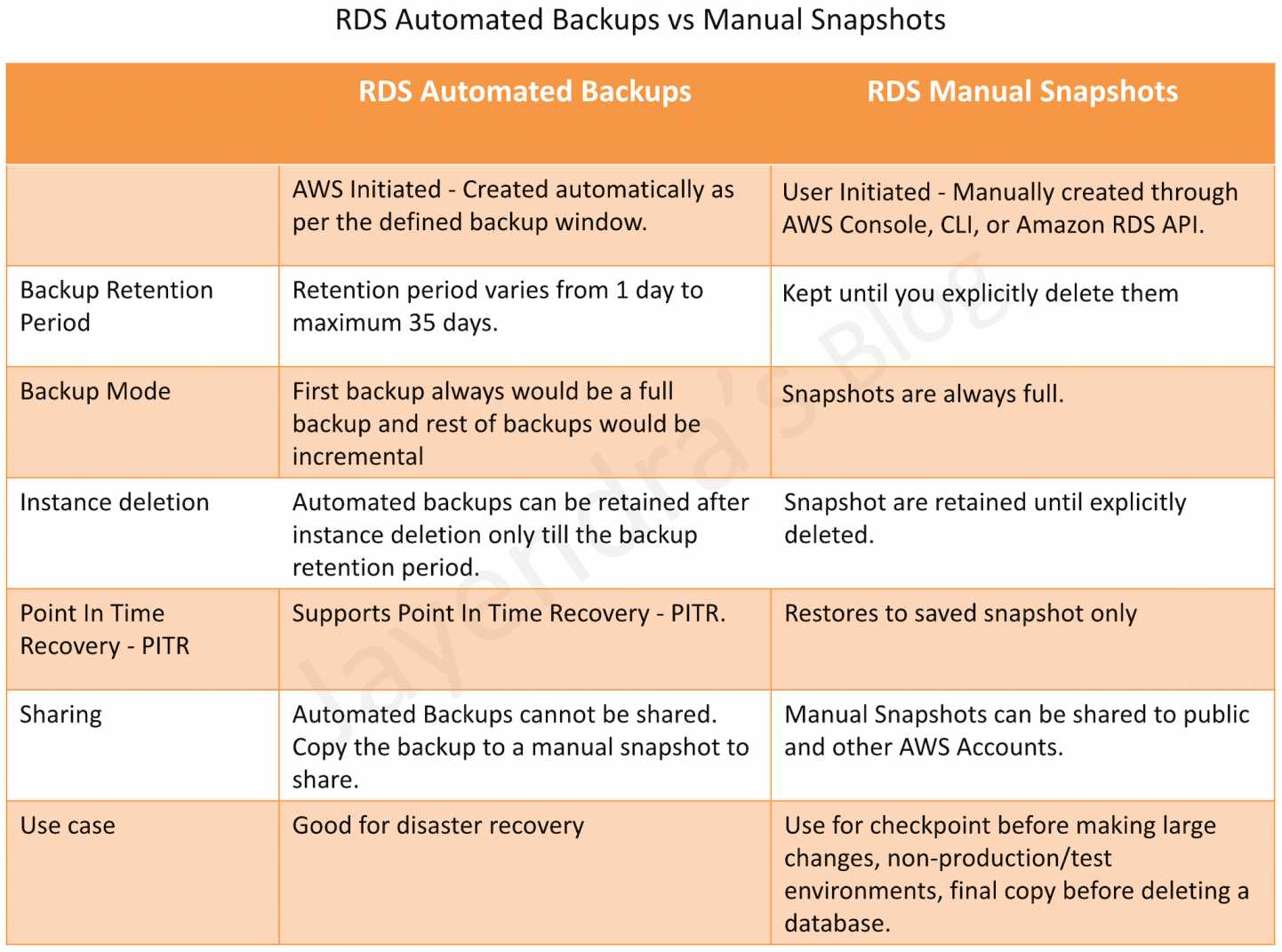
RDS Backups are incremental. The first snapshot of a DB instance contains the data for the full database. Subsequent snapshots of the same database are incremental, which means that only the data that has changed after your most recent snapshot is saved.
Automated backups are enabled by default for a new DB instance.
Automated backups occur during a daily user-configurable period of time, known as the preferred backup window.
If a preferred backup window is not specified when a DB instance is created, RDS assigns a default 30-minute backup window which is selected at random from an 8-hour block of time per region.
Changes to the backup window take effect immediately.
Backup window cannot overlap with the weekly maintenance window for the DB instance.
Backups created during the backup window are retained for a user-configurable number of days, known as the backup retention period
If the backup retention period is not set, RDS defaults the period retention period to one day, if created using RDS API or the AWS CLI, or seven days if created from AWS Console.
Backup retention period can be modified with valid values are 0 (for no backup retention) to a maximum of 35 days.
Manual snapshot limits (100 per region) do not apply to automated backups.
If the backup requires more time than allotted to the backup window, the backup will continue to completion.
An immediate outage occurs if the backup retention period is changed
from 0 to a non-zero value as the first backup occurs immediately or
from a non-zero value to 0 as it turns off automatic backups, and deletes all existing automated backups for the instance.
RDS uses the periodic data backups in conjunction with the transaction logs to enable restoration of the DB Instance to any second during the retention period, up to the LatestRestorableTime (typically up to the last few minutes).
During the backup window,
for Single AZ instance, storage I/O may be briefly suspended while the backup process initializes (typically under a few seconds) and a brief period of elevated latency might be experienced.
for Multi-AZ DB deployments, there is No I/O suspension since the backup is taken from the standby instance
The first backup is a full backup, while the others are incremental.
Automated backups don’t occur while a DB snapshot copy is running in the same AWS Region for the same database.
Automated DB backups are deleted when
the retention period expires
the automated DB backups for a DB instance are disabled
the DB instance is deleted
When a DB instance is deleted,
a final DB snapshot can be created upon deletion; which can be used to restore the deleted DB instance at a later date.
RDS retains the final user-created DB snapshot along with all other manually created DB snapshots
all automated backups are deleted and cannot be recovered
NOTE: RDS can be configured to retain the automated backups on RDS instance deletion.
For the MySQL DB engine, automated backups are only supported for the InnoDB storage engine. Use of these features with other MySQL storage engines, including MyISAM, can lead to unreliable behavior while restoring from backups.
Point-In-Time Recovery
In addition to the daily automated backup, RDS archives database change logs. This enables recovery of the database to any point in time during the backup retention period, up to the last five minutes of database usage.
Disabling automated backups also disables point-in-time recovery
RDS stores multiple copies of the data, but for Single-AZ DB instances these copies are stored in a single availability zone.
If for any reason a Single-AZ DB instance becomes unusable, point-in-time recovery can be used to launch a new DB instance with the latest restorable data
Cross-Region Automated Backup Replication
RDS supports replicating automated backups to another AWS Region for disaster recovery.
With Cross-Region Automated Backup replication, RDS replicates snapshots and transaction logs to the chosen destination AWS Region.
In the event the primary AWS Region becomes unavailable, the automated backup can be restored to a point in time in the secondary AWS Region to quickly resume operations.
You can replicate up to 20 backups to each destination AWS Region for each AWS account.
Cross-Region automated backup replication is not supported for Multi-AZ DB clusters.
Provides cross-Region DR capability with RPO of minutes.
Available for RDS for MySQL, PostgreSQL, MariaDB, Oracle, SQL Server, and Db2.
DB Snapshots (User Initiated – Manual)
DB snapshots are manual, user-initiated backups that enable a DB instance backup to a known state, and restore to that specific state at any time.
RDS keeps all manual DB snapshots until explicitly deleted.
Manual DB snapshots have a limit of 100 per region (can be increased by requesting a quota increase).
DB Snapshots Creation
DB snapshot is a user-initiated storage volume snapshot of DB instance, backing up the entire DB instance and not just individual databases.
DB snapshots enable backing up of the DB instance in a known state as needed, and can then be restored to that specific state at any time.
DB snapshots are kept until explicitly deleted.
Creating DB snapshot on a Single-AZ DB instance results in a brief I/O suspension that typically lasts no more than a few minutes.
Multi-AZ DB instances are not affected by this I/O suspension since the backup is taken on the standby instance
DB Snapshot Restore
DB instance can be restored to any specific time during this retention period, creating a new DB instance.
DB restore creates a New DB instance with a different endpoint.
RDS uses the periodic data backups in conjunction with the transaction logs to enable restoration of the DB Instance to any second during the retention period, up to the LatestRestorableTime (typically up to the last few minutes).
Option group associated with the DB snapshot is associated with the restored DB instance once it is created. However, the option group is associated with the VPC, so would apply only when the instance is restored in the same VPC as the DB snapshot.
Default DB parameter and security groups are associated with the restored instance. After the restoration is complete, any custom DB parameter or security groups used by the restored instance should be associated explicitly.
A DB instance can be restored with a different storage type than the source DB snapshot. In this case, the restoration process will be slower because of the additional work required to migrate the data to the new storage type e.g. from GP2 to Provisioned IOPS
A DB instance can be restored with a different edition of the DB engine only if the DB snapshot has the required storage allocated for the new edition for e.g., to change from SQL Server Web Edition to SQL Server Standard Edition, the DB snapshot must have been created from a SQL Server DB instance that had at least 200 GB of allocated storage, which is the minimum allocated storage for SQL Server Standard edition
NEW (Feb 2026): RDS now supports viewing and modifying backup retention period and preferred backup window settings prior to and upon restoring database snapshots, providing visibility into backup configurations before initiating restore operations.
DB Snapshot Copy
RDS supports two types of DB snapshot copying.
Copy an automated DB snapshot to create a manual DB snapshot in the same AWS region. Manual DB snapshots are not deleted automatically and can be kept indefinitely.
Copy either an automated or manual DB snapshot from one region to another region. By copying the DB snapshot to another region, a manual DB snapshot is created that is retained in that region
For each AWS account, you can copy up to 20 DB snapshots at a time from one AWS Region to another.
Automated backups cannot be shared. They need to be copied to a manual snapshot, and the manual snapshot can be shared.
Manual DB snapshots can be shared with other AWS accounts and snapshots shared can be copied by other AWS accounts.
Snapshot Copy Encryption
DB snapshot that has been encrypted using an AWS Key Management Service (AWS KMS) encryption key can be copied.
Copying an encrypted DB snapshot results in an encrypted copy of the DB snapshot
When copying, DB snapshot can either be encrypted with the same KMS encryption key as the original DB snapshot, or a different KMS encryption key to encrypt the copy of the DB snapshot.
An unencrypted DB snapshot can be copied to an encrypted snapshot, a quick way to add encryption to a previously unencrypted DB instance.
Encrypted snapshot can be restored only to an encrypted DB instance.
If a KMS encryption key is specified when restoring from an unencrypted DB cluster snapshot, the restored DB cluster is encrypted using the specified KMS encryption key.
Copying an encrypted snapshot shared from another AWS account requires access to the KMS encryption key that was used to encrypt the DB snapshot.
AWS supports copying encrypted DB snapshots between accounts and across multiple regions seamlessly.
NEW (Oct 2025): AWS Backup now supports copying database snapshots across AWS Regions and accounts using a single copy action. This feature supports Amazon RDS, Aurora, Neptune, and DocumentDB snapshots, eliminating the need for sequential copying steps.
DB Snapshot Sharing
Manual DB snapshots or DB cluster snapshots can be shared with up to 20 other AWS accounts.
Manual snapshots shared with other AWS accounts can copy the snapshot, or restore a DB instance or DB cluster from that snapshot.
Manual snapshots can also be shared as public, which makes the snapshot available to all AWS accounts. Care should be taken when sharing a snapshot as public so that none of the private information is included
Shared snapshot can be copied to another region.
However, following limitations apply when sharing manual snapshots with other AWS accounts:
When a DB instance or DB cluster is restored from a shared snapshot using the AWS CLI or RDS API, the Amazon Resource Name (ARN) of the shared snapshot as the snapshot identifier should be specified.
DB snapshot that uses an option group with permanent or persistent options cannot be shared.
A permanent option cannot be removed from an option group. Option groups with persistent options cannot be removed from a DB instance once the option group has been assigned to the DB instance.
DB snapshots that have been encrypted “at rest” using the AES-256 encryption algorithm can be shared
Users can only copy encrypted DB snapshots if they have access to the AWS Key Management Service (AWS KMS) encryption key that was used to encrypt the DB snapshot.
AWS KMS encryption keys can be shared with another AWS account by adding the other account to the KMS key policy.
However, KMS key policy must first be updated by adding any accounts to share the snapshot with, before sharing an encrypted DB snapshot
NEW (2026): RDS for Oracle and SQL Server now support cross-account snapshot sharing for database instances with additional storage volumes (up to 256 TiB total across multiple volumes).
DB Snapshot Export to S3
RDS can export DB snapshot data to an Amazon S3 bucket in Apache Parquet format.
Supported engines: RDS for PostgreSQL, RDS for MySQL, RDS for MariaDB, Aurora PostgreSQL-Compatible, and Aurora MySQL.
By default, all data in the snapshot is exported. However, you can choose to export specific sets of databases, schemas, or tables.
After export, the data can be analyzed directly using tools like Amazon Athena or Amazon Redshift Spectrum.
Useful for data archiving, compliance, analytics, and machine learning use cases.
Export eliminates the need to restore a snapshot to query data, reducing costs and complexity.
Supported for Multi-AZ deployments with two readable standbys (since June 2024).
AWS Backup Integration
AWS Backup provides a centralized, policy-based backup service for RDS instances.
Periodic snapshots created by AWS Backup are considered manual backups in Amazon RDS and are taken according to backup plan schedules.
AWS Backup Vault Lock provides Write Once Read Many (WORM) immutability for backup data through retention policies, protecting against accidental or malicious deletion.
Logically Air-Gapped Vaults (GA Aug 2024): Stores immutable backup copies that are locked by default and further protected through encryption using AWS-owned keys. Provides ransomware protection by isolating backups in service-owned accounts.
AWS Backup supports RDS Multi-AZ clusters across 17 Regions (expanded March 2026), providing lifecycle management and immutable backups.
Single-Action Cross-Region/Cross-Account Copy (Oct 2025): Copy RDS snapshots across regions and accounts in one step, eliminating sequential copying.
Questions are collected from Internet and the answers are marked as per my knowledge and understanding (which might differ with yours).
AWS services are updated everyday and both the answers and questions might be outdated soon, so research accordingly.
AWS exam questions are not updated to keep up the pace with AWS updates, so even if the underlying feature has changed the question might not be updated
Open to further feedback, discussion and correction.
Amazon RDS automated backups and DB Snapshots are currently supported for only the __________ storage engine
InnoDB
MyISAM
Automated backups are enabled by default for a new DB Instance.
TRUE
FALSE
Amazon RDS DB snapshots and automated backups are stored in
Amazon S3
Amazon EBS Volume
Amazon RDS
Amazon EMR
You receive a frantic call from a new DBA who accidentally dropped a table containing all your customers. Which Amazon RDS feature will allow you to reliably restore your database to within 5 minutes of when the mistake was made?
Multi-AZ RDS
RDS snapshots
RDS read replicas
RDS automated backup
Disabling automated backups ______ disable the point-in-time recovery.
if configured to can
will never
will
Changes to the backup window take effect ______.
from the next billing cycle
after 30 minutes
immediately
after 24 hours
You can modify the backup retention period; valid values are 0 (for no backup retention) to a maximum of ___________ days.
45
35
15
5
Amazon RDS automated backups and DB Snapshots are currently supported for only the ______ storage engine
MyISAM
InnoDB
What happens to the I/O operations while you take a database snapshot?
I/O operations to the database are suspended for a few minutes while the backup is in progress.
I/O operations to the database are sent to a Replica (if available) for a few minutes while the backup is in progress.
I/O operations will be functioning normally
I/O operations to the database are suspended for an hour while the backup is in progress
True or False: When you perform a restore operation to a point in time or from a DB Snapshot, a new DB Instance is created with a new endpoint.
FALSE
TRUE
True or False: Manually created DB Snapshots are deleted after the DB Instance is deleted.
TRUE
FALSE
A user is running a MySQL RDS instance. The user will not use the DB for the next 3 months. How can the user save costs?
Pause the RDS activities from CLI until it is required in the future
Stop the RDS instance
Create a snapshot of RDS to launch in the future and terminate the instance now
Change the instance size to micro
A company needs to ensure their RDS database backups are protected from ransomware and accidental deletion. Which AWS service feature provides immutable, WORM-compliant backup storage?
RDS automated backup retention
RDS Multi-AZ deployment
AWS Backup Vault Lock
RDS snapshot sharing
A disaster recovery team needs to be able to restore their RDS database in a secondary AWS Region. Which RDS feature provides cross-Region point-in-time recovery capability?
RDS Read Replicas
Cross-Region Automated Backup Replication
RDS Manual Snapshot Copy
RDS Multi-AZ Deployment
An analytics team needs to query data from an RDS snapshot without restoring the entire database. What is the most cost-effective approach?
Restore the snapshot to a new RDS instance and run queries
Export the snapshot data to S3 in Parquet format and use Athena to query
Create a read replica from the snapshot
Copy the snapshot to another region and restore there