Google Cloud Armor – Security Policies, WAF Rules, DDoS Protection & Rate Limiting
Google Cloud Armor is GCP’s web application firewall (WAF) and DDoS protection service. This cheat sheet covers Cloud Armor security policies, preconfigured WAF rules (OWASP Top 10), rate limiting, bot management with reCAPTCHA, Adaptive Protection, hierarchical policies, and Cloud Armor Enterprise vs Standard tiers — essential for GCP certification exams including Associate Cloud Engineer and Professional Cloud Architect.
🔄 Major Updates (2024-2026)
- Cloud Armor Enterprise (formerly Managed Protection Plus) is now the premium tier with advanced DDoS, Threat Intelligence, and Adaptive Protection features.
- Cloud CDN, Media CDN, and Cloud Storage are now supported via edge security policies.
- Regional internal Application Load Balancer support is now GA (Oct 2024).
- Hierarchical Security Policies for organization/folder-level policy management are GA (Oct 2025).
- Enhanced WAF inspection up to 64 KB request body is GA (Feb 2026).
- Match Condition Builder for visual CEL expression creation (March 2026).
- Google Cloud Armor helps protect the applications from multiple types of threats, including distributed denial-of-service (DDoS) attacks and application attacks like cross-site scripting (XSS) and SQL injection (SQLi).
- Google Cloud Armor is offered in two service tiers: Cloud Armor Standard and Cloud Armor Enterprise.
- Cloud Armor provides always-on protection from L3 and L4 volumetric and network protocol-based DDoS attacks for applications behind supported load balancers.
- Cloud Armor supports applications deployed on Google Cloud, in a hybrid deployment, or in a multi-cloud architecture.
- Cloud Armor is implemented at the edge of Google’s network in Google’s points of presence (PoP).
- Cloud Armor security policies can be attached to the following load balancers:
- Global external Application Load Balancer (HTTP/HTTPS)
- Classic Application Load Balancer (HTTP/HTTPS)
- Regional external Application Load Balancer (HTTP/HTTPS)
- Regional internal Application Load Balancer (HTTP/HTTPS)
- Global external proxy Network Load Balancer (TCP/SSL)
- Classic proxy Network Load Balancer (TCP/SSL)
- External passthrough Network Load Balancer (TCP/UDP)
- Cloud CDN (via edge security policies)
- Media CDN (via edge security policies)
Cloud Armor Standard vs Cloud Armor Enterprise
- Cloud Armor Standard
- Pay-as-you-go pricing model
- Always-on L3/L4 volumetric and protocol-based DDoS protection
- Access to Cloud Armor WAF rule capabilities including preconfigured WAF rules for OWASP Top 10
- Integration with Cloud CDN and Media CDN
- Adaptive Protection (alerting only)
- Cloud Armor Enterprise (formerly Managed Protection Plus)
- Available in two pricing models: Annual ($3000/month per billing account) and Paygo ($200/month per project)
- All features of Cloud Armor Standard
- Bundled Cloud Armor WAF usage (rules, policy, and requests)
- Third-party named IP address lists
- Google Threat Intelligence for Cloud Armor
- Adaptive Protection for L7 endpoints (full capabilities)
- Advanced network DDoS protection for passthrough endpoints, protocol forwarding, and VMs with public IP addresses
- DDoS attack visibility telemetry
- Hierarchical security policies
- DDoS bill protection (Annual only)
- DDoS response team services (Annual only, with eligibility requirements)
Security Policies
- Security policies protect applications by providing Layer 7 filtering and scrubbing incoming requests for common web attacks before traffic reaches load-balanced backend services or backend buckets.
- Each security policy is made up of a set of rules configurable on attributes from Layer 3 through Layer 7.
- Rules can filter traffic based on conditions such as IP address, IP range, region code, request headers, and more using Common Expression Language (CEL).
- A backend service can have only one security policy associated with it.
- Types of Security Policies:
- Backend security policies (CLOUD_ARMOR) – filter HTTP requests targeting backend services before they hit origin servers
- Edge security policies (CLOUD_ARMOR_EDGE) – filter HTTP requests targeting backend services (including Cloud CDN-enabled) and backend buckets (Cloud Storage) before requests are served from cache
- Network edge security policies – filter traffic at the network edge for external passthrough NLB, protocol forwarding, and VMs with public IPs (Enterprise only)
- Regional backend security policies – for regional internal Application Load Balancers
Security Policy Rules
- Prioritized rules define configurable match conditions, actions, and order in a security policy.
- Rule evaluation order is determined by rule priority, from the lowest number to the highest number.
- Security policies are made up of rules that allow or prohibit traffic from IP addresses or ranges defined in the rule.
- Rule Actions: allow, deny (with configurable HTTP status codes), throttle, rate-based ban, redirect.
- Cloud Armor provides Preview mode that helps evaluate and preview the rules before going live.
- Match Condition Builder (2026) allows creating complex CEL expressions visually without writing raw code.
Preconfigured WAF Rules
- Preconfigured rules are complex WAF rules with dozens of signatures compiled from open source industry standards.
- Help protect web applications from common attacks and mitigate the OWASP Top 10 risks.
- Rule source is OWASP ModSecurity Core Rule Set (CRS) 4.22.
- Can inspect up to the first 64 KB of request body content (configurable: 8 KB, 16 KB, 32 KB, 48 KB, or 64 KB) – GA as of Feb 2026.
- Preconfigured rules can be tuned to disable noisy or unnecessary signatures.
- Note: XML body parsing is not supported by Cloud Armor preconfigured WAF rules.
Rate Limiting
- Rate limiting helps protect applications from a large volume of requests that could flood instances and block legitimate users.
- Supports throttle action (rate limits requests per client) and rate-based ban action (temporarily bans clients exceeding a threshold).
- Supports granular rate limiting with the ability to combine multiple keys.
- Rate limiting keys include: IP address, HTTP headers, HTTP cookies, XFF IP, region code, ASN, JA4 fingerprint (GA June 2025).
- Also supports internal service security policies for service mesh with global server-side rate limiting per client (Preview, July 2025).
Bot Management
- Cloud Armor integrates natively with reCAPTCHA Enterprise for bot management.
- Provides automated protection for applications from bots and helps stop fraud inline and at the edge.
- Based on reCAPTCHA token attributes, Cloud Armor can allow, deny, rate-limit, or redirect incoming requests.
- Helps detect and mitigate automated threats without impacting legitimate users.
Adaptive Protection
- Adaptive Protection helps protect applications and services from L7 distributed DDoS attacks by analyzing patterns of traffic to backend services.
- Detects and alerts on suspected attacks, and generates suggested WAF rules to mitigate such attacks.
- Can be enabled on a per-security policy basis.
- Granular models for Adaptive Protection are GA (July 2024), allowing more precise detection.
- Cloud Armor Standard: alerting only. Cloud Armor Enterprise: full Adaptive Protection capabilities with automatic rule suggestions.
- Supports automatic deployment of suggested rules.
Hierarchical Security Policies
- Hierarchical security policies extend Cloud Armor WAF and DDoS protection beyond individual projects (GA October 2025).
- Can be attached at the organization, folder, or project level.
- Facilitate centralized control, enhanced consistency, operational efficiency, and effective delegation of security policy management.
- Require Cloud Armor Enterprise enrollment for all projects that inherit the policy.
- Support organization-scoped address groups (GA September 2025).
Advanced Network DDoS Protection
- Available only to Cloud Armor Enterprise subscribers.
- Provides additional protections for workloads using external passthrough Network Load Balancers, protocol forwarding, or VMs with public IP addresses.
- Provides always-on attack monitoring and alerting, targeted attack mitigations, and mitigation telemetry.
Google Threat Intelligence
- Cloud Armor integrates with Google Threat Intelligence to allow or block traffic based on categories of threat intelligence data.
- Available for global external Application Load Balancers and classic Application Load Balancers.
- Also supported in globally scoped edge security policies for Media CDN (GA September 2025).
- Requires Cloud Armor Enterprise.
How Google Cloud Armor Works
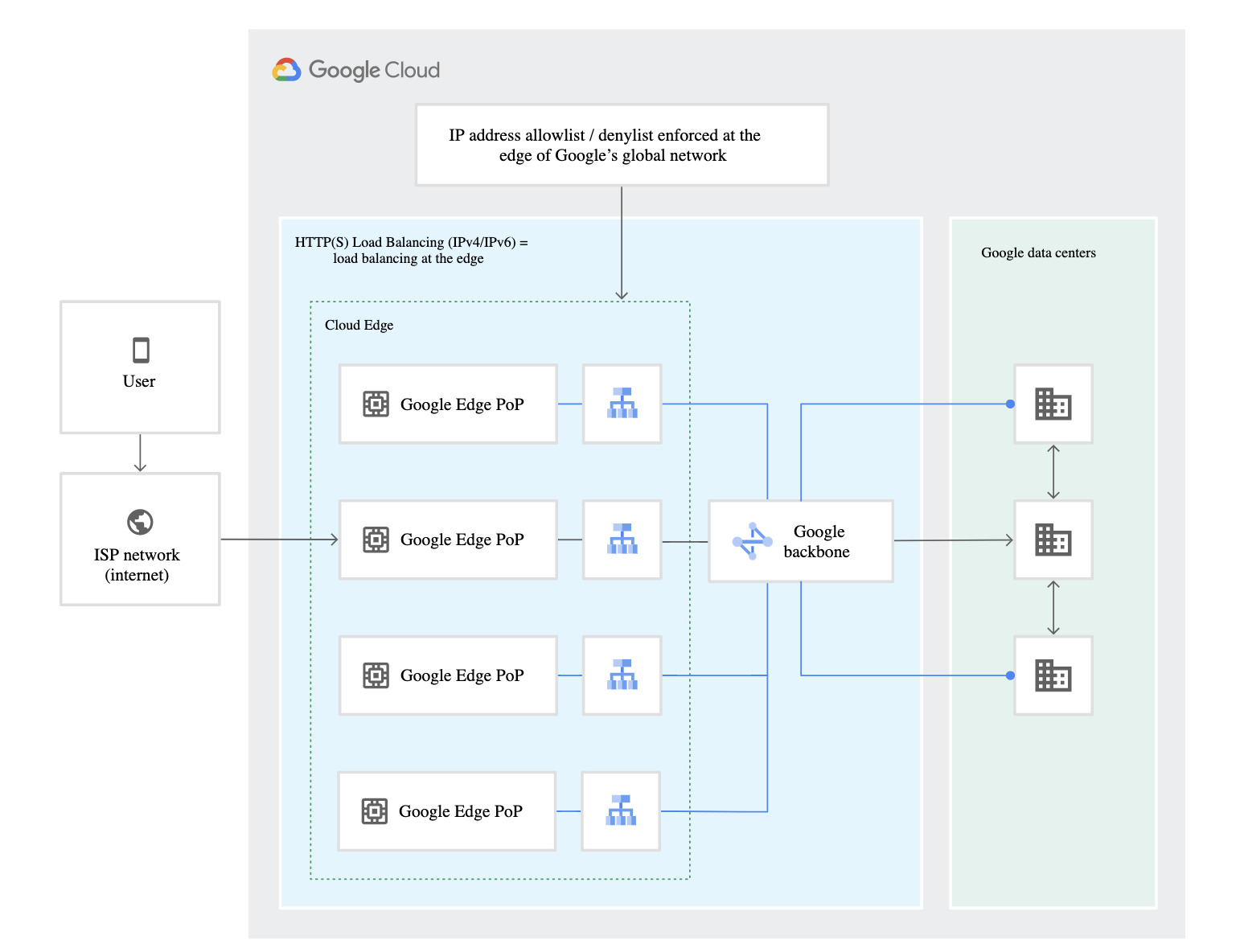
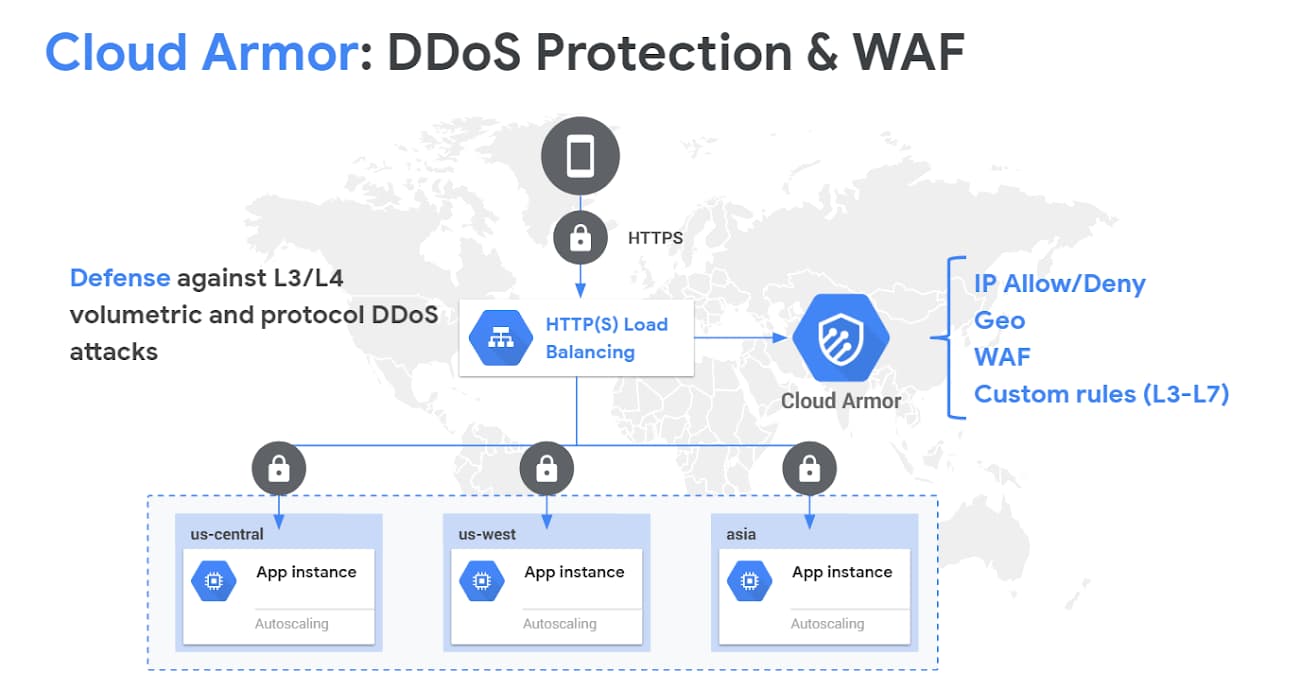
- Cloud Armor provides always-on DDoS protection against network or protocol-based volumetric DDoS attacks for applications behind supported load balancers.
- Cloud Armor’s DDoS protection is always-on inline, scaling to the capacity of Google’s global network.
- Cloud Armor is implemented at the edge of Google’s network in Google’s points of presence (PoP).
- Cloud Armor security policies help allow or deny access at the Google Cloud edge, as close as possible to the source of incoming traffic.
- Prevents unwelcome traffic from consuming resources or entering the VPC networks.
- Backend services have access to security policies to enforce custom Layer 7 filtering policies, including pre-configured WAF rules.
- Backends to the backend service can be:
- VM instances in an instance group
- Zonal network endpoint groups (zonal NEGs)
- Internet network endpoint groups (internet NEGs)
- Serverless NEGs
- Hybrid connectivity NEGs
- For hybrid or multi-cloud architectures, backends must be internet NEGs or hybrid connectivity NEGs.
- Cloud Armor also protects serverless NEGs when traffic is routed through a load balancer.
GCP Certification Exam Practice Questions
- Questions are collected from Internet and the answers are marked as per my knowledge and understanding (which might differ with yours).
- GCP services are updated everyday and both the answers and questions might be outdated soon, so research accordingly.
- GCP exam questions are not updated to keep up the pace with GCP updates, so even if the underlying feature has changed the question might not be updated
- Open to further feedback, discussion and correction.
- Your company offers a popular gaming service. Your instances are deployed with private IP addresses, and external access is granted through a global load balancer. You believe you have identified a potential malicious actor, but aren’t certain you have the correct client IP address. You want to identify this actor while minimizing disruption to your legitimate users. What should you do?
- Create a Cloud Armor Policy rule that denies traffic and review necessary logs.
- Create a Cloud Armor Policy rule that denies traffic, enable preview mode, and review necessary logs.
- Create a VPC Firewall rule that denies traffic, enable logging and set enforcement to disabled, and review necessary logs.
- Create a VPC Firewall rule that denies traffic, enable logging and set enforcement to enabled, and review necessary logs
- Your organization is experiencing a sudden spike in traffic to a web application behind a global external Application Load Balancer. Cloud Armor Adaptive Protection has detected a potential L7 DDoS attack and generated a suggested WAF rule. What should you do?
- Immediately apply the suggested rule in deny mode.
- Review the suggested rule, apply it in preview mode first, verify it targets attack traffic, then enable it.
- Disable the application until the attack subsides.
- Increase the number of backend instances to absorb the traffic.
- You need to protect multiple projects in your organization with a consistent set of Cloud Armor security policies. The security team wants centralized control while allowing individual project teams some flexibility. What should you use?
- Duplicate the same security policy in each project manually.
- Use a shared VPC with a single security policy.
- Use Cloud Armor hierarchical security policies at the organization or folder level.
- Create a Terraform module that deploys the same policy to all projects.
- You want to protect your Cloud CDN-enabled backend service from malicious requests before they are served from Google’s cache. Which type of Cloud Armor security policy should you use?
- Backend security policy (CLOUD_ARMOR)
- Edge security policy (CLOUD_ARMOR_EDGE)
- Network edge security policy
- Regional backend security policy
- Your company wants to rate-limit API requests to prevent abuse while allowing legitimate traffic. You need to limit requests per client based on a combination of IP address and a specific HTTP header. What Cloud Armor feature should you use?
- Preconfigured WAF rules
- Adaptive Protection
- Rate limiting with multiple keys (IP + HTTP header)
- Bot management with reCAPTCHA Enterprise
- You need advanced network DDoS protection for workloads behind an external passthrough Network Load Balancer. What is required?
- Cloud Armor Standard tier is sufficient.
- Attach a backend security policy to the NLB.
- Enroll the project in Cloud Armor Enterprise and enable advanced network DDoS protection for the region.
- Use Cloud Armor preconfigured WAF rules on the NLB.