AWS Route 53 Alias vs CNAME
📅 Last Updated: June 2026 | Added: OpenSearch Service, AWS AppSync, VPC Lattice, App Runner alias targets; clarified record type support for alias-to-alias records.
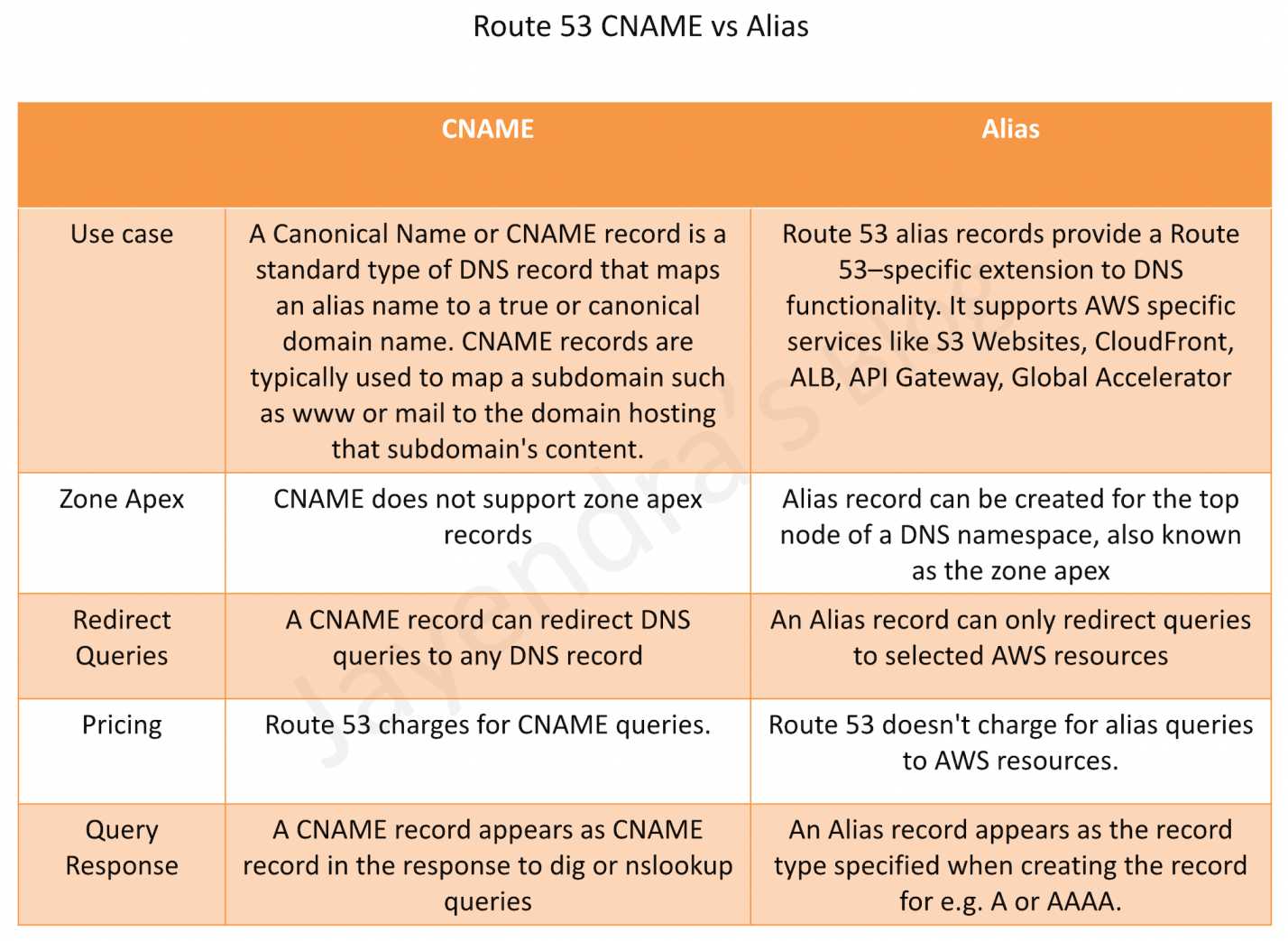
- Route 53 Alias records are similar to CNAME records, but there are some important differences.
- Supported Resources
- Alias records support selected AWS resources
- Elastic Load Balancers (Application, Network, and Classic Load Balancers)
- CloudFront distributions
- Amazon API Gateway (custom regional and edge-optimized APIs)
- Elastic Beanstalk environments
- S3 Website (bucket configured as static website)
- AWS Global Accelerator
- VPC Interface Endpoints
- Amazon OpenSearch Service custom domain endpoints (Added 2024)
- AWS AppSync domain names
- AWS App Runner services (Note: App Runner is no longer accepting new customers as of April 30, 2026)
- Amazon VPC Lattice service domain endpoints (Added June 2025)
- Route 53 record in the same hosted zone
- Alias records do not support
- EC2 DNS endpoint
- RDS DNS endpoint
- Non-AWS DNS endpoints
- CNAME record can redirect DNS queries to any DNS record (AWS or non-AWS)
- Alias records support selected AWS resources
- Zone Apex or Root domain like
example.com- Alias record supports mapping Zone Apex records
- CNAME record does not support Zone Apex records (per DNS RFC standards)
- Charges
- Route 53 doesn’t charge for alias queries to AWS resources
- Route 53 charges for CNAME queries
- Note: A CNAME record pointing to another Route 53 record incurs charges for both queries
- Record Type
- For AWS resource targets (ELB, CloudFront, S3, etc.), alias records support A (IPv4) or AAAA (IPv6) record types
- For alias records pointing to another record in the same hosted zone, all record types are supported except NS and SOA
- CNAME record redirects DNS queries for a record name regardless of the record type specified in the DNS query, such as A or AAAA
- TTL (Time to Live)
- When an alias record points to an AWS resource, you cannot set the TTL; Route 53 uses the default TTL for the resource
- When an alias record points to another record in the same hosted zone, Route 53 uses the TTL of the target record
- CNAME records allow custom TTL configuration
- Health Checking
- Alias records support “Evaluate Target Health” which integrates with the target resource’s health
- For ELB and Elastic Beanstalk, Evaluate Target Health provides routing away from unhealthy resources
- For highly available services (S3, API Gateway, Global Accelerator, OpenSearch, VPC Lattice), use Route 53 health checks instead
Route 53 Alias vs CNAME Comparison
Key Considerations for Alias Records
- Automatic IP Resolution – Route 53 automatically recognizes changes in the resource’s IP addresses (e.g., when an ELB’s IP changes)
- No Extra Hop – Unlike CNAME which requires an additional DNS lookup, alias records resolve directly to IP addresses
- IPv6 Support – For CloudFront, ELB, and OpenSearch Service, create separate A (IPv4) and AAAA (IPv6) alias records
- Cross-Account Support – Alias records can point to resources in different AWS accounts (e.g., a CloudFront distribution in another account)
AWS Certification Exam Practice Questions
- Questions are collected from Internet and the answers are marked as per my knowledge and understanding (which might differ with yours).
- AWS services are updated everyday and both the answers and questions might be outdated soon, so research accordingly.
- AWS exam questions are not updated to keep up the pace with AWS updates, so even if the underlying feature has changed the question might not be updated
- Open to further feedback, discussion and correction.
- Which of the following statements are true about Amazon Route 53 resource records? Choose 2 answers
- An Alias record can map one DNS name to another Amazon Route 53 DNS name.
- A CNAME record can be created for your zone apex.
- An Amazon Route 53 CNAME record can point to any DNS record hosted anywhere.
- TTL can be set for an Alias record in Amazon Route 53.
- An Amazon Route 53 Alias record can point to any DNS record hosted anywhere.
- How can the domain’s zone apex for example “myzoneapexdomain com” be pointed towards an Elastic Load Balancer?
- By using an AAAA record
- By using an A record
- By using an Amazon Route 53 CNAME record
- By using an Amazon Route 53 Alias record
- A company hosts its website using Amazon S3 static website hosting. They want to use their domain’s zone apex (example.com) to point to the S3 bucket. Which record type should they use?
- CNAME record pointing to the S3 website endpoint
- Alias record of type A pointing to the S3 website endpoint
- A record with the IP address of the S3 bucket
- MX record pointing to the S3 bucket
- Which of the following AWS resources can be targets for a Route 53 Alias record? (Choose 3)
- Application Load Balancer
- RDS database instance
- CloudFront distribution
- EC2 instance public DNS
- Amazon OpenSearch Service custom domain
- What is the primary advantage of using a Route 53 Alias record instead of a CNAME record when routing traffic to an AWS Elastic Load Balancer?
- Alias records support more record types than CNAME
- Alias records can point to non-AWS resources
- Alias records can be used at the zone apex and don’t incur query charges for AWS resources
- Alias records allow custom TTL values