AWS ElastiCache
🆕 Major Updates (2024-2026)
- Valkey is now the recommended engine (open-source Redis fork, BSD licensed, stewarded by Linux Foundation)
- ElastiCache Serverless (GA Nov 2023) – zero infrastructure management with instant scaling
- Vector Search (GA Oct 2025) – microsecond-latency similarity search with 99% recall
- Full-Text & Hybrid Search (Valkey 9.0, May 2026) – real-time search without separate service
- Durability (June 2026) – Multi-AZ transactional log with zero data loss option
- ElastiCache now supports three engines: Valkey, Memcached, and Redis OSS
- AWS ElastiCache is a managed web service that helps deploy and run Valkey, Memcached, or Redis OSS protocol-compliant cache clusters in the cloud easily.
- ElastiCache is available in three engines: Valkey (recommended), Memcached, and Redis OSS
- ElastiCache helps
- simplify and offload the management, monitoring, and operation of in-memory cache environments, enabling the engineering resources to focus on developing applications.
- automate common administrative tasks required to operate a distributed cache environment.
- improves the performance of web applications by allowing retrieval of information from a fast, managed, in-memory caching system, instead of relying entirely on slower disk-based databases.
- helps improve load & response times to user actions and queries, but also reduces the cost associated with scaling web applications.
- helps automatically detect and replace failed cache nodes, providing a resilient system that mitigates the risk of overloaded databases, which can slow website and application load times.
- provides enhanced visibility into key performance metrics associated with the cache nodes through integration with CloudWatch.
- code, applications, and popular tools already using Memcached, Redis OSS, or Valkey environments work seamlessly, with being protocol-compliant with these environments
- ElastiCache provides in-memory caching which can
- significantly lower latency and improve throughput for many
- read-heavy application workloads e.g. social networking, gaming, media sharing, and Q&A portals.
- compute-intensive workloads such as a recommendation engine.
- improve application performance by storing critical pieces of data in memory for low-latency access.
- be used to cache the results of I/O-intensive database queries or the results of computationally-intensive calculations.
- significantly lower latency and improve throughput for many
- ElastiCache currently allows access only from within a VPC. It can be accessed from EC2 instances, Lambda functions, or other services within the same VPC, or via VPN/Direct Connect from on-premises networks.
ElastiCache Engine Options
- ElastiCache supports three engines:
- Valkey – Recommended engine. Open-source, BSD-licensed, high-performance key-value datastore stewarded by the Linux Foundation. Drop-in replacement for Redis OSS with 230% higher throughput and 20% better memory efficiency.
- Redis OSS – Open-source key-value store (versions up to 7.2 under BSD license). Redis 7.4+ changed to SSPL/RSALv2, and Redis 8.0+ moved to AGPLv3. ElastiCache continues to support Redis OSS 7.x.
- Memcached – Simple, high-performance in-memory key-value store for small chunks of arbitrary data.
- ElastiCache offers two deployment options:
- Serverless – Zero infrastructure management, instant scaling, create a cache in under a minute. Pay-per-use based on data stored and requests executed.
- Self-designed (Node-based) – Traditional cluster deployment with control over node types, shard count, and replica configuration.
Valkey (Recommended Engine)
- Valkey is an open-source, high-performance key-value datastore stewarded by the Linux Foundation, backed by 40+ companies including AWS, Google, and Microsoft.
- Valkey was forked from Redis OSS 7.2.4 (the last BSD-licensed release) in March 2024, after Redis Ltd. changed its license to SSPL/RSALv2.
- ElastiCache for Valkey provides:
- 230% higher throughput compared to Redis OSS
- 20% better memory efficiency
- 33% lower pricing on Serverless compared to other engines
- 20% lower pricing on self-designed (node-based) clusters
- Full wire-compatibility with Redis OSS – existing code works without changes
- Valkey version history on ElastiCache:
- Valkey 7.2 (Oct 2024) – Initial release, drop-in Redis OSS replacement
- Valkey 8.0 (Nov 2024) – Faster scaling for Serverless, improved memory efficiency
- Valkey 8.1 (Jul 2025) – Vector search, Bloom filters, performance improvements (8% more ops/sec, 22% lower P99 latency)
- Valkey 9.0 (May 2026) – Full-text search, hybrid search, aggregation pipelines, durability
Valkey Key Features
- All Redis OSS features (replication, Multi-AZ, backup/restore, cluster mode, Global Datastore)
- Vector Search (GA Oct 2025) – Index, search, and update billions of high-dimensional vectors with microsecond latency and up to 99% recall. Supports HNSW and FLAT algorithms with Euclidean, cosine, and inner product distance metrics.
- Full-Text Search (May 2026) – Real-time full-text, exact-match, and numeric range search directly in cache. Search terabytes of data with microsecond latency and millions of search ops/sec.
- Hybrid Search (May 2026) – Combine vector similarity with full-text search, tag filters, and numeric filters in a single query for optimized relevance.
- Durability (Jun 2026) – Multi-AZ transactional log prevents data loss during failures:
- Synchronous writes: Data persisted across 2+ AZs before responding. Zero data loss at single-digit millisecond write latency.
- Asynchronous writes: Data persisted after responding. Microsecond write latency at no extra cost, with up to 10 seconds of possible data loss in rare failures.
- Bloom Filters (Jul 2025) – Space-efficient probabilistic data structure to quickly check set membership.
- Semantic Caching for AI – Use vector search to cache and retrieve semantically similar queries for GenAI/LLM applications, reducing API costs and latency.
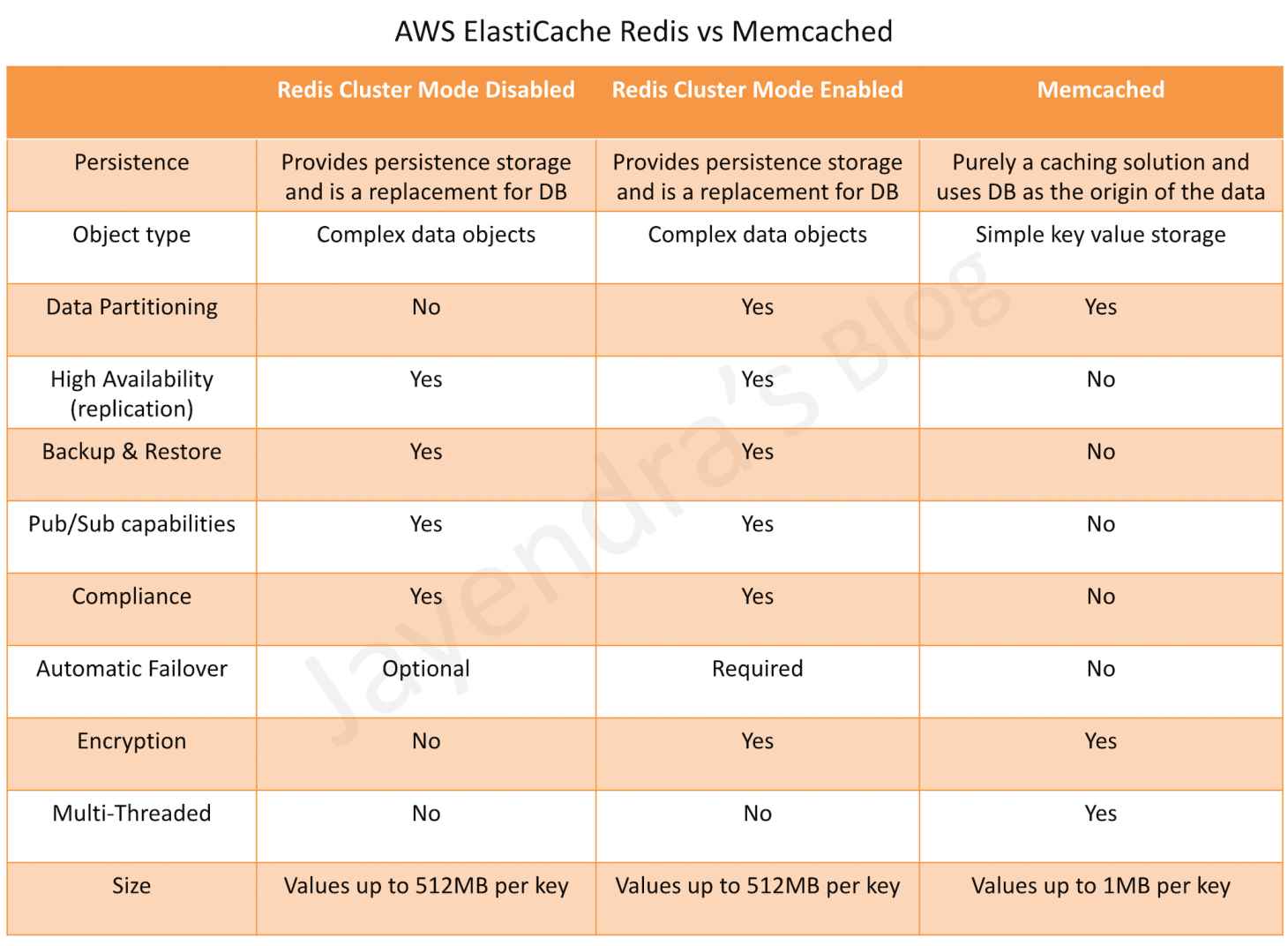
ElastiCache Valkey/Redis vs Memcached
ElastiCache Serverless
- ElastiCache Serverless (GA November 2023) provides a serverless option that eliminates infrastructure management and capacity planning.
- Key capabilities:
- Create a cache in under a minute by providing just a name
- Automatically scales capacity based on application traffic patterns
- Monitors memory, CPU, and network utilization continuously
- Provides a simple endpoint experience abstracting cluster topology
- Data automatically replicated across multiple AZs with up to 99.99% availability SLA
- Zero downtime maintenance
- Supported engines for Serverless:
- Valkey 7.2 and above (recommended, 33% lower pricing)
- Memcached 1.6 and above
- Redis OSS 7.0 and above
- Pricing: Pay-per-use based on data stored (per GB-hour) and ElastiCache Processing Units (ECPUs) consumed
- Serverless for Valkey 8.0 can scale from zero to 5M requests per second in under 13 minutes with consistent sub-millisecond p50 read latency
- Ideal for:
- Variable or unpredictable workloads
- New applications where traffic patterns are unknown
- Development and testing environments
- Applications with spiky traffic that want to avoid over-provisioning
Redis OSS
- Redis is an open source key-value cache & store. Note: Redis 7.4+ changed to SSPL/RSALv2 license (March 2024), and Redis 8.0 moved to AGPLv3 (March 2025).
- ElastiCache for Redis OSS continues to support versions up to Redis OSS 7.x. AWS recommends migrating to ElastiCache for Valkey for better performance, lower cost, and continued open-source (BSD) licensing.
- Redis OSS versions 4 and 5 reached community End of Life. Standard support for ElastiCache versions 4 and 5 ended January 31, 2026, after which clusters are enrolled in Extended Support.
- ElastiCache for Redis OSS can be used as a primary in-memory key-value data store, providing fast, sub-millisecond data performance, high availability and scalability up to 16 nodes plus up to 5 read replicas, each of up to 3.55 TiB of in-memory data.
- ElastiCache for Redis OSS supports (similar to RDS features)
- Redis Master/Slave replication.
- Multi-AZ operation by creating read replicas in another AZ
- Backup and Restore feature for persistence using snapshots
- ElastiCache for Redis OSS can be vertically scaled upwards by selecting a larger node type or by adding shards (with cluster mode enabled).
- Parameter group can be specified for Redis OSS during installation, which acts as a “container” for configuration values that can be applied to one or more primary clusters.
- Append Only File – AOF
- provides persistence and can be enabled for recovery scenarios.
- if a node restarts or service crashes, Redis will replay the updates from an AOF file, thereby recovering the data lost due to the restart or crash.
- cannot protect against all failure scenarios, cause if the underlying hardware fails, a new server would be provisioned and the AOF file will no longer be available to recover the data.
- ElastiCache for Redis OSS doesn’t support the AOF feature but you can achieve persistence by snapshotting the Redis data using the Backup and Restore feature.
- Enabling Redis Multi-AZ is a Better Approach to Fault Tolerance, as failing over to a read replica is much faster than rebuilding the primary from an AOF file.
- Note: For new deployments, AWS recommends using ElastiCache for Valkey with the new Durability feature (Multi-AZ transactional log) instead of AOF for data persistence.
Redis OSS / Valkey Features
- High Availability, Fault Tolerance & Auto Recovery
- Multi-AZ for a failed primary cluster to a read replica, in Redis/Valkey clusters that support replication.
- Fault Tolerance – Flexible AZ placement of nodes and clusters
- High Availability – Primary instance and a synchronous secondary instance to fail over when problems occur. You can also use read replicas to increase read scaling.
- Auto-Recovery – Automatic detection of and recovery from cache node failures.
- Backup & Restore – Automated backups or manual snapshots can be performed. Restore process works reliably and efficiently.
- Performance
- Data Partitioning – Cluster mode supports partitioning the data across up to 500 shards.
- Data Tiering – Provides a price-performance option by utilizing lower-cost solid state drives (SSDs) in each cluster node in addition to storing data in memory. It is ideal for workloads that access up to 20% of their overall dataset regularly, and for applications that can tolerate additional latency when accessing data on SSD.
- Auto Scaling – Automatically adjusts the number of shards or replicas in response to changes in demand (not supported for Global Datastores, Outposts, or Local Zones).
- Security
- Encryption – Supports encryption in transit and encryption at rest. This support helps you build HIPAA-compliant applications.
- Access Control – Control access using AWS IAM to define users and permissions.
- Supports Redis AUTH or Managed Role-Based Access Control (RBAC).
- AWS PrivateLink – Privately access ElastiCache APIs from within a VPC without exposing traffic to the public internet.
- Administration
- Low Administration – Manages backups, software patching, automatic failure detection, and recovery.
- Integration with other AWS services such as EC2, CloudWatch, CloudTrail, and SNS.
- Global Datastore provides fully managed, fast, reliable, and secure replication across AWS Regions. Cross-Region read replica clusters can be created to enable low-latency reads and disaster recovery across AWS Regions.
Read Replica (Valkey/Redis OSS)
- Read Replicas help provide Read scaling and handling failures
- Read Replicas are kept in sync with the Primary node using asynchronous replication technology
- Read Replicas provides
- Horizontal scaling beyond the compute or I/O capacity of a single primary node for read-heavy workloads.
- Serving read traffic while the primary is unavailable either being down due to failure or maintenance
- Data protection scenarios to promote a Read Replica as the primary node, in case the primary node or the AZ of the primary node fails.
- ElastiCache supports initiated or forced failover where it flips the DNS record for the primary node to point at the read replica, which is in turn promoted to become the new primary.
- Read replica cannot span across regions and may only be provisioned in the same or different AZ of the same Region as the cache node primary. (Use Global Datastore for cross-region replication.)
Multi-AZ (Valkey/Redis OSS)
- ElastiCache for Valkey/Redis OSS shard consists of a primary and up to 5 read replicas
- Data is asynchronously replicated from the primary node to the read replicas
- Multi-AZ mode
- provides enhanced availability and a smaller need for administration as the node failover is automatic.
- impact on the ability to read/write to the primary is limited to the time it takes for automatic failover to complete.
- no longer needs monitoring of nodes and manually initiating a recovery in the event of a primary node disruption.
- During certain types of planned maintenance, or in the unlikely event of node failure or AZ failure,
- it automatically detects the failure,
- selects a replica, depending upon the read replica with the smallest asynchronous replication lag to the primary, and promotes it to become the new primary node
- it will also propagate the DNS changes so that the primary endpoint remains the same
- If Multi-AZ is not enabled,
- ElastiCache monitors the primary node.
- in case the node becomes unavailable or unresponsive, it will repair the node by acquiring new service resources.
- it propagates the DNS endpoint changes to redirect the node’s existing DNS name to point to the new service resources.
- If the primary node cannot be healed and you will have the choice to promote one of the read replicas to be the new primary.
Backup & Restore (Valkey/Redis OSS)
- Backup and Restore allow users to create snapshots of clusters.
- Snapshots can be used for recovery, restoration, archiving purposes, or warm start a cluster with preloaded data
- Snapshots can be created on a cluster basis using the native mechanism to create and store an RDB file as the snapshot.
- Increased latencies for a brief period at the node might be encountered while taking a snapshot and is recommended to be taken from a Read Replica minimizing performance impact
- Snapshots can be created either automatically (if configured) or manually
- When a cluster is deleted, automatic snapshots are removed. However, manual snapshots are retained.
Cluster Mode (Valkey/Redis OSS)
ElastiCache provides the ability to create distinct types of clusters:
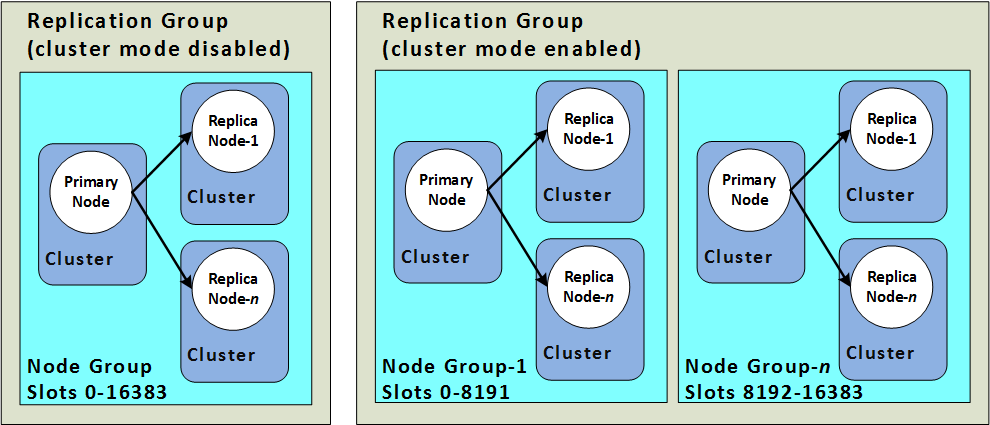
- A cluster mode disabled cluster
- always has a single shard with up to 5 read replica nodes.
- A cluster mode enabled cluster
- has up to 500 shards with 1 to 5 read replica nodes in each.
- Scaling vs Partitioning
- Cluster mode disabled supports Horizontal scaling for read capacity by adding or deleting replica nodes, or vertical scaling by scaling up to a larger node type.
- Cluster mode enabled supports partitioning the data across up to 500 node groups. The number of shards can be changed dynamically as the demand changes. It also helps spread the load over a greater number of endpoints, which reduces access bottlenecks during peak demand.
- Node Size vs Number of Nodes
- Cluster mode disabled has only one shard and the node type must be large enough to accommodate all the cluster’s data plus necessary overhead.
- Cluster mode enabled can have smaller node types as the data can be spread across partitions.
- Reads vs Writes
- Cluster mode disabled can be scaled for reads by adding more read replicas (5 max)
- Cluster mode enabled can be scaled for both reads and writes by adding read replicas and multiple shards.
Memcached
- Memcached is an in-memory key-value store for small chunks of arbitrary data.
- ElastiCache for Memcached can be used to cache a variety of objects
- ElastiCache for Memcached
- can be scaled Vertically by increasing the node type size
- can be scaled Horizontally by adding and removing nodes
- does not support the persistence of data
- does not support replication, Multi-AZ, or backups
- ElastiCache for Memcached cluster can have
- nodes that can span across multiple AZs within the same region
- maximum of 20 nodes per cluster with a maximum of 100 nodes per region (soft limit and can be extended).
- ElastiCache for Memcached supports auto-discovery, which enables the automatic discovery of cache nodes by clients when they are added to or removed from an ElastiCache cluster.
ElastiCache Mitigating Failures
- ElastiCache should be designed to plan so that failures have a minimal impact on the application and data.
- Mitigating Failures when Running Memcached
- Mitigating Node Failures
- spread the cached data over more nodes
- as Memcached does not support replication, a node failure will always result in some data loss from the cluster
- having more nodes will reduce the proportion of cache data lost
- Mitigating Availability Zone Failures
- locate the nodes in as many availability zones as possible, only the data cached in that AZ is lost, not the data cached in the other AZs
- Mitigating Node Failures
- Mitigating Failures when Running Valkey/Redis OSS
- Mitigating Cluster Failures
- Durability (Valkey 9.0+, Recommended)
- Uses Multi-AZ transactional log to prevent data loss during failures
- Synchronous writes: zero data loss, single-digit millisecond write latency
- Asynchronous writes: microsecond write latency, up to 10 seconds of potential data loss
- Both options maintain microsecond read latency
- Replaces the need for AOF-based recovery
- Redis Append Only Files (AOF) (Legacy approach)
- enable AOF so whenever data is written to the cluster, a corresponding transaction record is written to a Redis AOF.
- when Redis process restarts, ElastiCache creates a replacement cluster and provisions it and repopulates it with data from AOF.
- It is time-consuming
- AOF can get big.
- Using AOF cannot protect you from all failure scenarios.
- Replication Groups
- A replication group is comprised of a single primary cluster which the application can both read from and write to, and from 1 to 5 read-only replica clusters.
- Data written to the primary cluster is also asynchronously updated on the read replica clusters.
- When a Read Replica fails, ElastiCache detects the failure, replaces the instance in the same AZ, and synchronizes with the Primary Cluster.
- Multi-AZ with Automatic Failover: ElastiCache detects Primary cluster failure and promotes a read replica with the least replication lag to primary.
- Multi-AZ with Auto Failover disabled: ElastiCache detects Primary cluster failure, creates a new one and syncs the new Primary with one of the existing replicas.
- Durability (Valkey 9.0+, Recommended)
- Mitigating Availability Zone Failures
- locate the clusters in as many availability zones as possible
- Mitigating Cluster Failures
AWS Certification Exam Practice Questions
- Questions are collected from Internet and the answers are marked as per my knowledge and understanding (which might differ with yours).
- AWS services are updated everyday and both the answers and questions might be outdated soon, so research accordingly.
- AWS exam questions are not updated to keep up the pace with AWS updates, so even if the underlying feature has changed the question might not be updated
- Open to further feedback, discussion and correction.
- What does Amazon ElastiCache provide?
- A service by this name doesn’t exist. Perhaps you mean Amazon CloudCache.
- A virtual server with a huge amount of memory.
- A managed In-memory cache service
- An Amazon EC2 instance with the Memcached software already pre-installed.
- You are developing a highly available web application using stateless web servers. Which services are suitable for storing session state data? Choose 3 answers.
- Elastic Load Balancing
- Amazon Relational Database Service (RDS)
- Amazon CloudWatch
- Amazon ElastiCache
- Amazon DynamoDB
- AWS Storage Gateway
- Which statement best describes ElastiCache?
- Reduces the latency by splitting the workload across multiple AZs
- A simple web services interface to create and store multiple data sets, query your data easily, and return the results
- Offload the read traffic from your database in order to reduce latency caused by read-heavy workload
- Managed service that makes it easy to set up, operate and scale a relational database in the cloud
- Our company is getting ready to do a major public announcement of a social media site on AWS. The website is running on EC2 instances deployed across multiple Availability Zones with a Multi-AZ RDS MySQL Extra Large DB Instance. The site performs a high number of small reads and writes per second and relies on an eventual consistency model. After comprehensive tests you discover that there is read contention on RDS MySQL. Which are the best approaches to meet these requirements? (Choose 2 answers)
- Deploy ElastiCache in-memory cache running in each availability zone
- Implement sharding to distribute load to multiple RDS MySQL instances
- Increase the RDS MySQL Instance size and Implement provisioned IOPS
- Add an RDS MySQL read replica in each availability zone
- You are using ElastiCache Memcached to store session state and cache database queries in your infrastructure. You notice in CloudWatch that Evictions and Get Misses are both very high. What two actions could you take to rectify this? Choose 2 answers
- Increase the number of nodes in your cluster
- Tweak the max_item_size parameter
- Shrink the number of nodes in your cluster
- Increase the size of the nodes in the cluster
- You have been tasked with moving an ecommerce web application from a customer’s datacenter into a VPC. The application must be fault tolerant and well as highly scalable. Moreover, the customer is adamant that service interruptions not affect the user experience. As you near launch, you discover that the application currently uses multicast to share session state between web servers, In order to handle session state within the VPC, you choose to:
- Store session state in Amazon ElastiCache for Valkey/Redis (scalable and makes the web applications stateless)
- Create a mesh VPN between instances and allow multicast on it
- Store session state in Amazon Relational Database Service (RDS solution not highly scalable)
- Enable session stickiness via Elastic Load Balancing (affects user experience if the instance goes down)
- When you are designing to support a 24-hour flash sale, which one of the following methods best describes a strategy to lower the latency while keeping up with unusually heavy traffic?
- Launch enhanced networking instances in a placement group to support the heavy traffic (only improves internal communication)
- Apply Service Oriented Architecture (SOA) principles instead of a 3-tier architecture (just simplifies architecture)
- Use Elastic Beanstalk to enable blue-green deployment (only minimizes download for applications and ease of rollback)
- Use ElastiCache as in-memory storage on top of DynamoDB to store user sessions (scalable, faster read/writes and in memory storage)
- You are configuring your company’s application to use Auto Scaling and need to move user state information. Which of the following AWS services provides a shared data store with durability and low latency?
- AWS ElastiCache Memcached (does not provide durability as if the node is gone the data is gone)
- Amazon Simple Storage Service
- Amazon EC2 instance storage
- Amazon DynamoDB
- Your application is using an ELB in front of an Auto Scaling group of web/application servers deployed across two AZs and a Multi-AZ RDS Instance for data persistence. The database CPU is often above 80% usage and 90% of I/O operations on the database are reads. To improve performance you recently added a single-node Memcached ElastiCache Cluster to cache frequent DB query results. In the next weeks the overall workload is expected to grow by 30%. Do you need to change anything in the architecture to maintain the high availability for the application with the anticipated additional load and Why?
- You should deploy two Memcached ElastiCache Clusters in different AZs because the RDS Instance will not be able to handle the load if the cache node fails.
- If the cache node fails the automated ElastiCache node recovery feature will prevent any availability impact. (does not provide high availability, as data is lost if the node is lost)
- Yes you should deploy the Memcached ElastiCache Cluster with two nodes in the same AZ as the RDS DB master instance to handle the load if one cache node fails. (Single AZ affects availability as DB is Multi AZ and would be overloaded is the AZ goes down)
- No if the cache node fails you can always get the same data from the DB without having any availability impact. (Will overload the database affecting availability)
- A read only news reporting site with a combined web and application tier and a database tier that receives large and unpredictable traffic demands must be able to respond to these traffic fluctuations automatically. What AWS services should be used meet these requirements?
- Stateless instances for the web and application tier synchronized using ElastiCache Memcached in an autoscaling group monitored with CloudWatch and RDS with read replicas.
- Stateful instances for the web and application tier in an autoscaling group monitored with CloudWatch and RDS with read replicas (Stateful instances will not allow for scaling)
- Stateful instances for the web and application tier in an autoscaling group monitored with CloudWatch and multi-AZ RDS (Stateful instances will allow not for scaling & multi-AZ is for high availability and not scaling)
- Stateless instances for the web and application tier synchronized using ElastiCache Memcached in an autoscaling group monitored with CloudWatch and multi-AZ RDS (multi-AZ is for high availability and not scaling)
- You have written an application that uses the Elastic Load Balancing service to spread traffic to several web servers. Your users complain that they are sometimes forced to login again in the middle of using your application, after they have already logged in. This is not behavior you have designed. What is a possible solution to prevent this happening?
- Use instance memory to save session state.
- Use instance storage to save session state.
- Use EBS to save session state.
- Use ElastiCache to save session state.
- Use Glacier to save session slate.
- A company wants to build a real-time recommendation engine for their e-commerce platform. The system needs to perform vector similarity searches against millions of product embeddings with sub-millisecond latency. Which AWS service and feature combination is most appropriate?
- Amazon OpenSearch Service with k-NN plugin
- Amazon RDS for PostgreSQL with pgvector extension
- Amazon ElastiCache for Valkey with vector search (provides microsecond-latency vector search with up to 99% recall, ideal for real-time use cases)
- Amazon Neptune with vector similarity
- A startup is launching a new application with unpredictable traffic patterns. They need a caching solution that requires minimal management and can scale automatically. They want to minimize costs during low-traffic periods. Which ElastiCache deployment option should they choose?
- ElastiCache for Redis OSS with cluster mode enabled
- ElastiCache Serverless for Valkey (zero infrastructure management, instant auto-scaling, pay-per-use, and Valkey offers 33% lower Serverless pricing)
- ElastiCache for Memcached with Auto Discovery
- ElastiCache for Redis OSS with data tiering
- An organization is migrating from ElastiCache for Redis OSS to ElastiCache for Valkey. Which statements about this migration are correct? (Choose 2 answers)
- Valkey is wire-compatible with Redis OSS, requiring no application code changes
- Valkey requires a different client library than Redis
- Valkey does not support cluster mode
- Valkey provides up to 230% higher throughput and 20% better memory efficiency compared to Redis OSS
- A financial services company needs an in-memory data store for payment tokenization that cannot tolerate any data loss, while maintaining microsecond read latency. Which ElastiCache configuration meets these requirements?
- ElastiCache for Redis OSS with AOF enabled
- ElastiCache for Memcached with Multi-AZ nodes
- ElastiCache for Valkey 9.0 with synchronous durability (Multi-AZ transactional log with synchronous writes ensures zero data loss while maintaining microsecond read latency)
- ElastiCache for Valkey with asynchronous durability