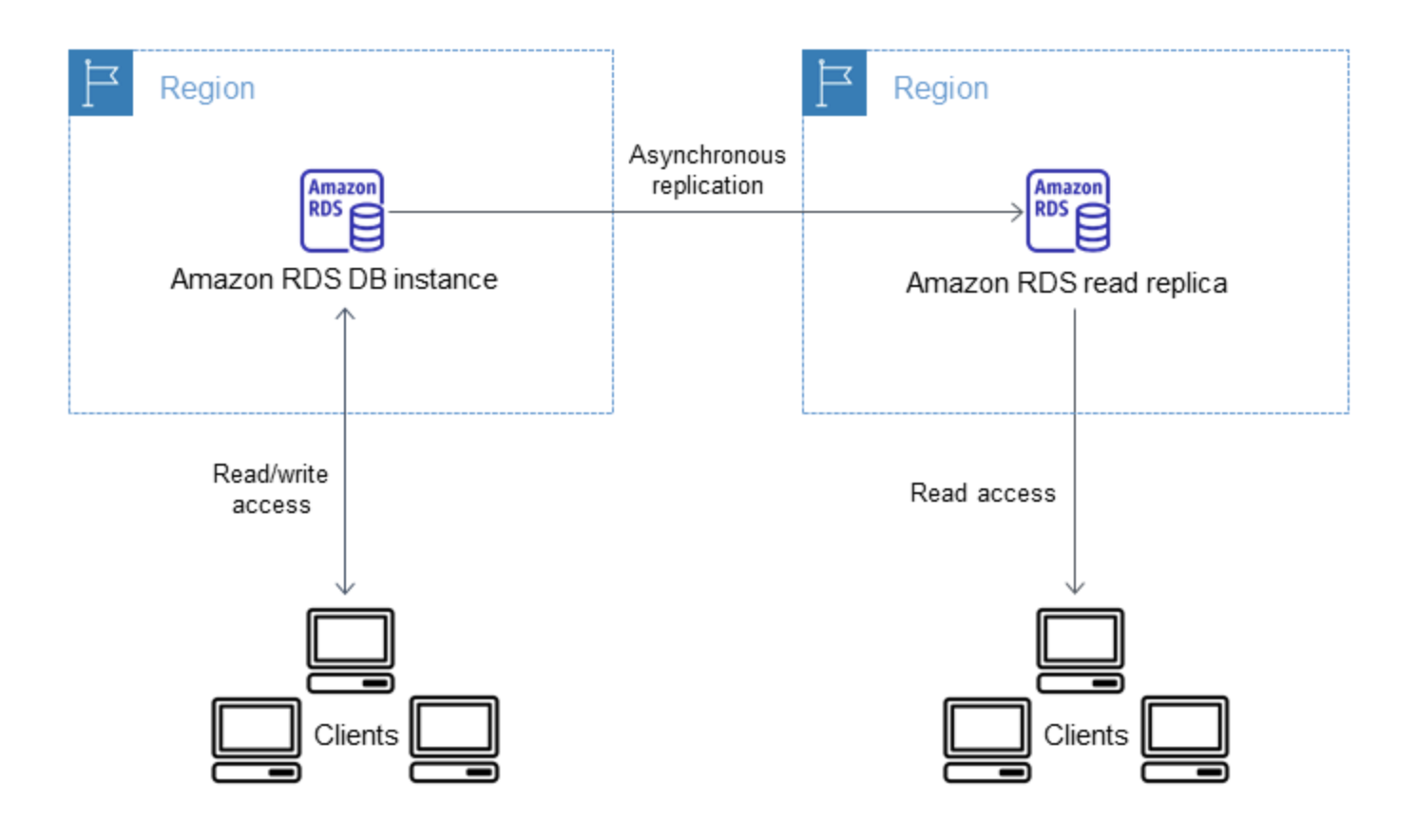
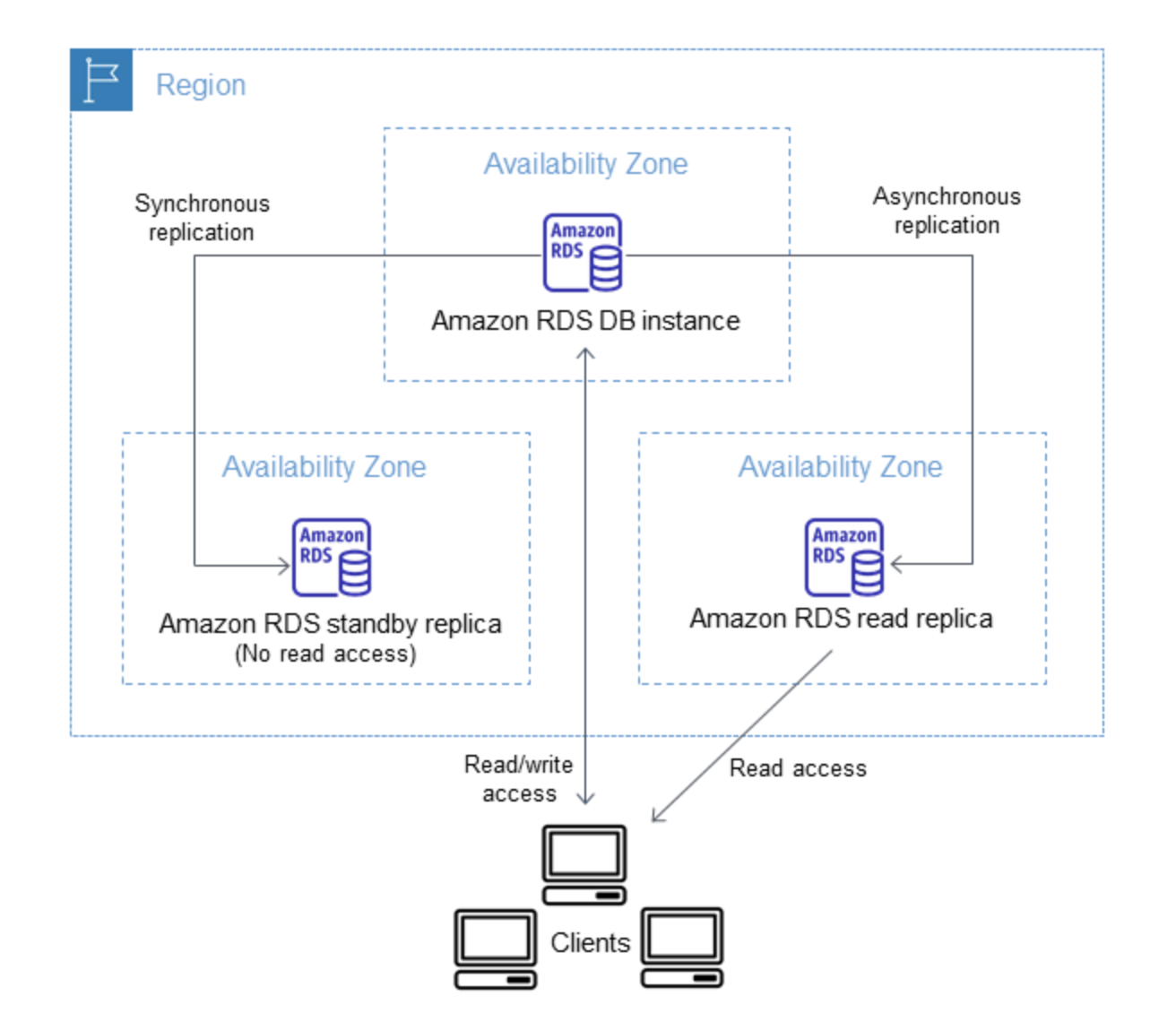
RDS Cross-Region Read Replicas create an asynchronously replicated read-only DB instance in a secondary AWS Region.
Supported for MySQL, PostgreSQL, MariaDB, Oracle, SQL Server, and Db2
Cross-Region Read Replicas help to improve
disaster recovery capabilities (reduces RTO and RPO),
scale read operations into a region closer to end users,
migration from a data center in one region to another region
You can create up to 15 in-Region and cross-Region read replicas combined per source DB instance.
Due to the limit on the number of access control list (ACL) entries for the source VPC, RDS can’t guarantee more than five cross-Region read replica DB instances.
RDS Cross-Region Read Replicas Process
RDS configures the source DB instance as a replication source and setups the specified read replica in the destination AWS Region.
RDS creates an automated DB snapshot of the source DB instance in the source AWS Region.
RDS begins a cross-Region snapshot copy for the initial data transfer.
RDS then uses the copied DB snapshot for the initial data load on the read replica. When the load is complete the DB snapshot copy is deleted.
RDS starts by replicating the changes made to the source instance since the start of the create read replica operation.
RDS Cross-Region Read Replicas Considerations
A source DB instance can have cross-region read replicas in multiple AWS Regions.
You can create up to 15 in-Region and cross-Region read replicas combined per source DB instance (applies to MySQL, MariaDB, PostgreSQL, Oracle, SQL Server, and Db2).
Due to the limit on the number of access control list (ACL) entries for the source VPC, RDS can’t guarantee more than five cross-Region read replica DB instances.
Replica lags are higher for Cross-region replicas. This lag time comes from the longer network channels between regional data centers.
Read Replica uses the default DB parameter group and DB option group for the specified DB engine when configured from AWS console. For MySQL and Oracle DB engines, you can specify a custom parameter group via CLI/API. For Db2, you must specify a custom parameter group that includes your IBM Site ID and Customer ID.
Read Replica uses the default security group.
Cross-Region RDS read replica can be created from a source RDS DB instance that is not a read replica of another RDS DB instance for Db2, Microsoft SQL Server, Oracle, and PostgreSQL DB instances (versions lower than 14.1). This limitation doesn’t apply to MariaDB, MySQL, and PostgreSQL 14.1+ DB instances which support cascading cross-region read replicas.
Deleting the source for a cross-region read replica will result in
read replica promotion for Db2, MariaDB, MySQL, and Oracle DB instances
no automatic read replica promotion for PostgreSQL DB instances — the replication status of the read replica is set to terminated. You must promote the read replica manually or delete it.
An encrypted read replica in a different AWS Region requires the source DB instance to be encrypted. A KMS key in the destination Region must be specified.
You can replicate between the GovCloud (US-East) and GovCloud (US-West) Regions, but not into or out of GovCloud (US).
Cross-Region Cascading Read Replicas
MySQL and MariaDB support creating read replicas from other read replicas (cascading), including cross-Region scenarios. This can reduce cross-Region data transfer costs.
PostgreSQL 14.1+ supports cross-Region cascading read replicas with up to three levels of cascading.
You can create a cross-Region replica from the source, then create same-Region replicas from it.
You can also create a same-Region replica from the source, then create cross-Region replicas from it.
Cascading replicas help reduce data transfer costs — only the first replica in the chain incurs cross-Region transfer charges.
SQL Server, Oracle, and Db2 do not support cascading (creating cross-Region replicas from another replica).
Cross-Region Replication Costs
Data transferred for cross-Region replication incurs Amazon RDS data transfer charges.
Cross-Region replication actions that generate data transfer out charges:
Initial snapshot transfer when creating the read replica
Ongoing data modification replication from source to read replica region
For MySQL and MariaDB, cascading read replicas can reduce costs — create one cross-Region replica and then create additional replicas from it within the same destination Region (no cross-Region transfer charges for same-Region replication).
Related Cross-Region DR Features (2024-2026 Updates)
Cross-Region Automated Backup Replication
RDS supports replicating automated backups (snapshots and transaction logs) to a different AWS Region.
Enables point-in-time recovery in the secondary Region with RPO of minutes.
You can replicate up to 20 backups to each destination Region per account.
Supported for MySQL, PostgreSQL, MariaDB, Oracle, SQL Server, and Db2 (encrypted databases).
Not supported for Multi-AZ DB clusters.
Expanded to five additional AWS Regions in April 2025.
Cross-Region and Cross-Account Snapshot Copy (September 2025)
Amazon RDS now supports copying RDS and Aurora snapshots across Regions and accounts in a single step.
Previously required sequential copying (first cross-Region, then cross-account, or vice versa).
Protects against ransomware attacks and Region outages by enabling isolated backup environments.
RDS for Db2 Cross-Region Standby Replicas (June 2025)
RDS for Db2 introduced cross-Region standby replicas for disaster recovery.
Standby replicas don’t accept user connections but provide faster failover for cross-Region DR scenarios.
Complements read replicas which are used for read scaling.
RDS for PostgreSQL Delayed Read Replicas (August 2025)
Allows specifying a minimum time period that a replica lags behind the source using the recovery_min_apply_delay parameter.
Creates a time buffer to protect against accidental data loss (e.g., table drops, unintended modifications).
Available with PostgreSQL versions 14.19, 15.14, 16.10, 17.6, and later.
Can be promoted to become the new primary for quick recovery within minutes.
Works with both in-Region and cross-Region replicas, including cascaded read replicas.
RDS for Oracle Cross-Region Replicas with Additional Storage Volumes (January 2026)
Cross-Region replicas for Oracle now support additional storage volumes.
Customers can add up to three storage volumes (each up to 64 TiB) in addition to the primary storage volume, totaling up to 256 TiB.
Enables scaling Oracle workloads without architecture changes while maintaining cross-Region DR.
AWS Certification Exam Practice Questions
Questions are collected from Internet and the answers are marked as per my knowledge and understanding (which might differ with yours).
AWS services are updated everyday and both the answers and questions might be outdated soon, so research accordingly.
AWS exam questions are not updated to keep up the pace with AWS updates, so even if the underlying feature has changed the question might not be updated
Open to further feedback, discussion and correction.
Your company has HQ in Tokyo and branch offices worldwide and is using logistics software with a multi-regional deployment on AWS in Japan, Europe, and US. The logistic software has a 3-tier architecture and uses MySQL 5.6 for data persistence. Each region has deployed its database. In the HQ region, you run an hourly batch process reading data from every region to compute cross-regional reports that are sent by email to all offices this batch process must be completed as fast as possible to optimize logistics quickly. How do you build the database architecture to meet the requirements?
For each regional deployment, use RDS MySQL with a master in the region and a read replica in the HQ region
For each regional deployment, use MySQL on EC2 with a master in the region and send hourly EBS snapshots to the HQ region
For each regional deployment, use RDS MySQL with a master in the region and send hourly RDS snapshots to the HQ region
For each regional deployment, use MySQL on EC2 with a master in the region and use S3 to copy data files hourly to the HQ region
A company has a production database running on RDS for PostgreSQL in us-east-1. They need to provide read access to users in eu-west-1 with minimal latency, and also want the ability to quickly recover from a regional failure. They want to minimize cross-region data transfer costs while having three read replicas available in eu-west-1. What is the most cost-effective architecture?
Create three cross-Region read replicas directly from the source in us-east-1 to eu-west-1
Use Aurora Global Database with three reader instances in eu-west-1
Create one cross-Region read replica in eu-west-1, then create two cascading read replicas from it in the same Region (requires PostgreSQL 14.1+)
Enable cross-Region automated backup replication and restore in eu-west-1 when needed
A solutions architect needs to design a disaster recovery strategy for an RDS for PostgreSQL database. The strategy must allow recovery from accidental data deletions within a 2-hour window while maintaining a separate cross-Region replica for regional failover. Which combination of features provides this capability? (Select TWO)
Enable Multi-AZ deployment in the primary Region
Configure a delayed read replica with recovery_min_apply_delay set to 2 hours
Enable cross-Region automated backup replication
Create a cross-Region read replica for regional failover
Use Aurora Global Database with write forwarding
Which of the following statements about RDS cross-Region read replicas is correct? (Select TWO)
RDS for SQL Server supports cascading cross-Region read replicas
RDS for PostgreSQL 14.1+ supports creating cross-Region read replicas from another read replica (cascading)
When the source is deleted, PostgreSQL cross-Region read replicas are automatically promoted
You can create up to 15 in-Region and cross-Region read replicas combined per source instance
Cross-Region read replicas are synchronously replicated
A company wants to minimize RTO for their RDS for Db2 database during a regional disaster. They need the replica to be ready for immediate failover without serving read traffic. Which approach should they use?
Create a cross-Region read replica and promote it during failover
Create a cross-Region standby replica for faster failover
Enable cross-Region automated backup replication and perform point-in-time recovery
Use AWS DMS for continuous replication to the secondary Region
Multi-AZ DB Cluster deployments provide high availability with readable standbys, faster failover (under 35 seconds), improved write latency, and increased read capacity.
Read replicas enable increased scalability and database availability in the case of an AZ failure. Read Replicas allow elastic scaling beyond the capacity constraints of a single DB instance for read-heavy database workloads.
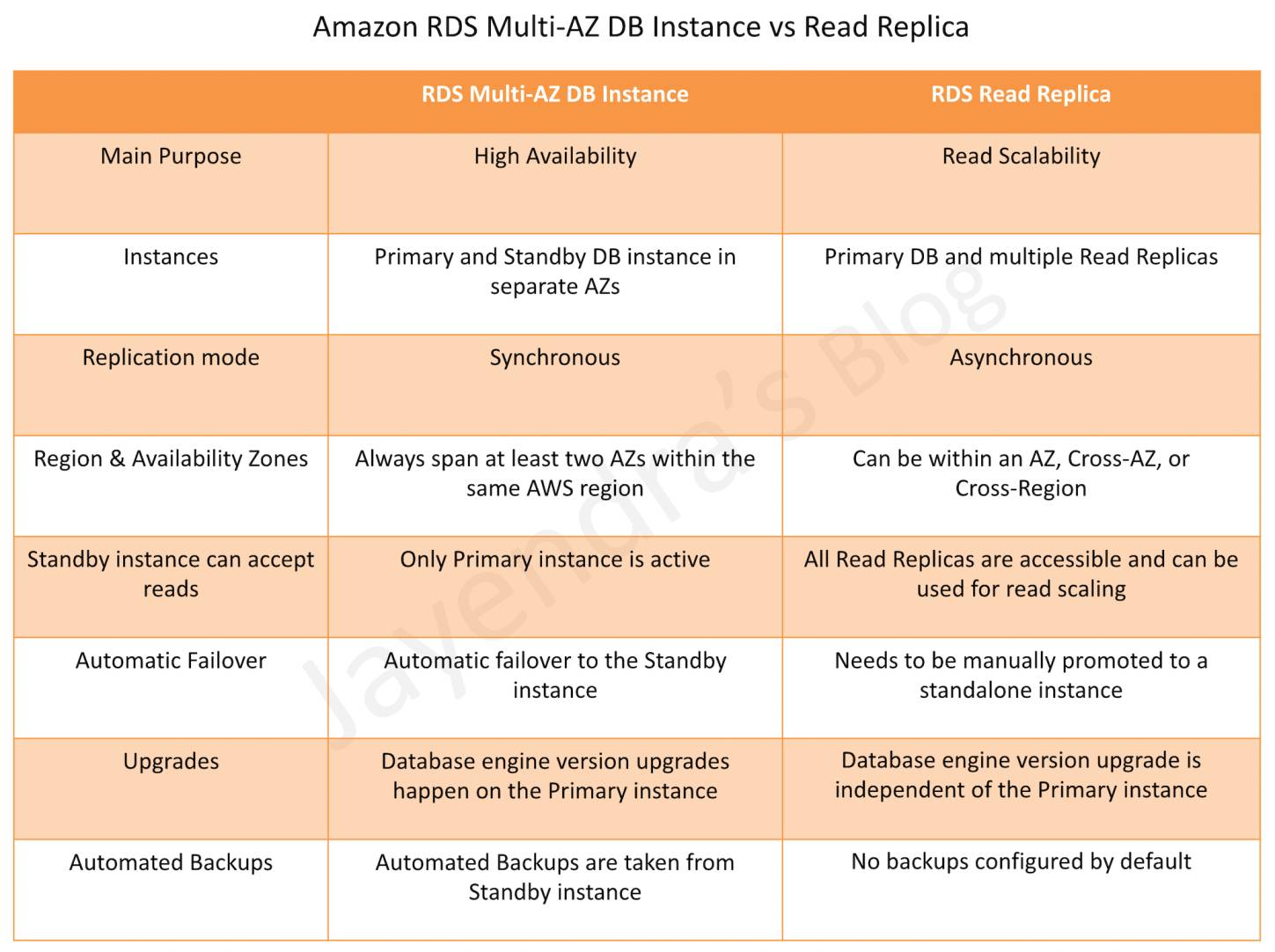
Region & Availability Zones
RDS Multi-AZ DB Instance deployment automatically provisions and manages a standby instance in a different AZ (independent infrastructure in a physically separate location) within the same AWS region.
RDS Multi-AZ DB Cluster deployment provisions a writer DB instance and two readable standby DB instances across three different AZs within the same region.
RDS Read Replicas can be provisioned within the same AZ, Cross-AZ or even as a Cross-Region replica.
Replication Mode
RDS Multi-AZ DB Instance deployment manages a synchronous standby instance in a different AZ.
RDS Multi-AZ DB Cluster deployment uses semi-synchronous replication (transaction acknowledged when at least one standby confirms write) for high durability with improved write latency.
RDS Read Replicas have data replicated asynchronously from the Primary instance to the read replicas.
Standby Instance can Accept Reads
Multi-AZ DB Instance deployment is a high-availability solution and the standby instance does not support read requests.
Multi-AZ DB Cluster deployment provides two readable standby instances that can serve read traffic, increasing application read throughput.
Read Replica deployment provides readable instances to increase application read-throughput.
Automatic Failover & Failover Time
Multi-AZ DB Instance deployment performs an automatic failover to the standby instance without administrative intervention, and the failover time is typically 60–120 seconds based on crash recovery.
Planned database maintenance
Software patching
Rebooting the Primary instance with failover
Primary DB instance connectivity or host failure, or an
Availability Zone failure
Multi-AZ DB Cluster deployment provides automated failover typically under 35 seconds with zero data loss. When combined with RDS Proxy, failover downtime can be reduced to under 1 second.
RDS maintains the same endpoint for the DB Instance after a failover, so the application can resume database operation without the need for manual administrative intervention.
Read Replica deployment does not provide automatic failover. Read Replica instance needs to be manually promoted to a Standalone instance.
Upgrades
For a Multi-AZ DB Instance deployment, database engine version upgrades happen on the Primary instance with downtime of 60–120 seconds for failover.
For a Multi-AZ DB Cluster deployment, minor version upgrades can be completed with 35 seconds or less of downtime (under 1 second with RDS Proxy).
RDS Blue/Green Deployments provide a safer upgrade mechanism by creating a staging (green) environment, testing changes, and then switching over with typically under 5 seconds of downtime (as of Jan 2026).
For Read Replicas, the database engine version upgrade is independent of the Primary instance.
Automated Backups
Multi-AZ DB Instance deployment has the Automated Backups taken from the Standby instance (reducing I/O impact on Primary).
Multi-AZ DB Cluster deployment takes automated backups from one of the reader instances.
Read Replicas do not have any backups configured by default, but automated backups can be enabled on read replicas.
Cascading (Chained) Read Replicas
RDS supports creating a Read Replica of another Read Replica (cascading), which helps scale reads without adding overhead to the source DB instance.
MySQL: Supports cascading read replicas with up to 3 levels of chaining.
PostgreSQL: Supports cascading read replicas from version 14.1 onwards, with up to 3 levels of chaining and 5 replicas per instance (up to 155 total read replicas per source).
Cross-Region cascading read replicas are also supported for PostgreSQL.
Delayed Read Replicas (New – 2025)
RDS for PostgreSQL now supports delayed read replicas (Aug 2025), allowing you to specify a minimum time period (0 to 24 hours) that a replica lags behind the source.
Creates a time buffer that helps protect against accidental data loss from human errors such as table drops or unintended data modifications.
When data corruption occurs on primary, the delayed replica can be promoted before the problematic operation is applied, providing recovery within minutes.
Configured using the recovery_min_apply_delay parameter.
Available with RDS for PostgreSQL versions 14.19, 15.14, 16.10, 17.6 and later.
RDS for MySQL also supports delayed replication using the mysql.rds_set_source_delay stored procedure.
RDS Proxy for Improved Failover
Amazon RDS Proxy is a fully managed, highly available database proxy that can significantly reduce failover times.
RDS Proxy eliminates DNS propagation delay by continuously monitoring both primary and standby instances, allowing faster failover response.
When used with Multi-AZ DB Cluster deployments, RDS Proxy can reduce minor version upgrade downtime to under 1 second.
RDS Proxy also helps manage connection pooling and reduces database connection overhead for applications using many connections (e.g., Lambda functions).
SQL Server Multi-AZ Replication Technologies
RDS for SQL Server supports Multi-AZ using Always On Availability Groups (AGs) for Enterprise and Standard editions.
SQL Server Database Mirroring (DBM) was the legacy approach but is deprecated; AWS recommends migrating to Always On AGs.
New (Nov 2025): RDS for SQL Server Web Edition now supports Multi-AZ using block-level replication, eliminating the need for more expensive Enterprise/Standard editions for high availability.
SQL Server Read Replicas now support cross-region deployment in 16+ additional AWS Regions (Jan 2026) and additional storage volumes up to 256 TiB (May 2026).
Questions are collected from Internet and the answers are marked as per my knowledge and understanding (which might differ with yours).
AWS services are updated everyday and both the answers and questions might be outdated soon, so research accordingly.
AWS exam questions are not updated to keep up the pace with AWS updates, so even if the underlying feature has changed the question might not be updated
Open to further feedback, discussion and correction.
You are running a successful multi-tier web application on AWS and your marketing department has asked you to add a reporting tier to the application. The reporting tier will aggregate and publish status reports every 30 minutes from user-generated information that is being stored in your web applications database. You are currently running a Multi-AZ RDS MySQL instance for the database tier. You also have implemented ElastiCache as a database caching layer between the application tier and database tier. Please select the answer that will allow you to successfully implement the reporting tier with as little impact as possible to your database.
Continually send transaction logs from your master database to an S3 bucket and generate the reports of the S3 bucket using S3 byte range requests.
Generate the reports by querying the synchronously replicated standby RDS MySQL instance maintained through Multi-AZ (Standby instance cannot be used as a scaling solution)
Launch an RDS Read Replica connected to your Multi-AZ master database and generate reports by querying the Read Replica.
Generate the reports by querying the ElastiCache database caching tier. (ElasticCache does not maintain full data and is simply a caching solution)
A company is deploying a new two-tier web application in AWS. The company has limited staff and requires high availability, and the application requires complex queries and table joins. Which configuration provides the solution for the company’s requirements?
MySQL Installed on two Amazon EC2 Instances in a single Availability Zone (does not provide High Availability out of the box)
Amazon RDS for MySQL with Multi-AZ
Amazon ElastiCache (Just a caching solution)
Amazon DynamoDB (Not suitable for complex queries and joins)
Your company is getting ready to do a major public announcement of a social media site on AWS. The website is running on EC2 instances deployed across multiple Availability Zones with a Multi-AZ RDS MySQL Extra Large DB Instance. The site performs a high number of small reads and writes per second and relies on an eventual consistency model. After comprehensive tests you discover that there is read contention on RDS MySQL. Which are the best approaches to meet these requirements? (Choose 2 answers)
Deploy ElastiCache in-memory cache running in each availability zone
Implement sharding to distribute load to multiple RDS MySQL instances (this is only a read contention, the writes work fine)
Increase the RDS MySQL Instance size and Implement provisioned IOPS (not scalable, this is only a read contention, the writes work fine)
Add an RDS MySQL read replica in each availability zone
Your company has HQ in Tokyo and branch offices all over the world and is using logistics software with a multi-regional deployment on AWS in Japan, Europe and US. The logistic software has a 3-tier architecture and currently uses MySQL 5.6 for data persistence. Each region has deployed its own database. In the HQ region you run an hourly batch process reading data from every region to compute cross-regional reports that are sent by email to all offices this batch process must be completed as fast as possible to quickly optimize logistics. How do you build the database architecture in order to meet the requirements?
For each regional deployment, use RDS MySQL with a master in the region and a read replica in the HQ region
For each regional deployment, use MySQL on EC2 with a master in the region and send hourly EBS snapshots to the HQ region
For each regional deployment, use RDS MySQL with a master in the region and send hourly RDS snapshots to the HQ region
For each regional deployment, use MySQL on EC2 with a master in the region and use S3 to copy data files hourly to the HQ region
Use Direct Connect to connect all regional MySQL deployments to the HQ region and reduce network latency for the batch process
What would happen to an RDS (Relational Database Service) Multi-Availability Zone deployment if the primary DB instance fails?
IP of the primary DB Instance is switched to the standby DB Instance.
A new DB instance is created in the standby availability zone.
The canonical name record (CNAME) is changed from primary to standby.
The RDS (Relational Database Service) DB instance reboots.
Your business is building a new application that will store its entire customer database on a RDS MySQL database, and will have various applications and users that will query that data for different purposes. Large analytics jobs on the database are likely to cause other applications to not be able to get the query results they need to, before time out. Also, as your data grows, these analytics jobs will start to take more time, increasing the negative effect on the other applications. How do you solve the contention issues between these different workloads on the same data?
Enable Multi-AZ mode on the RDS instance
Use ElastiCache to offload the analytics job data
Create RDS Read-Replicas for the analytics work
Run the RDS instance on the largest size possible
Will my standby RDS instance be in the same Availability Zone as my primary?
Only for Oracle RDS types
Yes
Only if configured at launch
No
Is creating a Read Replica of another Read Replica supported?
Only in certain regions
Only with MySQL based RDSYes, for MySQL and PostgreSQL (14.1+). Both support cascading read replicas with up to 3 levels of chaining.
Only for Oracle RDS types
No
A user is planning to set up the Multi-AZ feature of RDS. Which of the below mentioned conditions won’t take advantage of the Multi-AZ feature?
Availability zone outage
A manual failover of the DB instance using Reboot with failover option
Region outage
When the user changes the DB instance’s server type
When you run a DB Instance as a Multi-AZ deployment, the “_____” serves database writes and reads
secondary
backup
stand by
primary
When running my DB Instance as a Multi-AZ deployment, can I use the standby for read or write operations?
Yes
Only with MSSQL based RDS
Only for Oracle RDS instances
No (for Multi-AZ DB Instance deployment. Note: Multi-AZ DB Cluster deployment provides readable standbys)
Read Replicas require a transactional storage engine and are only supported for the _________ storage engine
OracleISAM
MSSQLDB
InnoDB
MyISAM
A user is configuring the Multi-AZ feature of an RDS DB. The user came to know that this RDS DB does not use the AWS technology, but uses server mirroring to achieve replication. Which DB is the user using right now?
MySQL
Oracle
MS SQL (Note: AWS now recommends Always On Availability Groups over Database Mirroring. SQL Server Web Edition uses block-level replication for Multi-AZ as of Nov 2025.)
PostgreSQL
If I have multiple Read Replicas for my master DB Instance and I promote one of them, what happens to the rest of the Read Replicas?
The remaining Read Replicas will still replicate from the older master DB Instance
The remaining Read Replicas will be deleted
The remaining Read Replicas will be combined to one read replica
If you have chosen Multi-AZ deployment, in the event of a planned or unplanned outage of your primary DB Instance, Amazon RDS automatically switches to the standby replica. The automatic failover mechanism simply changes the ______ record of the main DB Instance to point to the standby DB Instance.
DNAME
CNAME
TXT
MX
When automatic failover occurs, Amazon RDS will emit a DB Instance event to inform you that automatic failover occurred. You can use the _____ to return information about events related to your DB Instance
FetchFailure
DescriveFailure
DescribeEvents
FetchEvents
The new DB Instance that is created when you promote a Read Replica retains the backup window period.
TRUE
FALSE
Will I be alerted when automatic failover occurs?
Only if SNS configured
No
Yes
Only if Cloudwatch configured
Can I initiate a “forced failover” for my MySQL Multi-AZ DB Instance deployment?
Only in certain regions
Only in VPC
Yes
No
A user is accessing RDS from an application. The user has enabled the Multi-AZ feature with the MS SQL RDS DB. During a planned outage how will AWS ensure that a switch from DB to a standby replica will not affect access to the application?
RDS will have an internal IP which will redirect all requests to the new DB
RDS uses DNS to switch over to standby replica for seamless transition
The switch over changes Hardware so RDS does not need to worry about access
RDS will have both the DBs running independently and the user has to manually switch over
Which of the following is part of the failover process for a Multi-AZ Amazon Relational Database Service (RDS) instance?
The failed RDS DB instance reboots.
The IP of the primary DB instance is switched to the standby DB instance.
The DNS record for the RDS endpoint is changed from primary to standby.
A new DB instance is created in the standby availability zone.
Which of these is not a reason a Multi-AZ RDS instance will failover?
An Availability Zone outage
A manual failover of the DB instance was initiated using Reboot with failover
To autoscale to a higher instance class (Refer link)
Master database corruption occurs
The primary DB instance fails
You need to scale an RDS deployment. You are operating at 10% writes and 90% reads, based on your logging. How best can you scale this in a simple way?
Create a second master RDS instance and peer the RDS groups.
Cache all the database responses on the read side with CloudFront.
Create read replicas for RDS since the load is mostly reads.
Create a Multi-AZ RDS installs and route read traffic to standby.
How does Amazon RDS multi Availability Zone model work?
A second, standby database is deployed and maintained in a different availability zone from master, using synchronous replication. (Refer link)
A second, standby database is deployed and maintained in a different availability zone from master using asynchronous replication.
A second, standby database is deployed and maintained in a different region from master using asynchronous replication.
A second, standby database is deployed and maintained in a different region from master using synchronous replication.
A customer is running an application in US-West (Northern California) region and wants to setup disaster recovery failover to the Asian Pacific (Singapore) region. The customer is interested in achieving a low Recovery Point Objective (RPO) for an Amazon RDS multi-AZ MySQL database instance. Which approach is best suited to this need?
Synchronous replication
Asynchronous replication
Route53 health checks
Copying of RDS incremental snapshots
A user is using a small MySQL RDS DB. The user is experiencing high latency due to the Multi AZ feature. Which of the below mentioned options may not help the user in this situation?
Schedule the automated back up in non-working hours
Use a large or higher size instance
Use PIOPS
Take a snapshot from standby Replica
Are Reserved Instances available for Multi-AZ Deployments?
Only for Cluster Compute instances
Yes for all instance types
Only for M3 instance types
My Read Replica appears “stuck” after a Multi-AZ failover and is unable to obtain or apply updates from the source DB Instance. What do I do?
You will need to delete the Read Replica and create a new one to replace it.
You will need to disassociate the DB Engine and re-associate it.
The instance should be deployed to Single AZ and then moved to Multi-AZ once again
You will need to delete the DB Instance and create a new one to replace it.
What is the charge for the data transfer incurred in replicating data between your primary and standby?
No charge. It is free.
Double the standard data transfer charge
Same as the standard data transfer charge
Half of the standard data transfer charge
A user has enabled the Multi-AZ feature with the MS SQL RDS database server. Which of the below mentioned statements will help the user understand the Multi-AZ feature better?
In a Multi-AZ, AWS runs two DBs in parallel and copies the data asynchronously to the replica copy
In a Multi-AZ, AWS runs two DBs in parallel and copies the data synchronously to the replica copy
In a Multi-AZ, AWS runs just one DB but copies the data synchronously to the standby replica
AWS MS SQL does not support the Multi-AZ feature
A company is running a batch analysis every hour on their main transactional DB running on an RDS MySQL instance to populate their central Data Warehouse running on Redshift. During the execution of the batch their transactional applications are very slow. When the batch completes they need to update the top management dashboard with the new data. The dashboard is produced by another system running on-premises that is currently started when a manually sent email notifies that an update is required The on-premises system cannot be modified because is managed by another team. How would you optimize this scenario to solve performance issues and automate the process as much as possible?
Replace RDS with Redshift for the batch analysis and SNS to notify the on-premises system to update the dashboard
Replace RDS with Redshift for the batch analysis and SQS to send a message to the on-premises system to update the dashboard
Create an RDS Read Replica for the batch analysis and SNS to notify the on-premises system to update the dashboard
Create an RDS Read Replica for the batch analysis and SQS to send a message to the on-premises system to update the dashboard.
New Practice Questions (Multi-AZ DB Cluster & Recent Features)
A company needs a highly available MySQL database with the fastest possible automatic failover time and the ability to offload read queries to standby instances. Which RDS deployment option should they choose?
Multi-AZ DB Instance deployment with Read Replicas
Single-AZ with automated backups
Multi-AZ DB Cluster deployment
Aurora Global Database
What is the typical failover time for an RDS Multi-AZ DB Cluster deployment?
60–120 seconds
5–10 minutes
Under 35 seconds
Under 5 seconds
Which replication method does the RDS Multi-AZ DB Cluster deployment use?
Asynchronous replication
Synchronous replication
Semi-synchronous replication
Logical replication
A database administrator wants to protect against accidental table drops by maintaining a replica that lags behind the primary by 1 hour. Which RDS feature should they use?
Multi-AZ DB Instance standby
Cross-Region Read Replica
Delayed Read Replica
Blue/Green Deployment
Which of the following DB engines support Multi-AZ DB Cluster deployments? (Choose 2)
Oracle
MySQL
SQL Server
PostgreSQL
MariaDB
How can you reduce RDS Multi-AZ DB Cluster minor version upgrade downtime to under 1 second?