Google Cloud Virtual Private Cloud – VPC
Virtual Private Cloud (VPC) provides networking functionality to Compute Engine virtual machine (VM) instances, Google Kubernetes Engine (GKE) clusters, and serverless workloads. VPC provides networking for the cloud-based resources and services that is global, scalable, and flexible.
VPC Networks
- VPC network is a virtual version of a physical network, implemented inside of Google’s production network by using Andromeda (Google’s distributed network virtualization platform).
- A VPC network is a global resource that consists of a list of regional virtual subnets in data centers, all connected by a global wide area network.
- VPC networks are logically isolated from each other in Google Cloud.
- VPC networks
- provides connectivity for the Compute Engine VMs, including GKE clusters, serverless workloads, and other Google Cloud products built on Compute Engine VMs
- offers built-in internal passthrough Network Load Balancers and proxy systems for internal Application Load Balancers.
- connects to on-premises networks using Cloud VPN tunnels and VLAN attachments for Cloud Interconnect.
- distributes traffic from Google Cloud external load balancers to backends
Specifications
- VPC networks are global resources, including the associated routes and firewall rules, and are not associated with any particular region or zone.
- Subnets are regional resources and each subnet defines a range of IP addresses.
- Firewall rules control the traffic to and from instances. Rules are implemented on the VMs themselves, so traffic can only be controlled and logged as it leaves or arrives at a VM.
- Resources within a VPC network can communicate with one another by using internal IPv4 addresses (and IPv6 addresses in dual-stack or IPv6-only subnets), subject to applicable network firewall rules.
- Private access options for services allow instances with internal IP addresses to communicate with Google APIs and services.
- Network administration can be secured by using IAM roles.
- An organization can use Shared VPC to keep a VPC network in a common host project. Authorized IAM members from other projects in the same organization can create resources that use Shared VPC network subnets.
- VPC Network Peering allows VPC networks to be connected with other VPC networks in different projects or organizations.
- VPC networks can be securely connected in hybrid environments by using Cloud VPN or Cloud Interconnect.
- VPC networks support IPv4 unicast traffic, and now also support IPv6 traffic through dual-stack and IPv6-only subnets (available in custom-mode VPC networks only). Broadcast and multicast traffic are not supported within the network.
- Network Connectivity Center (NCC) can be used to connect VPC networks via a hub-and-spoke model using VPC spokes, supporting up to 250 VPC spokes per hub.
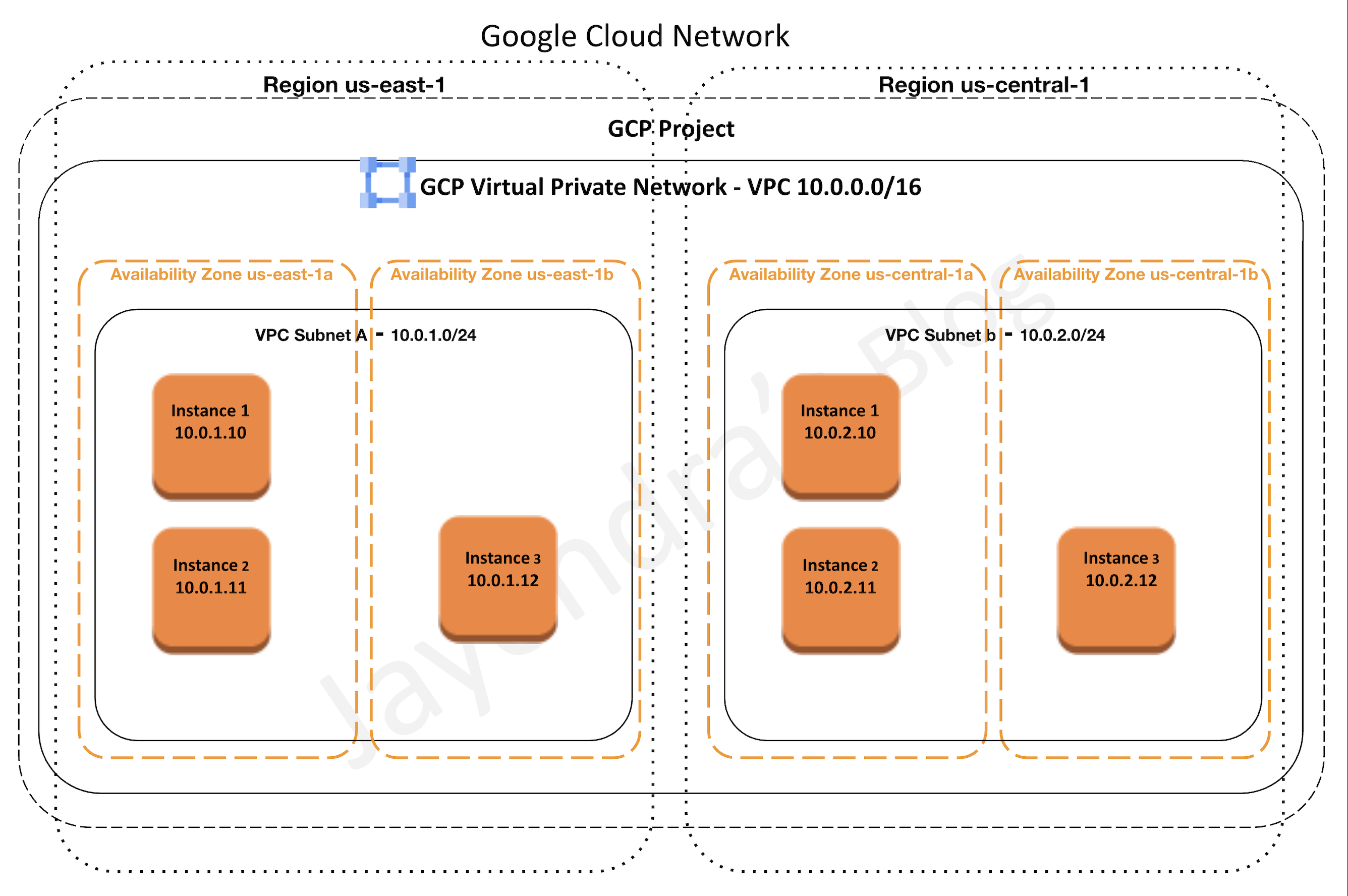
VPC Subnets
- VPC networks do not have any IP address ranges associated with them.
- Each VPC network consists of one or more useful IP range partitions called subnets and IP ranges are defined for the subnets.
- Subnets are regional resources and each subnet is associated with a region.
- A network must have at least one subnet before it can be used.
- More than one subnet per region can be created.
- VPC Network supports the following subnet creation mode
- Auto mode VPC networks
- create subnets in each region automatically
- adds new subnets automatically, if a new region becomes available
- can be switched to custom mode VPC networks
- support only IPv4 subnet ranges
- Custom mode VPC networks
- start with no subnets, giving full control over subnet creation.
- are more flexible and are better suited for production
- cannot be switched to auto mode VPC networks
- support IPv4, dual-stack (IPv4 + IPv6), and IPv6-only subnet configurations
- Auto mode VPC networks
- Subnet must have a defined primary IP address range, and any resources created within are assigned an IP address from the defined range.
- Subnets can be assigned a secondary IP address range, which is only used by alias IP ranges. This is useful if you have multiple services running on a VM and want to assign each service a different IP address.
- Primary IP range of an existing subnet can be expanded by modifying its subnet mask, setting the prefix length to a smaller number.
Subnet Stack Types
- IPv4-only subnets — default, supports IPv4 addressing only.
- Dual-stack (IPv4 and IPv6) subnets — have both IPv4 and IPv6 address ranges. The IPv6 subnet range is /64 (e.g., fd20:a:b:c::/64).
- IPv6 can be either internal ULA (Unique Local Address) or external GUA (Globally Unique Address)
- Internal ULA requires the VPC network internal IPv6 range to be enabled
- IPv6-only subnets — support only IPv6 addressing. Can use DNS64 and NAT64 to access IPv4-only destinations.
- IPv6 functionality is available only in Premium Tier networking.
- IPv6 addressing is not available in auto mode VPC networks — only custom mode networks support IPv6.
VPC Routes
- Routes define paths for packets leaving instances (egress traffic), either inside the network or outside of Google Cloud.
- A route consists of
- a single destination prefix in CIDR format (0.0.0.0/0) and
- a single next hop (for e.g. Internet Gateway)
- When an instance in a VPC network sends a packet, Google Cloud delivers the packet to the route’s next hop if the packet’s destination address is within the route’s destination range.
- Routes are defined at the VPC network level but implemented at each VM instance level.
- Each VM instance has a controller that is kept informed of all applicable routes from the network’s routing table. Each packet leaving a VM is delivered to the appropriate next hop of an applicable route based on a routing order. When a route is added or deleted, the set of changes is propagated to the VM controllers by using an eventually consistent design.
- Routes are divided into two categories: system-generated and custom.
- system-generated routes
- default — send traffic from eligible instances to the internet and can be removed or replaced
- subnet routes — route traffic among its subnets and updated automatically by Google Cloud
- are applied at the VPC level to all the instances
- custom routes
- are either static routes created manually or dynamic routes maintained automatically by one or more of the Cloud Routers
- can be applied to all the instances or specific instance using network tag
- system-generated routes
- Policy-based routes let you direct traffic based on more than just the destination IP address — they can match on source IP, protocol, and port to steer traffic to specific next hops (e.g., for third-party network appliances).
VPC Firewall Rules & Cloud NGFW
- Refer blog post @ Google Cloud VPC Firewall Rules
📢 Update (2024-2025): Google Cloud now recommends migrating from legacy VPC firewall rules to Cloud NGFW (Next Generation Firewall) network firewall policies. Cloud NGFW provides:
- Hierarchical firewall policies — apply to an entire organization or folders
- Global network firewall policies — apply across all regions of a VPC network
- Regional network firewall policies — apply to a specific region
- Cloud NGFW Standard — FQDN objects, geolocation objects, threat intelligence
- Cloud NGFW Enterprise — intrusion prevention (IPS), TLS inspection
A migration tool is available to convert existing VPC firewall rules to global network firewall policies.
VPC Private Access Options
- Google Cloud provides several private access options which allow VM instances with internal IP addresses to reach certain APIs and services.
- Private Google Access
- allows VMs to connect to the set of external IP addresses used by Google APIs and services by enabling Private Google Access on the subnet used by the VM’s network interface.
- allows access to the external IP addresses used by App Engine, including third-party App Engine-based services.
- configured on a subnet by subnet basis
- provides following routing options
- use default route with its next-hop being the default internet gateway, and it provides a path to the default domains,
private.googleapis.com, andrestricted.googleapis.com. - use custom static routes, each having a more specific destination, and each using the default internet gateway next hop.
- use default route with its next-hop being the default internet gateway, and it provides a path to the default domains,
- Use this option to connect to Google APIs and services without giving the Google Cloud resources external IP addresses.
- Private Service Connect (PSC)
- is a capability of Google Cloud networking that allows consumers to access managed services privately from inside their VPC network.
- allows managed service producers to host services in their own separate VPC networks and offer a private connection to their consumers.
- creates a private endpoint with an internal IP address in the consumer’s VPC to access producer services.
- supports access to Google APIs (global and regional), published third-party services, and your own services.
- PSC Endpoints — consumer-side resources for accessing published services or Google APIs via an internal IP.
- PSC Interfaces — allow producer VPCs to initiate connections to consumer VPCs via network attachments.
- Service Connectivity Automation — lets service consumers automate the deployment of connectivity to managed services using service connection policies.
- PSC is the recommended approach for private connectivity to Google Cloud managed services.
- Private services access
- is a private connection between the VPC network and a network owned by Google or a third party i.e. service producers
- enables VM instances in the VPC network and the accessed services to communicate exclusively by using internal IP addresses.
- VM instances don’t need Internet access or external IP addresses to reach services that are available through private services access.
- Use this option to connect to specific Google and third-party services without assigning external IP addresses to the Google Cloud and Google or third-party resources.
Shared VPC – VPC Sharing
Refer blog post GCP Shared VPC
VPC Peering
Refer blog post GCP VPC Peering
Network Connectivity Center
- Network Connectivity Center (NCC) provides a hub-and-spoke connectivity model for connecting VPC networks.
- VPC spokes let you connect two or more VPC networks to an NCC hub so that the networks can exchange subnet routes.
- Supports up to 250 VPC spokes per hub and millions of VMs.
- Provides smooth workload mobility between VPCs and simplified management of cross-VPC connectivity.
- Also supports hybrid spokes (Cloud VPN, Cloud Interconnect, Router Appliance) for connecting on-premises/multi-cloud networks.
- NCC is an alternative to VPC Peering for large-scale network topologies, providing centralized management and transitive connectivity.
VPC Flow Logs
- VPC Flow Logs records a sample of network flows sent from and received by VM instances, including instances used as GKE nodes.
- Flow Logs can be used for network monitoring, forensics, real-time security analysis, and expense optimization.
- Flow logs can be configured at multiple levels:
- Organization level — enables flow logs for all subnets, VLAN attachments, and Cloud VPN tunnels across the entire organization
- VPC network level — enables for all subnets in a VPC
- Subnet level — enables for a specific subnet
- VLAN attachment level — for Cloud Interconnect traffic
- Cloud VPN tunnel level — for VPN traffic
- Flow logs record TCP, UDP, ICMP, ESP, and GRE connections.
- With GCP Shared VPC, all Flow logs are in the host project.
- Cloud Logging can be used to view the flow logs and it can be exported to any destination that Cloud Logging export supports.
- Flow logs are aggregated by the connection from Compute Engine VMs and exported in real-time.
- Flow logs can be analyzed using real-time streaming APIs by subscribing to Pub/Sub.
- Flow logs are collected for each VM connection at specific intervals (sampling period). All packets collected for a given interval for a given connection are aggregated for a period of time (aggregation interval) into a single flow log entry.
- VPC Flow Logs for Cross-Cloud Network — expanded support for logging traffic across multi-cloud and hybrid topologies.
- Organization policy constraints can be configured to enforce VPC Flow Logs enablement.
Hybrid Subnets (Preview)
- Hybrid Subnets helps migrate workloads to Google Cloud without needing to change any IP addresses.
- A hybrid subnet is a single logical subnet that combines a segment of an on-premises network with a subnet in a VPC network.
- Enables gradual migration where workloads can reside both on-premises and in Google Cloud on the same subnet during transition.
- Useful for lift-and-shift migrations where changing IP addresses is impractical.
GCP Certification Exam Practice Questions
- Questions are collected from Internet and the answers are marked as per my knowledge and understanding (which might differ with yours).
- GCP services are updated everyday and both the answers and questions might be outdated soon, so research accordingly.
- GCP exam questions are not updated to keep up the pace with GCP updates, so even if the underlying feature has changed the question might not be updated
- Open to further feedback, discussion and correction.
- Your VMs are running in a subnet that has a subnet mask of 255.255.255.240. The current subnet has no more free IP addresses and you require an additional 10 IP addresses for new VMs. The existing and new VMs should all be able to reach each other without additional routes. What should you do?
- Use
gcloudto expand the IP range of the current subnet. - Delete the subnet, and recreate it using a wider range of IP addresses.
- Create a new project. Use Shared VPC to share the current network with the new project.
- Create a new subnet with the same starting IP but a wider range to overwrite the current subnet
- Use
- An IT company has a set of compute engine instances hosted in a VPC. They are not exposed to the internet. These instances now need to install an important security patch. How can the security patch be installed on the instances?
- Upload to Cloud Storage and enable VPC peering
- Upload to Cloud Storage and whitelist instance IP address
- Upload to Cloud Storage and enable Private Google Access
- Upload to Cloud Source Repository and enable VPC peering
- Your security team wants to be able to audit network traffic inside of your network. What’s the best way to ensure they have access to the data they need?
- Disable flow logs.
- Enable flow logs.
- Enable VPC Network logs
- Add a firewall capture filter.
- Your organization needs to provide private connectivity from a VPC to a managed Google service without using external IP addresses. The solution should assign an internal IP address for the connection. What should you use?
- VPC Network Peering
- Private Google Access
- Private Service Connect
- Cloud VPN
- You need to connect 50 VPC networks across different projects in your organization with centralized management and transitive routing. Which solution is most appropriate?
- Create VPC Peering between all networks
- Use Shared VPC for all projects
- Use Network Connectivity Center with VPC spokes
- Create Cloud VPN tunnels between all networks
- You are deploying IPv6 workloads in Google Cloud. Which VPC network mode supports dual-stack subnets?
- Auto mode VPC networks
- Custom mode VPC networks
- Both auto mode and custom mode
- Legacy networks
- Your organization wants to enforce consistent firewall rules across multiple VPC networks in different projects and folders. What should you use?
- VPC firewall rules in each network
- Cloud NGFW hierarchical firewall policies
- Network tags
- Service accounts
See also: Google Cloud Networking Services Cheat Sheet