AWS Control Tower
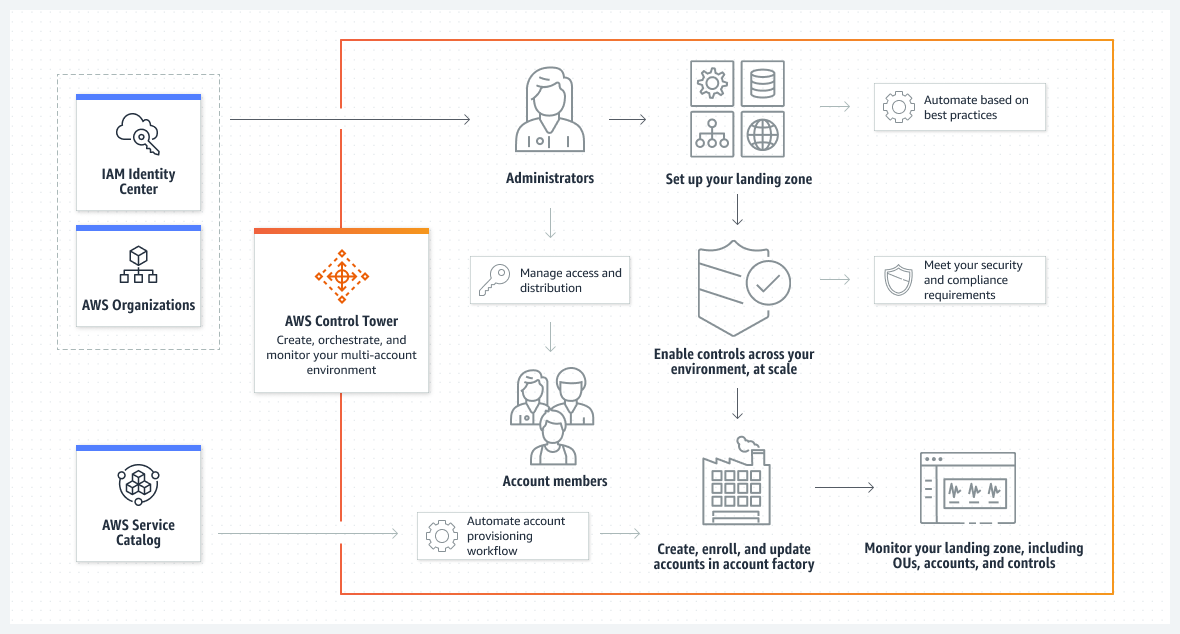
- AWS Control Tower helps set up and govern an AWS multi-account environment, following prescriptive best practices.
- AWS Control Tower offers the easiest way to set up and govern a secure, compliant, well-architected, multi-account AWS environment, that adheres to corporate standards, and meets regulatory requirements based on best practices established by working with thousands of enterprises.
- AWS Control Tower orchestrates the capabilities of several other AWS services, including AWS Organizations, AWS Service Catalog, and AWS IAM Identity Center (formerly AWS Single Sign-On), to build a landing zone in less than an hour. Resources are set up and managed on your behalf.
- Control Tower applies controls (also known as guardrails) to help keep AWS organizations and accounts from drift, which is a divergence from best practices for e.g., controls can be used to help ensure that security logs and necessary cross-account access permissions are created, and not altered.
- Control Tower enables end-users on distributed teams to provision new AWS accounts quickly using configurable account templates in Account Factory. The central cloud administrators can monitor that all accounts are aligned with established, company-wide compliance policies.
- AWS Control Tower provides over 750 preconfigured managed controls that can be applied enterprise-wide or to specific groups of accounts.
Control Tower Features
- Landing Zone
- A landing zone is a well-architected, multi-account environment that’s based on security and compliance best practices.
- It is the enterprise-wide container that holds all of the organizational units (OUs), accounts, users, and other resources that need to be subject to compliance regulation.
- A landing zone can scale to fit the needs of an enterprise of any size.
- AWS Control Tower automates a landing zone to set up a baseline environment that includes:
- A multi-account environment using AWS Organizations.
- Identity management using AWS IAM Identity Center (formerly AWS SSO).
- Federated access to accounts using AWS IAM Identity Center.
- Centralized logging from CloudTrail, and Config stored in S3.
- Cross-account security audits using AWS IAM and AWS IAM Identity Center.
- Centralized data backup using AWS Backup with predefined backup plans.
- Landing Zone 4.0 (Nov 2025) introduces a flexible Controls-Only experience:
- Optional Service Integrations – selectively enable or disable AWS Config, CloudTrail, Security Roles, and AWS Backup integrations.
- Dedicated Resources – separate S3 buckets for Config and CloudTrail, individual SNS topics for each service.
- Flexible Organization Structure – Security OU is no longer required; define your own organizational structure.
- Controls Dedicated Experience – create a minimal landing zone with basic AWS Organizations integration and ability to enable controls without the full AWSControlTowerBaseline baseline.
- Controls (formerly Guardrails)
- A control (also known as a guardrail) is a high-level rule that provides ongoing governance for the overall AWS environment.
- AWS Control Tower provides over 750 preconfigured managed controls available through the Control Catalog.
- Three types of controls (behaviors):
- Preventive – prevents deployment of resources that don’t conform to policies. Implemented using:
- Service Control Policies (SCPs) – restrict actions at the API level.
- Resource Control Policies (RCPs) – establish data perimeters and restrict external access to resources (e.g., S3, STS, KMS, SQS, Secrets Manager).
- Declarative Policies – enforced directly at the service level, ensuring configuration is maintained even when new features or APIs are introduced.
- Detective – continuously monitors deployed resources for non-conformance. Implemented using AWS Config rules.
- Proactive – checks resources before deployment. Implemented using AWS CloudFormation Hooks that block non-compliant resources during CloudFormation deployments.
- Preventive – prevents deployment of resources that don’t conform to policies. Implemented using:
- Three categories of guidance apply to all control types:
- Mandatory – always applied by AWS Control Tower.
- Strongly recommended.
- Elective.
- AWS Control Tower automatically translates controls into granular AWS policies by:
- Establishing a configuration baseline using AWS CloudFormation.
- Preventing configuration changes using SCPs, RCPs, or declarative policies (for preventive controls).
- Continuously detecting configuration changes through AWS Config rules (for detective controls).
- Blocking non-compliant resource deployment through CloudFormation Hooks (for proactive controls).
- Updating control status on the AWS Control Tower dashboard.
- Controls support relationships: Complementary, Mutually exclusive, and Alternative.
- Control Catalog
- Provides a centralized catalog that consolidates all AWS controls in one single place.
- Contains 750+ managed controls for common use cases including security, cost, durability, and operations.
- Controls can be enabled on AWS Organizations without setting up a full Landing Zone (Controls Dedicated Experience).
- Supports industry frameworks and compliance standards with updated metadata.
- Account Factory
- An Account Factory is a configurable account template that helps to standardize the provisioning of new accounts with pre-approved account configurations.
- AWS Control Tower offers a built-in Account Factory that helps automate the account provisioning workflow in the organization.
- Account Factory uses AWS Service Catalog to provision new accounts.
- Supports configuring pre-approved network configuration and AWS Region selections for self-service account provisioning.
- Supports up to 1000 accounts per OU.
- Automatic Account Enrollment (2025) – automatically applies OU baselines and controls when accounts are moved into a new OU, and removes them when accounts are moved out.
- Account Factory for Terraform (AFT)
- Allows provisioning and customizing accounts managed by AWS Control Tower using Terraform.
- Follows a GitOps-style model with automated Terraform pipelines.
- Supports GitHub and GitLab as version control systems.
- Supports Terraform version 1.6.
- Customizations for AWS Control Tower (CfCT)
- Enables more extensive customizations for landing zones than available through the console.
- Uses a GitOps-style, automated process with a configuration package including a manifest file, CloudFormation templates, and JSON policy files.
- Supports GitHub and AWS CodeCommit as configuration sources.
- Supports Resource Control Policies (RCPs) for customizations.
- Dashboard
- The dashboard offers continuous oversight of the landing zone to your team of central cloud administrators.
- Use the dashboard to see provisioned accounts across the enterprise, controls enabled for policy enforcement, controls enabled for continuous detection of policy non-conformance, and non-compliant resources organized by accounts and OUs.
- Provides centralized visibility of enabled controls across OUs.
Control Tower Key APIs
- EnableControl / DisableControl – programmatically enable and disable controls on OUs at scale.
- ResetEnabledControl – reset a control to its default configuration.
- GetControl – retrieve control details from the Control Catalog.
- CreateLandingZone / UpdateLandingZone – manage landing zone lifecycle.
- ListLandingZoneOperations – track landing zone operations.
- Supports up to 100 concurrent control operations.
- Supports tagging of EnabledControl resources in CloudFormation.
Control Tower Integration with AWS Services
- AWS Organizations – provides the multi-account structure and policy management.
- AWS IAM Identity Center – centralized access management to accounts and resources.
- AWS Config – powers detective controls and tracks resource activity.
- AWS CloudTrail – provides centralized logging of actions and API activity.
- AWS CloudFormation – establishes configuration baselines; CloudFormation Hooks power proactive controls.
- AWS Service Catalog – powers Account Factory for account provisioning.
- AWS Backup – provides prescriptive backup plans with predefined rules for retention, frequency, and backup windows.
- AWS KMS – optional encryption key configuration within the landing zone.
AWS Certification Exam Practice Questions
- Questions are collected from Internet and the answers are marked as per my knowledge and understanding (which might differ with yours).
- AWS services are updated everyday and both the answers and questions might be outdated soon, so research accordingly.
- AWS exam questions are not updated to keep up the pace with AWS updates, so even if the underlying feature has changed the question might not be updated
- Open to further feedback, discussion and correction.
- A company is expanding its use of AWS services across its portfolios. The company wants to provision AWS accounts for each team to ensure a separation of business processes for security, compliance, and billing. Account creation and bootstrapping should be completed in a scalable and efficient way so new accounts are created with a defined baseline and governance guardrails in place. An administrator needs to design a provisioning process that saves time and resources. Which action should be taken to meet these requirements?
- Automate using AWS Elastic Beanstalk to provision the AWS accounts, set up infrastructure, and integrate with AWS Organizations.
- Create bootstrapping scripts in AWS OpsWorks and combine them with AWS CloudFormation templates to provision accounts and infrastructure.
- Use AWS Config to provision accounts and deploy instances using AWS Service Catalog.
- Use AWS Control Tower to create a template in Account Factory and use the template to provision new accounts.
- A company wants to enforce governance rules across multiple AWS accounts but also needs to proactively block non-compliant resources before they are deployed via CloudFormation. Which type of AWS Control Tower control should they use?
- Preventive controls using SCPs
- Detective controls using AWS Config rules
- Proactive controls using CloudFormation Hooks
- Preventive controls using Resource Control Policies
- A security team wants to establish a data perimeter across their AWS Control Tower environment to protect resources like S3 buckets and KMS keys from unintended external access. Which control implementation should they use?
- Service Control Policies (SCPs)
- AWS Config rules
- CloudFormation Hooks
- Resource Control Policies (RCPs)
- A company is using AWS Control Tower and wants to automate account provisioning using Terraform with a GitOps workflow. Which AWS Control Tower feature should they use?
- AWS Service Catalog
- Customizations for AWS Control Tower (CfCT)
- Account Factory for Terraform (AFT)
- AWS CloudFormation StackSets
- An organization uses AWS Control Tower and wants to automatically apply controls to new accounts when they are moved into an OU, without manual intervention. Which feature supports this requirement?
- Account Factory provisioning
- Automatic account enrollment
- CfCT deployment pipelines
- CloudFormation StackSets
- A company wants to use AWS Control Tower for governance controls only, without setting up a full landing zone with all service integrations. Which Control Tower capability enables this? (Select TWO)
- Landing Zone 4.0 with Controls Dedicated Experience
- Account Factory for Terraform
- Control Catalog with controls enabled directly on AWS Organizations
- Customizations for Control Tower (CfCT)
- AWS Service Catalog portfolios