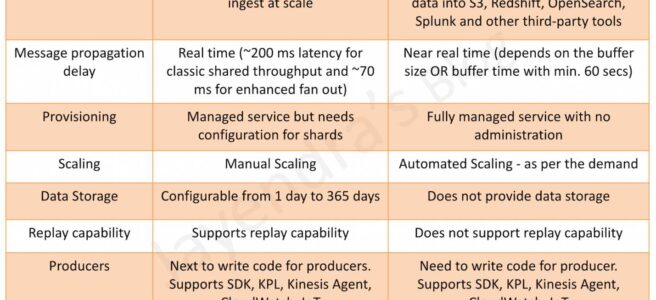
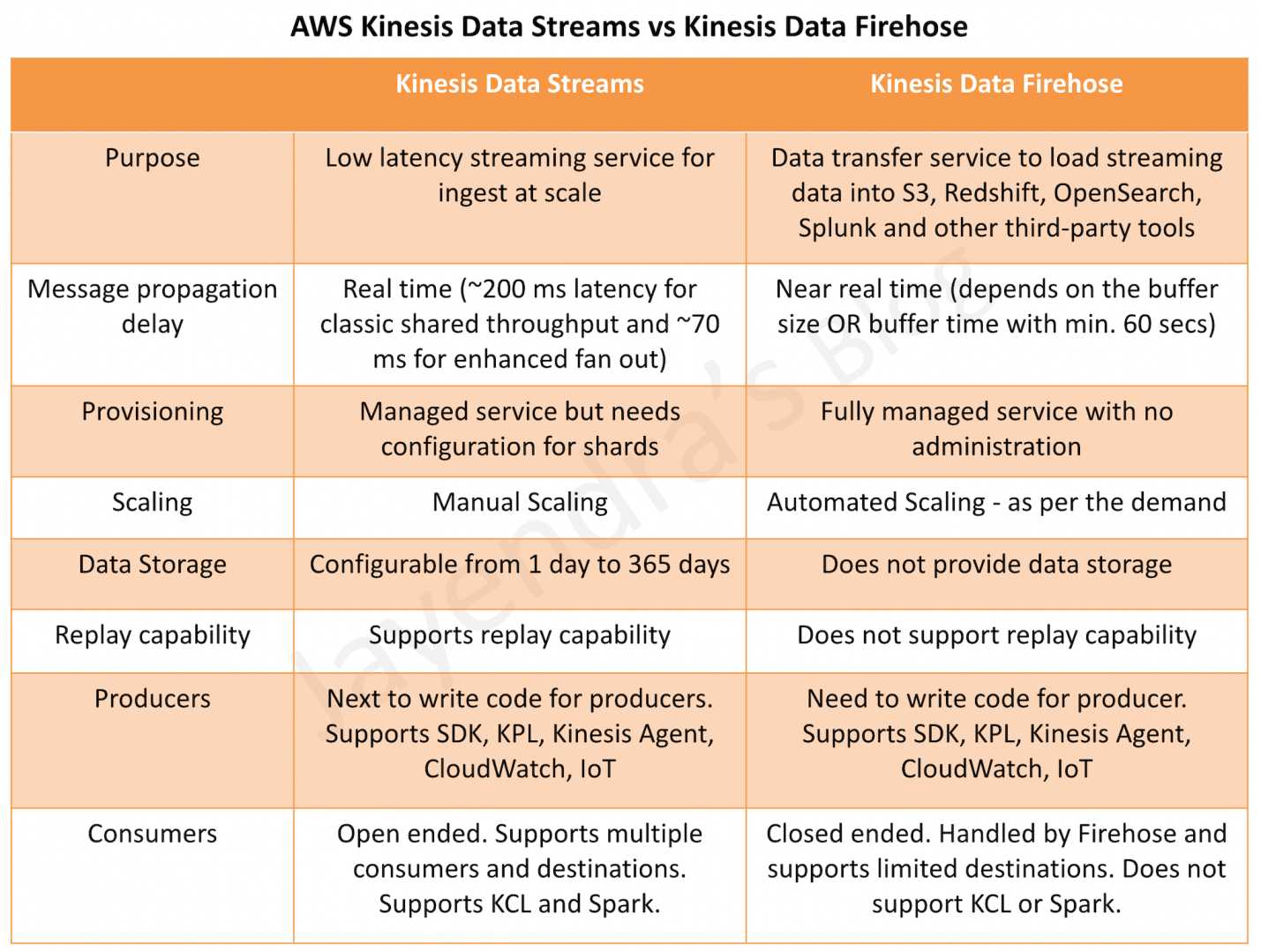
AWS Kinesis Data Streams vs Amazon Data Firehose
📢 Service Rename (February 2024): Amazon Kinesis Data Firehose has been renamed to Amazon Data Firehose. The functionality remains the same. This post uses both names for clarity.
- Kinesis acts as a highly available conduit to stream messages between data producers and data consumers.
- Data producers can be almost any source of data: system or web log data, social network data, financial trading information, geospatial data, mobile app data, or telemetry from connected IoT devices.
- Data consumers will typically fall into the category of data processing and storage applications such as Apache Hadoop, Apache Storm, S3, and OpenSearch.
Purpose
- Kinesis Data Streams is highly customizable and best suited for developers building custom applications or streaming data for specialized needs.
- Amazon Data Firehose (formerly Kinesis Data Firehose) handles loading data streams directly into AWS products for processing. Firehose allows streaming to S3, OpenSearch Service, Redshift, Apache Iceberg tables, Amazon S3 Tables, Snowflake, and other destinations, where data can be copied for processing through additional services.
Provisioning & Scaling
- Kinesis Data Streams offers three capacity modes:
- Provisioned Mode: Requires manual configuration of shards and scaling. You specify the number of shards needed based on expected throughput. Each shard provides 1 MB/s write (1000 records/s) and 2 MB/s read.
- On-Demand Standard Mode (Launched November 2021): Automatically scales to handle gigabytes of write and read throughput per minute without manual shard management. Default capacity of 4 MB/s write (4000 records/s), can scale up to 200 MB/s (or 1 GB/s with limit increase).
- On-Demand Advantage Mode (Launched November 2025): Enables warm throughput capability for instant scaling up to 10 GB/s or 10 million events/second. Offers 60% lower pricing compared to On-demand Standard ($0.032/GB ingest, $0.016/GB retrieval). Removes per-stream fixed charge. Supports up to 50 enhanced fan-out consumers (vs. 20 for other modes). Best for workloads ingesting at least 10 MB/s aggregate, high fan-out use cases, or accounts with hundreds of streams.
- Amazon Data Firehose is fully managed and sends data to S3, Redshift, OpenSearch, Apache Iceberg tables, Amazon S3 Tables, Snowflake, and other destinations. Scaling is handled automatically, up to gigabytes per second, and allows for batching, encrypting, and compressing.
Processing Delay
- Kinesis Data Streams provides real-time processing with ~200 ms for shared throughput classic single consumer and ~70 ms for the enhanced fan-out consumer.
- Amazon Data Firehose provides near real-time processing:
- Standard Buffering: Minimum buffer time of 60 seconds (1 min), maximum 900 seconds (15 min)
- Zero Buffering (Announced December 2023): Delivers data within ~5 seconds with no buffering delay, enabling real-time use cases
Record Size
- Kinesis Data Streams supports record sizes up to 10 MiB (increased from 1 MiB in October 2025), enabling larger data payloads like images, documents, and complex event data without splitting records.
- Amazon Data Firehose supports record sizes up to 1 MiB per record.
Data Storage
- Kinesis Data Streams provides data storage. Data typically is made available in a stream for 24 hours, but for an additional cost, users can gain data availability for up to 365 days (8760 hours). On-demand Advantage mode offers 77% lower extended retention pricing ($0.023/GB-month vs $0.10/GB-month).
- Amazon Data Firehose does not provide data storage.
Replay
- Kinesis Data Streams supports replay capability
- Amazon Data Firehose does not support replay capability
Producers & Consumers
- Kinesis Data Streams & Amazon Data Firehose support multiple producer options including SDK, KPL, Kinesis Agent, IoT, etc.
- Kinesis Data Streams supports multiple consumer options including SDK, KCL, and Lambda, and can write data to multiple destinations. However, they have to be coded.
- Supports up to 50 enhanced fan-out consumers per stream with On-demand Advantage mode (up from 20 with On-demand Standard/Provisioned modes) — Launched November 2025
- Enhanced fan-out provides dedicated 2 MB/s throughput per consumer per shard with ~70 ms latency
- Amazon Data Firehose consumers are close-ended and support destinations including:
- Amazon S3
- Amazon Redshift
- Amazon OpenSearch Service
- Amazon OpenSearch Serverless
- Apache Iceberg Tables (Added October 2024) — Stream data directly into Iceberg format tables in S3
- Amazon S3 Tables (GA March 2025) — Stream data into S3 Tables with built-in Apache Iceberg support and automatic table maintenance (compaction, snapshot management)
- Snowflake (with Snowpipe Streaming) — Real-time streaming to Snowflake
- Splunk
- Third-party HTTP endpoints (Datadog, Dynatrace, New Relic, MongoDB, Coralogix, Elastic, etc.)
- Amazon Data Firehose also supports database CDC replication (Preview, November 2024) — captures change data from MySQL and PostgreSQL databases and replicates directly to Apache Iceberg tables in S3, enabling near real-time data lake updates without custom ETL code.
Key Differences Summary
| Feature | Kinesis Data Streams | Amazon Data Firehose |
|---|---|---|
| Capacity Mode | Provisioned, On-Demand Standard, or On-Demand Advantage | Fully managed (automatic) |
| Latency | Real-time (~70-200 ms) | Near real-time (60s default, ~5s with zero buffering) |
| Max Record Size | 10 MiB (since Oct 2025) | 1 MiB |
| Data Retention | 24 hours to 365 days | No storage |
| Replay | ✅ Supported | ❌ Not supported |
| Max Throughput | Up to 10 GB/s (On-demand Advantage with warm throughput) | Automatic scaling (gigabytes/second) |
| Enhanced Fan-Out Consumers | Up to 50 (Advantage) / 20 (Standard/Provisioned) | N/A — pre-defined destinations |
| Consumers | Custom (SDK, KCL, Lambda) | Pre-defined (S3, Redshift, OpenSearch, Iceberg, S3 Tables, Snowflake, etc.) |
| Use Case | Custom processing, real-time analytics | ETL, loading to data stores, CDC replication |
KCL 1.x End of Support
⚠️ Important: Kinesis Client Library (KCL) 1.x reached end-of-support on January 30, 2026. AWS strongly recommends migrating KCL applications to KCL 2.x or later. KCL 1.x entered maintenance mode on April 17, 2025 with only critical bug fixes and security updates.
Migration: See Migrate consumers from KCL 1.x to KCL 2.x
AWS Certification Exam Practice Questions
- Questions are collected from Internet and the answers are marked as per my knowledge and understanding (which might differ with yours).
- AWS services are updated everyday and both the answers and questions might be outdated soon, so research accordingly.
- AWS exam questions are not updated to keep up the pace with AWS updates, so even if the underlying feature has changed the question might not be updated
- Open to further feedback, discussion and correction.
- Questions are collected from Internet and the answers are marked as per my knowledge and understanding (which might differ with yours).
- AWS services are updated everyday and both the answers and questions might be outdated soon, so research accordingly.
- AWS exam questions are not updated to keep up the pace with AWS updates, so even if the underlying feature has changed the question might not be updated
- Open to further feedback, discussion and correction.
- Your organization needs to ingest a big data stream into its data lake on Amazon S3. The data may stream in at a rate of hundreds of megabytes per second. What AWS service will accomplish the goal with the least amount of management?
- Amazon Data Firehose
- Amazon Kinesis Data Streams
- Amazon CloudFront
- Amazon SQS
- Your organization is looking for a solution that can help the business with streaming data several services will require access to read and process the same stream concurrently. What AWS service meets the business requirements?
- Amazon Data Firehose
- Amazon Kinesis Data Streams
- Amazon CloudFront
- Amazon SQS
- Your application generates a 1 KB JSON payload that needs to be queued and delivered to EC2 instances for applications. At the end of the day, the application needs to replay the data for the past 24 hours. In the near future, you also need the ability for other multiple EC2 applications to consume the same stream concurrently. What is the best solution for this?
- Kinesis Data Streams
- Amazon Data Firehose
- SNS
- SQS
- A company needs to stream data to Amazon S3 with the lowest possible latency (under 10 seconds). Which Kinesis service and configuration should they use? (Assume December 2023 or later)
- Kinesis Data Streams with Lambda consumer
- Amazon Data Firehose with zero buffering enabled
- Amazon Data Firehose with 60-second buffer
- Kinesis Data Streams with KCL consumer
- A company wants to avoid manual shard management for their Kinesis Data Streams and needs to handle instant traffic surges up to 10 GB/s. Which capacity mode should they use?
- Provisioned mode with Auto Scaling
- On-Demand Standard mode
- On-Demand Advantage mode with warm throughput
- Enhanced fan-out mode
- A data analytics team needs to stream real-time data into Apache Iceberg tables in S3 for analytics. Which AWS service supports this natively? (Assume October 2024 or later)
- Kinesis Data Streams
- Amazon Data Firehose
- AWS Glue Streaming
- Amazon MSK
- A company streams data using Kinesis Data Streams with 30 independent consumer applications needing dedicated throughput. Which configuration supports this?
- On-Demand Standard mode with enhanced fan-out
- Provisioned mode with enhanced fan-out
- On-Demand Advantage mode with enhanced fan-out
- Create separate streams for each consumer
- A company needs to stream IoT sensor data that occasionally includes 5 MiB payloads. Which streaming service supports this record size natively? (Assume October 2025 or later)
- Amazon Data Firehose
- Kinesis Data Streams
- Amazon SQS
- Amazon SNS
- A company wants to stream real-time data into Amazon S3 Tables with built-in Apache Iceberg support and automatic table maintenance. Which service should they use?
- Kinesis Data Streams with custom Lambda
- Amazon Data Firehose
- AWS Glue ETL job
- Amazon EMR Streaming
References
- Kinesis Data Streams
- Amazon Data Firehose
- Kinesis Data Streams Capacity Modes (Provisioned, On-Demand Standard, On-Demand Advantage)
- Kinesis Data Streams On-demand Advantage Mode (November 2025)
- Kinesis Data Streams 10 MiB Record Size Support (October 2025)
- Kinesis Data Streams 50 Enhanced Fan-Out Consumers (November 2025)
- Data Firehose Zero Buffering (December 2023)
- Data Firehose Apache Iceberg Support (October 2024)
- Data Firehose Amazon S3 Tables Support (March 2025)
- KCL 1.x to 2.x Migration Guide