Site Reliability Engineering Best Practices
SRE Implements DevOps. The goal of SRE is to accelerate product development teams and keep services running in reliable and continuous way.
📋 2025-2026 SRE Landscape Updates
- AI-Powered SRE (AI SRE) — AI agents now automate up to 80% of incident investigation and response (2025-2026)
- OpenTelemetry Graduated — CNCF graduated OpenTelemetry (May 2026) as the de facto observability standard with 12,000+ contributors
- Platform Engineering Convergence — Gartner predicts 80% of large engineering orgs will have platform teams by 2026, integrating SRE practices
- On-Call Burnout Crisis — Catchpoint SRE Report 2025 found nearly 70% of SREs say on-call stress impacts burnout and attrition
- Chaos Engineering Mainstreamed — Resilience testing now standard in CI/CD pipelines, not just production experiments
SRE Concepts
- Remove Silos and help increase sharing and collaboration between the Development and Operations team
- Accidents are Normal. It is more profitable to focus on speeding recovery than preventing accidents.
- Focus on small and gradual changes. This strategy, coupled with automatic testing of smaller changes and reliable rollback of bad changes, leads to approaches to change management like CI/CD.
- Measurement is Crucial.
- Embrace Risk — Manage risk as a continuum rather than binary; use error budgets to quantify acceptable risk levels.
- Automation over Toil — Invest engineering effort to automate repetitive operational work, targeting less than 50% toil for SRE teams.
SRE Foundations
- SLIs, SLOs, and SLAs
- Monitoring & Observability
- Alerting
- Toil reduction
- Simplicity
SLI, SLO, and SLAs
- SRE does not attempt to give everything 100% availability
- SLIs – Service Level Indicators
- “A carefully defined quantitative measure of some aspect of the level of service that is provided”
- SLIs define what to measure
- SLIs are metrics over time – specific to a user journey such as request/response, data processing – which shows how well the service is performing.
- SLIs is the ratio between two numbers: the good and the total:
- Success Rate = No. of successful HTTP request / total HTTP requests
- Throughput Rate = No. of consumed jobs in a queue / total number of jobs in a queue
- SLI is divided into specification and implementation. for e.g.
- Specification: ratio of requests loaded in < 100 ms
- Implementation is a way to measure for e.g. based on: a) server logs b) client code instrumentation c) synthetic monitoring probes
- SLI ranges from 0% to 100%, where 0% means nothing works, and 100% means nothing is broken
- Types of SLIs
- Availability – The proportion of requests which result in a successful state
- Latency – The proportion of requests below some time threshold
- Freshness – The proportion of data transferred to some time threshold. Replication or Data pipeline
- Correctness – The proportion of input that produces correct output
- Durability – The proportion of records written that can be successfully read
- Throughput – The proportion of time where the served traffic meets demand
- SLO – Service Level Objective
- “SLOs specify a target level for the reliability of your service.”
- SLO is a goal that the service provider wants to reach.
- SLOs are tools to help determine what engineering work to prioritize.
- SLO is a target percentage based on SLIs and can be a single target value or range of values for e.g. SLI <= SLO or (lower bound <= SLI <= upper bound) = SLO
- SLOs also define the concept of error budget.
- The Product and SRE team should select an appropriate availability target for the service and its user base, and the service is managed to that SLO.
- SLOs should be reviewed and updated regularly (quarterly recommended) to reflect evolving user expectations and system capabilities.
- Error Budget
- Error budgets are a tool for balancing reliability with other engineering work, and a great way to decide which projects will have the most impact.
- An Error budget is 100% minus the SLO (e.g., 99.9% SLO = 0.1% error budget = 43.2 minutes/month downtime)
- If an Error budget is exhausted, a team can declare an emergency with high-level approval to deprioritize all external demands until the service meets SLOs and exit criteria.
- Error budget burn rate measures how fast the budget is being consumed relative to the compliance window.
- SLOs & Error budget approach
- SLOs are agreed and approved by all stakeholders
- It is possible to meet SLOs needs under normal conditions
- The organization is committed to using the error budget for decision making and prioritizing
- Error budget policy should cover the policy if the error budget is exhausted.
- SLO and SLI in practice
- The strategy to implement SLO, SLI in the company is to start small.
- Consider the following aspects when working on the first SLO.
- Choose one application for which you want to define SLOs
- Decide on a few key SLIs specs that matter to your service and users
- Consider common ways and tasks through which your users interact with service
- Draw a high-level architecture diagram of your system
- Show key components. The requests flow. The data flow
- The result is a narrow and focused proof of concept that would help to make the benefits of SLO, SLI concise and clear.
- Tools for SLO management include Google Cloud Service Monitoring, Nobl9, Dynatrace SLO, and Datadog SLO tracking.
Monitoring & Observability
- Monitoring allows you to gain visibility into a system, which is a core requirement for judging service health and diagnosing your service when things go wrong
- Observability extends traditional monitoring by enabling teams to ask arbitrary questions about system behavior without deploying new instrumentation.
- The three pillars of observability: Metrics, Logs, and Traces (distributed tracing)
- Modern observability adds a fourth signal: Profiling (continuous profiling for performance insights)
- From an SRE perspective:
- Alert on conditions that require attention
- Investigate and diagnose issues
- Display information about the system visually
- Gain insight into system health and resource usage for long-term planning
- Compare the behavior of the system before and after a change, or between two control groups
- Monitoring features that might be relevant
- Speed of data retrieval and freshness of data.
- Data retention and calculations
- Interfaces: graphs, tables, charts. High level or low level.
- Alerts: multiple categories, notifications flow, suppress functionality.
- Monitoring sources
- Metrics are numerical measurements representing attributes and events, typically harvested via many data points at regular time intervals.
- Logs are an append-only record of events.
- Traces represent the end-to-end journey of a request through distributed systems, showing latency and dependencies.
- Events are discrete occurrences (deployments, configuration changes) that provide context for anomalies.
OpenTelemetry (OTel) — The Observability Standard
- OpenTelemetry graduated from CNCF in May 2026, solidifying its status as the de facto observability standard.
- Provides a single, vendor-neutral framework for collecting telemetry data (metrics, logs, traces) with 12,000+ contributors from 2,800+ companies.
- Eliminates vendor lock-in — organizations can change observability backends without rewriting instrumentation code.
- Key components:
- OTel SDK — Language-specific libraries for auto-instrumentation
- OTel Collector — Vendor-agnostic agent for receiving, processing, and exporting telemetry
- OTLP (OpenTelemetry Protocol) — Standard wire protocol for telemetry data
- Supported by all major observability platforms: Datadog, Grafana, Splunk, Elastic, Dynatrace, New Relic, Google Cloud Operations
- Best practice: Adopt OpenTelemetry for new services and progressively migrate existing instrumentation to reduce tooling fragmentation.
Alerting
- Alerting helps ensure alerts are triggered for a significant event, an event that consumes a large fraction of the error budget.
- Alerting should be configured to notify an on-caller only when there are actionable, specific threats to the error budget.
- Alerting considerations
- Precision – The proportion of events detected that were significant.
- Recall – The proportion of significant events detected.
- Detection time – How long it takes to send notification in various conditions. Long detection time negatively impacts the error budget.
- Reset time – How long alerts fire after an issue is resolved
- Ways to alert
- The recommendation is to combine several strategies to enhance your alert quality from different directions.
- Target error rate ≥ SLO threshold.
- Choose a small time window (for example, 10 minutes) and alert if the error rate over that window exceeds the SLO.
- Upsides: Short detection time, Fast recall time
- Downsides: Precision is low
- Increased Alert Windows.
- By increasing the window size, you spend a higher budget amount before triggering an alert. for e.g. if an event consumes 5% of the 30-day error budget – a 36-hour window.
- Upsides: good detection time, better precision
- Downside: poor reset time
- Increment Alert Duration.
- For how long alert should be triggered to be significant.
- Upsides: Higher precision.
- Downside: poor recall and poor detection time
- Alert on Burn Rate.
- How fast, relative to SLO, the service consumes an error budget.
- Example: 5% error budget over 1 hour period.
- Upside: Good precision, short time window, good detection time.
- Downside: low recall, long reset time
- Multiple Burn Rate Alerts.
- Burn rate is how fast, relative to the SLO, the service consumes the error budget
- Depend on burn rate determine the severity of alert which leads to page notification or a ticket
- Upsides: good recall, good precision
- Downsides: More parameters to manage, long reset time
- Multi-window, multi burn alerts (Recommended).
- Combines short and long windows with multiple burn rates for comprehensive coverage
- Example: Alert if 2% budget consumed in 1 hour (page) OR 10% budget consumed in 3 days (ticket)
- Upsides: Flexible alert framework, good precision, good recall, short reset time
- Downside: More complex to configure and manage
- This is the recommended approach by Google SRE for SLO-based alerting
- Alert Fatigue (2025-2026 Focus)
- Catchpoint SRE Report 2025 found nearly 70% of SREs say on-call stress impacts burnout and attrition.
- Best practices to combat alert fatigue:
- Only alert on SLO burn rate, not individual metric thresholds
- Implement alert deduplication and correlation
- Use AI-powered alert triage to suppress non-actionable notifications
- Regular alert hygiene reviews (monthly) to retire stale alerts
- Tiered severity with clear escalation paths
Toil Reduction
It’s better to fix root causes when possible. If I fixed the symptom, there would be no incentive to fix the root cause.
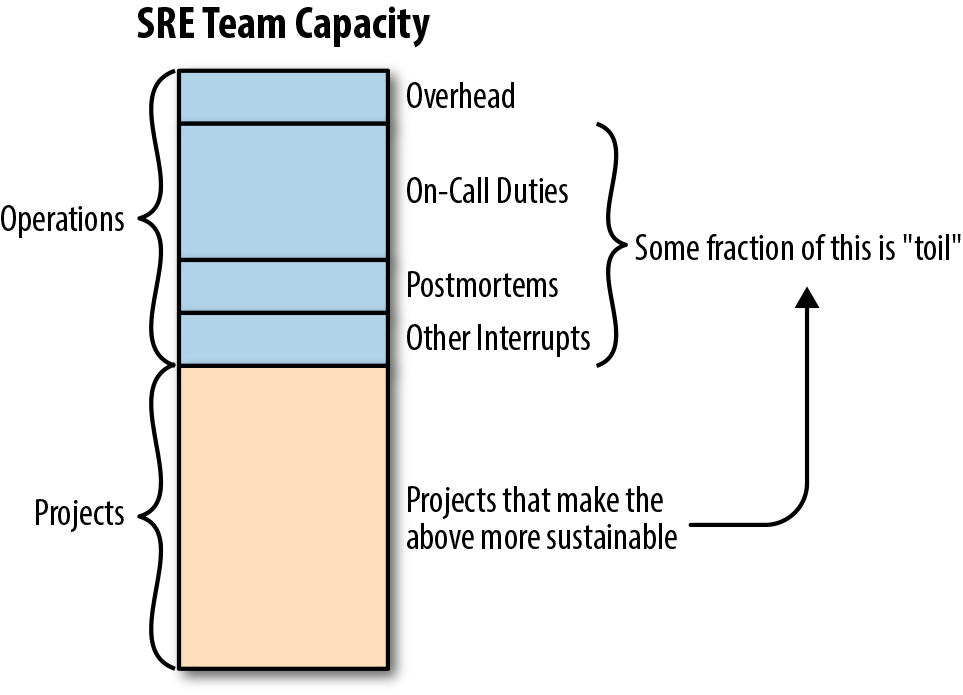
- Toil is a repetitive, predictable, constant stream of tasks related to maintaining a service.
- Any time spent on operational tasks means time not spent on project work and project work is how we make our services more reliable and scalable.
- Google SRE targets: no more than 50% of an SRE’s time should be spent on toil.
- Toil can be defined using following characteristics
- Manual. When the
tmpdirectory on a web server reaches 95% utilization, you need to login and find a space to clean up - Repetitive. A full
tmpdirectory is unlikely to be a one-time event - Automatable. If the instructions are well defined then it’s better to automate the problem detection and remediation
- Reactive. When you receive too many alerts of “disks full”, they distract more than help. So, potentially high-severity alerts could be missed
- Lacks enduring value. The satisfaction of completed tasks is short term because it is to prevent the issue in the future
- Grow at least as fast as its source. The growing popularity of the service will require more infrastructure and more toil work
- Manual. When the
- Potential benefits of toil automation
- Engineering work might reduce toil in the future
- Increased team morale and reduced burnout
- Less context switching for interrupts, which raises team productivity
- Increased process clarity and standardization
- Enhanced technical skills and career growth for team members
- Reduced training time
- Fewer outages attributable to human errors
- Improved security
- Shorter response times for user requests
- Toil Measurement
- Identify it.
- Measure the amount of human effort applied to this toil
- Track these measurements before, during, and after toil reduction efforts
- Use time-tracking or tagging in ticketing systems to quantify toil hours per sprint
- Toil categorization
- Business processes. A most common source of toil.
- Production interrupts. The key tasks to keep the system running.
- Product releases. Depending on the tooling and release size they could generate toil (release requests, rollbacks, hotfixes, and repetitive manual configuration changes)
- Migrations. Large-scale migration or even small database structure change is likely done manually as a one-time effort. Such thinking is a mistake because this work is repetitive.
- Cost engineering and capacity planning. Ensure a cost-effective baseline. Prepare for critical high traffic events.
- Troubleshooting
- Toil management strategies in practice
- Identify and measure
- Engineer toil out of the system
- Reject the toil
- Use SLO to reduce toil
- Organizational:
- Start with human-backed interfaces. For complex businesses, problems start with a partially automated approach.
- Get support from management and colleagues. Toil reduction is a worthwhile goal.
- Promote toil reduction as a feature. Create strong business case for toil reduction.
- Start small and then improve
- Standardization and automation:
- Increase uniformity. Lean-to standard tools, equipment and processes.
- Assess risk within automation. Automation with admin-level privileges should have safety mechanism which checks automation actions against the system. It will prevent outages caused by bugs in automation tools.
- Automate toil response. Think how to approach toil automation. It shouldn’t eliminate human understanding of what’s going on.
- Use open-source and third-party tools.
- AI-assisted automation (2025+) — Use LLM-based agents for runbook execution, log analysis, and automated remediation with human-in-the-loop oversight.
- Use feedback to improve. Seek for feedback from users who interact with your tools, workflows and automation.
Simplicity
- Simple software breaks less often and is easier and faster to fix when it does break.
- Simple systems are easier to understand, easier to maintain, and easier to test
- Measure complexity
- Training time. How long does it take for a newcomer engineer to get on full speed.
- Explanation time. The time it takes to provide a view on system internals.
- Administrative diversity. How many ways are there to configure similar settings
- Diversity of deployed configuration
- Age. How old is the system
- SRE work on simplicity
- SRE understand the system as a whole to prevent and fix the source of complexity
- SRE should be involved in the design, system architecture, configuration, deployment processes, or elsewhere.
- SRE leadership empowers SRE teams to push for simplicity and to explicitly reward these efforts.
- Manage cognitive load — Reduce the number of systems and contexts an engineer must hold in working memory during on-call.
SRE Practices
SRE practices apply software engineering solutions to operational problems
- SRE teams are responsible for the day-to-day functioning of the systems we support, our engineering work often focuses on reliability, scalability, and operational efficiency.
Incident Management & Response
- Incident Management involves coordinating the efforts of responding teams in an efficient manner and ensuring that communication flows both between the responders and those interested in the incident’s progress.
- Incident management is to respond to an incident in a structured way.
- Incident Response involves mitigating the impact and/or restoring the service to its previous condition.
- Basic principles of incident response include the following:
- Maintain a clear line of command.
- Designate clearly defined roles.
- Keep a working record of debugging and mitigation as you go.
- Declare incidents early and often.
- Key roles in an Incident Response
- Incident Commander (IC)
- the person who declares the incident typically steps into the IC role and directs the high-level state of the incident
- Commands and coordinates the incident response, delegating roles as needed.
- By default, the IC assumes all roles that have not been delegated yet.
- Communicates effectively.
- Stays in control of the incident response.
- Works with other responders to resolve the incident.
- Remove roadblocks that prevent Ops from working most effectively.
- Communications Lead (CL)
- CL is the public face of the incident response team.
- The CL’s main duties include providing periodic updates to the incident response team and stakeholders and managing inquiries about the incident.
- Operations or Ops Lead (OL)
- OL works to respond to the incident by applying operational tools to mitigate or resolve the incident.
- The operations team should be the only group modifying the system during an incident.
- Incident Commander (IC)
- Live Incident State Document
- Live Incident State Document can live in a wiki, but should ideally be editable by several people concurrently.
- This living doc can be messy, but must be functional and not usually shared with stakeholders.
- Live Incident State Document is Incident commander’s most important responsibility.
- Using a template makes generating this documentation easier, and keeping the most important information at the top makes it more usable.
- Retain this documentation for postmortem analysis and, if necessary, meta analysis.
- Incident Management Best Practices
- Prioritize – Stop the bleeding, restore service, and preserve the evidence for root-causing.
- Prepare – Develop and document your incident management procedures in advance, in consultation with incident participants.
- Trust – Give full autonomy within the assigned role to all incident participants.
- Introspect – Pay attention to your emotional state while responding to an incident. If you start to feel panicky or overwhelmed, solicit more support.
- Consider alternatives – Periodically consider your options and re-evaluate whether it still makes sense to continue what you’re doing or whether you should be taking another tack in incident response.
- Practice – Use the process routinely so it becomes second nature.
- Change it around – Were you incident commander last time? Take on a different role this time. Encourage every team member to acquire familiarity with each role.
- AI-Powered Incident Response (2025-2026)
- AI SRE agents can now automate up to 80% of incident investigation and response tasks.
- Key capabilities of AI incident response:
- Automated triage — AI correlates alerts, logs, and traces to identify root cause candidates
- Context enrichment — Automatically pulls relevant runbooks, recent deployments, and historical incidents
- Suggested remediation — Proposes fixes based on past incident patterns using RAG (Retrieval-Augmented Generation)
- Automated postmortem drafting — Generates initial postmortem documents from incident timeline
- Tools: incident.io, PagerDuty AIOps, Rootly, FireHydrant, Resolve AI
- Important: AI assists but does not replace human judgment for critical decisions. Human-in-the-loop remains essential.
Postmortem
- A postmortem is a written record of an incident, its impact, the actions taken to mitigate or resolve it, the root cause(s), and the follow-up actions to prevent the incident from recurring.
- Postmortems are expected after any significant undesirable event.
- The primary goals of writing a postmortem are to ensure that the incident is documented, that all contributing root cause(s) are well understood, and, especially, that effective preventive actions are put in place to reduce the likelihood and/or impact of recurrence.
- Writing a postmortem is not punishment – it is a learning opportunity for the entire company.
- Postmortem Best Practices
- Blameless
- Postmortems should be Blameless.
- It must focus on identifying the contributing causes of the incident without indicting any individual or team for bad or inappropriate behavior.
- Collaborate and Share Knowledge
- Postmortems should be used to collaborate and share knowledge. It should be shared broadly, typically with the larger engineering team or on an internal mailing list.
- The goal should be to share postmortems to the widest possible audience that would benefit from the knowledge or lessons imparted.
- No Postmortem Left Unreviewed
- An unreviewed postmortem might as well never have existed.
- Track action items to completion with owners and due dates.
- Ownership
- Declaring official ownership results in accountability, which leads to action.
- It’s better to have a single owner and multiple collaborators.
- Blameless
Chaos Engineering & Resilience Testing
- Chaos engineering proactively tests system resilience by injecting controlled failures to discover weaknesses before they cause real outages.
- Core Principles
- Build a hypothesis around steady-state behavior
- Vary real-world events (server failures, network partitions, latency injection)
- Run experiments in production (with safeguards)
- Automate experiments to run continuously
- Minimize blast radius — start small and expand scope gradually
- Types of Chaos Experiments
- Infrastructure failures — terminate instances, fill disks, exhaust CPU
- Network failures — packet loss, latency injection, DNS failures, partition
- Application failures — kill processes, inject exceptions, corrupt state
- Dependency failures — simulate third-party API outages, database unavailability
- Chaos Engineering in CI/CD (2025+ Best Practice)
- Integrate chaos tests into deployment pipelines to catch resilience regressions before production
- Validate disaster recovery plans using automated chaos experiments
- Teams that test dependency outages can improve uptime from 99.9% to 99.99%
- Tools
- Gremlin — Enterprise chaos engineering platform
- LitmusChaos — CNCF project for Kubernetes chaos engineering
- Chaos Monkey — Netflix’s original chaos tool (part of Simian Army)
- AWS Fault Injection Service (FIS) — Managed fault injection for AWS
- Azure Chaos Studio — Managed chaos for Azure resources
On-Call Best Practices
- On-call is a critical SRE responsibility that requires careful management to sustain team health and system reliability.
- On-Call Structure
- Maximum 25% of time on-call (Google SRE recommendation)
- At least two people in each on-call rotation for redundancy
- Clear escalation paths and handoff procedures
- Compensatory time off after high-severity incidents
- Reducing On-Call Burden
- Implement SLO-based alerting to reduce non-actionable pages
- Maintain up-to-date runbooks for common incidents
- Automate common remediation actions
- Conduct regular on-call retrospectives to identify patterns
- Use AI-powered tools for alert correlation and auto-resolution of known issues
- On-Call Well-Being (2025-2026 Priority)
- Nearly 70% of SREs report on-call stress impacts burnout and attrition (Catchpoint SRE Report 2025)
- Best practices: fair rotation distribution, protected sleep hours, clear incident severity definitions
- Organizations investing in AI-powered observability report reduced alert fatigue and improved engineer retention
Capacity Planning & Load Management
- Plan for organic growth, inorganic growth (launches, marketing campaigns), and failure scenarios.
- Key practices:
- Load testing — Regular performance testing to establish baselines and identify breaking points
- Traffic management — Load shedding, rate limiting, and graceful degradation during overload
- Autoscaling — Horizontal and vertical scaling based on demand signals
- Demand forecasting — Use historical data and ML models to predict capacity needs
- N+2 redundancy — Plan for at least two simultaneous failures
AI-Powered SRE (2025-2026)
- AI SRE refers to AI agents that correlate telemetry, investigate incidents, and execute bounded remediation under governance with human oversight.
- Unlike traditional “if X, then Y” automation, AI agents analyze context from code changes, alerts, and past incidents to make decisions.
- Gartner predicts that by 2026, over 80% of ITOps teams will adopt AIOps platforms to manage hybrid and multi-cloud complexity.
- Key AI SRE Capabilities
- Predictive alerting — ML models detect anomalies and predict failures before they impact users
- Automated root cause analysis (RCA) — AI correlates metrics, logs, traces, and deployment events to identify probable causes
- Intelligent runbook execution — LLM-powered agents interpret and execute runbooks contextually
- Auto-remediation — Bounded automated fixes for known patterns (restart services, scale resources, rollback deployments)
- Postmortem generation — Automated drafting of incident timelines and contributing factors
- Noise reduction — AI-powered alert deduplication, correlation, and suppression to combat alert fatigue
- AI SRE Architecture
- RAG (Retrieval-Augmented Generation) grounded in infrastructure-specific data (logs, runbooks, service topology)
- Guardrails and governance to prevent AI from making destructive changes without approval
- Human-in-the-loop for critical actions (data deletion, production deployments, security changes)
- Tools & Platforms
- incident.io — AI-powered incident management automating up to 80% of response
- PagerDuty AIOps — Intelligent alert grouping and event correlation
- Datadog AI — Watchdog for automated anomaly detection and RCA
- Google Cloud — Operations Suite with AI-assisted troubleshooting
- Resolve AI — Autonomous investigation and remediation agents
- Best Practices for AI SRE Adoption
- Start with read-only AI assistance (investigation, correlation) before enabling write actions
- Define clear boundaries for autonomous remediation (blast radius limits)
- Maintain human oversight for all irreversible actions
- Train AI models on your specific infrastructure data and runbooks
- Measure AI effectiveness: reduction in MTTR, false positive rate, engineer satisfaction
SRE & Platform Engineering
- Platform Engineering has emerged as a natural evolution that integrates SRE practices into self-service Internal Developer Platforms (IDPs).
- Gartner predicts that by 2026, 80% of large software engineering organizations will have dedicated platform teams.
- How SRE and Platform Engineering Converge
- Platform teams embed SRE best practices (SLOs, observability, incident response) into golden paths
- Developers get reliability “for free” through platform-provided observability, deployment pipelines, and scaling
- SRE practices shift from team-specific to organization-wide through platform services
- Reduces cognitive load on individual development teams
- Key Platform Components for SRE
- Self-service infrastructure provisioning with built-in reliability guardrails
- Standardized observability (OpenTelemetry-based) across all services
- Automated SLO tracking and error budget dashboards
- Pre-configured alerting templates aligned with SRE best practices
- Service catalogs (Backstage, Port, Cortex) with reliability scorecards
- Benefits of Platform-Driven SRE
- Consistent reliability practices across hundreds of services
- Reduced toil through self-service automation
- Faster onboarding for new teams and services
- Organizations integrating DevOps, SRE, and Platform Engineering outperform those treating them separately (in deployment frequency, uptime, and incident recovery)
SRE Maturity Model
- Level 1 — Reactive: No SLOs defined, reactive firefighting, manual deployments, no postmortems
- Level 2 — Defined: Basic SLOs established, monitoring in place, incident response procedures documented, some automation
- Level 3 — Measured: SLO-based alerting, error budgets tracked, regular postmortems, toil measured and reduced, chaos experiments begun
- Level 4 — Optimized: Full observability with OpenTelemetry, AI-assisted operations, platform engineering integration, continuous resilience testing
- Level 5 — Autonomous: AI SRE agents handle routine incidents, predictive scaling, proactive reliability improvements, minimal toil
Conclusions
- SRE practices require a significant amount of time and skilled SRE people to implement right
- A lot of tools are involved in day-to-day SRE work, with OpenTelemetry emerging as the unifying observability standard
- SRE processes are one of the keys to the success of a tech company
- AI-powered SRE is transforming operations from reactive to proactive, reducing MTTR by up to 70%
- Platform Engineering embeds SRE practices at the organizational level, making reliability scalable
- On-call sustainability and engineer well-being are critical priorities for SRE teams in 2025-2026
GCP Certification Relevance
- Google Cloud Professional Cloud DevOps Engineer — Heavily tests SRE concepts including SLIs/SLOs/error budgets, incident management, and monitoring with Google Cloud Operations
- The exam validates applying SRE principles and building secure, automated CI/CD pipelines using Google Cloud tools
- Key exam topics aligned with this post: SLO implementation, error budget policies, incident response, monitoring & alerting, release engineering
- Coursera: Preparing for Google Cloud Certification: Cloud DevOps Engineer Professional Certificate
Related Posts
References
- The Site Reliability Workbook (Free Online) — Google SRE
- Site Reliability Engineering: How Google Runs Production Systems (Free Online)
- Google SRE Workbook — Implementing SLOs
- Google SRE Workbook — Alerting on SLOs
- Site Reliability Workbook – Practical Ways to Implement SRE (Amazon)
- Building Secure and Reliable Systems: Best Practices for Designing, Implementing, and Maintaining Systems
- OpenTelemetry — Official Documentation
- Catchpoint SRE Report 2025
- Google Cloud Professional Cloud DevOps Engineer Certification