AWS Gateway Load Balancer – GWLB
- Gateway Load Balancer helps deploy, scale, and manage virtual appliances, such as firewalls, intrusion detection and prevention systems (IDS/IPS), and deep packet inspection systems.
- GWLB and its registered virtual appliance instances exchange application traffic using the GENEVE (Generic Network Virtualization Encapsulation) protocol on port 6081.
- operates at Layer 3 of the OSI model, the network layer.
- transparently passes all Layer 3 traffic through third-party virtual appliances, and is invisible to the source and destination of the traffic.
- combines a transparent network gateway (that is, a single entry and exit point for all traffic) and distributes traffic while scaling the virtual appliances with the demand.
- listens for all IP packets across all ports and forwards traffic to the target group that’s specified in the listener rule.
- runs within one AZ and is recommended to be deployed in multiple AZs for greater availability. If all appliances fail in one AZ, scripts can be used to either add new appliances or direct traffic to a GWLB in a different AZ.
- subnets cannot be removed after the load balancer is created. To remove a subnet, you must create a new load balancer.
- is architected to handle millions of requests/second, volatile traffic patterns, and introduces extremely low latency.
- does not perform TLS termination and does not maintain any application state. These functions are performed by the third-party virtual appliances it directs traffic to and receives traffic from.
- maintains stickiness of flows to a specific target appliance using 5-tuple (default), 3-tuple, or 2-tuple.
- 5-tuple (default) – source IP, destination IP, protocol, source port, destination port
- 3-tuple – source IP, destination IP, transport protocol
- 2-tuple – source IP, destination IP
- supports a maximum transmission unit (MTU) size of 8500 bytes. GENEVE encapsulation adds 68 bytes, so appliances must support at least 8,568 bytes MTU.
- does not support IP fragmentation and does not generate ICMP “Destination Unreachable: fragmentation needed and DF set” messages, so Path MTU Discovery (PMTUD) is not supported.
- supports cross-zone load balancing, which is disabled by default. You pay charges for inter-AZ data transfer if enabled.
- supports both IPv4 and dual-stack (IPv4 and IPv6) IP address types. In dual-stack mode, GWLB encapsulates both IPv4 and IPv6 client traffic with an IPv4 GENEVE header.
- supports asymmetric flows when the load balancer processes the initial flow packet and the response flow packet is not routed through the load balancer. Asymmetric routing is not recommended as it can reduce network performance.
Gateway Load Balancer TCP Idle Timeout
- GWLB creates a flow entry in its flow table when it sees the first packet of a flow and maintains traffic symmetry by coupling each flow entry to one backend target appliance.
- When packets for a flow stop, the flow is considered idle and the idle timer starts. GWLB removes the flow entry after the idle time expires.
- TCP idle timeout is configurable from 60 seconds to 6000 seconds (default: 350 seconds). (Launched September 2024)
- Configuring the timeout helps align GWLB with firewall appliances (e.g., Palo Alto, Fortinet, Cisco, Check Point) that often default to 3600 seconds, preventing traffic disruptions for long-lived idle flows.
- TCP idle timeout can only be updated when using 5-tuple stickiness. When using 3-tuple or 2-tuple stickiness, the default 350-second timeout is used.
- UDP idle timeout is fixed at 120 seconds and cannot be changed.
- TCP keepalive packets reset the idle timeout timer.
- Existing flows are not impacted when the timeout value is changed; the new value applies only to new flow entries.
- CloudWatch metrics RejectedFlowCount and RejectedFlowCount_TCP help monitor when flows are rejected due to flow table exhaustion.
Gateway Load Balancer Target Failover
- Target Failover allows GWLB to rebalance existing flows to a healthy target when the original target fails or is deregistered. (Launched October 2022)
- By default, GWLB continues to send existing flows to failed or drained targets (no failover).
- When enabled, reduces failover time when a target becomes unhealthy and allows graceful patching or upgrading of appliances during maintenance windows.
- Can be configured per target group via the target group attributes.
Gateway Load Balancer Health Checks
- GWLB supports configurable health check parameters for target groups. (Enhanced February 2023)
- HealthCheckIntervalSeconds – configurable from 5 to 300 seconds (default: 10 seconds).
- UnhealthyThresholdCount – defaults to 2, meaning GWLB takes a target out of the target group after 2 missed health checks, reducing target failure detection time.
- Supports configuring HTTP response codes that determine target health.
- Supports HTTP, HTTPS, and TCP health check protocols.
Gateway Load Balancer Endpoint – GWLBE
- GWLB uses Gateway Load Balancer endpoints – GWLBE to exchange traffic across VPC boundaries securely.
- A Gateway Load Balancer endpoint is a VPC endpoint that provides private connectivity between virtual appliances in the service provider VPC and application servers in the service consumer VPC.
- One GWLB can be connected to many GWLBEs.
- GWLB is deployed in the same VPC as the virtual appliances.
- Virtual appliances are registered with a target group for the GWLB.
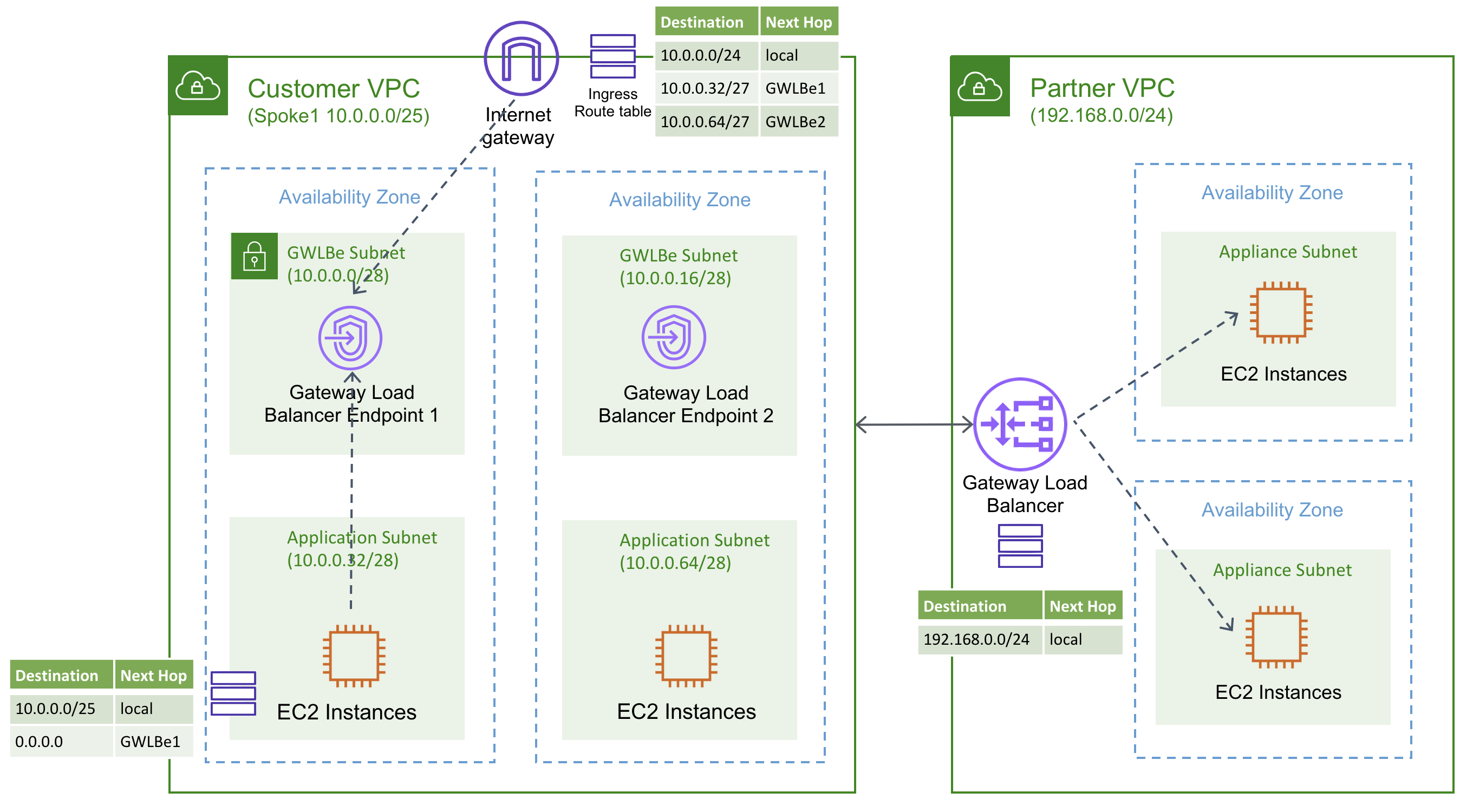
- Traffic to and from a GWLBE is configured using route tables.
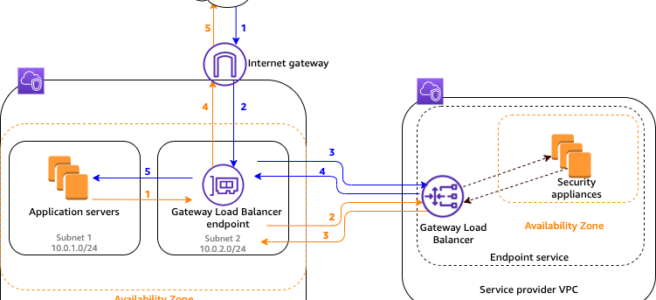
- Traffic flows from the service consumer VPC over the GWLBE to the GWLB in the service provider VPC, and then returns to the service consumer VPC.
- GWLBE and the application servers must be created in different subnets. This enables you to configure the GWLBE as the next hop in the route table for the application subnet.
- GWLBE supports both IPv4 and IPv6 traffic end-to-end. (Launched December 2022)
- GWLBE can be specified as the next-hop in the Virtual Private Gateway (VGW) route table, enabling inspection of traffic entering a VPC from on-premises via VPN or Direct Connect without Transit Gateway overhead. (Launched August 2023)
- GWLBE can be used as a VPC Traffic Mirroring target, enabling centralized traffic monitoring appliances deployed behind GWLB. (Launched May 2022)
Gateway Load Balancer Flow
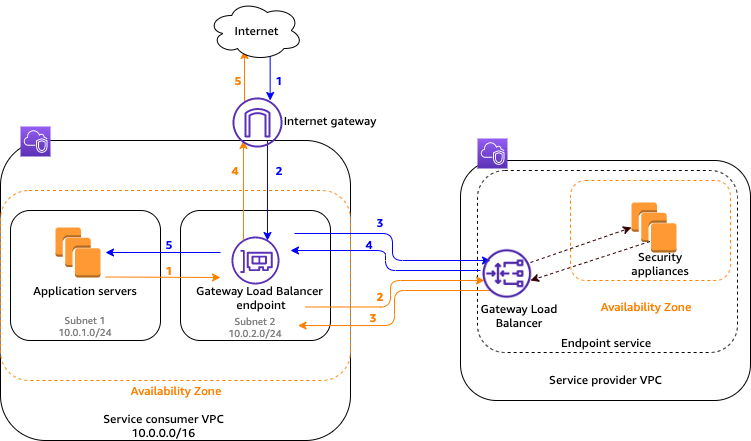
Traffic from the internet to the application (blue arrows)
- Traffic enters the service consumer VPC through the internet gateway.
- Traffic is sent to the GWLBE, as a result of VPC ingress routing.
- Traffic is sent to the GWLB for inspection through the security appliance.
- Traffic is sent back to the GWLBE after inspection.
- Traffic is sent to the application servers (destination subnet).
Traffic from the application to the internet (orange arrows):
- Traffic is sent to the Gateway Load Balancer endpoint due to the default route configured on the application server subnet.
- Traffic is sent to the GWLB for inspection through the security appliance.
- Traffic is sent back to the GWLBE after inspection.
- Traffic is sent to the internet gateway based on the route table configuration.
- Traffic is routed back to the internet.
Gateway Load Balancer High Availability
Gateway Load Balancer LCU Reservations
- Load Balancer Capacity Unit (LCU) Reservation allows proactively setting a minimum bandwidth capacity for the GWLB, complementing its existing ability to auto-scale based on traffic patterns. (Launched April 2025)
- Useful for preparing for sharp traffic increases due to planned events such as traffic migrations or product launches.
- Capacity is reserved at the regional level and is evenly distributed across availability zones.
- Ensure enough evenly distributed targets in each AZ before enabling LCU reservation.
- CloudWatch metrics PeakBytesPerSecond and ReservedLCUs can be used to monitor utilization.
Gateway Load Balancer Deployment Architectures
- Distributed model – GWLB and GWLBE in same VPC as applications; inspection happens locally per VPC.
- Centralized model with Transit Gateway – GWLB deployed in a shared security VPC; spoke VPCs route traffic through Transit Gateway to the inspection VPC. Requires Transit Gateway appliance mode to ensure flow symmetry.
- Centralized model with AWS Cloud WAN Service Insertion – AWS Cloud WAN service insertion (launched June 2024) simplifies integrating GWLB-backed security appliances into global networks without static routes, supporting both same-segment and cross-segment traffic inspection.
- VGW Ingress Routing model – Direct steering of on-premises ingress traffic (via VPN/Direct Connect) through GWLBE for inspection without requiring Transit Gateway.
Amazon VPC Route Server Integration
- Amazon VPC Route Server (GA April 2025) enables dynamic routing within VPC using BGP, providing an alternative to static route table management for appliance-based architectures.
- Virtual appliances (firewalls) behind GWLB can peer with VPC Route Server via BGP, enabling dynamic route propagation and automatic active/standby failover using AS-path prepending.
- Reduces manual route management overhead and enables faster failover compared to static routing approaches.
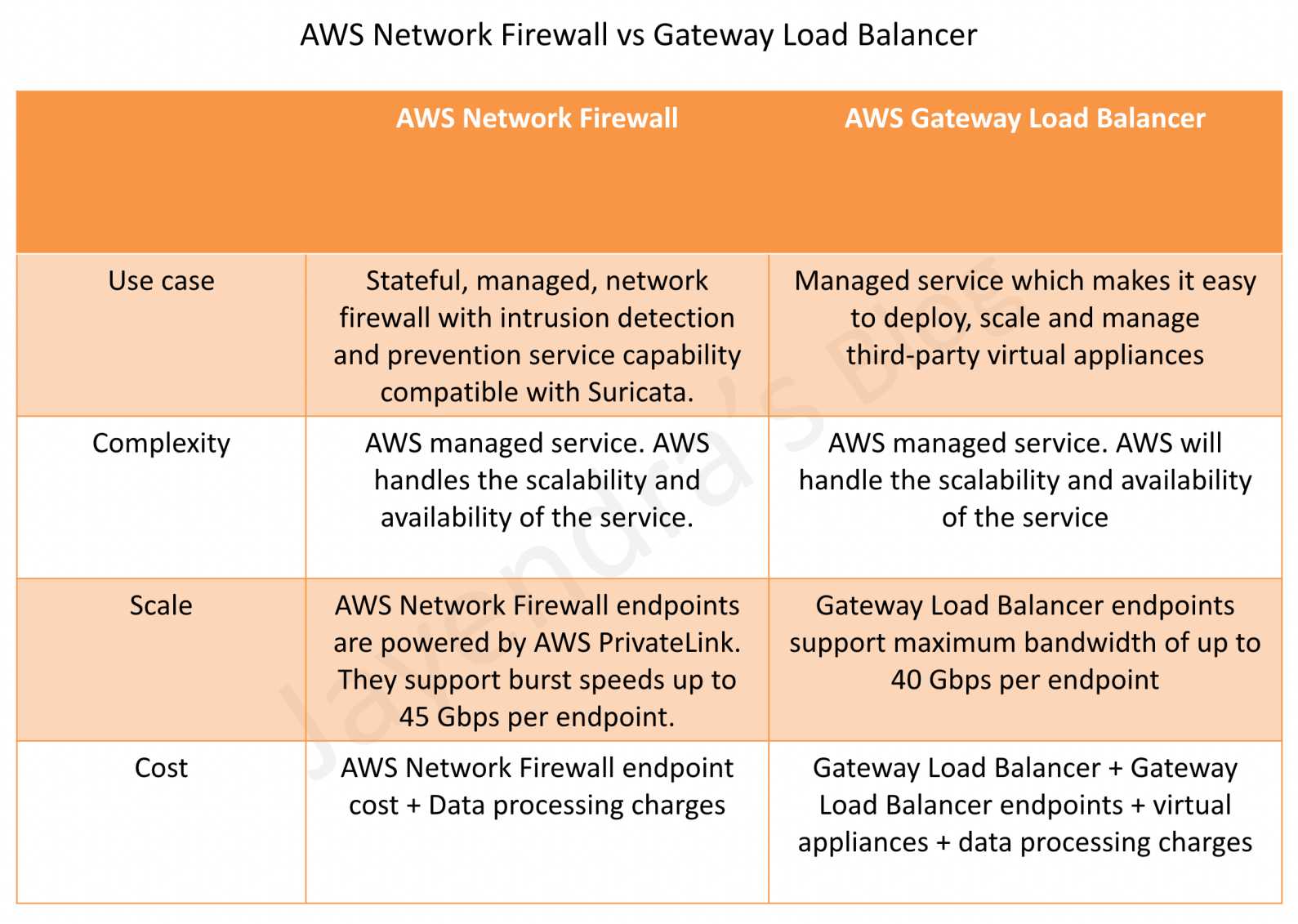
AWS Gateway Load Balancer vs Network Firewall
AWS Certification Exam Practice Questions
- Questions are collected from Internet and the answers are marked as per my knowledge and understanding (which might differ with yours).
- AWS services are updated everyday and both the answers and questions might be outdated soon, so research accordingly.
- AWS exam questions are not updated to keep up the pace with AWS updates, so even if the underlying feature has changed the question might not be updated
- Open to further feedback, discussion and correction.
- A company uses third-party firewall appliances for traffic inspection across multiple VPCs. The firewalls are deployed in a centralized security VPC. The company needs to automatically scale the firewall fleet based on traffic demand while maintaining flow symmetry to the same appliance. Which AWS service should the company use?
- AWS Network Firewall
- Network Load Balancer with UDP listener
- AWS Gateway Load Balancer
- Application Load Balancer with IP targets
Answer: 3. GWLB is designed specifically to deploy, scale, and manage third-party virtual appliances while maintaining flow stickiness.
- A security team has deployed firewall appliances behind a Gateway Load Balancer. The firewalls have a TCP idle timeout of 3600 seconds. Users report intermittent connectivity issues for long-running database connections that go idle. What should the team do to resolve this issue?
- Enable cross-zone load balancing on the GWLB
- Configure the GWLB TCP idle timeout to a value higher than the firewall’s timeout (e.g., 3700 seconds)
- Switch from 5-tuple to 2-tuple flow stickiness
- Enable Target Failover on the GWLB target group
Answer: 2. The configurable TCP idle timeout (60-6000 seconds) allows alignment with the firewall’s timeout to prevent flows from being rerouted to different targets.
- A company wants to inspect traffic entering their VPC from on-premises networks via AWS Direct Connect. They want to use third-party firewall appliances behind a Gateway Load Balancer without using Transit Gateway. What feature enables this?
- VPC Peering with GWLBE as route target
- Virtual Private Gateway ingress routing to GWLBE
- AWS PrivateLink with GWLBE
- VPC Flow Logs with GWLB integration
Answer: 2. VGW ingress routing support (August 2023) allows specifying GWLBE as the next-hop in the VGW route table.
- An organization needs to perform maintenance on firewall appliances registered as Gateway Load Balancer targets. They want existing connections to be gracefully moved to healthy targets when an appliance is deregistered. Which feature should they enable?
- Connection Draining
- Target Failover
- Cross-zone load balancing
- Deregistration Delay
Answer: 2. Target Failover allows GWLB to rebalance existing flows to healthy targets when the original target fails or is deregistered.
- A company wants to centralize network traffic monitoring using third-party tools deployed behind a Gateway Load Balancer. They need to mirror traffic from EC2 instances in spoke VPCs to the monitoring appliances. What is the recommended approach?
- Configure VPC Flow Logs to the GWLB target group
- Use VPC Traffic Mirroring with GWLBE as the mirror target
- Enable packet capture on the GWLB listener
- Configure Transit Gateway flow logs to the monitoring VPC
Answer: 2. GWLBE can be used as a VPC Traffic Mirroring target, enabling centralized traffic monitoring behind GWLB.
- A company expects a significant traffic spike next week due to a planned migration event. They want to ensure their Gateway Load Balancer can handle the increased load immediately without waiting for auto-scaling. What should they do?
- Increase the number of registered targets
- Enable cross-zone load balancing
- Configure LCU Reservations on the GWLB
- Create additional GWLB endpoints in more AZs
Answer: 3. LCU Reservations (April 2025) allow proactively setting a minimum bandwidth capacity for the GWLB to prepare for planned traffic increases.
- Which of the following are valid flow stickiness options for AWS Gateway Load Balancer? (Select TWO)
- 5-tuple (source IP, destination IP, protocol, source port, destination port)
- 4-tuple (source IP, destination IP, source port, destination port)
- 2-tuple (source IP, destination IP)
- 1-tuple (source IP only)
- 6-tuple (includes VLAN ID)
Answer: 1, 3. GWLB supports 5-tuple (default), 3-tuple, and 2-tuple flow stickiness.