Google Cloud Dataflow
- Google Cloud Dataflow is a fully managed, serverless service for unified stream and batch data processing at enterprise scale.
- Dataflow provides Horizontal autoscaling to automatically choose the appropriate number of worker instances required to run the job.
- Dataflow is based on Apache Beam, an open-source, unified model for defining both batch and streaming-data parallel-processing pipelines.
- Dataflow scales to 4,000 workers per job and routinely processes petabytes of data.
- Dataflow provides exactly-once processing by default for streaming pipelines, with an at-least-once mode available for lower latency when duplicates are tolerable.
- Dataflow supports Java, Python, and Go SDKs, as well as multi-language pipelines.
Dataflow Prime
- Dataflow Prime is an enhanced execution mode that provides advanced autoscaling and resource optimization features.
- Starting August 4, 2025, Google-managed template jobs run on Dataflow Prime by default.
- Vertical Autoscaling – Automatically scales up or down the memory available to workers to fit the requirements of the job, preventing out-of-memory (OOM) errors and maximizing pipeline efficiency.
- Right Fitting – Uses Apache Beam resource hints to customize worker resources for specific pipeline steps, providing flexibility and potential cost savings.
- Dynamic Thread Scaling – Adjusts the number of parallel tasks (bundles) each worker runs, complementing horizontal autoscaling.
- Vertical Autoscaling works alongside Horizontal Autoscaling to scale resources dynamically for both batch and streaming pipelines.
Dataflow (Apache Beam) Programming Model
Pipelines
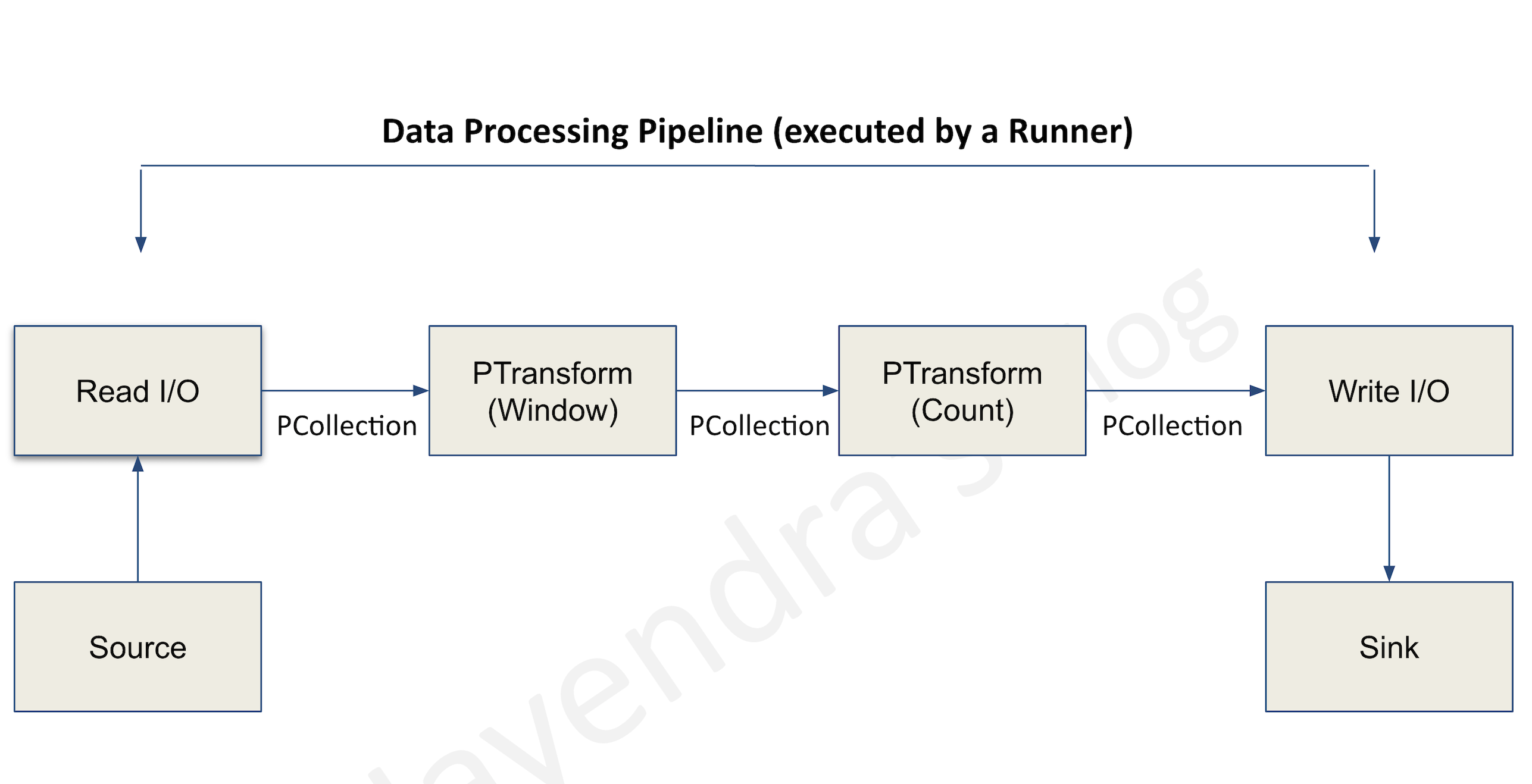
- A pipeline encapsulates the entire series of computations involved in reading input data, transforming that data, and writing output data.
- The input source and output sink can be the same or of different types, allowing data conversion from one format to another.
- Apache Beam programs start by constructing a Pipeline object and then using that object as the basis for creating the pipeline’s datasets.
- Each pipeline represents a single, repeatable job.
PCollection
- A PCollection represents a potentially distributed, multi-element dataset that acts as the pipeline’s data.
- Apache Beam transforms use PCollection objects as inputs and outputs for each step in your pipeline.
Transforms
- A transform represents a processing operation that transforms data.
- A transform takes one or more PCollections as input, performs a specified operation on each element in that collection, and produces one or more PCollections as output.
- A transform can perform nearly any kind of processing operation like
- performing mathematical computations,
- data conversion from one format to another,
- grouping data together,
- reading and writing data,
- filtering data to output only the required elements, or
- combining data elements into single values.
ParDo
- ParDo is the core parallel processing operation invoking a user-specified function on each of the elements of the input PCollection.
- ParDo collects the zero or more output elements into an output PCollection.
- ParDo processes elements independently and in parallel, if possible.
Pipeline I/O
- Apache Beam I/O connectors help read data into the pipeline and write output data from the pipeline.
- An I/O connector consists of a source and a sink.
- All Apache Beam sources and sinks are transforms that let the pipeline work with data from several different data storage formats.
- Managed I/O (introduced 2024) – Dataflow automatically upgrades managed I/O connectors in your pipeline, providing security fixes, performance improvements, and bug fixes without requiring code changes. Managed I/O also supports rolling upgrades for streaming jobs.
Aggregation
- Aggregation is the process of computing some value from multiple input elements.
- The primary computational pattern for aggregation is to
- group all elements with a common key and window.
- combine each group of elements using an associative and commutative operation.
User-defined functions (UDFs)
- User-defined functions allow executing user-defined code as a way of configuring the transform.
- For ParDo, user-defined code specifies the operation to apply to every element, and for Combine, it specifies how values should be combined.
- A pipeline might contain UDFs written in a different language than the language of the runner.
- A pipeline might also contain UDFs written in multiple languages.
Runner
- Runners are the software that accepts a pipeline and executes it.
- Dataflow Runner v2 is the current recommended runner for Dataflow jobs. It supports multi-language pipelines (Java transforms from Python and vice versa), custom containers, and is required for GPU/TPU workloads.
Event time
- Time a data event occurs, determined by the timestamp on the data element itself.
- This contrasts with the time the actual data element gets processed at any stage in the pipeline.
Windowing
- Windowing enables grouping operations over unbounded collections by dividing the collection into windows of finite collections according to the timestamps of the individual elements.
- A windowing function tells the runner how to assign elements to an initial window, and how to merge windows of grouped elements.
Tumbling Windows (Fixed Windows)
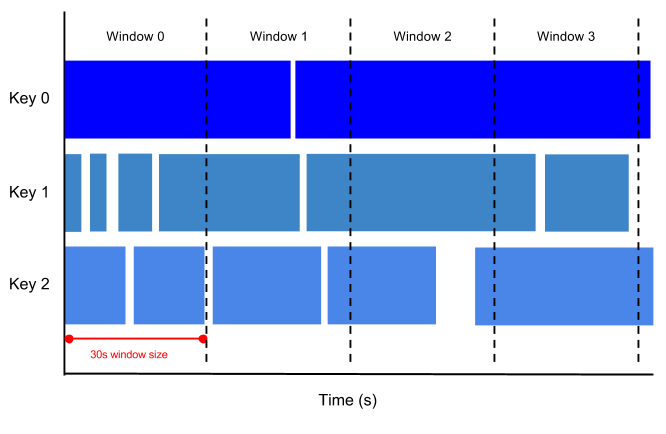
- A tumbling window represents a consistent, disjoint time interval, for e.g. every 1 min, in the data stream.
Hopping Windows (Sliding Windows)
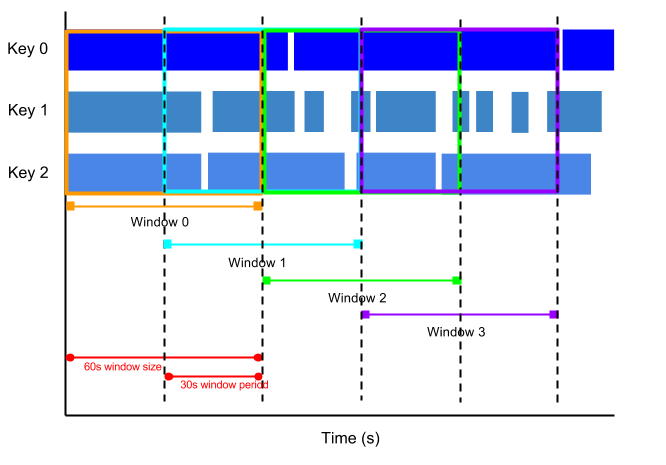
- A hopping window represents a consistent time interval in the data stream for e.g., a hopping window can start every 30 seconds and capture 1 min of data and the window. The frequency with which hopping windows begin is called the period.
- Hopping windows can overlap, whereas tumbling windows are disjoint.
- Hopping windows are ideal to take running averages of data
Session windows
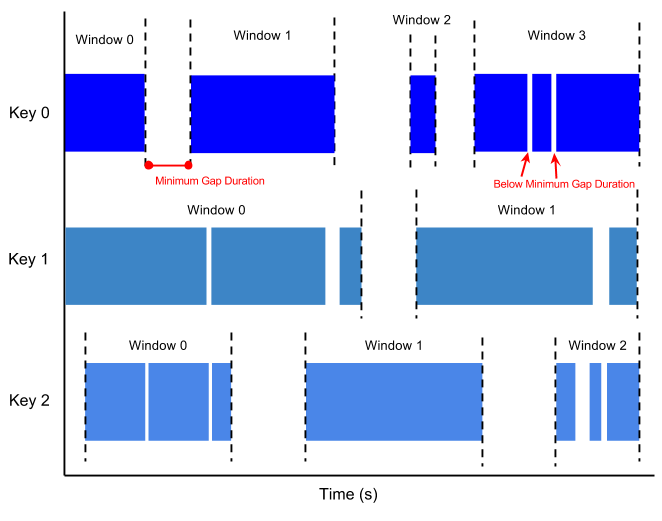
- A session window contains elements within a gap duration of another element for e.g., session windows can divide a data stream representing user mouse activity. This data stream might have long periods of idle time interspersed with many clicks. A session window can contain the data generated by the clicks.
- The gap duration is an interval between new data in a data stream.
- If data arrives after the gap duration, the data is assigned to a new window
- Session windowing assigns different windows to each data key.
- Tumbling and hopping windows contain all elements in the specified time interval, regardless of data keys.
Watermarks
- A Watermark is a threshold that indicates when Dataflow expects all of the data in a window to have arrived.
- Watermark is tracked and its a system’s notion of when all data in a certain window can be expected to have arrived in the pipeline
- If new data arrives with a timestamp that’s in the window but older than the watermark, the data is considered late data.
- Dataflow tracks watermarks because of the following:
- Data is not guaranteed to arrive in time order or at predictable intervals.
- Data events are not guaranteed to appear in pipelines in the same order that they were generated.
Trigger
- Triggers determine when to emit aggregated results as data arrives.
- For bounded data, results are emitted after all of the input has been processed.
- For unbounded data, results are emitted when the watermark passes the end of the window, indicating that the system believes all input data for that window has been processed.
Dataflow Streaming Engine
- Streaming Engine offloads the window state storage from worker VMs to a back-end service, enabling better autoscaling and reducing resource consumption on worker VMs.
- Streaming Engine is recommended for all streaming jobs and is required for in-flight job updates.
- Exactly-once processing – Default mode that ensures results are accurate with no duplicate records in the output.
- At-least-once mode – Available for use cases that can tolerate duplicate records; reduces cost and improves latency by skipping deduplication overhead.
- Streaming Engine provides responsive autoscaling that can be tuned using an autoscaling hint value (0.3 for minimal latency, 0.7 for minimal cost).
Dataflow Templates
- Dataflow templates allow you to package a pipeline for deployment without requiring a development environment.
- Templates separate pipeline design from deployment — a developer creates a template, and others can deploy it later.
- Flex Templates (recommended for new templates)
- Package the pipeline as a Docker image in Artifact Registry, along with a template specification file in Cloud Storage.
- Support any source or sink I/O and allow parameterized customization.
- Support launching from the Console, CLI, or REST API.
- Classic Templates – Older template format; Flex Templates are recommended for new development.
- Google provides pre-built templates for common scenarios (e.g., Pub/Sub to BigQuery, Cloud Storage to BigQuery).
Dataflow ML and AI Integration
- Dataflow supports machine learning inference directly within pipelines using the RunInference transform from Apache Beam.
- RunInference provides intelligent model memory management, automatic model refresh, batching for throughput optimization, and support for multiple ML frameworks (TensorFlow, PyTorch, scikit-learn, and custom models).
- GPU Support – Dataflow supports GPUs (including NVIDIA RTX Pro 6000) for ML inference workloads. Requires Runner v2 and custom Docker containers.
- TPU Support (launched 2025) – Supports TPU V5E, V5P, and V6E for high-volume, low-latency ML inference at scale. Features include TPU-aware autoscaling and duty-cycle policy enforcement.
- MLTransform – Provides ready-to-use patterns for data preprocessing and feature engineering for ML pipelines.
- Vertex AI Integration – Supports remote inference with Vertex AI models, Gemini models, and Gemma models.
- Global Compute – Dynamically schedules workloads across Google’s global infrastructure, automatically determining optimal location based on data locality and resource availability.
Dataflow Pipeline Operations
- Cancelling a job
- causes the Dataflow service to stop the job immediately.
- might lose in-flight data
- Draining a job
- supports graceful stop
- prevents data loss
- is useful to deploy incompatible changes
- allows the job to clear the existing queue before stopping
- supports only streaming jobs and does not support batch pipelines
- Updating a streaming job
- In-flight job update – For streaming jobs using Streaming Engine, you can update min/max worker counts without stopping the job or changing the job ID.
- Job replacement – Submit updated pipeline code; Dataflow performs a compatibility check before swapping the job (new job ID, same job name).
- Snapshots
- Save the state of a streaming pipeline, allowing you to start a new version without losing state.
- Useful for backup and recovery, testing, and rolling back updates to streaming pipelines.
Dataflow Security
- Dataflow provides data-in-transit encryption.
- All communication with Google Cloud sources and sinks is encrypted and is carried over HTTPS.
- All inter-worker communication occurs over a private network and is subject to the project’s permissions and firewall rules.
- Supports Customer-Managed Encryption Keys (CMEK) for data at rest.
- Supports VPC Service Controls to restrict data exfiltration.
- Supports Private Google Access and private IPs for workers to run without public IP addresses.
Dataflow SQL (Deprecated)
⚠️ Dataflow SQL has been deprecated.
- As of July 31, 2024, Dataflow SQL is no longer accessible in the Google Cloud Console.
- As of January 31, 2025, Dataflow SQL cannot be used in the Google Cloud CLI.
Alternatives: Use BigQuery for SQL-based analytics or Apache Beam SQL transform for SQL within pipelines.
Cloud Dataflow vs Dataproc
Refer blog post @ Cloud Dataflow vs Dataproc
GCP Certification Exam Practice Questions
- Questions are collected from Internet and the answers are marked as per my knowledge and understanding (which might differ with yours).
- GCP services are updated everyday and both the answers and questions might be outdated soon, so research accordingly.
- GCP exam questions are not updated to keep up the pace with GCP updates, so even if the underlying feature has changed the question might not be updated
- Open to further feedback, discussion and correction.
- A startup plans to use a data processing platform, which supports both batch and streaming applications. They would prefer to have a hands-off/serverless data processing platform to start with. Which GCP service is suited for them?
- Dataproc
- Dataprep
- Dataflow
- BigQuery
- A company is running a streaming Dataflow pipeline that processes real-time events. They need to minimize costs but can tolerate occasional duplicate records in the output. What should they do?
- Use Dataflow Prime with vertical autoscaling
- Enable at-least-once streaming mode
- Use Classic templates instead of Flex templates
- Disable Streaming Engine
- An ML team wants to run inference using a large language model directly within their Dataflow streaming pipeline. Which feature should they use?
- Cloud Functions trigger
- BigQuery ML
- RunInference transform with GPU/TPU support
- Vertex AI batch prediction
- A data engineer’s streaming Dataflow job is experiencing out-of-memory errors. They want an automated solution without manually tuning worker configurations. What should they use?
- Increase the machine type for all workers
- Set a higher max-num-workers value
- Enable Dataflow Prime with Vertical Autoscaling
- Use session windows to reduce data volume
- A company needs to update a running streaming pipeline with new transformation logic without losing the pipeline’s in-flight state. What approach should they use?
- Cancel the job and start a new one
- Drain the job and resubmit
- Use the pipeline update feature to replace the running job
- Use Dataflow snapshots and start a new job from the snapshot
- A team wants to deploy Dataflow pipelines without requiring a development environment on the deployment machine. What should they use?
- Cloud Composer DAGs
- Cloud Run Jobs
- Dataflow Flex Templates
- Cloud Build triggers
- Which of the following is NOT a valid window type in Apache Beam / Dataflow?
- Fixed (Tumbling) windows
- Sliding (Hopping) windows
- Session windows
- Rotating windows
See also: Google Cloud Data Services Cheat Sheet