AWS Resilience Hub – Resiliency Assessment & Testing

AWS Resilience Hub Overview

  • AWS Resilience Hub is a central location in the AWS Console to manage and improve the resilience of workloads on AWS.
  • It helps proactively prepare and protect applications from disruptions by providing expert-level analysis and actionable guidance to achieve resilience objectives.
  • Resilience Hub identifies gaps before they become incidents and provides centralized visibility into resilience posture.
  • It enables defining resilience goals, assessing resilience posture against those goals, and implementing recommendations for improvement based on the AWS Well-Architected Framework and the AWS Resilience Analysis Framework.
  • A built-in generative AI-driven assessment engine (multi-agent AI engine) evaluates the resilience of workloads against resilience policies, Well-Architected best practices, and the Resilience Analysis Framework to deliver actionable recommendations.
  • Resilience Hub can be integrated into CI/CD pipelines to validate every build before it is released into production.
  • It is part of the Management & Governance category of AWS services.

Key Features

Application/Service Definition

  • Resilience Hub allows defining applications (or services in the next-generation model) by importing resources from multiple sources:
    • AWS CloudFormation stacks
    • Terraform state files
    • Amazon EKS clusters and namespaces
    • AWS Service Catalog AppRegistry (myApplications)
    • AWS Resource Groups
    • Resource Tags
  • Each collection supports cross-Region and cross-account resources.
  • The next-generation model (launched May 2026) introduces a business-level understanding with:
    • Systems – represent a business application
    • User Journeys – describe critical business paths
    • Services – deployable units comprising AWS resources, code, and observability
  • Resilience Hub automatically discovers and maps resources into a topology showing how resources connect (data flow, containment, and permissions).

Resiliency Policy with RTO/RPO Targets

  • Resiliency policies define the resilience expectations for applications through modular, composable requirements.
  • Policies can include:
    • Service Level Objective (SLO) – e.g., 99.95% or 99.99% availability
    • Recovery Time Objective (RTO) – maximum acceptable time to restore service after a disruption
    • Recovery Point Objective (RPO) – maximum acceptable data loss measured in time
    • Disaster Recovery strategy – aligned with RTO/RPO requirements
    • Data Recovery Time Objective – time for restoring from backups
  • Policies can be defined at different disruption levels:
    • Application disruption
    • Infrastructure disruption
    • Availability Zone (AZ) disruption
    • Region disruption
  • Policies are reusable and can be assigned to multiple services/applications across the organization.

Assessment Against Targets

  • Resilience Hub runs failure mode assessments powered by a multi-agent AI engine to uncover potential failures before they occur in production.
  • The assessment engine:
    • Reads current resource state
    • Analyzes application topology
    • Evaluates architecture against five critical failure modes: Single Points of Failure, Excessive Load, Excessive Latency, Misconfiguration, and Shared Fate
    • Identifies potential failure modes and provides actionable recommendations
  • Assessments compare the estimated workload RTO and RPO against the targets defined in the resiliency policy.
  • Applications are rated as meeting or not meeting their policy targets.
  • Two failure mode assessments per month are included per service.

Recommendations

  • Resilience Hub provides both Resiliency Recommendations and Operational Recommendations:
    • Resiliency Recommendations – architectural guidance for improving application resiliency (e.g., add Multi-AZ deployment, enable cross-Region replication)
    • Operational Recommendations – include:
      • Amazon CloudWatch Alarms – recommended alarms to monitor resilience
      • Standard Operating Procedures (SOPs) – utilizing AWS Systems Manager Documents
      • Chaos Experiments – using AWS Fault Injection Service (FIS)
  • Recommendations include code (CloudFormation templates) for implementing tests, alarms, and SOPs that can be deployed in CI/CD pipelines.
  • Each finding identifies what the failure mode is, why it matters, how to fix it, and which policy requirement it relates to.

Drift Detection

  • Resilience Hub can detect drift when the actual application infrastructure deviates from the defined application description.
  • Drift detection identifies when resources have been added, removed, or modified outside of the defined infrastructure-as-code templates.
  • Helps ensure that the assessed state matches the deployed state, maintaining assessment accuracy.
  • Integrates with CloudFormation drift detection to identify configuration changes.

Automated Dependency Discovery

  • Automatically discovers AWS services, internal endpoints, and third-party endpoints that services depend on.
  • Uses DNS query log analysis (VPC query logs) to identify dependencies, including:
    • Unexpected cross-Region calls
    • Critical third-party dependencies
    • Internal service-to-service dependencies
  • Provides a 35-day lookback for comprehensive dependency identification.
  • Continuous scanning keeps the dependency inventory always up to date, eliminating stale point-in-time snapshots.
  • Available as an optional add-on ($10 per service per month).

Testing with FIS Integration

  • Resilience Hub integrates with AWS Fault Injection Service (FIS) to provide fault-injection simulations of real-world failures.
  • FIS experiments recommended by Resilience Hub include:
    • Network errors
    • Application processing errors
    • Database connection failures
    • AZ disruptions
    • Instance terminations
  • Resilience Hub generates FIS experiment templates as CloudFormation templates that can be deployed and executed.
  • Tests validate that the application meets its defined RTO/RPO targets under real failure conditions.
  • FIS provides guardrails (stop conditions) to automatically roll back experiments if specific thresholds are breached.

Resiliency Score

  • AWS Resilience Hub calculates a resiliency score (0-100 points) for each application based on assessment results.
  • The score reflects how well the application meets its defined resiliency policy targets.
  • Score components consider:
    • Whether estimated RTO/RPO meets targets for each disruption type (Application, Infrastructure, AZ, Region)
    • Resource-level compliance with resilience best practices
    • Implementation status of recommended alarms, SOPs, and tests
  • A higher score indicates better alignment with the defined resiliency policy.
  • The score is visible in the Resilience Hub dashboard and can be tracked over time.
  • AWS Trusted Advisor integrates with Resilience Hub to alert when application resiliency scores fall below a specific threshold.

Operational Recommendations

  • Operational recommendations provide actionable implementation guidance in three categories:

Alarm Recommendations

  • Resilience Hub recommends Amazon CloudWatch alarms based on the resources and components of the application configuration.
  • Alarms monitor key resilience metrics and alert when thresholds are breached.
  • Provides CloudFormation templates to deploy recommended alarms.
  • Supports alarm detection – identifies existing CloudWatch alarms already monitoring the application and avoids duplicating them.
  • Alarm recommendations are tailored to each resource type (e.g., CPU utilization for EC2, throttle events for DynamoDB, error rates for Lambda).

SOP Recommendations (Systems Manager Integration)

  • Recommends Standard Operating Procedures implemented as AWS Systems Manager Documents (SSM Documents).
  • SOPs cover recovery procedures such as:
    • Database failover procedures
    • Instance recovery steps
    • Scaling procedures
    • Backup restoration workflows
  • SOPs can be automated using Systems Manager Automation runbooks.
  • Provides code templates for immediate deployment.

Testing Recommendations (FIS Integration)

  • Recommends AWS FIS experiments to validate resilience under failure conditions.
  • Experiments are provided as deployable CloudFormation templates.
  • Covers various failure scenarios: AZ failures, network disruptions, resource terminations.

Supported Resources

  • AWS Resilience Hub supports resources from the following AWS services:
Category Supported Services
Compute Amazon EC2, AWS Lambda, Amazon EKS, Amazon ECS (including Fargate), AWS Step Functions
Database Amazon RDS, Amazon DynamoDB, Amazon DocumentDB, Amazon ElastiCache (Redis OSS)
Networking Amazon Route 53, Elastic Load Balancing, NAT Gateway
Storage Amazon EBS, Amazon EFS, Amazon S3, Amazon FSx for Windows File Server
Others Amazon API Gateway, Amazon ARC, Amazon SNS, Amazon SQS, AWS Auto Scaling, AWS Backup, AWS Elastic Disaster Recovery
  • Resources that do not affect estimated workload RTO or RPO (e.g., DB parameter groups) are ignored.
  • Only top-level resources are imported; child resources are derived from parent properties.
  • Amazon EKS assessments support Deployments, ReplicaSets, and Pods.

Cross-Region and Cross-Account Support

  • Resilience Hub supports cross-Region resource assessment – resources in different Regions can be grouped under a single Application Component.
  • Supports cross-account assessment through:
    • AWS Organizations integration – enables organization-wide resilience management from a single delegated administrator account
    • Cross-account IAM roles – for environments not using Organizations, trust policies with ExternalId prevent confused deputy attacks
  • Organization-wide reporting provides:
    • Resilience posture across all AWS accounts, Regions, and organizational units
    • Centralized policy management
    • Assessment trends over time
    • Compliance status filtering
  • Eliminates the need to log in to individual accounts to assess resilience posture across the enterprise.

Integration with Other AWS Services

  • AWS Fault Injection Service (FIS) – generates chaos engineering experiment templates to validate resilience
  • AWS Systems Manager – provides SOPs as SSM Documents/Automation runbooks for recovery procedures
  • Amazon CloudWatch – recommends and detects alarms for monitoring application resilience
  • AWS CloudFormation – imports application resources and provides implementation templates
  • AWS Organizations – enables multi-account, organization-wide resilience management
  • AWS Trusted Advisor – surfaces Resilience Hub scores and alerts when scores fall below thresholds
  • AWS Backup – assesses backup configurations as part of RPO evaluation
  • AWS Elastic Disaster Recovery – assesses DR configurations for recovery validation
  • Amazon Application Recovery Controller (ARC) – assesses readiness for DynamoDB global, ELB, RDS, and Auto Scaling groups
  • AWS Well-Architected Tool – assessments are based on Well-Architected best practices

Comparison: Resilience Hub vs. Well-Architected Tool vs. Trusted Advisor

Feature AWS Resilience Hub AWS Well-Architected Tool AWS Trusted Advisor
Purpose Assess and improve application resilience (RTO/RPO) Review workloads against all 6 Well-Architected pillars Automated best practice checks across account
Scope Application-level resilience focused Workload-level across all pillars (Reliability, Security, Performance, Cost, Operational Excellence, Sustainability) Account-level checks (Cost, Performance, Security, Fault Tolerance, Service Limits)
Assessment Type Automated AI-powered failure mode analysis against defined RTO/RPO targets Manual questionnaire-based review with best practice guidance Automated checks against predefined rules
Input Actual infrastructure (CloudFormation, Terraform, EKS, tags) Self-reported answers to framework questions Automated scanning of AWS account resources
Output Resiliency score, failure modes, recommendations with implementation code (alarms, SOPs, FIS tests) Improvement plan, high/medium risk items, milestones Check results (OK, Warning, Error) with recommendations
Resilience Focus Deep – RTO/RPO targets, multi-AZ/Region DR, failure mode analysis Broad – covers reliability pillar among other concerns Shallow – basic fault tolerance checks (ELB, RDS Multi-AZ, backups)
Testing Generates FIS experiment templates for chaos engineering No testing capabilities No testing capabilities
Dependency Discovery Yes – automated via DNS query log analysis No No
Cross-Account Yes – via Organizations or cross-account roles Yes – supports multi-account via Organizations Yes – via Organizations (organizational view)
CI/CD Integration Yes – can validate builds before release No No
Pricing $15/service/month (includes 2 assessments); optional dependency discovery $10/service/month Free Free (basic); full checks require Business/Enterprise Support

Pricing

  • Original Resilience Hub (legacy model):
    • Free for first 3 applications for 6 months
    • $15 per application per month after free period
  • Next-Generation Resilience Hub (launched May 28, 2026):
    • $15 per service per month – includes 2 failure mode assessments for services with ≤150 resources
    • Additional resources beyond 150 – $0.10 per resource during each failure mode assessment
    • Additional assessments (beyond 2 included) – $0.10 per assessed resource (minimum 50 resources billed)
    • Automated Dependency Discovery – optional add-on at $10 per service per month
  • Billing begins after the service is created and the first failure mode assessment is completed.
  • Billing stops when the service is removed from Resilience Hub.

AWS Certification Relevance

  • AWS Solutions Architect Professional (SAP-C02):
    • Domain 1: Design Solutions for Organizational Complexity – multi-account resilience management
    • Domain 3: Design Solutions for Reliability – defining and validating RTO/RPO targets, DR strategy assessment
    • Understanding when to use Resilience Hub vs. Well-Architected Tool vs. Trusted Advisor
  • AWS Solutions Architect Associate (SAA-C03):
    • Domain 2: Design Resilient Architectures – understanding RTO/RPO concepts, high availability patterns
    • Knowing that Resilience Hub can assess and validate disaster recovery configurations
    • Understanding the integration between Resilience Hub and FIS for resilience testing
  • Resilience Hub may also appear in AWS DevOps Engineer Professional and AWS SysOps Administrator exams in the context of operational resilience and chaos engineering.

AWS Resilience Hub Practice Questions

Question 1:

A company wants to validate that their multi-Region application can recover within 15 minutes (RTO) and lose no more than 5 minutes of data (RPO) during a Regional failure. They need automated assessment against these targets and recommendations for improvement. Which AWS service should they use?

  1. AWS Trusted Advisor
  2. AWS Well-Architected Tool
  3. AWS Resilience Hub
  4. AWS Config
Show Answer

Answer: 3

Explanation: AWS Resilience Hub enables defining RTO/RPO targets as resiliency policies and running automated assessments to validate whether applications can meet those targets. It provides specific architectural recommendations when targets are not met. Trusted Advisor provides basic fault tolerance checks but cannot assess against custom RTO/RPO targets. The Well-Architected Tool is questionnaire-based and does not perform automated infrastructure assessment. AWS Config tracks configuration compliance but does not assess resilience against RTO/RPO targets.

Question 2:

A solutions architect wants to implement chaos engineering to test an application’s ability to handle AZ failures. They need the testing approach to align with their defined resiliency policies and generate appropriate experiment templates. Which combination of services should they use?

  1. AWS Resilience Hub with AWS Fault Injection Service (FIS)
  2. AWS CloudFormation with AWS Config
  3. AWS Well-Architected Tool with Amazon CloudWatch
  4. AWS Systems Manager with AWS Trusted Advisor
Show Answer

Answer: 1

Explanation: AWS Resilience Hub integrates with AWS Fault Injection Service (FIS) to generate chaos engineering experiment templates based on the application’s defined resiliency policies. These templates can simulate AZ failures, network disruptions, and resource terminations. Resilience Hub provides the policy-aligned testing recommendations, while FIS executes the actual fault injection experiments with guardrails.

Question 3:

An enterprise runs 200+ applications across 15 AWS accounts. The SRE team needs to establish consistent resilience standards, assess all applications from a central location, and report compliance to stakeholders. Which approach provides centralized multi-account resilience management?

  1. Deploy AWS Config rules in each account with an aggregator
  2. Use AWS Resilience Hub with AWS Organizations integration
  3. Create Well-Architected reviews for each application in each account
  4. Use AWS Trusted Advisor organizational view
Show Answer

Answer: 2

Explanation: AWS Resilience Hub integrates with AWS Organizations to enable organization-wide resilience management from a single delegated administrator account. This allows setting resilience policies once and applying them organization-wide, tracking assessment trends, and filtering by compliance status. This eliminates the need to log in to individual accounts. Trusted Advisor organizational view provides basic checks but lacks application-level resilience assessment with RTO/RPO targets.

Question 4:

A company discovers that their application has undocumented dependencies on third-party services and unexpected cross-Region API calls that could cause failures. Which AWS Resilience Hub feature helps identify these hidden dependencies automatically?

  1. Resiliency Score calculation
  2. Failure Mode Assessment
  3. Automated Dependency Discovery
  4. Drift Detection
Show Answer

Answer: 3

Explanation: AWS Resilience Hub’s Automated Dependency Discovery uses DNS query log analysis to identify AWS services, internal endpoints, and third-party endpoints that services depend on—including unexpected cross-Region calls and integrations the team may not be aware of. It provides a 35-day lookback for comprehensive identification. Failure Mode Assessment evaluates architecture against failure scenarios but doesn’t specifically discover undocumented external dependencies through DNS analysis.

Question 5:

A team uses AWS Resilience Hub and wants to implement the recommended monitoring for their application. Resilience Hub has generated alarm recommendations. How should they deploy these alarms?

  1. Manually create each alarm in the CloudWatch console
  2. Deploy the CloudFormation templates provided by Resilience Hub’s operational recommendations
  3. Use AWS Config managed rules to create alarms
  4. Enable AWS Trusted Advisor alarm checks
Show Answer

Answer: 2

Explanation: AWS Resilience Hub provides operational recommendations that include CloudFormation templates for recommended Amazon CloudWatch alarms. These templates can be deployed directly into the application’s infrastructure-as-code pipeline. This approach ensures alarms are version-controlled, repeatable, and aligned with the application’s resilience requirements. Resilience Hub also supports alarm detection to identify existing alarms and avoid duplication.

Frequently Asked Questions

What is AWS Resilience Hub?

Resilience Hub assesses your applications against defined RTO/RPO targets, identifies resiliency gaps, and provides actionable recommendations. It discovers application components from CloudFormation, Terraform, or EKS and scores your resiliency posture.

Is AWS Resilience Hub free?

The legacy model charges $0.001 per resource per assessment. The next-gen model (2025) provides continuous monitoring at $3/month per application for up to 100 resources, with $0.03/month per additional resource.

How does Resilience Hub differ from Well-Architected Tool?

Well-Architected Tool provides manual questionnaire-based reviews across 6 pillars. Resilience Hub automatically discovers your architecture, runs automated assessments against specific RTO/RPO targets, and integrates with FIS for chaos testing.

References

AWS Disaster Recovery – Whitepaper

AWS Disaster Recovery Whitepaper

📋 Content Update Notice (June 2026)

This post has been updated to reflect the latest AWS DR whitepaper “Disaster Recovery of Workloads on AWS: Recovery in the Cloud” which replaces the original AWS Disaster Recovery whitepaper. Key updates include AWS Elastic Disaster Recovery (DRS), AWS Backup, AWS Resilience Hub, deprecation of OpsWorks and AWS Import/Export, and rebranding of Amazon Glacier to S3 Glacier storage classes.

AWS Disaster Recovery Whitepaper is one of the very important Whitepaper for both the Associate & Professional AWS Certification exam

Disaster Recovery Overview

  • AWS Disaster Recovery whitepaper “Disaster Recovery of Workloads on AWS: Recovery in the Cloud” highlights AWS services and features that can be leveraged for disaster recovery (DR) processes to significantly minimize the impact on data, system, and overall business operations.
  • It outlines best practices to improve your DR processes, from minimal investments to full-scale availability and fault tolerance, and describes how AWS services can be used to reduce cost and ensure business continuity during a DR event
  • Disaster recovery (DR) is about preparing for and recovering from a disaster. Any event that has a negative impact on a company’s business continuity or finances could be termed a disaster. One of the AWS best practice is to always design your systems for failures
  • Resiliency is a shared responsibility between AWS and the customer. AWS is responsible for “Resiliency of the Cloud” (infrastructure), while customers are responsible for “Resiliency in the Cloud” (workload architecture)

Disaster Recovery Key AWS services

  1. Region
    • AWS services are available in multiple regions around the globe, and the DR site location can be selected as appropriate, in addition to the primary site location
    • Each AWS Region is fully isolated and consists of multiple Availability Zones, which are physically isolated partitions of infrastructure
    • All traffic between AZs is encrypted and interconnected with high-bandwidth, low-latency networking
  2. Storage
    • Amazon S3
      • provides a highly durable (99.999999999%) storage infrastructure designed for mission-critical and primary data storage.
      • stores Objects redundantly on multiple devices across multiple facilities within a region
      • supports cross-region replication for DR scenarios
    • Amazon S3 Glacier Storage Classes (formerly Amazon Glacier)
      • S3 Glacier Instant Retrieval – millisecond retrieval for archives that need immediate access
      • S3 Glacier Flexible Retrieval (formerly S3 Glacier) – retrieval times of minutes to hours, suitable for backup data
      • S3 Glacier Deep Archive – lowest cost storage, retrieval time of 12-48 hours for long-term archive
      • Note: Amazon Glacier (original standalone vault-based service) no longer accepts new customers as of December 15, 2025. Use S3 Glacier storage classes instead.
    • Amazon EBS
      • provides the ability to create point-in-time snapshots of data volumes.
      • Snapshots can then be used to create volumes and attached to running instances
      • Snapshots can be copied across regions for cross-region DR
    • AWS Storage Gateway
      • a service that provides seamless and highly secure integration between on-premises IT environment and the storage infrastructure of AWS.
      • Supports File Gateway (S3 File Gateway, FSx File Gateway), Volume Gateway (cached and stored), and Tape Gateway
    • AWS Snow Family (formerly AWS Import/Export)
      • accelerates moving large amounts of data into and out of AWS by using portable storage devices for transport bypassing the Internet
      • ⚠️ Important: Effective November 7, 2025, AWS Snowball Edge devices are only available to existing customers. New customers should explore:
        • AWS DataSync – for online data transfers
        • AWS Data Transfer Terminal – secure physical locations for high-speed data upload using 100 GbE connections
        • AWS Partner solutions – for specialized transfer needs
    • AWS Backup
      • Fully managed service that centralizes and automates data protection across AWS services and hybrid workloads
      • Define central backup policies (backup plans) that work across compute, storage, and database services
      • Supports cross-region and cross-account backup for DR
      • Provides ransomware detection and recovery capabilities
      • Includes compliance insights and analytics for data protection policies
  3. Compute
    • Amazon EC2
      • provides resizable compute capacity in the cloud which can be easily created and scaled.
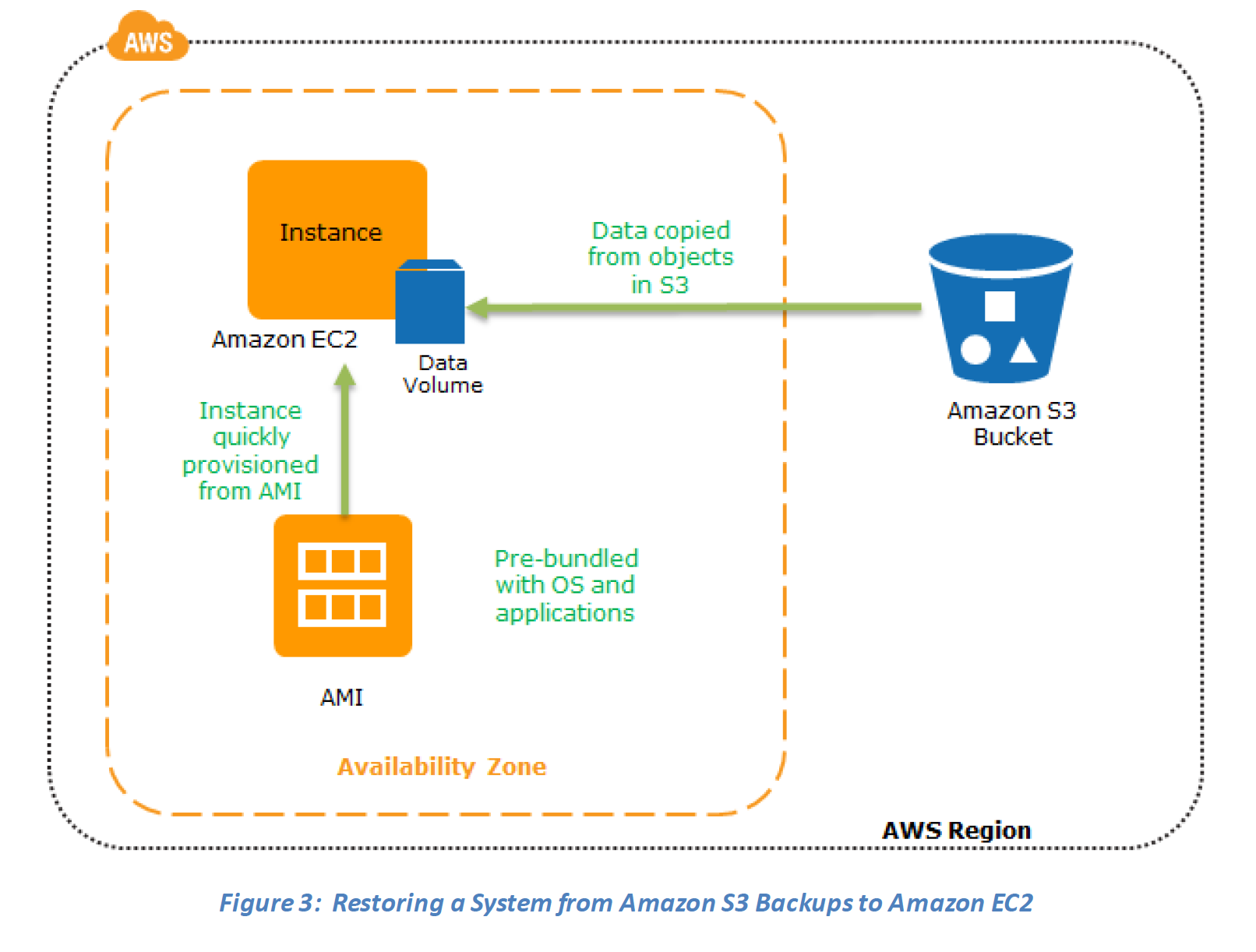
      • EC2 instance creation using Preconfigured AMIs
      • EC2 instances can be launched in multiple AZs, which are engineered to be insulated from failures in other AZs
  4. Networking
    • Amazon Route 53
      • is a highly available and scalable DNS web service
      • includes a number of global load-balancing capabilities that can be effective when dealing with DR scenarios for e.g. DNS endpoint health checks and the ability to failover between multiple endpoints
    • Amazon Route 53 Application Recovery Controller (ARC)
      • Provides readiness checks and routing controls to manage application failover across AZs and Regions
      • Zonal Shift – temporarily moves traffic away from an impaired Availability Zone within minutes
      • Zonal Autoshift – AWS automatically shifts traffic away from an AZ when a potential failure is detected
      • No additional charge for zonal autoshift
    • Elastic IP
      • addresses enables masking of instance or Availability Zone failures by programmatically remapping
      • addresses are static IP addresses designed for dynamic cloud computing.
    • Elastic Load Balancing (ELB)
      • performs health checks and automatically distributes incoming application traffic across multiple EC2 instances
    • Amazon Virtual Private Cloud (Amazon VPC)
      • allows provisioning of a private, isolated section of the AWS cloud where resources can be launched in a defined virtual network
    • Amazon Direct Connect
      • makes it easy to set up a dedicated network connection from on-premises environment to AWS
  5. Databases
    • RDS, DynamoDB, Redshift provided as a fully managed RDBMS, NoSQL and data warehouse solutions which can scale up easily
    • DynamoDB offers global tables with multi-region, active-active replication
    • RDS provides Multi-AZ and Read Replicas and also ability to snapshot data from one region to other
    • Amazon Aurora Global Database provides cross-region replication with RPO typically measured in seconds and RTO in under a minute for failover
  6. Deployment Orchestration
    • CloudFormation
      • gives developers and systems administrators an easy way to create a collection of related AWS resources and provision them in an orderly and predictable fashion
      • Infrastructure as Code (IaC) enables rapid re-creation of environments in DR regions
    • Elastic Beanstalk
      • is an easy-to-use service for deploying and scaling web applications and services
    • OpsWorks (EOL – May 26, 2024)
      • ⚠️ AWS OpsWorks reached End of Life on May 26, 2024 and has been disabled for both new and existing customers.
      • The OpsWorks console, API, CLI, and CloudFormation resources have been discontinued in all AWS Regions.
      • Migration alternatives: AWS Systems Manager, AWS CloudFormation, AWS CDK, or third-party tools like Ansible, Puppet, or Chef directly.
  7. Disaster Recovery Services
    • AWS Elastic Disaster Recovery (AWS DRS)
      • Minimizes downtime and data loss with fast, reliable recovery of on-premises and cloud-based applications
      • Achieves RPOs in seconds and RTOs in minutes (typically 5-20 minutes)
      • Uses lightweight staging environment with minimal resources to keep costs down
      • Supports automated failover and failback
      • Supports physical, VMware vSphere, Microsoft Hyper-V, and cloud infrastructure sources
      • Provides point-in-time recovery capability for ransomware protection
      • Supports servers with up to 60 volumes
      • Supports AWS Outposts for on-premises recovery
      • Note: AWS DRS replaced CloudEndure Disaster Recovery (CEDR), which was discontinued on March 31, 2024
    • AWS Resilience Hub
      • Central location to define resilience goals, assess resilience posture, and implement recommendations
      • Continuously validates and tracks the resilience of AWS workloads
      • Assesses whether RTO and RPO targets can be met
      • Provides automated DR testing and compliance reporting
      • Integrates with AWS Well-Architected Framework for improvement recommendations
      • Next generation (GA May 2026) includes generative AI-based SRE resilience journey

Key factors for Disaster Planning

Disaster Recovery RTO RPO Defination

Recovery Time Objective (RTO) – The time it takes after a disruption to restore a business process to its service level, as defined by the operational level agreement (OLA) for e.g. if the RTO is 1 hour and disaster occurs @ 12:00 p.m (noon), then the DR process should restore the systems to an acceptable service level within an hour i.e. by 1:00 p.m

Recovery Point Objective (RPO) – The acceptable amount of data loss measured in time before the disaster occurs. for e.g., if a disaster occurs at 12:00 p.m (noon) and the RPO is one hour, the system should recover all data that was in the system before 11:00 a.m.

Disaster Recovery Scenarios

  • Disaster Recovery scenarios can be implemented with the Primary infrastructure running in your data center in conjunction with the AWS
  • Disaster Recovery Scenarios still apply if Primary site is running in AWS using AWS multi region feature.
  • Combination and variation of the below is always possible.
  • Use AWS Resilience Hub to continuously validate and track the resilience of your workloads, including whether you are likely to meet your RTO and RPO targets.

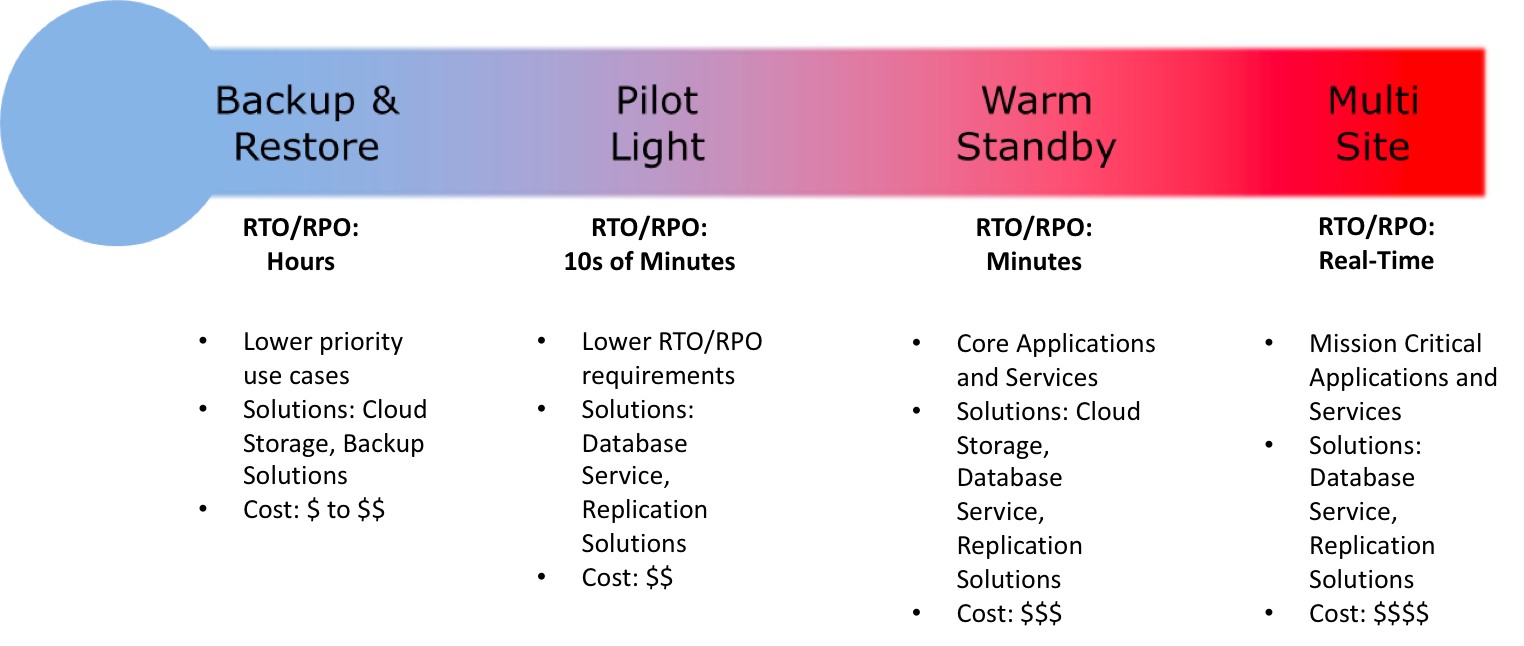
Disaster Recovery Scenarios Options

  1. Backup & Restore (Data backed up and restored)
  2. Pilot Light (Only Minimal critical functionalities)
  3. Warm Standby (Fully Functional Scaled down version)
  4. Multi-Site Active/Active

For the DR scenarios options, RTO and RPO reduces with an increase in Cost as you move from Backup & Restore option (left) to Multi-Site option (right)

Note: For a disaster event based on disruption or loss of one physical data center for a well-architected, highly available workload, you may only require a backup and restore approach. If your definition of a disaster goes beyond the disruption of a physical data center to that of a Region or if you are subject to regulatory requirements, then consider Pilot Light, Warm Standby, or Multi-Site Active/Active.

Backup & Restore

AWS can be used to backup the data in a cost effective, durable and secure manner as well as recover the data quickly and reliably.

Backup phase

In most traditional environments, data is backed up to tape and sent off-site regularly taking longer time to restore the system in the event of a disruption or disasterBackup Restore - Backup Phase

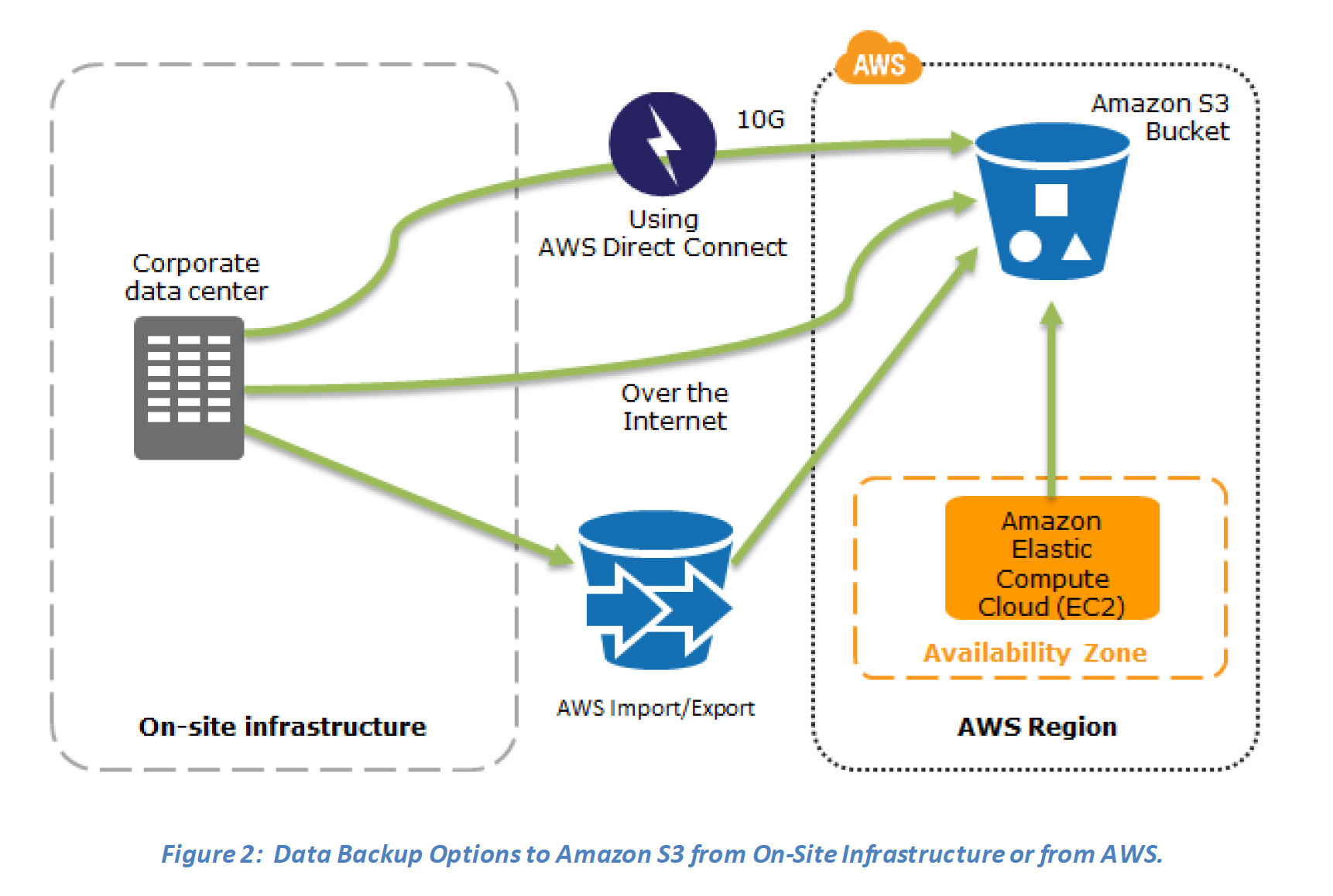
  1. Amazon S3 can be used to backup the data and perform a quick restore and is also available from any location
  2. AWS Snow Family (for existing customers) or AWS Data Transfer Terminal (for new customers) can be used to transfer large data sets bypassing the Internet
  3. Amazon S3 Glacier storage classes can be used for archiving data – use S3 Glacier Flexible Retrieval for hours or S3 Glacier Instant Retrieval for millisecond access
  4. AWS Storage Gateway enables snapshots (used to created EBS volumes) of the on-premises data volumes to be transparently copied into S3 for backup. It can be used either as a backup solution (Volume Gateway – stored volumes) or as a primary data store (Volume Gateway – cached volumes)
  5. AWS Direct Connect can be used to transfer data directly from On-Premise to Amazon consistently and at high speed
  6. Snapshots of Amazon EBS volumes, Amazon RDS databases, and Amazon Redshift data warehouses can be stored in Amazon S3
  7. AWS Backup can centrally manage backup policies across all AWS services with automated scheduling, retention management, and cross-region/cross-account copying

Restore phase

Data backed up then can be used to quickly restore and create Compute and Database instances

Backup Restore - Recovery PhaseKey steps for Backup and Restore:
1. Select an appropriate tool or method to back up the data into AWS.
2. Ensure an appropriate retention policy for this data.
3. Ensure appropriate security measures are in place for this data, including encryption and access policies.
4. Regularly test the recovery of this data and the restoration of the system.

Pilot Light

In a Pilot Light Disaster Recovery scenario option a minimal version of an environment is always running in the cloud, which basically host the critical functionalities of the application for e.g. databases

In this approach :-

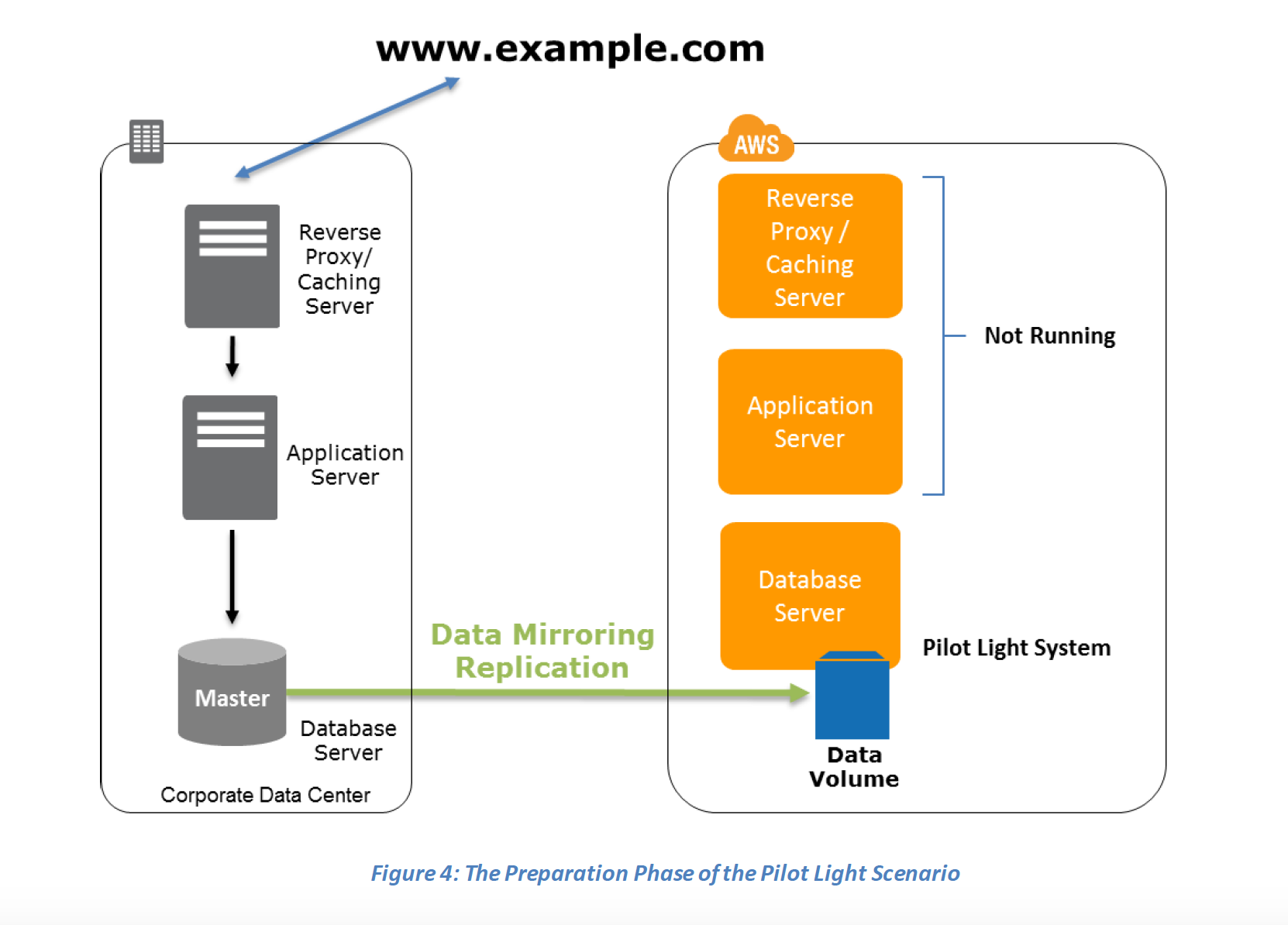
  1. Maintain a pilot light by configuring and running the most critical core elements of your system in AWS for e.g. Databases where the data needs to be replicated and kept updated.
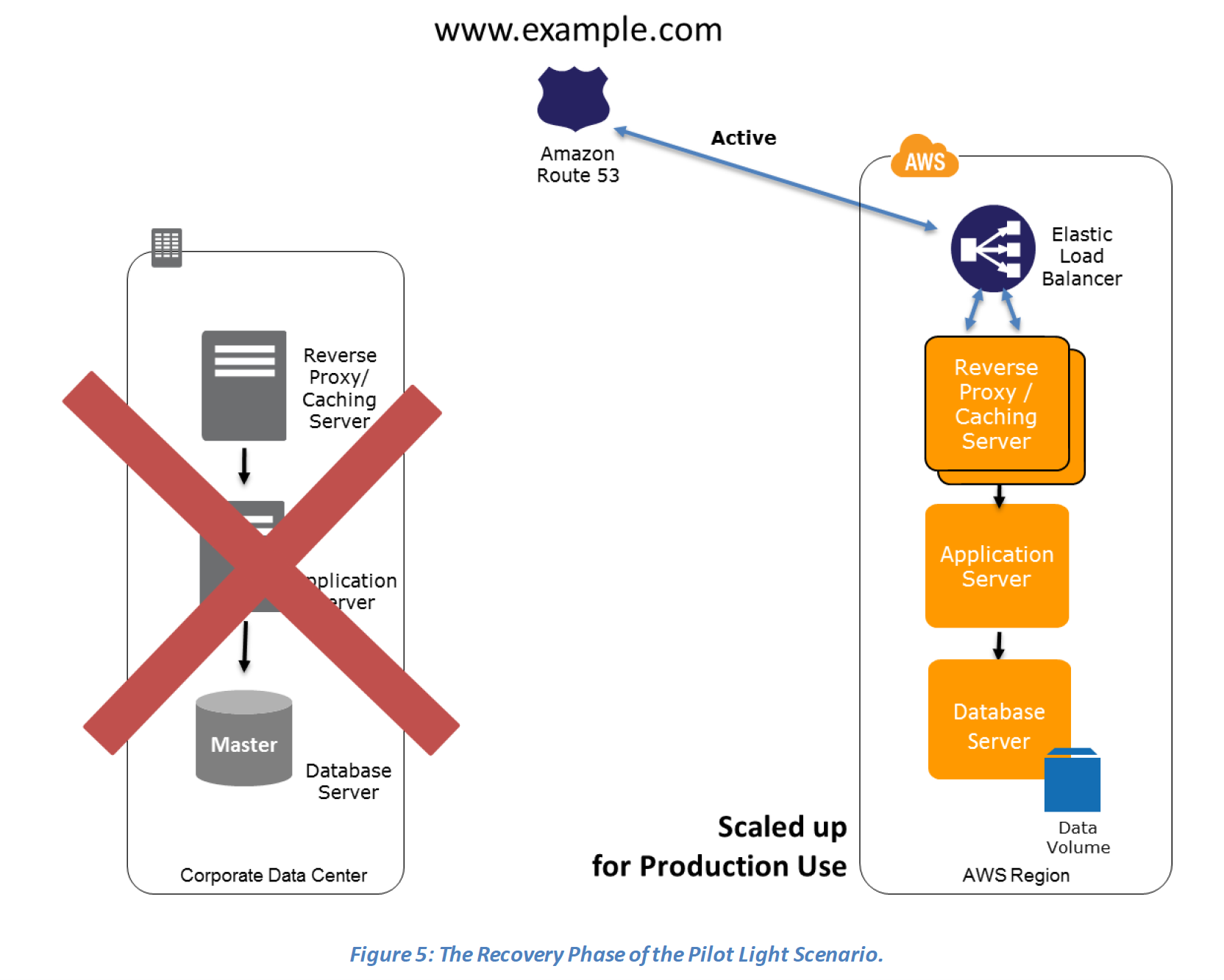
  2. During recovery, a full-scale production environment, for e.g. application and web servers, can be rapidly provisioned (using preconfigured AMIs and EBS volume snapshots) around the critical core
  3. For Networking, either a ELB to distribute traffic to multiple instances and have DNS point to the load balancer or preallocated Elastic IP address with instances associated can be used
  4. AWS Elastic Disaster Recovery (DRS) can automate the pilot light approach with continuous replication and rapid failover capabilities
Preparation phase steps :
  1. Set up Amazon EC2 instances or RDS instances to replicate or mirror data critical data
  2. Ensure that all supporting custom software packages available in AWS.
  3. Create and maintain AMIs of key servers where fast recovery is required.
  4. Regularly run these servers, test them, and apply any software updates and configuration changes.
  5. Consider automating the provisioning of AWS resources.
  6. Use AWS Resilience Hub to validate your DR posture and ensure RTO/RPO targets can be met.
Pilot Light Scenario - Preparation Phase

Recovery Phase steps :

  1. Start the application EC2 instances from your custom AMIs.
  2. Resize existing database/data store instances to process the increased traffic for e.g. If using RDS, it can be easily scaled vertically while EC2 instances can be easily scaled horizontally
  3. Add additional database/data store instances to give the DR site resilience in the data tier for e.g. turn on Multi-AZ for RDS to improve resilience.
  4. Change DNS to point at the Amazon EC2 servers.
  5. Install and configure any non-AMI based systems, ideally in an automated way.

Pilot Light Scenario - Recovery Phase

Warm Standby

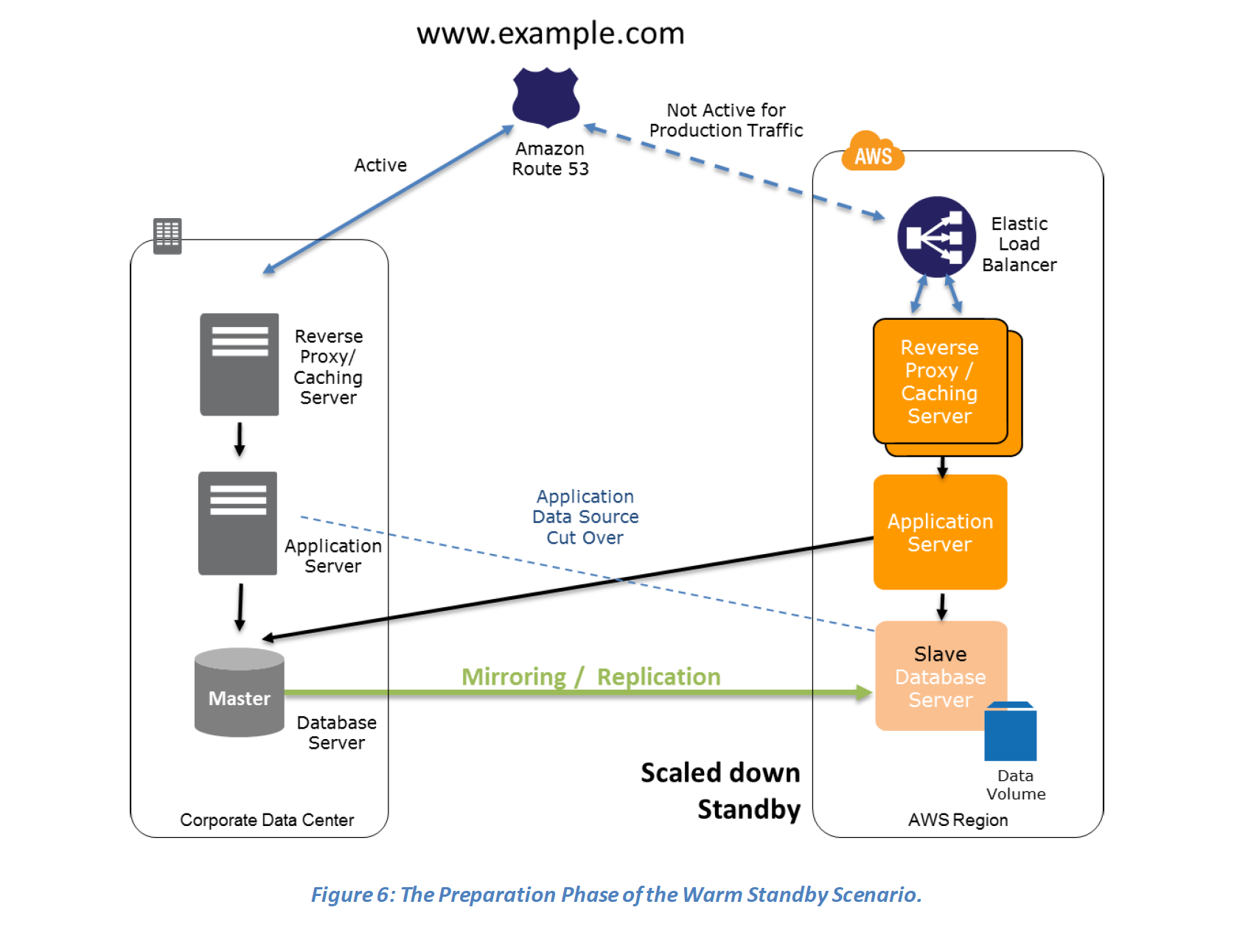
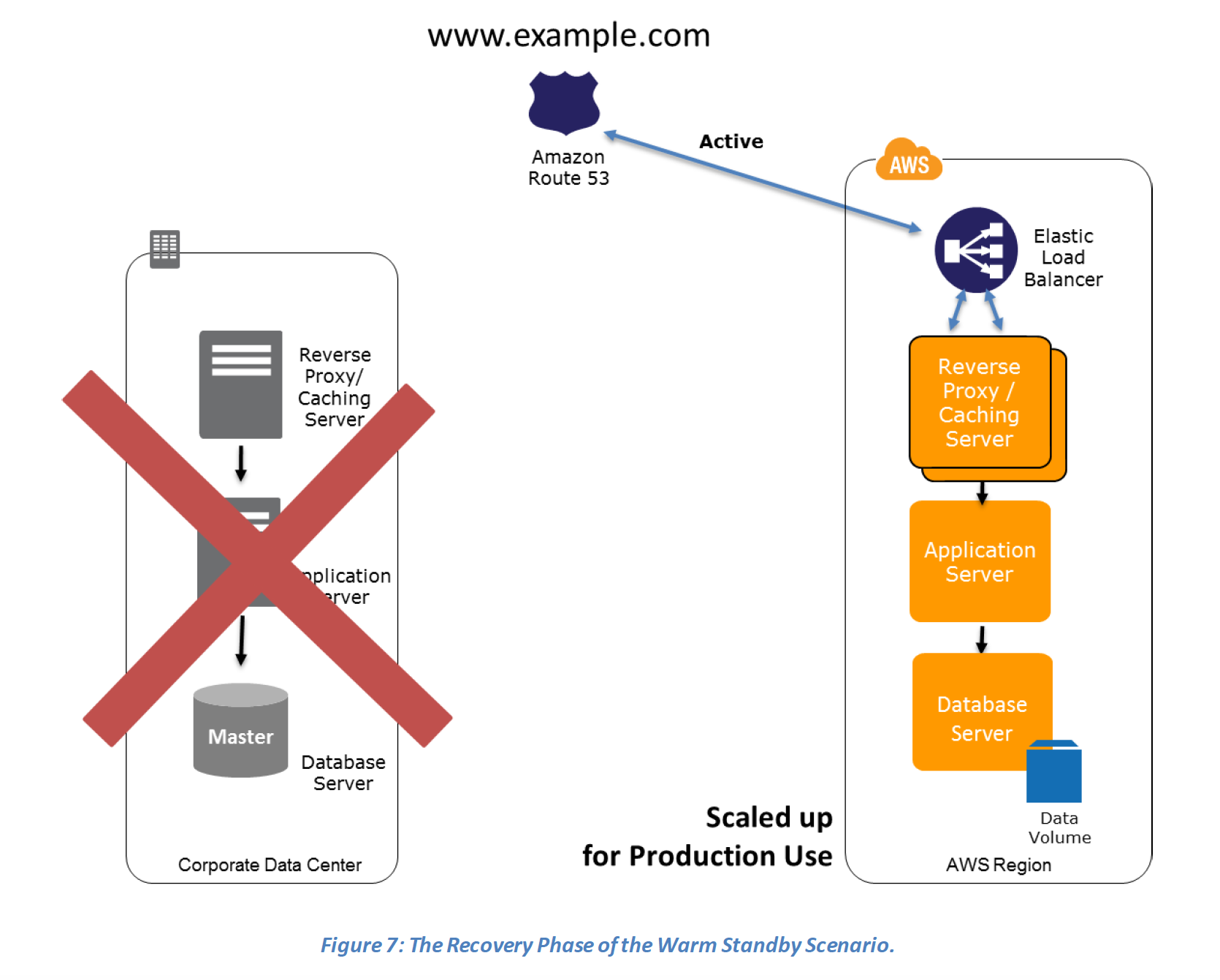
  • In a Warm standby DR scenario a scaled-down version of a fully functional environment identical to the business critical systems is always running in the cloud
  • This setup can be used for testing, quality assurances or for internal use.
  • In case of an disaster, the system can be easily scaled up or out to handle production load.

Preparation phase steps :

  1. Set up Amazon EC2 instances to replicate or mirror data.
  2. Create and maintain AMIs for faster provisioning
  3. Run the application using a minimal footprint of EC2 instances or AWS infrastructure.
  4. Patch and update software and configuration files in line with your live environment.

Warm Standby - Preparation PhaseRecovery phase Steps:

  1. Increase the size of the Amazon EC2 fleets in service with the load balancer (horizontal scaling).
  2. Start applications on larger Amazon EC2 instance types as needed (vertical scaling).
  3. Either manually change the DNS records, or use Route 53 automated health checks to route all the traffic to the AWS environment.
  4. Consider using Auto Scaling to right-size the fleet or accommodate the increased load.
  5. Add resilience or scale up your database to guard against DR going down

Warm Standby - Recovery Phase

Multi-Site Active/Active

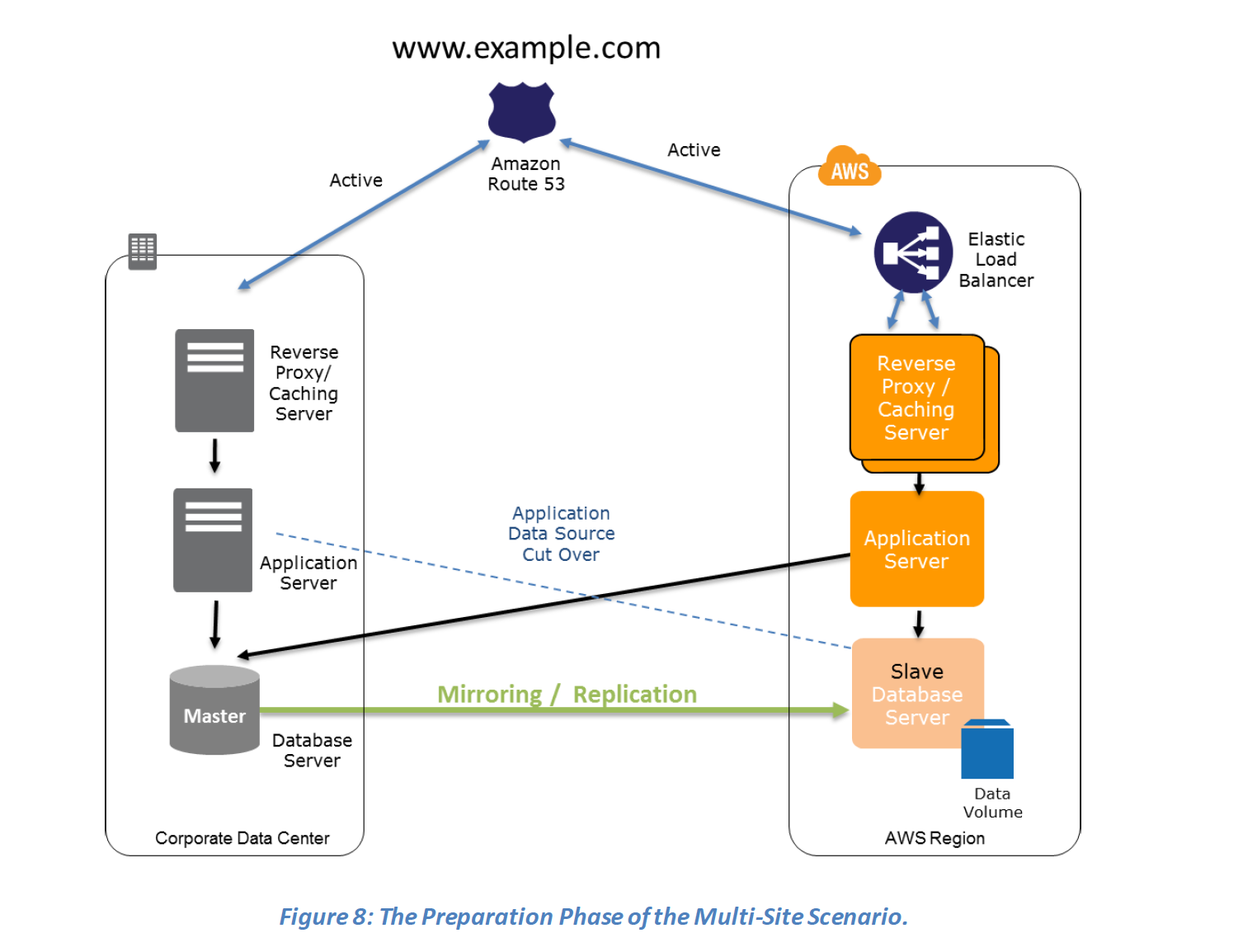
  • Multi-Site is an active-active configuration DR approach, where in an identical solution runs on AWS as your on-site infrastructure.
  • Traffic can be equally distributed to both the infrastructure as needed by using DNS service weighted routing approach.
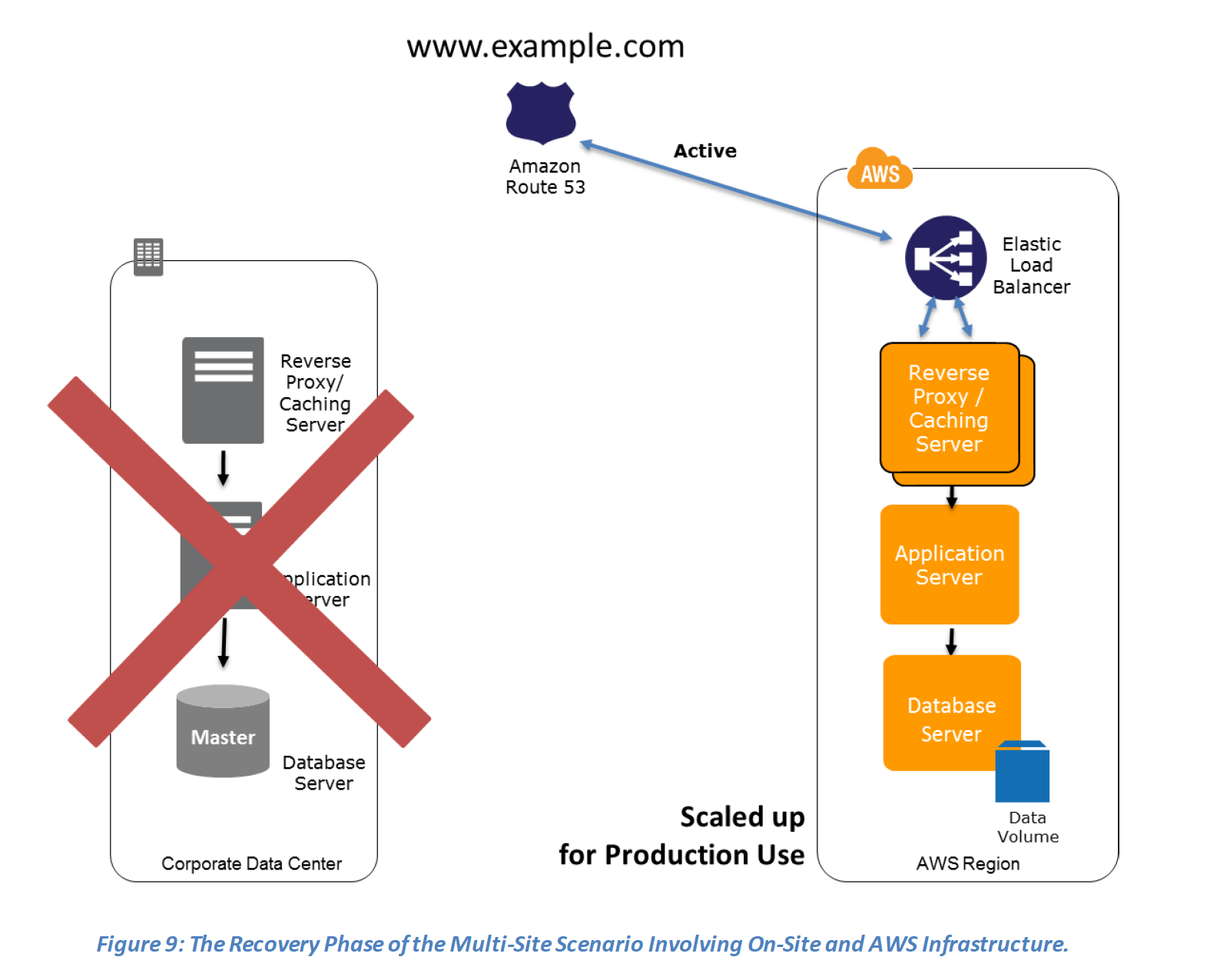
  • In case of a disaster the DNS can be tuned to send all the traffic to the AWS environment and the AWS infrastructure scaled accordingly.
  • Route 53 Application Recovery Controller (ARC) can manage failover with readiness checks and routing controls for multi-site architectures.

Preparation phase steps :

  1. Set up your AWS environment to duplicate the production environment.
  2. Set up DNS weighting, or similar traffic routing technology, to distribute incoming requests to both sites.
  3. Configure automated failover to re-route traffic away from the affected site. for e.g. application to check if primary DB is available if not then redirect to the AWS DB
Multi-Site - Preparation Phase

Recovery phase steps :

  1. Either manually or by using DNS failover, change the DNS weighting so that all requests are sent to the AWS site.
  2. Have application logic for failover to use the local AWS database servers for all queries.
  3. Consider using Auto Scaling to automatically right-size the AWS fleet.Multi-Site - Recovery Phase

AWS Elastic Disaster Recovery (AWS DRS)

  • AWS Elastic Disaster Recovery (DRS) is the primary AWS service for disaster recovery, replacing CloudEndure Disaster Recovery which was discontinued in March 2024.
  • Provides continuous block-level replication of source servers to a lightweight staging area in the target AWS Region
  • Achieves RPOs in seconds and RTOs in minutes (typically 5-20 minutes)
  • Uses cost-effective AWS resources – you only pay for the full recovery site during drills or actual recovery
  • Supports recovery from:
    • Physical infrastructure (on-premises)
    • VMware vSphere environments
    • Microsoft Hyper-V workloads
    • Other cloud providers (e.g., Azure to AWS)
    • AWS EC2 instances (cross-region DR)
  • Point-in-time recovery – launch previous versions of servers from before a ransomware attack without paying ransom
  • Automated failover and failback – reduces RTO and eliminates manual intervention
  • Supports source servers with up to 60 volumes
  • Supports AWS Outposts for on-premises DR targets
  • Integrates with AWS CloudTrail, IAM, and CloudWatch for security and monitoring
  • Can be used alongside any DR scenario (Pilot Light, Warm Standby, Multi-Site) for automated recovery

AWS Resilience Hub

  • Central service for defining resilience goals, assessing resilience posture, and implementing improvements
  • Continuously validates and tracks whether workloads can meet defined RTO and RPO targets
  • Provides automated resilience assessments based on the AWS Well-Architected Framework
  • Generates compliance evidence for auditors without manually spinning up DR environments
  • Detects drift in infrastructure and triggers remediation
  • Sends notifications to operators to launch recovery processes during outages
  • Available at no additional charge in the AWS Management Console
  • Supports multi-account application resilience assessment
  • Next Generation (GA May 2026): Includes generative AI-based SRE resilience journey for structured alignment on resilience policy expectations

AWS Certification Exam Practice Questions

  • Questions are collected from Internet and the answers are marked as per my knowledge and understanding (which might differ with yours).
  • AWS services are updated everyday and both the answers and questions might be outdated soon, so research accordingly.
  • AWS exam questions are not updated to keep up the pace with AWS updates, so even if the underlying feature has changed the question might not be updated
  • Open to further feedback, discussion and correction.
  1. Which of these Disaster Recovery options costs the least?
    1. Pilot Light (most systems are down and brought up only after disaster)
    2. Fully Working Low capacity Warm standby
    3. Multi site Active-Active
  2. Your company currently has a 2-tier web application running in an on-premises data center. You have experienced several infrastructure failures in the past two months resulting in significant financial losses. Your CIO is strongly agreeing to move the application to AWS. While working on achieving buy-in from the other company executives, he asks you to develop a disaster recovery plan to help improve Business continuity in the short term. He specifies a target Recovery Time Objective (RTO) of 4 hours and a Recovery Point Objective (RPO) of 1 hour or less. He also asks you to implement the solution within 2 weeks. Your database is 200GB in size and you have a 20Mbps Internet connection. How would you do this while minimizing costs?
    1. Create an EBS backed private AMI which includes a fresh install or your application. Setup a script in your data center to backup the local database every 1 hour and to encrypt and copy the resulting file to an S3 bucket using multi-part upload (while AMI is a right approach to keep cost down, Upload to S3 very Slow)
    2. Install your application on a compute-optimized EC2 instance capable of supporting the application’s average load synchronously replicate transactions from your on-premises database to a database instance in AWS across a secure Direct Connect connection. (EC2 running in Compute Optimized as well as Direct Connect is expensive to start with also Direct Connect cannot be implemented in 2 weeks)
    3. Deploy your application on EC2 instances within an Auto Scaling group across multiple availability zones asynchronously replicate transactions from your on-premises database to a database instance in AWS across a secure VPN connection. (While VPN can be setup quickly asynchronous replication using VPN would work, running instances in DR is expensive)
    4. Create an EBS backed private AMI that includes a fresh install of your application. Develop a CloudFormation template which includes your AMI and the required EC2. Auto-Scaling and ELB resources to support deploying the application across Multiple Availability Zones. Asynchronously replicate transactions from your on-premises database to a database instance in AWS across a secure VPN connection. (Pilot Light approach with only DB running and replicate while you have preconfigured AMI and autoscaling config. Note: Today, AWS Elastic Disaster Recovery (DRS) could also achieve this more easily with automated failover.)
  3. You are designing an architecture that can recover from a disaster very quickly with minimum down time to the end users. Which of the following approaches is best?
    1. Leverage Route 53 health checks to automatically fail over to backup site when the primary site becomes unreachable
    2. Implement the Pilot Light DR architecture so that traffic can be processed seamlessly in case the primary site becomes unreachable
    3. Implement either Fully Working Low Capacity Standby or Multi-site Active-Active architecture so that the end users will not experience any delay even if the primary site becomes unreachable
    4. Implement multi-region architecture to ensure high availability
  4. Your customer wishes to deploy an enterprise application to AWS that will consist of several web servers, several application servers and a small (50GB) Oracle database. Information is stored, both in the database and the file systems of the various servers. The backup system must support database recovery, whole server and whole disk restores, and individual file restores with a recovery time of no more than two hours. They have chosen to use RDS Oracle as the database. Which backup architecture will meet these requirements?
    1. Backup RDS using automated daily DB backups. Backup the EC2 instances using AMIs and supplement with file-level backup to S3 using traditional enterprise backup software to provide file level restore (RDS automated backups with file-level backups can be used. Note: AWS Backup can now centrally manage all of these backups.)
    2. Backup RDS using a Multi-AZ Deployment Backup the EC2 instances using AMIs, and supplement by copying file system data to S3 to provide file level restore (Multi-AZ is more of a High Availability solution, not a backup solution)
    3. Backup RDS using automated daily DB backups. Backup the EC2 instances using EBS snapshots and supplement with file-level backups to Amazon S3 Glacier using traditional enterprise backup software to provide file level restore (S3 Glacier Flexible Retrieval (formerly Glacier) retrieval time may not meet the 2 hours RTO depending on retrieval option selected)
    4. Backup RDS database to S3 using Oracle RMAN. Backup the EC2 instances using AMIs, and supplement with EBS snapshots for individual volume restore. (Will use RMAN only if Database hosted on EC2 and not when using RDS)
  5. Which statements are true about the Pilot Light Disaster recovery architecture pattern?
    1. Pilot Light is a hot standby (Cold Standby)
    2. Enables replication of all critical data to AWS
    3. Very cost-effective DR pattern
    4. Can scale the system as needed to handle current production load
  6. An ERP application is deployed across multiple AZs in a single region. In the event of failure, the Recovery Time Objective (RTO) must be less than 3 hours, and the Recovery Point Objective (RPO) must be 15 minutes. The customer realizes that data corruption occurred roughly 1.5 hours ago. What DR strategy could be used to achieve this RTO and RPO in the event of this kind of failure?
    1. Take hourly DB backups to S3, with transaction logs stored in S3 every 5 minutes
    2. Use synchronous database master-slave replication between two availability zones. (Replication won’t help to backtrack and would be sync always)
    3. Take hourly DB backups to EC2 Instance store volumes with transaction logs stored In S3 every 5 minutes. (Instance store not a preferred storage)
    4. Take 15 minute DB backups stored in S3 Glacier with transaction logs stored in S3 every 5 minutes. (S3 Glacier Flexible Retrieval does not meet the RTO)
  7. Your company’s on-premises content management system has the following architecture:
    – Application Tier – Java code on a JBoss application server
    – Database Tier – Oracle database regularly backed up to Amazon Simple Storage Service (S3) using the Oracle RMAN backup utility
    – Static Content – stored on a 512GB gateway stored Storage Gateway volume attached to the application server via the iSCSI interface

    Which AWS based disaster recovery strategy will give you the best RTO?

    1. Deploy the Oracle database and the JBoss app server on EC2. Restore the RMAN Oracle backups from Amazon S3. Generate an EBS volume of static content from the Storage Gateway and attach it to the JBoss EC2 server.
    2. Deploy the Oracle database on RDS. Deploy the JBoss app server on EC2. Restore the RMAN Oracle backups from Amazon S3 Glacier. Generate an EBS volume of static content from the Storage Gateway and attach it to the JBoss EC2 server. (S3 Glacier retrieval does not help to give best RTO)
    3. Deploy the Oracle database and the JBoss app server on EC2. Restore the RMAN Oracle backups from Amazon S3. Restore the static content by attaching an AWS Storage Gateway running on Amazon EC2 as an iSCSI volume to the JBoss EC2 server. (No need to attach the Storage Gateway as an iSCSI volume can just create an EBS volume)
    4. Deploy the Oracle database and the JBoss app server on EC2. Restore the RMAN Oracle backups from Amazon S3. Restore the static content from an AWS Storage Gateway-VTL running on Amazon EC2 (VTL is Virtual Tape library and doesn’t fit the RTO)
  8. [New] A company wants to implement disaster recovery for their on-premises application with an RPO of seconds and RTO of minutes. They want to minimize idle DR resources and costs. Which AWS service should they use?
    1. AWS Backup with cross-region copy (AWS Backup provides RPO in hours, not seconds)
    2. AWS Elastic Disaster Recovery (DRS) (DRS provides RPO in seconds and RTO in minutes using continuous replication with minimal staging resources)
    3. Amazon S3 Cross-Region Replication with CloudFormation templates (This is a Backup & Restore approach, not suitable for seconds RPO)
    4. Multi-Site Active-Active with Route 53 failover (Achieves the RPO/RTO but does not minimize costs – full duplicate environment runs at all times)
  9. [New] Which AWS service provides a centralized way to define resilience goals, assess whether applications can meet their RTO and RPO targets, and provides recommendations for improvement?
    1. AWS CloudWatch
    2. AWS Config
    3. AWS Resilience Hub (Resilience Hub provides centralized resilience assessment, RTO/RPO validation, and improvement recommendations based on the Well-Architected Framework)
    4. AWS Systems Manager
  10. [New] A company wants to automatically shift traffic away from an impaired Availability Zone without manual intervention. Which AWS service provides this capability?
    1. Amazon Route 53 weighted routing
    2. AWS Global Accelerator
    3. Amazon Route 53 Application Recovery Controller (ARC) with Zonal Autoshift (ARC Zonal Autoshift automatically moves traffic away from an AZ when AWS detects a potential failure, at no additional charge)
    4. Elastic Load Balancing cross-zone load balancing

References