EC2 Dedicated Host vs Dedicated Instances
- Each instance launched into a VPC has a tenancy attribute.
default- is the default option
- instances run on shared hardware.
- all instances launched would be shared, unless you explicitly specify a different tenancy during the instance launch.
dedicated- instance runs on single-tenant hardware.
- all instances launched would be dedicated
- can’t be changed to
defaultafter creation
host- instance runs on a Dedicated Host, which is an isolated server with configurations that you can control.
- Tenancy conversion rules (instance must be in
stoppedstate):defaulttenancy can be changed todedicatedorhost.dedicatedtenancy can be changed todefaultorhost.hosttenancy can be changed todedicatedordefault(except for T3 instances, which cannot change fromhosttodedicatedordefault).- Changes take effect the next time the instance starts.
- Tenancy conversions are managed through AWS License Manager tenancy conversion with billing code restrictions (e.g., Windows BYOL not permitted on shared tenancy, license-included SQL Server/SUSE not permitted on Dedicated Hosts).
- VPC tenancy of
dedicatedcan’t be changed todefaultafter creation. - Dedicated Hosts and Dedicated Instances can both be used to launch EC2 instances onto physical servers that are dedicated for your use.
- There are no performance, security, or physical differences between Dedicated Instances and instances on Dedicated Hosts.
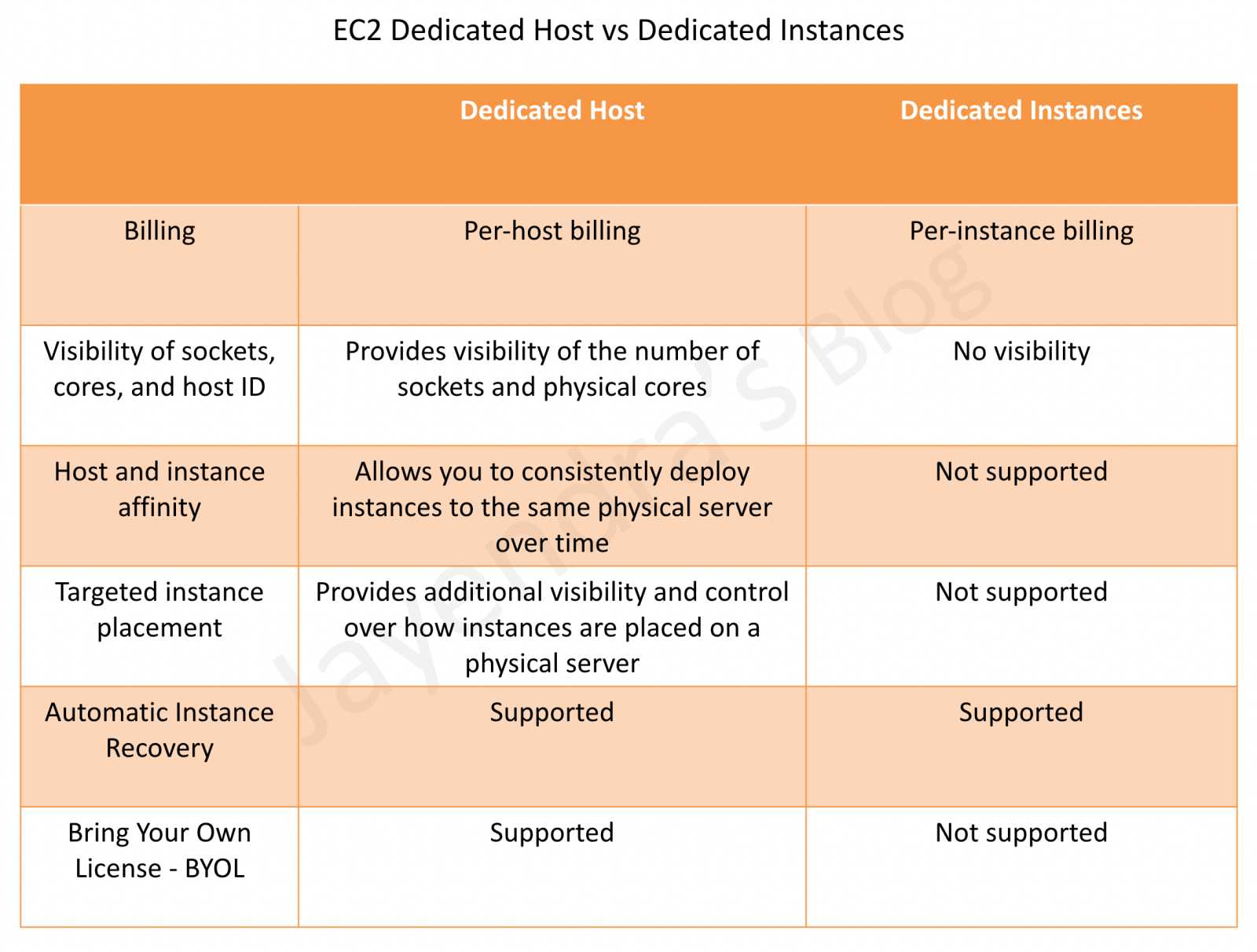
Dedicated Host vs Dedicated Instances
| Feature | Dedicated Host | Dedicated Instance |
|---|---|---|
| Dedicated physical server | Physical server with instance capacity fully dedicated to your use | Physical server dedicated to a single customer account |
| Instance capacity sharing | Can share capacity with other accounts via AWS RAM | Not supported |
| Billing | Per-host billing | Per-instance billing |
| Visibility of sockets, cores, and host ID | Provides visibility of the number of sockets and physical cores | No visibility |
| Host and instance affinity | Allows consistent deployment to the same physical server | Not supported |
| Targeted instance placement | Provides control over how instances are placed on a physical server | Not supported |
| Automatic instance recovery | Supported | Supported |
| Bring Your Own License (BYOL) | Comprehensive support | Partial support (SQL Server with License Mobility, Windows VDA only) |
| Capacity Reservations | Not supported | Supported |
Dedicated Hosts
- EC2 Dedicated Host is a physical server with EC2 instance capacity fully dedicated to your use.
- provides Affinity that allows you to specify which Dedicated Host an instance will run on after it has been stopped and restarted.
- Dedicated Hosts provide visibility and the option to control how you place your instances on a specific, physical server. This enables you to deploy instances using configurations that help address corporate compliance and regulatory requirements.
- Dedicated Hosts allow using existing per-socket, per-core, or per-VM software licenses, including Windows Server, Microsoft SQL Server, SUSE Linux Enterprise Server, Red Hat Enterprise Linux, or other software licenses that are bound to VMs, sockets, or physical cores.
- Dedicated Host is also integrated with AWS License Manager, a service that helps you manage your software licenses, including Microsoft Windows Server and Microsoft SQL Server licenses.
- Dedicated Hosts support Host Resource Groups through AWS License Manager, allowing you to manage a collection of Dedicated Hosts as a single entity with automated host allocation and license tracking.
- Dedicated Hosts can be shared across AWS accounts using AWS Resource Access Manager (RAM), allowing other accounts to launch instances on your Dedicated Hosts.
- Dedicated Hosts support both single instance type and multiple instance type configurations within the same instance family.
- RDS instances are not supported.
- Dedicated Hosts cannot be launched in placement groups.
- SQL Server, SUSE, and RHEL AMIs provided by Amazon EC2 cannot be used with Dedicated Hosts (BYOL only for these).
- AWS recommends migrating from Xen-based Dedicated Hosts to Nitro-based Dedicated Hosts for improved price performance.
Dedicated Host Maintenance
- Live Migration-based Host Maintenance (October 2024) – AWS now supports live migration for Dedicated Hosts during maintenance events. When a host requires maintenance, AWS allocates a replacement Dedicated Host and moves instances to the new host automatically within 24 hours, without stopping and restarting them.
- Host Recovery – Automatically detects hardware issues and migrates instances to a replacement host, minimizing disruption.
- If host maintenance is disabled, you receive notification to manually migrate instances within 28 days. After 28 days, instances are terminated and the host is released.
- EC2 Mac Dedicated Hosts (August 2025) – Now support Host Recovery and Reboot-based Host Maintenance for Mac instances.
Dedicated Host Auto-Placement
- When auto-placement is enabled, instances launched with
hosttenancy (without a specific host ID) are automatically placed on any available Dedicated Host with matching instance type. - When auto-placement is disabled, you must provide a specific host ID for instance launch.
- Auto-placement works with Host Resource Groups in License Manager for automated host management and allocation.
Dedicated Instances
- Dedicated Instances are EC2 instances that run in a VPC on hardware that’s dedicated to a single customer.
- Dedicated Instances are physically isolated at the host hardware level from the instances that aren’t Dedicated Instances and from instances that belong to other AWS accounts.
- Dedicated Instances may share hardware with other instances from the same AWS account that are not Dedicated Instances.
- Dedicated Instances provide no visibility or control over instance placement and do not support host affinity.
- Dedicated Instances provide limited support for Bring Your Own License (BYOL).
- Dedicated Instances can be launched using:
- Create the VPC with the instance tenancy set to
dedicated– all instances launched into this VPC are Dedicated Instances. - Create the VPC with the instance tenancy set to
default, and specifydedicatedtenancy for any instances that should be Dedicated Instances when launched.
- Create the VPC with the instance tenancy set to
- Dedicated Instances support:
- Reserved Instances and Capacity Reservations
- Auto Scaling
- Automatic instance recovery
- Spot Instances (Dedicated Spot Instances)
- Burstable performance instances (T3)
- EBS volumes attached to Dedicated Instances do NOT run on single-tenant hardware.
AWS Certification Exam Practice Questions
- Questions are collected from Internet and the answers are marked as per my knowledge and understanding (which might differ with yours).
- AWS services are updated everyday and both the answers and questions might be outdated soon, so research accordingly.
- AWS exam questions are not updated to keep up the pace with AWS updates, so even if the underlying feature has changed the question might not be updated
- Open to further feedback, discussion and correction.
- A company wants its instances to run on single-tenant hardware with dedicated hardware for compliance reasons. Which value should they have to set the instance’s tenancy attribute to?
- Dedicated
- Isolated
- Default
- Reserved
- A company is performing migration from on-premises to AWS cloud. They have a compliance requirement for application hosting on physical servers to be able to use existing server-bound software licenses. Which AWS EC2 purchase type would help fulfill the requirement?
- Spot instances
- Reserved instances
- On-demand instances
- Dedicated Hosts
- A company runs licensed software that requires visibility into the physical cores and sockets of the underlying server. Which EC2 tenancy option provides this visibility?
- Default tenancy
- Dedicated Instances
- Dedicated Hosts
- Placement Groups
- A company uses EC2 Dedicated Hosts and wants to minimize downtime during host maintenance events. Which feature should they enable? (Select TWO)
- Live migration-based host maintenance
- Enhanced networking
- Host Recovery
- Elastic Fabric Adapter
- Placement Groups
- A company wants to share Dedicated Host capacity with other AWS accounts in their organization. Which AWS service enables this?
- AWS Organizations
- AWS Resource Access Manager (RAM)
- AWS License Manager
- AWS Service Catalog
- Which of the following statements about Dedicated Instances is CORRECT? (Select TWO)
- EBS volumes attached to Dedicated Instances do NOT run on single-tenant hardware
- Dedicated Instances provide visibility into the number of physical cores
- Dedicated Instances may share hardware with other non-dedicated instances from the same account
- Dedicated Instances support host affinity
- Dedicated Instances cannot use Spot pricing