IAM helps control whether users in the organization can perform a task using specific EC2 API actions and whether they can use specific AWS resources.
Use IAM roles to prevent the need to share as well as manage, and rotate the security credentials that the applications use.
Security groups act as a virtual firewall that controls the traffic to the EC2 instances. They can help specify rules that control the inbound traffic that’s allowed to reach the instances and the outbound traffic that’s allowed to leave the instance.
Use AWS Systems Manager Session Manager to connect to the instance as it provides secure and auditable instance management without the need to open inbound ports, maintain bastion hosts, or manage SSH keys.
Use EC2 Instance Connect to connect to your instances using Secure Shell (SSH) without the need to share and manage SSH keys.
Use EC2 Instance Connect Endpoint to connect securely to instances in private subnets without requiring a public IP address, Internet Gateway, or bastion host.
Use AWS Systems Manager Run Command to automate common administrative tasks instead of opening inbound SSH ports and managing SSH keys.
Use Systems Manager Patch Manager to automate the process of patching, installing security-related updates for both the operating system and applications.
Use AWS Verified Access to provide secure, VPN-less, zero-trust access to EC2 instances over SSH, RDP, and other protocols.
Enforce IMDSv2 (Instance Metadata Service Version 2) to add defense-in-depth against unauthorized metadata access using session-oriented token-based requests.
EC2 Key Pairs
EC2 uses public-key cryptography to encrypt & decrypt login information
Public-key cryptography uses a public key to encrypt a piece of data, such as a password, then the recipient uses the private key to decrypt the data.
Public and private keys are known as a key pair.
To log in to an EC2 instance, a key pair needs to be created and specified when the instance is launched, and the private key can be used to connect to the instance.
Linux instances have no password, and the key pair is used for ssh log in
For Windows instances, the key pair can be used to obtain the administrator password and then log in using RDP
EC2 stores the public key only, and the private key resides with the user. EC2 doesn’t keep a copy of your private key
Public key content (on Linux instances) is placed in an entry within ~/.ssh/authorized_keys at boot time and enables the user to securely access the instance without passwords
Public key specified for an instance when launched is also available through its instance metadata http://169.254.169.254/latest/meta-data/public-keys/0/openssh-key
EC2 Security Best Practice: Store the private keys in a secure place as anyone who possesses the private key can decrypt the login information
Also, if the private key is lost, there is no way to recover the same.
For instance store, you cannot access the instance
For EBS-backed Linux instances, access can be regained.
EBS-backed instance can be stopped, its root volume detached and attached to another instance as a data volume
Modify the authorized_keys file, move the volume back to the original instance, and restart the instance
Key pair associated with the instances can either be
Generated by EC2
EC2 supports RSA (2048-bit SSH-2) and ED25519 key pair types.
ED25519 keys are not supported for Windows instances.
Key pairs can be generated in PEM or PPK format.
Created separately (using third-party tools) and Imported into EC2
EC2 accepts RSA and ED25519 keys for import (does not accept DSA keys)
RSA supported lengths: 1024, 2048, and 4096
Supports five thousand key pairs per region
Key pair management features include viewing creation date and public key material for existing and new key pairs.
Deleting a key pair only deletes the public key and does not impact the servers already launched with the key.
Use AWS Systems Manager Session Manager to connect to the instance as it provides secure and auditable instance management without the need to open inbound ports, maintain bastion hosts, or manage SSH keys.
EC2 Instance Connect
EC2 Instance Connect provides a simple and secure way to connect to instances using SSH without the need to share and manage SSH keys.
Generates a one-time-use SSH public key and pushes it to the instance metadata, where it remains available for 60 seconds.
IAM policies control which users can access and connect to specific instances.
All connection requests using EC2 Instance Connect are logged to AWS CloudTrail for auditing.
Supports IPv6 connectivity (added Sep 2024), allowing connections to instances with IPv6 addresses.
Available at no additional cost.
EC2 Instance Connect Endpoint
EC2 Instance Connect Endpoint (EIC Endpoint), launched in June 2023, allows secure connectivity from the Internet to instances in private subnets.
Eliminates the need for an Internet Gateway (IGW) in the VPC, a public IP address on the resource, a bastion host, or any agent to connect to instances.
Supports SSH (Linux) and RDP (Windows) connectivity without public IP addresses.
Uses IAM-based authentication to establish secure connections.
Supports IPv6 connectivity (added Oct 2025) — EIC Endpoints can be configured as dual-stack or IPv6-only.
IAM policies can restrict which instances users can connect to through the endpoint.
Available at no additional cost.
Replaces traditional bastion host architecture for many use cases, reducing operational overhead and attack surface.
EC2 Security Groups
An EC2 instance, when launched, can be associated with one or more security groups, which acts as a virtual firewall that controls the traffic to that instance
Security groups help specify rules that control the inbound traffic that’s allowed to reach the instances and the outbound traffic that’s allowed to leave the instance
Security groups are associated with network interfaces. Changing an instance’s security groups changes the security groups associated with the primary network interface (eth0)
An ENI can be associated with 5 security groups and with 60 inbound and 60 outbound rules per security group (120 total rules per security group)
A single network interface cannot have more than 1000 combined rules from all attached Security Groups.
Rules for a security group can be modified at any time; the new rules are automatically applied to all instances associated with the security group.
All the rules from all associated security groups are evaluated to decide where to allow traffic to an instance
Security Group features
For the VPC default security group, it allows all inbound traffic from other instances associated with the default security group
By default, VPC default security groups or newly created security groups allow all outbound traffic
Security group rules are always permissive; deny rules can’t be created
Rules can be added and removed any time.
Any modification to the rules are automatically applied to the instances associated with the security group after a short period, depending on the connection tracking for the traffic
Security groups are stateful — if you send a request from your instance, the response traffic for that request is allowed to flow in regardless of inbound security group rules. For VPC security groups, this also means that responses to allowed inbound traffic are allowed to flow out, regardless of outbound rules
If multiple rules are defined for the same protocol and port, the Most permissive rule is applied for e.g. for multiple rules for tcp and port 22 for specific IP and Everyone, everyone is granted access being the most permissive rule
Security Group VPC Associations (Oct 2024)
Security groups can now be associated with multiple VPCs in the same account and AWS Region using Security Group VPC Associations.
Enables enforcing consistent traffic filtering rules for workloads regardless of the VPC.
Security groups can be shared with participant accounts using AWS Resource Access Manager (RAM) in shared VPC environments.
Cannot share security groups that are in a default VPC.
Eliminates the need to duplicate security group rules across multiple VPCs.
Security Group Referencing across Transit Gateway (Sep 2024)
Security group referencing is now supported across VPCs connected by AWS Transit Gateway.
Allows creating inbound security rules that reference security groups defined in other VPCs attached to a Transit Gateway within the same Region.
Simplifies management and provides better security posture for TGW-based networks.
Also supported across AWS Cloud WAN (Jun 2025) for cross-VPC connectivity.
Related Resources View (Feb 2026)
The EC2 and VPC consoles now display a “Related resources” tab for security groups.
Provides a consolidated view of all resources that depend on a specific security group.
Eliminates the need to manually check multiple services before making security group configuration changes.
Connection Tracking
Security groups are Stateful and they use Connection tracking to track information about traffic to and from the instance.
This allows responses to inbound traffic to flow out of the instance regardless of outbound security group rules, and vice versa.
Connection Tracking is maintained only if there is no explicit Outbound rule for an Inbound request (and vice versa)
However, if there is an explicit Outbound rule for an Inbound request, the response traffic is allowed on the basis of the Outbound rule and not on the Tracking information
Any existing flow of traffic, that is tracked, is not interrupted even if the rules for the security groups are changed. To ensure traffic is immediately interrupted, use NACL as they are stateless and therefore do not allow automatic response traffic.
Also, If the instance (host A) initiates traffic to host B and uses a protocol other than TCP, UDP, or ICMP, the instance’s firewall only tracks the IP address and protocol number for the purpose of allowing response traffic from host B. If host B initiates traffic to your instance in a separate request within 600 seconds of the original request or response, your instance accepts it regardless of inbound security group rules, because it’s regarded as response traffic.
Can be controlled by modifying the security group’s outbound rules to permit only certain types of outbound traffic or using NACL
Configurable Idle Timeouts (Nov 2023)
Idle timeouts for connection tracking are now configurable on a per Elastic Network Interface (ENI) basis.
Configurable timeout settings:
TCP Established: Min 60 seconds, Max 432,000 seconds (5 days). Default: 432,000 seconds (pre-Nitro v6) or 350 seconds (Nitro v6 instances).
UDP Stream: Min 60 seconds, Max 180 seconds. Default: 180 seconds.
UDP Unidirectional: Min 30 seconds, Max 60 seconds. Default: 30 seconds.
Important (Jun 2025): Sixth-generation Nitro (Nitro v6) instances (c8, r8, etc.) changed the default TCP connection tracking idle timeout from 432,000 seconds (5 days) to 350 seconds. If a TCP connection remains idle for more than 350 seconds, the ENI evicts the session from its tracking table.
Applications with long-lived idle connections on Nitro v6 instances should either configure keep-alive mechanisms or adjust the idle timeout setting.
Instance Metadata Service v2 (IMDSv2)
IMDSv2 is an enhancement to the Instance Metadata Service that uses session-oriented token-based requests to add defense-in-depth against unauthorized metadata access.
IMDSv2 requires a session token obtained via a PUT request before metadata can be retrieved, protecting against SSRF attacks and unauthorized access.
Sessions can last up to six hours and tokens can only be used from the EC2 instance where the session began.
Session token PUT requests are blocked if they contain an X-forwarded-for header (mitigates reverse proxy exploitation).
IMDSv2 enforcement timeline:
Mar 2024: Account-level setting available to set IMDSv2 as default for all new instance launches.
Mid-2024: All newly released EC2 instance types require IMDSv2 only (IMDSv1 disabled).
AWS Console Quick Starts and other launch pathways default to IMDSv2.
Methods to enforce IMDSv2:
Set account-level default using ModifyInstanceMetadataDefaults API
Set AMI-level property to require IMDSv2
Set instance metadata options during launch
Use declarative policies via AWS Organizations for multi-account, multi-region enforcement
When IMDSv2 is required, IMDSv1 is disabled — applications relying on IMDSv1 will break.
Default hop limit is set to 2 when IMDSv2 is required (supports containerized workloads).
Best Practice: Enforce IMDSv2 across all instances to prevent credential theft via SSRF attacks
IAM with EC2
IAM policy can be defined to allow or deny a user access to the EC2 resources and actions
EC2 partially supports resource-level permissions. For some EC2 API actions, you cannot specify which resource a user is allowed to work with for that action; instead, you have to allow users to work with all resources for that action
IAM allows to control only what actions a user can perform on the EC2 resources but cannot be used to grant access for users to be able to access or login to the instances
EC2 with IAM Role
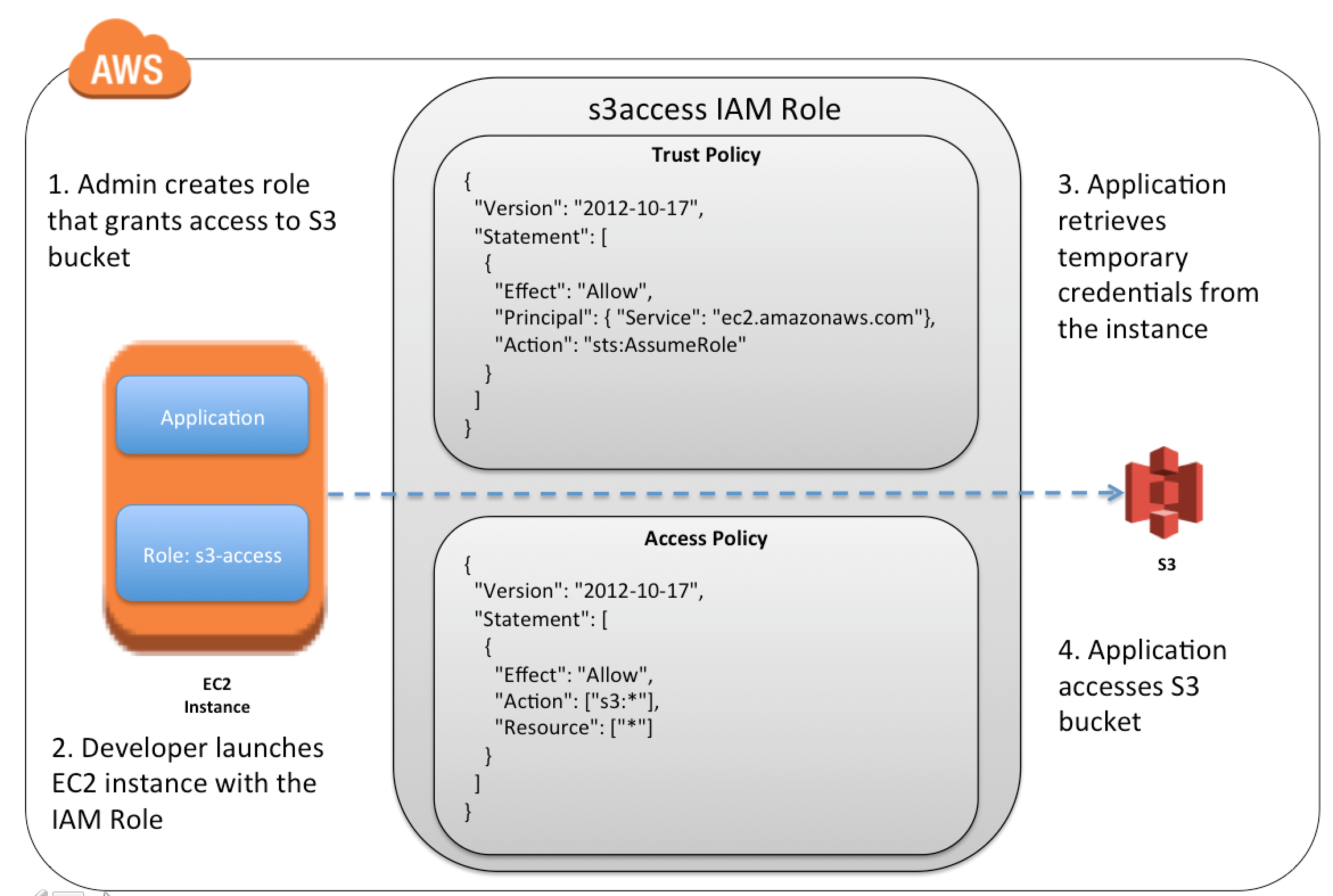
EC2 instances can be launched with IAM roles so that the applications can securely make API requests from your instances.
IAM roles prevent the need to share as well as manage, rotate the security credentials that the applications use.
IAM role can be added to an existing running EC2 instance.
EC2 uses an instance profile as a container for an IAM role.
Creation of an IAM role using the console, creates an instance profile automatically and gives it the same name as the role it corresponds to.
When using the AWS CLI, API, or an AWS SDK to create a role, the role and instance profile needs to be created as separate actions, and they can be given different names.
One role per instance profile (this limit cannot be increased).
To launch an instance with an IAM role, the name of its instance profile needs to be specified.
An application on the instance can retrieve the security credentials provided by the role from the instance metadata item http://169.254.169.254/latest/meta-data/iam/security-credentials/role-name.
Security credentials are temporary and are rotated automatically and new credentials are made available at least five minutes prior to the expiration of the old credentials.
EC2 IAM role credentials are not subject to maximum session durations configured in the role.
Best Practice: Always launch EC2 instance with IAM role instead of hardcoded credentials
AWS Verified Access
AWS Verified Access provides secure, VPN-less access to corporate applications and resources using zero-trust principles (“never trust, always verify”).
Evaluates each access request based on user identity and device health rather than network location.
Supports fine-grained access policies using the Cedar policy language.
Originally supported HTTP(S) applications only (GA April 2023).
Non-HTTP(S) protocol support (GA Feb 2025): Extends zero-trust access to SSH, RDP, JDBC, ODBC, and other TCP protocols.
Eliminates the need for VPNs or bastion hosts for SSH/RDP access to EC2 instances.
Simplifies security operations by using a single solution for all application types.
Integrates with third-party identity providers (IdPs) and device management solutions.
All access requests are logged for auditing and compliance.
Achieved FedRAMP High and Moderate authorization (Mar 2025).
Can be combined with AWS Network Firewall for deep packet inspection.
EC2 Resiliency
EC2 offers the following features to support your data resiliency:
Copying AMIs across Regions
Copying EBS snapshots across Regions
Automating EBS-backed AMIs using Data Lifecycle Manager
Automating EBS snapshots using Data Lifecycle Manager
Maintaining the health and availability of the fleet using EC2 Auto Scaling
Distributing incoming traffic across multiple instances in a single AZ or multiple AZs using Elastic Load Balancing
Using Recycle Bin to protect EBS snapshots, EBS-backed AMIs, and EBS Volumes from accidental deletion with configurable retention periods
Automatically deleting underlying EBS snapshots when deregistering AMIs (Jun 2025) to simplify cleanup
AWS Certification Exam Practice Questions
Questions are collected from Internet and the answers are marked as per my knowledge and understanding (which might differ with yours).
AWS services are updated everyday and both the answers and questions might be outdated soon, so research accordingly.
AWS exam questions are not updated to keep up the pace with AWS updates, so even if the underlying feature has changed the question might not be updated
Open to further feedback, discussion and correction.
You launch an Amazon EC2 instance without an assigned AWS identity and Access Management (IAM) role. Later, you decide that the instance should be running with an IAM role. Which action must you take in order to have a running Amazon EC2 instance with an IAM role assigned to it?
Create an image of the instance, and register the image with an IAM role assigned and an Amazon EBS volume mapping.
Create a new IAM role with the same permissions as an existing IAM role, and assign it to the running instance. (As per AWS latest enhancement, this is possible now)
Create an image of the instance, add a new IAM role with the same permissions as the desired IAM role, and deregister the image with the new role assigned.
Create an image of the instance, and use this image to launch a new instance with the desired IAM role assigned (This was correct before, as it was not possible to add an IAM role to an existing instance)
What does the following command do with respect to the Amazon EC2 security groups? ec2-revoke RevokeSecurityGroupIngress
Removes one or more security groups from a rule.
Removes one or more security groups from an Amazon EC2 instance.
Removes one or more rules from a security group
Removes a security group from our account.
Which of the following cannot be used in Amazon EC2 to control who has access to specific Amazon EC2 instances?
Security Groups
IAM System
SSH keys
Windows passwords
You must assign each server to at least _____ security group
3
2
4
1
A company is building software on AWS that requires access to various AWS services. Which configuration should be used to ensure that AWS credentials (i.e., Access Key ID/Secret Access Key combination) are not compromised?
Enable Multi-Factor Authentication for your AWS root account.
Assign an IAM role to the Amazon EC2 instance
Store the AWS Access Key ID/Secret Access Key combination in software comments.
Assign an IAM user to the Amazon EC2 Instance.
Which of the following items are required to allow an application deployed on an EC2 instance to write data to a DynamoDB table? Assume that no security keys are allowed to be stored on the EC2 instance. (Choose 2 answers)
Create an IAM Role that allows write access to the DynamoDB table
Add an IAM Role to a running EC2 instance. (As per AWS latest enhancement, this is possible now)
Create an IAM User that allows write access to the DynamoDB table.
Add an IAM User to a running EC2 instance.
Launch an EC2 Instance with the IAM Role included in the launch configuration (This was correct before, as it was not possible to add an IAM role to an existing instance)
You have an application running on an EC2 Instance, which will allow users to download files from a private S3 bucket using a pre-assigned URL. Before generating the URL the application should verify the existence of the file in S3. How should the application use AWS credentials to access the S3 bucket securely?
Use the AWS account access Keys the application retrieves the credentials from the source code of the application.
Create a IAM user for the application with permissions that allow list access to the S3 bucket launch the instance as the IAM user and retrieve the IAM user’s credentials from the EC2 instance user data.
Create an IAM role for EC2 that allows list access to objects in the S3 bucket. Launch the instance with the role, and retrieve the role’s credentials from the EC2 Instance metadata
Create an IAM user for the application with permissions that allow list access to the S3 bucket. The application retrieves the IAM user credentials from a temporary directory with permissions that allow read access only to the application user.
A user has created an application, which will be hosted on EC2. The application makes calls to DynamoDB to fetch certain data. The application is using the DynamoDB SDK to connect with from the EC2 instance. Which of the below mentioned statements is true with respect to the best practice for security in this scenario?
The user should attach an IAM role with DynamoDB access to the EC2 instance
The user should create an IAM user with DynamoDB access and use its credentials within the application to connect with DynamoDB
The user should create an IAM role, which has EC2 access so that it will allow deploying the application
The user should create an IAM user with DynamoDB and EC2 access. Attach the user with the application so that it does not use the root account credentials
Your application is leveraging IAM Roles for EC2 for accessing object stored in S3. Which two of the following IAM policies control access to you S3 objects.
An IAM trust policy allows the EC2 instance to assume an EC2 instance role.
An IAM access policy allows the EC2 role to access S3 objects
An IAM bucket policy allows the EC2 role to access S3 objects. (Bucket policy is defined with S3 and not with IAM)
An IAM trust policy allows applications running on the EC2 instance to assume as EC2 role (Trust policy allows EC2 instance to assume the role)
An IAM trust policy allows applications running on the EC2 instance to access S3 objects. (Applications can access S3 through EC2 assuming the role)
You have an application running on an EC2 Instance, which will allow users to download files from a private S3 bucket using a pre-assigned URL. Before generating the URL the application should verify the existence of the file in S3. How should the application use AWS credentials to access the S3 bucket securely?
Use the AWS account access Keys the application retrieves the credentials from the source code of the application.
Create a IAM user for the application with permissions that allow list access to the S3 bucket launch the instance as the IAM user and retrieve the IAM user’s credentials from the EC2 instance user data.
Create an IAM role for EC2 that allows list access to objects in the S3 bucket. Launch the instance with the role, and retrieve the role’s credentials from the EC2 Instance metadata
Create an IAM user for the application with permissions that allow list access to the S3 bucket. The application retrieves the IAM user credentials from a temporary directory with permissions that allow read access only to the application user.
New Practice Questions
A company wants to provide secure SSH access to EC2 instances in private subnets without using bastion hosts, VPNs, or public IP addresses. Which AWS service should they use?
AWS Direct Connect
AWS Site-to-Site VPN
EC2 Instance Connect Endpoint
AWS PrivateLink
A security team wants to protect EC2 instances from credential theft through SSRF (Server-Side Request Forgery) attacks targeting the instance metadata service. Which approach should they implement?
Disable the instance metadata service entirely
Use security groups to block metadata access
Enforce IMDSv2 which requires session tokens for metadata access
Encrypt the metadata service endpoint
An organization uses multiple VPCs within the same account and region and wants to maintain consistent security group rules across all VPCs without duplication. Which feature should they use?
VPC Peering with security group referencing
Security Group VPC Associations
AWS Network Firewall
AWS Config rules
A company is migrating to sixth-generation Nitro (Nitro v6) EC2 instances and experiencing dropped TCP connections for long-running idle workloads. What is the most likely cause?
Security group rules are being modified
Network ACLs are timing out
The default TCP connection tracking idle timeout changed from 432,000 seconds to 350 seconds on Nitro v6 instances
The instance is being stopped by Auto Scaling
A company wants to implement zero-trust access for SSH and RDP connections to EC2 instances, evaluating user identity and device security posture for each request without requiring a VPN. Which AWS service provides this capability?
EC2 Instance Connect Endpoint
AWS Systems Manager Session Manager
AWS Verified Access
AWS Client VPN
Which of the following key pair types are supported for EC2 Linux instances? (Choose 2)
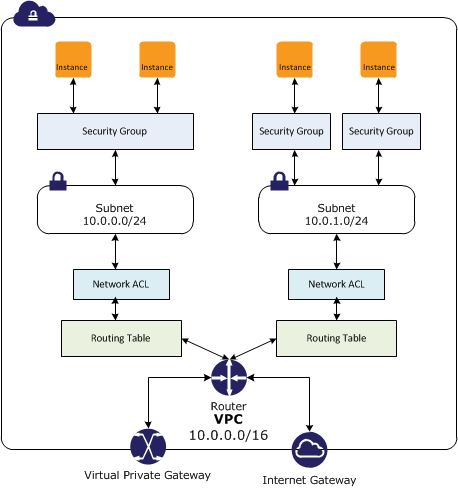
In a VPC, both Security Groups and Network ACLs (NACLS) together help to build a layered network defence.
Security groups – Act as a virtual firewall for associated instances, controlling both inbound and outbound traffic at the instance level
Network access control lists (NACLs) – Act as a firewall for associated subnets, controlling both inbound and outbound traffic at the subnet level
Security Groups
Acts at an Instance level and not at the subnet level.
Each instance within a subnet can be assigned a different set of Security groups
An instance can be assigned up to 5 security groups (default, can be increased up to 16) with each security group having up to 60 rules (inbound and outbound separately).
allows separate rules for inbound and outbound traffic.
allows adding or removing rules (authorizing or revoking access) for both Inbound (ingress) and Outbound (egress) traffic to the instance
Default Security group allows no external inbound traffic but allows inbound traffic from instances with the same security group
Default Security group allows all outbound traffic
New Security groups start with only an outbound rule that allows all traffic to leave the instances.
can specify only Allow rules, but not deny rules
can grant access to a specific IP, CIDR range, or to another security group in the VPC or in a peer VPC (requires a VPC peering connection)
are evaluated as a Whole or Cumulative bunch of rules with the most permissive rule taking precedence for e.g. if you have a rule that allows access to TCP port 22 (SSH) from IP address 203.0.113.1 and another rule that allows access to TCP port 22 from everyone, everyone has access to TCP port 22.
are Stateful – responses to allowed inbound traffic are allowed to flow outbound regardless of outbound rules, and vice versa. Hence an Outbound rule for the response is not needed
Instances associated with a security group can’t talk to each other unless rules allowing the traffic are added.
are associated with ENI (network interfaces).
are associated with the instance and can be changed, which changes the security groups associated with the primary network interface (eth0) and the changes would be applicable immediately to all the instances associated with the Security Group.
Security Group Quotas
VPC security groups per Region: 2,500 (adjustable)
Inbound or outbound rules per security group: 60 (adjustable, enforced separately for IPv4 and IPv6)
Security groups per network interface: 5 (default, adjustable up to 16)
Total rules per network interface: Maximum of 1,000 rules across all attached security groups (hard limit)
The quota for rules per security group multiplied by security groups per network interface cannot exceed 1,000
Security Group VPC Associations and Sharing (New – 2024)
Security Group VPC Associations allow associating a security group with multiple VPCs in the same account and Region, enabling consistent security rules across workloads in different VPCs without duplicating security groups.
Shared Security Groups allow the VPC owner to share security groups with participant accounts in a shared VPC using AWS Resource Access Manager (RAM).
Participant accounts can use the shared security groups but cannot modify them.
Shared security groups can only be used with resources in shared subnets of the owner’s VPC.
Cannot be used with default security groups or default VPCs.
These features complement security group referencing across VPC peering and Transit Gateway.
VPC Peering: Can reference security groups in a peer VPC within the same Region.
Transit Gateway (Sep 2024): Can reference security groups from other VPCs attached to the same Transit Gateway within the same Region, eliminating the need to hard-code IP address ranges.
Cloud WAN (Jun 2025): Can reference security groups defined in other VPCs within the same Region attached to the same Cloud WAN core network.
Security group referencing allows rules to dynamically adapt as instances scale up/down without updating IP-based rules.
Connection Tracking
Security groups are Stateful as they use Connection tracking to track information about traffic to and from the instance.
Responses to inbound traffic are allowed to flow out of the instance regardless of outbound security group rules, and vice versa.
Connection Tracking is maintained only if there is no explicit Outbound rule for an Inbound request (and vice versa)
However, if there is an explicit Outbound rule for an Inbound request, the response traffic is allowed on the basis of the Outbound rule and not on the Tracking information
Tracking flow e.g.
If an instance (host A) initiates traffic to host B and uses a protocol other than TCP, UDP, or ICMP, the instance’s firewall only tracks the IP address & protocol number for the purpose of allowing response traffic from host B.
If host B initiates traffic to the instance in a separate request within 600 seconds of the original request or response, the instance accepts it regardless of inbound security group rules, because it’s regarded as response traffic.
This can be controlled by modifying the security group’s outbound rules to permit only certain types of outbound traffic. Alternatively, Network ACLs (NACLs) can be used for the subnet, network ACLs are stateless and therefore do not automatically allow response traffic.
Connection Tracking Idle Timeouts (Configurable)
Connection tracking idle timeouts are configurable per Elastic Network Interface (ENI) since Nov 2023.
TCP Established timeout:
Default: 432,000 seconds (5 days) for most instance types
Default: 350 seconds for Nitro V6 instance types (since Jun 2025)
Recommended: Less than 432,000 seconds to prevent connection tracking table exhaustion
UDP Stream timeout (bidirectional traffic): Min 60s, Max 180s, Default 180s
UDP Unidirectional timeout: Min 30s, Max 60s, Default 30s
Configurable timeouts help prevent connection tracking exhaustion for high-throughput workloads, DNS-heavy UDP workloads, and long-lived idle connections.
Network Access Control Lists – NACLs
A Network ACLs (NACLs) is an optional layer of security for the VPC that acts as a firewall for controlling traffic in and out of one or more subnets.
are not for granular control and are assigned at a Subnet level and are applicable to all the instances in that Subnet
has separate inbound and outbound rules, and each rule can either allow or deny traffic
Default ACL allows all inbound and outbound traffic.
The newly created ACL denies all inbound and outbound traffic.
A Subnet can be assigned only 1 NACL and if not associated explicitly would be associated implicitly with the default NACL
can associate a network ACL with multiple subnets
is a numbered list of rules that are evaluated in order starting with the lowest numbered rule, to determine whether traffic is allowed in or out of any subnet associated with the network ACL e.g. if you have a Rule No. 100 with Allow All and 110 with Deny All, the Allow All would take precedence and all the traffic will be allowed.
are Stateless; responses to allowed inbound traffic are subject to the rules for outbound traffic (and vice versa) for e.g. if you enable Inbound SSH on port 22 from the specific IP address, you would need to add an Outbound rule for the response as well.
Network ACL Quotas
Network ACLs per VPC: 200 (adjustable)
Rules per network ACL: 20 (adjustable up to 40 inbound and 40 outbound, total 80 rules)
Note: Increasing rules beyond 40 per direction may impact network performance
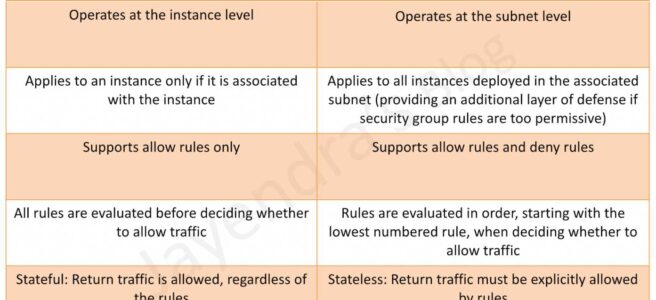
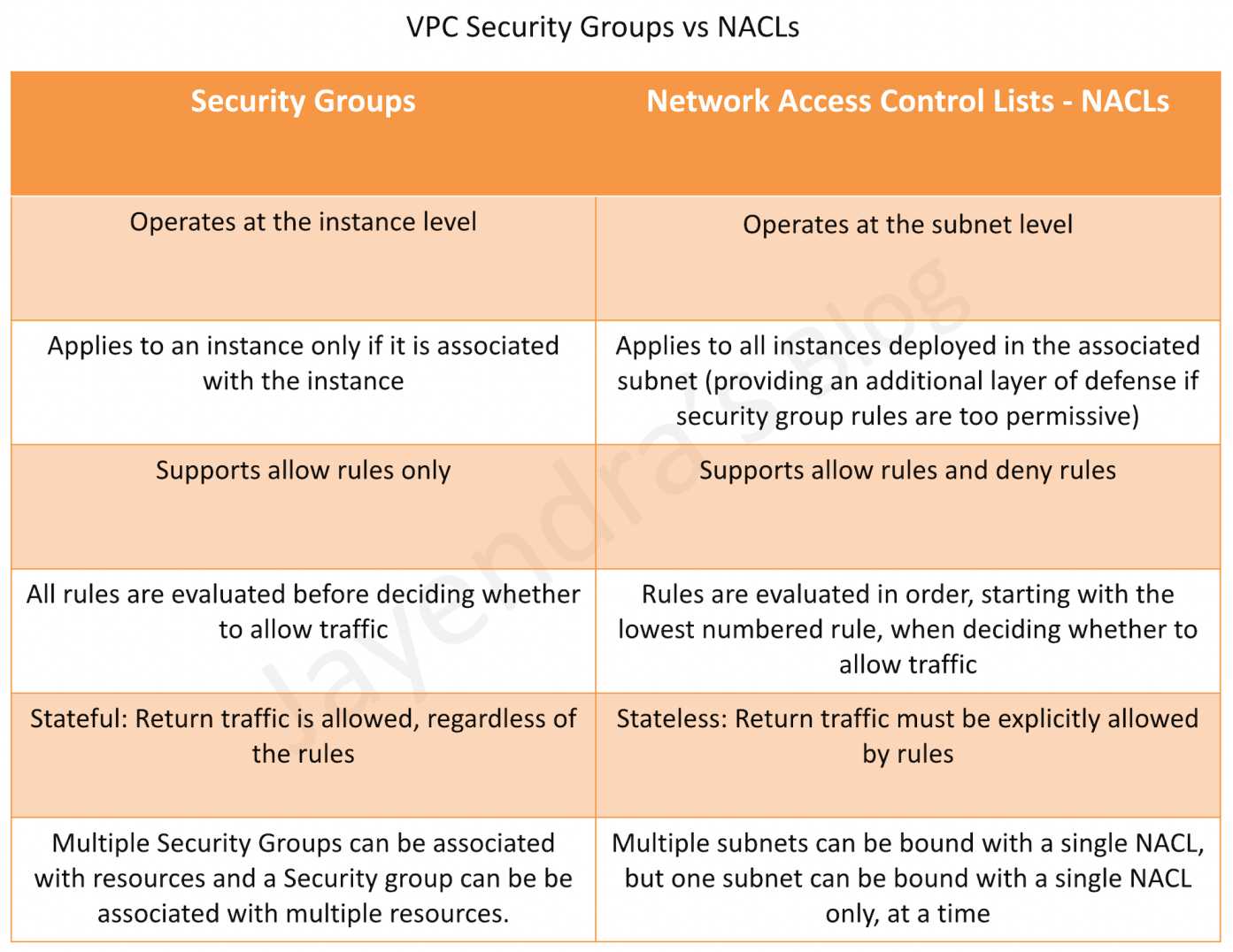
Security Group vs NACLs
AWS Certification Exam Practice Questions
Questions are collected from Internet and the answers are marked as per my knowledge and understanding (which might differ with yours).
AWS services are updated everyday and both the answers and questions might be outdated soon, so research accordingly.
AWS exam questions are not updated to keep up the pace with AWS updates, so even if the underlying feature has changed the question might not be updated
Open to further feedback, discussion and correction.
Instance A and instance B are running in two different subnets A and B of a VPC. Instance A is not able to ping instance B. What are two possible reasons for this? (Pick 2 correct answers)
The routing table of subnet A has no target route to subnet B
The security group attached to instance B does not allow inbound ICMP traffic
The policy linked to the IAM role on instance A is not configured correctly
The NACL on subnet B does not allow outbound ICMP traffic
An instance is launched into a VPC subnet with the network ACL configured to allow all inbound traffic and deny all outbound traffic. The instance’s security group is configured to allow SSH from any IP address and deny all outbound traffic. What changes need to be made to allow SSH access to the instance?
The outbound security group needs to be modified to allow outbound traffic.
The outbound network ACL needs to be modified to allow outbound traffic.
Nothing, it can be accessed from any IP address using SSH.
Both the outbound security group and outbound network ACL need to be modified to allow outbound traffic.
From what services I can block incoming/outgoing IPs?
Security Groups
DNS
ELB
VPC subnet
IGW
NACL
What is the difference between a security group in VPC and a network ACL in VPC (chose 3 correct answers)
Security group restricts access to a Subnet while ACL restricts traffic to EC2
Security group restricts access to EC2 while ACL restricts traffic to a subnet
Security group can work outside the VPC also while ACL only works within a VPC
Network ACL performs stateless filtering and Security group provides stateful filtering
Security group can only set Allow rule, while ACL can set Deny rule also
You are currently hosting multiple applications in a VPC and have logged numerous port scans coming in from a specific IP address block. Your security team has requested that all access from the offending IP address block be denied for the next 24 hours. Which of the following is the best method to quickly and temporarily deny access from the specified IP address block?
Create an AD policy to modify Windows Firewall settings on all hosts in the VPC to deny access from the IP address block
Modify the Network ACLs associated with all public subnets in the VPC to deny access from the IP address block
Add a rule to all of the VPC 5 Security Groups to deny access from the IP address block
Modify the Windows Firewall settings on all Amazon Machine Images (AMIs) that your organization uses in that VPC to deny access from the IP address block
You have two Elastic Compute Cloud (EC2) instances inside a Virtual Private Cloud (VPC) in the same Availability Zone (AZ) but in different subnets. One instance is running a database and the other instance an application that will interface with the database. You want to confirm that they can talk to each other for your application to work properly. Which two things do we need to confirm in the VPC settings so that these EC2 instances can communicate inside the VPC? Choose 2 answers
A network ACL that allows communication between the two subnets.
Both instances are the same instance class and using the same Key-pair.
That the default route is set to a NAT instance or Internet Gateway (IGW) for them to communicate.
Security groups are set to allow the application host to talk to the database on the right port/protocol
A benefits enrollment company is hosting a 3-tier web application running in a VPC on AWS, which includes a NAT (Network Address Translation) instance in the public Web tier. There is enough provisioned capacity for the expected workload tor the new fiscal year benefit enrollment period plus some extra overhead Enrollment proceeds nicely for two days and then the web tier becomes unresponsive, upon investigation using CloudWatch and other monitoring tools it is discovered that there is an extremely large and unanticipated amount of inbound traffic coming from a set of 15 specific IP addresses over port 80 from a country where the benefits company has no customers. The web tier instances are so overloaded that benefit enrollment administrators cannot even SSH into them. Which activity would be useful in defending against this attack?
Create a custom route table associated with the web tier and block the attacking IP addresses from the IGW (internet Gateway)
Change the EIP (Elastic IP Address) of the NAT instance in the web tier subnet and update the Main Route Table with the new EIP
Create 15 Security Group rules to block the attacking IP addresses over port 80
Create an inbound NACL (Network Access control list) associated with the web tier subnet with deny rules to block the attacking IP addresses
Which of the following statements describes network ACLs? (Choose 2 answers)
Responses to allowed inbound traffic are allowed to flow outbound regardless of outbound rules, and vice versa (are stateless)
Using network ACLs, you can deny access from a specific IP range
Keep network ACL rules simple and use a security group to restrict application level access
NACLs are associated with a single Availability Zone (associated with Subnet)
You are designing security inside your VPC. You are considering the options for establishing separate security zones and enforcing network traffic rules across different zone to limit Instances can communications. How would you accomplish these requirements? Choose 2 answers
Configure a security group for every zone. Configure a default allow all rule. Configure explicit deny rules for the zones that shouldn’t be able to communicate with one another (Security group does not allow deny rules)
Configure you instances to use pre-set IP addresses with an IP address range every security zone. Configure NACL to explicitly allow or deny communication between the different IP address ranges, as required for interzone communication
Configure a security group for every zone. Configure allow rules only between zone that need to be able to communicate with one another. Use implicit deny all rule to block any other traffic
Configure multiple subnets in your VPC, one for each zone. Configure routing within your VPC in such a way that each subnet only has routes to other subnets with which it needs to communicate, and doesn’t have routes to subnets with which it shouldn’t be able to communicate. (default routes are unmodifiable)
Your entire AWS infrastructure lives inside of one Amazon VPC. You have an Infrastructure monitoring application running on an Amazon instance in Availability Zone (AZ) A of the region, and another application instance running in AZ B. The monitoring application needs to make use of ICMP ping to confirm network reachability of the instance hosting the application. Can you configure the security groups for these instances to only allow the ICMP ping to pass from the monitoring instance to the application instance and nothing else” If so how?
No Two instances in two different AZ’s can’t talk directly to each other via ICMP ping as that protocol is not allowed across subnet (i.e. broadcast) boundaries (Can communicate)
Yes Both the monitoring instance and the application instance have to be a part of the same security group, and that security group needs to allow inbound ICMP (Need not have to be part of same security group)
Yes, The security group for the monitoring instance needs to allow outbound ICMP and the application instance’s security group needs to allow Inbound ICMP (is stateful, so just allow outbound ICMP from monitoring and inbound ICMP on monitored instance)
Yes, Both the monitoring instance’s security group and the application instance’s security group need to allow both inbound and outbound ICMP ping packets since ICMP is not a connection-oriented protocol (Security groups are stateful)
A user has configured a VPC with a new subnet. The user has created a security group. The user wants to configure that instances of the same subnet communicate with each other. How can the user configure this with the security group?
There is no need for a security group modification as all the instances can communicate with each other inside the same subnet
Configure the subnet as the source in the security group and allow traffic on all the protocols and ports
Configure the security group itself as the source and allow traffic on all the protocols and ports
The user has to use VPC peering to configure this
You are designing a data leak prevention solution for your VPC environment. You want your VPC Instances to be able to access software depots and distributions on the Internet for product updates. The depots and distributions are accessible via third party CDNs by their URLs. You want to explicitly deny any other outbound connections from your VPC instances to hosts on the Internet. Which of the following options would you consider?
Configure a web proxy server in your VPC and enforce URL-based rules for outbound access Remove default routes. (Security group and NACL cannot have URLs in the rules nor does the route)
Implement security groups and configure outbound rules to only permit traffic to software depots.
Move all your instances into private VPC subnets remove default routes from all routing tables and add specific routes to the software depots and distributions only.
Implement network access control lists to all specific destinations, with an Implicit deny as a rule.
You have an EC2 Security Group with several running EC2 instances. You change the Security Group rules to allow inbound traffic on a new port and protocol, and launch several new instances in the same Security Group. The new rules apply:
Immediately to all instances in the security group.
Immediately to the new instances only.
Immediately to the new instances, but old instances must be stopped and restarted before the new rules apply.
To all instances, but it may take several minutes for old instances to see the changes.
A company has multiple VPCs in the same AWS account and Region. They want to apply the same security group rules consistently across all VPCs without duplicating security groups. Which feature should they use?
VPC Peering with security group referencing
Security Group VPC Associations
AWS Transit Gateway security group referencing
AWS Firewall Manager common security group policy
An organization uses VPC sharing with multiple participant accounts. The VPC owner wants to enforce consistent security group rules on all participant workloads while preventing participants from modifying the rules. Which approach meets this requirement?
Create security groups in each participant account and use AWS Config rules for compliance
Use AWS Firewall Manager to create audit security group policies
Share security groups from the VPC owner account to participant accounts using AWS RAM
Create identical security groups in each participant account using CloudFormation StackSets
An application running on Nitro V6 instances is experiencing dropped connections after being idle for about 6 minutes. The security groups allow all required traffic. What is the most likely cause?
The NACL outbound rules are blocking the return traffic
The security group inbound rules need to be updated
The TCP established idle timeout on Nitro V6 instances defaults to 350 seconds, and the connection is being dropped by connection tracking