Google Cloud BigQuery
- Google Cloud BigQuery is a fully managed, peta-byte scale, serverless, highly scalable, and cost-effective multi-cloud data-to-AI platform.
- BigQuery supports GoogleSQL (standard SQL dialect that is ANSI:2011 compliant), which reduces the need for code rewrites.
- BigQuery transparently and automatically provides highly durable, replicated storage in multiple locations and high availability with no extra charge and no additional setup.
- BigQuery supports federated data and can process external data sources in GCS for Parquet and ORC open-source file formats, transactional databases (Bigtable, Cloud SQL, Spanner, AlloyDB), or spreadsheets in Drive without moving the data.
- BigQuery automatically replicates data and keeps a seven-day history of changes, allowing easy restoration and comparison of data from different times (time travel).
- BigQuery Data Transfer Service automatically transfers data from external data sources, like Google Marketing Platform, Google Ads, YouTube, external sources like S3 or Teradata, and partner SaaS applications to BigQuery on a scheduled and fully managed basis.
- BigQuery provides a REST API for easy programmatic access and application integration. Client libraries are available in Java, Python, Node.js, C#, Go, Ruby, and PHP.
- BigQuery provides three editions — Standard, Enterprise, and Enterprise Plus — each offering different feature sets and pricing tiers for capacity-based compute.
- BigQuery supports both on-demand pricing (pay per TiB processed) and capacity-based pricing (pay per slot-hour via editions).
⚠️ Legacy SQL Deprecation Notice
Legacy SQL is being phased out. For organizations and projects that don’t use legacy SQL between November 1, 2025, and June 1, 2026, legacy SQL becomes unavailable after the evaluation period ends. Migrate all queries to GoogleSQL (Standard SQL).
BigQuery Key Features (2024-2026 Updates)
- Gemini in BigQuery — AI-powered SQL code generation, explanation, Python code generation, data canvas, data insights, and partitioning/clustering recommendations (GA since 2024).
- BigQuery Data Canvas — Visual, natural-language-driven workspace for data discovery, preparation, querying, and visualization all within BigQuery.
- Vector Search — Native vector search with embedding generation, vector indexes, and semantic search capabilities for RAG and AI applications (GA since 2024).
- BigQuery Graph — Graph analytics solution for modeling, analyzing, and visualizing massive-scale relationships using graph queries (Preview 2025).
- Continuous Queries — Real-time, always-on queries that process streaming data as it arrives, enabling true real-time analytics (Enterprise/Enterprise Plus editions).
- Apache Iceberg Managed Tables — Fully managed tables using open Iceberg format stored in customer-owned buckets, with interoperability across open-source engines.
- BigQuery Studio — Unified workspace for SQL, Python notebooks, Spark, and data pipelines in a single interface.
- Change Data Capture (CDC) — Native CDC ingestion via Storage Write API for streaming row-level changes (inserts, updates, deletes) directly.
- MCP Server — Model Context Protocol server for connecting LLMs and AI agents directly to BigQuery.
- Multimodal Data Analysis — Analyze images, audio, video, and documents directly using SQL with Gemini integration.
BigQuery Resources
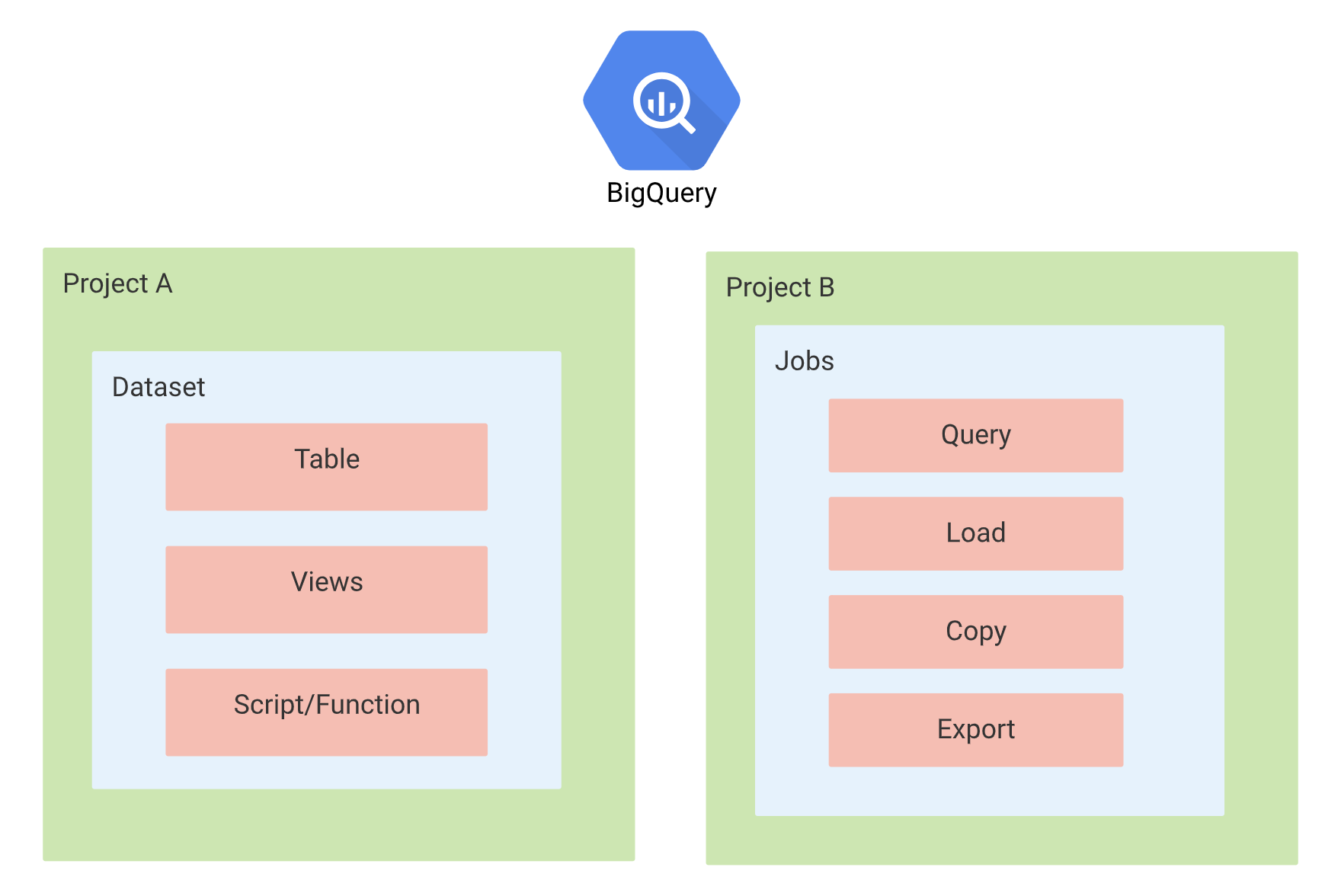
Datasets
- Datasets are the top-level containers used to organize and control access to the BigQuery tables and views.
- Datasets frequently map to schemas in standard relational databases and data warehouses.
- Datasets are scoped to the Cloud project.
- A dataset is bound to a location and can be defined as
- Regional: A specific geographic place, such as London.
- Multi-regional: A large geographic area, such as the United States, that contains two or more geographic places.
- Dataset location can be set only at the time of its creation.
- A query can contain tables or views from different datasets in the same location.
- Dataset names must be unique for each project.
- BigQuery supports cross-region dataset replication for disaster recovery and data residency requirements.
- BigQuery supports dataset data retention (time travel) allowing access to data at any point within the configured window.
Tables
- BigQuery tables are row-column structures that hold the data.
- A BigQuery table contains individual records organized in rows. Each record is composed of columns (also called fields).
- Every table is defined by a schema that describes the column names, data types, and other information.
- BigQuery has the following types of tables:
- Native tables: Tables backed by native BigQuery storage.
- External tables: Tables backed by storage external to BigQuery.
- BigLake tables: Tables backed by external storage with fine-grained access control and metadata caching.
- Apache Iceberg managed tables: Fully managed tables using open Iceberg format in customer-owned buckets.
- Views: Virtual tables defined by a SQL query.
- Schema of a table can either be defined during creation or specified in the query job or load job that first populates it with data.
- Schema auto-detection is also supported when data is loaded from BigQuery or an external data source. BigQuery makes a best-effort attempt to automatically infer the schema for CSV and JSON files.
- Columns datatype cannot be changed once defined (except for supported type widening conversions in Iceberg tables).
- BigQuery supports table clones (lightweight, writable copies) and table snapshots (point-in-time read-only copies) for efficient data management.
- BigQuery supports primary and foreign keys for query optimization (used by the optimizer for better join planning).
Partitioned Tables
- A partitioned table is a special table that is divided into segments, called partitions, that make it easier to manage and query your data.
- By dividing a large table into smaller partitions, query performance and costs can be controlled by reducing the number of bytes read by a query.
- BigQuery tables can be partitioned by:
- Time-unit column: Tables are partitioned based on a TIMESTAMP, DATE, or DATETIME column in the table.
- Ingestion time: Tables are partitioned based on the timestamp when BigQuery ingests the data.
- Integer range: Tables are partitioned based on an integer column.
- If a query filters on the value of the partitioning column, BigQuery can scan the partitions that match the filter and skip the remaining partitions. This process is called pruning.
- BigQuery provides partition and cluster recommendations based on query patterns to help optimize table layouts automatically.
Clustered Tables
- With Clustered tables, the table data is automatically organized based on the contents of one or more columns in the table’s schema.
- Columns specified are used to colocate the data.
- Clustering can be performed on multiple columns, where the order of the columns is important as it determines the sort order of the data.
- Clustering can improve query performance for specific filter queries or ones that aggregate data as BigQuery uses the sorted blocks to eliminate scans of unnecessary data.
- Clustering does not provide cost guarantees before running the query.
- Partitioning can be used with clustering where data is first partitioned and then data in each partition is clustered by the clustering columns. When the table is queried, partitioning sets an upper bound of the query cost based on partition pruning.
- BigQuery supports automatic clustering for Iceberg managed tables, which optimizes file layout without manual configuration.
Views
- A View is a virtual table defined by a SQL query.
- View query results contain data only from the tables and fields specified in the query that defines the view.
- Views are read-only and do not support DML queries.
- Dataset that contains the view and the dataset that contains the tables referenced by the view must be in the same location.
- View does not support BigQuery job that exports data.
- View does not support JSON API to retrieve data from the view.
- Standard SQL and legacy SQL queries cannot be mixed.
- Legacy SQL view cannot be automatically updated to standard SQL syntax.
- No user-defined functions allowed.
- No wildcard table references allowed.
- BigQuery supports authorized views to share query results with particular users/groups without giving access to underlying tables.
Materialized Views
- Materialized views are precomputed views that periodically cache the results of a query for increased performance and efficiency.
- BigQuery leverages pre-computed results from materialized views and whenever possible reads only delta changes from the base table to compute up-to-date results.
- Materialized views can be queried directly or can be used by the BigQuery optimizer to process queries to the base tables (smart tuning).
- Materialized views queries are generally faster and consume fewer resources than queries that retrieve the same data only from the base table.
- Materialized views can significantly improve the performance of workloads that have the characteristic of common and repeated queries.
- BigQuery supports automatic refresh and manual refresh of materialized views.
- BigQuery provides materialized view recommendations based on query history to suggest views that would improve performance.
- Creating and refreshing materialized views requires Enterprise edition or higher (Standard edition can only query existing materialized views directly).
Jobs
- Jobs are actions that BigQuery runs on your behalf to load data, export data, query data, or copy data.
- Jobs are not linked to the same project that the data is stored in. However, the location where the job can execute is linked to the dataset location.
External Data Sources
- An external data source (federated data source) is a data source that can be queried directly even though the data is not stored in BigQuery.
- Instead of loading or streaming the data, a table can be created that references the external data source.
- BigQuery offers support for querying data directly from:
- Cloud Bigtable
- Cloud Storage
- Google Drive
- Cloud SQL
- Spanner
- AlloyDB
- Amazon S3 (via BigQuery Omni)
- Azure Blob Storage (via BigQuery Omni)
- Supported formats are:
- Avro
- CSV
- JSON (newline delimited only)
- ORC
- Parquet
- Apache Iceberg
- External data sources use cases
- Loading and cleaning the data in one pass by querying the data from an external data source and writing the cleaned result into BigQuery storage.
- Having a small amount of frequently changing data that needs to be joined with other tables. As an external data source, the frequently changing data does not need to be reloaded every time it is updated.
- Permanent vs Temporary external tables
- The external data sources can be queried in BigQuery by using a permanent table or a temporary table.
- Permanent Table
- is a table that is created in a dataset and is linked to the external data source.
- access controls can be used to share the table with others who also have access to the underlying external data source.
- Temporary Table
- you submit a command that includes a query and creates a non-permanent table linked to the external data source.
- no table is created in the BigQuery datasets.
- cannot be shared with others.
- Querying an external data source using a temporary table is useful for one-time, ad-hoc queries over external data, or for extract, transform, and load (ETL) processes.
- Limitations
- does not guarantee data consistency for external data sources.
- query performance for external data sources may not be as high as querying data in a native BigQuery table.
- cannot reference an external data source in a wildcard table query.
- support table partitioning or clustering in limited ways.
- results are not cached and would be charged for each query execution.
- Metadata Caching — BigQuery supports metadata caching for external tables to improve query planning performance and reduce latency.
BigQuery Editions
- BigQuery provides three editions for capacity-based pricing, each with different feature sets:
- Standard — Autoscaling only (max 1,600 slots per reservation), no capacity commitments, 99.9% SLO. No access to BigQuery ML, continuous queries, BigQuery Graph, or fine-grained security controls.
- Enterprise — Autoscaling + Baseline slots, advanced workload management, BigQuery ML, continuous queries, BigQuery Omni, VPC Service Controls, CMEK, column/row-level security, 99.99% SLO. Supports 1-year (20% discount) and 3-year (40% discount) commitments.
- Enterprise Plus — All Enterprise features plus managed disaster recovery, Assured Workloads compliance controls, 99.99% SLO.
- BigQuery also offers on-demand pricing at $6.25 per TiB processed (first 1 TiB/month free), which includes BigQuery ML, CMEK, and fine-grained security.
- Editions are a property of reservations (compute), not storage. Datasets and tables are unaffected by edition choice.
- To change an edition, you must delete and recreate the reservation.
- Slots autoscaling automatically scales capacity to accommodate workload demands without pre-provisioning.
- BigQuery fluid scaling removes the 1-minute minimum duration for slot usage.
BigLake
- BigLake is a storage engine that unifies data warehouses and data lakes by extending BigQuery’s fine-grained security and governance to data stored in Cloud Storage, Amazon S3, and Azure Blob Storage.
- BigLake tables provide:
- Fine-grained access control (column-level and row-level security) on external data.
- Metadata caching for improved query performance on external data.
- Support for open formats (Parquet, ORC, Avro, JSON, CSV, Iceberg).
- Consistent governance across multi-cloud storage.
- Apache Iceberg Managed Tables (formerly BigLake tables for Apache Iceberg) provide:
- Fully managed experience similar to native BigQuery tables but with data stored in customer-owned buckets.
- DML support, streaming via Storage Write API, schema evolution.
- Automatic storage optimization (adaptive file sizing, automatic clustering, garbage collection).
- Iceberg V2 snapshot export for interoperability with Spark, Flink, Presto, and other engines.
- Time travel, column-level security, and data masking.
BigQuery Omni
- BigQuery Omni is a multi-cloud analytics solution that lets you query data across Google Cloud, AWS, and Azure without moving data.
- Uses BigLake tables to access data stored in Amazon S3 and Azure Blob Storage.
- Supports cross-cloud joins — query data across different clouds in a single SQL statement.
- Supports cross-cloud transfer — move data between clouds for consolidation.
- Available in Enterprise edition with on-demand pricing.
- Compute runs locally in the cloud where data resides (data never leaves the cloud it’s stored in).
BigQuery AI and ML
- BigQuery ML allows building and deploying ML models directly within BigQuery using SQL, supporting classification, regression, clustering, forecasting, recommendation, and anomaly detection.
- Gemini Integration — BigQuery integrates with Gemini models via Vertex AI for:
- Text generation and summarization using
ML.GENERATE_TEXT - Embedding generation using
ML.GENERATE_EMBEDDING - Image, audio, and video analysis
- Document processing and OCR
- Sentiment analysis and text understanding
- Text generation and summarization using
- Generative AI Functions — SQL functions like
AI.GENERATEfor calling AI models directly from queries. - Remote Models — Connect to models hosted on Vertex AI, Cloud AI services, or custom endpoints.
- Gemini in BigQuery (Assistive AI) — AI-powered assistance for:
- SQL code generation and explanation
- Python code generation in notebooks
- Data insights and recommendations
- Partitioning and clustering recommendations
- Requires Enterprise edition or higher (not available in Standard edition).
BigQuery Vector Search
- Vector Search enables semantic search and similarity matching directly in BigQuery using vector embeddings.
- Supports generating embeddings using Vertex AI models, then searching with the
VECTOR_SEARCHfunction. - Vector Indexes optimize search performance for large-scale embedding datasets (requires Enterprise edition or higher for index acceleration).
- Use cases include: RAG (Retrieval-Augmented Generation), product recommendations, anomaly detection, multi-modal search, and semantic analysis.
- Supports automated embedding generation that automatically generates and maintains embeddings as data changes.
- Eliminates the need for specialized vector databases for many use cases.
BigQuery Graph
- BigQuery Graph (Preview 2025) provides graph analytics capabilities for modeling, analyzing, and visualizing relationships in data.
- Enables multi-hop traversals, path finding, and relationship analysis that would require complex nested JOINs in traditional SQL.
- Use cases: fraud detection, social network analysis, supply chain mapping, knowledge graphs.
- Includes a visual graph modeler for schema design and graph visualization tools.
- Available in Enterprise and Enterprise Plus editions only.
BigQuery Continuous Queries
- Continuous queries are always-on queries that process data in real-time as it arrives via streaming.
- Enables true real-time analytics without the latency of batch processing.
- Supports stream-to-stream joins and window aggregations.
- Can export results to Pub/Sub, Bigtable, or other BigQuery tables for downstream consumption.
- Available in Enterprise and Enterprise Plus editions only.
- Uses dedicated
CONTINUOUSassignment type in reservations.
BigQuery Security
Refer blog post @ BigQuery Security
BigQuery Best Practices
- Cost Control
- Query only the needed columns and avoid
select *as BigQuery does a full scan of every column in the table. - Don’t run queries to explore or preview table data. Use preview option.
- Before running queries, preview them to estimate costs. Queries are billed according to the number of bytes read and the cost can be estimated using
--dry-runfeature. - Use the maximum bytes billed setting to limit query costs.
- Use clustering and partitioning to reduce the amount of data scanned.
- For non-clustered tables, do not use a
LIMITclause as a method of cost control. Applying aLIMITclause to a query does not affect the amount of data read, but shows limited results only. With a clustered table, aLIMITclause can reduce the number of bytes scanned. - Partition the tables by date which helps query relevant subsets of data which improves performance and reduces costs.
- Materialize the query results in stages. Break the query into stages where each stage materializes the query results by writing them to a destination table.
- Use streaming inserts only if the data must be immediately available as streaming data is charged.
- Consider editions with capacity-based pricing for predictable workloads to reduce costs vs. on-demand.
- Use commitment plans (1-year at 20% or 3-year at 40% discount) for sustained workloads.
- Query only the needed columns and avoid
- Query Performance
- Control projection, Query only the needed columns. Avoid
SELECT *. - Prune partitioned queries, use the
_PARTITIONTIMEpseudo column to filter the partitions. - Denormalize data whenever possible using nested and repeated fields.
- Avoid external data sources, if query performance is a top priority.
- Avoid repeatedly transforming data via SQL queries, use materialized views instead.
- Avoid using Javascript user-defined functions.
- Optimize Join patterns. Start with the largest table.
- Use BI Engine for sub-second query response on dashboards and BI tools (Enterprise edition+).
- Use search indexes for full-text search acceleration on large text columns.
- Use vector indexes to accelerate vector search on embedding columns.
- Leverage history-based optimizations where BigQuery automatically optimizes repeated query patterns.
- Control projection, Query only the needed columns. Avoid
- Optimizing Storage
- Use the expiration settings to remove unneeded tables and partitions.
- Keep the data in BigQuery to take advantage of the long-term storage cost benefits rather than exporting to other storage options.
- Long-term storage pricing automatically applies to data not modified for 90 consecutive days.
- Use physical storage billing (compressed bytes) instead of logical storage billing for better cost efficiency on compressed data.
BigQuery Data Transfer Service
Refer GCP blog post @ Google Cloud BigQuery Data Transfer Service
GCP Certification Exam Practice Questions
- Questions are collected from Internet and the answers are marked as per my knowledge and understanding (which might differ with yours).
- GCP services are updated everyday and both the answers and questions might be outdated soon, so research accordingly.
- GCP exam questions are not updated to keep up the pace with GCP updates, so even if the underlying feature has changed the question might not be updated.
- Open to further feedback, discussion and correction.
- A user wishes to generate reports on petabyte-scale data using Business Intelligence (BI) tools. Which storage option provides integration with BI tools and supports OLAP workloads up to petabyte-scale?
- Bigtable
- Cloud Datastore
- Cloud Storage
- BigQuery
- Your company uses Google Analytics for tracking. You need to export the session and hit data from a Google Analytics 360 reporting view on a scheduled basis into BigQuery for analysis. How can the data be exported?
- Configure a scheduler in Google Analytics to convert the Google Analytics data to JSON format, then import directly into BigQuery using
bqcommand line. - Use
gsutilto export the Google Analytics data to Cloud Storage, then import into BigQuery and schedule it using Cron. - Import data to BigQuery directly from Google Analytics using Cron.
- Use BigQuery Data Transfer Service to import the data from Google Analytics.
- Configure a scheduler in Google Analytics to convert the Google Analytics data to JSON format, then import directly into BigQuery using
- A company wants to run machine learning models on their BigQuery data without moving it to a separate ML platform. Which feature should they use?
- Export data to Vertex AI Workbench
- BigQuery ML
- Dataflow ML
- Cloud Composer with TensorFlow
- Your organization needs to query data stored in Amazon S3 from BigQuery without copying the data to Google Cloud. Which feature enables this?
- BigQuery Data Transfer Service
- Cloud Storage Transfer Service
- BigQuery Omni
- Storage Transfer Service
- A data team needs to perform real-time analytics on streaming data arriving in BigQuery. They need results to update continuously as new data arrives. Which BigQuery feature should they use?
- Scheduled queries with 1-minute interval
- Materialized views with automatic refresh
- Continuous queries
- Streaming buffer queries
- You need to store data in an open format that can be accessed by both BigQuery and Apache Spark, while maintaining BigQuery’s fully managed experience. Which table type should you use?
- External tables on Cloud Storage
- BigQuery native tables
- Apache Iceberg managed tables (BigLake)
- Bigtable federated tables
- A company wants to build a semantic search application using product descriptions stored in BigQuery. They need to find products based on meaning rather than exact keyword matches. Which BigQuery feature should they use?
- SEARCH function with search indexes
- LIKE operator with wildcard patterns
- Full-text search with text analyzers
- Vector Search with ML.GENERATE_EMBEDDING
- Which BigQuery edition is required to use BigQuery ML and continuous queries?
- Standard edition
- Enterprise edition or higher
- Enterprise Plus edition only
- On-demand pricing only