AWS Web Application Firewall – WAF
⚠️ AWS WAF Classic End of Life: AWS WAF Classic support ended on September 30, 2025. All customers must use AWS WAF (v2). This post covers the current AWS WAF (v2) service. If you are still on WAF Classic, use the automated migration tool in the AWS WAF console.
- AWS WAF – Web Application Firewall protects web applications from attacks by allowing rules configuration that allow, block, or monitor (count) web requests based on defined conditions.
- helps protect from common attack techniques like SQL injection and Cross-Site Scripting (XSS). Conditions can be based on IP addresses, HTTP headers, HTTP body, URI strings, geographic location, and rate of requests.
- tightly integrates with the following AWS services:
- Amazon CloudFront distribution
- AWS WAF rules run in all AWS Edge Locations, located around the world close to the end users.
- Blocked requests are stopped before they reach the web servers.
- Helps support custom origins outside of AWS.
- Application Load Balancer (ALB)
- WAF rules run in the region and can be used to protect internet-facing as well as internal load balancers.
- Amazon API Gateway REST API
- Can help secure and protect the REST APIs.
- AWS AppSync GraphQL API
- Protects GraphQL APIs from common web exploits.
- Amazon Cognito user pool
- Protects user authentication and registration endpoints.
- AWS App Runner service
- Protects containerized web applications deployed on App Runner.
- Note: AWS App Runner is closed to new customers starting April 30, 2026.
- AWS Verified Access instance
- Adds web application firewall capabilities to zero-trust access.
- AWS Amplify application
- Protects Amplify-hosted web applications directly.
- Amazon CloudFront distribution
- helps protect applications and can inspect web requests transmitted over HTTP or HTTPS.
- provides Managed Rules which are pre-configured rules to protect applications from common threats like application vulnerabilities like OWASP, bots, or Common Vulnerabilities and Exposures (CVE).
- logs can be sent to CloudWatch Logs log group, an S3 bucket, or Amazon Data Firehose (formerly Kinesis Data Firehose).
- supports body inspection up to 64 KB for regional resources (API Gateway, Cognito, App Runner, Verified Access), with a default of 16 KB. CloudFront supports up to 64 KB with an 8 KB default.
WAF Benefits
- Additional protection against web attacks using specified conditions
- Conditions can be defined by using characteristics of web requests such as the following:
- IP addresses that the requests originate from
- Values in request headers
- Strings that appear in the requests
- Length of requests
- Presence of SQL code that is likely to be malicious (SQL injection)
- Presence of a script that is likely to be malicious (cross-site scripting)
- Geographic location (country) of the request origin
- Rate of requests from a single IP or other aggregation key
- Managed Rules to get started quickly with pre-configured protection packs
- Rules that can be reused for multiple web applications
- Real-time metrics, sampled web requests, and dashboards
- Automated administration using the WAF API
- CloudFront Security Dashboard for unified CDN and security experience
- Simplified console with up to 80% reduction in configuration steps (launched June 2025)
How WAF Works
WAF allows controlling the behaviour of web requests by creating conditions, rules, and web access control lists (web ACLs), now also called protection packs in the new console experience.
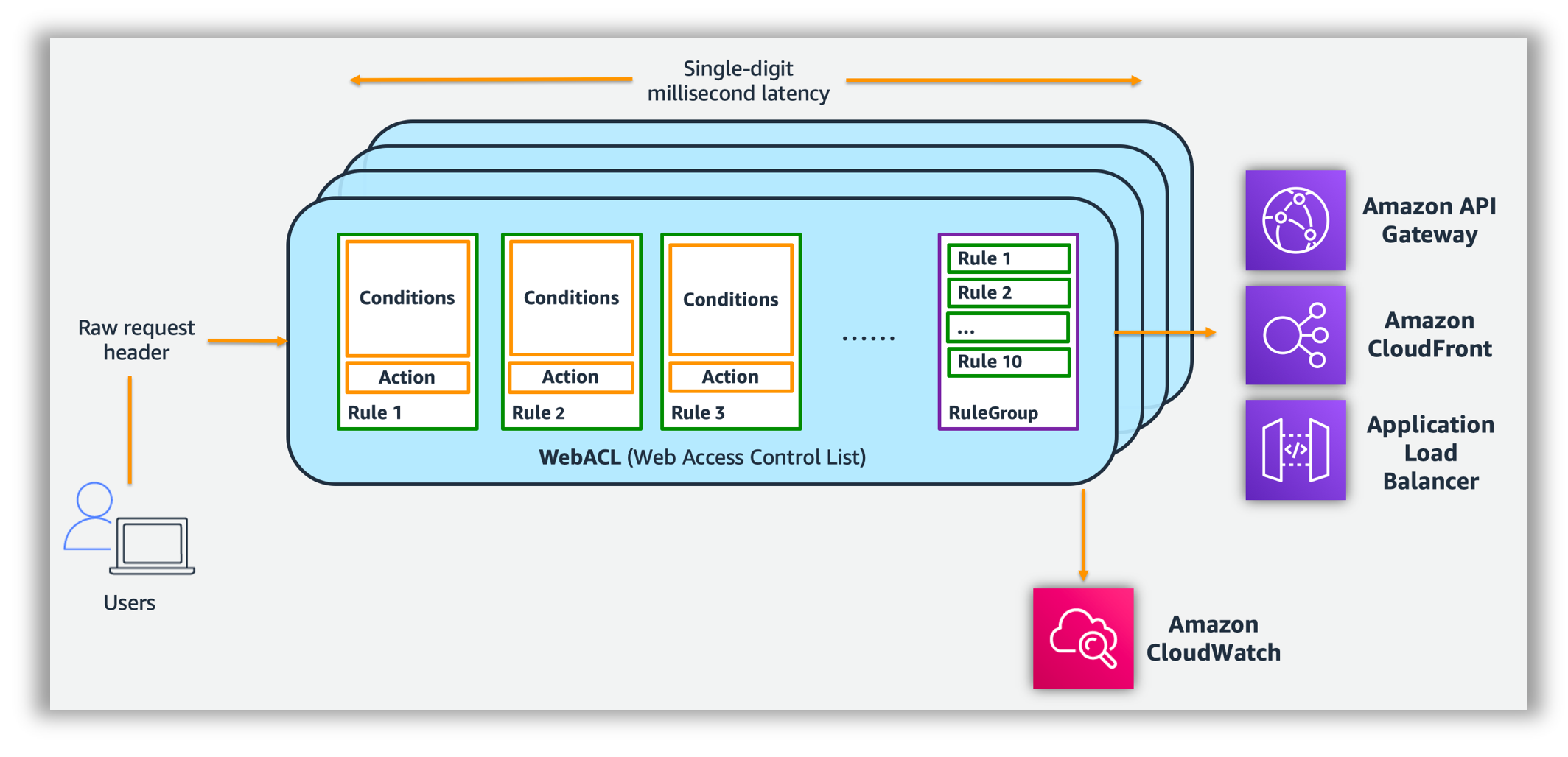
Conditions
- Conditions define basic characteristics to watch for in a web request
- Malicious script – XSS (Cross Site Scripting) – Attackers embed scripts that can exploit vulnerabilities in web applications
- IP addresses or address ranges that requests originate from.
- Size – Length of specified parts of the request, such as the query string.
- Malicious SQL – SQL injection – Attackers try to extract data from the database by embedding malicious SQL code in a web request
- Geographic match – Allow or block requests based on the country from which the requests originate.
- Strings that appear in the request, for e.g., values that appear in the User-Agent header or text strings that appear in the query string.
- Regex match – Match request components against regular expressions.
- Label match – Match against labels added by prior rules in the web ACL evaluation.
Actions
- Allow – allows the request to be forwarded to the protected resource.
- Block – blocks the request. By default returns HTTP 403 (Forbidden), but can be configured with custom responses.
- Count – counts the requests that match the rule without allowing or blocking. Useful for testing rules before enforcing them.
- CAPTCHA – runs a CAPTCHA puzzle challenge against the request to verify a human is sending it. If solved, the request is allowed with a valid token.
- Challenge – runs a silent browser challenge (JavaScript) to verify the client is a legitimate browser without user interaction. Useful for detecting bots without impacting user experience.
Rules
- AWS WAF rule defines how to inspect HTTP(S) web requests and the action to take on a request when it matches the inspection criteria.
- Each rule requires one top-level rule statement, which might contain nested statements at any depth, depending on the rule and statement type.
- AWS WAF supports logical statements for
AND,OR, andNOTthat can be used to combine statements in a rule. for e.g.,- based on recent requests from an attacker, a rule might include the following conditions with logical AND:
- The requests come from 192.0.2.44.
- They contain the value BadBot in the User-Agent header.
- They appear to include malicious SQL code in the query string.
- All 3 conditions should be satisfied for the Rule to be passed and the associated action to be taken.
- based on recent requests from an attacker, a rule might include the following conditions with logical AND:
- Rules can also add labels to matching requests. Labels are metadata that can be used by subsequent rules in the same web ACL for more complex logic.
Rate-Based Rules
- Rate-based rules track and limit the rate of requests from individual sources.
- Aggregation can be by IP address, forwarded IP, custom keys (headers, query parameters), or combinations.
- Minimum rate limit is 10 requests per 5-minute window (reduced from 100 in 2025).
- Scope-down statements can narrow which requests are counted, for e.g., only count requests to /login path.
- Automatically blocks source IPs (or other aggregation keys) when the rate exceeds the threshold.
- Useful for protecting against HTTP flood DDoS attacks and brute-force login attempts.
Rule Groups
- A Rule Group is a reusable set of rules that can be added to a Web ACL.
- Rule groups fall into the following main categories:
- AWS Managed rule groups – maintained by AWS, includes:
- Core rule set (CRS) – common web vulnerabilities
- Known bad inputs – patterns associated with exploitation
- SQL injection and XSS rules
- IP reputation list
- Anonymous IP list (VPNs, proxies, Tor)
- Bot Control rule group
- Account Takeover Prevention (ATP) rule group
- Account Creation Fraud Prevention (ACFP) rule group
- Anti-DDoS rule group (AWSManagedRulesAntiDDoSRuleSet) – launched June 2025
- AWS Marketplace rule groups – third-party managed rules
- Your own rule groups – custom rules you create and maintain
- Service-owned rule groups – managed by AWS Firewall Manager and Shield Advanced
- AWS Managed rule groups – maintained by AWS, includes:
Web ACLs – Access Control Lists (Protection Packs)
- A Web Access Control List (Web ACL), also called a protection pack in the new console, provides fine-grained control over all HTTP(S) web requests that the protected resource responds to.
- Web ACLs provide:
- Rule Groups OR Combination of Rules
- Action – allow, block, count, CAPTCHA, or Challenge for each rule
- WAF compares a request with the rules in a web ACL in the order listed and takes the action associated with the first rule that matches.
- When a web request matches all conditions in a rule, WAF immediately takes the action (allow or block) and doesn’t evaluate the remaining rules.
- Default action
- Determines whether WAF allows or blocks a request that does not match any of the rules.
- Supports criteria like the following to allow or block requests:
- IP address origin of the request
- Country of origin of the request
- String match or regular expression (regex) match in a part of the request
- Size of a particular part of the request
- Detection of malicious SQL code or scripting
- Rate-based rules
- Label match from prior rules
AWS WAF Bot Control
- Bot Control provides visibility and control over common and pervasive bot traffic.
- Bot Control detection catalog covers more than 650 unique bots and agents (as of 2026), including:
- AI search engine crawlers
- AI data collectors and scrapers
- AI assistants and agents
- Large language model (LLM) training crawlers
- Traditional scrapers, scanners, crawlers, and status monitors
- Two levels of protection:
- Common – identifies self-identifying bots through request headers verification
- Targeted – advanced detection using behavioral analysis, browser fingerprinting, and ML-based detection for sophisticated bots that don’t self-identify
- Actions available: Block, Allow, Count, CAPTCHA, Challenge, or custom response.
- Uses AWS WAF token management for client session tracking.
AI Activity Dashboard (Feb 2026)
- Provides centralized visibility into AI bot and agent traffic reaching applications.
- Visualize AI traffic trends over time.
- Identify most active bots and frequently accessed paths.
- Analyze request volumes by bot category and verification status.
- Take action directly: allow verified AI search crawlers while rate-limiting or blocking unverified agents.
- Classifies AI bots into three types:
- AI scrapers – systematically collect data to train AI models
- AI tools – surface data from applications in AI applications using function calling
- AI agents – autonomously navigate and interact dynamically with applications
- Available at no additional cost for all WAF customers.
AI Traffic Monetization (June 2026)
- Gives digital content owners and publishers a way to charge AI bots and agents for access to protected web content at the network edge.
- Configure pricing through the AWS WAF console.
- Define AI bot or agent policies based on verification status.
- Supports Web Bot Auth signatures for bot identity verification.
- Available at no additional WAF charge.
AWS WAF Fraud Control
- Provides intelligent threat mitigation for fraud prevention.
- Two managed rule groups:
- Account Takeover Prevention (ATP)
- Detects and blocks credential stuffing and brute-force login attempts.
- Analyzes login requests for compromised credentials.
- Uses stolen credential databases to identify credential stuffing.
- Account Creation Fraud Prevention (ACFP)
- Monitors sign-up and registration pages for anomalous activity.
- Detects automated account creation using bots.
- Blocks suspicious requests based on request identifiers and behavioral analysis.
- Account Takeover Prevention (ATP)
- Blocks fraud at the network edge when used with CloudFront, minimizing impact on application performance.
- Uses client-side interrogation with JavaScript challenges and behavioral analysis.
AWS WAF Anti-DDoS Protection
- The Anti-DDoS Managed Rule Group (AWSManagedRulesAntiDDoSRuleSet) launched in June 2025 provides automatic application-layer (Layer 7) DDoS protection.
- Automatically detects and mitigates DDoS events of any duration in single-digit seconds.
- Establishes a traffic baseline and uses it to detect anomalies.
- When an attack is detected, labels requests:
event-detected– added to all incoming requests during an eventddos-request– added to requests suspected of contributing to the attack
- Supersedes the Shield Advanced Layer 7 Auto Mitigation (L7AM) feature as of March 2026.
- Works with CloudFront, ALB, and other AWS WAF-supported services.
- Customizable behavior using labels and additional WAF rules.
- Managed by AWS Firewall Manager for centralized deployment.
AWS WAF Data Protection
- Data Protection settings (Feb 2025) allow granular protection of sensitive information in WAF outputs.
- Protects passwords, API keys, authentication tokens, and other confidential data in specific fields (headers, parameters, body content).
- Applies to full logs, sampled requests, and Security Lake outputs.
- Two transformation options:
- Substitution – replaces sensitive data with static strings
- Cryptographic hashing – replaces with hashed values for correlation without exposure
- Configured per web ACL in the Logging and Metrics section.
AWS WAF Labels and Dynamic Label Interpolation
- Labels are metadata added to web requests by matching rules, available for subsequent rules in the same web ACL.
- Enable complex multi-rule logic without duplicating conditions.
- Managed rule groups add labels to indicate match details (e.g., bot category, attack type).
- Dynamic Label Interpolation (May 2026) enables forwarding WAF classification signals to origin servers:
- Use
${namespace:}syntax in custom request headers, response headers, and response bodies. - Forward entire label namespaces at once.
- Eliminates need for multiple rules to pass different classification signals.
- Use
New Console Experience (June 2025)
- Simplified console reduces web application security configuration steps by up to 80%.
- Protection Packs – pre-configured rule packs for specific workloads:
- Recommended – enables recommended protections for selected application categories
- Essentials – enables essential protections
- You build it – select and customize from available options
- Automated security recommendations based on AWS Threat Intelligence analysis of allowed traffic patterns.
- Unified dashboard with Sankey visualization of protection activity to WAF actions.
- Integrated log explorer with pre-built filters.
- Direct AWS Marketplace integration for partner security solutions.
- Available at no additional cost.
AWS WAF Architecture
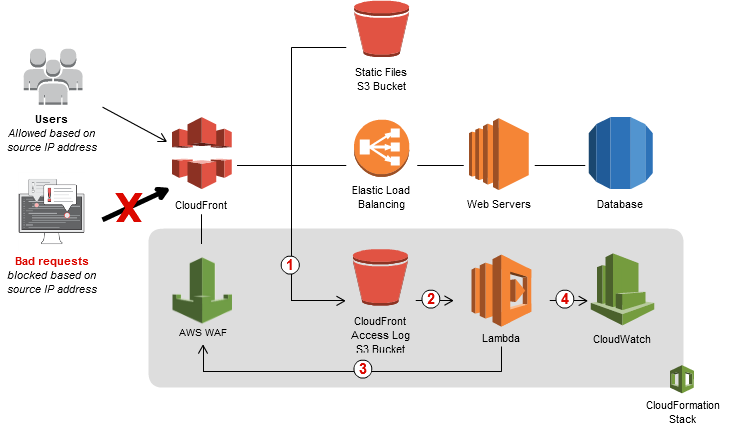
- AWS WAF integration with CloudFront and Lambda to dynamically update WAF rules
- CloudFront receives requests on behalf of the web application, it sends access logs to an S3 bucket that contains detailed information about the requests.
- For every new access log stored in the S3 bucket, a Lambda function is triggered. The Lambda function parses the log files and looks for requests that resulted in error codes 400, 403, 404, and 405.
- Lambda function then counts the number of bad requests and temporarily stores results in the S3 bucket
- Lambda function updates AWS WAF rules to block the IP addresses for a period of time that you specify.
- After this blocking period has expired, AWS WAF allows those IP addresses to access your application again, but continues to monitor the requests from those IP addresses.
- Lambda function publishes execution metrics in CloudWatch, such as the number of requests analyzed and IP addresses blocked.
- CloudWatch metrics can be integrated with SNS for notification
Web Application Firewall Sandwich Architecture (Historical)
NOTE: This is from the older DDoS Resiliency Whitepaper. It uses third-party WAF software on EC2 instances, NOT AWS WAF. With the introduction of AWS WAF Anti-DDoS Managed Rule Group (June 2025), this pattern is largely superseded by native AWS WAF protections.
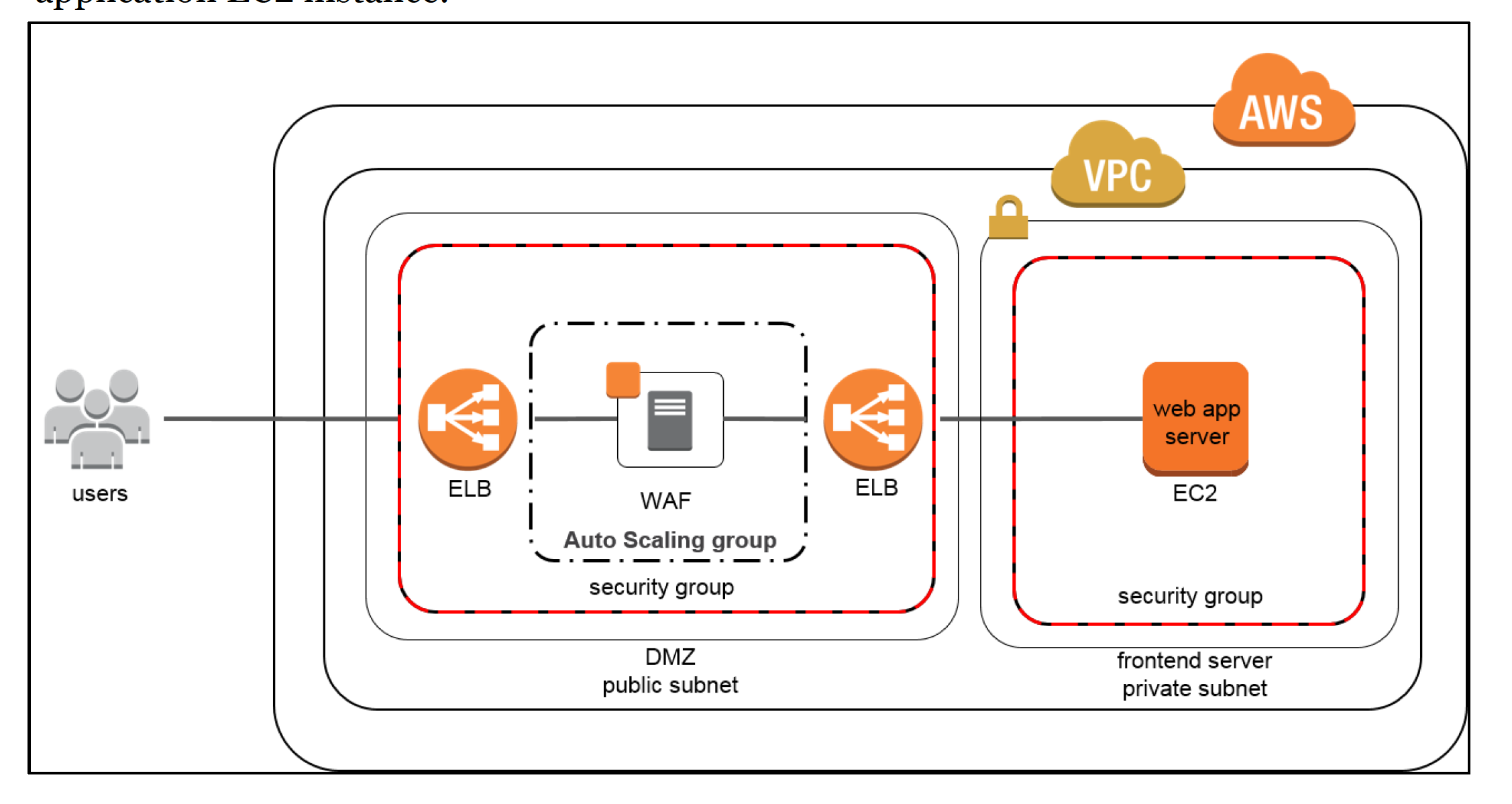
- DDoS attacks at the application layer commonly target web applications with lower volumes of traffic compared to infrastructure attacks.
- WAF can be included as part of the infrastructure to mitigate these types of attacks.
- WAFs act as filters that apply a set of rules to web traffic, which cover exploits like XSS and SQL injection but can also help build resiliency against DDoS by mitigating HTTP GET or POST floods.
- In the “WAF sandwich,” the EC2 instance running third-party WAF software (not the AWS WAF service) is included in an Auto Scaling group and placed between two ELB load balancers.
- With WAF sandwich pattern, the instances can scale and add additional WAF EC2 instances should the traffic spike to elevated levels.
- Once the traffic has been inspected and filtered, the WAF EC2 instance forwards traffic to the internal, backend load balancer which then distributes traffic across the application EC2 instances.
- Modern Alternative: Use AWS WAF with the Anti-DDoS managed rule group attached to CloudFront or ALB for native Layer 7 DDoS protection without managing EC2-based WAF instances.
AWS Certification Exam Practice Questions
- Questions are collected from Internet and the answers are marked as per my knowledge and understanding (which might differ with yours).
- AWS services are updated everyday and both the answers and questions might be outdated soon, so research accordingly.
- AWS exam questions are not updated to keep up the pace with AWS updates, so even if the underlying feature has changed the question might not be updated
- Open to further feedback, discussion and correction.
- The Web Application Development team is worried about malicious activity from 200 random IP addresses. Which action will ensure security and scalability from this type of threat?
- Use inbound security group rules to block the IP addresses.
- Use inbound network ACL rules to block the IP addresses.
- Use AWS WAF to block the IP addresses.
- Write iptables rules on the instance to block the IP addresses.
- You’ve been hired to enhance the overall security posture for a very large e-commerce site. They have a well architected multi-tier application running in a VPC that uses ELBs in front of both the web and the app tier with static assets served directly from S3. They are using a combination of RDS and DynamoDB for their dynamic data and then archiving nightly into S3 for further processing with EMR. They are concerned because they found questionable log entries and suspect someone is attempting to gain unauthorized access. Which approach provides a cost effective scalable mitigation to this kind of attack? [Old Exam Question]
- Recommend that they lease space at a DirectConnect partner location and establish a 1G DirectConnect connection to their VPC they would then establish Internet connectivity into their space, filter the traffic in hardware Web Application Firewall (WAF). And then pass the traffic through the DirectConnect connection into their application running in their VPC. (Not cost effective)
- Add previously identified hostile source IPs as an explicit INBOUND DENY NACL to the web tier subnet. (does not protect against new sources)
- Add a WAF tier by creating a new ELB and an AutoScaling group of EC2 Instances running a host-based WAF. They would redirect Route 53 to resolve to the new WAF tier ELB. The WAF tier would then pass the traffic to the current web tier. Web tier Security Groups would be updated to only allow traffic from the WAF tier Security Group
- Remove all but TLS 1.2 from the web tier ELB and enable Advanced Protocol Filtering. This will enable the ELB itself to perform WAF functionality. (No advanced protocol filtering in ELB)
NOTE: This is an older exam question. In modern architectures, AWS WAF can be directly attached to CloudFront or ALB without needing EC2-based WAF instances.
- A company’s web application is experiencing a high volume of automated bot traffic that is consuming resources and scraping proprietary content. The security team needs to implement bot management that can differentiate between legitimate users, verified search engine crawlers, and malicious bots. Which AWS WAF feature should they implement?
- Rate-based rules with IP-based aggregation
- AWS WAF Bot Control with Targeted protection level
- Geographic match rules to block countries with high bot traffic
- Custom regex rules to match bot User-Agent strings
- A media company wants to allow verified AI search crawlers to access their content while blocking unverified AI data scrapers. Which combination of AWS WAF features provides this capability? (Select TWO)
- AWS WAF Bot Control with AI bot category detection
- Network ACL rules with IP deny lists
- AI Activity Dashboard to identify and categorize AI bot traffic
- AWS Shield Advanced automatic DDoS protection
- AWS Firewall Manager centralized policy
- An organization is experiencing a Layer 7 DDoS attack against their web application hosted behind an Application Load Balancer. They need automatic detection and mitigation without manual intervention. Which is the MOST effective solution?
- Create a rate-based rule with a threshold of 100 requests per 5 minutes
- Enable AWS Shield Advanced with automatic application layer mitigation
- Add the AWS WAF Anti-DDoS Managed Rule Group (AWSManagedRulesAntiDDoSRuleSet) to the web ACL
- Deploy EC2 instances running third-party WAF software in a WAF sandwich architecture
- A security engineer needs to protect login pages from credential stuffing attacks and detect compromised credentials. Which AWS WAF feature should they enable?
- AWS WAF Bot Control Common level
- Rate-based rules with URI path scope-down
- AWS WAF Fraud Control Account Takeover Prevention (ATP)
- SQL injection rule group from AWS Managed Rules
- A company needs to ensure sensitive data like API keys and passwords in web requests are not exposed in WAF logs while still maintaining full logging for security analysis. Which AWS WAF feature addresses this requirement?
- CloudWatch Logs field-level encryption
- S3 bucket encryption for WAF log storage
- AWS WAF Data Protection with substitution or cryptographic hashing
- Kinesis Data Firehose data transformation
📖 Related: AWS Network Firewall vs WAF vs Security Groups vs NACLs – Comparison