AWS S3 Subresources

AWS S3 Subresources

  • S3 Subresources provides support to store, and manage the bucket configuration information.
  • S3 subresources only exist in the context of a specific bucket or object
  • S3 subresources are associated with buckets and objects.
  • S3 Subresources are subordinates to objects; i.e. they do not exist on their own, they are always associated with some other entity, such as an object or a bucket.
  • S3 supports various options to configure a bucket for e.g., the bucket can be configured for website hosting, configuration added to manage the lifecycle of objects in the bucket, and to log all access to the bucket.

S3 Default Security Settings

  • Starting April 2023, Amazon S3 applies two default security settings for all new S3 buckets:
    • S3 Block Public Access is enabled by default
    • S3 Access Control Lists (ACLs) are disabled by default (Bucket owner enforced setting)
  • Starting January 5, 2023, all new object uploads to S3 are automatically encrypted with server-side encryption using Amazon S3 managed keys (SSE-S3) at no additional cost.
  • Starting April 2026, SSE-C (server-side encryption with customer-provided keys) is disabled by default on all new general purpose buckets. It can be re-enabled if needed.
  • These defaults help enforce security best practices without requiring manual configuration.

S3 Object Lifecycle

Refer blog post @ S3 Object Lifecycle Management

Static Website Hosting

  • S3 can be used for Static Website hosting with Client-side scripts.
  • S3 does not support server-side scripting.
  • S3, in conjunction with Route 53, supports hosting a website at the root domain which can point to the S3 website endpoint
  • S3 website endpoints do not support HTTPS or access points. For HTTPS, use Amazon CloudFront to serve a static website hosted on Amazon S3.
  • For S3 website hosting the content should be made publicly readable which can be provided using a bucket policy.
  • Users can configure the index, and error document as well as configure the conditional routing of an object name
  • Requester Pays buckets do not allow access through the website endpoint. Any request to such a bucket will receive a 403 – Access Denied response
  • AWS Amplify Hosting now integrates with S3 (announced 2024), allowing static websites stored in S3 buckets to be served over a CDN with custom domains, HTTPS, and CI/CD pipelines with just a few clicks.

S3 Versioning

Refer blog post @ S3 Object Versioning

Policy & Access Control List (ACL)

Refer blog post @ S3 Permissions

  • Important (April 2023): ACLs are now disabled by default for all new S3 buckets. S3 Object Ownership is set to “Bucket owner enforced” by default, meaning the bucket owner automatically owns and has full control over every object in the bucket.
  • AWS recommends keeping ACLs disabled and using bucket policies for access management in most modern use cases.
  • ACLs can still be re-enabled by changing the Object Ownership setting if required for legacy compatibility.

CORS (Cross Origin Resource Sharing)

  • All browsers implement the Same-Origin policy, for security reasons, where the web page from a domain can only request resources from the same domain.
  • CORS allows client web applications loaded in one domain access to the restricted resources to be requested from another domain.
  • With CORS support, S3 allows cross-origin access to S3 resources
  • CORS configuration rules identify the origins allowed to access the bucket, the operations (HTTP methods) that would be supported for each origin, and other operation-specific information.
  • In the S3 console, the CORS configuration must be a JSON document (XML format was deprecated).

S3 Access Logs

  • S3 Access Logs enable tracking access requests to an S3 bucket.
  • S3 Access logs are disabled by default.
  • Each access log record provides details about a single access request, such as the requester, bucket name, request time, request action, response status, and error code, etc.
  • Access log information can be useful in security and access audits and also help learn about the customer base and understand the S3 bill.
  • S3 periodically collects access log records, consolidates the records in log files, and then uploads log files to a target bucket as log objects.
  • Logging can be enabled on multiple source buckets with the same target bucket which will have access logs for all those source buckets, but each log object will report access log records for a specific source bucket.
  • Source and target buckets should be in the same region.
  • Source and target buckets should be different to avoid an infinite loop of logs issue.
  • Target bucket can be encrypted using SSE-S3 default encryption. However, Default encryption with AWS KMS keys (SSE-KMS) is not supported.
  • S3 Object Lock cannot be enabled on the target bucket.
  • S3 uses a special log delivery account to write server access logs.
    • AWS recommends updating the bucket policy on the target bucket to grant access to the logging service principal (logging.s3.amazonaws.com) for access log delivery.
    • Access for access log delivery can also be granted to the S3 log delivery group through the bucket ACL. Granting access to the S3 log delivery group using your bucket ACL is not recommended.
  • Access log records are delivered on a best-effort basis. The completeness and timeliness of server logging is not guaranteed i.e. log record for a particular request might be delivered long after the request was actually processed, or it might not be delivered at all.
  • S3 Access Logs can be analyzed using data analysis tools or Amazon Athena.
  • AWS recommends using AWS CloudTrail for logging bucket-level and object-level actions for S3 resources, as it provides more comprehensive logging with identity context.
  • S3 Metadata journal tables (launched 2024) provide another logging option focused on object state changes—capturing storage class transitions, encryption changes, tag modifications, and Object Lock events in query-optimized Parquet format.

Tagging

  • S3 provides the tagging subresource to store and manage tags on a bucket
  • Cost allocation tags can be added to the bucket to categorize and track AWS costs.
  • AWS can generate a cost allocation report with usage and costs aggregated by the tags applied to the buckets.
  • Object tags can also be used for S3 Lifecycle rules, replication rules, access control, and S3 Analytics.

Location

  • AWS region needs to be specified during bucket creation and it cannot be changed.
  • S3 stores this information in the location subresource and provides an API for retrieving this information
  • S3 supports two bucket types:
    • General purpose buckets – the original S3 bucket type, recommended for most use cases, supporting all storage classes except S3 Express One Zone.
    • Directory buckets – use the S3 Express One Zone storage class for single-digit millisecond latency, with data stored in a specific Availability Zone.

Event Notifications

  • S3 notification feature enables notifications to be triggered when certain events happen in the bucket.
  • Notifications are enabled at the Bucket level
  • Notifications can be configured to be filtered by the prefix and suffix of the key name of objects. However, filtering rules cannot be defined with overlapping prefixes, overlapping suffixes, or prefix and suffix overlapping
  • S3 can publish the following events
    • New Object created events
      • Can be enabled for PUT, POST, or COPY operations
      • You will not receive event notifications from failed operations
    • Object Removal events
      • Can publish delete events for object deletion, version object deletion or insertion of delete marker
      • You will not receive event notifications from automatic deletes from lifecycle policies or from failed operations.
    • Restore object events
      • restoration of objects archived to the S3 Glacier storage classes
    • Lifecycle transition events
      • notification when an object is transitioned from one storage class to another by an S3 Lifecycle configuration
    • Lifecycle expiration events
      • notification when S3 Lifecycle deletes an object or creates a delete marker
    • S3 Intelligent-Tiering archive events
      • notification when objects are moved to Archive Access or Deep Archive Access tiers
    • Object tagging events
      • notification when tags are added, updated, or deleted on an object
    • Object ACL events
      • notification when an object ACL is put
    • Replication events
      • for replication configurations that have S3 replication metrics or S3 Replication Time Control (S3 RTC) enabled
  • S3 can publish events to the following destinations
    • SNS topic
    • SQS queue
    • AWS Lambda
    • Amazon EventBridge – allows matching any attribute or combination of attributes (object size, time range, etc.) for filtering before invoking targets. Unlike other destinations, EventBridge does not require selecting specific event types.
  • For S3 to be able to publish events to the destination, the S3 principal should be granted the necessary permissions
  • S3 event notifications are designed to be delivered at least once. Typically, event notifications are delivered in seconds but can sometimes take a minute or longer.

Cross-Region Replication & Same-Region Replication

  • S3 Replication enables automatic, asynchronous copying of objects across S3 buckets in the same or different AWS regions.
  • S3 Cross-Region Replication – CRR is used to copy objects across S3 buckets in different AWS Regions.
  • S3 Same-Region Replication – SRR is used to copy objects across S3 buckets in the same AWS Regions.
  • S3 Replication helps to
    • Replicate objects while retaining metadata
    • Replicate objects into different storage classes
    • Maintain object copies under different ownership
    • Keep objects stored over multiple AWS Regions
    • Replicate objects within 15 minutes (with S3 Replication Time Control – RTC)
  • S3 can replicate all or a subset of objects with specific key name prefixes or tags
  • S3 encrypts all data in transit across AWS regions using SSL
  • Object replicas in the destination bucket are exact replicas of the objects in the source bucket with the same key names and the same metadata.
  • Objects may be replicated to a single destination bucket or multiple destination buckets.
  • S3 Batch Replication allows replication of existing objects that were created before a replication configuration was added, objects that previously failed to replicate, or objects that were already replicated. It uses an S3 Batch Operations job.
  • Two-way (bi-directional) replication enables data to be fully synchronized between two or more buckets, keeping replicas in sync using replica modification sync.
  • Cross-Region Replication can be useful for the following scenarios:-
    • Compliance requirement to have data backed up across regions
    • Minimize latency to allow users across geography to access objects
    • Operational reasons compute clusters in two different regions that analyze the same set of objects
  • Same-Region Replication can be useful for the following scenarios:-
    • Aggregate logs into a single bucket
    • Configure live replication between production and test accounts
    • Abide by data sovereignty laws to store multiple copies
  • Replication Requirements
    • source and destination buckets must be versioning-enabled
    • for CRR, the source and destination buckets must be in different AWS regions.
    • S3 must have permission to replicate objects from that source bucket to the destination bucket on your behalf.
    • If the source bucket owner also owns the object, the bucket owner has full permission to replicate the object. If not, the source bucket owner must have permission for the S3 actions s3:GetObjectVersion and s3:GetObjectVersionACL to read the object and object ACL
    • Setting up cross-region replication in a cross-account scenario (where the source and destination buckets are owned by different AWS accounts), the source bucket owner must have permission to replicate objects in the destination bucket.
    • if the source bucket has S3 Object Lock enabled, the destination buckets must also have S3 Object Lock enabled.
    • destination buckets cannot be configured as Requester Pays buckets
  • Replicated & Not Replicated
    • Only new objects created after you add a replication configuration are replicated. S3 does NOT retroactively replicate objects that existed before you added replication configuration. Use S3 Batch Replication to replicate existing objects.
    • Objects encrypted using SSE-C, SSE-S3, or SSE-KMS can all be replicated.
    • S3 replicates only objects in the source bucket for which the bucket owner has permission to read objects and read ACLs
    • Any object ACL updates are replicated, although there can be some delay before S3 can bring the two in sync. This applies only to objects created after you add a replication configuration to the bucket.
    • S3 does NOT replicate objects in the source bucket for which the bucket owner does not have permission.
    • Updates to bucket-level S3 subresources are NOT replicated, allowing different bucket configurations on the source and destination buckets
    • Only customer actions are replicated & actions performed by lifecycle configuration are NOT replicated
    • S3 does NOT replicate the delete marker by default. However, you can add delete marker replication to non-tag-based rules to override it.
    • S3 does NOT replicate deletion by object version ID. This protects data from malicious deletions.

S3 Inventory

  • S3 Inventory helps manage the storage and can be used to audit and report on the replication and encryption status of the objects for business, compliance, and regulatory needs.
  • S3 inventory provides a scheduled alternative to the S3 synchronous List API operation.
  • S3 inventory provides CSV, ORC, or Apache Parquet output files that list the objects and their corresponding metadata on a daily or weekly basis for an S3 bucket or a shared prefix.
  • S3 Express One Zone directory buckets now also support S3 Inventory (2026).

S3 Metadata

  • Amazon S3 Metadata (launched at re:Invent 2024, GA in January 2025) delivers queryable object metadata in near real-time.
  • S3 Metadata automatically captures metadata from objects as they are uploaded and makes it queryable in a read-only Apache Iceberg table.
  • The metadata schema includes over 20 elements: bucket name, object key, creation/modification time, storage class, encryption status, tags, and user metadata.
  • Metadata tables can be queried using Amazon Athena and other analytics engines.
  • S3 Metadata now supports visibility into all existing objects (not just new/changed objects).
  • S3 Annotations (launched 2026) allow attaching up to 1 GB of rich, queryable context (JSON, XML, YAML, or plain text) directly to S3 objects without re-writing the objects.
  • S3 Metadata provides an alternative to S3 Inventory for real-time metadata analysis, while S3 Inventory is better for scheduled batch reporting.

Requester Pays

  • By default, buckets are owned by the AWS account that created it (the bucket owner) and the AWS account pays for storage costs, downloads, and data transfer charges associated with the bucket.
  • Using Requester Pays subresource:-
    • Bucket owner specifies that the requester requesting the download will be charged for the download
    • However, the bucket owner still pays the storage costs
  • Enabling Requester Pays on a bucket
    • disables anonymous access to that bucket
    • cannot be enabled for end-user logging bucket

Object ACL

Refer blog post @ S3 Permissions

  • Note: Starting April 2023, ACLs are disabled by default on new buckets. AWS recommends using bucket policies instead of ACLs for access management.

AWS Certification Exam Practice Questions

  • Questions are collected from Internet and the answers are marked as per my knowledge and understanding (which might differ with yours).
  • AWS services are updated everyday and both the answers and questions might be outdated soon, so research accordingly.
  • AWS exam questions are not updated to keep up the pace with AWS updates, so even if the underlying feature has changed the question might not be updated
  • Open to further feedback, discussion and correction.
  1. An organization’s security policy requires multiple copies of all critical data to be replicated across at least a primary and backup data center. The organization has decided to store some critical data on Amazon S3. Which option should you implement to ensure this requirement is met?
    1. Use the S3 copy API to replicate data between two S3 buckets in different regions
    2. You do not need to implement anything since S3 data is automatically replicated between regions
    3. Use the S3 copy API to replicate data between two S3 buckets in different facilities within an AWS Region
    4. You do not need to implement anything since S3 data is automatically replicated between multiple facilities within an AWS Region
  2. A customer wants to track access to their Amazon Simple Storage Service (S3) buckets and also use this information for their internal security and access audits. Which of the following will meet the Customer requirement?
    1. Enable AWS CloudTrail to audit all Amazon S3 bucket access.
    2. Enable server access logging for all required Amazon S3 buckets
    3. Enable the Requester Pays option to track access via AWS Billing
    4. Enable Amazon S3 event notifications for Put and Post.
  3. A user is enabling a static website hosting on an S3 bucket. Which of the below mentioned parameters cannot be configured by the user?
    1. Error document
    2. Conditional error on object name
    3. Index document
    4. Conditional redirection on object name
  4. Company ABCD is running their corporate website on Amazon S3 accessed from http//www.companyabcd.com. Their marketing team has published new web fonts to a separate S3 bucket accessed by the S3 endpoint: https://s3-us-west1.amazonaws.com/abcdfonts. While testing the new web fonts, Company ABCD recognized the web fonts are being blocked by the browser. What should Company ABCD do to prevent the web fonts from being blocked by the browser?
    1. Enable versioning on the abcdfonts bucket for each web font
    2. Create a policy on the abcdfonts bucket to enable access to everyone
    3. Add the Content-MD5 header to the request for webfonts in the abcdfonts bucket from the website
    4. Configure the abcdfonts bucket to allow cross-origin requests by creating a CORS configuration
  5. Company ABCD is currently hosting their corporate site in an Amazon S3 bucket with Static Website Hosting enabled. Currently, when visitors go to http://www.companyabcd.com the index.html page is returned. Company C now would like a new page welcome.html to be returned when a visitor enters http://www.companyabcd.com in the browser. Which of the following steps will allow Company ABCD to meet this requirement? Choose 2 answers.
    1. Upload an html page named welcome.html to their S3 bucket
    2. Create a welcome subfolder in their S3 bucket
    3. Set the Index Document property to welcome.html
    4. Move the index.html page to a welcome subfolder
    5. Set the Error Document property to welcome.html
  6. A company needs to replicate existing objects that were uploaded before a replication rule was configured. Which S3 feature should they use?
    1. S3 Cross-Region Replication with versioning
    2. S3 Same-Region Replication with lifecycle policies
    3. S3 Batch Replication
    4. S3 Transfer Acceleration
  7. A company wants to receive S3 event notifications and route them to multiple targets based on object attributes like size and key prefix patterns. Which destination should be configured?
    1. Amazon SNS
    2. Amazon SQS
    3. AWS Lambda
    4. Amazon EventBridge
  8. What security settings are applied by default to all new S3 buckets created after April 2023? (Choose 2)
    1. S3 Block Public Access is enabled
    2. Server-side encryption with KMS keys (SSE-KMS) is applied
    3. ACLs are disabled (Bucket owner enforced)
    4. Versioning is enabled
    5. Cross-region replication is configured

AWS S3 Permissions

AWS S3 Permissions

  • By default, all S3 buckets, objects, and related subresources are private.
  • Only the Resource owner, the AWS account (not the user) that creates the resource, can access the resource.
  • Resource owner can be
    • AWS account that creates the bucket or object owns those resources
    • If an IAM user creates the bucket or object, the AWS account of the IAM user owns the resource
    • If the bucket owner grants cross-account permissions to other AWS account users to upload objects to the buckets, the objects are owned by the AWS account of the user who uploaded the object and not the bucket owner except for the following conditions
      • Bucket owner can deny access to the object, as it is still the bucket owner who pays for the object
      • Bucket owner can delete or apply archival rules to the object and perform restoration
  • User is the AWS Account or the IAM user who access the resource
  • Bucket owner is the AWS account that created a bucket
  • Object owner is the AWS account that uploads the object to a bucket, not owned by the account
  • S3 permissions are classified into
    • Resource based policies and
    • User policies

S3 Object Ownership

  • S3 Object Ownership is a bucket-level setting that controls ownership of objects uploaded to the bucket and allows disabling or enabling ACLs.
  • By default (since April 2023), Object Ownership is set to Bucket owner enforced and all ACLs are disabled for all new buckets.
  • A majority of modern use cases in S3 no longer require ACLs, and AWS recommends keeping ACLs disabled.
  • With ACLs disabled, the bucket owner owns all objects and manages access exclusively using policies (IAM policies, bucket policies, access point policies).
  • Object Ownership has three settings:
    • Bucket owner enforced (default) – ACLs are disabled. The bucket owner automatically owns and has full control over every object. ACLs no longer affect permissions. The bucket uses policies exclusively for access control.
    • Bucket owner preferred – ACLs are enabled. The bucket owner owns new objects written with the bucket-owner-full-control canned ACL. Objects uploaded with other ACLs are owned by the writing account.
    • Object writer – ACLs are enabled. The AWS account that uploads an object owns it and can grant access via ACLs.
  • When ACLs are disabled (Bucket owner enforced):
    • All bucket and object ACLs are disabled, giving full access only to the bucket owner
    • The bucket owner automatically owns and has full control over every object
    • ACLs no longer affect access permissions; access control is based on IAM policies, bucket policies, VPC endpoint policies, and Organizations SCPs/RCPs
    • Requests to set or update ACLs fail, but requests to read ACLs are still supported
    • Only PUT requests that don’t specify an ACL or specify bucket-owner-full-control are accepted
  • ACLs can be re-enabled at any time by changing to another Object Ownership setting, and preexisting ACLs are restored.
  • For S3 Replication across accounts, the Bucket owner enforced setting automatically changes replica ownership to the destination bucket owner without needing the s3:ObjectOwnerOverrideToBucketOwner permission.
  • Permissions required: s3:PutBucketOwnershipControls to set, s3:GetBucketOwnershipControls to view.

S3 Block Public Access

  • S3 Block Public Access provides controls to ensure that S3 resources never have public access.
  • Since April 2023, Block Public Access is enabled by default for all newly created buckets in all AWS Regions.
  • Block Public Access can be applied at three levels:
    • Bucket level – applies to a specific bucket and its objects
    • Account level – applies to all buckets in the AWS account (current and future)
    • Organization level – centrally managed via AWS Organizations policies across all member accounts
  • Block Public Access settings override S3 permissions that allow public access, regardless of how an object is added or bucket is created.
  • Four settings are available:
    • BlockPublicAcls – blocks PUT requests that include public ACLs for buckets and objects
    • IgnorePublicAcls – ignores all public ACLs on a bucket and its objects
    • BlockPublicPolicy – rejects bucket policy changes that grant public access
    • RestrictPublicBuckets – restricts access to buckets with public policies to only AWS service principals and authorized users
  • S3 takes the most restrictive combination of bucket-level, account-level, and organization-level settings.
  • AWS recommends turning on “Block all public access” unless public access is explicitly required for specific use cases.

User Policies

  • User policies use IAM with S3 to control the type of access a user or group of users has to specific parts of an S3 bucket the AWS account owns
  • User policy is always attached to a User, Group, or a Role
  • Anonymous permissions cannot be granted
  • If an AWS account that owns a bucket wants to grant permission to users in its account, it can use either a bucket policy or a user policy

Resource-Based policies

  • Bucket policies and access control lists (ACLs) are resource-based because they are attached to the S3 resources

Screen Shot 2016-03-28 at 5.57.36 PM

Bucket Policies

  • Bucket policy can be used to grant cross-account access to other AWS accounts or IAM users in other accounts for the bucket and objects in it.
  • Bucket policies provide centralized, access control to buckets and objects based on a variety of conditions, including S3 operations, requesters, resources, and aspects of the request (e.g. IP address)
  • If an AWS account that owns a bucket wants to grant permission to users in its account, it can use either a bucket policy or a user policy
  • Permissions attached to a bucket apply to all of the objects in that bucket created and owned by the bucket owner
  • Policies can either add or deny permissions across all (or a subset) of objects within a bucket
  • Only the bucket owner is allowed to associate a policy with a bucket
  • Bucket policies can cater to multiple use cases
    • Granting permissions to multiple accounts with added conditions
    • Granting read-only permission to an anonymous user
    • Limiting access to specific IP addresses
    • Restricting access to a specific HTTP referer
    • Restricting access to a specific HTTP header for e.g. to enforce encryption
    • Granting permission to a CloudFront OAI
    • Adding a bucket policy to require MFA
    • Granting cross-account permissions to upload objects while ensuring the bucket owner has full control
    • Granting permissions for S3 inventory and Amazon S3 analytics
    • Granting permissions for S3 Storage Lens

Access Control Lists (ACLs)

  • Note: Since April 2023, ACLs are disabled by default for all newly created S3 buckets (Object Ownership set to “Bucket owner enforced”). AWS recommends keeping ACLs disabled and using bucket policies instead for the majority of use cases.
  • Each bucket and object has an ACL associated with it.
  • An ACL is a list of grants identifying grantee and permission granted
  • ACLs are used to grant basic read/write permissions on resources to other AWS accounts.
  • ACL supports limited permissions set and
    • cannot grant conditional permissions, nor can you explicitly deny permissions
    • cannot be used to grant permissions for bucket subresources
  • Permission can be granted to an AWS account by the email address or the canonical user ID (is just an obfuscated Account Id). If an email address is provided, S3 will still find the canonical user ID for the user and add it to the ACL.
  • It is Recommended to use Canonical user ID as email address would not be supported
  • Bucket ACL
    • Only recommended use case for the bucket ACL is to grant write permission to the S3 Log Delivery group to write access log objects to the bucket
    • Bucket ACL will help grant write permission on the bucket to the Log Delivery group if access log delivery is needed to the bucket
    • Only way you can grant necessary permissions to the Log Delivery group is via a bucket ACL
  • Object ACL
    • Object ACLs control only Object-level Permissions
    • Object ACL is the only way to manage permission to an object in the bucket not owned by the bucket owner i.e. If the bucket owner allows cross-account object uploads and if the object owner is different from the bucket owner, the only way for the object owner to grant permissions on the object is through Object ACL
    • If the Bucket and Object is owned by the same AWS account, Bucket policy can be used to manage the permissions
    • If the Object and User is owned by the same AWS account, User policy can be used to manage the permissions
    • With Bucket owner enforced (default), cross-account object ownership issues are eliminated as the bucket owner automatically owns all objects

S3 Access Points

  • S3 Access Points are named network endpoints attached to buckets that simplify managing data access at scale for shared datasets.
  • Each access point has its own access point policy and can enforce distinct permissions and network controls for any request made through it.
  • Access point policies work in conjunction with the underlying bucket policy.
  • A bucket can have thousands of access points per AWS Region per account, each with a policy up to 20 KB.
  • Access points can only be used to perform object operations (GetObject, PutObject, etc.), not bucket operations like deleting buckets or configuring replication.
  • Network Controls:
    • Access points can be configured to accept requests only from a specific Virtual Private Cloud (VPC), restricting S3 data access to a private network.
    • Custom Block Public Access settings can be configured for each access point independently.
  • Use Cases:
    • Managing access for shared datasets (data lakes, media archives, user-generated content)
    • Creating individualized access points with permissions customized per application, team, or user
    • Simplifying complex bucket policies by distributing access rules across multiple access points
    • Restricting data access to specific VPCs for security compliance
  • S3 Multi-Region Access Points:
    • Provide a single global endpoint to access replicated datasets across multiple AWS Regions
    • Dynamically route requests via AWS Global Accelerator, reducing latency by up to 60%
    • Include failover controls for active-passive or active-active configurations
    • Allow shifting S3 data access request traffic between AWS Regions at any time
  • Access points are referenced using ARNs, access point aliases, or virtual-hosted-style URIs.

S3 Access Grants

  • S3 Access Grants (launched November 2023) provides a simplified model for defining access permissions to S3 data by prefix, bucket, or object.
  • Supports up to 100,000 grants per Region per account.
  • Grants access to both IAM principals and directly to users or groups from corporate directories (Microsoft Entra ID, Okta, Ping).
  • Key Capabilities:
    • Define direct access mappings of S3 prefixes to users and roles
    • Grant read-only, write-only, or read-write access on a per-prefix basis
    • Integrate with AWS IAM Identity Center for trusted identity propagation
    • End-user identities propagated to S3, simplifying audit via CloudTrail data events
    • Cross-account access support without frequent IAM policy updates
  • When to Use S3 Access Grants:
    • Bucket policy size limit (20 KB) is being reached
    • Granting corporate directory users/groups (Entra ID, Okta) access to S3 data for analytics
    • Cross-account access is needed without frequent policy updates
    • Data access is unstructured and object-level rather than row/column format
  • Components:
    • Access Grants Instance – container for grants, one per Region per account
    • Locations – registered S3 paths (default s3://, bucket, or prefix) with an IAM role
    • Grants – individual access mappings from a grantee to an S3 location with a permission level
  • Applications request temporary credentials from S3 Access Grants on behalf of the authenticated user.
  • Integrates with AWS services including Amazon SageMaker, Amazon Redshift, and AWS Glue.

S3 Request Authorization

When S3 receives a request, it must evaluate all the user policies, bucket policies, and ACLs to determine whether to authorize or deny the request.

S3 evaluates the policies in 3 context

  • User context is basically the context in which S3 evaluates the User policy that the parent AWS account (context authority) attaches to the user
  • Bucket context is the context in which S3 evaluates the access policies owned by the bucket owner (context authority) to check if the bucket owner has not explicitly denied access to the resource
  • Object context is the context where S3 evaluates policies owned by the Object owner (context authority)

Analogy

  • Consider 3 Parents (AWS Account) A, B and C with Child (IAM User) AA, BA and CA respectively
  • Parent A owns a Toy box (Bucket) with Toy AAA and also allows toys (Objects) to be dropped and picked up
  • Parent A can grant permission (User Policy OR Bucket policy OR both) to his Child AA to access the Toy box and the toys
  • Parent A can grant permissions (Bucket policy) to Parent B (different AWS account) to drop toys into the toys box. Parent B can grant permissions (User policy) to his Child BA to drop Toy BAA
  • Parent B can grant permissions (Object ACL) to Parent A to access Toy BAA
  • Parent A can grant permissions (Bucket Policy) to Parent C to pick up the Toy AAA who in turn can grant permission (User Policy) to his Child CA to access the toy
  • Parent A can grant permission (through IAM Role) to Parent C to pick up the Toy BAA who in turn can grant permission (User Policy) to his Child CA to access the toy

Bucket Operation Authorization

Screen Shot 2016-03-28 at 6.35.36 AM

  1. If the requester is an IAM user, the user must have permission (User Policy) from the parent AWS account to which it belongs
  2. Amazon S3 evaluates a subset of policies owned by the parent account. This subset of policies includes the user policy that the parent account attaches to the user.
  3. If the parent also owns the resource in the request (in this case, the bucket), Amazon S3 also evaluates the corresponding resource policies (bucket policy and bucket ACL) at the same time.
  4. Requester must also have permissions (Bucket Policy or ACL) from the bucket owner to perform a specific bucket operation.
  5. Amazon S3 evaluates a subset of policies owned by the AWS account that owns the bucket. The bucket owner can grant permission by using a bucket policy or bucket ACL.
  6. Note that, if the AWS account that owns the bucket is also the parent account of an IAM user, then it can configure bucket permissions in a user policy or bucket policy or both

Object Operation Authorization

Screen Shot 2016-03-28 at 6.39.54 AM

  1. If the requester is an IAM user, the user must have permission (User Policy) from the parent AWS account to which it belongs.
  2. Amazon S3 evaluates a subset of policies owned by the parent account. This subset of policies includes the user policy that the parent attaches to the user.
  3. If the parent also owns the resource in the request (bucket, object), Amazon S3 evaluates the corresponding resource policies (bucket policy, bucket ACL, and object ACL) at the same time.
  4. If the parent AWS account owns the resource (bucket or object), it can grant resource permissions to its IAM user by using either the user policy or the resource policy.
  5. S3 evaluates policies owned by the AWS account that owns the bucket.
  6. If the AWS account that owns the object in the request is not the same as the bucket owner, in the bucket context Amazon S3 checks the policies if the bucket owner has explicitly denied access to the object.
  7. If there is an explicit deny set on the object, Amazon S3 does not authorize the request.
  8. Requester must have permissions from the object owner (Object ACL) to perform a specific object operation.
  9. Amazon S3 evaluates the object ACL.
  10. If bucket and object owners are the same, access to the object can be granted in the bucket policy, which is evaluated in the bucket context.
  11. If the owners are different, the object owners must use an object ACL to grant permissions.
  12. If the AWS account that owns the object is also the parent account to which the IAM user belongs, it can configure object permissions in a user policy, which is evaluated in the user context.

Permission Delegation

  • If an AWS account owns a resource, it can grant those permissions to another AWS account.
  • That account can then delegate those permissions, or a subset of them, to users in the account. This is referred to as permission delegation.
  • But an account that receives permissions from another account cannot delegate permission cross-account to another AWS account.
  • If the Bucket owner wants to grant permission to the Object which does not belong to it to another AWS account it cannot do it through cross-account permissions and need to define an IAM role which can be assumed by the AWS account to gain access

AWS Certification Exam Practice Questions

  • Questions are collected from Internet and the answers are marked as per my knowledge and understanding (which might differ with yours).
  • AWS services are updated everyday and both the answers and questions might be outdated soon, so research accordingly.
  • AWS exam questions are not updated to keep up the pace with AWS updates, so even if the underlying feature has changed the question might not be updated
  • Open to further feedback, discussion and correction.
  1. Which features can be used to restrict access to data in S3? Choose 2 answers
    1. Set an S3 ACL on the bucket or the object.
    2. Create a CloudFront distribution for the bucket.
    3. Set an S3 bucket policy.
    4. Enable IAM Identity Federation
    5. Use S3 Virtual Hosting
  2. Which method can be used to prevent an IP address block from accessing public objects in an S3 bucket?
    1. Create a bucket policy and apply it to the bucket
    2. Create a NACL and attach it to the VPC of the bucket
    3. Create an ACL and apply it to all objects in the bucket
    4. Modify the IAM policies of any users that would access the bucket
  3. A user has granted read/write permission of his S3 bucket using ACL. Which of the below mentioned options is a valid ID to grant permission to other AWS accounts (grantee) using ACL?
    1. IAM User ID
    2. S3 Secure ID
    3. Access ID
    4. Canonical user ID
  4. A root account owner has given full access of his S3 bucket to one of the IAM users using the bucket ACL. When the IAM user logs in to the S3 console, which actions can he perform?
    1. He can just view the content of the bucket
    2. He can do all the operations on the bucket
    3. It is not possible to give access to an IAM user using ACL
    4. The IAM user can perform all operations on the bucket using only API/SDK
  5. A root AWS account owner is trying to understand various options to set the permission to AWS S3. Which of the below mentioned options is not the right option to grant permission for S3?
    1. User Access Policy
    2. S3 Object Policy
    3. S3 Bucket Policy
    4. S3 ACL
  6. A system admin is managing buckets, objects and folders with AWS S3. Which of the below mentioned statements is true and should be taken in consideration by the sysadmin?
    1. Folders support only ACL
    2. Both the object and bucket can have an Access Policy but folder cannot have policy
    3. Folders can have a policy
    4. Both the object and bucket can have ACL but folders cannot have ACL
  7. A user has created an S3 bucket which is not publicly accessible. The bucket is having thirty objects which are also private. If the user wants to make the objects public, how can he configure this with minimal efforts?
    1. User should select all objects from the console and apply a single policy to mark them public
    2. User can write a program which programmatically makes all objects public using S3 SDK
    3. Set the AWS bucket policy which marks all objects as public
    4. Make the bucket ACL as public so it will also mark all objects as public
  8. You need to configure an Amazon S3 bucket to serve static assets for your public-facing web application. Which methods ensure that all objects uploaded to the bucket are set to public read? Choose 2 answers
    1. Set permissions on the object to public read during upload.
    2. Configure the bucket ACL to set all objects to public read.
    3. Configure the bucket policy to set all objects to public read.
    4. Use AWS Identity and Access Management roles to set the bucket to public read.
    5. Amazon S3 objects default to public read, so no action is needed.
  9. Amazon S3 doesn’t automatically give a user who creates _____ permission to perform other actions on that bucket or object.
    1. a file
    2. a bucket or object
    3. a bucket or file
    4. a object or file
  10. A root account owner is trying to understand the S3 bucket ACL. Which of the below mentioned options cannot be used to grant ACL on the object using the authorized predefined group?
    1. Authenticated user group
    2. All users group
    3. Log Delivery Group
    4. Canonical user group
  11. A user is enabling logging on a particular bucket. Which of the below mentioned options may be best suitable to allow access to the log bucket?
    1. Create an IAM policy and allow log access
    2. It is not possible to enable logging on the S3 bucket
    3. Create an IAM Role, which has access to the log bucket
    4. Provide ACL for the logging group
  12. A user is trying to configure access with S3. Which of the following options is not possible to provide access to the S3 bucket / object?
    1. Define the policy for the IAM user
    2. Define the ACL for the object
    3. Define the policy for the object
    4. Define the policy for the bucket
  13. A user is having access to objects of an S3 bucket, which is not owned by him. If he is trying to set the objects of that bucket public, which of the below mentioned options may be a right fit for this action?
    1. Make the bucket public with full access
    2. Define the policy for the bucket
    3. Provide ACL on the object
    4. Create an IAM user with permission
  14. A bucket owner has allowed another account’s IAM users to upload or access objects in his bucket. The IAM user of Account A is trying to access an object created by the IAM user of account B. What will happen in this scenario?
    1. The bucket policy may not be created as S3 will give error due to conflict of Access Rights
    2. It is not possible to give permission to multiple IAM users
    3. AWS S3 will verify proper rights given by the owner of Account A, the bucket owner as well as by the IAM user B to the object
    4. It is not possible that the IAM user of one account accesses objects of the other IAM user
  15. A company creates a new S3 bucket using default settings. What security features are automatically enabled? [Choose 2 answers]
    1. S3 Block Public Access is enabled
    2. Server-side encryption with customer-managed KMS keys
    3. ACLs are disabled (Object Ownership set to Bucket owner enforced)
    4. S3 Object Lock is enabled
    5. Cross-Region Replication is enabled
  16. A company has a shared data lake in S3 accessed by multiple teams. They want to simplify access management without complex bucket policies. Which approach is most appropriate?
    1. Create separate buckets for each team
    2. Create S3 Access Points with individualized policies per team
    3. Use S3 ACLs for each team’s objects
    4. Create one large bucket policy with all team permissions
  17. A company needs to grant corporate directory users (Microsoft Entra ID) access to specific S3 prefixes for analytics workloads without mapping each user to an IAM principal. Which S3 feature should they use?
    1. S3 Bucket Policies with IAM federation
    2. S3 Access Points
    3. S3 Access Grants
    4. S3 ACLs with canonical user IDs
  18. An organization wants to restrict S3 data access to requests originating only from within their VPC. Which feature allows creating an S3 endpoint that enforces VPC-only access?
    1. S3 Bucket Policy with VPC condition key
    2. S3 Access Point configured with VPC network origin
    3. S3 Block Public Access at account level
    4. S3 Object Ownership with Bucket owner enforced
  19. With S3 Object Ownership set to “Bucket owner enforced”, what happens when another AWS account uploads an object to the bucket?
    1. The upload fails unless the uploader specifies an ACL
    2. The uploading account retains ownership of the object
    3. The bucket owner automatically owns the object and ACLs have no effect
    4. The object is placed in a pending state until the bucket owner approves it

References

AWS Security Groups vs NACLs – Stateful vs Stateless

Security Groups vs NACLs

AWS VPC Security Group vs NACLs

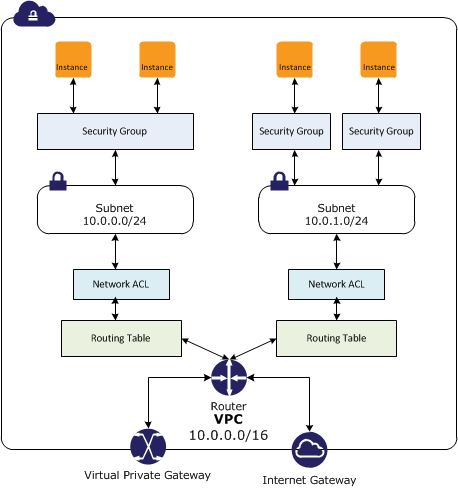
  • In a VPC, both Security Groups and Network ACLs (NACLS) together help to build a layered network defence.
  • Security groups – Act as a virtual firewall for associated instances, controlling both inbound and outbound traffic at the instance level
  • Network access control lists (NACLs) – Act as a firewall for associated subnets, controlling both inbound and outbound traffic at the subnet level

Security Groups vs NACLs

Security Groups

  • Acts at an Instance level and not at the subnet level.
  • Each instance within a subnet can be assigned a different set of Security groups
  • An instance can be assigned up to 5 security groups (default, can be increased up to 16) with each security group having up to 60 rules (inbound and outbound separately).
  • allows separate rules for inbound and outbound traffic.
  • allows adding or removing rules (authorizing or revoking access) for both Inbound (ingress) and Outbound (egress) traffic to the instance
    • Default Security group allows no external inbound traffic but allows inbound traffic from instances with the same security group
    • Default Security group allows all outbound traffic
    • New Security groups start with only an outbound rule that allows all traffic to leave the instances.
  • can specify only Allow rules, but not deny rules
  • can grant access to a specific IP, CIDR range, or to another security group in the VPC or in a peer VPC (requires a VPC peering connection)
  • are evaluated as a Whole or Cumulative bunch of rules with the most permissive rule taking precedence for e.g. if you have a rule that allows access to TCP port 22 (SSH) from IP address 203.0.113.1 and another rule that allows access to TCP port 22 from everyone, everyone has access to TCP port 22.
  • are Stateful – responses to allowed inbound traffic are allowed to flow outbound regardless of outbound rules, and vice versa. Hence an Outbound rule for the response is not needed
  • Instances associated with a security group can’t talk to each other unless rules allowing the traffic are added.
  • are associated with ENI (network interfaces).
  • are associated with the instance and can be changed, which changes the security groups associated with the primary network interface (eth0) and the changes would be applicable immediately to all the instances associated with the Security Group.

Security Group Quotas

  • VPC security groups per Region: 2,500 (adjustable)
  • Inbound or outbound rules per security group: 60 (adjustable, enforced separately for IPv4 and IPv6)
  • Security groups per network interface: 5 (default, adjustable up to 16)
  • Total rules per network interface: Maximum of 1,000 rules across all attached security groups (hard limit)
  • The quota for rules per security group multiplied by security groups per network interface cannot exceed 1,000

Security Group VPC Associations and Sharing (New – 2024)

  • Security Group VPC Associations allow associating a security group with multiple VPCs in the same account and Region, enabling consistent security rules across workloads in different VPCs without duplicating security groups.
  • Shared Security Groups allow the VPC owner to share security groups with participant accounts in a shared VPC using AWS Resource Access Manager (RAM).
    • Participant accounts can use the shared security groups but cannot modify them.
    • Shared security groups can only be used with resources in shared subnets of the owner’s VPC.
  • Cannot be used with default security groups or default VPCs.
  • These features complement security group referencing across VPC peering and Transit Gateway.
  • Can be managed centrally using AWS Firewall Manager security group policies.

Security Group Referencing (Cross-VPC)

  • VPC Peering: Can reference security groups in a peer VPC within the same Region.
  • Transit Gateway (Sep 2024): Can reference security groups from other VPCs attached to the same Transit Gateway within the same Region, eliminating the need to hard-code IP address ranges.
  • Cloud WAN (Jun 2025): Can reference security groups defined in other VPCs within the same Region attached to the same Cloud WAN core network.
  • Security group referencing allows rules to dynamically adapt as instances scale up/down without updating IP-based rules.

Connection Tracking

  • Security groups are Stateful as they use Connection tracking to track information about traffic to and from the instance.
  • Responses to inbound traffic are allowed to flow out of the instance regardless of outbound security group rules, and vice versa.
  • Connection Tracking is maintained only if there is no explicit Outbound rule for an Inbound request (and vice versa)
  • However, if there is an explicit Outbound rule for an Inbound request, the response traffic is allowed on the basis of the Outbound rule and not on the Tracking information
  • Tracking flow e.g.
    • If an instance (host A) initiates traffic to host B and uses a protocol other than TCP, UDP, or ICMP, the instance’s firewall only tracks the IP address & protocol number for the purpose of allowing response traffic from host B.
    • If host B initiates traffic to the instance in a separate request within 600 seconds of the original request or response, the instance accepts it regardless of inbound security group rules, because it’s regarded as response traffic.
  • This can be controlled by modifying the security group’s outbound rules to permit only certain types of outbound traffic. Alternatively, Network ACLs (NACLs) can be used for the subnet, network ACLs are stateless and therefore do not automatically allow response traffic.

Connection Tracking Idle Timeouts (Configurable)

  • Connection tracking idle timeouts are configurable per Elastic Network Interface (ENI) since Nov 2023.
  • TCP Established timeout:
    • Default: 432,000 seconds (5 days) for most instance types
    • Default: 350 seconds for Nitro V6 instance types (since Jun 2025)
    • Recommended: Less than 432,000 seconds to prevent connection tracking table exhaustion
  • UDP Stream timeout (bidirectional traffic): Min 60s, Max 180s, Default 180s
  • UDP Unidirectional timeout: Min 30s, Max 60s, Default 30s
  • Configurable timeouts help prevent connection tracking exhaustion for high-throughput workloads, DNS-heavy UDP workloads, and long-lived idle connections.

Network Access Control Lists – NACLs

  • A Network ACLs (NACLs) is an optional layer of security for the VPC that acts as a firewall for controlling traffic in and out of one or more subnets.
  • are not for granular control and are assigned at a Subnet level and are applicable to all the instances in that Subnet
  • has separate inbound and outbound rules, and each rule can either allow or deny traffic
    • Default ACL allows all inbound and outbound traffic.
    • The newly created ACL denies all inbound and outbound traffic.
  • A Subnet can be assigned only 1 NACL and if not associated explicitly would be associated implicitly with the default NACL
  • can associate a network ACL with multiple subnets
  • is a numbered list of rules that are evaluated in order starting with the lowest numbered rule, to determine whether traffic is allowed in or out of any subnet associated with the network ACL e.g. if you have a Rule No. 100 with Allow All and 110 with Deny All, the Allow All would take precedence and all the traffic will be allowed.
  • are Stateless; responses to allowed inbound traffic are subject to the rules for outbound traffic (and vice versa) for e.g. if you enable Inbound SSH on port 22 from the specific IP address, you would need to add an Outbound rule for the response as well.

Network ACL Quotas

  • Network ACLs per VPC: 200 (adjustable)
  • Rules per network ACL: 20 (adjustable up to 40 inbound and 40 outbound, total 80 rules)
  • Note: Increasing rules beyond 40 per direction may impact network performance

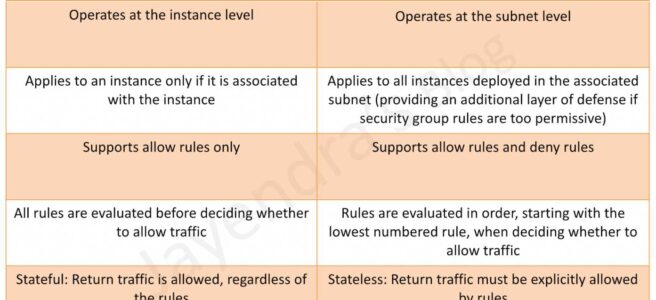
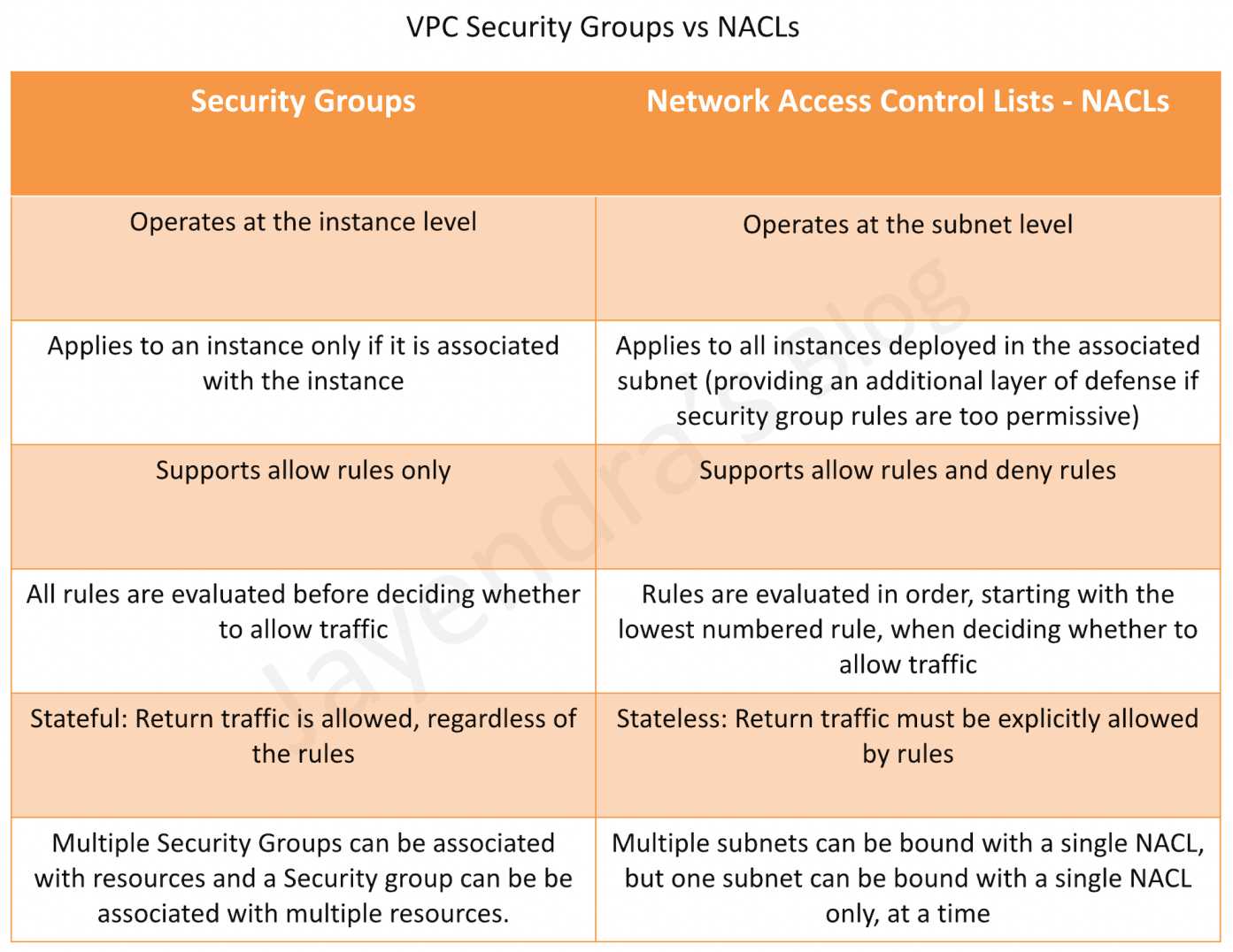
Security Group vs NACLs

Security Groups vs NACLs

AWS Certification Exam Practice Questions

  • Questions are collected from Internet and the answers are marked as per my knowledge and understanding (which might differ with yours).
  • AWS services are updated everyday and both the answers and questions might be outdated soon, so research accordingly.
  • AWS exam questions are not updated to keep up the pace with AWS updates, so even if the underlying feature has changed the question might not be updated
  • Open to further feedback, discussion and correction.
  1. Instance A and instance B are running in two different subnets A and B of a VPC. Instance A is not able to ping instance B. What are two possible reasons for this? (Pick 2 correct answers)
    1. The routing table of subnet A has no target route to subnet B
    2. The security group attached to instance B does not allow inbound ICMP traffic
    3. The policy linked to the IAM role on instance A is not configured correctly
    4. The NACL on subnet B does not allow outbound ICMP traffic
  2. An instance is launched into a VPC subnet with the network ACL configured to allow all inbound traffic and deny all outbound traffic. The instance’s security group is configured to allow SSH from any IP address and deny all outbound traffic. What changes need to be made to allow SSH access to the instance?
    1. The outbound security group needs to be modified to allow outbound traffic.
    2. The outbound network ACL needs to be modified to allow outbound traffic.
    3. Nothing, it can be accessed from any IP address using SSH.
    4. Both the outbound security group and outbound network ACL need to be modified to allow outbound traffic.
  3. From what services I can block incoming/outgoing IPs?
    1. Security Groups
    2. DNS
    3. ELB
    4. VPC subnet
    5. IGW
    6. NACL
  4. What is the difference between a security group in VPC and a network ACL in VPC (chose 3 correct answers)
    1. Security group restricts access to a Subnet while ACL restricts traffic to EC2
    2. Security group restricts access to EC2 while ACL restricts traffic to a subnet
    3. Security group can work outside the VPC also while ACL only works within a VPC
    4. Network ACL performs stateless filtering and Security group provides stateful filtering
    5. Security group can only set Allow rule, while ACL can set Deny rule also
  5. You are currently hosting multiple applications in a VPC and have logged numerous port scans coming in from a specific IP address block. Your security team has requested that all access from the offending IP address block be denied for the next 24 hours. Which of the following is the best method to quickly and temporarily deny access from the specified IP address block?
    1. Create an AD policy to modify Windows Firewall settings on all hosts in the VPC to deny access from the IP address block
    2. Modify the Network ACLs associated with all public subnets in the VPC to deny access from the IP address block
    3. Add a rule to all of the VPC 5 Security Groups to deny access from the IP address block
    4. Modify the Windows Firewall settings on all Amazon Machine Images (AMIs) that your organization uses in that VPC to deny access from the IP address block
  6. You have two Elastic Compute Cloud (EC2) instances inside a Virtual Private Cloud (VPC) in the same Availability Zone (AZ) but in different subnets. One instance is running a database and the other instance an application that will interface with the database. You want to confirm that they can talk to each other for your application to work properly. Which two things do we need to confirm in the VPC settings so that these EC2 instances can communicate inside the VPC? Choose 2 answers
    1. A network ACL that allows communication between the two subnets.
    2. Both instances are the same instance class and using the same Key-pair.
    3. That the default route is set to a NAT instance or Internet Gateway (IGW) for them to communicate.
    4. Security groups are set to allow the application host to talk to the database on the right port/protocol
  7. A benefits enrollment company is hosting a 3-tier web application running in a VPC on AWS, which includes a NAT (Network Address Translation) instance in the public Web tier. There is enough provisioned capacity for the expected workload tor the new fiscal year benefit enrollment period plus some extra overhead Enrollment proceeds nicely for two days and then the web tier becomes unresponsive, upon investigation using CloudWatch and other monitoring tools it is discovered that there is an extremely large and unanticipated amount of inbound traffic coming from a set of 15 specific IP addresses over port 80 from a country where the benefits company has no customers. The web tier instances are so overloaded that benefit enrollment administrators cannot even SSH into them. Which activity would be useful in defending against this attack?
    1. Create a custom route table associated with the web tier and block the attacking IP addresses from the IGW (internet Gateway)
    2. Change the EIP (Elastic IP Address) of the NAT instance in the web tier subnet and update the Main Route Table with the new EIP
    3. Create 15 Security Group rules to block the attacking IP addresses over port 80
    4. Create an inbound NACL (Network Access control list) associated with the web tier subnet with deny rules to block the attacking IP addresses
  8. Which of the following statements describes network ACLs? (Choose 2 answers)
    1. Responses to allowed inbound traffic are allowed to flow outbound regardless of outbound rules, and vice versa (are stateless)
    2. Using network ACLs, you can deny access from a specific IP range
    3. Keep network ACL rules simple and use a security group to restrict application level access
    4. NACLs are associated with a single Availability Zone (associated with Subnet)
  9. You are designing security inside your VPC. You are considering the options for establishing separate security zones and enforcing network traffic rules across different zone to limit Instances can communications. How would you accomplish these requirements? Choose 2 answers
    1. Configure a security group for every zone. Configure a default allow all rule. Configure explicit deny rules for the zones that shouldn’t be able to communicate with one another (Security group does not allow deny rules)
    2. Configure you instances to use pre-set IP addresses with an IP address range every security zone. Configure NACL to explicitly allow or deny communication between the different IP address ranges, as required for interzone communication
    3. Configure a security group for every zone. Configure allow rules only between zone that need to be able to communicate with one another. Use implicit deny all rule to block any other traffic
    4. Configure multiple subnets in your VPC, one for each zone. Configure routing within your VPC in such a way that each subnet only has routes to other subnets with which it needs to communicate, and doesn’t have routes to subnets with which it shouldn’t be able to communicate. (default routes are unmodifiable)
  10. Your entire AWS infrastructure lives inside of one Amazon VPC. You have an Infrastructure monitoring application running on an Amazon instance in Availability Zone (AZ) A of the region, and another application instance running in AZ B. The monitoring application needs to make use of ICMP ping to confirm network reachability of the instance hosting the application. Can you configure the security groups for these instances to only allow the ICMP ping to pass from the monitoring instance to the application instance and nothing else” If so how?
    1. No Two instances in two different AZ’s can’t talk directly to each other via ICMP ping as that protocol is not allowed across subnet (i.e. broadcast) boundaries (Can communicate)
    2. Yes Both the monitoring instance and the application instance have to be a part of the same security group, and that security group needs to allow inbound ICMP (Need not have to be part of same security group)
    3. Yes, The security group for the monitoring instance needs to allow outbound ICMP and the application instance’s security group needs to allow Inbound ICMP (is stateful, so just allow outbound ICMP from monitoring and inbound ICMP on monitored instance)
    4. Yes, Both the monitoring instance’s security group and the application instance’s security group need to allow both inbound and outbound ICMP ping packets since ICMP is not a connection-oriented protocol (Security groups are stateful)
  11. A user has configured a VPC with a new subnet. The user has created a security group. The user wants to configure that instances of the same subnet communicate with each other. How can the user configure this with the security group?
    1. There is no need for a security group modification as all the instances can communicate with each other inside the same subnet
    2. Configure the subnet as the source in the security group and allow traffic on all the protocols and ports
    3. Configure the security group itself as the source and allow traffic on all the protocols and ports
    4. The user has to use VPC peering to configure this
  12. You are designing a data leak prevention solution for your VPC environment. You want your VPC Instances to be able to access software depots and distributions on the Internet for product updates. The depots and distributions are accessible via third party CDNs by their URLs. You want to explicitly deny any other outbound connections from your VPC instances to hosts on the Internet. Which of the following options would you consider?
    1. Configure a web proxy server in your VPC and enforce URL-based rules for outbound access Remove default routes. (Security group and NACL cannot have URLs in the rules nor does the route)
    2. Implement security groups and configure outbound rules to only permit traffic to software depots.
    3. Move all your instances into private VPC subnets remove default routes from all routing tables and add specific routes to the software depots and distributions only.
    4. Implement network access control lists to all specific destinations, with an Implicit deny as a rule.
  13. You have an EC2 Security Group with several running EC2 instances. You change the Security Group rules to allow inbound traffic on a new port and protocol, and launch several new instances in the same Security Group. The new rules apply:
    1. Immediately to all instances in the security group.
    2. Immediately to the new instances only.
    3. Immediately to the new instances, but old instances must be stopped and restarted before the new rules apply.
    4. To all instances, but it may take several minutes for old instances to see the changes.
  14. A company has multiple VPCs in the same AWS account and Region. They want to apply the same security group rules consistently across all VPCs without duplicating security groups. Which feature should they use?
    1. VPC Peering with security group referencing
    2. Security Group VPC Associations
    3. AWS Transit Gateway security group referencing
    4. AWS Firewall Manager common security group policy
  15. An organization uses VPC sharing with multiple participant accounts. The VPC owner wants to enforce consistent security group rules on all participant workloads while preventing participants from modifying the rules. Which approach meets this requirement?
    1. Create security groups in each participant account and use AWS Config rules for compliance
    2. Use AWS Firewall Manager to create audit security group policies
    3. Share security groups from the VPC owner account to participant accounts using AWS RAM
    4. Create identical security groups in each participant account using CloudFormation StackSets
  16. An application running on Nitro V6 instances is experiencing dropped connections after being idle for about 6 minutes. The security groups allow all required traffic. What is the most likely cause?
    1. The NACL outbound rules are blocking the return traffic
    2. The security group inbound rules need to be updated
    3. The TCP established idle timeout on Nitro V6 instances defaults to 350 seconds, and the connection is being dropped by connection tracking
    4. The VPC flow logs are consuming network resources

References