Google Cloud CI/CD
Google Cloud CI/CD provides various tools for continuous integration and deployment and also integrates seamlessly with third-party solutions.
📋 Key Updates (2024-2025)
- Container Registry was shut down on March 18, 2025. Migrate to Artifact Registry.
- Cloud Source Repositories reached end of sale on June 17, 2024. New customers should use Secure Source Manager or third-party repositories.
- Cloud Build now supports 2nd gen repositories with direct GitHub, GitLab, and Bitbucket connections.
- Cloud Deploy is now the recommended fully-managed continuous delivery service for GKE and Cloud Run.
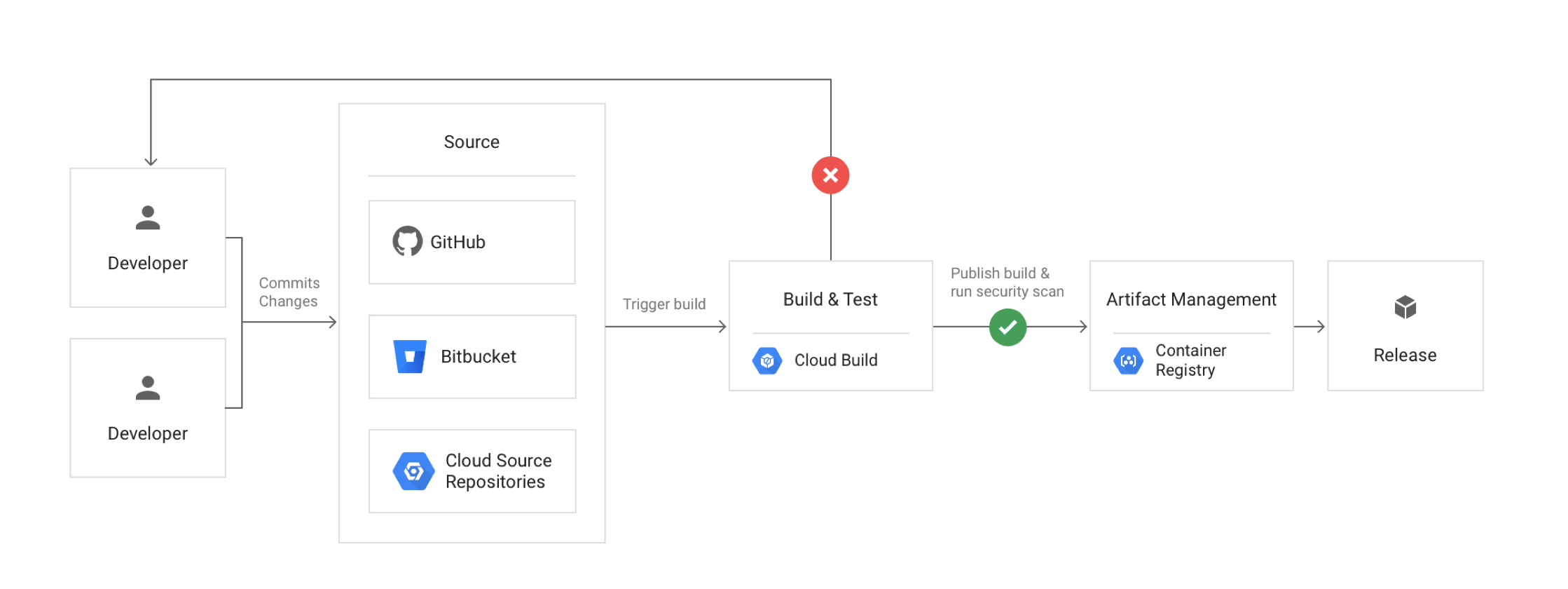
Google Cloud Source Repositories – CSR
- Cloud Source Repositories are fully-featured, private Git repositories hosted on Google Cloud.
- Cloud Source Repositories can be used for collaborative, version-controlled development of any app or service, including those that run on App Engine and Compute Engine.
- Cloud Source Repositories can connect to an existing GitHub or Bitbucket repository. Connected repositories are synchronized with Cloud Source Repositories automatically.
- Cloud Source Repositories automatically send logs on repository activity to Cloud Logging to help track and troubleshoot data access.
- Cloud Source Repositories offer security key detection to block git push transactions that contain sensitive information which helps improve the security of the source code.
- Cloud Source Repositories provide built-in integrations with other GCP tools like Cloud Build, Cloud Debugger, Cloud Operations, Cloud Logging, Cloud Functions, and others that let you automatically build, test, deploy, and debug code within minutes.
- Cloud Source Repositories publishes messages about the repository to Pub/Sub topic.
- Cloud Source Repositories provide a search feature to search for specific files or code snippets.
- Cloud Source Repositories allow permissions to be controlled at the project (all projects) or at the repo level.
Secure Source Manager (Recommended Alternative)
- Secure Source Manager is a regionally deployed, single-tenant, managed source code repository hosted on Google Cloud.
- Supports Git version control and integrates with Cloud Build, Cloud Deploy, and Artifact Registry.
- Provides IAM-based access control with fine-grained permissions at the instance, repository, and branch level.
- Offers centralized governance, audit logging, and policy control for platform and security teams.
- Supports standard Git tooling — developers can clone, fetch, and push code using familiar workflows.
- Data residency compliance with regional deployment options.
Cloud Build
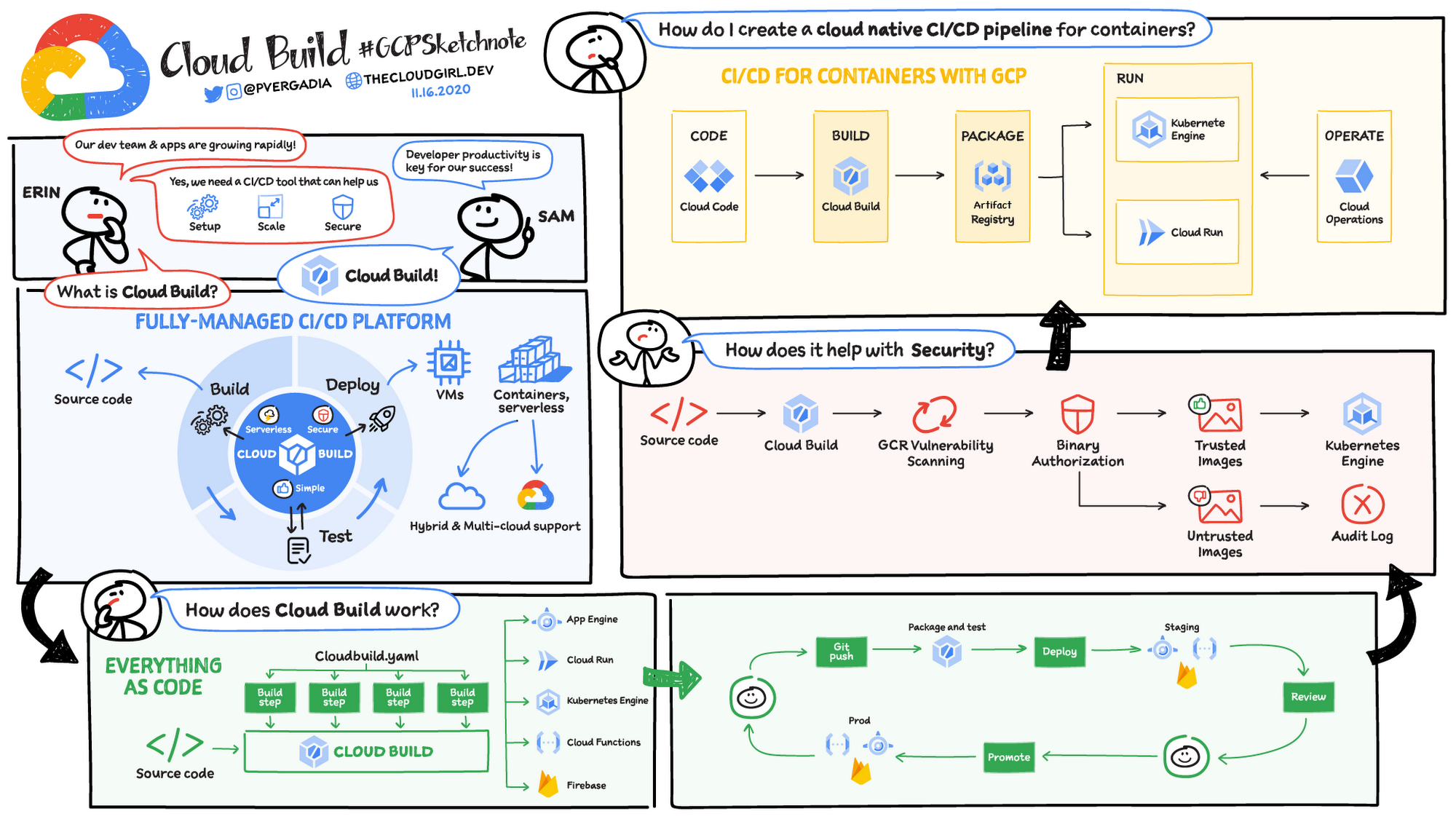
- Cloud Build is a fully-managed, serverless service that executes builds on Google Cloud Platform’s infrastructure.
- Cloud Build can pull/import source code from a variety of repositories or cloud storage spaces, execute a build to produce containers or artifacts, and push them to the artifact registry.
- Cloud Build executes the build as a series of build steps, where each build step specifies an action to be performed and is run in a Docker container.
- Build steps can be provided by Cloud Build and the Cloud Build community or can be custom as well.
- Build config file contains instructions for Cloud Build to perform tasks based on your specifications for e.g., the build config file can contain instructions to build, package, and push Docker images.
- Builds can be started either manually or using build triggers.
- Cloud Build uses build triggers to enable CI/CD automation.
- Build triggers can listen for incoming events, such as when a new commit is pushed to a repository or when a pull request is initiated, and then automatically execute a build when new events come in.
- Cloud Build publishes messages on a Pub/Sub topic called
cloud-buildswhen the build’s state changes, such as when the build is created, when the build transitions to a working state, and when the build completes. - Cloud Build features meet the requirements of Supply chain Levels for Software Artifacts (SLSA) level 3, providing build provenance and security insights out-of-the-box.
- Cloud Build supports uploading generic artifacts to generic repositories and downloading generic repositories as build dependencies.
Cloud Build Repositories (2nd Gen)
- Cloud Build repositories (2nd gen) provide direct connections to source repositories in GitHub, GitLab, GitLab Enterprise, GitHub Enterprise, and Bitbucket.
- Repository connections can be created and managed programmatically using Secret Manager secrets.
- A single connection can be set up for a repository and reused across regions and projects.
- Connections can be managed declaratively using Terraform.
- 1st gen repositories are available as a legacy option but are superseded by 2nd gen.
Cloud Build Private Pools
- Private pools are a set of worker instances that run in a Google Cloud project owned by Google, peered to your VPC network using VPC Network Peering.
- Private pools allow builds to access resources in a private network (e.g., private GKE clusters, private Artifact Registry repositories).
- Supports VPC Service Controls to guard against data exfiltration during builds.
- Up to 10 private pools can be created per Google Cloud project per region.
- Builds run in the region where the private pool is created, providing data residency control.
Software Supply Chain Security
- Cloud Build provides build provenance — verifiable metadata including image digests, input source locations, build toolchain, build steps, and duration.
- Cloud Build provides security insights panel in Artifact Registry showing supply chain security information for built artifacts.
- Supports Binary Authorization integration to enforce deploy-time security policies based on build attestations.
- Isolated and ephemeral build environments provide additional security guarantees.
Cloud Deploy
- Cloud Deploy is a fully-managed continuous delivery service that automates the delivery of applications to GKE and Cloud Run.
- Cloud Deploy defines delivery pipelines to deploy container images to targets in a predetermined sequence (e.g., dev → staging → production).
- Supports advanced deployment strategies including canary deployments, blue-green deployments, and progressive rollouts.
- Provides easy one-step promotion and rollback of releases via the web console, CLI, or API.
- Pipeline automation enables continuous deployment with rules like promote-release (automatic promotion between targets) and advance-rollout (automatic phase advancement).
- Supports parallel deployments to multiple targets simultaneously.
- Supports deployment verification to validate that deployments are working correctly before proceeding.
- Supports approval gates requiring manual approval before promoting to sensitive environments.
- Integrates with Cloud Build for the CI portion and with Cloud Run Jobs for deployment tasks.
- Automatically creates rollout resources that associate releases with target environments.
Container Registry
⚠️ SHUT DOWN — March 18, 2025
Container Registry was shut down on March 18, 2025. Writing images to Container Registry is no longer available. Starting June 3, 2025, GKE can no longer read images stored in Container Registry.
Migration: Use Artifact Registry as the replacement. Artifact Registry supports gcr.io repositories and provides an automatic migration tool that requires no downtime.
- Container Registry was a private container image registry that supported Docker Image Manifest V2 and OCI image formats.
- Container Registry provided a subset of Artifact Registry features.
- Container Registry stored its tags and layer files for container images in a Cloud Storage bucket in the same project as the registry.
- Access to the bucket was configured using Cloud Storage’s identity and access management (IAM) settings.
- Container Registry integrated seamlessly with Google Cloud services including Cloud Build and third-party tools such as Jenkins.
Artifact Registry
- Artifact Registry is a fully-managed service with support for both container images and non-container artifacts, extending the capabilities of the now-retired Container Registry.
- Artifact Registry is the only recommended service for container image storage and management on Google Cloud (Container Registry is shut down).
- Artifact Registry comes with fine-grained access control via Cloud IAM, enabling scoping permissions to specific regions or environments.
- Artifact Registry supports the creation of regional and multi-regional repositories.
- Supports multiple artifact formats: Docker containers, Maven, npm, Python (PyPI), Go, Apt, Yum, Helm, and generic artifacts.
Repository Modes
- Standard repositories — store your own artifacts (the default mode).
- Remote repositories — act as a pull-through cache for artifacts in public repositories such as Docker Hub, Maven Central, PyPI, or npm. Provides control over external dependencies and improves build performance.
- Virtual repositories — act as a single access point for multiple upstream repositories (both remote and standard). Enables aggregating packages from different teams behind a single endpoint.
Vulnerability Scanning & SBOM
- Artifact Analysis (formerly Container Analysis) provides automatic and on-demand vulnerability scanning for container images stored in Artifact Registry.
- Scanning detects OS and language package vulnerabilities in containers.
- Supports generating Software Bill of Materials (SBOM) for container images using the gcloud CLI.
- Security insights panel provides a high-level overview of vulnerabilities, build provenance, and SBOM information.
Container Registry vs Artifact Registry
GCP Certification Exam Practice Questions
- Questions are collected from Internet and the answers are marked as per my knowledge and understanding (which might differ with yours).
- GCP services are updated everyday and both the answers and questions might be outdated soon, so research accordingly.
- GCP exam questions are not updated to keep up the pace with GCP updates, so even if the underlying feature has changed the question might not be updated
- Open to further feedback, discussion and correction.
Question 1: Your team needs to store Docker container images and npm packages in a single managed service with fine-grained IAM controls. Which Google Cloud service should you use?
- Container Registry
- Artifact Registry
- Cloud Storage
- Cloud Source Repositories
Show Answer
Answer: B –
Artifact Registry supports multiple artifact formats including Docker containers and npm packages with fine-grained IAM. Container Registry only supports container images and has been shut down.
Question 2: You want to automate the deployment of container images to GKE with canary releases and automatic rollback capabilities. Which service should you use?
- Cloud Build
- Cloud Deploy
- Cloud Run
- Artifact Registry
Show Answer
Answer: B –
Cloud Deploy is a fully-managed continuous delivery service that supports canary deployments, progressive rollouts, and easy rollback for GKE and Cloud Run targets.
Question 3: Your organization requires builds to run within a VPC perimeter to prevent data exfiltration and access private GKE clusters. What Cloud Build feature should you use?
- Build triggers with VPC access
- Cloud Build private pools
- Cloud Build worker pools with Cloud NAT
- Cloud Build regional builds
Show Answer
Answer: B –
Cloud Build private pools are peered to your VPC network and support VPC Service Controls to guard against data exfiltration during builds.
Question 4: You need to connect Cloud Build directly to a GitLab repository for triggering builds on code changes. What should you use?
- Cloud Source Repositories mirroring
- Cloud Build repositories (1st gen)
- Cloud Build repositories (2nd gen)
- Manual webhook configuration
Show Answer
Answer: C –
Cloud Build repositories (2nd gen) support direct connections to GitLab, GitLab Enterprise, GitHub, GitHub Enterprise, and Bitbucket. 1st gen did not support GitLab.
Question 5: Your team wants to cache frequently used Maven Central dependencies locally to improve build performance and control external dependencies. Which Artifact Registry feature should you use?
- Standard repository
- Virtual repository
- Remote repository
- Multi-regional repository
Show Answer
Answer: C –
Remote repositories act as a pull-through cache for artifacts in public repositories like Maven Central, providing control over external dependencies and improving build performance.