AWS SQS Standard vs FIFO Queue – Differences & Use Cases
Amazon Simple Queue Service (SQS) offers two queue types — Standard and FIFO (First-In-First-Out) — each designed for different messaging requirements. Choosing the wrong queue type leads to either unnecessary complexity or data integrity issues. This comprehensive comparison covers every dimension: ordering, deduplication, throughput, pricing, delivery guarantees, and real-world use cases to help you make the right choice.
- Need maximum throughput, can handle duplicates & out-of-order? → Standard Queue
- Need strict ordering & exactly-once processing? → FIFO Queue
- Need strict ordering AND high throughput (70K+ TPS)? → FIFO Queue with High Throughput Mode
∞ throughput
3,000 msg/s (batch)
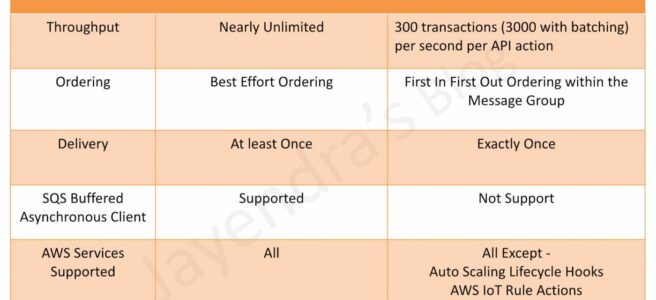
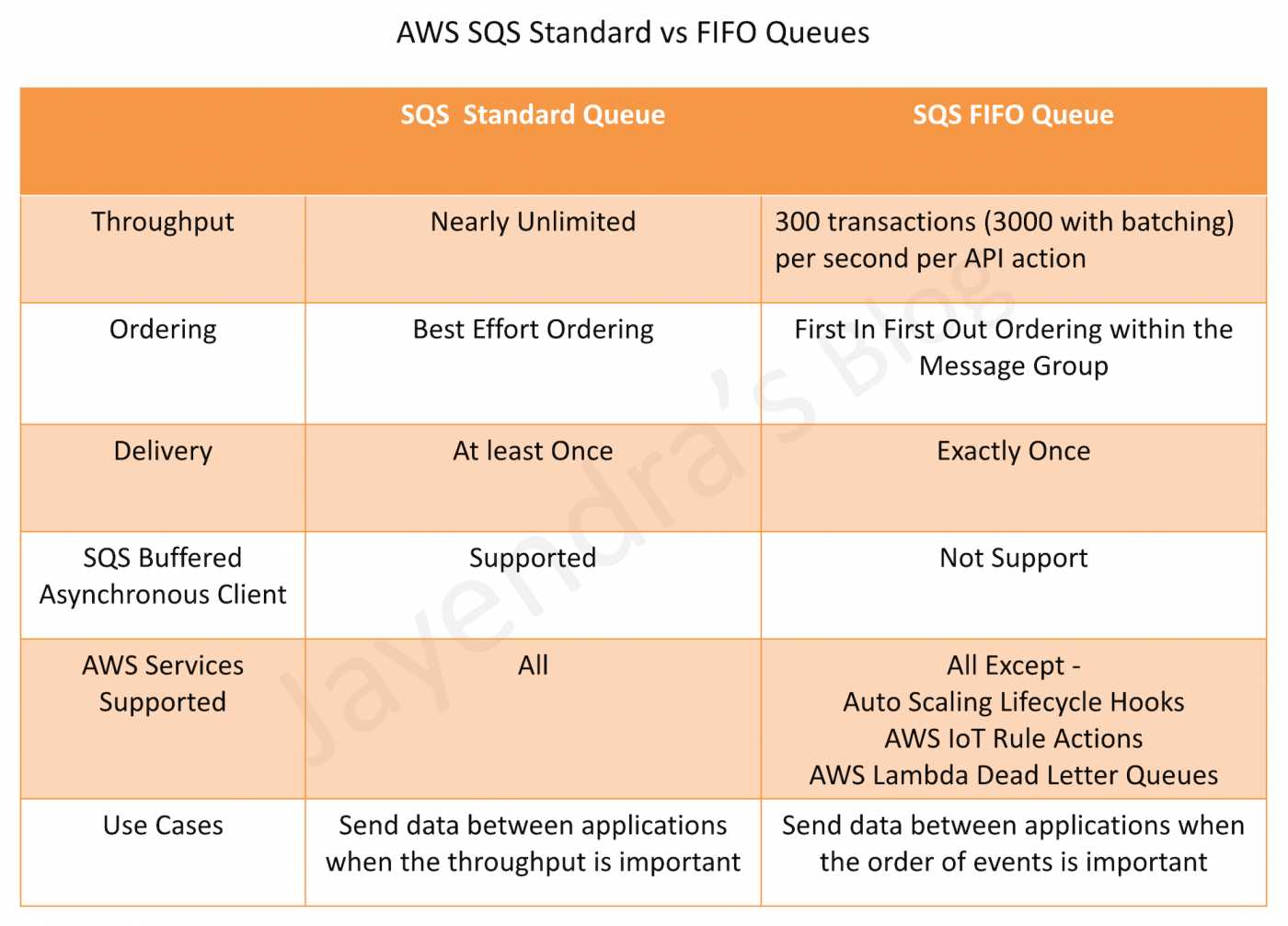
SQS Standard vs FIFO – Detailed Comparison Table
| Feature | Standard Queue | FIFO Queue |
|---|---|---|
| Message Ordering | Best-effort ordering; messages may arrive out of order | Strict first-in-first-out ordering within each message group |
| Delivery Guarantee | At-least-once delivery; duplicates possible | Exactly-once processing; no duplicates within 5-minute deduplication window |
| Throughput (Default) | Nearly unlimited TPS | 300 TPS per API action (3,000 msg/sec with batching) |
| Throughput (High Throughput Mode) | N/A – already unlimited | Up to 70,000 TPS per API action (700,000 msg/sec with batching) in select regions |
| Deduplication | No built-in deduplication; application must handle idempotency | Built-in 5-minute deduplication via MessageDeduplicationId or content-based deduplication (SHA-256 hash) |
| Message Groups | Optional (Fair Queue feature); not required | Required MessageGroupId; ordering guaranteed within each group |
| In-Flight Messages | ~120,000 messages | 120,000 messages (increased from 20,000 in Nov 2024) |
| Pricing (US East) | $0.40 per million requests (first 100B); tiered pricing down to $0.24/million | $0.50 per million requests (first 100B); tiered pricing down to $0.35/million |
| Free Tier | 1 million requests/month free | 1 million requests/month free (separate from Standard free tier) |
| Batching | Up to 10 messages per batch (max 256 KB total payload) | Up to 10 messages per batch (max 256 KB total payload); multiplies effective throughput 10x |
| Dead-Letter Queue (DLQ) | Supported; DLQ must be a Standard queue; redrive to source supported | Supported; DLQ must be a FIFO queue; redrive to source supported (since Nov 2023) |
| Queue Name | Any valid name (up to 80 characters) | Must end with .fifo suffix |
| Message Retention | 1 minute to 14 days (default 4 days) | 1 minute to 14 days (default 4 days) |
| Per-Message Delay | Supported (0–900 seconds per message) | Not supported per-message; only queue-level delay |
| AWS Service Integration | All AWS services (S3 events, SNS, Lambda, etc.) | SNS FIFO, Lambda, EventBridge; S3 Event Notifications NOT directly supported |
| Visibility Timeout | 0 seconds to 12 hours (default 30 seconds) | 0 seconds to 12 hours (default 30 seconds) |
| Long Polling | Supported (1–20 seconds) | Supported (1–20 seconds) |
Message Ordering
Standard Queue – Best-Effort Ordering
- Messages are generally delivered in the order they are sent, but this is not guaranteed
- The highly distributed architecture optimizes for throughput, which may cause occasional out-of-order delivery
- If ordering matters, the application must include sequence information in the message body and handle reordering at the consumer level
FIFO Queue – Strict Ordering
- Messages are delivered in exactly the order they are sent within a message group
- MessageGroupId is required — messages with the same group ID are delivered in strict FIFO order
- Different message groups can be processed in parallel by different consumers, enabling concurrent processing while maintaining per-group ordering
- Only one consumer can process messages from a given message group at a time (until the message is deleted or the visibility timeout expires)
Deduplication
Standard Queue – No Built-in Deduplication
- At-least-once delivery means the same message may be delivered more than once
- Applications must implement idempotent consumers — processing the same message twice should produce the same result
- Common patterns: use a unique message identifier stored in DynamoDB or a database to track processed messages
FIFO Queue – Built-in Deduplication
- Provides exactly-once processing within a 5-minute deduplication interval
- Two deduplication mechanisms:
- Content-based deduplication — Enable on the queue; SQS generates a SHA-256 hash of the message body as the deduplication ID. Messages with identical bodies within 5 minutes are treated as duplicates.
- MessageDeduplicationId — Explicitly provide a unique token per message. If a message with the same deduplication ID is sent within 5 minutes, it is accepted but not delivered again.
- If both are configured, the explicit MessageDeduplicationId takes precedence over content-based deduplication
- After the 5-minute window expires, sending the same message again is treated as a new message
Throughput & Scaling
Standard Queue
- Nearly unlimited throughput — supports unlimited TPS for SendMessage, ReceiveMessage, and DeleteMessage
- Can handle any spike without pre-provisioning or configuration changes
- Ideal for applications with unpredictable or extremely high message volumes
FIFO Queue
- Default mode: 300 TPS per API action (SendMessage, ReceiveMessage, DeleteMessage)
- With batching (10 messages/request): effectively 3,000 messages/second
- High Throughput Mode (enable via SQS console or API):
- Up to 70,000 TPS per API action without batching in US East (N. Virginia), US West (Oregon), and Europe (Ireland)
- Up to 700,000 messages/second with batching in those regions
- Up to 18,000 TPS in other supported regions
- Uses message group-level partitioning — distribute messages across multiple message group IDs for maximum throughput
- In-flight message limit: 120,000 messages (increased from 20,000 in November 2024)
Pricing
| Monthly Requests | Standard (per million) | FIFO (per million) |
|---|---|---|
| First 1 million | Free | Free |
| 1M – 100 Billion | $0.40 | $0.50 |
| 100B – 200 Billion | $0.30 | $0.40 |
| Over 200 Billion | $0.24 | $0.35 |
- FIFO queues cost approximately 25% more than Standard queues at every tier
- Each 64 KB chunk of payload counts as one request (a 256 KB message = 4 requests)
- Batch operations (up to 10 messages) count as a single request — use batching to reduce costs
- No additional cost for enabling High Throughput Mode on FIFO queues
- AWS KMS encryption adds KMS API call charges (if server-side encryption is enabled)
Delivery Guarantees
Standard Queue – At-Least-Once Delivery
- A message is delivered at least once, but occasionally more than once
- Duplicate delivery occurs because SQS stores messages redundantly across multiple servers for high availability
- Applications must be designed to handle duplicates gracefully (idempotent processing)
- Best suited when occasional duplicates are acceptable and throughput is the priority
FIFO Queue – Exactly-Once Processing
- Each message is delivered exactly once and remains available until processed and deleted
- SQS uses the deduplication mechanism to prevent duplicate delivery within the 5-minute window
- If a consumer receives a message but fails to delete it before the visibility timeout, the message becomes available again to the same or another consumer — but only within the same message group ordering constraints
- Best suited when duplicate processing would cause business logic errors (financial transactions, order processing)
Batching
- Both queue types support batch operations: SendMessageBatch, ReceiveMessage (up to 10 messages), and DeleteMessageBatch
- Maximum total payload per batch: 256 KB
- A single batch API call counts as one request for billing purposes — batching reduces cost by up to 10x
- Standard queues: Batching is purely a cost optimization; throughput is already unlimited
- FIFO queues: Batching is critical for throughput — it effectively multiplies the TPS limit by 10 (e.g., 300 TPS → 3,000 messages/sec; 70,000 TPS → 700,000 messages/sec)
- Note: FIFO queues are NOT compatible with the SQS Buffered Asynchronous Client (which batches messages client-side). Use the standard SDK SendMessageBatch API instead.
Dead-Letter Queues (DLQ)
- Both Standard and FIFO queues support DLQs for isolating messages that fail processing
- Configure maxReceiveCount (1–1,000) — after this many receives without deletion, the message moves to the DLQ
- DLQ must match the source queue type: Standard queue → Standard DLQ; FIFO queue → FIFO DLQ
- DLQ redrive to source (moving messages back to the original queue) is supported for both types
- FIFO DLQ redrive was launched in November 2023 and expanded to GovCloud in April 2024
- Messages retain their original message ID when moved to a DLQ, enabling tracking
Use Cases
When to Use Standard Queue
- High-volume event processing — website clickstream analytics, IoT telemetry ingestion
- Background job processing — image/video transcoding, report generation, email sending
- Decoupling microservices — when services need to communicate asynchronously at high throughput
- Fan-out with SNS — receiving messages from SNS Standard topics at scale
- Batch data processing — ETL pipelines where order doesn’t matter
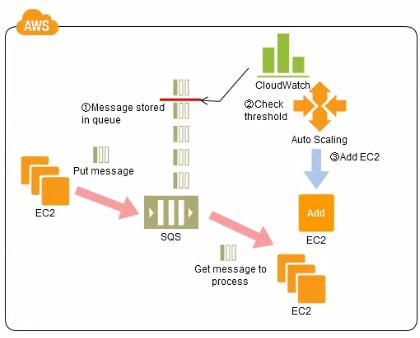
- Buffer for traffic spikes — absorbing burst traffic between web tier and backend services
- Log aggregation — collecting logs from distributed systems for centralized processing
When to Use FIFO Queue
- Financial transactions — ensuring debits and credits are processed in sequence
- E-commerce order processing — order placed → payment → fulfillment must happen in sequence
- Inventory management — stock updates must be applied in order to maintain accuracy
- Command execution — ensuring commands are executed in the exact order submitted
- Price updates — displaying the correct current price by processing changes in order
- Event sourcing — maintaining event sequence for aggregate reconstruction
- Ticketing systems — first-come-first-served ticket allocation
- Registration workflows — ensuring account creation precedes enrollment actions
Decision Guidance – When to Choose Each
- Your application can tolerate occasional duplicate messages
- Message order is not critical to business logic
- You need the highest possible throughput without any limits
- You’re integrating with AWS services that don’t support FIFO (e.g., S3 event notifications directly)
- Cost optimization is a priority (25% cheaper than FIFO)
- Your consumer is already idempotent
- Message ordering is critical to correctness (financial, ordering, sequential workflows)
- Duplicate processing would cause data corruption or business logic errors
- You need exactly-once semantics without building custom deduplication logic
- Throughput requirements are within FIFO limits (up to 70K TPS with High Throughput Mode)
- You can group messages logically using MessageGroupId for parallel processing within ordering constraints
Migration Considerations
- You cannot convert an existing Standard queue to FIFO or vice versa — you must create a new queue
- FIFO queue names must end with
.fifosuffix - When migrating from Standard to FIFO, you must add MessageGroupId (required) and either enable content-based deduplication or provide MessageDeduplicationId
- Test throughput requirements before migrating — ensure FIFO limits (even with High Throughput Mode) meet your peak load
AWS Certification Exam Tips (SAA-C03 / DVA-C02)
- FIFO = ordering + exactly-once. Any question mentioning “strict order,” “sequence,” “exactly-once,” or “no duplicates” → FIFO queue.
- Standard = high throughput + at-least-once. Questions about “unlimited throughput” or “maximum scalability” → Standard queue.
- MessageGroupId is required for FIFO queues. Messages with the same group ID are ordered; different groups can be processed in parallel.
- FIFO queue names must end in .fifo — this is a common trick in exam questions.
- S3 event notifications cannot directly target FIFO queues. Use EventBridge as an intermediary.
- DLQ must match queue type — Standard DLQ for Standard queue, FIFO DLQ for FIFO queue.
- High Throughput Mode eliminates the throughput objection — FIFO can now handle 70K+ TPS. Questions about “ordering AND high throughput” → FIFO with High Throughput Mode.
- Deduplication window is 5 minutes. Content-based deduplication uses SHA-256 hash of message body.
- Per-message delay is NOT supported in FIFO queues — only queue-level DelaySeconds.
- DVA-C02 focus: Understand how to implement idempotent consumers for Standard queues and how MessageDeduplicationId works for FIFO queues.
AWS Certification Exam Practice Questions
Questions are collected from Internet and the answers are marked as per my knowledge and understanding (which might differ with yours).
AWS services are updated everyday and both the answers and questions might be outdated soon, so research accordingly.
AWS exam questions are not updated to keep up the pace with AWS updates, so even if the underlying feature has changed the question might not be updated
Open to further feedback, discussion and correction.
-
A financial services company processes stock trade orders. Each trade must be processed exactly once and in the precise order it was submitted. The system handles approximately 500 trades per second during peak hours. Which Amazon SQS configuration meets these requirements with the LEAST operational overhead?
- Use a Standard queue with application-level deduplication using DynamoDB
- Use a Standard queue with message sequencing in the message body
- Use a FIFO queue with MessageGroupId set to the stock ticker symbol
- Use Amazon Kinesis Data Streams with one shard per stock symbol
Show Answer
Answer: c) – FIFO queues provide exactly-once processing and strict ordering within each message group. Using the stock ticker as the MessageGroupId ensures trades for the same stock are processed in order while allowing parallel processing across different stocks. 500 TPS is well within FIFO default limits (300 TPS per group, but distributed across many groups = much higher aggregate).
-
A developer is building an application that sends S3 event notifications to an SQS queue for ordered processing. The team requires FIFO delivery of these notifications. What should the developer do?
- Configure S3 to send events directly to an SQS FIFO queue
- Configure S3 to send events to Amazon EventBridge, then create a rule to forward events to an SQS FIFO queue
- Configure S3 to send events to an SNS Standard topic, then subscribe the SQS FIFO queue
- Configure S3 to send events to a Standard queue and use Lambda to forward them to a FIFO queue
Show Answer
Answer: b) – S3 Event Notifications do not support SQS FIFO queues as a direct destination. Amazon EventBridge receives S3 events and can route them to SQS FIFO queues as a rule target, providing the required FIFO delivery with minimal operational overhead.
-
An e-commerce platform needs to process over 100,000 order update messages per second with strict per-customer ordering. The solutions architect wants to use Amazon SQS. Which approach meets BOTH the throughput and ordering requirements?
- Use a Standard queue with application-level ordering per customer
- Use multiple FIFO queues with default settings and distribute customers across them
- Use a FIFO queue with High Throughput Mode enabled and a unique MessageGroupId per customer
- Use Amazon Kinesis Data Streams with customer ID as the partition key
Show Answer
Answer: c) – FIFO High Throughput Mode supports up to 70,000 TPS per API action (700,000 messages/sec with batching) in select regions. Using a unique MessageGroupId per customer ensures per-customer ordering while distributing load across message group partitions. With batching of 10 messages per request, 100,000+ messages/second is achievable.
-
A development team is using an SQS FIFO queue for processing payment events. They notice that after enabling content-based deduplication, some messages with different payment amounts but identical message bodies (due to a serialization bug) are being silently dropped. What is the MOST appropriate fix?
- Disable deduplication entirely on the FIFO queue
- Switch to a Standard queue to avoid deduplication issues
- Provide an explicit MessageDeduplicationId (e.g., a unique payment transaction ID) for each message instead of relying on content-based deduplication
- Increase the deduplication interval beyond 5 minutes
Show Answer
Answer: c) – Content-based deduplication uses a SHA-256 hash of the message body. If messages have identical bodies (due to a bug), they get the same deduplication ID and are treated as duplicates. Providing an explicit MessageDeduplicationId (like a unique transaction ID) ensures each legitimate message is treated as unique regardless of body content. The deduplication interval cannot be changed from 5 minutes.
-
A company has a Standard SQS queue receiving 50,000 messages per second. They are experiencing issues with duplicate message processing causing double charges to customers. The team wants to prevent duplicates with minimal code changes. What should they do?
- Increase the visibility timeout to prevent reprocessing
- Migrate to a FIFO queue with content-based deduplication enabled, using customer account ID as the MessageGroupId
- Add a DynamoDB table for deduplication tracking in the consumer application
- Enable long polling to reduce duplicate receives
Show Answer
Answer: b) – For “minimal code changes” and preventing duplicates, migrating to FIFO with content-based deduplication is the most effective solution. FIFO provides exactly-once processing natively without custom deduplication logic. However, verify that 50,000 TPS is achievable with High Throughput Mode enabled (70K TPS in select regions). Option c is valid but requires more code changes. Option a doesn’t prevent duplicates — it only reduces the window.
Related Posts
- AWS Simple Queue Service – SQS
- AWS SQS Standard Queue
- AWS SQS FIFO Queue
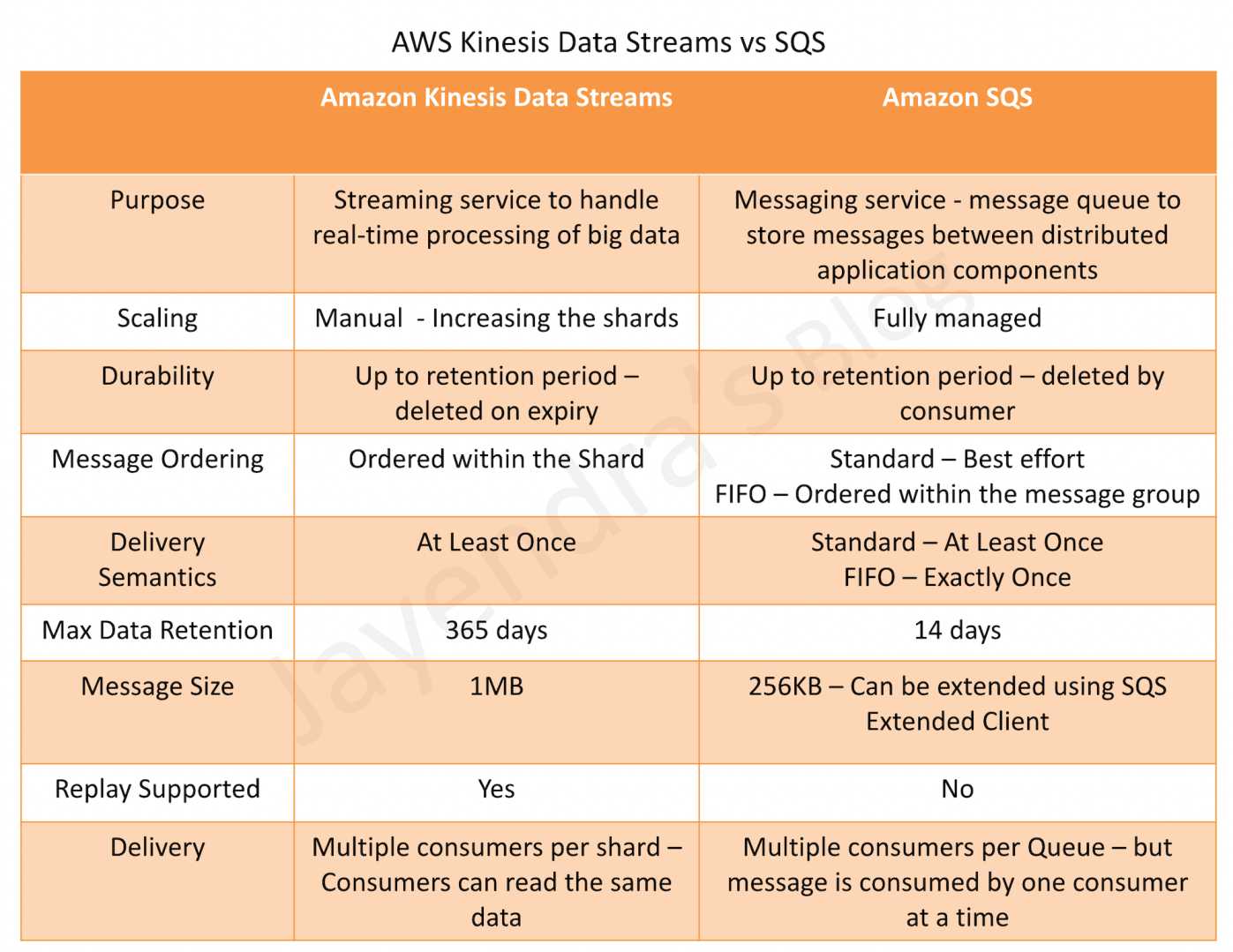
- AWS Kinesis Data Streams vs SQS
- AWS SQS Standard vs FIFO Queue – Ordering & Dedup
Frequently Asked Questions
What is the difference between SQS Standard and FIFO?
SQS Standard offers unlimited throughput with best-effort ordering and at-least-once delivery. FIFO guarantees exact message ordering and exactly-once processing but is limited to 3,000 messages/second with batching (300 without).
When should I use SQS FIFO queue?
Use FIFO when message ordering matters (e.g., financial transactions, e-commerce order processing) or when you need exactly-once processing to prevent duplicate actions. Use Standard for high-throughput workloads where occasional duplicates or out-of-order messages are acceptable.
Can I convert an SQS Standard queue to FIFO?
No, you cannot convert between queue types. You must create a new FIFO queue and migrate your application. FIFO queue names must end with the .fifo suffix.