AWS Snow Family

⚠️ MAJOR SERVICE CHANGES – IMPORTANT NOTICE

The AWS Snow Family has undergone significant changes in 2024-2025:

  • AWS Snowcone – Discontinued effective November 12, 2024. Support for existing customers ended November 12, 2025.
  • AWS Snowmobile – Retired in March 2024. Service is no longer available.
  • Previous Generation Snowball Devices (80TB Storage Optimized, 52 vCPU Compute Optimized, Compute Optimized with GPU) – Discontinued November 12, 2024.
  • AWS Snowball Edge – Only available to existing customers as of November 7, 2025. New customers cannot order Snowball Edge devices.

Recommended Alternatives:

  • AWS DataSync – For online data transfers and migrations
  • AWS Data Transfer Terminal – For secure physical data transfers at AWS locations
  • AWS Outposts – For edge computing workloads
  • AWS Partner Solutions – For specialized data transfer and edge needs

For details, refer to: AWS Snow Device Updates

AWS Snow Family

  • AWS Snow Family helps physically transport up to exabytes of data into and out of AWS.
  • AWS Snow Family helps customers that need to run operations in austere, non-data center environments, and in locations where there’s a lack of consistent network connectivity.
  • Snow Family devices are AWS owned & managed and integrate with AWS security, monitoring, storage management, and computing capabilities.
  • AWS Snow Family originally comprised of AWS Snowcone, AWS Snowball, and AWS Snowmobile. As of 2025, only AWS Snowball Edge (latest generation) remains available, and only to existing customers.
  • As of November 2025, the Snow Family is effectively being wound down in favor of online data transfer services (AWS DataSync), physical transfer locations (AWS Data Transfer Terminal), and dedicated edge infrastructure (AWS Outposts).

AWS Snowcone (Discontinued – November 2024)

⚠️ Discontinued: AWS Snowcone was discontinued on November 12, 2024. Support for existing customers ended November 12, 2025.
  • AWS Snowcone was a portable, rugged, and secure device that provided edge computing and data transfer capabilities.
  • Snowcone could be used to collect, process, and move data to AWS, either offline by shipping the device, or online with AWS DataSync.
  • AWS Snowcone stored data securely in edge locations, and could run edge computing workloads that use AWS IoT Greengrass or EC2 instances.
  • Snowcone devices were small and weigh 4.5 lbs. (2.1 kg), so they could be carried in a backpack or fit in tight spaces for IoT, vehicular, or drone use cases.
  • Snowcone was available in two versions: Snowcone HDD (8TB) and Snowcone SSD (14TB).
  • Alternatives: For portable edge computing, consider AWS Outposts (1U/2U servers). For data transfer, use AWS DataSync.

AWS Snowball Edge (Existing Customers Only – November 2025)

⚠️ Limited Availability: As of November 7, 2025, AWS Snowball Edge is only available to existing customers. New customers should use AWS DataSync, AWS Data Transfer Terminal, or AWS Outposts.
  • AWS Snowball Edge is a data migration and edge computing device that comes in two latest-generation device options:
    • Storage Optimized 210TB
      • Provides 210 TB of high-performance NVMe storage capacity.
      • Ability to transfer up to 1.5 gigabytes of data per second.
      • Supports two pricing options: less than 100TB, and from 100TB to 210TB.
      • Connectivity: 10GBASE-T, SFP28, and QSFP28 ports.
      • Enables migration of 2PB of data per month, doubling the velocity of large migrations.
      • Well-suited for multi-petabyte data migration from on-premises to AWS.
    • Compute Optimized 104 vCPU
      • Provides 104 vCPUs and 416 GB of RAM.
      • Fully SSD with 28 TB of NVMe storage.
      • Supports Amazon EC2, Amazon EBS, Amazon S3, AWS IoT Greengrass, AWS Lambda, and AWS IAM at the edge.
      • Ideal for dense compute workloads such as machine learning inference or video analytics at the rugged, mobile edge.
  • Customers can use these devices for data collection, machine learning and processing, and storage in environments with intermittent connectivity (such as manufacturing, industrial, and transportation) or in extremely remote locations (such as military or maritime operations) before shipping back to AWS.
  • Snowball devices may also be rack mounted and clustered together to build larger, temporary installations.

Previous Generation Devices (Discontinued – November 2024)

  • Snowball Edge Storage Optimized 80TB – Discontinued. Replaced by Storage Optimized 210TB.
  • Snowball Edge Compute Optimized 52 vCPU – Discontinued. Replaced by Compute Optimized 104 vCPU.
  • Snowball Edge Compute Optimized with GPU – Discontinued. No direct replacement in Snow family.

AWS Snowmobile (Retired – March 2024)

⚠️ Retired: AWS Snowmobile was retired in March 2024. The service is no longer available.
  • AWS Snowmobile was a 45-foot long ruggedized shipping container that could move up to 100 PB of data and was designed for multi-petabyte or exabyte-scale digital media migrations and data center shutdowns.
  • A Snowmobile would arrive at the customer site and appear as a network-attached data store for secure, high-speed data transfer.
  • After data was transferred to Snowmobile, it was driven back to an AWS Region where the data was loaded into S3.
  • Snowmobile was tamper-resistant, waterproof, and temperature controlled with multiple layers of logical and physical security – including encryption, fire suppression, dedicated security personnel, GPS tracking, alarm monitoring, 24/7 video surveillance, and an escort security vehicle during transit.
  • Alternatives: For exabyte-scale migrations, AWS recommends using multiple Snowball Edge 210TB devices, AWS DataSync over AWS Direct Connect, or AWS Data Transfer Terminal.

AWS Data Transfer Terminal (Recommended Alternative)

  • AWS Data Transfer Terminal is a secure, upload-ready, physical location where customers can bring their own storage devices to transfer data to or from AWS using a high-throughput connection.
  • Each terminal includes at least two 100 Gigabit Ethernet (100 GbE) ports.
  • Supports upload to any AWS endpoint including Amazon S3, Amazon EFS, and other AWS services.
  • Customers can reserve date and time to visit a terminal location through the AWS Management Console.
  • Pricing is based on the number of ports actively used during the reservation (charged per port-hour).
  • Available in multiple locations globally (expanding to new cities including Munich, San Francisco Bay Area, and others).
  • Use cases include media production data ingestion, large-scale data migrations, and autonomous vehicle data processing.
  • Unlike Snow devices, customers use their own storage hardware and transfer data on-site at AWS locations.
  • For details, refer to: AWS Data Transfer Terminal

AWS DataSync (Recommended for Online Transfers)

  • AWS DataSync is an online data movement service that simplifies and accelerates data migrations to AWS.
  • Moves data quickly and securely between on-premises storage, edge locations, other cloud providers, and AWS Storage services.
  • Automates scheduling, monitoring, encryption, and data verification.
  • Supports transfer between on-premises NFS, SMB, HDFS, self-managed object storage, AWS Snow, S3, EFS, FSx, and other cloud providers (Google Cloud Storage, Azure Files).
  • Enhanced mode (launched May 2025) simplifies cross-cloud transfers by removing the need for a DataSync agent.
  • Compresses data before transit, identifies only changed objects, and automatically recovers from network interruptions.
  • Integrates with Amazon CloudWatch and Amazon EventBridge for monitoring.
  • For details, refer to: AWS DataSync

Migration Decision Guide

  • Online transfer with sufficient bandwidth: Use AWS DataSync (preferred approach for most workloads).
  • Large data volume with limited bandwidth (existing Snow customers): Use Snowball Edge Storage Optimized 210TB.
  • Physical transfer with own hardware: Use AWS Data Transfer Terminal.
  • High-bandwidth dedicated connection: Use AWS DataSync over AWS Direct Connect.
  • Edge computing needs: Use AWS Outposts (1U/2U servers or 42U racks).
  • Specialized requirements: Explore AWS Partner solutions.

AWS Snow Family Feature Comparison (Historical)

Feature Snowcone (Discontinued) Snowball Edge Storage Optimized 210TB Snowball Edge Compute Optimized 104 vCPU Snowmobile (Retired)
Status Discontinued (Nov 2024) Existing customers only (Nov 2025) Existing customers only (Nov 2025) Retired (March 2024)
Storage Capacity 8TB HDD / 14TB SSD 210 TB NVMe 28 TB NVMe SSD Up to 100 PB
Compute 2 vCPUs, 4 GB RAM 40 vCPUs, 80 GB RAM 104 vCPUs, 416 GB RAM N/A
Transfer Speed Up to 10 Gbps Up to 1.5 GB/s (100 GbE) Up to 100 Gbps Up to 1 Tbps
Use Case IoT, remote data collection Multi-PB data migration ML inference, video analytics Exabyte-scale migration

AWS Certification Exam Practice Questions

  • Questions are collected from Internet and the answers are marked as per my knowledge and understanding (which might differ with yours).
  • AWS services are updated everyday and both the answers and questions might be outdated soon, so research accordingly.
  • AWS exam questions are not updated to keep up the pace with AWS updates, so even if the underlying feature has changed the question might not be updated
  • Open to further feedback, discussion and correction.
  1. A company wants to transfer petabyte-scale of data to AWS for their analytics, however are constrained on their internet connectivity? Which AWS service can help them transfer the data quickly?
    1. S3 enhanced uploader
    2. Snowmobile
    3. Snowball
    4. Direct Connect

    Note: While Snowball Edge is now limited to existing customers (Nov 2025), this question tests the concept of offline physical data transfer. For new customers, AWS Data Transfer Terminal is the recommended physical transfer alternative.

  2. A company wants to transfer its video library data, which runs in exabytes, to AWS. Which AWS service can help the company transfer the data?
    1. Snowmobile
    2. Snowball
    3. S3 upload
    4. S3 enhanced uploader

    Note: Snowmobile was retired in March 2024. For exabyte-scale transfers today, AWS recommends using multiple Snowball Edge 210TB devices (for existing customers) or AWS Data Transfer Terminal combined with AWS DataSync over Direct Connect.

  3. A company needs to migrate 500 TB of data to AWS but has limited internet bandwidth. They are a new AWS customer as of 2025. Which approach should they use? (Select TWO)
    1. Order AWS Snowball Edge devices
    2. Use AWS Data Transfer Terminal
    3. Use AWS Snowcone
    4. Use AWS DataSync over AWS Direct Connect
    5. Use AWS Snowmobile
  4. A media company captures large volumes of video data at remote locations and needs to transfer it to AWS for processing. They have minimal internet connectivity. Which current AWS service provides a physical location for high-speed data upload?
    1. AWS Snowcone
    2. AWS Snowball
    3. AWS Direct Connect
    4. AWS Data Transfer Terminal
  5. A company requires edge computing capabilities at a remote site with no internet connectivity and needs to run ML inference workloads. Which AWS service should they consider as of 2025?
    1. AWS Snowcone
    2. AWS Outposts
    3. AWS Snowmobile
    4. AWS Data Transfer Terminal

    Note: For edge computing, AWS recommends Outposts (1U/2U servers or 42U racks) as the long-term solution. Snowball Edge Compute Optimized is still available to existing customers but is not open to new customers.
References

AWS Data Transfer Services

AWS Data Transfer Services

📋 Last Updated: June 2026. Major changes include AWS Snowcone discontinuation (Nov 2024), AWS Snowmobile retirement (March 2024), Snowball Edge restricted to existing customers (Nov 2025), and the launch of AWS Data Transfer Terminal (Dec 2024).
  • AWS provides a suite of data transfer services that includes many methods to migrate data more effectively.
  • Data Transfer services work both Online and Offline and the usage depends on several factors like the amount of data, the time required, frequency, available bandwidth, and cost.
  • Online data transfer and hybrid cloud storage
    • A network link to the VPC, transfer data to AWS or use S3 for hybrid cloud storage with existing on-premises applications.
    • Helps both to lift and shift large datasets once, as well as help integrate existing process flows like backup and recovery or continuous data streams directly with cloud storage.
  • Offline/Physical data migration to S3.
    • Use shippable, ruggedized devices or visit AWS Data Transfer Terminals for moving large archives, data lakes, or in situations where bandwidth and data volumes cannot pass over your networks within your desired time frame.

Online Data Transfer

VPN

  • Connect securely between data centers and AWS
  • Quick to set up and cost-efficient
  • Ideal for small data transfers and connectivity
  • Not reliable as still uses shared Internet connection

Direct Connect

  • Provides a dedicated physical connection to accelerate network transfers between data centers and AWS
  • Provides reliable data transfer with consistent low latency
  • Ideal for regular large data transfer
  • Needs time to setup
  • Is not a cost-efficient solution for small workloads
  • Can be secured using VPN over Direct Connect or MACsec encryption
  • Supports dedicated connections at 1 Gbps, 10 Gbps, 100 Gbps, and 400 Gbps speeds
  • Supports hosted connections from 50 Mbps up to 25 Gbps via AWS Direct Connect Partners
  • MACsec (IEEE 802.1AE) – provides native, near line-rate, point-to-point Layer 2 encryption on 10 Gbps, 100 Gbps, and 400 Gbps dedicated connections at select locations
  • SiteLink – enables sending data between Direct Connect locations over the AWS global backbone, bypassing AWS Regions, for private site-to-site network connectivity

AWS S3 Transfer Acceleration

  • Makes public Internet transfers to S3 faster by up to 50-500% for long-distance transfers of larger objects.
  • Helps maximize the available bandwidth regardless of distance or varying Internet weather, and there are no special clients or proprietary network protocols. Simply change the endpoint you use with your S3 bucket and acceleration is automatically applied.
  • Uses globally distributed CloudFront edge locations (over 50 locations worldwide) for data transport.
  • Ideal for recurring jobs that travel across the globe, such as media uploads, backups, and local data processing tasks that are regularly sent to a central location.

AWS DataSync

  • Automates moving data between on-premises storage and Amazon S3, Amazon EFS, Amazon FSx, and other AWS storage services.
  • Automatically handles many of the tasks related to data transfers that can slow down migrations, including encryption, managing scripts, network optimization, and data integrity validation.
  • Helps transfer data at speeds up to 10 times faster than open-source tools.
  • Uses AWS Direct Connect or internet links to AWS and is ideal for one-time data migrations, recurring data processing workflows, and automated replication for data protection and recovery.
  • Enhanced Mode (2024-2025) – provides higher performance, scalability, and observability for transfers between S3 locations with virtually unlimited numbers of objects.
  • Cross-Cloud Transfers (May 2025) – supports direct data transfers between other clouds (Google Cloud Storage, Microsoft Azure Blob Storage, Oracle Cloud Object Storage) and Amazon S3 without deploying DataSync agents.
  • On-Premises Enhanced Mode (Dec 2025) – Enhanced mode now supports transfers between on-premises file servers and Amazon S3 with higher performance.
  • Supports AWS Secrets Manager for credential management across all location types including HDFS, FSx for Windows, and FSx for NetApp ONTAP.

AWS Transfer Family

  • Provides fully managed support for file transfers directly into and out of Amazon S3 and Amazon EFS using SFTP, FTPS, FTP, and AS2 protocols.
  • Eliminates the need to manage file transfer infrastructure and helps migrate file transfer workflows to AWS seamlessly.
  • SFTP Connectors – fully managed, low-code capability to copy files between remote SFTP servers and Amazon S3, supporting up to 150 GB files at 100 files/second throughput.
  • VPC-Based Connectivity (2025) – SFTP connectors can connect to remote servers through your VPC for private transfers.
  • Web Apps – browser-based interface for data transfers to/from S3, with VPC hosted endpoint support.
  • Supports quantum-resistant ML-KEM key exchange for SFTP connections.
  • Ideal for B2B file exchanges, data distribution, and supply chain management.

Physical/Offline Data Transfer

AWS Data Transfer Terminal

🆕 NEW (December 2024) – AWS recommends Data Transfer Terminal for new customers requiring physical data transfer.
  • AWS Data Transfer Terminal provides secure, upload-ready, physical locations where you can bring your own storage devices and connect them to the AWS network for high-speed data transfer.
  • Supports upload to any AWS endpoint including Amazon S3, Amazon EFS, and others using a high-throughput connection.
  • Each Terminal includes at least two 100 Gigabit Ethernet (100 GbE) ports.
  • You can reserve a date and time to visit, connect your storage device, initiate transfer, and validate completion.
  • Available at multiple locations globally (including Los Angeles, New York, San Francisco Bay Area, Munich, and more).
  • Pricing is based on port hours (number of 100 GbE ports actively used during your reservation).
  • Ideal for media production teams, large-scale data migrations, and data center shutdowns where you bring your own storage devices.

AWS Snowball Edge

⚠️ Notice: Effective November 7, 2025, AWS Snowball Edge devices are only available to existing customers. New customers should use AWS DataSync for online transfers or AWS Data Transfer Terminal for physical transfers.
  • AWS Snowball Edge is a data migration and edge computing device.
  • Latest Generation Devices (available to existing customers only):
    • Storage Optimized 210TB
      • 210 terabytes of NVMe storage with up to 1.5 GB/s data transfer speed.
      • Connectivity options: 10GBASE-T, SFP48, and QSFP28.
      • Well-suited for petabyte-scale data migrations.
    • Compute Optimized
      • 104 vCPUs, 416 GB of memory, and 28 TB of dedicated NVMe SSD for compute instances.
      • 42 TB of usable block or object storage plus 7.68 TB of dedicated NVMe SSD for instances.
      • Well-suited for advanced machine learning, full-motion video analysis, and edge computing in disconnected environments.
  • Data is encrypted at rest and in transit for security during physical transport.
  • Five to ten devices can be clustered for local compute jobs, data durability, and to grow/shrink storage on demand.
  • Customers can use these for data collection, machine learning and processing, and storage in environments with intermittent connectivity (manufacturing, industrial, transportation) or extremely remote locations (military or maritime operations).
  • Supports running Lambda functions and EC2 instances locally on the device.
  • Managed using AWS OpsHub (graphical interface).

AWS Snowcone (Discontinued)

⚠️ DISCONTINUED – AWS Snowcone was discontinued effective November 12, 2024. Support for existing customers ended November 12, 2025. Use AWS DataSync for online transfers or AWS Data Transfer Terminal for physical transfers.
  • AWS Snowcone was a portable, rugged, and secure edge computing and data transfer device.
  • Snowcone could collect, process, and move data to AWS, either offline by shipping the device or online with AWS DataSync.
  • Snowcone devices were small and weighed 4.5 lbs. (2.1 kg) for IoT, vehicular, or drone use cases.

Previous Generation Snowball Devices (Discontinued)

⚠️ DISCONTINUED – Previous generation Snowball Edge devices (80TB Storage Optimized, 52 vCPU Compute Optimized, and Compute Optimized with GPU) were discontinued effective November 12, 2024. Support for existing customers ended November 12, 2025.
  • Snowball Edge Storage Optimized (previous gen) provided 40 vCPUs with 80 terabytes of usable block or S3-compatible object storage.
  • Snowball Edge Compute Optimized (previous gen) provided 52 vCPUs, 42 terabytes of usable storage.

AWS Snowmobile (Retired)

⚠️ SERVICE RETIRED – AWS Snowmobile was retired in March 2024. The service is no longer available. For exabyte-scale migrations, AWS recommends using multiple Snowball Edge devices or AWS Data Transfer Terminal combined with AWS DataSync.
  • AWS Snowmobile moved up to 100 PB of data in a 45-foot long ruggedized shipping container for multi-petabyte or Exabyte-scale digital media migrations and data center shutdowns.
  • A Snowmobile arrived at the customer site and appeared as a network-attached data store for high-speed data transfer.
  • After data was transferred to Snowmobile, it was driven back to an AWS Region where the data was loaded into S3.

Data Transfer Decision Guide

Scenario Recommended Service Notes
Regular ongoing transfers with reliable bandwidth AWS Direct Connect + DataSync Dedicated connection, consistent performance
One-time large migration (limited bandwidth) AWS Data Transfer Terminal Bring your own devices, 100 GbE speeds
Edge computing + data transfer (existing customer) AWS Snowball Edge Only available to existing customers
Cross-globe S3 uploads S3 Transfer Acceleration 50-500% faster for long-distance transfers
Multi-cloud data migration AWS DataSync (Enhanced Mode) Agentless cross-cloud transfers to S3
B2B file transfers (SFTP/FTPS/AS2) AWS Transfer Family Managed file transfer protocols
Quick, low-cost secure connectivity VPN Uses shared internet, unpredictable performance

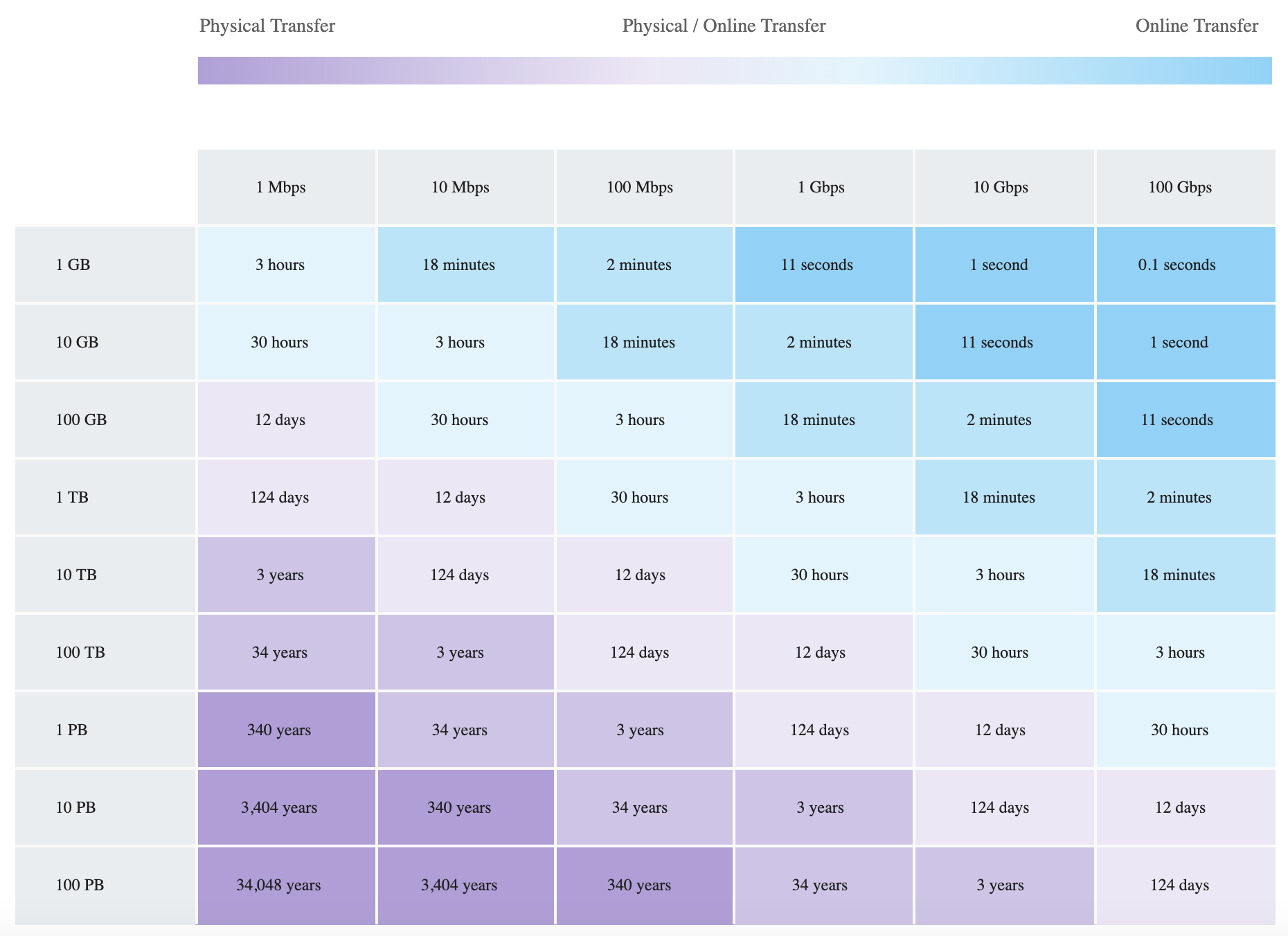
Data Transfer Chart – Bandwidth vs Time

Data Migration Speeds

AWS Certification Exam Practice Questions

  • Questions are collected from Internet and the answers are marked as per my knowledge and understanding (which might differ with yours).
  • AWS services are updated everyday and both the answers and questions might be outdated soon, so research accordingly.
  • AWS exam questions are not updated to keep up the pace with AWS updates, so even if the underlying feature has changed the question might not be updated
  • Open to further feedback, discussion and correction.
  1. An organization is moving non-business-critical applications to AWS while maintaining a mission critical application in an on-premises data center. An on-premises application must share limited confidential information with the applications in AWS. The Internet performance is unpredictable. Which configuration will ensure continued connectivity between sites MOST securely?
    1. VPN and a cached storage gateway
    2. AWS Snowball Edge
    3. VPN Gateway over AWS Direct Connect
    4. AWS Direct Connect
  2. A company wants to transfer petabyte-scale of data to AWS for their analytics, however are constrained on their internet connectivity? Which AWS service can help them transfer the data quickly?
    1. S3 enhanced uploader
    2. Snowmobile
    3. Snowball
    4. Direct Connect
  3. A company wants to transfer its video library data, which runs in exabytes, to AWS. Which AWS service can help the company transfer the data? [Note: Snowmobile was retired in March 2024. For current exabyte-scale migrations, multiple Snowball Edge devices or AWS Data Transfer Terminal would be recommended.]
    1. Snowmobile
    2. Snowball
    3. S3 upload
    4. S3 enhanced uploader
  4. You are working with a customer who has 100 TB of archival data that they want to migrate to Amazon Glacier. The customer has a 1-Gbps connection to the Internet. Which service or feature provides the fastest method of getting the data into Amazon Glacier?
    1. Amazon Glacier multipart upload
    2. AWS Storage Gateway
    3. VM Import/Export
    4. AWS Snowball
  5. A media company needs to transfer 500 TB of video content from their on-premises data center to Amazon S3. They have a 10 Gbps Direct Connect link but need the transfer completed within 1 week. Which approach is MOST appropriate?
    1. Use S3 Transfer Acceleration over the internet
    2. Use AWS DataSync over the Direct Connect link
    3. Use multiple AWS Snowball Edge devices
    4. Upload directly using the AWS CLI
  6. A company needs to regularly transfer files from a partner’s SFTP server to Amazon S3 for processing. Which AWS service provides a fully managed solution for this requirement?
    1. AWS DataSync
    2. Amazon S3 Transfer Acceleration
    3. AWS Transfer Family SFTP Connectors
    4. AWS Direct Connect
  7. A company is migrating data from Google Cloud Storage to Amazon S3. They want a managed solution that does not require deploying agents. Which AWS service and feature should they use?
    1. AWS DataSync Basic mode with an agent
    2. AWS S3 Batch Operations
    3. AWS DataSync Enhanced mode (cross-cloud transfers)
    4. AWS Transfer Family
  8. A film production company has 200 TB of raw footage on portable NAS devices after a remote shoot. They need to upload it to S3 as quickly as possible. They are near an AWS Data Transfer Terminal location. What is the FASTEST approach?
    1. Ship an AWS Snowball Edge device and transfer offline
    2. Use AWS DataSync over the internet
    3. Visit the AWS Data Transfer Terminal with their storage devices
    4. Use S3 Transfer Acceleration for parallel uploads

References