⚠️ MAJOR SERVICE CHANGES – IMPORTANT NOTICE
The AWS Snow Family has undergone significant changes in 2024-2025:
- AWS Snowcone – Discontinued effective November 12, 2024. Support for existing customers ended November 12, 2025.
- AWS Snowmobile – Retired in March 2024. Service is no longer available.
- Previous Generation Snowball Devices (80TB Storage Optimized, 52 vCPU Compute Optimized, Compute Optimized with GPU) – Discontinued November 12, 2024.
- AWS Snowball Edge – Only available to existing customers as of November 7, 2025. New customers cannot order Snowball Edge devices.
Recommended Alternatives:
- AWS DataSync – For online data transfers and migrations
- AWS Data Transfer Terminal – For secure physical data transfers at AWS locations
- AWS Outposts – For edge computing workloads
- AWS Partner Solutions – For specialized data transfer and edge needs
For details, refer to: AWS Snow Device Updates
AWS Snow Family
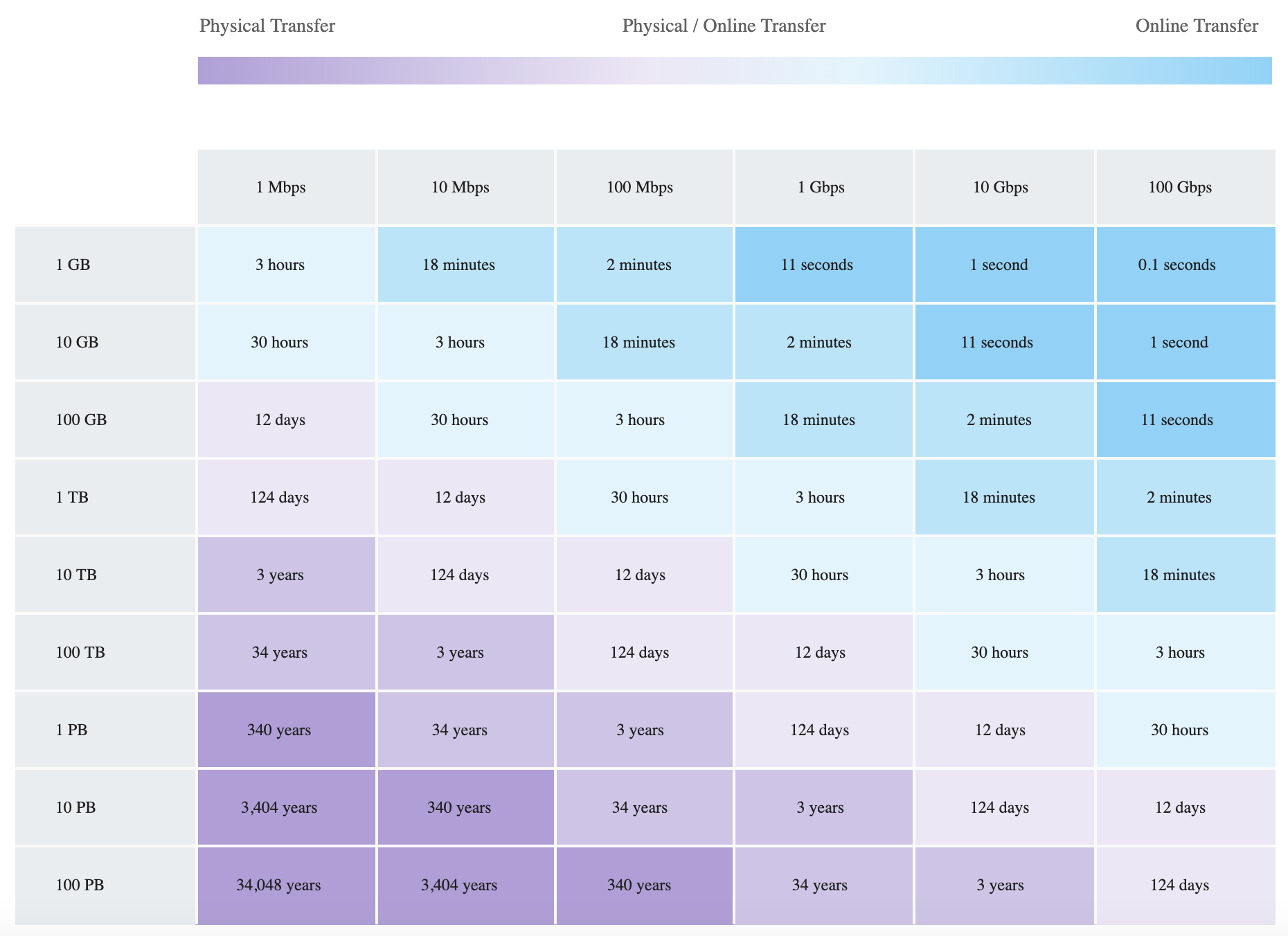
- AWS Snow Family helps physically transport up to exabytes of data into and out of AWS.
- AWS Snow Family helps customers that need to run operations in austere, non-data center environments, and in locations where there’s a lack of consistent network connectivity.
- Snow Family devices are AWS owned & managed and integrate with AWS security, monitoring, storage management, and computing capabilities.
- AWS Snow Family originally comprised of AWS Snowcone, AWS Snowball, and AWS Snowmobile. As of 2025, only AWS Snowball Edge (latest generation) remains available, and only to existing customers.
- As of November 2025, the Snow Family is effectively being wound down in favor of online data transfer services (AWS DataSync), physical transfer locations (AWS Data Transfer Terminal), and dedicated edge infrastructure (AWS Outposts).
AWS Snowcone (Discontinued – November 2024)
- AWS Snowcone was a portable, rugged, and secure device that provided edge computing and data transfer capabilities.
- Snowcone could be used to collect, process, and move data to AWS, either offline by shipping the device, or online with AWS DataSync.
- AWS Snowcone stored data securely in edge locations, and could run edge computing workloads that use AWS IoT Greengrass or EC2 instances.
- Snowcone devices were small and weigh 4.5 lbs. (2.1 kg), so they could be carried in a backpack or fit in tight spaces for IoT, vehicular, or drone use cases.
- Snowcone was available in two versions: Snowcone HDD (8TB) and Snowcone SSD (14TB).
- Alternatives: For portable edge computing, consider AWS Outposts (1U/2U servers). For data transfer, use AWS DataSync.
AWS Snowball Edge (Existing Customers Only – November 2025)
- AWS Snowball Edge is a data migration and edge computing device that comes in two latest-generation device options:
- Storage Optimized 210TB
- Provides 210 TB of high-performance NVMe storage capacity.
- Ability to transfer up to 1.5 gigabytes of data per second.
- Supports two pricing options: less than 100TB, and from 100TB to 210TB.
- Connectivity: 10GBASE-T, SFP28, and QSFP28 ports.
- Enables migration of 2PB of data per month, doubling the velocity of large migrations.
- Well-suited for multi-petabyte data migration from on-premises to AWS.
- Compute Optimized 104 vCPU
- Provides 104 vCPUs and 416 GB of RAM.
- Fully SSD with 28 TB of NVMe storage.
- Supports Amazon EC2, Amazon EBS, Amazon S3, AWS IoT Greengrass, AWS Lambda, and AWS IAM at the edge.
- Ideal for dense compute workloads such as machine learning inference or video analytics at the rugged, mobile edge.
- Storage Optimized 210TB
- Customers can use these devices for data collection, machine learning and processing, and storage in environments with intermittent connectivity (such as manufacturing, industrial, and transportation) or in extremely remote locations (such as military or maritime operations) before shipping back to AWS.
- Snowball devices may also be rack mounted and clustered together to build larger, temporary installations.
Previous Generation Devices (Discontinued – November 2024)
- Snowball Edge Storage Optimized 80TB – Discontinued. Replaced by Storage Optimized 210TB.
- Snowball Edge Compute Optimized 52 vCPU – Discontinued. Replaced by Compute Optimized 104 vCPU.
- Snowball Edge Compute Optimized with GPU – Discontinued. No direct replacement in Snow family.
AWS Snowmobile (Retired – March 2024)
- AWS Snowmobile was a 45-foot long ruggedized shipping container that could move up to 100 PB of data and was designed for multi-petabyte or exabyte-scale digital media migrations and data center shutdowns.
- A Snowmobile would arrive at the customer site and appear as a network-attached data store for secure, high-speed data transfer.
- After data was transferred to Snowmobile, it was driven back to an AWS Region where the data was loaded into S3.
- Snowmobile was tamper-resistant, waterproof, and temperature controlled with multiple layers of logical and physical security – including encryption, fire suppression, dedicated security personnel, GPS tracking, alarm monitoring, 24/7 video surveillance, and an escort security vehicle during transit.
- Alternatives: For exabyte-scale migrations, AWS recommends using multiple Snowball Edge 210TB devices, AWS DataSync over AWS Direct Connect, or AWS Data Transfer Terminal.
AWS Data Transfer Terminal (Recommended Alternative)
- AWS Data Transfer Terminal is a secure, upload-ready, physical location where customers can bring their own storage devices to transfer data to or from AWS using a high-throughput connection.
- Each terminal includes at least two 100 Gigabit Ethernet (100 GbE) ports.
- Supports upload to any AWS endpoint including Amazon S3, Amazon EFS, and other AWS services.
- Customers can reserve date and time to visit a terminal location through the AWS Management Console.
- Pricing is based on the number of ports actively used during the reservation (charged per port-hour).
- Available in multiple locations globally (expanding to new cities including Munich, San Francisco Bay Area, and others).
- Use cases include media production data ingestion, large-scale data migrations, and autonomous vehicle data processing.
- Unlike Snow devices, customers use their own storage hardware and transfer data on-site at AWS locations.
- For details, refer to: AWS Data Transfer Terminal
AWS DataSync (Recommended for Online Transfers)
- AWS DataSync is an online data movement service that simplifies and accelerates data migrations to AWS.
- Moves data quickly and securely between on-premises storage, edge locations, other cloud providers, and AWS Storage services.
- Automates scheduling, monitoring, encryption, and data verification.
- Supports transfer between on-premises NFS, SMB, HDFS, self-managed object storage, AWS Snow, S3, EFS, FSx, and other cloud providers (Google Cloud Storage, Azure Files).
- Enhanced mode (launched May 2025) simplifies cross-cloud transfers by removing the need for a DataSync agent.
- Compresses data before transit, identifies only changed objects, and automatically recovers from network interruptions.
- Integrates with Amazon CloudWatch and Amazon EventBridge for monitoring.
- For details, refer to: AWS DataSync
Migration Decision Guide
- Online transfer with sufficient bandwidth: Use AWS DataSync (preferred approach for most workloads).
- Large data volume with limited bandwidth (existing Snow customers): Use Snowball Edge Storage Optimized 210TB.
- Physical transfer with own hardware: Use AWS Data Transfer Terminal.
- High-bandwidth dedicated connection: Use AWS DataSync over AWS Direct Connect.
- Edge computing needs: Use AWS Outposts (1U/2U servers or 42U racks).
- Specialized requirements: Explore AWS Partner solutions.
AWS Snow Family Feature Comparison (Historical)
| Feature | Snowcone (Discontinued) | Snowball Edge Storage Optimized 210TB | Snowball Edge Compute Optimized 104 vCPU | Snowmobile (Retired) |
|---|---|---|---|---|
| Status | Discontinued (Nov 2024) | Existing customers only (Nov 2025) | Existing customers only (Nov 2025) | Retired (March 2024) |
| Storage Capacity | 8TB HDD / 14TB SSD | 210 TB NVMe | 28 TB NVMe SSD | Up to 100 PB |
| Compute | 2 vCPUs, 4 GB RAM | 40 vCPUs, 80 GB RAM | 104 vCPUs, 416 GB RAM | N/A |
| Transfer Speed | Up to 10 Gbps | Up to 1.5 GB/s (100 GbE) | Up to 100 Gbps | Up to 1 Tbps |
| Use Case | IoT, remote data collection | Multi-PB data migration | ML inference, video analytics | Exabyte-scale migration |
AWS Certification Exam Practice Questions
- Questions are collected from Internet and the answers are marked as per my knowledge and understanding (which might differ with yours).
- AWS services are updated everyday and both the answers and questions might be outdated soon, so research accordingly.
- AWS exam questions are not updated to keep up the pace with AWS updates, so even if the underlying feature has changed the question might not be updated
- Open to further feedback, discussion and correction.
- A company wants to transfer petabyte-scale of data to AWS for their analytics, however are constrained on their internet connectivity? Which AWS service can help them transfer the data quickly?
- S3 enhanced uploader
- Snowmobile
- Snowball
- Direct Connect
Note: While Snowball Edge is now limited to existing customers (Nov 2025), this question tests the concept of offline physical data transfer. For new customers, AWS Data Transfer Terminal is the recommended physical transfer alternative.
- A company wants to transfer its video library data, which runs in exabytes, to AWS. Which AWS service can help the company transfer the data?
- Snowmobile
- Snowball
- S3 upload
- S3 enhanced uploader
Note: Snowmobile was retired in March 2024. For exabyte-scale transfers today, AWS recommends using multiple Snowball Edge 210TB devices (for existing customers) or AWS Data Transfer Terminal combined with AWS DataSync over Direct Connect.
- A company needs to migrate 500 TB of data to AWS but has limited internet bandwidth. They are a new AWS customer as of 2025. Which approach should they use? (Select TWO)
- Order AWS Snowball Edge devices
- Use AWS Data Transfer Terminal
- Use AWS Snowcone
- Use AWS DataSync over AWS Direct Connect
- Use AWS Snowmobile
- A media company captures large volumes of video data at remote locations and needs to transfer it to AWS for processing. They have minimal internet connectivity. Which current AWS service provides a physical location for high-speed data upload?
- AWS Snowcone
- AWS Snowball
- AWS Direct Connect
- AWS Data Transfer Terminal
- A company requires edge computing capabilities at a remote site with no internet connectivity and needs to run ML inference workloads. Which AWS service should they consider as of 2025?
- AWS Snowcone
- AWS Outposts
- AWS Snowmobile
- AWS Data Transfer Terminal
Note: For edge computing, AWS recommends Outposts (1U/2U servers or 42U racks) as the long-term solution. Snowball Edge Compute Optimized is still available to existing customers but is not open to new customers.