Google Cloud Compute Engine Storage Options
Hyperdisk
- Hyperdisk is the fastest and most efficient durable block storage for Compute Engine, recommended by Google for boot and data disks.
- Hyperdisk leverages Google’s Titanium storage offload technology for higher IOPS and throughput than Persistent Disk.
- Hyperdisk volumes are durable network storage devices that function as physical disks attached to compute instances.
- Hyperdisk provides customizable performance — IOPS and throughput can be configured independently and adjusted dynamically while in use.
- Hyperdisk volumes are portable and can be detached from one instance and attached to another.
- Hyperdisk provides built-in torn write protection with an atomic write unit of 128 KB, which can improve database write throughput by up to 25% by eliminating the need for doublewrite buffers.
- Hyperdisk supports Confidential Computing mode for Hyperdisk Balanced volumes attached to Confidential VMs.
Hyperdisk Types
- Hyperdisk Balanced — Best fit for most workloads; supports boot disks, virtual desktops, databases (Postgres, MySQL). Max 160,000 IOPS / 2,400 MiB/s throughput. Supports multi-writer (up to 8 instances).
- Hyperdisk Balanced High Availability — Synchronously replicates data across two zones in the same region. Max 100,000 IOPS / 2,400 MiB/s. Supports multi-writer (up to 8 instances). Designed for RPO of 0.
- Hyperdisk Extreme — Highest IOPS for demanding workloads (SAP HANA, Oracle, SQL Server). Max 350,000 IOPS / 5,000 MiB/s throughput.
- Hyperdisk Throughput — High throughput for scale-out analytics (Hadoop, Spark, Kafka) and cold storage. Max 2,400 MiB/s. Cost-effective for capacity-intensive applications.
- Hyperdisk ML — Designed for AI/ML inference and training; supports read-only attachment to up to 2,500 instances simultaneously. Highest read-only throughput.
Hyperdisk Storage Pools
- Hyperdisk Storage Pools allow purchasing capacity and performance in bulk, reducing storage TCO by up to 40%.
- Simplifies planning with thin provisioning, data reduction, and capacity pooling.
- Supports Hyperdisk Balanced and Hyperdisk Throughput volumes.
- Hyperdisk Exapools are designed for workloads requiring 1 PiB+ capacity or 1 TiB/s+ throughput per zone (e.g., large-scale AI/ML, parallel file systems).
Hyperdisk High Availability & Disaster Recovery
- Cross-zonal (synchronous) — Hyperdisk Balanced High Availability replicates data synchronously between two zones in the same region.
- Cross-regional (asynchronous) — Asynchronous Replication continuously copies data to a secondary region. Supported for Hyperdisk Balanced, Hyperdisk Extreme, and Hyperdisk Balanced High Availability.
Hyperdisk Machine Series Support
- Hyperdisk Balanced is supported on C3, C3D, C4, C4A, C4D, N4, N4A, N4D, M3, M4, A3, A4, G4, Z3 and other 3rd-gen+ machine series.
- Older machine series (N1, E2, C2, C2D, T2A) do not support Hyperdisk and must use Persistent Disk.
- Generally, use Hyperdisk Balanced High Availability for 3rd-gen+ machine series and Regional Persistent Disks for 2nd-gen or older.
Persistent Disk
- Persistent disks are durable network storage devices that the instances can access like physical disks in a desktop or a server.
- Persistent disks are used as boot disks.
- Data on each persistent disk is distributed across several physical disks.
- Compute Engine manages the physical disks and the data distribution to ensure redundancy and optimal performance.
- Persistent disks are located independently from the VM instances and can be detached or moved to keep the data even after the instance is deleted.
- Persistent disk performance scales automatically with size, so they can be resized or additional ones added to meet the performance and storage space requirements.
- Google now recommends Hyperdisk for highest performance and advanced features on supported machine series.
Persistent Disk Types
- Standard persistent disks (pd-standard) are backed by standard hard disk drives (HDD).
- Balanced persistent disks (pd-balanced) are backed by solid-state drives (SSD). They are an alternative to SSD persistent disks that balance performance and cost.
- SSD persistent disks (pd-ssd) are backed by solid-state drives (SSD).
- Extreme persistent disks (pd-extreme) provide configurable IOPS (2,500 to 120,000) with SSD-backed storage for high-performance database workloads like SAP HANA and SQL Server.
Zonal Persistent Disks
- Zonal persistent disks provide durable storage and replication of data within a single zone in a region.
- Persistent disks have built-in redundancy to protect the data against equipment failure and to ensure data availability through datacenter maintenance events.
- For additional space on the persistent disks, resize the disks and resize the single file system rather than repartitioning and formatting.
- Compute Engine automatically encrypts the data in transit, before it travels outside of the instance to persistent disk storage space.
- Zonal persistent disk remains encrypted either with system-defined keys or with customer-supplied keys.
Regional Persistent Disks
- Regional persistent disks provide durable storage and replication of data between two zones in the same region.
- Regional persistent disks are also designed to work with regional managed instance groups.
- Zonal outage can be handled by force attaching the disk to the standby instance, even if the disk can’t be detached from the original VM.
- Regional persistent disks are designed for
- workloads that require a lower RPO and RTO compared to using persistent disk snapshots.
- write performance is less critical than data redundancy across multiple zones.
- Regional persistent disks cannot be used with memory-optimized machines and compute-optimized machines.
- For 3rd-gen+ machine series, Google recommends Hyperdisk Balanced High Availability instead of Regional Persistent Disks.
Local SSD
- Local SSDs are physically attached to the server that hosts the VM instance.
- Local SSDs have higher throughput and lower latency than standard persistent disks or SSD persistent disks.
- Data stored on a local SSD persists only until the instance is stopped or deleted.
- Local SSD disks cannot be used as boot disks.
- Local SSD disks can be attached only during instance creation, and not once the instance is created.
- Local SSDs performance gains require certain trade-offs in availability, durability, and flexibility. Because of these trade-offs, Local SSD storage isn’t automatically replicated and all data on the local SSD might be lost if the instance terminates for any reason.
- Each local SSD is 375 GB in size, but a maximum of 24 local SSD partitions can be attached for a total of 9 TB per instance.
- Compute Engine automatically encrypts the data when it is written to local SSD storage space. Customer-supplied encryption keys is not supported with local SSDs.
Local SSD on Newer Machine Series
- For C3, C3D, C4, and C4D machine series, Local SSD is available only with specific machine types that end in
-lssd(e.g.,c3-standard-88-lssd,c4-standard-96-lssd). - For Z3, A4X, A4, A3, and A2 Ultra machine series, every machine type comes with Local SSD storage.
- C4 VMs with Intel Xeon 6 (Granite Rapids) use Titanium Local SSD with up to 35% lower access latency compared to prior generations.
- Local SSD cannot be used with shared-core machine types (e.g., E2).
Cloud Storage Buckets
- Cloud Storage buckets are the most flexible, scalable, and durable storage option for the VM instances.
- Cloud Storage is ideal if you don’t require the lower latency of Persistent Disks and Local SSDs, and can store the data in a Cloud Storage bucket.
- Performance of Cloud Storage depends on the selected storage class.
- Standard storage class used in the same location as the instance gives performance that is comparable to persistent disks but with higher latency and less consistent throughput characteristics.
- Cloud Storage buckets have built-in redundancy to protect the data against equipment failure and to ensure data availability through datacenter maintenance events.
- Cloud Storage buckets aren’t restricted to the zone where the instance is located. Multiregional Cloud Storage buckets store the data redundantly across at least two regions within a larger multiregional location.
- Cloud Storage bucket can be mounted on the instance as a file system using Cloud Storage FUSE (gcsfuse).
- Cloud Storage allows read and write data to a bucket from multiple instances simultaneously.
- However, Cloud Storage buckets are object stores that don’t have the same write constraints as a POSIX file system and can’t be used as boot disks. Multiple instances working on the same file can lead to overwritten data.
- Cloud Storage supports both encryption at rest and in transit.
Cloud Storage FUSE
- Cloud Storage FUSE (gcsfuse) is a fully supported, GA product that allows mounting Cloud Storage buckets as local file systems on Compute Engine instances.
- Particularly beneficial for AI/ML workloads that use frameworks requiring file-based data access (PyTorch, TensorFlow).
- Supports caching, parallel downloads, and performance profiles for optimized workloads.
- Provides a cost-effective alternative to persistent disk storage for read-heavy workloads.
Filestore
- Filestore provides high-performance, fully managed network-attached storage (NAS) file storage using NFSv3 and NFSv4.1 protocols.
- Filestore is ideal for workloads requiring a shared file system across multiple Compute Engine instances.
Filestore Service Tiers
- Basic (HDD/SSD) — Entry-level, single-zone file storage for development and testing.
- Zonal — High-performance, single-zone storage with up to 26 GiB/s throughput. Ideal for AI/ML training workloads.
- Regional — Multi-zone availability within a region for business-critical workloads.
- Enterprise — Multi-zone, multi-share capable, regional resilience for mission-critical enterprise workloads. Supports the Filestore CSI driver for GKE.
Storage Options Comparison
| Feature | Hyperdisk | Persistent Disk | Local SSD | Cloud Storage | Filestore |
|---|---|---|---|---|---|
| Type | Network block storage | Network block storage | Locally attached | Object storage | Managed NFS |
| Durability | 99.999%–99.9999% | 99.999%–99.9999% | Not durable (ephemeral) | 99.999999999% (11 nines) | Regional redundancy |
| Boot Disk | Yes (Balanced only) | Yes | No | No | No |
| Performance | Up to 350K IOPS / 5,000 MiB/s | Up to 120K IOPS (Extreme) | Very high (lowest latency) | High throughput, higher latency | Up to 26 GiB/s (Zonal) |
| Multi-VM Access | Yes (multi-writer / read-only) | Yes (multi-writer / read-only) | No (single VM only) | Yes | Yes |
| Encryption | Google-managed / CMEK / Confidential | Google-managed / CMEK / CSEK | Automatic (no CSEK) | Google-managed / CMEK / CSEK | Google-managed / CMEK |
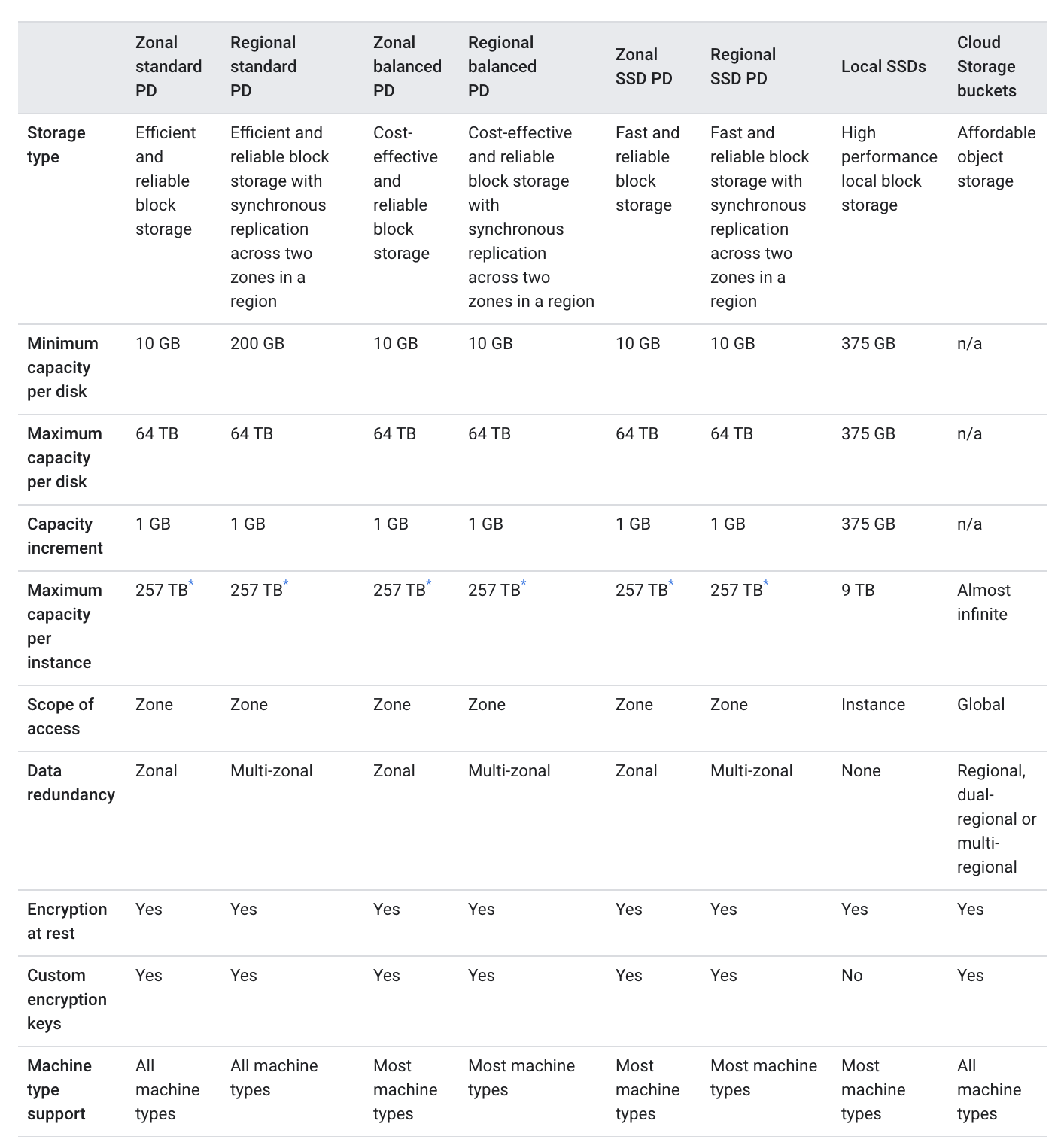
Storage Options Performance Comparison

GCP Certification Exam Practice Questions
- Questions are collected from Internet and the answers are marked as per my knowledge and understanding (which might differ with yours).
- GCP services are updated everyday and both the answers and questions might be outdated soon, so research accordingly.
- GCP exam questions are not updated to keep up the pace with GCP updates, so even if the underlying feature has changed the question might not be updated
- Open to further feedback, discussion and correction.
- A company needs block storage for a database running on a C4 machine that requires the highest IOPS with configurable performance. Which storage option should they use?
- Persistent Disk SSD (pd-ssd)
- Hyperdisk Balanced
- Hyperdisk Extreme
- Local SSD
Show Answer
Answer: c – Hyperdisk Extreme provides the highest IOPS (up to 350,000) with configurable performance on C4 machine series.
- An organization wants to ensure zero data loss (RPO = 0) across zones for their mission-critical application running on C3 VMs. Which storage option provides this?
- Regional Persistent Disk
- Hyperdisk Balanced High Availability
- Hyperdisk Balanced with Asynchronous Replication
- Cloud Storage with multi-region bucket
Show Answer
Answer: b – Hyperdisk Balanced High Availability synchronously replicates data across two zones within the same region with RPO of 0. For 3rd-gen+ machine series, it is preferred over Regional Persistent Disks.
- A data science team needs to share a large ML model dataset across 500 GPU instances for inference. Which storage type is most appropriate?
- Hyperdisk Balanced with multi-writer
- Hyperdisk ML
- Hyperdisk Throughput
- Cloud Storage
Show Answer
Answer: b – Hyperdisk ML supports read-only attachment to up to 2,500 instances simultaneously and provides the highest read-only throughput, making it ideal for ML inference workloads.
- Which of the following statements about Local SSD on newer machine series (C3, C4) is correct?
- Local SSD can be attached to any C4 machine type after instance creation
- Local SSD is available only on machine types ending in -lssd (e.g., c3-standard-88-lssd)
- Local SSD is automatically attached to all C3 machine types
- Local SSD on C4 uses HDD storage for cost savings
Show Answer
Answer: b – For C3, C3D, C4, and C4D machine series, Local SSD is only available with specific machine types ending in -lssd.
- A company has a Hadoop cluster requiring high throughput, low-cost storage. Which Hyperdisk type is most suitable?
- Hyperdisk Balanced
- Hyperdisk Extreme
- Hyperdisk Throughput
- Hyperdisk ML
Show Answer
Answer: c – Hyperdisk Throughput is designed for scale-out analytics workloads like Hadoop, Spark, and Kafka, providing high throughput at a cost-effective price.
- Which Hyperdisk feature can improve MySQL database write performance by up to 25%?
- Customizable IOPS
- Torn write protection
- Storage Pools
- Multi-writer mode
Show Answer
Answer: b – Hyperdisk’s built-in torn write protection eliminates the need for database-level doublewrite buffers, increasing write throughput by up to 25%.
- An organization running N1 VMs needs high-performance block storage. Which storage option is available?
- Hyperdisk Balanced
- Hyperdisk Extreme
- Extreme Persistent Disk (pd-extreme)
- Hyperdisk ML
Show Answer
Answer: c – N1 machine series does not support any Hyperdisk type. Extreme Persistent Disk (pd-extreme) is available for high-performance needs on older machine series.
- Which storage option should be used to protect Hyperdisk data from a regional outage?
- Hyperdisk Balanced High Availability
- Regional Persistent Disk
- Asynchronous Replication
- Cloud Storage multi-region bucket
Show Answer
Answer: c – Asynchronous Replication maintains a copy of Hyperdisk data in another region for cross-regional disaster recovery. Hyperdisk Balanced HA only protects against zonal outages within a region.