Google Kubernetes Engine – Networking
IP allocation
Kubernetes uses various IP ranges to assign IP addresses to Nodes, Pods, and Services.
- Node IP
- Each node has an IP address assigned from the cluster’s VPC network.
- Node IP provides connectivity from control components like
kube-proxyandkubeletto the Kubernetes API server. - Node IP is the node’s connection to the rest of the cluster.
- Pod CIDR or Address Range
- Each node has a pool of IP addresses that GKE assigns the Pods running on that node (a /24 CIDR block by default).
- With Multi-Pod CIDR (GKE 1.29+), additional Pod IP address ranges can be added to an existing cluster without recreating it.
- Pod Address
- Each Pod has a single IP address assigned from the Pod CIDR range of its node.
- Pod IP address is shared by all containers running within the Pod and connects them to other Pods running in the cluster.
- Service Address Range
- Each Service has an IP address, called the ClusterIP, assigned from the cluster’s VPC network.
- For Standard clusters
- a maximum of 110 Pods can run on a node with a /24 range, not 256 as you might expect. This provides a buffer so that Pods don’t become unschedulable due to a transient lack of IP addresses in the Pod IP range for a given node.
- For ranges smaller than /24, roughly half as many Pods can be scheduled as IP addresses in the range.
- Autopilot clusters can run a maximum of 32 Pods per node.
GKE Cluster Networking Types
- GKE, clusters can be distinguished according to the way they route traffic from one Pod to another Pod.
- VPC-native cluster: A cluster that uses alias IP address ranges (recommended and default)
- Routes-based cluster: A cluster that uses custom static routes in a VPC network (legacy, not recommended for new clusters)
- GKE clusters can also be distinguished by their dataplane:
- GKE Dataplane V2 (default for Autopilot): Uses eBPF/Cilium for packet processing, replacing iptables and kube-proxy
- Legacy Dataplane: Uses iptables and kube-proxy with Calico for network policy
VPC-Native Clusters
- VPC-native cluster uses alias IP address ranges
- VPC-native is the default and recommended network mode for all new clusters
- VPC-native clusters have several benefits:
- Pod IP addresses are natively routable within the cluster’s VPC network and other VPC networks connected to it by VPC Network Peering.
- Pod IP address ranges, and subnet secondary IP address ranges in general, are accessible from on-premises networks connected with Cloud VPN or Cloud Interconnect using Cloud Routers.
- Pod IP addresses are reserved in the VPC network before the Pods are created in the cluster. This prevents conflict with other resources in the VPC network and allows you to better plan IP address allocations.
- Pod IP address ranges do not depend on custom static routes and do not consume the system-generated and custom static routes quota. Instead, automatically generated subnet routes handle routing for VPC-native clusters.
- Firewall rules can be created that apply to just Pod IP address ranges instead of any IP address on the cluster’s nodes.
- Supports GKE Dataplane V2 with eBPF-based networking
- Required for multi-network support for Pods (multi-NIC)
VPC-Native Clusters IP Allocation
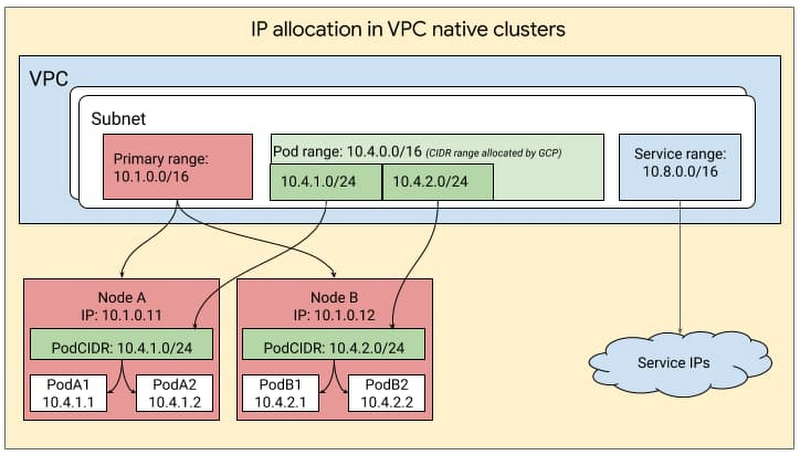
- VPC-native cluster uses three unique subnet IP address ranges
- Subnet’s primary IP address range for all node IP addresses.
- Node IP addresses are assigned from the primary IP address range of the subnet associated with the cluster.
- Both node IP addresses and the size of the subnet’s secondary IP address range for Pods limit the number of nodes that a cluster can support
- One secondary IP address range for all Pod IP addresses.
- Pod IP addresses are taken from the cluster subnet’s secondary IP address range for Pods.
- By default, GKE allocates a
/24alias IP range (256 addresses) to each node for the Pods running on it. - On each node, those 256 alias IP addresses support up to 110 Pods.
- Pod Address Range previously could not be changed once created. However, with Multi-Pod CIDR (available since GKE 1.29), additional Pod IP address ranges can now be added to an existing cluster.
- Allows adding discontiguous secondary ranges for Pod IPs without recreating the cluster.
- If the original range is exhausted, add a new Pod CIDR range using
gcloud container clusters update. - Alternatively, node pools can be recreated with decreased
--max-pods-per-nodesettings.
- Another secondary IP address range for all Service (cluster IP) addresses.
- Service (cluster IP) addresses are taken from the cluster’s subnet’s secondary IP address range for Services.
- Service address range should be large enough to provide addresses for all the Kubernetes Services hosted in the cluster.
- Subnet’s primary IP address range for all node IP addresses.
- Node, Pod, and Services IP address ranges must all be unique and subnets with overlapping primary and secondary IP addresses cannot be created.
Routes-based Cluster
- Routes-based cluster that uses custom static routes in a VPC network i.e. it uses Google Cloud Routes to route traffic between nodes
- In a routes-based cluster,
- each node is allocated a /24 range of IP addresses for Pods.
- With a /24 range, there are 256 addresses, but the maximum number of Pods per node is 110.
- With approximately twice as many available IP addresses as possible Pods, Kubernetes is able to mitigate IP address reuse as Pods are added to and removed from a node.
- Routes-based cluster uses two unique subnet IP address ranges
- Subnet’s primary IP address range for all node IP addresses.
- Node IP addresses are taken from the primary range of the cluster subnet
- Cluster subnet must be large enough to hold the total number of nodes in your cluster.
- Pod address range
- A routes-based cluster has a range of IP addresses that are used for Pods and Services
- Last /20 (4096 addresses) of the Pod address range is used for Services and the rest of the range is used for Pods
- Pod address range size cannot be changed after cluster creation. So ensure that a large enough Pod address range is chosen to accommodate the cluster’s anticipated growth during cluster creation
- Subnet’s primary IP address range for all node IP addresses.
- Maximum number of nodes, Pods, and Services for a given GKE cluster is determined by the size of the cluster subnet and the size of the Pod address range.
- Routes-based clusters do not support GKE Dataplane V2, multi-network Pods, or many newer GKE networking features.
GKE Dataplane V2
- GKE Dataplane V2 is a modern dataplane optimized for Kubernetes networking, powered by eBPF and Cilium.
- Enabled by default for all new Autopilot clusters.
- Replaces iptables and kube-proxy with eBPF programs for packet processing, routing, load balancing, and network policy enforcement.
- Key benefits:
- Scalability: Removes iptables bottlenecks; supports up to 260,000 endpoints across all services via eBPF maps.
- Security: Kubernetes NetworkPolicy is always enabled without needing third-party add-ons like Calico.
- Observability: Built-in network policy logging and Hubble integration for real-time traffic visibility.
- Consistency: Unified networking behavior across GKE environments.
- SCTP Support: Supports Stream Control Transmission Protocol workloads.
- Implementation:
- Deploys a DaemonSet named
anetdin thekube-systemnamespace on each node. anetdinterprets Kubernetes objects and programs network topologies using eBPF.- Does not use kube-proxy or iptables for service routing.
- Deploys a DaemonSet named
- Cluster scale with Dataplane V2:
- Up to 15,000 nodes per regional cluster (65,000 with scale-optimized mode that disables network policy enforcement).
- Up to 400,000 Pods per cluster.
- Up to 10,000 ClusterIP Services.
- Limitations:
- Can only be enabled at cluster creation time; existing clusters cannot be upgraded.
- Custom eBPF programs are not supported on Dataplane V2 nodes.
- Third-party eBPF tools may interfere with Dataplane V2 programs.
- Supports Cilium Cluster-wide Network Policies for centralized network rule enforcement across all namespaces.
- Refer GKE Dataplane V2
GKE Network Isolation (Control Plane & Node Access)
- As of January 2025, GKE has simplified cluster networking by decoupling control-plane access from node-pool IP configuration.
- The terms “public cluster” and “private cluster” are being replaced with flexible network isolation settings.
- Control plane access and node configuration can now be changed at any time without recreating the cluster.
- Control Plane Access Methods:
- DNS-based endpoint (new, recommended): Uses IAM and authentication-based policies for dynamic, flexible access. Works with VPC Service Controls for multi-layer security.
- Public IP-based endpoint: Traditional external access with authorized networks.
- Private IP-based endpoint: Access restricted to private networks (VPC Peering or Private Service Connect-based clusters). Can now be locked down to specific RFC-1918 addresses.
- All three endpoints can be enabled simultaneously or in any combination.
- Node Pool Flexibility:
- Each node pool has its own network configuration (public/private IP).
- Public IPs can be attached or detached from node pools independently at any time.
- Traffic between nodes and the control plane is always private regardless of configuration.
- Private Service Connect (PSC): Newer clusters use PSC instead of VPC Peering for control-plane connectivity, eliminating VPC peering complexity.
- Refer GKE Network Isolation
Gateway API (Recommended for Service Networking)
- The Gateway API is the recommended evolution of Kubernetes service networking, replacing traditional Ingress resources.
- Key advantages over Ingress:
- Role-oriented: Separate API resources for cluster operators (Gateway), developers (HTTPRoute), and infrastructure providers (GatewayClass).
- Expressive: Built-in support for header-based matching, traffic weighting, and traffic splitting without custom annotations.
- Portable: Consistent concepts across environments with a core conformance model.
- Multi-namespace: A single Gateway can serve routes across multiple namespaces.
- GKE Gateway supports:
- External and Internal Application Load Balancers
- Frontend mTLS (client certificate validation) — 2025
- Cloud CDN integration
- Multi-cluster Gateways for cross-cluster load balancing
- All Ingress resources are directly convertible to Gateway and HTTPRoute resources.
- Refer GKE Gateway API
GKE Inference Gateway
- GKE Inference Gateway is a specialized networking layer for AI/ML inference workloads, announced in 2025.
- Extends the GKE Gateway to optimize serving of generative AI applications.
- Key features:
- Model-aware routing: Routes traffic to inference pools of model replicas based on model name.
- Predicted latency-based routing: Routes requests to the model server with the lowest predicted latency.
- Body-based routing: Routes based on request body content.
- Prefix caching: Accelerates inference by caching common prompt prefixes.
- Multi-cluster support: Scale AI workloads across clusters and regions.
- Benchmarks show 15.7% higher throughput, 92.8% shorter wait times, and 62.6% lower inter-token latency vs. competing solutions.
- Refer GKE Inference Gateway
Multi-Network Support for Pods
- GKE supports attaching multiple network interfaces (multi-NIC) to Pods, removing the single-interface limitation.
- Requires GKE Dataplane V2 and VPC-native clusters.
- Use cases:
- Separating control plane traffic from data plane traffic.
- Network isolation between different workload types.
- Multicast capability for Pods.
- High-performance RDMA networking for AI/GPU workloads (via DRANET).
- Pods can connect to up to 8 networks (default + 7 additional).
- DRANET (Dynamic Resource Allocation for Networking): Specifically designed for AI workloads running across multiple GPUs, enabling RDMA network interface allocation for high-throughput inter-GPU communication.
- Supports multi-network network policies for per-interface traffic control.
- Refer Multi-Network Support for Pods
IPv6 Dual-Stack Networking
- GKE supports dual-stack (IPv4 and IPv6) networking for clusters.
- Available for Standard clusters (GKE 1.24+) and Autopilot clusters (GKE 1.25+).
- Dual-stack clusters assign both IPv4 and IPv6 addresses to Pods and Services.
- Requirements:
- VPC-native clusters only.
- Dual-stack subnets with both IPv4 and IPv6 ranges.
- For internal IPv6, VPC must be custom mode with ULA internal IPv6 enabled.
- Enables applications to serve both IPv4 and IPv6 clients without separate infrastructure.
Related Reads
GCP Certification Exam Practice Questions
- Questions are collected from Internet and the answers are marked as per my knowledge and understanding (which might differ with yours).
- GCP services are updated everyday and both the answers and questions might be outdated soon, so research accordingly.
- GCP exam questions are not updated to keep up the pace with GCP updates, so even if the underlying feature has changed the question might not be updated
- Open to further feedback, discussion and correction.
Questions on GKE Networking Updates:
- Your organization runs a GKE cluster that is running out of Pod IP addresses. What is the best approach to address this without downtime?
- Recreate the cluster with a larger Pod CIDR range
- Use Multi-Pod CIDR to add additional Pod IP address ranges to the existing cluster
- Migrate to a routes-based cluster with more IP space
- Reduce the number of Pods per node
Show Answer
Answer: b – Multi-Pod CIDR (GKE 1.29+) allows adding discontiguous Pod IP ranges to existing VPC-native clusters without recreation.
- Which of the following are advantages of GKE Dataplane V2 over the legacy dataplane? (Choose THREE)
- Uses eBPF instead of iptables for packet processing
- Built-in Kubernetes NetworkPolicy enforcement without third-party add-ons
- Can be enabled on existing clusters via an upgrade
- Provides real-time network observability via Hubble
- Requires manual installation of Calico for network policies
Show Answer
Answer: a, b, d – Dataplane V2 uses eBPF/Cilium replacing iptables/kube-proxy, has built-in NetworkPolicy (no Calico needed), and integrates Hubble for observability. It can only be enabled at cluster creation.
- A company wants to change their GKE cluster from publicly accessible to private without recreating it. Which GKE networking feature enables this?
- VPC Peering-based private clusters
- Routes-based cluster configuration
- GKE flexible network isolation with DNS-based endpoints
- Cloud NAT configuration
Show Answer
Answer: c – Since January 2025, GKE allows changing control-plane access and node-pool configuration at any time without cluster recreation. DNS-based endpoints provide IAM-based dynamic security.
- Your team needs to expose multiple HTTP services across different namespaces using a single load balancer with traffic splitting capabilities. Which GKE networking resource should you use?
- Kubernetes Ingress with annotations
- GKE Gateway with HTTPRoute resources
- LoadBalancer Service per application
- Cloud DNS with round-robin
Show Answer
Answer: b – Gateway API is the recommended approach for HTTP service networking in GKE. A single Gateway can serve routes across namespaces with built-in traffic splitting.
- An AI team needs high-throughput RDMA networking between GPU pods in their GKE cluster. Which feature should they use?
- Standard Pod networking with increased MTU
- Multi-network support for Pods with DRANET
- Routes-based cluster with custom routes
- GKE Inference Gateway
Show Answer
Answer: b – DRANET (Dynamic Resource Allocation for Networking) enables allocation of RDMA network interfaces for high-throughput inter-GPU communication in AI workloads.
- What is the maximum number of nodes supported in a GKE regional cluster with Dataplane V2?
- 5,000 nodes
- 15,000 nodes
- 65,000 nodes with scale-optimized mode
- 1,000 nodes
Show Answer
Answer: c – GKE supports up to 65,000 nodes in regional clusters with Dataplane V2 scale-optimized mode (which disables network policy enforcement). Standard regional clusters support up to 15,000 nodes.