AWS Transit Gateway – TGW
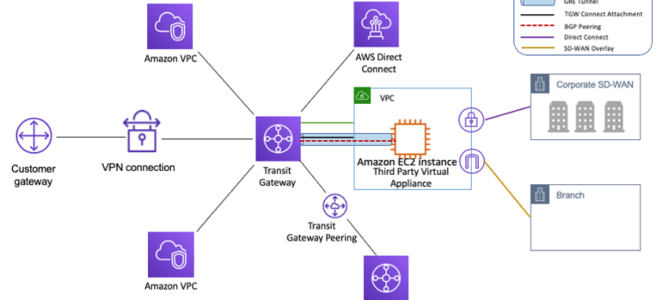
- AWS Transit Gateway – TGW is a highly available and scalable service to consolidate the AWS VPC routing configuration for a region with a hub-and-spoke architecture.
- acts as a Regional virtual router and is a network transit hub that can be used to interconnect VPCs and on-premises networks.
- traffic always stays on the global AWS backbone, data is automatically encrypted, and never traverses the public internet, thereby reducing threat vectors, such as common exploits and DDoS attacks.
- is a Regional resource and can connect thousands of VPCs within the same AWS Region.
- TGWs across different regions can peer with each other to enable VPC communications across regions.
- Each spoke VPC only needs to connect to the TGW to gain access to other connected VPCs.
- provides simpler VPC-to-VPC communication management over VPC Peering with a large number of VPCs.
- scales elastically based on the volume of network traffic.
- TGW routing operates at layer 3, where the packets are sent to a specific next-hop attachment, based on their destination IP addresses.
- AWS Resource Access Manager – RAM can be used to share the TGW with other accounts.
- supports Path Maximum Transmission Unit Discovery (PMTUD) for both IPv4 and IPv6, allowing effective mitigation against MTU mismatch issues. (Added Nov 2024)
Transit Gateway Attachments
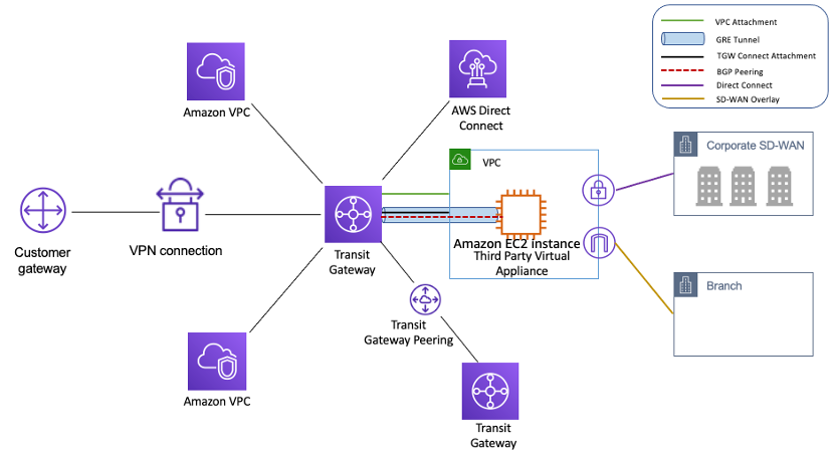
- Transit Gateway attachment is the connection between resources like VPC, VPN, Direct Connect, and the TGW.
- TGW attachment is both a source and a destination of packets.
- TGW supports the following attachments
- One or more VPCs
- One or more VPN connections
- One or more AWS Direct Connect Gateways
- One or more Transit Gateway Connect attachments
- One or more Transit Gateway peering connections
- One or more Connect SD-WAN/third-party network appliance
- One or more VPN Concentrator attachments (Added Nov 2025)
- AWS Client VPN native attachment (Added Apr 2026)
- AWS Network Firewall native attachment (Added Jul 2025)
Transit Gateway Routing
- Transit Gateway routes IPv4 and IPv6 packets between attachments using transit gateway route tables.
- Route tables can be configured to propagate routes from the route tables for the attached VPCs, VPN connections, and Direct Connect gateways.
- When a packet comes from one attachment, it is routed to another attachment using the route that matches the destination IP address.
- VPC attached to a TGW must be added a route to the subnet route table in order for traffic to route through the TGW.
Transit Gateway Security Group Referencing
- Transit Gateway supports Security Group Referencing across VPCs connected to the same TGW within the same Region. (GA Sep 2024)
- allows creating inbound security group rules that reference security groups defined in other VPCs attached to the transit gateway.
- simplifies security group management by eliminating the need to hard-code IPv4/IPv6 address ranges for cross-VPC communication.
- improves security posture for TGW-based networks by providing more granular, identity-based access control.
- must be enabled on the VPC attachment by setting the
SecurityGroupReferencingSupportoption.
Transit Gateway Peering
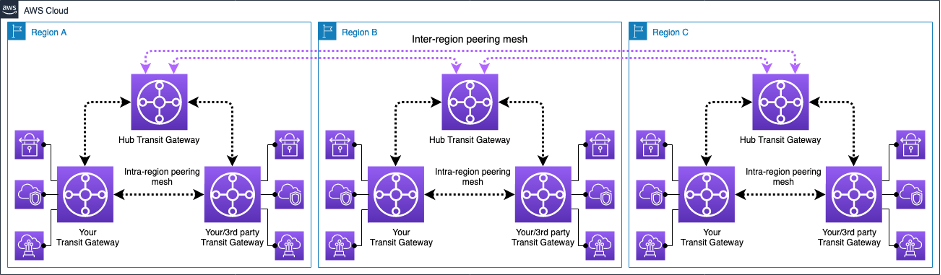
- Transit Gateway supports the ability to establish peering connections between TGWs in the same and different AWS Regions.
- Inter-region Transit Gateway peering
- enables customers to extend this connectivity and build global networks spanning multiple AWS Regions.
- simplifies routing and inter-connectivity between VPCs and on-premises networks that are serviced and managed via separate TGWs
- encrypts inter-region traffic with no single point of failure.
- ensures the traffic always stays on the AWS global network and never traverses the public internet, thereby reducing threat vectors, such as common exploits and DDoS attacks.
- Intra-region Transit Gateway peering
- allows multiple TGWs within the same Region to peer with each other.
- provides flexibility to deploy multiple TGWs with separate administrative domains while enabling easy interconnection.
Transit Gateway High Availability
- Transit Gateway must be enabled with multiple AZs to ensure availability and to route traffic to the resources in the VPC subnets.
- AZ can be enabled by specifying exactly one subnet within the AZ
- TGW places a network interface in that subnet using one IP address from the subnet.
- TGW can route traffic to all the subnets and not just the specified subnet within the enabled AZ.
- Resources that reside in AZs where there is no TGW attachment cannot reach the TGW.
Transit Gateway Appliance Mode
- For stateful network appliances in the VPC, appliance mode support for the VPC attachment can be enabled in which the appliance is located.
- Appliance Mode ensures that network flows are symmetrically routed to the same AZ and network appliance
- Appliance Mode ensures that the same AZ for that VPC attachment is used for the lifetime of a flow of traffic between source and destination.
- Appliance Mode also allows the TGW to send traffic to any AZ in the VPC, as long as there is a subnet association in that zone.
Transit Gateway Connect Attachment
- Transit Gateway Connect attachment can help establish a connection between a TGW and third-party virtual appliances (such as SD-WAN appliances) running in a VPC.
- A Connect attachment supports the Generic Routing Encapsulation (GRE) tunnel protocol for high performance and Border Gateway Protocol (BGP) for dynamic routing.
Transit Gateway VPN Concentrator
- AWS Site-to-Site VPN Concentrator is a Transit Gateway attachment type that simplifies multi-site connectivity for distributed enterprises. (Launched Nov 2025)
- allows multiple remote sites (25+) to connect through a single VPN attachment to Transit Gateway.
- suitable for customers with many low-bandwidth sites (under 100 Mbps per site).
- supports up to 100 remote sites per VPN Concentrator with 5 Gbps aggregate bandwidth.
- eliminates the need to provision individual VPN connections for each remote site.
Transit Gateway Native Attachments
- AWS Network Firewall Native Attachment (Jul 2025)
- Network Firewall can attach directly to Transit Gateway, eliminating the need for a dedicated inspection VPC.
- simplifies network architecture by removing the need to manage dedicated VPC subnets and route tables for firewall connectivity.
- enables flexible cost allocation through Transit Gateway metering policies.
- AWS Client VPN Native Attachment (Apr 2026)
- AWS Client VPN can attach directly to Transit Gateway without needing an intermediate VPC.
- provides centralized remote access to multiple VPCs and on-premises networks directly from the Client VPN endpoint.
- preserves source IP addresses end-to-end without SNAT.
Transit Gateway Flow Logs
- Transit Gateway Flow Logs enables capturing detailed information about IP traffic going to and from transit gateways.
- captures source/destination IPs, ports, protocol, traffic counters, timestamps, and other metadata for all network flows traversing the TGW.
- can publish logs to Amazon S3 or Amazon CloudWatch Logs.
- provides centralized flow-level visibility from a single point in the network using a single AWS account.
- useful for network troubleshooting, security analysis, compliance auditing, and cost chargeback.
Transit Gateway Flexible Cost Allocation
- Flexible Cost Allocation (FCA) provides granular control over how Transit Gateway data processing costs are allocated across AWS accounts. (Launched Nov 2025)
- Previously, Transit Gateway used only a sender-pay model where the source attachment account owner was responsible for all data usage costs.
- FCA enables automatic allocation of all TGW charges including data processing, Site-to-Site VPN Data Transfer Out, Direct Connect Data Transfer Out, and peering charges.
- Supports allocation to the source attachment account, destination attachment account, or the central Transit Gateway account.
- Metering policies can be configured at attachment-level or individual flow-level granularity.
- Available in all commercial AWS Regions with no additional charge for using FCA.
Transit Gateway Per-AZ CloudWatch Metrics
- Transit Gateway supports per availability zone (AZ) metrics delivered to CloudWatch. (Added Nov 2024)
- provides more granular visibility into traffic distribution across AZs.
- helps identify AZ-level traffic imbalances and troubleshoot connectivity issues.
- includes metrics such as BytesIn, BytesOut, PacketsIn, PacketsOut, BytesDropCountBlackhole, and BytesDropCountNoRoute.
Transit Gateway Network Manager
- AWS Transit Gateway Network Manager (now part of AWS Global Networks for Transit Gateways) provides a single global view of the private network.
- includes events and metrics to monitor the quality of the global network, both in AWS and on-premises.
- Event alerts specify changes in the topology, routing, and connection status. Usage metrics provide information on up/down connection, bytes in/out, packets in/out, and packets dropped.
- seamlessly integrates with SD-WAN solutions.
- now supports AWS PrivateLink and IPv6-based connectivity to the management endpoint. (Mar 2025)
- Note: For global multi-Region WAN management with policy-based automation, consider AWS Cloud WAN, which provides a managed wide area networking service with built-in Transit Gateway orchestration.
Transit Gateway and AWS Cloud WAN
- AWS Cloud WAN is a managed wide area networking (WAN) service that can orchestrate Transit Gateways across multiple Regions.
- Cloud WAN provides centralized dashboard, global dynamic routing using BGP, and policy-based network management.
- Transit Gateway can be federated with Cloud WAN, allowing gradual migration from TGW-only architectures.
- Cloud WAN can replace statically created Transit Gateway peering connections, simplifying inter-region connectivity.
- For greenfield deployments requiring multi-Region connectivity, Cloud WAN is recommended over manually peering multiple Transit Gateways.
- Transit Gateway remains the optimal choice for single-Region hub-and-spoke architectures.
Transit Gateway Best Practices
- Use a separate subnet for each transit gateway VPC attachment.
- Create one network ACL and associate it with all of the subnets that are associated with the TGW. Keep the network ACL open in both the inbound and outbound directions.
- Associate the same VPC route table with all of the subnets that are associated with the TGW, unless your network design requires multiple VPC route tables (for example, a middle-box VPC that routes traffic through multiple NAT gateways).
- Use BGP Site-to-Site VPN connections, if the customer gateway device or firewall for the connection supports multipath, enable the feature.
- Enable route propagation for AWS Direct Connect gateway attachments and BGP Site-to-Site VPN attachments.
- TGWs are highly available by design and do not need additional TGWs for high availability.
- Limit the number of TGW route tables unless the design requires multiple TGW route tables.
- For redundancy, use a single TGW in each Region for disaster recovery.
- For deployments with multiple TGWs, it is recommended to use a unique ASN for each of them.
- Enable Security Group Referencing on VPC attachments to simplify cross-VPC security management.
- Use Transit Gateway Flow Logs for centralized network visibility and troubleshooting.
- Consider Flexible Cost Allocation for multi-account environments to accurately allocate network costs.
- For 5 Gbps VPN throughput, use Large Bandwidth Tunnels (available only with TGW or Cloud WAN attachments). (Nov 2025)
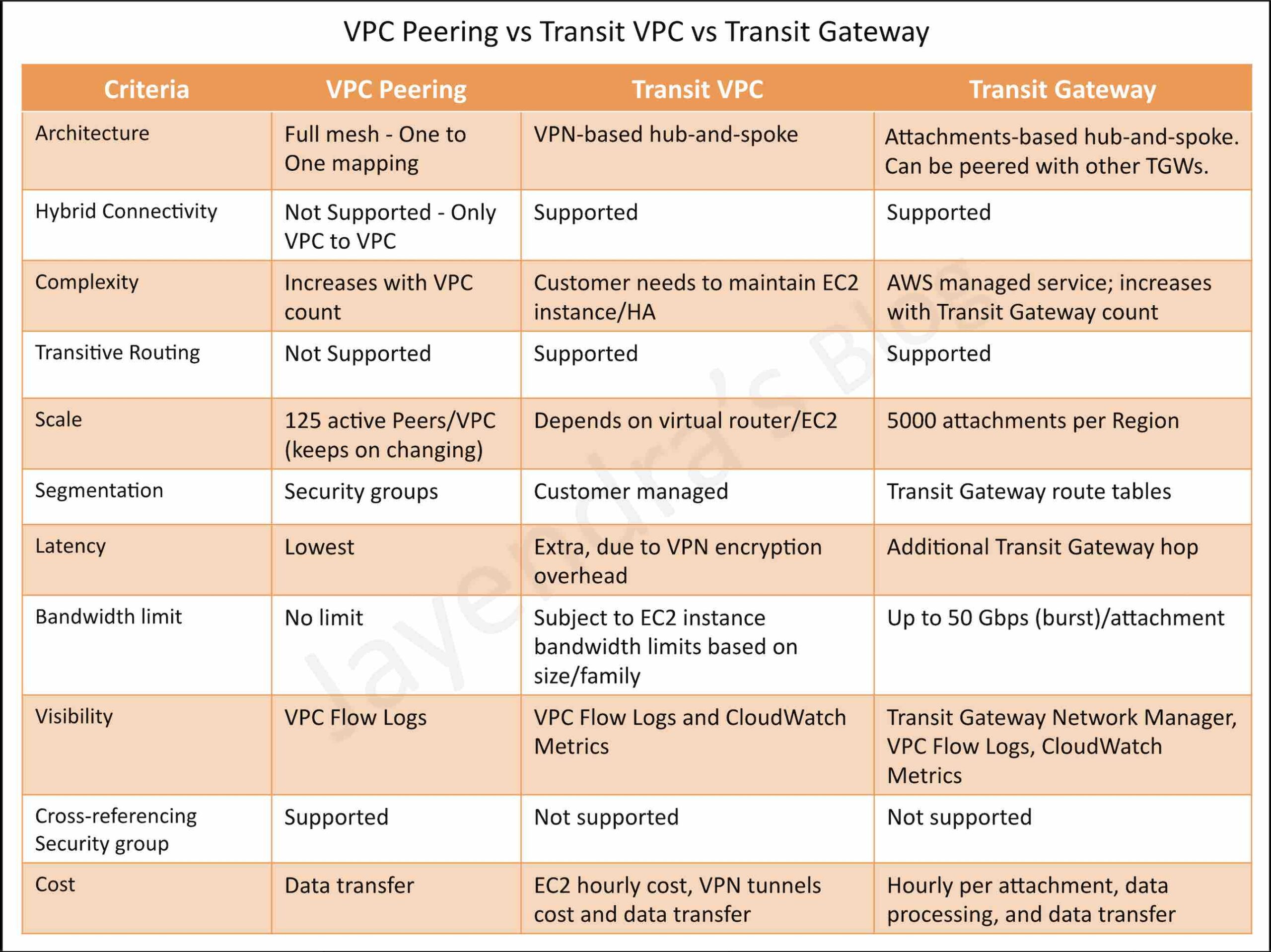
Transit Gateway vs Transit VPC vs VPC Peering
AWS Certification Exam Practice Questions
- Questions are collected from Internet and the answers are marked as per my knowledge and understanding (which might differ with yours).
- AWS services are updated everyday and both the answers and questions might be outdated soon, so research accordingly.
- AWS exam questions are not updated to keep up the pace with AWS updates, so even if the underlying feature has changed the question might not be updated
- Open to further feedback, discussion and correction.
- A company is using a VPC peering strategy to connect its VPCs in a single Region to allow for cross-communication. A recent increase in account creations and VPCs has made it difficult to maintain the VPC peering strategy, and the company expects to grow to hundreds of VPCs. There are also new requests to create site-to-site VPNs with some of the VPCs.
A solutions architect has been tasked with creating a centrally managed networking setup for multiple accounts, VPCs, and VPNs.Which networking solution meets these requirements?- Configure shared VPCs and VPNs and share with each other.
- Configure a hub-and-spoke VPC and route all traffic through VPC peering.
- Configure an AWS Direct Connect connection between all VPCs and VPNs.
- Configure a transit gateway with AWS Transit Gateway and connect all VPCs and VPNs
- A company hosts its core network services, including directory services and DNS, in its on-premises data center. The data center is connected to the AWS Cloud using AWS Direct Connect (DX). Additional AWS accounts are planned that will require quick, cost-effective, and consistent access to these network services. What should a solutions architect implement to meet these requirements with the LEAST amount of operational overhead?
- Create a DX connection in each new account. Route the network traffic to the on-premises servers.
- Configure VPC endpoints in the DX VPC for all required services. Route the network traffic to the on-premises servers.
- Create a VPN connection between each new account and the DX VPC. Route the network traffic to the on-premises servers.
- Configure AWS Transit Gateway between the accounts. Assign DX to the transit gateway and route network traffic to the on-premises servers.
- A company has 50 VPCs connected to a Transit Gateway. Multiple application teams in different accounts need to communicate with each other, but the security team requires that cross-VPC security group rules reference specific security groups rather than IP ranges. Which Transit Gateway feature should the solutions architect enable?
- Enable Transit Gateway Flow Logs on all attachments.
- Configure Transit Gateway route table propagation.
- Enable Security Group Referencing on the VPC attachments to the Transit Gateway.
- Create a peering connection between the VPCs.
- A large enterprise with 200+ branch offices needs to connect all locations to AWS. Each site requires less than 50 Mbps of bandwidth. The network team wants to minimize the number of VPN connections they need to manage. What is the MOST operationally efficient solution?
- Create individual Site-to-Site VPN connections for each branch office to a Transit Gateway.
- Use AWS Direct Connect with a Transit Gateway for all branch offices.
- Use AWS Site-to-Site VPN Concentrator attachments on Transit Gateway to aggregate multiple sites per attachment.
- Deploy software VPN appliances in a shared services VPC.
- A company uses a centralized Transit Gateway shared across 20 AWS accounts using AWS RAM. The finance team needs to allocate Transit Gateway data processing costs to the accounts consuming network resources rather than the account that sends the traffic. How should the solutions architect configure this?
- Use cost allocation tags on Transit Gateway attachments.
- Enable Transit Gateway Flow Logs and build custom billing reports.
- Configure Transit Gateway Flexible Cost Allocation (FCA) metering policies to bill the destination attachment account.
- Create separate Transit Gateways for each account to track costs independently.
- A company wants to centralize traffic inspection for all VPCs without managing a dedicated inspection VPC with firewall endpoints. Which solution provides the simplest architecture? (Select TWO)
- Use AWS Network Firewall with native Transit Gateway attachment.
- Deploy third-party firewall appliances in each VPC.
- Route traffic through Transit Gateway to the Network Firewall attachment for inspection.
- Create VPC peering between all VPCs and the inspection VPC.
- Use AWS WAF on all VPC endpoints.