AWS S3 Encryption
📌 Key Updates (2023-2026)
- January 2023: All new S3 object uploads are automatically encrypted with SSE-S3 by default at no additional cost.
- Terminology Change: AWS KMS replaced “Customer Master Key (CMK)” with “KMS key.” The concept is unchanged.
- June 2023: Dual-Layer Server-Side Encryption (DSSE-KMS) introduced for compliance workloads.
- November 2025: New bucket-level setting to standardize encryption types (block SSE-C per bucket).
- January 2026: UpdateObjectEncryption API allows changing encryption type without data movement.
- April 2026: SSE-C is now disabled by default on all new general purpose buckets.
- Client-Side Encryption: AmazonS3EncryptionClient is deprecated; use the standalone Amazon S3 Encryption Client (v4) with key commitment.
- AWS S3 Encryption supports both data at rest and data in transit encryption.
- Starting January 5, 2023, all new object uploads to Amazon S3 are automatically encrypted with SSE-S3 at no additional cost and with no impact on performance.
- Data in-transit
- S3 allows protection of data in transit by enabling communication via SSL/TLS or using client-side encryption.
- Data at Rest
- Server-Side Encryption
- S3 encrypts the object before saving it on disks in its data centers and decrypts it when the objects are downloaded.
- SSE-S3 is automatically applied as the base level of encryption for every bucket.
- Client-Side Encryption
- Data is encrypted at the client-side and uploaded to S3.
- The encryption process, the encryption keys, and related tools are managed by the user.
- Server-Side Encryption
S3 Server-Side Encryption
- Server-side encryption is about data encryption at rest.
- Server-side encryption encrypts only the object data.
- Any object metadata is not encrypted.
- S3 handles the encryption (as it writes to disks) and decryption (when objects are accessed) of the data objects.
- There is no difference in the access mechanism for both encrypted and unencrypted objects and is handled transparently by S3.
- Starting January 5, 2023, SSE-S3 is applied as the base level of encryption for every bucket in Amazon S3. All new object uploads are automatically encrypted.
- S3 supports the following server-side encryption options:
- SSE-S3 – Server-Side Encryption with S3-Managed Keys (default)
- SSE-KMS – Server-Side Encryption with AWS KMS Keys
- DSSE-KMS – Dual-Layer Server-Side Encryption with AWS KMS Keys
- SSE-C – Server-Side Encryption with Customer-Provided Keys
Server-Side Encryption with S3-Managed Keys – SSE-S3
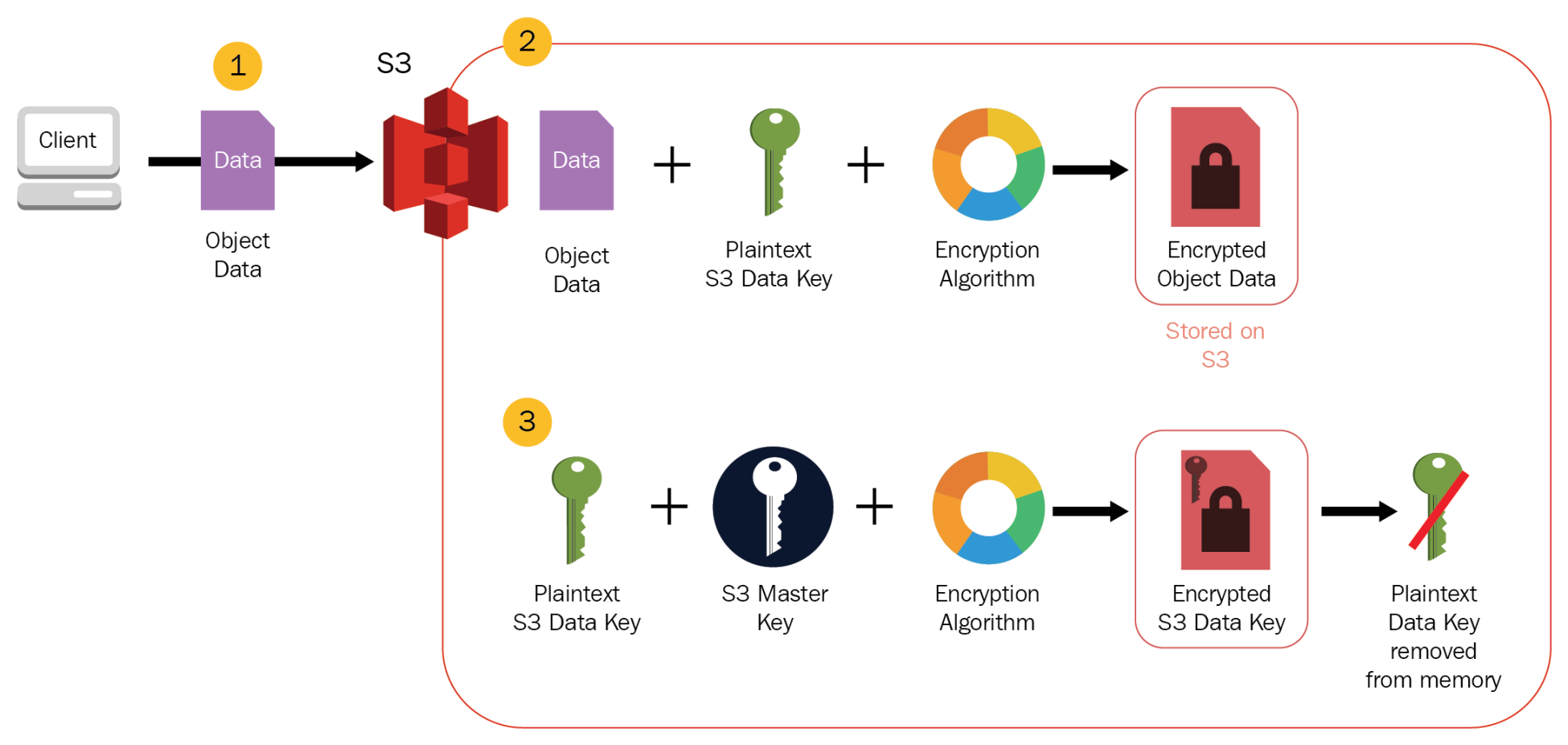
- Encryption keys are handled and managed by AWS.
- SSE-S3 is the default encryption for all S3 buckets. Since January 5, 2023, all new objects are automatically encrypted with SSE-S3 unless a different encryption option is specified.
- Each object is encrypted with a unique data key employing strong multi-factor encryption.
- SSE-S3 encrypts the data key with a root key that is regularly rotated.
- S3 server-side encryption uses one of the strongest block ciphers available, 256-bit Advanced Encryption Standard (AES-256), to encrypt the data.
- Whether or not objects are encrypted with SSE-S3 can’t be enforced when they are uploaded using pre-signed URLs, because the only way server-side encryption can be specified is through the AWS Management Console or through an HTTP request header.
- Request must set header
x-amz-server-side-encryptiontoAES256 - For enforcing server-side encryption for all of the objects that are stored in a bucket, use a bucket policy that denies permissions to upload an object unless the request includes
x-amz-server-side-encryptionheader to request server-side encryption. - Since all objects are now encrypted by default, bucket policies to enforce encryption are no longer strictly required but can still be used to enforce a specific encryption type (e.g., SSE-KMS over SSE-S3).
Server-Side Encryption with AWS KMS Keys – SSE-KMS
- SSE-KMS is similar to SSE-S3, but it uses AWS Key Management Service (KMS) which provides additional benefits along with additional charges.
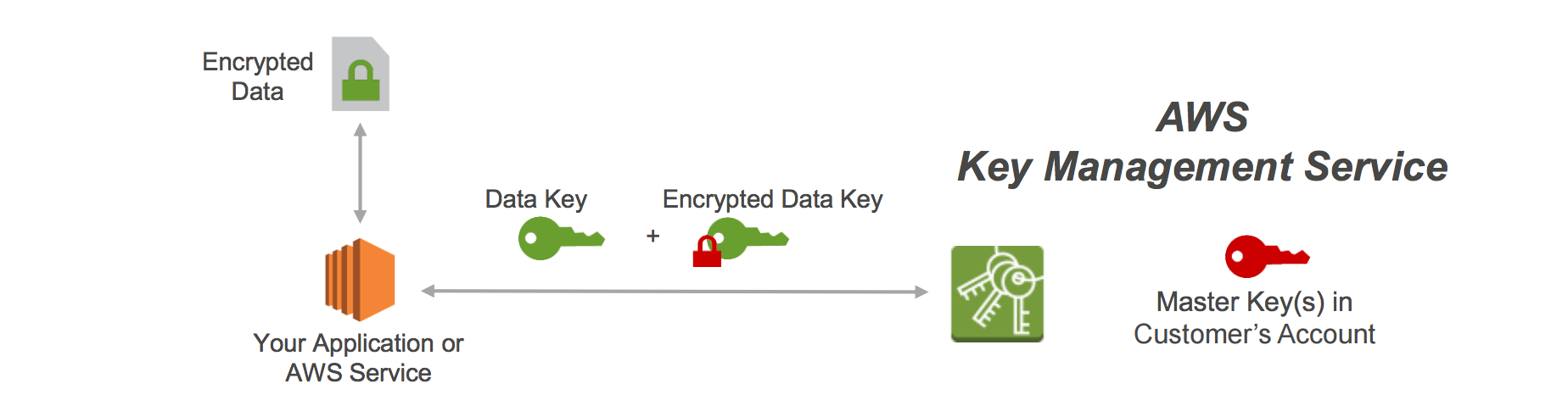
- KMS is a service that combines secure, highly available hardware and software to provide a key management system scaled for the cloud.
- KMS uses KMS keys (previously called customer master keys or CMKs) to encrypt the S3 objects.
- The KMS key material is never made available in plaintext.
- KMS enables you to centrally create encryption keys, and define the policies that control how keys can be used.
- Allows audit of key usage to prove they are being used correctly, by inspecting logs in AWS CloudTrail.
- Allows keys to be temporarily disabled and re-enabled.
- Allows keys to be rotated regularly (automatic annual rotation or on-demand rotation).
- Security controls in AWS KMS can help meet encryption-related compliance requirements.
- SSE-KMS enables separate permissions for the use of an envelope key (that is, a key that protects the data’s encryption key) that provides added protection against unauthorized access to the objects in S3.
- SSE-KMS provides the option to create and manage encryption keys yourself (customer managed keys), or use an AWS managed key that is unique to you, the service you’re using, and the region you’re working in.
- Creating and managing customer managed keys gives more flexibility, including the ability to create, rotate, disable, and define access controls, and audit the encryption keys used to protect the data.
- Data keys used to encrypt the data are also encrypted and stored alongside the data they protect and are unique to each object.
- Process flow
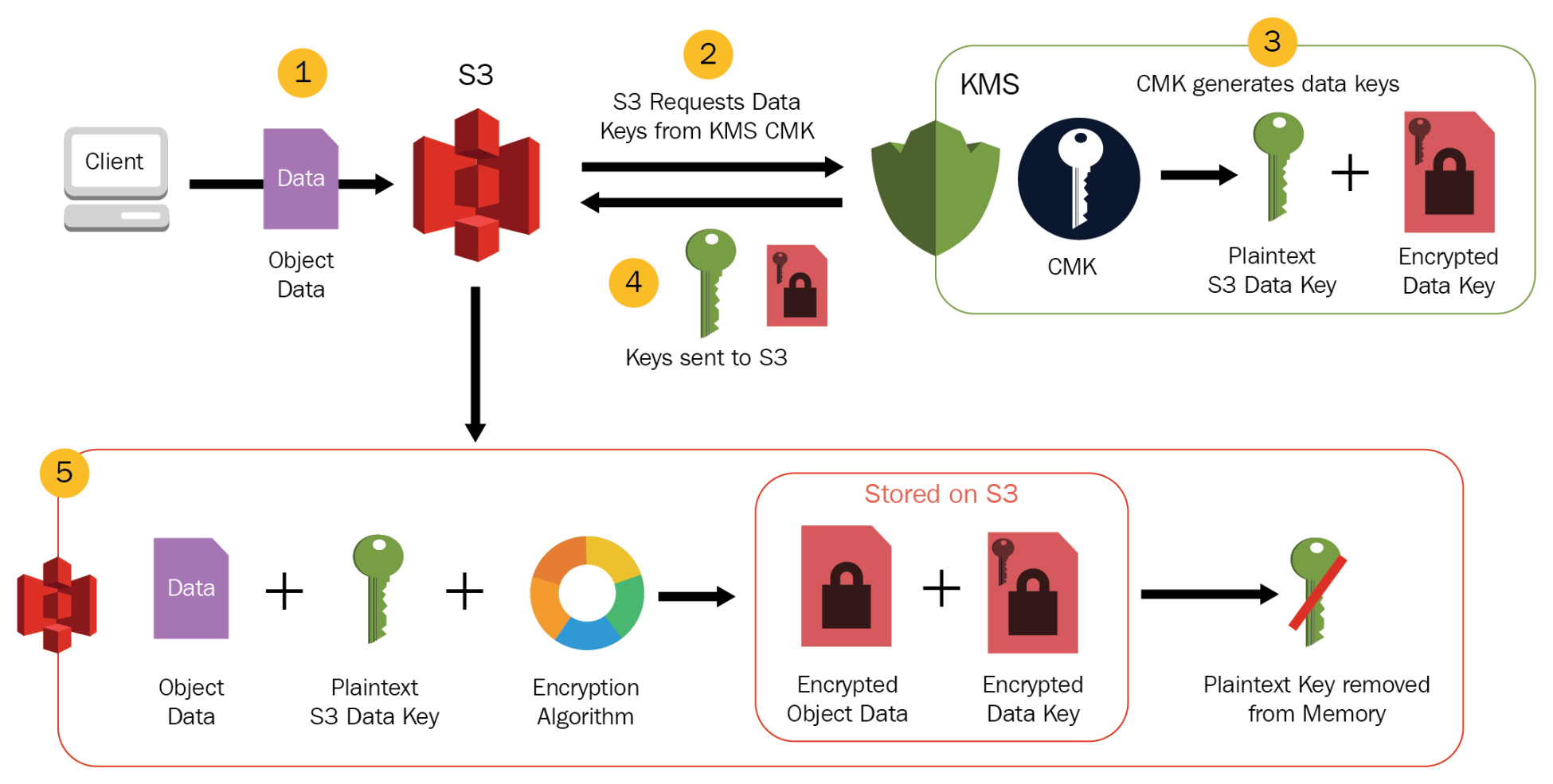
- An application or AWS service client requests an encryption key to encrypt data and passes a reference to a KMS key under the account.
- Client requests are authenticated based on whether they have access to use the KMS key.
- A new data encryption key is created, and a copy of it is encrypted under the KMS key.
- Both the data key and encrypted data key are returned to the client.
- Data key is used to encrypt customer data and then deleted as soon as is practical.
- Encrypted data key is stored for later use and sent back to AWS KMS when the source data needs to be decrypted.
- S3 only supports symmetric KMS keys and not asymmetric keys.
- Must set header
x-amz-server-side-encryptiontoaws:kms
S3 Bucket Keys
- S3 Bucket Keys reduce the cost of SSE-KMS by decreasing the request traffic from Amazon S3 to AWS KMS by up to 99%.
- When enabled, S3 generates a bucket-level key from KMS and uses it to create data keys for objects in the bucket, reducing the number of KMS API calls.
- S3 Bucket Keys are recommended for all SSE-KMS workloads to optimize both performance and cost.
- S3 Bucket Keys are always enabled when using SSE-KMS with S3 Express One Zone.
- Bucket Keys can be enabled at the bucket level or specified per object in PUT requests.
Dual-Layer Server-Side Encryption with AWS KMS Keys – DSSE-KMS
- Launched June 2023 for compliance workloads requiring two layers of encryption.
- DSSE-KMS applies two independent layers of encryption to objects when they are uploaded to Amazon S3.
- Each layer uses a different implementation of the 256-bit AES-GCM algorithm.
- Designed to meet CNSSP 15 and other compliance standards requiring multi-layer encryption.
- Can be specified in PUT/COPY requests or configured as the bucket’s default encryption.
- Can be enforced using IAM and bucket policies.
- Must set header
x-amz-server-side-encryptiontoaws:kms:dsse - Higher cost than SSE-KMS due to additional processing overhead and KMS API calls.
- Use cases: Government workloads, financial services, and any regulated industry requiring dual-layer encryption at rest.
Server-Side Encryption with Customer-Provided Keys – SSE-C
⚠️ Important Change (April 2026)
SSE-C is now disabled by default on all new general purpose buckets and existing buckets in accounts with no SSE-C encrypted objects. To use SSE-C, you must explicitly enable it by setting BlockedEncryptionTypes to NONE in the bucket’s default encryption configuration via the PutBucketEncryption API.
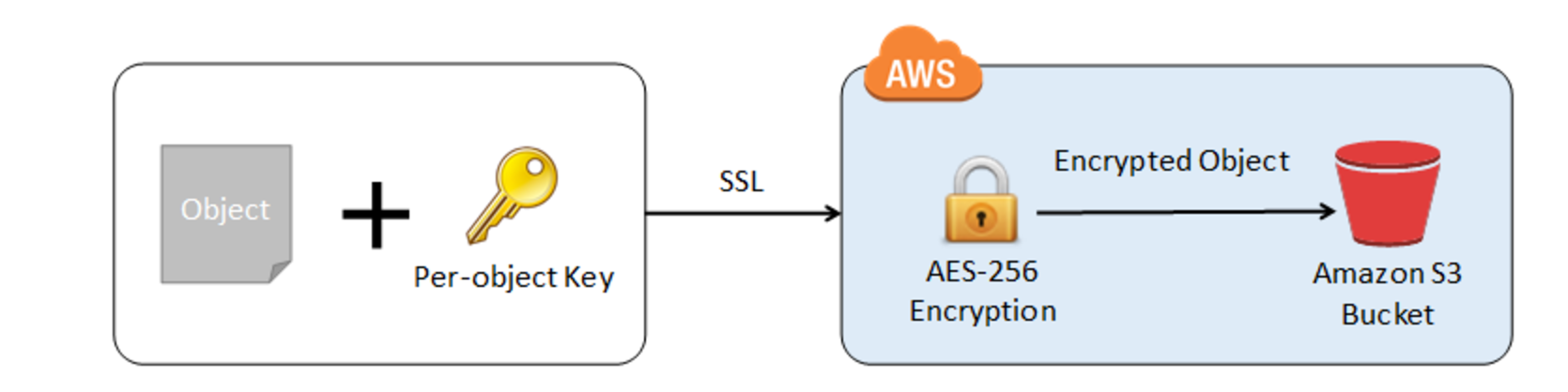
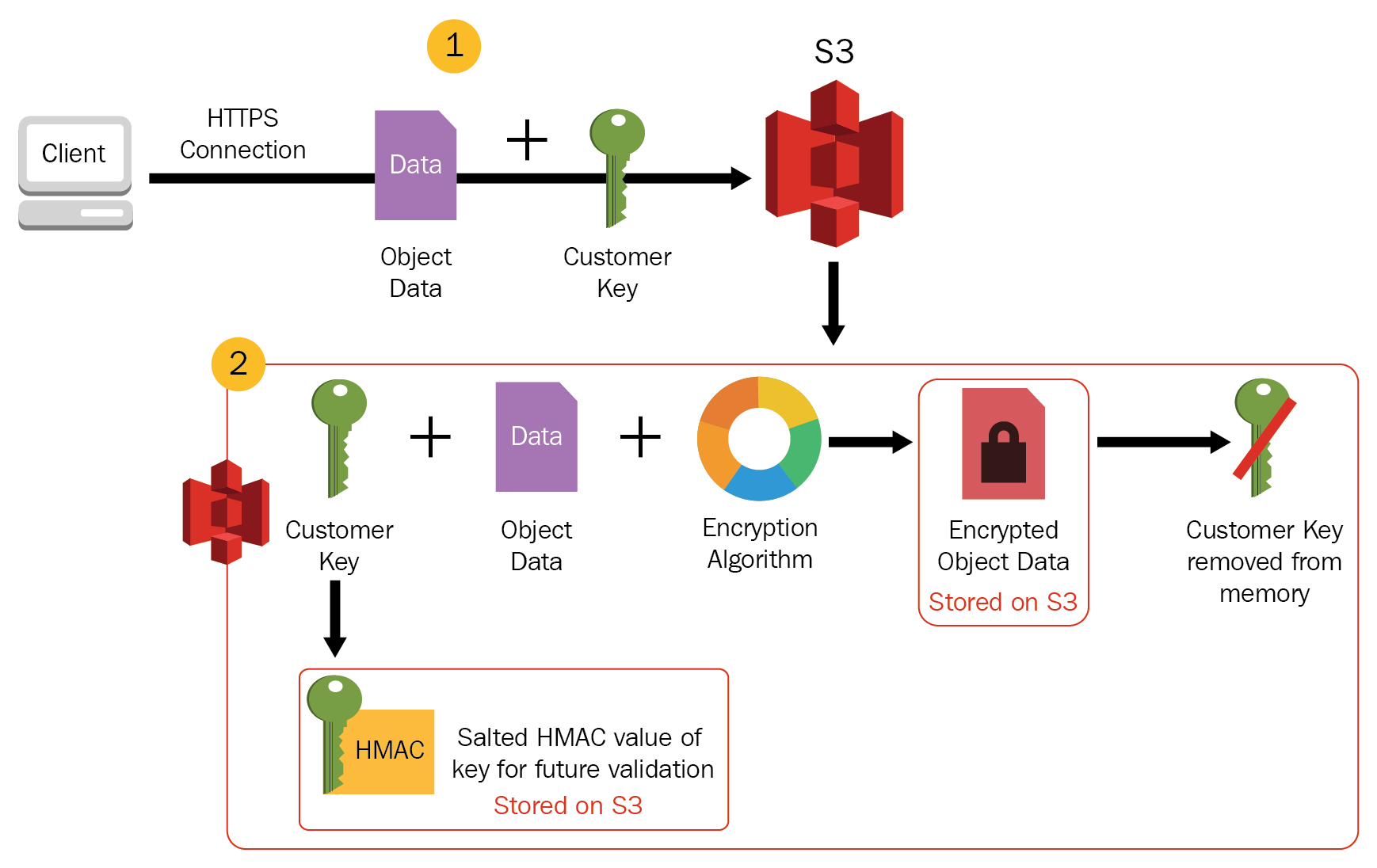
- Encryption keys can be managed and provided by the Customer and S3 manages the encryption, as it writes to disks, and decryption, when you access the objects.
- When you upload an object, the encryption key is provided as a part of the request and S3 uses that encryption key to apply AES-256 encryption to the data and removes the encryption key from memory.
- When you download an object, the same encryption key should be provided as a part of the request. S3 first verifies the encryption key and if it matches, the object is decrypted before returning back to you.
- As each object and each object’s version can be encrypted with a different key, you are responsible for maintaining the mapping between the object and the encryption key used.
- SSE-C requests must be done through HTTPS and S3 will reject any requests made over HTTP when using SSE-C.
- For security considerations, AWS recommends considering any key sent erroneously using HTTP to be compromised and it should be discarded or rotated.
- S3 does not store the encryption key provided. Instead, a randomly salted HMAC value of the encryption key is stored which can be used to validate future requests. The salted HMAC value cannot be used to decrypt the contents of the encrypted object or to derive the value of the encryption key. That means, if you lose the encryption key, you lose the object.
- Starting April 2026: SSE-C is disabled by default for all new general purpose buckets. You must explicitly enable SSE-C on a bucket before using it. This change was introduced to prevent ransomware attacks that exploited SSE-C with attacker-controlled keys.
Client-Side Encryption
Client-side encryption refers to encrypting data before sending it to S3 and decrypting the data after downloading it.
⚠️ SDK Update Notice
The original AmazonS3EncryptionClient class is deprecated. AWS now provides a standalone Amazon S3 Encryption Client library (currently at v4) that supports key commitment (AES-GCM with Key Commitment) for enhanced security. The AWS SDK for Java v1 reached end-of-support on December 31, 2025. Migrate to the standalone S3 Encryption Client or AWS SDK v2/v4 equivalents.
AWS KMS-managed Key (Client-Side Encryption with KMS – CSE-KMS)
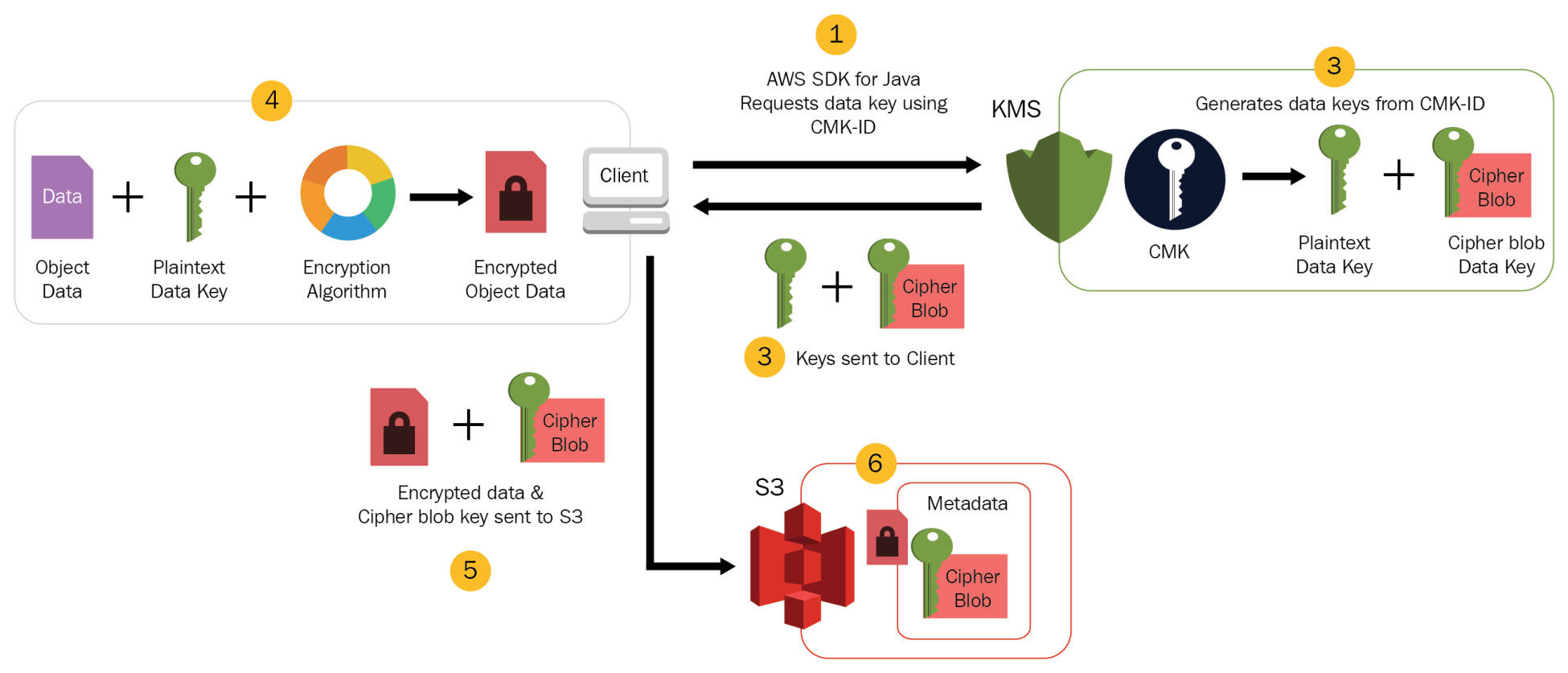
- Customer can maintain the encryption KMS key with AWS KMS and can provide the KMS key ID to the client to encrypt the data.
- Uploading Object
- The S3 Encryption Client first sends a request to AWS KMS for the key to encrypt the object data.
- AWS KMS returns a randomly generated data encryption key with 2 versions: a plaintext version for encrypting the data and a cipher blob to be uploaded with the object as object metadata.
- The client obtains a unique data encryption key for each object it uploads.
- The S3 Encryption Client uploads the encrypted data and the cipher blob with object metadata.
- Download Object
- The client first downloads the encrypted object along with the cipher blob version of the data encryption key stored as object metadata.
- The client then sends the cipher blob to AWS KMS to get the plaintext version of the same, so that it can decrypt the object data.
Client-Side Master Key (CSE-C)
- Encryption master keys are completely maintained at the Client-side.
- Uploading Object
- The S3 Encryption Client locally generates a random one-time-use symmetric key (data encryption key or data key).
- Client encrypts the data encryption key using the customer-provided master key.
- Client uses this data encryption key to encrypt the data of a single S3 object (for each object, the client generates a separate data key).
- Client then uploads the encrypted data to S3 and also saves the encrypted data key and its material description as object metadata (
x-amz-meta-x-amz-key) in S3 by default.
- Downloading Object
- Client first downloads the encrypted object from S3 along with the object metadata.
- Using the material description in the metadata, the client first determines which master key to use to decrypt the encrypted data key.
- Using that master key, the client decrypts the data key and uses it to decrypt the object.
- Client-side master keys and your unencrypted data are never sent to AWS.
- If the master key is lost the data cannot be decrypted.
UpdateObjectEncryption API (January 2026)
- Launched January 29, 2026 – allows changing the server-side encryption type of existing S3 objects without any data movement.
- Atomically updates the encryption key of objects regardless of size or storage class.
- Uses envelope encryption to re-encrypt the data key with the newly specified encryption type.
- Supported transitions: SSE-S3 → SSE-KMS, and applying S3 Bucket Keys to existing objects.
- Can be used with S3 Batch Operations to change encryption type at scale while preserving object properties and S3 Lifecycle eligibility.
- Eliminates the need to copy objects to change their encryption (previously required COPY operations).
Enforcing S3 Encryption
- S3 Encryption in Transit
- S3 Bucket Policy can be used to enforce SSL/TLS communication with S3 using the effect
denywith conditionaws:SecureTransportset to false.
- S3 Bucket Policy can be used to enforce SSL/TLS communication with S3 using the effect
- S3 Default Encryption
- Helps set the default encryption behavior for an S3 bucket so that all new objects are encrypted when they are stored in the bucket.
- Objects are encrypted using SSE with either S3-managed keys (SSE-S3) or AWS KMS keys (SSE-KMS).
- Since January 2023, SSE-S3 is automatically applied as the base level of encryption for all buckets. You can override this to SSE-KMS or DSSE-KMS.
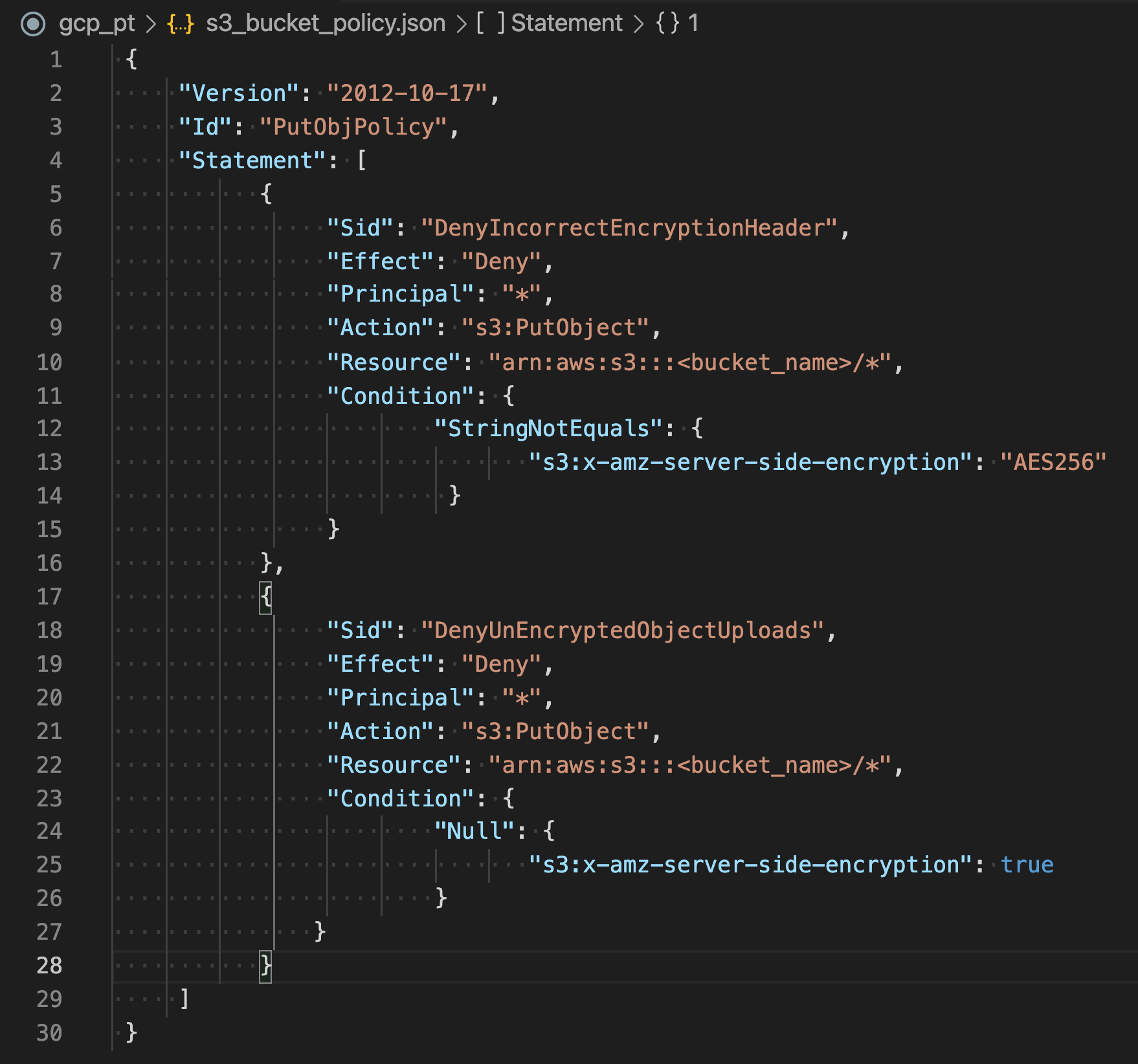
- S3 Bucket Policy
- Can be applied to deny permissions to upload an object unless the request includes
x-amz-server-side-encryptionheader to request server-side encryption. - Since all objects are now encrypted by default (SSE-S3), bucket policies are primarily useful to enforce a specific encryption type (e.g., SSE-KMS).
- Bucket policies are evaluated before the default encryption.
- Can be applied to deny permissions to upload an object unless the request includes
- Bucket-Level Encryption Standardization (November 2025)
- New
BlockedEncryptionTypessetting via thePutBucketEncryptionAPI. - Allows disabling specific encryption types (e.g., SSE-C) at the bucket level.
- Helps standardize the server-side encryption types used with your buckets.
- Configurable via AWS Management Console, API, CLI, and CloudFormation.
- New
AWS Certification Exam Practice Questions
- Questions are collected from Internet and the answers are marked as per my knowledge and understanding (which might differ with yours).
- AWS services are updated everyday and both the answers and questions might be outdated soon, so research accordingly.
- AWS exam questions are not updated to keep up the pace with AWS updates, so even if the underlying feature has changed the question might not be updated
- Open to further feedback, discussion and correction.
- A company is storing data on Amazon Simple Storage Service (S3). The company’s security policy mandates that data is encrypted at rest. Which of the following methods can achieve this? Choose 3 answers
- Use Amazon S3 server-side encryption with AWS Key Management Service managed keys
- Use Amazon S3 server-side encryption with customer-provided keys
- Use Amazon S3 server-side encryption with EC2 key pair.
- Use Amazon S3 bucket policies to restrict access to the data at rest.
- Encrypt the data on the client-side before ingesting to Amazon S3 using their own master key
- Use SSL to encrypt the data while in transit to Amazon S3.
- A user has enabled versioning on an S3 bucket. The user is using server side encryption for data at Rest. If the user is supplying his own keys for encryption (SSE-C) which of the below mentioned statements is true?
- The user should use the same encryption key for all versions of the same object
- It is possible to have different encryption keys for different versions of the same object
- AWS S3 does not allow the user to upload his own keys for server side encryption
- The SSE-C does not work when versioning is enabled
- A storage admin wants to encrypt all the objects stored in S3 using server side encryption. The user does not want to use the AES 256 encryption key provided by S3. How can the user achieve this?
- The admin should upload his secret key to the AWS console and let S3 decrypt the objects
- The admin should use CLI or API to upload the encryption key to the S3 bucket. When making a call to the S3 API mention the encryption key URL in each request
- S3 does not support client supplied encryption keys for server side encryption
- The admin should send the keys and encryption algorithm with each API call
- A user has enabled versioning on an S3 bucket. The user is using server side encryption for data at rest. If the user is supplying his own keys for encryption (SSE-C), what is recommended to the user for the purpose of security?
- User should not use his own security key as it is not secure
- Configure S3 to rotate the user’s encryption key at regular intervals
- Configure S3 to store the user’s keys securely with SSL
- Keep rotating the encryption key manually at the client side
- A system admin is planning to encrypt all objects being uploaded to S3 from an application. The system admin does not want to implement his own encryption algorithm; instead he is planning to use server side encryption by supplying his own key (SSE-C). Which parameter is not required while making a call for SSE-C?
- x-amz-server-side-encryption-customer-key-AES-256
- x-amz-server-side-encryption-customer-key
- x-amz-server-side-encryption-customer-algorithm
- x-amz-server-side-encryption-customer-key-MD5
- You are designing a personal document-archiving solution for your global enterprise with thousands of employee. Each employee has potentially gigabytes of data to be backed up in this archiving solution. The solution will be exposed to the employees as an application, where they can just drag and drop their files to the archiving system. Employees can retrieve their archives through a web interface. The corporate network has high bandwidth AWS DirectConnect connectivity to AWS. You have regulatory requirements that all data needs to be encrypted before being uploaded to the cloud. How do you implement this in a highly available and cost efficient way?
- Manage encryption keys on-premise in an encrypted relational database. Set up an on-premises server with sufficient storage to temporarily store files and then upload them to Amazon S3, providing a client-side master key. (Storing temporary increases cost and not a high availability option)
- Manage encryption keys in a Hardware Security Module(HSM) appliance on-premise server with sufficient storage to temporarily store, encrypt, and upload files directly into Amazon Glacier. (Not cost effective)
- Manage encryption keys in Amazon Key Management Service (KMS), upload to Amazon Simple Storage Service (S3) with client-side encryption using a KMS key ID and configure Amazon S3 lifecycle policies to store each object using the Amazon S3 Glacier storage class. (with CSE-KMS the encryption happens at client side before the object is uploaded to S3 and KMS is cost effective as well)
- Manage encryption keys in an AWS CloudHSM appliance. Encrypt files prior to uploading on the employee desktop and then upload directly into Amazon Glacier (Not cost effective)
- A user has enabled server side encryption with S3. The user downloads the encrypted object from S3. How can the user decrypt it?
- S3 does not support server side encryption
- S3 provides a server side key to decrypt the object
- The user needs to decrypt the object using their own private key
- S3 manages encryption and decryption automatically
- When uploading an object, what request header can be explicitly specified in a request to Amazon S3 to encrypt object data when saved on the server side?
- x-amz-storage-class
- Content-MD5
- x-amz-security-token
- x-amz-server-side-encryption
- A company must ensure that any objects uploaded to an S3 bucket are encrypted. Which of the following actions should the SysOps Administrator take to meet this requirement? (Select TWO.)
- Implement AWS Shield to protect against unencrypted objects stored in S3 buckets.
- Implement Object access control list (ACL) to deny unencrypted objects from being uploaded to the S3 bucket.
- Implement Amazon S3 default encryption to make sure that any object being uploaded is encrypted before it is stored.
- Implement Amazon Inspector to inspect objects uploaded to the S3 bucket to make sure that they are encrypted.
- Implement S3 bucket policies to deny unencrypted objects from being uploaded to the buckets.
- A company wants to ensure all objects in their S3 bucket are encrypted with SSE-KMS using a specific customer managed key. They also want to reduce AWS KMS costs. What combination of steps should be taken? (Select TWO.)
- Configure the bucket’s default encryption to use SSE-KMS with the specific customer managed KMS key.
- Configure a bucket policy to deny all s3:PutObject requests that don’t include the x-amz-server-side-encryption header set to AES256.
- Enable S3 Transfer Acceleration to reduce KMS API calls.
- Enable S3 Bucket Keys to reduce request traffic from S3 to KMS and lower costs by up to 99%.
- Use DSSE-KMS to apply dual-layer encryption for cost savings.
- An organization needs to change the encryption type of millions of existing S3 objects from SSE-S3 to SSE-KMS without impacting object metadata or lifecycle policies. What is the most efficient approach?
- Download all objects and re-upload them with SSE-KMS specified in the PUT request.
- Use S3 Batch Operations with a COPY operation to copy objects in-place with SSE-KMS encryption.
- Use S3 Batch Operations with the UpdateObjectEncryption operation to atomically change the encryption type without data movement.
- Change the bucket default encryption to SSE-KMS; existing objects will be automatically re-encrypted.
References
- AWS S3 – Protecting data with encryption
- AWS S3 – Protecting data with server-side encryption
- AWS S3 – Using dual-layer server-side encryption (DSSE-KMS)
- AWS S3 – Reducing the cost of SSE-KMS with Amazon S3 Bucket Keys
- AWS S3 – Using SSE-C
- AWS S3 – Updating server-side encryption for existing data
- AWS S3 – Default SSE-C setting for new buckets FAQ
- Amazon S3 Encryption Client Developer Guide