Google Cloud Compute Engine
- Compute Engine instance is a virtual machine (VM) hosted on Google’s infrastructure.
- Compute Engine instances can run the public images for Linux and Windows Server that Google provides as well as private custom images created or imported from existing systems.
- Docker containers can also be deployed, which are automatically launched on instances running the Container-Optimized OS public image.
- Each instance belongs to a GCP project, and a project can have one or more instances. When you delete an instance, it is removed from the project.
- For instance creation, the zone, operating system, and machine type (number of virtual CPUs and the amount of memory) need to be specified.
- By default, each Compute Engine instance has a small boot persistent disk that contains the OS. Additional storage options can be attached.
- Each network interface of a Compute Engine instance is associated with a subnet of a unique VPC network.
- Regardless of the region where the VM instance is created, the default time for the VM instance is Coordinated Universal Time (UTC).
- Compute Engine offers the best single instance compute availability SLA of any cloud provider: 99.95% availability for memory-optimized VMs and 99.9% for all other VM families.
Compute Engine Instance Lifecycle
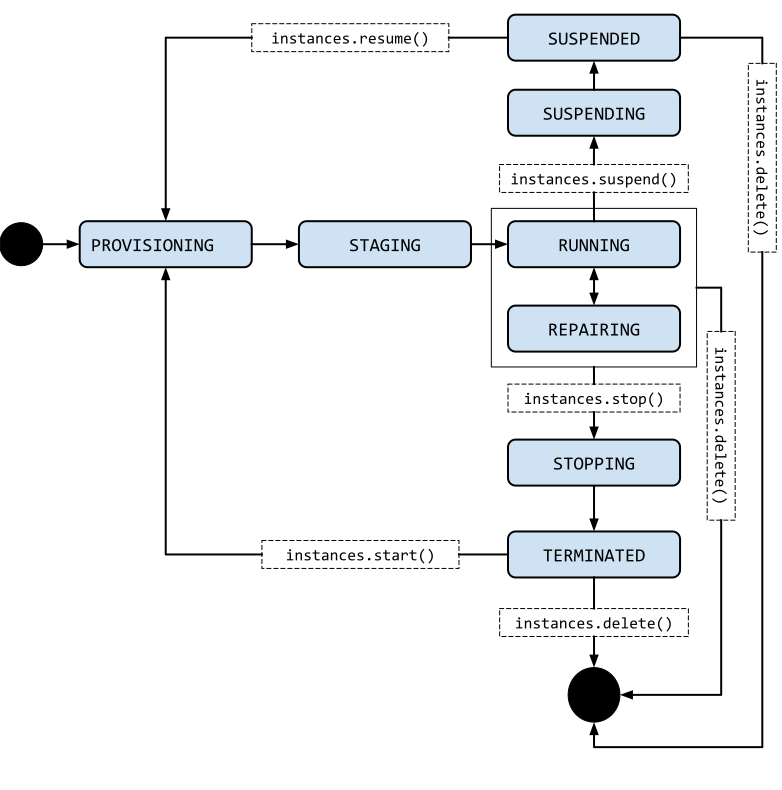
PROVISIONING. Resources are being allocated for the instance. The instance is not running yet.STAGING. Resources have been acquired and the instance is being prepared for the first boot.RUNNING. The instance is booting up or running. You should be able to ssh into the instance soon, but not immediately after it enters this state.REPAIRING– The instance is being repaired because the instance encountered an internal error or the underlying machine is unavailable due to maintenance. During this time, the instance is unusable. If repair is successful, the instance returns to one of the above states.STOPPING: The instance is being stopped because a user has made a request to stop the instance or there was a failure. This is a temporary status and the instance will move toTERMINATED.TERMINATED. A user shut down the instance, or the instance encountered a failure. You can choose to restart the instance or delete it.SUSPENDINGThe instance is being suspended due to a user actionSUSPENDED– Instance is suspended and can be resumed or deleted
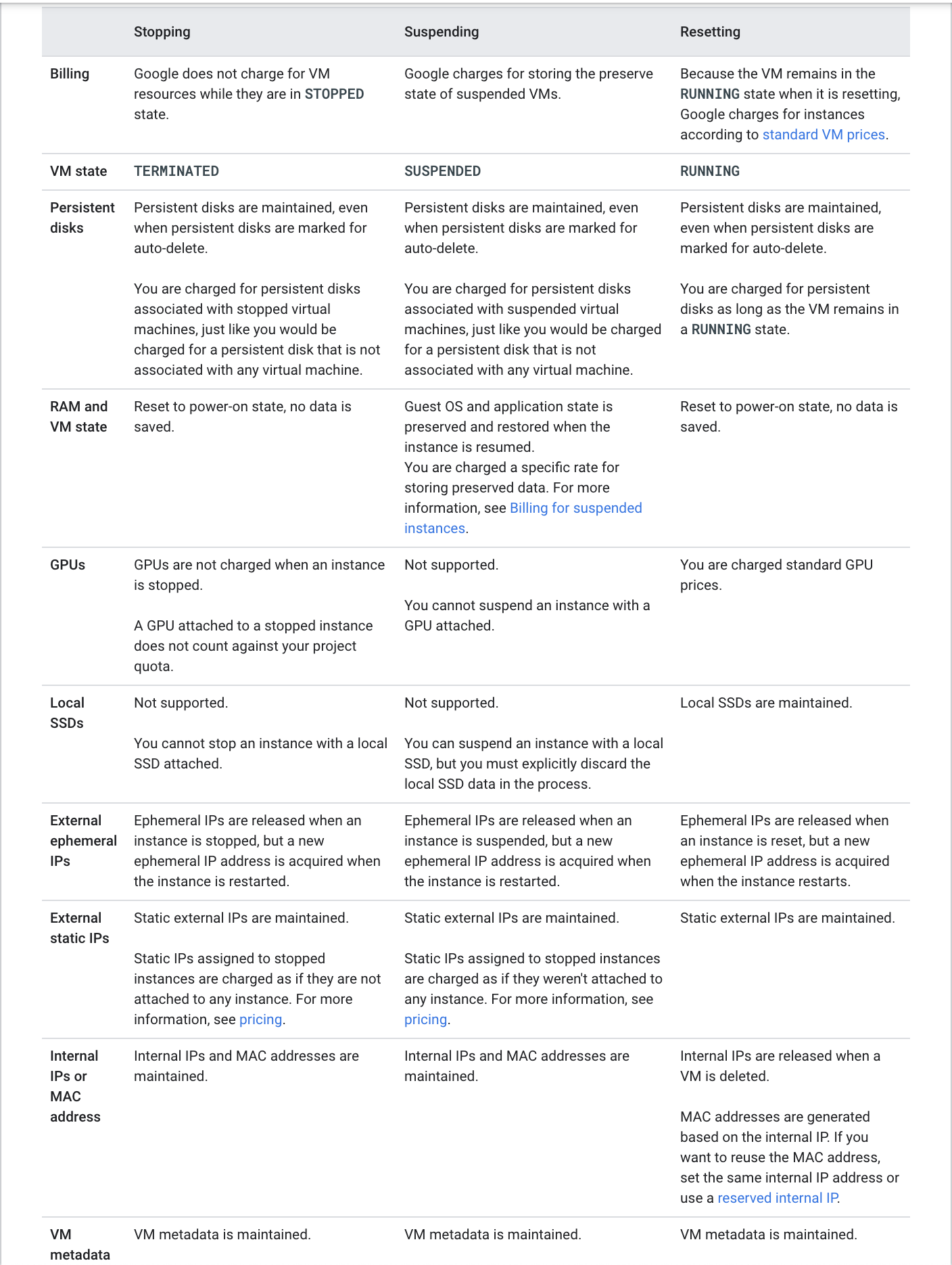
Compute Engine Machine Types
- A machine type is a set of virtualized hardware resources available to a virtual machine (VM) instance, including the system memory size, virtual CPU (vCPU) count, and persistent disk limits.
- Machine types are grouped and curated by families for different workloads.
- Machine families are further classified by series, generation, and processor type.
Machine Families
- General-purpose — best price-performance ratio for a variety of workloads (N4, N4A, N4D, N2, N2D, N1, C4, C4A, C4D, C3, C3D, E2, Tau T2D, Tau T2A)
- Compute-optimized — highest performance per core for HPC and compute-intensive workloads (H4D, H3, C2, C2D)
- Memory-optimized — ideal for memory-intensive workloads, with up to 32 TB of memory (X4, M4, M4N, M3, M2, M1)
- Storage-optimized — best for workloads that are low in core usage and high in storage density (Z3)
- Network-optimized — ideal for IO-intensive workloads with up to 400 Gbps internal bandwidth (M4N)
- Accelerator-optimized — ideal for massively parallelized CUDA compute workloads such as ML/AI and HPC (A4X Max, A4X, A4, A3, A2, G4, G2)
4th Generation Machine Series (Latest – 2024-2025)
- C4 — Intel Granite Rapids/Emerald Rapids with Titanium offload, up to 288 vCPUs, 2.2 TB DDR5 memory. Delivers up to 20% better price-performance for general-purpose workloads.
- C4A — Google Axion (Arm Neoverse V2) processor with Titanium, up to 72 vCPUs, 576 GB DDR5 memory. Delivers up to 65% better price-performance and 60% better energy efficiency than comparable x86 instances.
- C4D — AMD EPYC Turin with Titanium, up to 384 vCPUs, 3 TB DDR5 memory.
- N4 — Intel Emerald Rapids with Titanium, up to 80 vCPUs, 640 GB DDR5 memory. Supports custom machine types.
- N4A — Google Axion (Arm Neoverse N3) with Titanium, up to 64 vCPUs, 512 GB DDR5 memory. Most efficient and flexible Arm-based series.
- N4D — AMD EPYC Turin with Titanium, up to 96 vCPUs, 768 GB DDR5 memory. Supports custom machine types and dynamic resource management.
- X4 — Intel Sapphire Rapids bare metal, up to 1,920 vCPUs, 6-32 TB of memory.
- M4 — Intel Emerald Rapids, up to 224 vCPUs with up to 26.5 GB memory per vCPU.
- H4D — AMD EPYC Turin with Titanium and Cloud RDMA support, 192 vCPUs, 720 GB DDR5. Designed for HPC workloads.
- A4 — 224 vCPUs with 8 NVIDIA B200 GPUs, up to 3,600 Gbps network bandwidth.
- A4X — NVIDIA Grace CPUs with 4 NVIDIA B200 GPUs, up to 2,000 Gbps network bandwidth.
- G4 — AMD EPYC Turin with NVIDIA RTX PRO 6000 GPUs, supports fractional GPUs (1/8, 1/4, 1/2), up to 400 Gbps networking.
Google Titanium
- Titanium is Google Cloud’s custom-designed architecture that offloads networking and storage tasks to dedicated hardware.
- Delivers more consistent and predictable performance by reserving the entire CPU exclusively for applications.
- Foundation to all 3rd-generation and newer Compute Engine machine types (C3, C4, N4, H3, H4D, Z3, etc.).
- Provides performance, reliability, and security improvements by freeing up the CPU from I/O processing.
Compute Engine Storage
- Compute Engine offers multiple storage options:
- Persistent Disk (PD) — network-attached block storage (Standard PD, Balanced PD, SSD PD, Extreme PD)
- Hyperdisk — next-generation block storage with independently configurable IOPS, throughput, and capacity
- Local SSD / Titanium SSD — physically attached high-performance local storage
- Hyperdisk (GA 2024+) is the recommended storage for newer machine series (C4, N4, C4A, etc.):
- Hyperdisk Balanced — best combination of price and performance; also used as boot disk for newer machine types. Up to 160,000 IOPS and 2,400 MiB/s throughput per volume.
- Hyperdisk Balanced High Availability — synchronous replication across two zones in a region.
- Hyperdisk Extreme — highest IOPS for demanding database workloads.
- Hyperdisk ML — optimized for ML model serving with high throughput.
- Hyperdisk Throughput — optimized for high-throughput sequential workloads.
- Hyperdisk Storage Pools allow pre-provisioning capacity, throughput, and IOPS that multiple disks can share, enabling deduplication and thin provisioning.
Refer blog post @ Compute Engine Storage Options
Compute Engine Guest Environment
- A Guest environment is automatically installed on the VM instance when using Google-provided public images
- Guest environment is a set of scripts, daemons, and binaries that read the content of the metadata server to make a VM run properly on CE
- A metadata server is a communication channel for transferring information from a client to the guest operating system.
- Guest environment can be manually installed on custom images
Compute Engine Instance Availability Policies
- Compute Engine does regular maintenance of its infrastructure which entails hardware and software updates
- Google might require to move the VM away from the host undergoing maintenance and Compute Engine automatically manages the scheduling behavior of these instances.
- Compute Engine instance’s availability policy determines how it behaves when there is a maintenance event
- Live migrate – move the VM instances to another host machine
- Stop the instances
- Instance’s availability policy can be changed by configuring the following two settings:
- VM instance’s maintenance behavior
onHostMaintenance, which determines whether the instance is live migratedMIGRATE(default) or stoppedTERMINATE - Instance’s restart behavior
automaticRestartwhich determines whether the instance automatically restarts (default) if it crashes or gets stopped
- VM instance’s maintenance behavior
Compute Engine Live Migration
- Live migration helps keep the VM instances running even when a host system event, such as a software or hardware update, occurs
- Compute Engine live migrates the running instances to another host in the same zone instead of requiring the VMs to be rebooted
- Live migration allows Google to perform maintenance to keep infrastructure protected and reliable without interrupting any of the VMs.
- GCP provides a notification to the guest that migration is imminent, when a VM is scheduled to be live migrated
- Regular infrastructure maintenance and upgrades.
- Network and power grid maintenance in the data centers.
- Failed hardware such as memory, CPU, network interface cards, disks, power, and so on. This is done on a best-effort basis; if hardware fails completely or otherwise prevents live migration, the VM crashes and restarts automatically and a
hostErroris logged. - Host OS and BIOS upgrades.
- Security-related updates, with the need to respond quickly.
- System configuration changes, including changing the size of the host root partition, for storage of the host image and packages.
- Live migration does not change any attributes or properties of the VM including internal and external IP addresses, instance metadata, block storage data and volumes, OS and application state, network settings, network connections, and so on.
- Compute Engine can also live migrate instances with Local SSD disks attached, moving the VMs along with their local SSD to a new machine in advance of any planned maintenance.
- Instances with GPUs attached cannot be live migrated and must be set to stop and optionally restart. Compute Engine offers a 60-minute notice before a VM instance with a GPU attached is stopped.
- Instances created with bare metal machine types cannot be live migrated.
- Spot VMs cannot be configured for live migration.
Spot VMs
✅ Spot VMs are the latest and recommended version of preemptible VMs. Google recommends using Spot VMs instead of preemptible VMs for new workloads.
- A Spot VM is an instance that can be created and run at a much lower price (60-91% discount) than standard on-demand instances.
- Compute Engine might stop (preempt) Spot VMs if it requires access to those resources for other tasks.
- Spot VMs are excess Compute Engine capacity, so their availability varies with usage.
- Spot VMs are ideal for fault-tolerant, batch, and stateless workloads that can withstand possible interruptions.
- Key advantages over legacy Preemptible VMs:
- No 24-hour maximum runtime limit — Spot VMs can run indefinitely as long as capacity is available (unless you explicitly limit the runtime).
- Same pricing as preemptible VMs.
- Same preemption behavior and mechanisms.
- Spot VM limitations:
- Compute Engine might preempt Spot VMs at any time due to system events.
- Are finite GCE resources, so they might not always be available.
- Can’t live migrate to a regular VM instance, or be set to automatically restart when there is a maintenance event.
- Are not covered by any Service Level Agreement (SLA).
- GCP Free Tier credits for Compute Engine don’t apply to Spot VMs.
- Preemption process:
- Compute Engine sends a preemption notice to the instance in the form of an ACPI G2 Soft Off signal.
- Shutdown script can be used to handle the preemption notice and complete cleanup actions before the instance stops.
- If the instance does not stop after 30 seconds, Compute Engine sends an ACPI G3 Mechanical Off signal to the operating system.
- Compute Engine transitions the instance to a
TERMINATEDstate.
- Managed Instance Groups (MIGs) support Spot VMs.
Preemptible VM Instances (Legacy)
⚠️ Note: Preemptible VMs are the legacy version of Spot VMs. Google recommends using Spot VMs for all new workloads. Preemptible VMs continue to be supported but have the additional limitation of a 24-hour maximum runtime.
- A preemptible VM is an instance that can be created and run at a much lower price than normal instances.
- Preemptible instance limitations (in addition to Spot VM limitations):
- Always stops preemptible instances after they run for 24 hours (Spot VMs do NOT have this limit).
Flex-start VMs
- Flex-start VMs (introduced 2024) provide on-demand pricing but with flexible start times.
- Ideal for workloads that need guaranteed capacity but can tolerate a short delay in provisioning.
- Supported in managed instance groups (MIGs) for batch and scale-out workloads.
Shielded VM
- Shielded VM offers verifiable integrity of the Compute Engine VM instances, to confirm the instances haven’t been compromised by boot- or kernel-level malware or rootkits.
- Shielded VM’s verifiable integrity is achieved through the use of Secure Boot, virtual trusted platform module (vTPM)-enabled Measured Boot, and integrity monitoring.
Confidential VMs
- Confidential VMs are a type of Compute Engine virtual machine that use hardware-based memory encryption to help ensure that data and applications can’t be read or modified while in use.
- Provides an additional layer of security for sensitive workloads through hardware-level isolation.
- Supported technologies:
- AMD SEV (Secure Encrypted Virtualization) — encrypts VM memory with a dedicated per-VM key. Supported on N2D, C2D, C3D, C4D, and G4 machine series.
- AMD SEV-SNP — adds memory integrity protection and attestation. Supported on N2D machine series.
- Intel TDX (Trust Domain Extensions) — creates isolated trust domains with hardware-based attestation. GA on C3 machine series (since September 2024) and A3 accelerator-optimized machines.
- NVIDIA Confidential Computing — enables GPU memory encryption for AI workloads. Supported on A3 and G4 machine series.
- No additional code changes required for applications running inside Confidential VMs.
Managing Access to the Instances
- Linux instances:
- Compute Engine uses key-based SSH authentication to establish connections to Linux virtual machine (VM) instances.
- By default, local users with passwords aren’t configured on Linux VMs.
- By default, Compute Engine uses custom project and/or instance metadata to configure SSH keys and to manage SSH access. If OS Login is used, metadata SSH keys are disabled.
- Managing Instance Access Using OS Login,
- allows associating SSH keys with the Google Account or Google Workspace account and manage admin or non-admin access to the instance through IAM roles.
- connecting to the instances using the
gcloudcommand-line tool or SSH from the console, Compute Engine can automatically generate SSH keys and apply them to the Google Account or Google Workspace account. - Supports two-factor authentication (2FA) for additional security.
- Supports SSH certificates for enhanced key management.
- Supports security keys (FIDO2) as SSH authentication factors.
- Manage the SSH keys in the project or instance metadata
- allows granting admin access to instances with metadata access that does not use OS Login.
- connecting to the instances using the
gcloudcommand-line tool or SSH from the console, Compute Engine can automatically generate SSH keys and apply them to project metadata. - Project-wide public SSH keys
- give users general access to a Linux instance.
- give users access to all of the Linux instances in a project that allows project-wide public SSH keys
- Instance metadata
- If an instance blocks project-wide public SSH keys, a user can’t use the project-wide public SSH key to connect to the instance unless the same public SSH key is also added to instance metadata
- Identity-Aware Proxy (IAP) TCP forwarding — allows SSH connections to VMs that don’t have external IP addresses through IAP tunnels, without needing a VPN or bastion host.
- On Windows Server instances:
- Create a password for a Windows Server instance
Compute Engine Images
- Compute Engine Images help provide operation system images to create boot disks and application images with preinstalled, configured software
- Main purpose is to create new instances or configure instance templates
- Images can be regional or multi-regional and can be shared and accessed across projects and organizations
- Compute Engine instances can run the public images for Linux and Windows Server that Google provides as well as private custom images created or imported from existing systems.
- Public images
- provided and maintained by Google, open-source communities, and third-party vendors.
- All Google Cloud projects have access to these images and can use them to create instances.
- Custom images
- are available only to the Cloud project.
- Custom images can be created from boot disks and other images.
- Public images
- Image families
- help image versioning
- helps to manage images in the project by grouping related images together, so that they can roll forward and roll back between specific image versions
- always points to newest latest non-deprecated version
- Linux images can be exported as a tar.gz file to Cloud Storage
- Google Cloud supports images with Container-Optimized OS, an OS image for the CE instances optimized for running Docker containers
Instance Templates
- Instance template is a resource used to create VM instances and managed instance groups (MIGs) with identical configuration
- Instance templates define the machine type, boot disk image or container image, labels, and other instance properties
- Instance templates are a convenient way to save a VM instance’s configuration to create VMs or groups of VMs later
- Google Cloud has two Instance Template resources:
- Global instance templates — can be reused in different regions. This is a global resource that is not bound to a zone or a region.
- Regional instance templates — can be used in a specified region only. Useful for reducing cross-region dependency or achieving data residency requirements.
- If some zonal resources are specified in an instance template for e.g. disks, which restricts the template to the zone where that resource resides.
- Labels defined within an instance template are applied to all instances that are created from that instance template. The labels do not apply to the instance template itself.
- Existing instance template cannot be updated or changed after it’s created
Instance Groups
Refer blog post @ Compute Engine Instance Groups
Snapshots
Refer blog post @ Compute Engine Snapshots
Startup & Shutdown Scripts
- Startup scripts
- can be added and executed on the VM instances to perform automated tasks every time the instance boots up.
- can perform actions such as installing software, turning on services, performing updates, and any other tasks defined in the script.
- Shutdown scripts
- execute commands right before a VM instance is stopped or restarted.
- can be useful allowing instances time to clean up or perform tasks, such as exporting logs, or syncing with other systems.
- are executed only on a best-effort basis
- have a limited amount of time to finish running before the instance stops i.e. 90 secs for on-demand and 30 secs for Spot/Preemptible instances
- Startup & Shutdown scripts are executed using
rootuser - Startup & Shutdown scripts can be provided to the VM instance using
- local file, supported by
gcloudonly - inline using
startup-scriptorshutdown-scriptoption - Cloud Storage URL and
startup-script-urlorshutdown-script-urlas the metadata key, provided the instance has access to the script
- local file, supported by
- Graceful Shutdown (2025+) — allows configuring extended shutdown time for VMs in a MIG, giving workloads more time to complete in-flight requests during scale-in or updates.
Machine Image
- A machine image is a Compute Engine resource that stores all the configuration, metadata, permissions, and data from one or more disks required to create a virtual machine (VM) instance.
- Machine images can be used for VM backup, cloning, and replication across projects.
Sole Tenant Nodes
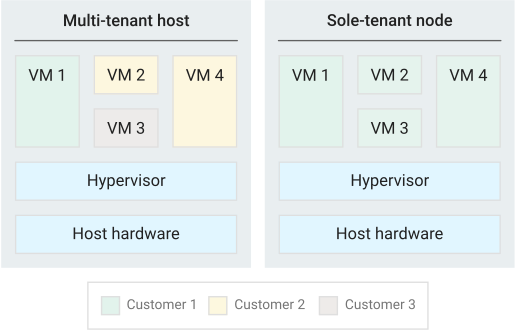
- Sole-tenancy provides dedicated hosting only for the project’s VM and provides an added layer of hardware isolation
- Sole-tenant nodes ensure that the VMs do not share host hardware with VMs from other projects
- Each sole-tenant node maintains a one-to-one mapping to the physical server that is backing the node
- Project has exclusive access to a sole-tenant node, which is a physical CE server and can be used to keep the VMs physically separated from VMs in other projects or to group the VMs together on the same host hardware
- Sole-tenant nodes can help meet dedicated hardware requirements for bring your own license (BYOL) scenarios that require per-core or per-processor licenses
Bare Metal Instances
- Bare metal instances (2024+) run directly on physical servers without a hypervisor layer.
- Available in C4, C4A, C4D, Z3, and X4 machine series.
- Ideal for workloads that require direct hardware access, specialized hypervisors, or specific compliance requirements.
- Can attach disks and use VPC networking just like regular VM instances.
- Cannot be live migrated during host maintenance events.
Preventing Accidental VM Deletion
- Accidental VM deletion can be prevented by setting the property
deletionProtectionon an instance resource esp. for VMs running critical workloads and need to be protected - Deletion request fails if a user attempts to delete a VM instance for which the
deletionProtectionflag is set - Only a user granted with
compute.instances.createpermission can reset the flag to allow the resource to be deleted. - Deletion prevention does not prevent the following actions:
- Terminating an instance from within the VM (such as running the
shutdowncommand) - Stopping an instance
- Resetting an instance
- Suspending an instance
- Instances being removed due to fraud and abuse after being detected by Google
- Instances being removed due to project termination
- Terminating an instance from within the VM (such as running the
- Deletion protection can be applied to both regular and Spot VMs.
- Deletion protection cannot be applied to VMs that are part of a managed instance group but can be applied to instances that are part of unmanaged instance groups.
- Deletion prevention cannot be specified in instance templates.
Cost Optimization
- Committed Use Discounts (CUDs) — discounts for committing to use a specific amount of resources for 1 or 3 years.
- Resource-based CUDs — commit to a specific amount of vCPUs and memory in a region. 1-year: ~20% off, 3-year: ~45% off.
- Compute Flexible CUDs (Flex CUDs) — spend-based commitments that apply across Compute Engine, GKE, and Cloud Run. 1-year: 28% off, 3-year: 46% off. No need to specify machine type or region.
- Sustained Use Discounts (SUDs) — automatic discounts for running instances for a significant portion of the month. Available for N2, N2D, N1, C2, M1, M2 series. Not available for newer 4th-gen series (C4, N4, etc.) which are covered by Flex CUDs instead.
- Spot VMs — up to 60-91% discount for interruptible workloads.
- Rightsizing Recommendations — Compute Engine provides machine type recommendations based on workload utilization to help optimize costs.
GCP Certification Exam Practice Questions
- Questions are collected from Internet and the answers are marked as per my knowledge and understanding (which might differ with yours).
- GCP services are updated everyday and both the answers and questions might be outdated soon, so research accordingly.
- GCP exam questions are not updated to keep up the pace with GCP updates, so even if the underlying feature has changed the question might not be updated
- Open to further feedback, discussion and correction.
- Your company hosts multiple applications on Compute Engine instances. They want the instances to be resilient to any Host maintenance activities performed on the instance. How would you configure the instances?
- Set
automaticRestartavailability policy totrue - Set
automaticRestartavailability policy tofalse - Set
onHostMaintenanceavailability policy tomigrateinstances - Set
onHostMaintenanceavailability policy toterminateinstances
- Set
- A company needs to run a fault-tolerant batch processing workload at the lowest possible cost. The workload can tolerate interruptions and does not have a fixed completion deadline. Which VM provisioning model should they use?
- Standard on-demand VMs
- Preemptible VMs
- Spot VMs
- Sole-tenant VMs
- What is the key advantage of Spot VMs over legacy Preemptible VMs in Google Cloud?
- Spot VMs are cheaper than Preemptible VMs
- Spot VMs can be live migrated during maintenance
- Spot VMs have no 24-hour maximum runtime limit
- Spot VMs are covered by a Service Level Agreement
- Your organization requires that VM memory is encrypted in use to protect sensitive data processing. Which Compute Engine feature should you enable?
- Shielded VM
- Confidential VM
- Customer-Managed Encryption Keys (CMEK)
- Customer-Supplied Encryption Keys (CSEK)
- Which 4th-generation machine series is powered by Google’s custom Axion Arm processor and offers up to 65% better price-performance than comparable x86 instances?
- C4
- C4A
- N4
- C4D
- A team needs a Compute Engine machine type that allows independently configuring vCPUs and memory for their specific workload needs. Which machine series supports custom machine types? (Choose TWO)
- C4
- N4
- N4D
- C4A
- H4D
- What is Google Titanium in the context of Compute Engine?
- A type of SSD storage
- A machine type family
- A custom-designed architecture that offloads networking and storage tasks to dedicated hardware
- A security feature for VM encryption
- Which storage type is recommended as the boot disk for newer Compute Engine machine series like C4 and N4?
- Standard Persistent Disk
- SSD Persistent Disk
- Hyperdisk Balanced
- Local SSD