AWS Organizations Service Control Policies
-
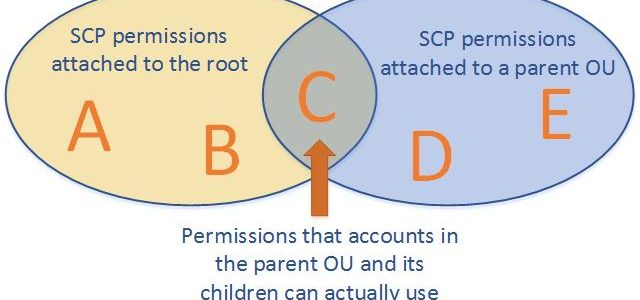
AWS Organizations Service control policies – SCPs offer central control over the maximum available permissions for all of the accounts in the organization, ensuring member accounts stay within the organization’s access control guidelines.
- are one type of policy that help manage the organization.
- are available only in an organization that has all features enabled, and aren’t available if the organization has enabled only the consolidated billing features.
- are NOT sufficient for granting access to the accounts in the organization.
- defines a guardrail for what actions accounts within the organization root or OU can do, but IAM policies need to be attached to the users and roles in the organization’s accounts to grant permissions to them.
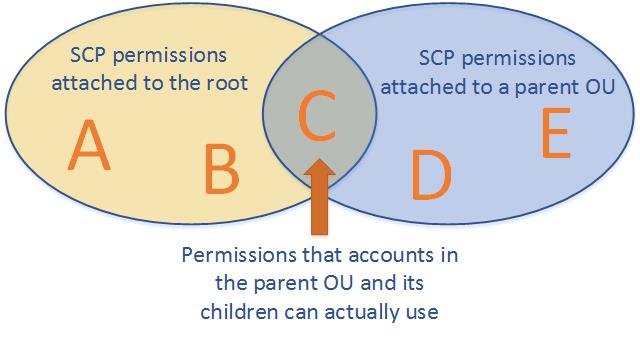
- Effective permissions are the logical intersection between what is allowed by the SCP and what is allowed by the IAM and resource-based policies.
- with an SCP attached to member accounts, identity-based and resource-based policies grant permissions to entities only if those policies and the SCP allow the action.
- don’t affect users or roles in the management account. They affect only the member accounts in your organization.
- SCPs also apply to member accounts that are designated as delegated administrators.
- work alongside Resource Control Policies (RCPs) and Declarative Policies to provide comprehensive preventive controls across an organization.
SCPs Effects on Permissions
- never grant permissions but define the maximum permissions for the affected accounts.
- Users and roles must still be granted permissions with appropriate IAM permission policies. A user without any IAM permission policies has no access at all, even if the applicable SCPs allow all services and all actions.
- limits permissions for entities in member accounts, including each AWS account root user.
- does not limit actions performed by the management account.
- does not affect any service-linked role. Service-linked roles enable other AWS services to integrate with AWS Organizations and can’t be restricted by SCPs.
- affect only IAM users or roles that are managed by accounts that are part of the organization. They don’t affect users or roles from accounts outside the organization.
- don’t affect resource-based policies directly.
- SCPs focus on identity-based (principal) permissions, while RCPs focus on resource-based permissions. Together they establish a comprehensive data perimeter.
SCPs Strategies
- By default, an SCP named
FullAWSAccessis attached to every root, OU, and account, which allows all actions and all services. - Blacklist or Deny Strategy
- actions are allowed by default and services and actions to be prohibited need to be specified.
- blacklist permissions using deny statements can be assigned in combination with the default
FullAWSAccessSCP. - using deny statements in SCPs require less maintenance because they don’t need to be updated when AWS adds new services.
- deny statements usually use less space, thus making it easier to stay within SCP size limits.
- Whitelist or Allow Strategy
- actions are prohibited by default, and you specify what services and actions are allowed.
- whitelist permissions can be assigned, by removing the default
FullAWSAccessSCP. - allows SCP that explicitly permits only those allowed services and actions
SCP Full IAM Policy Language Support
- As of September 2025, SCPs now support the full IAM policy language, removing previous limitations.
- Newly supported capabilities include:
Conditionelement inAllowstatements – enables contextual boundaries like restricting by Region or account.NotActioninAllowstatements – allows specifying exempt actions.Resourcewith specific ARNs inAllowstatements – enables scoped resource access.NotResourcein bothAllowandDenystatements – simplifies exceptions for service-owned resources.- Wildcards (
*,?) anywhere inAction/NotActionelements (e.g.,"servicename:*action","servicename:some*action").
- These enhancements enable more precise, concise, and scalable policies without complex workarounds.
- AWS recommends using explicit
Denystatements as best practice and avoiding overlappingAllowstatements. - Use IAM Access Analyzer to validate SCPs before applying them.
SCP Quotas (Updated May 2026)
- Maximum SCP size: 10,240 characters (doubled from previous 5,120 limit in May 2026).
- Maximum SCPs per node (root, OU, or account): 10 (increased from previous limit of 5).
- Maximum SCPs in an organization: 2,000.
- Maximum nesting depth of OUs: 5 levels.
- These increased quotas are automatically available across all commercial, GovCloud, and China Regions with no request needed.
SCPs Testing Effects
- don’t attach SCPs to the root of the organization without thoroughly testing the impact that the policy has on accounts.
- Create an OU that the accounts can be moved into one at a time, or at least in small numbers, to ensure that users are not inadvertently locked out of key services.
- Use IAM Access Analyzer policy validation and custom policy checks to verify SCP correctness before deployment.
Resource Control Policies (RCPs)
- Resource Control Policies (RCPs), launched in November 2024, are a new authorization policy type in AWS Organizations.
- RCPs set the maximum available permissions on resources within your organization, complementing SCPs which set maximum permissions on principals.
- Help centrally establish a data perimeter by restricting external access to resources at scale.
- RCPs are evaluated when resources are accessed, irrespective of who is making the API request.
- Use
Denystatements to restrict access (similar to SCPs). - A default
RCPFullAWSAccesspolicy is automatically attached to every entity when RCPs are enabled. - RCPs don’t affect resources in the management account.
- Supported services (expanding): Amazon S3, AWS STS, AWS KMS, Amazon SQS, AWS Secrets Manager, Amazon ECR, Amazon OpenSearch Serverless, Amazon Cognito, Amazon CloudWatch Logs, and more being added.
- SCPs and RCPs have independent quotas — each RCP can have up to 5,120 characters, with up to 5 RCPs per node and 1,000 RCPs per organization.
- Neither SCPs nor RCPs grant permissions — they only restrict the maximum available permissions.
SCP vs RCP Comparison
| Feature | SCP (Service Control Policy) | RCP (Resource Control Policy) |
|---|---|---|
| Controls | Maximum permissions for principals (IAM users/roles) | Maximum permissions on resources |
| Scope | What principals can do | Who can access resources |
| Evaluation | Evaluated based on who is making the request | Evaluated when resources are accessed, regardless of requester |
| Management account | Not affected | Not affected |
| Default policy | FullAWSAccess | RCPFullAWSAccess |
| Max size | 10,240 characters | 5,120 characters |
| Max per node | 10 | 5 |
Declarative Policies
- Declarative Policies, launched in December 2024, are a new management policy type in AWS Organizations.
- Allow you to declare and enforce desired configuration for AWS services at scale across the organization.
- Unlike SCPs/RCPs (which restrict API actions), declarative policies enforce the desired state of service attributes.
- Once set, the configuration is maintained even as new features or APIs are added — no policy maintenance overhead.
- Enforcement applies regardless of whether the action was invoked by an IAM role or a service-linked role.
- Support custom error messages so end users see actionable guidance when actions are restricted.
- Provide an account status report to assess current state before applying policies.
- Supported service attributes (at launch — EC2, VPC, EBS):
- Enforce IMDSv2 for EC2 instances
- Block public access for Amazon EBS snapshots
- Block public access for Amazon EC2 AMIs
- Block public access for Amazon VPC (internet gateway control)
- Allowed AMI image settings (restrict to trusted providers)
- Serial console access control
- Can be applied at organization, OU, or account level.
- Manageable via AWS Organizations console, CLI, CloudFormation, or AWS Control Tower.
AWS Organizations Policy Types Summary
| Policy Type | Purpose | Mechanism |
|---|---|---|
| SCPs | Restrict maximum permissions for principals | Allow/Deny API actions for IAM users and roles |
| RCPs | Restrict maximum permissions on resources | Deny external access to resources |
| Declarative Policies | Enforce desired service configuration | Set desired state for service attributes |
AWS Certification Exam Practice Questions
- Questions are collected from Internet and the answers are marked as per my knowledge and understanding (which might differ with yours).
- AWS services are updated everyday and both the answers and questions might be outdated soon, so research accordingly.
- AWS exam questions are not updated to keep up the pace with AWS updates, so even if the underlying feature has changed the question might not be updated
- Open to further feedback, discussion and correction.
- Your company is planning on setting up multiple accounts in AWS. The IT Security department has a requirement to ensure that certain services and actions are not allowed across all accounts. How would the system admin achieve this in the most EFFECTIVE way possible?
- Create a common IAM policy that can be applied across all accounts
- Create an IAM policy per account and apply them accordingly
- Deny the services to be used across accounts by contacting AWS support
- Use AWS Organizations and Service Control Policies
- You are in the process of implementing AWS Organizations for your company. At your previous company, you saw an Organizations implementation go bad when an SCP (Service Control Policy) was applied at the root of the organization before being thoroughly tested. In what way can an SCP be properly tested and implemented?
- Back up your entire Organization to S3 and restore rollback and restore if something goes wrong
- The SCP must be verified with AWS before it is implemented to avoid any problems.
- Mirror your Organizational Unit in another region. Apply the SCP and test it. Once testing is complete, attach the SCP to the root of your organization.
- Create an Organizational Unit (OU). Attach the SCP to this new OU. Move your accounts in one at a time to ensure that you don’t inadvertently lock users out of key services.
- A security team wants to prevent any external AWS accounts from accessing their organization’s S3 buckets, regardless of what resource-based policies individual developers might configure. Which approach should they use?
- Apply an SCP to deny all S3 actions from external principals
- Use AWS Config rules to detect non-compliant bucket policies
- Apply a Resource Control Policy (RCP) that restricts S3 access to principals within the organization
- Configure S3 Block Public Access at the account level
- An organization needs to ensure that all EC2 instances launched across hundreds of accounts use IMDSv2, even if new APIs or features are added in the future. They also want end users to see a custom error message explaining why their configuration was blocked. What is the BEST solution?
- Create an SCP denying ec2:RunInstances without the IMDSv2 metadata condition
- Use AWS Config with auto-remediation to terminate non-compliant instances
- Apply a Declarative Policy for EC2 that enforces IMDSv2 with a custom error message
- Create a Lambda function triggered by CloudTrail to stop non-compliant instances
- A company wants to implement a data perimeter strategy that controls both which principals can perform actions AND who can access their AWS resources. Which combination of AWS Organizations policies provides the most comprehensive data perimeter?
- SCPs and AWS Config rules
- SCPs and Resource Control Policies (RCPs)
- SCPs and VPC endpoint policies only
- IAM permission boundaries and SCPs
- An administrator needs to restrict EC2 actions to only 3 specific AWS Regions for all accounts. Previously this required both an Allow and a separate Deny statement. With recent SCP enhancements, what is the simplified approach?
- Use a Deny statement with StringNotEquals condition on aws:RequestedRegion
- Use an Allow statement with a Condition element specifying aws:RequestedRegion
- Create separate SCPs per region and attach them to respective OUs
- Use declarative policies to block EC2 access outside specific regions