AWS S3 Storage Classes
- AWS S3 offers a range of S3 Storage Classes to match the use case scenario and performance access requirements.
- S3 storage classes are designed to sustain the concurrent loss of data in one or two facilities.
- S3 storage classes allow lifecycle management for automatic transition of objects for cost savings.
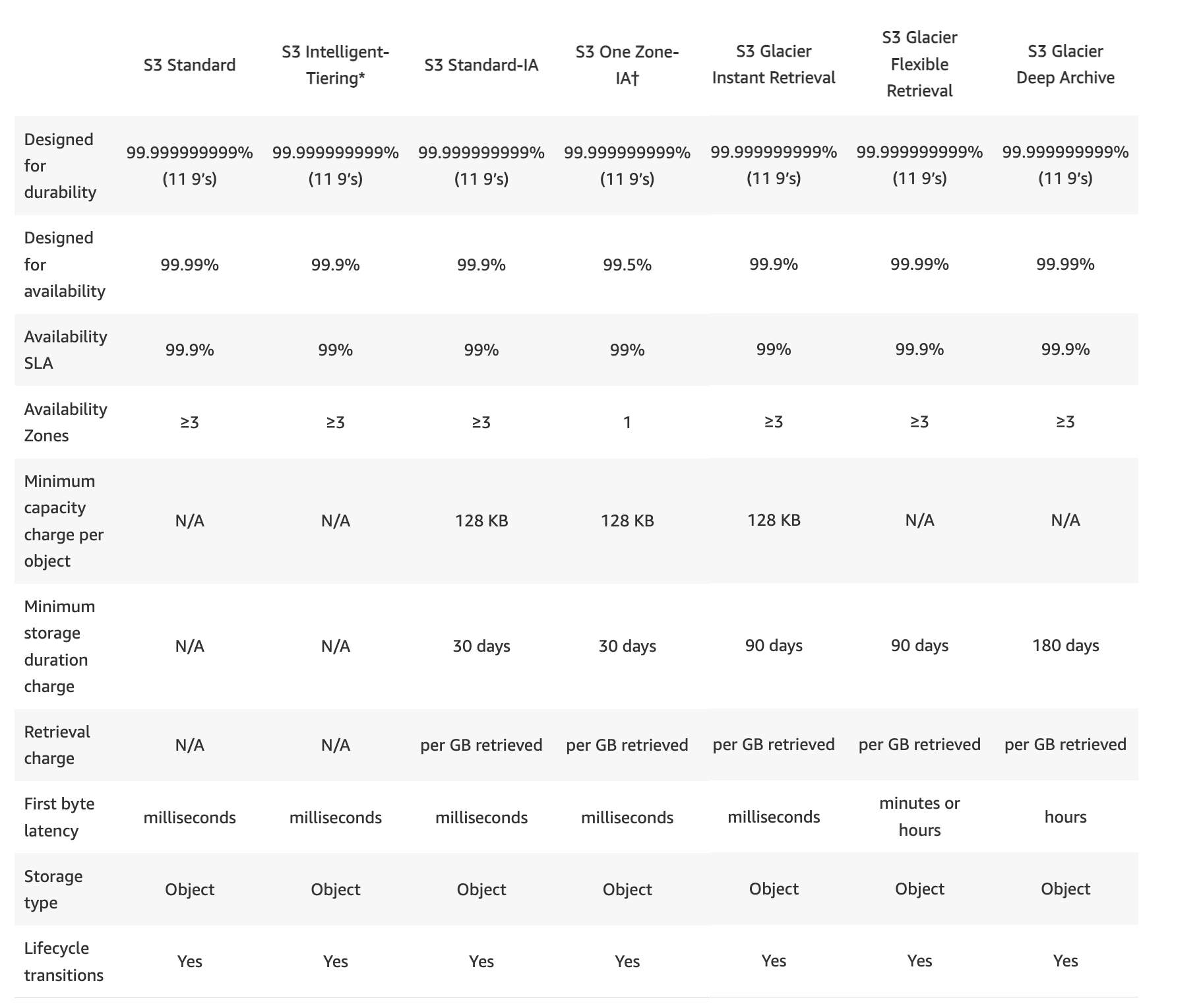
- All S3 storage classes provide the same durability, first-byte latency, and support SSL encryption of data in transit, and data encryption at rest.
- S3 also regularly verifies the integrity of the data using checksums and provides the auto-healing capability.
- S3 currently offers the following storage classes: S3 Standard, S3 Express One Zone, S3 Intelligent-Tiering, S3 Standard-IA, S3 One Zone-IA, S3 Glacier Instant Retrieval, S3 Glacier Flexible Retrieval, and S3 Glacier Deep Archive.
S3 Storage Classes Comparison
S3 Standard
- STANDARD is the default storage class, if none specified during upload
- Low latency and high throughput performance
- Designed for 99.999999999% i.e. 11 9’s Durability of objects across AZs
- Designed for 99.99% availability over a given year
- Resilient against events that impact an entire Availability Zone and is designed to sustain the loss of data in two facilities
- Stores data redundantly across a minimum of 3 Availability Zones
- Ideal for performance-sensitive use cases and frequently accessed data
- S3 Standard is appropriate for a wide variety of use cases, including cloud applications, dynamic websites, content distribution, mobile and gaming applications, and big data analytics.
- No minimum storage duration and no minimum billable object size
S3 Express One Zone
- S3 Express One Zone is a high-performance, single-Availability Zone storage class purpose-built to deliver consistent single-digit millisecond data access for latency-sensitive applications.
- Delivers data access speed up to 10x faster and request costs up to 50% lower than S3 Standard.
- Supports up to 2 million GET transactions per second (TPS) and up to 200,000 PUT TPS per directory bucket.
- Stores data in a single Availability Zone that you choose, enabling co-location with compute resources (EC2, EKS, ECS) for lowest latency.
- Uses directory buckets (different from general purpose buckets).
- Designed for 99.999999999% i.e. 11 9’s Durability within a single AZ
- Designed for 99.95% availability
- No minimum storage duration and no minimum billable object size
- Data is not resilient to the physical loss of the Availability Zone.
- Ideal for ML training, interactive analytics, media content creation, high-performance computing (HPC), and financial modeling.
- Supports appending data to existing objects without downloading and re-uploading.
- Pricing Update (April 2025): AWS reduced storage prices by 31%, PUT request prices by 55%, GET request prices by 85%, and data upload/retrieval per-byte charges by 60%.
S3 Intelligent Tiering (S3 Intelligent-Tiering)
- S3 Intelligent Tiering storage class is designed to optimize storage costs by automatically moving data to the most cost-effective storage access tier, without performance impact or operational overhead.
- S3 Intelligent-Tiering is the only cloud storage class that delivers automatic cost savings by moving data on a granular object level between access tiers when access patterns change.
- S3 Intelligent-Tiering automatically stores objects in three automatic low-latency access tiers:
- Frequent Access tier (automatic) – Default tier for newly uploaded objects. Provides low latency and high throughput.
- Infrequent Access tier (automatic) – Objects not accessed for 30 consecutive days are moved here.
- Archive Instant Access tier (automatic) – Objects not accessed for 90 consecutive days are moved here. Provides millisecond access and high throughput, with up to 68% lower cost vs. Frequent Access.
- Additionally offers two optional asynchronous archive access tiers (must be activated):
- Archive Access tier (optional) – For data that can be accessed asynchronously. Objects not accessed for a minimum of 90 consecutive days (configurable up to 730 days). Retrieval: 3-5 hours (standard).
- Deep Archive Access tier (optional) – Objects not accessed for a minimum of 180 consecutive days (configurable up to 730 days). Retrieval: within 12 hours.
- No retrieval fees when using the S3 Intelligent-Tiering storage class.
- If an object in the Infrequent Access tier or Archive Instant Access tier is accessed, it is automatically moved back to the Frequent Access tier.
- No additional fees apply when objects are moved between access tiers.
- For a small monthly monitoring and automation fee per object, S3 monitors access patterns and moves objects automatically.
- No minimum storage duration charge.
- Objects smaller than 128 KB are not monitored and not eligible for auto-tiering; they are always stored in the Frequent Access tier. No monitoring and automation charge applies to objects smaller than 128 KB.
- Designed for 99.999999999% i.e. 11 9’s Durability of objects across AZs
- Designed for 99.9% availability over a given year
- Ideal when you want to optimize storage costs for data with unknown or changing access patterns.
S3 Standard-Infrequent Access (S3 Standard-IA)
- S3 Standard-Infrequent Access storage class is optimized for long-lived and less frequently accessed data. for e.g. for backups and older data where access is limited, but the use case still demands high performance
- Ideal for use for the primary or only copy of data that can’t be recreated.
- Data stored redundantly across multiple geographically separated AZs and are resilient to the loss of an Availability Zone.
- Offers greater availability and resiliency than the ONEZONE_IA class.
- Objects are available for real-time access.
- Suitable for objects larger than 128 KB (smaller objects are charged for 128 KB only) kept for at least 30 days (charged for minimum 30 days)
- Same low latency and high throughput performance of Standard
- Designed for 99.999999999% i.e. 11 9’s Durability of objects across AZs
- Designed for 99.9% availability over a given year
- S3 charges a per-GB retrieval fee for these objects, so they are most suitable for infrequently accessed data.
S3 One Zone-Infrequent Access (S3 One Zone-IA)
- S3 One Zone-Infrequent Access storage class is designed for long-lived and infrequently accessed data, but available for millisecond access (similar to the STANDARD and STANDARD_IA storage class).
- Ideal when the data can be recreated if the AZ fails, and for object replicas when setting cross-region replication (CRR).
- Objects are available for real-time access.
- Suitable for objects greater than 128 KB (smaller objects are charged for 128 KB only) kept for at least 30 days (charged for a minimum of 30 days)
- Stores the object data in only one AZ, which makes it less expensive than Standard-Infrequent Access
- Data is not resilient to the physical loss of the AZ resulting from disasters, such as earthquakes and floods.
- One Zone-Infrequent Access storage class is as durable as Standard-Infrequent Access, but it is less available and less resilient.
- Designed for 99.999999999% i.e. 11 9’s Durability of objects in a single AZ
- Designed for 99.5% availability over a given year
- S3 charges a retrieval fee for these objects, so they are most suitable for infrequently accessed data.
- Can also be used in directory buckets within AWS Local Zones for data residency and isolation use cases.
Reduced Redundancy Storage – RRS (Not Recommended)
⚠️ NOT RECOMMENDED – EFFECTIVELY DEPRECATED
AWS recommends NOT using Reduced Redundancy Storage (RRS). The S3 Standard storage class is more cost-effective. RRS no longer participates in AWS pricing discounts, making it more expensive than S3 Standard while providing lower durability (99.99% vs 99.999999999%).
Recommendation: Use S3 Standard for all use cases previously served by RRS. For infrequently accessed reproducible data, use S3 One Zone-IA instead.
- NOTE – AWS recommends not to use this storage class. The STANDARD storage class is more cost-effective. RRS is effectively deprecated – it costs more than S3 Standard and offers lower durability.
- Reduced Redundancy Storage (RRS) storage class is designed for non-critical, reproducible data stored at lower levels of redundancy than the STANDARD storage class
- Designed for durability of 99.99% of objects (average annual expected loss of 0.01% of objects)
- Designed for 99.99% availability over a given year
- RRS does not replicate objects as many times as S3 standard storage and is designed to sustain the loss of data in a single facility.
- If an RRS object is lost, S3 returns a 405 error on requests made to that object
- S3 can send an event notification, configured on the bucket, to alert a user or start a workflow when it detects that an RRS object is lost
S3 Glacier Instant Retrieval
- Use for archiving data that is rarely accessed (approximately once per quarter) and requires milliseconds retrieval.
- Delivers the same low latency and high throughput performance as S3 Standard and S3 Standard-IA.
- Provides up to 68% lower storage cost compared to S3 Standard-IA for data accessed once per quarter.
- Storage class has a minimum storage duration period of 90 days
- Minimum billable object size of 128 KB
- Per-GB retrieval fees apply.
- Designed for 99.999999999% i.e. 11 9’s Durability of objects across AZs
- Designed for 99.9% availability
- Ideal for medical images, news media assets, genomic sequences, satellite images, and user-generated content archives.
S3 Glacier Flexible Retrieval (formerly S3 Glacier)
- S3 Glacier Flexible Retrieval storage class is suitable for low-cost data archiving where data access is infrequent and retrieval time of minutes to hours is acceptable.
- Storage class has a minimum storage duration period of 90 days
- Requires 40 KB of additional metadata per archived object (32 KB at Glacier rate + 8 KB at Standard rate).
- Provides configurable retrieval times, from minutes to hours
- Expedited retrieval: 1-5 mins
- Standard retrieval: 3-5 hours
- Bulk retrieval: 5-12 hours (free)
- Objects in this storage class are managed through S3 (not through the separate Glacier service)
- For accessing Glacier Flexible Retrieval objects,
- the object must be restored which can take anywhere between minutes to hours
- objects are only available for the time period (the number of days) specified during the restoration request
- object’s storage class remains GLACIER
- charges are levied for both the archive (GLACIER rate) and the copy restored temporarily
- Vault Lock feature enforces compliance via a lockable policy.
- Designed for 99.999999999% i.e. 11 9’s Durability of objects across AZs
- Designed for 99.99% availability (after objects are restored)
S3 Glacier Deep Archive
- Glacier Deep Archive storage class provides the lowest-cost data archiving where data access is infrequent and retrieval time of hours is acceptable.
- Has a minimum storage duration period of 180 days.
- Requires 40 KB of additional metadata per archived object (32 KB at Deep Archive rate + 8 KB at Standard rate).
- Retrieval options:
- Standard retrieval: within 12 hours
- Bulk retrieval: within 48 hours
- Supports long-term retention and digital preservation for data that may be accessed once or twice a year
- Designed for 99.999999999% i.e. 11 9’s Durability of objects across AZs
- Designed for 99.99% availability (after objects are restored)
- Ideal alternative to magnetic tape libraries
- Suitable for regulatory compliance archives, healthcare and life sciences data, financial services records, and media asset archiving.
S3 on Outposts
- S3 on Outposts provides a storage class called S3 Outposts (OUTPOSTS) for on-premises object storage.
- Allows creating S3 buckets on AWS Outposts resources for local data access, local data processing, and data residency requirements.
- Uses the same S3 API operations and features as in AWS Regions, including access policies, encryption, and tagging.
- Objects stored in S3 Outposts are always encrypted using SSE-S3 (can also use SSE-C).
- Does not support SSE-KMS.
- Capacity options: 26 TB, 48 TB, 96 TB, 240 TB, or 380 TB per Outpost.
S3 Analytics – S3 Storage Classes Analysis
- S3 Analytics – Storage Class Analysis helps analyze storage access patterns to decide when to transition the right data to the right storage class.
- S3 Analytics feature observes data access patterns to help determine when to transition less frequently accessed STANDARD storage to the STANDARD_IA (IA, for infrequent access) storage class.
- Storage Class Analysis can be configured to analyze all the objects in a bucket or filters to group objects.
- Results can help inform S3 Lifecycle policies and S3 Intelligent-Tiering configurations.
S3 Storage Classes – Key Differences Summary
| Storage Class | Designed For | Availability | AZs | Min Duration | Retrieval Fee |
|---|---|---|---|---|---|
| S3 Standard | Frequently accessed data | 99.99% | ≥ 3 | None | None |
| S3 Express One Zone | Latency-sensitive (single-digit ms) | 99.95% | 1 | None | None |
| S3 Intelligent-Tiering | Unknown/changing access patterns | 99.9% | ≥ 3 | None | None |
| S3 Standard-IA | Infrequent access, millisecond retrieval | 99.9% | ≥ 3 | 30 days | Per-GB |
| S3 One Zone-IA | Recreatable, infrequent access | 99.5% | 1 | 30 days | Per-GB |
| S3 Glacier Instant Retrieval | Archive, once/quarter, ms retrieval | 99.9% | ≥ 3 | 90 days | Per-GB |
| S3 Glacier Flexible Retrieval | Archive, once/year, min-to-hour retrieval | 99.99%* | ≥ 3 | 90 days | Per-GB |
| S3 Glacier Deep Archive | Long-term archive, hours retrieval | 99.99%* | ≥ 3 | 180 days | Per-GB |
* Availability is 99.99% after objects are restored.
All storage classes provide 99.999999999% (11 nines) durability.
📖 Related: AWS S3 vs EBS vs EFS – Complete Storage Comparison Guide
AWS Certification Exam Practice Questions
- Questions are collected from Internet and the answers are marked as per my knowledge and understanding (which might differ with yours).
- AWS services are updated everyday and both the answers and questions might be outdated soon, so research accordingly.
- AWS exam questions are not updated to keep up the pace with AWS updates, so even if the underlying feature has changed the question might not be updated
- Open to further feedback, discussion and correction.
- What does RRS stand for when talking about S3?
- Redundancy Removal System
- Relational Rights Storage
- Regional Rights Standard
- Reduced Redundancy Storage
- What is the durability of S3 RRS?
- 99.99%
- 99.95%
- 99.995%
- 99.999999999%
- What is the Reduced Redundancy option in Amazon S3?
- Less redundancy for a lower cost
- It doesn’t exist in Amazon S3, but in Amazon EBS.
- It allows you to destroy any copy of your files outside a specific jurisdiction.
- It doesn’t exist at all
Note: While the answer above was correct historically, RRS is now more expensive than S3 Standard and AWS recommends against using it.
- An application is generating a log file every 5 minutes. The log file is not critical but may be required only for verification in case of some major issue. The file should be accessible over the internet whenever required. Which of the below mentioned options is a best possible storage solution for it?
- AWS S3
- AWS Glacier
- AWS RDS
- AWS S3 RRS (Reduced Redundancy Storage (RRS) is an Amazon S3 storage option that enables customers to store noncritical, reproducible data at lower levels of redundancy than Amazon S3’s standard storage. RRS is designed to sustain the loss of data in a single facility.)
Note: This question is outdated. Today the best answer would be S3 Standard or S3 One Zone-IA, as RRS is more expensive than S3 Standard and not recommended.
- A user has moved an object to Glacier using the life cycle rules. The user requests to restore the archive after 6 months. When the restore request is completed the user accesses that archive. Which of the below mentioned statements is not true in this condition?
- The archive will be available as an object for the duration specified by the user during the restoration request
- The restored object’s storage class will be RRS (After the object is restored the storage class still remains GLACIER. Read more)
- The user can modify the restoration period only by issuing a new restore request with the updated period
- The user needs to pay storage for both RRS (restored) and Glacier (Archive) Rates
- Your department creates regular analytics reports from your company’s log files. All log data is collected in Amazon S3 and processed by daily Amazon Elastic Map Reduce (EMR) jobs that generate daily PDF reports and aggregated tables in CSV format for an Amazon Redshift data warehouse. Your CFO requests that you optimize the cost structure for this system. Which of the following alternatives will lower costs without compromising average performance of the system or data integrity for the raw data? [PROFESSIONAL]
- Use reduced redundancy storage (RRS) for PDF and CSV data in Amazon S3. Add Spot instances to Amazon EMR jobs. Use Reserved Instances for Amazon Redshift. (Spot instances impacts performance)
- Use reduced redundancy storage (RRS) for all data in S3. Use a combination of Spot instances and Reserved Instances for Amazon EMR jobs. Use Reserved instances for Amazon Redshift (Combination of the Spot and reserved with guarantee performance and help reduce cost. Also, RRS would reduce cost and guarantee data integrity, which is different from data durability )
- Use reduced redundancy storage (RRS) for all data in Amazon S3. Add Spot Instances to Amazon EMR jobs. Use Reserved Instances for Amazon Redshift (Spot instances impacts performance)
- Use reduced redundancy storage (RRS) for PDF and CSV data in S3. Add Spot Instances to EMR jobs. Use Spot Instances for Amazon Redshift. (Spot instances impacts performance)
Note: This question is outdated. RRS is now more expensive than S3 Standard. Modern approach would use S3 Standard or S3 Intelligent-Tiering.
- Which of the below mentioned options can be a good use case for storing content in AWS RRS?
- Storing mission critical data Files
- Storing infrequently used log files
- Storing a video file which is not reproducible
- Storing image thumbnails
Note: RRS is no longer recommended. For reproducible data like thumbnails, use S3 Standard or S3 One Zone-IA.
- A newspaper organization has an on-premises application which allows the public to search its back catalogue and retrieve individual newspaper pages via a website written in Java. They have scanned the old newspapers into JPEGs (approx. 17TB) and used Optical Character Recognition (OCR) to populate a commercial search product. The hosting platform and software is now end of life and the organization wants to migrate its archive to AWS and produce a cost efficient architecture and still be designed for availability and durability. Which is the most appropriate? [PROFESSIONAL]
- Use S3 with reduced redundancy to store and serve the scanned files, install the commercial search application on EC2 Instances and configure with auto-scaling and an Elastic Load Balancer. (RRS impacts durability and commercial search would add to cost)
- Model the environment using CloudFormation. Use an EC2 instance running Apache webserver and an open source search application, stripe multiple standard EBS volumes together to store the JPEGs and search index. (Using EBS is not cost effective for storing files)
- Use S3 with standard redundancy to store and serve the scanned files, use CloudSearch for query processing, and use Elastic Beanstalk to host the website across multiple availability zones. (Standard S3 and Elastic Beanstalk provides availability and durability, Standard S3 and CloudSearch provides cost effective storage and search)
- Use a single-AZ RDS MySQL instance to store the search index and the JPEG images use an EC2 instance to serve the website and translate user queries into SQL. (RDS is not ideal and cost effective to store files, Single AZ impacts availability)
- Use a CloudFront download distribution to serve the JPEGs to the end users and Install the current commercial search product, along with a Java Container for the website on EC2 instances and use Route53 with DNS round-robin. (CloudFront needs a source and using commercial search product is not cost effective)
- A research scientist is planning for the one-time launch of an Elastic MapReduce cluster and is encouraged by her manager to minimize the costs. The cluster is designed to ingest 200TB of genomics data with a total of 100 Amazon EC2 instances and is expected to run for around four hours. The resulting data set must be stored temporarily until archived into an Amazon RDS Oracle instance. Which option will help save the most money while meeting requirements? [PROFESSIONAL]
- Store ingest and output files in Amazon S3. Deploy on-demand for the master and core nodes and spot for the task nodes.
- Optimize by deploying a combination of on-demand, RI and spot-pricing models for the master, core and task nodes. Store ingest and output files in Amazon S3 with a lifecycle policy that archives them to Amazon Glacier. (Master and Core must be RI or On Demand. Cannot be Spot)
- Store the ingest files in Amazon S3 RRS and store the output files in S3. Deploy Reserved Instances for the master and core nodes and on-demand for the task nodes. (Need better durability for ingest file. Spot instances can be used for task nodes for cost saving.)
- Deploy on-demand master, core and task nodes and store ingest and output files in Amazon S3 RRS (Input must be in S3 standard)
- A company stores rarely accessed medical images in S3. The images are accessed approximately once per quarter but must be available with millisecond latency when needed. Which storage class is most cost-effective?
- S3 Standard
- S3 Standard-IA
- S3 Glacier Instant Retrieval (S3 Glacier Instant Retrieval is designed for rarely accessed data (once per quarter) requiring millisecond access, with up to 68% lower cost than S3 Standard-IA.)
- S3 Glacier Flexible Retrieval
- A data lake has objects with unpredictable access patterns. Some objects are accessed frequently for a few weeks, then not again for months. Which storage class provides the best automatic cost optimization without operational overhead?
- S3 Standard with lifecycle policies to S3 Standard-IA
- S3 Intelligent-Tiering (S3 Intelligent-Tiering automatically moves objects between Frequent Access, Infrequent Access, and Archive Instant Access tiers based on access patterns, with no retrieval fees and no operational overhead.)
- S3 One Zone-IA
- S3 Glacier Flexible Retrieval
- An AI/ML team needs to store training datasets that are accessed thousands of times per second during model training. The datasets are in the same Availability Zone as their compute cluster. Which storage class provides the best performance?
- S3 Standard
- S3 One Zone-IA
- S3 Express One Zone (S3 Express One Zone provides single-digit millisecond data access, up to 10x faster than S3 Standard, and can be co-located in the same AZ as compute resources. It supports up to 2M GET TPS per directory bucket.)
- S3 Standard with Transfer Acceleration
- How many automatic access tiers does S3 Intelligent-Tiering provide? (Select TWO correct statements)
- Two automatic tiers: Frequent Access and Infrequent Access
- Three automatic tiers: Frequent Access, Infrequent Access, and Archive Instant Access
- Two optional archive tiers must be activated: Archive Access and Deep Archive Access
- Objects smaller than 128 KB are automatically tiered between all tiers
- Archive Instant Access tier requires manual activation
- A company needs to archive compliance data that must be retained for 7 years and is almost never accessed. When accessed, a retrieval time of 12 hours is acceptable. Which is the most cost-effective storage class?
- S3 Glacier Instant Retrieval
- S3 Glacier Flexible Retrieval
- S3 Glacier Deep Archive (S3 Glacier Deep Archive provides the lowest-cost storage for data that is rarely accessed and where a retrieval time of 12 hours (standard) or 48 hours (bulk) is acceptable. It has a 180-day minimum storage duration.)
- S3 Standard-IA