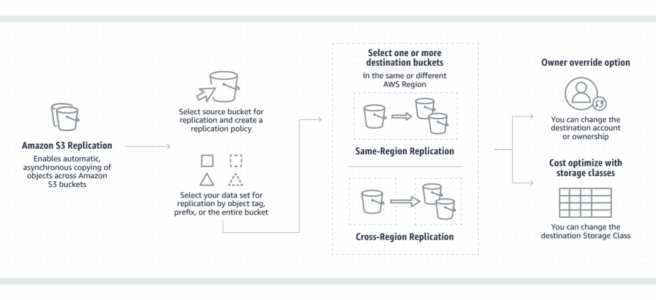
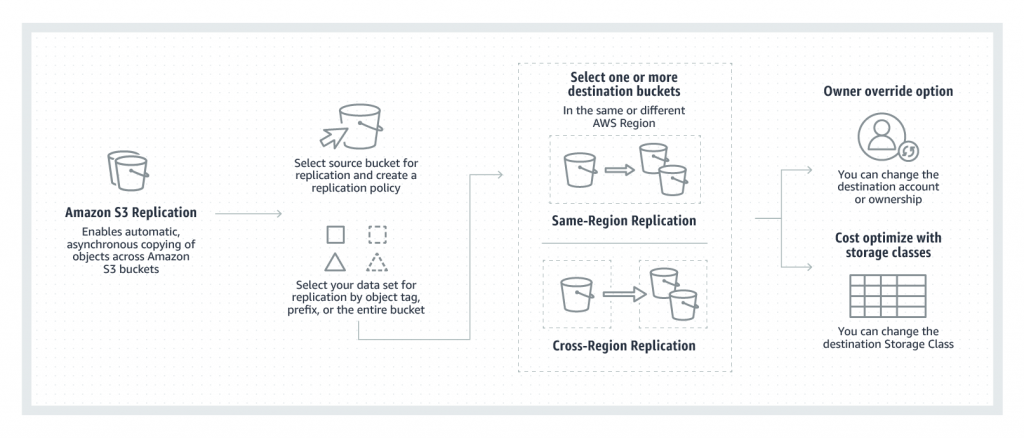
Amazon S3 Replication
- S3 Replication enables automatic, asynchronous copying of objects across S3 buckets in the same or different AWS regions.
- S3 Replication supports two types:
- Live Replication – automatically replicates new and updated objects as they are written to the source bucket.
- On-Demand Replication (Batch Replication) – replicates existing objects from the source bucket to destination buckets on demand.
- S3 Cross-Region Replication (CRR) is used to copy objects across S3 buckets in different AWS Regions.
- S3 Same-Region Replication (SRR) is used to copy objects across S3 buckets in the same AWS Region.
- S3 Replication supports two-way (bidirectional) replication between two or more buckets in the same or different AWS Regions.
- S3 Replication helps to
- Replicate objects while retaining metadata (creation time, version IDs, ACLs)
- Replicate objects into different storage classes (including S3 Glacier, Deep Archive)
- Maintain object copies under different ownership (owner override option)
- Keep objects stored over multiple AWS Regions
- Replicate objects within 15 minutes (with S3 Replication Time Control)
- Sync buckets, replicate existing objects, and retry previously failed replications (with Batch Replication)
- Replicate objects and fail over to a bucket in another AWS Region (with Multi-Region Access Points)
- S3 can replicate all or a subset of objects with specific key name prefixes or object tags
- S3 encrypts all data in transit across AWS regions using SSL
- Object replicas in the destination bucket are exact replicas of the objects in the source bucket with the same key names and the same metadata.
- Objects may be replicated to a single destination bucket or multiple destination buckets.
- Cross-Region Replication can be useful for the following scenarios:-
- Compliance requirement to have data backed up across regions
- Minimize latency to allow users across geography to access objects
- Operational reasons compute clusters in two different regions that analyze the same set of objects
- Same-Region Replication can be useful for the following scenarios:-
- Aggregate logs into a single bucket
- Configure live replication between production and test accounts
- Abide by data sovereignty laws to store multiple copies
S3 Replication Requirements
- Source and destination buckets must be versioning-enabled
- For CRR, the source and destination buckets must be in different AWS Regions.
- The source bucket owner must have the source and destination AWS Regions enabled for their account. The destination bucket owner must have the destination Region enabled for their account.
- S3 must have permission to replicate objects from that source bucket to the destination bucket on your behalf.
- If the source bucket owner also owns the object, the bucket owner has full permission to replicate the object. If not, the object owner must grant the bucket owner
READandREAD_ACPpermissions with the object ACL. - Setting up cross-region replication in a cross-account scenario (where the source and destination buckets are owned by different AWS accounts), the destination bucket owner must grant the source bucket owner permissions to replicate objects with a bucket policy.
- If the source bucket has S3 Object Lock enabled, the destination buckets must also have S3 Object Lock enabled. Additional permissions
s3:GetObjectRetentionands3:GetObjectLegalHoldare required on the IAM role. - Destination buckets cannot be configured as Requester Pays buckets.
S3 Batch Replication
- S3 Batch Replication allows you to replicate existing objects to different buckets as an on-demand operation.
- Live replication (CRR/SRR) only replicates new objects created after the replication rule is configured. Batch Replication addresses the gap for pre-existing objects.
- Use cases for Batch Replication:
- Backfill newly created buckets with existing objects from another bucket
- Retry failed replications – replicate objects with a replication status of FAILED
- Migrate data across accounts while preserving metadata and version IDs
- Add new buckets to your data lake by replicating existing objects to new destinations
- Replicate replicas – replicate objects that were created by another replication rule (not possible with live replication)
- Batch Replication uses S3 Batch Operations jobs and provides a completion report when finished.
- S3 RTC does not apply to Batch Replication; it is tracked via S3 Batch Operations.
S3 Replication Time Control (S3 RTC)
- S3 Replication Time Control (RTC) provides a predictable replication time backed by a Service Level Agreement (SLA).
- S3 RTC replicates 99.99% of new objects within 15 minutes after upload, with the majority replicated in seconds.
- S3 RTC is backed by an SLA with a commitment to replicate 99.9% of objects within 15 minutes during any billing month.
- S3 RTC, by default, includes S3 Replication Metrics and S3 Event Notifications.
- S3 RTC is available in all AWS Regions including AWS GovCloud (US) Regions.
- Delete marker replication does not adhere to the 15-minute SLA granted by S3 RTC.
S3 Two-Way Replication (Bidirectional)
- S3 Replication supports two-way (bidirectional) replication between two or more buckets in the same or different AWS Regions.
- Replica Modification Sync enables replicating metadata changes (ACLs, object tags, Object Lock settings) made to replica objects back to the source.
- Replica Modification Sync must be enabled on both buckets for bidirectional metadata synchronization.
- Two-way replication is essential for:
- Building shared datasets across multiple AWS Regions
- Keeping data synchronized during failover with S3 Multi-Region Access Points
- Making applications highly available even during Regional traffic disruptions
- To set up two-way replication, create replication rules in both directions between the source and destination buckets.
S3 Multi-Region Access Points with Replication
- S3 Multi-Region Access Points provide a single global endpoint that routes S3 requests to the bucket closest to the requester.
- Multi-Region Access Points include failover controls to shift S3 data request traffic between AWS Regions within minutes.
- Supports active-active and active-passive configurations:
- Active-Active – Traffic is distributed to multiple active Regions. If disruption occurs, traffic is automatically redirected.
- Active-Passive – An active Region services all requests; a passive Region is on standby for failover.
- Multi-Region Access Points require Cross-Region Replication (CRR) to be configured so that objects are available regardless of which bucket receives the request.
- Two-way replication rules should be configured with Multi-Region Access Points to keep all objects and metadata in sync during failover.
- Multi-Region Access Points accelerate performance by routing requests via AWS Global Accelerator, reducing latency by up to 60%.
S3 Replication Metrics and Notifications
- S3 Replication provides detailed metrics and notifications to monitor replication status between buckets.
- Replication metrics available in S3 console and Amazon CloudWatch:
- Bytes Pending – total size of objects pending replication
- Operations Pending – total number of operations pending replication
- Replication Latency – maximum time to replicate
- Operations Failed Replication – per-minute count of objects that failed to replicate
- S3 Replication metrics are automatically enabled with S3 Replication Time Control (RTC).
- S3 Event Notifications provide replication events:
s3:Replication:OperationFailedReplications3:Replication:OperationMissedThresholds3:Replication:OperationReplicatedAfterThresholds3:Replication:OperationNotTracked
- Failure notifications do NOT require S3 RTC to be enabled.
- Notifications can be sent to Amazon SNS, Amazon SQS, or AWS Lambda to diagnose configuration issues.
S3 Replication – Replicated & Not Replicated
- Only new objects created after you add a replication configuration are replicated by live replication. Use S3 Batch Replication to replicate existing objects.
- Objects encrypted using:
- SSE-S3 (S3 managed keys) – replicated by default
- SSE-KMS (AWS KMS keys) – replicated when the replication rule is configured with KMS key specification
- DSSE-KMS (Dual-layer server-side encryption) – supported for replication
- SSE-C (Customer-provided keys) – supported for replication (added October 2022)
- S3 replicates only objects in the source bucket for which the bucket owner has permission to read objects and read ACLs.
- Any object ACL updates are replicated, although there can be some delay before S3 can bring the two in sync.
- S3 does NOT replicate objects in the source bucket for which the bucket owner does not have permission.
- Updates to bucket-level S3 subresources are NOT replicated, allowing different bucket configurations on the source and destination buckets.
- Only customer actions are replicated & actions performed by lifecycle configuration are NOT replicated.
- Replication chaining is NOT allowed – objects that are replicas created by another replication rule are NOT replicated by live replication. Use Batch Replication to replicate replicas.
- S3 does NOT replicate the delete marker by default. However, you can enable delete marker replication in non-tag-based rules to replicate delete markers.
- Delete marker replication is NOT supported for tag-based replication rules.
- Delete markers added by S3 Lifecycle expiration rules are NOT replicated even with delete marker replication enabled.
- S3 does NOT replicate deletion by object version ID. This protects data from malicious deletions.
S3 Replication with Encryption
- Starting January 5, 2023, Amazon S3 applies server-side encryption with S3 managed keys (SSE-S3) as the base level of encryption for every bucket.
- SSE-S3 encrypted objects are replicated by default with no additional configuration.
- SSE-KMS encrypted objects require specifying the destination KMS key in the replication rule. The IAM role must have
kms:Decryptpermission on the source key andkms:Encrypton the destination key. - DSSE-KMS (dual-layer encryption with KMS keys) is supported for replication.
- SSE-C encrypted objects are supported for replication since October 2022. S3 automatically replicates newly uploaded SSE-C objects if eligible per replication configuration.
- Note: Starting April 2026, SSE-C is disabled by default on all new S3 general purpose buckets. Applications requiring SSE-C must explicitly enable it via the
PutBucketEncryptionAPI.
S3 on Outposts Replication
- S3 Replication on AWS Outposts enables automatic replication of S3 objects across different Outposts or between buckets on the same Outpost.
- Available at no additional cost in all AWS Regions where AWS Outposts racks are available (since March 2023).
- Helps meet local data residency requirements while providing data redundancy.
- S3 on Outposts does NOT support replicating delete markers for tag-based rules.
- Existing Object Replication is NOT supported for S3 on Outposts buckets.
AWS Certification Exam Practice Questions
- Questions are collected from Internet and the answers are marked as per my knowledge and understanding (which might differ with yours).
- AWS services are updated everyday and both the answers and questions might be outdated soon, so research accordingly.
- AWS exam questions are not updated to keep up the pace with AWS updates, so even if the underlying feature has changed the question might not be updated
- Open to further feedback, discussion and correction.
- A company needs to replicate millions of existing objects from a source S3 bucket to a new destination bucket in another region. They also need to replicate any new objects going forward. What combination of features should they use?
- Enable Cross-Region Replication for new objects and use S3 Batch Replication for existing objects
- Use S3 Batch Replication only, as it handles both existing and new objects
- Enable Cross-Region Replication with Replication Time Control
- Use AWS DataSync to copy existing objects and CRR for new objects
Show Answer
Answer: a – CRR handles new objects automatically, while Batch Replication is the managed way to replicate existing objects on demand.
- A company requires that all replicated objects arrive at the destination bucket within 15 minutes and needs an SLA guarantee. Which feature should they enable?
- S3 Cross-Region Replication with Transfer Acceleration
- S3 Replication Time Control (S3 RTC)
- S3 Same-Region Replication with CloudWatch alarms
- S3 Multi-Region Access Points
Show Answer
Answer: b – S3 RTC replicates 99.99% of objects within 15 minutes and is backed by an SLA guaranteeing 99.9% within 15 minutes.
- A company wants to build a highly available multi-region application using S3. They need automatic failover of S3 data requests if a region becomes unavailable. What should they configure?
- CRR with CloudFront distribution
- S3 Multi-Region Access Points with two-way replication and failover controls
- SRR with Route 53 failover routing
- S3 Batch Operations with Lambda triggers
Show Answer
Answer: b – S3 Multi-Region Access Points with failover controls and two-way CRR provide a single global endpoint with the ability to shift traffic between regions.
- Which of the following statements about S3 Replication are correct? (Choose 3)
- Live replication automatically replicates objects that existed before the replication rule was configured
- Versioning must be enabled on both source and destination buckets
- S3 Batch Replication can replicate replicas that were created by another replication rule
- Delete markers are replicated by default
- SSE-C encrypted objects are supported for replication
Show Answer
Answer: b, c, e – Live replication does NOT replicate pre-existing objects (a is wrong). Delete markers are NOT replicated by default (d is wrong). Versioning is required, Batch Replication can replicate replicas, and SSE-C is supported since October 2022.
- A company uses two-way replication between two S3 buckets. They want metadata changes (ACLs and tags) made to replica objects to be synchronized back to the source. What must they enable?
- S3 Replication Time Control on both buckets
- Replica Modification Sync on both buckets
- S3 Batch Replication with metadata preservation
- S3 Object Lock on both buckets
Show Answer
Answer: b – Replica Modification Sync must be enabled on both buckets to replicate metadata changes (ACLs, tags, Object Lock settings) bidirectionally.
- Which S3 Replication metrics can be monitored via Amazon CloudWatch? (Choose 3)
- Bytes Pending replication
- Operations Pending replication
- Number of buckets with replication enabled
- Operations Failed Replication
- Cost of data transfer for replication
Show Answer
Answer: a, b, d – S3 Replication metrics include Bytes Pending, Operations Pending, Replication Latency, and Operations Failed Replication. Number of buckets and cost are not replication metrics.