AWS Firewall Manager – Centralized Security Policies

AWS Firewall Manager

  • AWS Firewall Manager is a security management service that simplifies administration and maintenance tasks across multiple accounts and resources for a variety of protections.
  • Firewall Manager enables centrally configuring and managing firewall rules across accounts and applications in an AWS Organization.
  • With Firewall Manager, protections are set up once and the service automatically applies them across accounts and resources, even as new accounts and resources are added.
  • Firewall Manager is particularly useful when protecting an entire organization rather than a small number of specific accounts, or when frequently adding new resources that need protection.
  • Firewall Manager provides centralized monitoring of DDoS attacks across the organization.
  • A Firewall Manager administrator account (delegated from the Organizations management account) manages all policies centrally.

AWS Firewall Manager Key Features

  • Centralized Security Policy Management
    • Create and enforce security policies across all accounts in an AWS Organization from a single administrator account.
    • Policies are applied automatically to existing resources and to new resources as they are created.
    • Supports hierarchical rule enforcement — centrally applied rules are constantly monitored for accidental removal or mishandling.
  • Auto-Remediation of Non-Compliant Resources
    • Automatically bring non-compliant resources into compliance by deploying protections (e.g., creating WAF Web ACLs, associating security groups, deploying Network Firewall endpoints).
    • Can be configured to either auto-remediate or notify only, allowing a phased rollout.
    • Best practice is to start without auto-remediation to identify resources requiring manual handling, then enable auto-remediation when confidence is established.
  • Cross-Account Protection Policies
    • Integrated with AWS Organizations to automatically discover all accounts.
    • Policies can be scoped to all accounts or specific OUs and accounts.
    • New in-scope accounts that join the organization are automatically protected.
  • Compliance Dashboard with Notifications
    • Visual dashboard to quickly view protected AWS resources, identify non-compliant resources, and take action.
    • SNS notification streams for configuration changes.
    • Reports non-compliant issues including VPCs and accounts missing protections.
  • Hierarchical Rule Enforcement
    • Allows applying protection policies hierarchically — centrally mandated rules can be enforced while delegating application-specific rule creation to individual accounts.
    • For WAF policies, first and last rule groups are enforced centrally, while account owners can add rules in between.
  • Third-Party Firewall Support
    • Centrally deploy and monitor AWS Marketplace subscribed third-party cloud firewalls (e.g., Palo Alto Networks Cloud NGFW, Fortinet) across all VPCs in the organization.
    • Automates cross-account deployment of firewalls, association of rules, and VPC route configuration.

AWS Firewall Manager Supported Policy Types

  • Firewall Manager supports multiple types of protection policies, similar to how Amazon RDS supports multiple database engines.

AWS WAF Policy

  • Centrally deploys AWS WAF Web ACLs with rule groups across Application Load Balancers, API Gateways, Amazon CloudFront distributions, AWS AppSync GraphQL APIs, Amazon Cognito user pools, AWS App Runner services, and AWS Verified Access instances.
  • Defines first and last rule groups that are enforced centrally — individual accounts can add rules between them.
  • Supports AWS Managed Rules and Marketplace managed rule groups.
  • Automatically creates Web ACLs in member accounts and associates them with in-scope resources.

AWS Shield Advanced Policy

  • Applies Shield Advanced protections across the organization for specified resource types.
  • Protects Application Load Balancers, Classic Load Balancers, Elastic IP addresses, CloudFront distributions, and Global Accelerator accelerators.
  • Automatically subscribes in-scope accounts to Shield Advanced.
  • Associates empty WAF Web ACLs with resources for DDoS mitigation layer.

Amazon VPC Security Group Policy

  • Three types of security group policies:
    • Common security groups — Creates and applies a baseline security group across EC2 instances, ENIs, and Elastic Load Balancers in VPCs.
    • Auditing security groups — Defines guardrails for what security group rules are allowed/disallowed, detects overly permissive rules.
    • Usage auditing security groups — Identifies unused and redundant security groups for cleanup.
  • Continuously monitors security groups for compliance and can auto-remediate violations.

Amazon VPC Network ACL (NACL) Policy

  • Centrally manages VPC network access control lists across the organization (added April 2024).
  • Defines first and last rules for inbound and outbound traffic — individual accounts can create custom rules in between.
  • Enforces presence and ordering of rules in network ACLs within policy scope.
  • Reports non-compliance for NACLs that don’t match the policy configuration.

AWS Network Firewall Policy

  • Centrally deploys AWS Network Firewall endpoints across VPCs in the organization.
  • Supports three deployment models:
    • Distributed — Firewall endpoints deployed in each VPC within policy scope.
    • Centralized — Single firewall in an inspection VPC.
    • Import existing firewalls — Import existing Network Firewalls for centralized management.
  • Automatically manages VPC route tables to route traffic through firewall endpoints.
  • Changes to centrally configured rules are automatically deployed to all accounts and VPCs.

Amazon Route 53 Resolver DNS Firewall Policy

  • Centrally associates VPCs with Route 53 Resolver DNS Firewall rule groups across the organization.
  • Filters DNS queries to block resolution of known malicious domains.
  • Supports shared domain lists for consistent DNS filtering across all accounts.
  • Prevents DNS exfiltration and C2 communications.

Palo Alto Networks Cloud NGFW Policy (Third-Party)

  • Centrally deploys Palo Alto Networks Cloud NGFW resources and rulestacks across all accounts.
  • Supports both distributed and centralized deployment models.
  • Provides advanced threat prevention capabilities including App-ID, URL filtering, DNS Security, WildFire, and Enterprise DLP.
  • Managed through either AWS Firewall Manager native policy or Panorama Cloud Device Groups.
  • Requires active Cloud NGFW subscription from AWS Marketplace.

Fortinet FortiGate Cloud Native Firewall Policy (Third-Party)

  • Centrally deploys Fortinet FortiGate firewalls across VPCs using Firewall Manager.
  • Available through AWS Marketplace subscription.

AWS Firewall Manager Prerequisites

  • AWS Organizations
    • Accounts must be part of an AWS Organization with all features enabled.
    • Organization management account designates a Firewall Manager administrator (delegated administrator).
  • AWS Config
    • AWS Config must be enabled in all accounts and Regions where Firewall Manager policies will be applied.
    • Config records resource configuration changes that Firewall Manager uses to track compliance.
    • Firewall Manager creates Config rules automatically per policy per account to monitor compliance.
  • Firewall Manager Administrator Account
    • Must be a member account in the organization (or management account).
    • Designated by the Organizations management account.
    • Uses a delegated administrator model — can be the management account or a dedicated security account.
    • Best practice: Use a dedicated security account (not the management account) as the Firewall Manager administrator.
  • AWS WAF (for WAF policies)
    • Must use AWS WAF (not WAF Classic) for new policies.
  • Shield Advanced Subscription (for Shield policies)
    • Required only if creating Shield Advanced policies.
    • Shield Advanced subscription fee applies ($3,000/month per organization).
  • Third-Party Marketplace Subscriptions (for third-party policies)
    • Active subscription to the third-party firewall product in AWS Marketplace is required in all target accounts.

Policy Scope and Auto-Remediation

Policy Scope

  • Firewall Manager policies can be scoped using:
    • Account scope — Include all accounts in the organization, specific OUs, or specific accounts. Exclude specific accounts or OUs.
    • Resource type — Target specific resource types (e.g., ALBs, CloudFront distributions, EC2 instances).
    • Resource tags — Include or exclude resources based on tags. Supports both inclusion and exclusion tag lists.
  • Specifying an OU is equivalent to specifying all accounts in that OU and any child OUs, including accounts added later.
  • Best practice: Exclude the Firewall Manager administrator account from security group policies.

Auto-Remediation

  • When enabled, Firewall Manager automatically applies protections to non-compliant resources:
    • WAF policies — Creates Web ACLs and associates them with unprotected resources.
    • Shield policies — Enables Shield Advanced protection and associates empty Web ACLs.
    • Security group policies — Creates and applies security groups, removes non-compliant rules.
    • Network Firewall policies — Creates firewall endpoints and configures VPC route tables.
    • DNS Firewall policies — Associates rule groups with VPCs.
    • NACL policies — Updates network ACLs to match policy rules.
  • When disabled, Firewall Manager reports non-compliance but does not make changes — useful for monitoring mode.
  • Recommended approach: Start with auto-remediation disabled to identify resources requiring manual handling, then enable it when confident in the policy scope.

Integration with AWS Security Hub

  • Firewall Manager integrates natively with AWS Security Hub to send compliance findings.
  • Findings are generated for:
    • Resources that are out of compliance with Firewall Manager policies.
    • Attacks detected by Shield Advanced.
    • Resources missing expected protections.
  • Security Hub aggregates findings across accounts and Regions for centralized visibility.
  • Enables SOC teams to track and respond to compliance drift from a single pane of glass.
  • Supports automated remediation workflows when combined with Security Hub custom actions and EventBridge.
  • Integration can be enabled/disabled from the Security Hub console under Integrations.

Cross-Account Management

  • Firewall Manager uses the delegated administrator model for cross-account management.
  • The Firewall Manager administrator can:
    • Create and apply policies across all member accounts.
    • View compliance status of all accounts.
    • Monitor DDoS events across the organization.
    • Manage WAF rule groups that are shared across accounts.
  • Individual account owners can:
    • Add their own rules between centrally managed first and last rule groups (WAF policies).
    • View compliance status for their own resources.
    • Cannot remove or modify centrally enforced rules.
  • Firewall Manager uses AWS Organizations service-linked roles to deploy resources in member accounts.
  • Multiple Firewall Manager administrators can be designated with different administrative scopes.

Firewall Manager vs Individual Service Management vs Control Tower Guardrails

Feature Individual Service Management AWS Firewall Manager AWS Control Tower Guardrails
Scope Single account, manual per-account setup Multi-account via Organizations, centralized policies Multi-account governance and compliance controls
Primary Purpose Configure individual firewall/security resources Centralized firewall policy deployment and enforcement Account governance, SCPs, and compliance baselines
Auto-Remediation Not built-in (requires custom automation) Yes — automatically deploys protections to non-compliant resources Preventive (SCPs block actions) and Detective (Config rules report violations)
New Account Handling Manual configuration required Automatic — policies applied to new accounts/resources immediately Automatic via Account Factory and enrolled OUs
Policy Types Depends on individual service (WAF rules, SGs, NACLs) WAF, Shield, Security Groups, NACLs, Network Firewall, DNS Firewall, Third-party SCPs, Config Rules (detective/proactive), CloudFormation Hooks
Focus Area Network/application layer protection configuration Network/application layer firewall policy enforcement at scale Broad governance (IAM, logging, networking, data residency)
Compliance Monitoring Must configure separately (Config, CloudWatch) Built-in dashboard + Security Hub integration Built-in Control Tower dashboard
Prerequisites None beyond IAM permissions Organizations (all features), AWS Config Organizations, Control Tower landing zone
Cost Only the underlying service charges $100/policy/Region/month + underlying service charges No additional charge (pays for underlying Config rules)
Best For Small environments, single account, simple setups Multi-account firewall/security policy enforcement at scale Overall account governance, compliance frameworks, landing zone management
Complementary Use Used alongside Firewall Manager as the underlying service Works with Control Tower — Firewall Manager handles network security while Control Tower handles governance Works with Firewall Manager — Control Tower handles governance while Firewall Manager handles firewall policies

When to Use Which

  • Individual Service Management — Single-account environments, proof of concepts, or when you need granular per-resource configuration without organizational overhead.
  • AWS Firewall Manager — Multi-account environments requiring consistent firewall policies, automatic protection of new resources, and centralized compliance monitoring for network security.
  • AWS Control Tower Guardrails — Broad organizational governance including IAM restrictions, logging requirements, data residency controls, and account baseline configurations.
  • Firewall Manager + Control Tower (Together) — Best practice for enterprises: Control Tower manages account governance and baselines, while Firewall Manager enforces network security policies. They are complementary, not competing services.

AWS Firewall Manager Pricing

  • Protection Policy Fee: $100 per policy per Region per month (prorated hourly).
  • Shield Advanced customers: Firewall Manager policy fee is included at no additional charge (only pays for Config rules).
  • AWS Config Rules: Firewall Manager creates 2 Config rules per policy per account — charged at standard Config pricing ($0.003/CI change + $0.001/rule evaluation).
  • Underlying service charges: WAF Web ACLs/rules, Network Firewall endpoints, Shield Advanced, DNS Firewall queries, and third-party firewall charges apply separately.
  • No minimum fees or upfront commitments — pay only for what is used.
  • Note: Some Regions have per-policy prices greater than $100. Check the AWS pricing page for Region-specific pricing.

Pricing Example

  • 1 WAF policy, 7 accounts, no Shield Advanced:
    • Firewall Manager: $100/month
    • WAF (7 Web ACLs + 7 rules): $42/month
    • Config rules: ~$40/month
    • Total: ~$182/month
  • Same scenario WITH Shield Advanced:
    • Firewall Manager: $0 (included with Shield Advanced)
    • WAF: $0 (included with Shield Advanced)
    • Config rules: ~$40/month
    • Total: ~$40/month (plus Shield Advanced subscription of $3,000/month)

AWS Certification Exam Practice Questions

Questions are based on this topic for the AWS Certified Security – Specialty (SCS-C02) and AWS Certified Solutions Architect – Professional (SAP-C02) exams.

  1. A security team wants to enforce a standard set of AWS WAF rules across all accounts in an AWS Organization. The rules should be applied automatically to any new Application Load Balancer created in any account. Individual teams should be able to add their own additional WAF rules. What is the most operationally efficient approach?
    1. Create a WAF Web ACL in each account using AWS CloudFormation StackSets
    2. Use AWS Firewall Manager to create a WAF policy with first and last rule groups scoped to the entire organization
    3. Use AWS Control Tower to create a preventive guardrail that blocks ALBs without WAF
    4. Create a Lambda function triggered by CloudTrail to attach WAF rules to new ALBs
Show Answer

Answer: b – AWS Firewall Manager WAF policies support first and last rule groups that are centrally enforced while allowing account owners to add rules between them. It automatically applies to new resources including ALBs created in new accounts.

  1. A company uses AWS Organizations with 50 accounts across 3 Regions. The security architect needs to ensure all VPCs have AWS Network Firewall endpoints deployed with a standard inspection rule set. New VPCs should be protected automatically without manual intervention. What combination of services achieves this with the LEAST operational overhead?
    1. AWS CloudFormation StackSets with drift detection
    2. AWS Firewall Manager with a Network Firewall policy in distributed mode with auto-remediation enabled
    3. AWS Control Tower with a custom Config rule and Systems Manager remediation
    4. AWS Service Catalog with an approved Network Firewall product
Show Answer

Answer: b – Firewall Manager Network Firewall policies in distributed mode automatically deploy firewall endpoints to all in-scope VPCs. With auto-remediation enabled, new VPCs are protected immediately. This requires the least operational overhead compared to custom automation approaches.

  1. An organization wants to audit all security groups across 100 accounts to identify rules that allow unrestricted SSH access (0.0.0.0/0 on port 22). Non-compliant security groups should be flagged but NOT automatically modified. Findings should appear in AWS Security Hub. Which approach meets these requirements?
    1. Create a Firewall Manager security group audit policy with auto-remediation disabled
    2. Create a Firewall Manager common security group policy
    3. Deploy a Config managed rule restricted-ssh using StackSets
    4. Use AWS Control Tower detective guardrail for open SSH
Show Answer

Answer: a – Firewall Manager security group audit policies define guardrails for allowed/disallowed security group rules and detect overly permissive rules. With auto-remediation disabled, it reports non-compliance without making changes. Findings are automatically sent to Security Hub.

  1. What are the mandatory prerequisites for deploying AWS Firewall Manager policies across an organization? (Select TWO)
    1. AWS Control Tower must be configured
    2. AWS Organizations must be enabled with all features
    3. AWS Config must be enabled in all accounts and Regions where policies apply
    4. AWS CloudTrail must have an organization trail configured
    5. AWS Shield Advanced must be subscribed
Show Answer

Answer: b, c – AWS Organizations (all features enabled) and AWS Config are mandatory prerequisites for Firewall Manager. Control Tower and CloudTrail are not required. Shield Advanced is only required for Shield policies specifically.

  • A company uses AWS Firewall Manager to enforce WAF policies across 20 accounts in us-east-1 and eu-west-1. They are NOT Shield Advanced subscribers. What is the monthly Firewall Manager policy fee alone (excluding WAF and Config charges)?
    1. $100 (one policy applies to both Regions)
    2. $200 (one policy, charged per Region)
    3. $2,000 (one policy per account per Region)
    4. $4,000 (charged per account per Region)
  • Show Answer

    Answer: b – Firewall Manager charges $100 per policy per Region per month. With one WAF policy applied in 2 Regions, the Firewall Manager fee is $200/month. The fee is per policy per Region, regardless of the number of accounts in scope.

    AWS Firewall Manager Certification Tips

    • SCS-C02 (Security Specialty) — Firewall Manager is heavily tested. Focus on:
      • Centralized WAF management across accounts
      • Auto-remediation capabilities and when to use monitoring-only mode
      • Prerequisites (Organizations + Config)
      • Security group auditing for compliance
      • Integration with Security Hub for findings
      • Shield Advanced policy management
    • SAP-C02 (Solutions Architect Professional) — Focus on:
      • Multi-account security architecture with Organizations
      • When to use Firewall Manager vs individual service management
      • Firewall Manager + Control Tower as complementary services
      • Cost optimization (Shield Advanced includes FM at no charge)
      • Operational efficiency — FM as the answer for “least operational overhead” in multi-account scenarios
      • Network Firewall deployment models (distributed vs centralized)
    • Common Exam Patterns:
      • “Centrally manage security policies across all accounts” → Firewall Manager
      • “Automatically protect new resources” → Firewall Manager with auto-remediation
      • “Enforce WAF rules while allowing teams flexibility” → FM WAF policy with first/last rule groups
      • “Audit security groups across organization” → FM security group audit policy
      • “Deploy Network Firewall across multiple VPCs with least effort” → FM Network Firewall policy

    Frequently Asked Questions

    What is AWS Firewall Manager?

    Firewall Manager centrally configures and manages security policies (WAF, Shield Advanced, Security Groups, Network Firewall, DNS Firewall) across all accounts in your AWS Organization. It auto-remediates non-compliant resources.

    What are the prerequisites for Firewall Manager?

    You need AWS Organizations with all features enabled, AWS Config enabled in all accounts/Regions you want to protect, and a designated Firewall Manager administrator account.

    How much does Firewall Manager cost?

    Firewall Manager charges $100 per policy per Region per month, plus the underlying service charges (WAF rules, Network Firewall endpoints, etc.). Shield Advanced customers get Firewall Manager at no additional charge for WAF and Shield policies.
    References

    AWS Organizations Service Control Policies – SCPs

    AWS Organizations Service Control Policies

    • AWS Organizations Service control policies – SCPs offer central control over the maximum available permissions for all of the accounts in the organization, ensuring member accounts stay within the organization’s access control guidelines.
    • are one type of policy that help manage the organization.
    • are available only in an organization that has all features enabled, and aren’t available if the organization has enabled only the consolidated billing features.
    • are NOT sufficient for granting access to the accounts in the organization.
    • defines a guardrail for what actions accounts within the organization root or OU can do, but IAM policies need to be attached to the users and roles in the organization’s accounts to grant permissions to them.
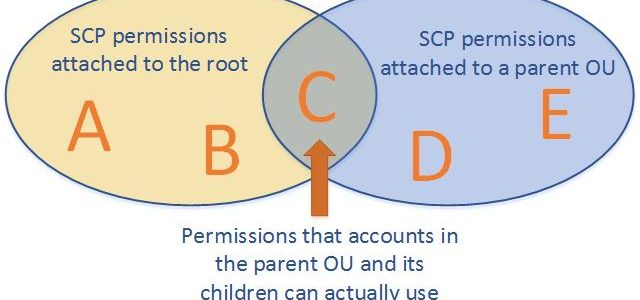
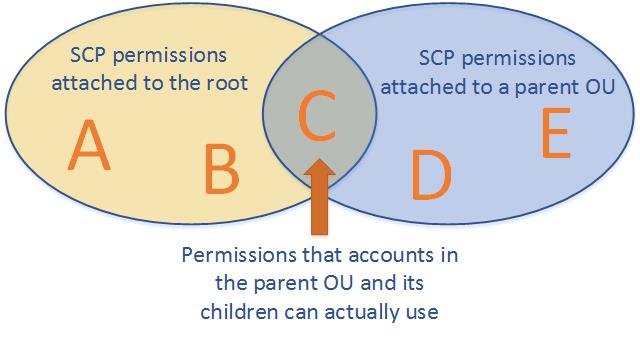
    • Effective permissions are the logical intersection between what is allowed by the SCP and what is allowed by the IAM and resource-based policies.
    • with an SCP attached to member accounts, identity-based and resource-based policies grant permissions to entities only if those policies and the SCP allow the action.
    • don’t affect users or roles in the management account. They affect only the member accounts in your organization.
    • SCPs also apply to member accounts that are designated as delegated administrators.
    • work alongside Resource Control Policies (RCPs) and Declarative Policies to provide comprehensive preventive controls across an organization.

    SCPs Effects on Permissions

    • never grant permissions but define the maximum permissions for the affected accounts.
    • Users and roles must still be granted permissions with appropriate IAM permission policies. A user without any IAM permission policies has no access at all, even if the applicable SCPs allow all services and all actions.
    • limits permissions for entities in member accounts, including each AWS account root user.
    • does not limit actions performed by the management account.
    • does not affect any service-linked role. Service-linked roles enable other AWS services to integrate with AWS Organizations and can’t be restricted by SCPs.
    • affect only IAM users or roles that are managed by accounts that are part of the organization. They don’t affect users or roles from accounts outside the organization.
    • don’t affect resource-based policies directly.
    • SCPs focus on identity-based (principal) permissions, while RCPs focus on resource-based permissions. Together they establish a comprehensive data perimeter.

    SCPs Strategies

    • By default, an SCP named FullAWSAccess is attached to every root, OU, and account, which allows all actions and all services.
    • Blacklist or Deny Strategy
      • actions are allowed by default and services and actions to be prohibited need to be specified.
      • blacklist permissions using deny statements can be assigned in combination with the default FullAWSAccess SCP.
      • using deny statements in SCPs require less maintenance because they don’t need to be updated when AWS adds new services.
      • deny statements usually use less space, thus making it easier to stay within SCP size limits.
    • Whitelist or Allow Strategy
      • actions are prohibited by default, and you specify what services and actions are allowed.
      • whitelist permissions can be assigned, by removing the default FullAWSAccess SCP.
      • allows SCP that explicitly permits only those allowed services and actions

    SCP Full IAM Policy Language Support

    • As of September 2025, SCPs now support the full IAM policy language, removing previous limitations.
    • Newly supported capabilities include:
      • Condition element in Allow statements – enables contextual boundaries like restricting by Region or account.
      • NotAction in Allow statements – allows specifying exempt actions.
      • Resource with specific ARNs in Allow statements – enables scoped resource access.
      • NotResource in both Allow and Deny statements – simplifies exceptions for service-owned resources.
      • Wildcards (*, ?) anywhere in Action/NotAction elements (e.g., "servicename:*action", "servicename:some*action").
    • These enhancements enable more precise, concise, and scalable policies without complex workarounds.
    • AWS recommends using explicit Deny statements as best practice and avoiding overlapping Allow statements.
    • Use IAM Access Analyzer to validate SCPs before applying them.

    SCP Quotas (Updated May 2026)

    • Maximum SCP size: 10,240 characters (doubled from previous 5,120 limit in May 2026).
    • Maximum SCPs per node (root, OU, or account): 10 (increased from previous limit of 5).
    • Maximum SCPs in an organization: 2,000.
    • Maximum nesting depth of OUs: 5 levels.
    • These increased quotas are automatically available across all commercial, GovCloud, and China Regions with no request needed.

    SCPs Testing Effects

    • don’t attach SCPs to the root of the organization without thoroughly testing the impact that the policy has on accounts.
    • Create an OU that the accounts can be moved into one at a time, or at least in small numbers, to ensure that users are not inadvertently locked out of key services.
    • Use IAM Access Analyzer policy validation and custom policy checks to verify SCP correctness before deployment.

    Resource Control Policies (RCPs)

    • Resource Control Policies (RCPs), launched in November 2024, are a new authorization policy type in AWS Organizations.
    • RCPs set the maximum available permissions on resources within your organization, complementing SCPs which set maximum permissions on principals.
    • Help centrally establish a data perimeter by restricting external access to resources at scale.
    • RCPs are evaluated when resources are accessed, irrespective of who is making the API request.
    • Use Deny statements to restrict access (similar to SCPs).
    • A default RCPFullAWSAccess policy is automatically attached to every entity when RCPs are enabled.
    • RCPs don’t affect resources in the management account.
    • Supported services (expanding): Amazon S3, AWS STS, AWS KMS, Amazon SQS, AWS Secrets Manager, Amazon ECR, Amazon OpenSearch Serverless, Amazon Cognito, Amazon CloudWatch Logs, and more being added.
    • SCPs and RCPs have independent quotas — each RCP can have up to 5,120 characters, with up to 5 RCPs per node and 1,000 RCPs per organization.
    • Neither SCPs nor RCPs grant permissions — they only restrict the maximum available permissions.

    SCP vs RCP Comparison

    FeatureSCP (Service Control Policy)RCP (Resource Control Policy)
    ControlsMaximum permissions for principals (IAM users/roles)Maximum permissions on resources
    ScopeWhat principals can doWho can access resources
    EvaluationEvaluated based on who is making the requestEvaluated when resources are accessed, regardless of requester
    Management accountNot affectedNot affected
    Default policyFullAWSAccessRCPFullAWSAccess
    Max size10,240 characters5,120 characters
    Max per node105

    Declarative Policies

    • Declarative Policies, launched in December 2024, are a new management policy type in AWS Organizations.
    • Allow you to declare and enforce desired configuration for AWS services at scale across the organization.
    • Unlike SCPs/RCPs (which restrict API actions), declarative policies enforce the desired state of service attributes.
    • Once set, the configuration is maintained even as new features or APIs are added — no policy maintenance overhead.
    • Enforcement applies regardless of whether the action was invoked by an IAM role or a service-linked role.
    • Support custom error messages so end users see actionable guidance when actions are restricted.
    • Provide an account status report to assess current state before applying policies.
    • Supported service attributes (at launch — EC2, VPC, EBS):
      • Enforce IMDSv2 for EC2 instances
      • Block public access for Amazon EBS snapshots
      • Block public access for Amazon EC2 AMIs
      • Block public access for Amazon VPC (internet gateway control)
      • Allowed AMI image settings (restrict to trusted providers)
      • Serial console access control
    • Can be applied at organization, OU, or account level.
    • Manageable via AWS Organizations console, CLI, CloudFormation, or AWS Control Tower.

    AWS Organizations Policy Types Summary

    Policy TypePurposeMechanism
    SCPsRestrict maximum permissions for principalsAllow/Deny API actions for IAM users and roles
    RCPsRestrict maximum permissions on resourcesDeny external access to resources
    Declarative PoliciesEnforce desired service configurationSet desired state for service attributes

    AWS Certification Exam Practice Questions

    • Questions are collected from Internet and the answers are marked as per my knowledge and understanding (which might differ with yours).
    • AWS services are updated everyday and both the answers and questions might be outdated soon, so research accordingly.
    • AWS exam questions are not updated to keep up the pace with AWS updates, so even if the underlying feature has changed the question might not be updated
    • Open to further feedback, discussion and correction.
    1. Your company is planning on setting up multiple accounts in AWS. The IT Security department has a requirement to ensure that certain services and actions are not allowed across all accounts. How would the system admin achieve this in the most EFFECTIVE way possible?
      1. Create a common IAM policy that can be applied across all accounts
      2. Create an IAM policy per account and apply them accordingly​
      3. Deny the services to be used across accounts by contacting AWS​ support
      4. Use AWS Organizations and Service Control Policies
    2. You are in the process of implementing AWS Organizations for your company. At your previous company, you saw an Organizations implementation go bad when an SCP (Service Control Policy) was applied at the root of the organization before being thoroughly tested. In what way can an SCP be properly tested and implemented?
      1. Back up your entire Organization to S3 and restore rollback and restore if something goes wrong
      2. The SCP must be verified with AWS before it is implemented to avoid any problems.
      3. Mirror your Organizational Unit in another region. Apply the SCP and test it. Once testing is complete, attach the SCP to the root of your organization.
      4. Create an Organizational Unit (OU). Attach the SCP to this new OU. Move your accounts in one at a time to ensure that you don’t inadvertently lock users out of key services.
    3. A security team wants to prevent any external AWS accounts from accessing their organization’s S3 buckets, regardless of what resource-based policies individual developers might configure. Which approach should they use?
      1. Apply an SCP to deny all S3 actions from external principals
      2. Use AWS Config rules to detect non-compliant bucket policies
      3. Apply a Resource Control Policy (RCP) that restricts S3 access to principals within the organization
      4. Configure S3 Block Public Access at the account level
    4. An organization needs to ensure that all EC2 instances launched across hundreds of accounts use IMDSv2, even if new APIs or features are added in the future. They also want end users to see a custom error message explaining why their configuration was blocked. What is the BEST solution?
      1. Create an SCP denying ec2:RunInstances without the IMDSv2 metadata condition
      2. Use AWS Config with auto-remediation to terminate non-compliant instances
      3. Apply a Declarative Policy for EC2 that enforces IMDSv2 with a custom error message
      4. Create a Lambda function triggered by CloudTrail to stop non-compliant instances
    5. A company wants to implement a data perimeter strategy that controls both which principals can perform actions AND who can access their AWS resources. Which combination of AWS Organizations policies provides the most comprehensive data perimeter?
      1. SCPs and AWS Config rules
      2. SCPs and Resource Control Policies (RCPs)
      3. SCPs and VPC endpoint policies only
      4. IAM permission boundaries and SCPs
    6. An administrator needs to restrict EC2 actions to only 3 specific AWS Regions for all accounts. Previously this required both an Allow and a separate Deny statement. With recent SCP enhancements, what is the simplified approach?
      1. Use a Deny statement with StringNotEquals condition on aws:RequestedRegion
      2. Use an Allow statement with a Condition element specifying aws:RequestedRegion
      3. Create separate SCPs per region and attach them to respective OUs
      4. Use declarative policies to block EC2 access outside specific regions

    AWS Organizations

    AWS Organizations

    AWS Organizations

    • AWS Organizations is an account management service that enables consolidating multiple AWS accounts into an organization that can be created and centrally managed.
    • AWS Organizations include consolidated billing and account management capabilities that enable one to better meet the budgetary, security, and compliance needs of the business.
    • As an administrator of an organization, new accounts can be created in an organization, and existing accounts invited to join the organization.
    • AWS Organizations enables you to
      • Automate AWS account creation and management, and provision resources with AWS CloudFormation Stacksets.
      • Maintain a secure environment with policies and management of AWS security services
      • Govern access to AWS services, resources, and regions
      • Centrally manage policies across multiple AWS accounts
      • Audit the environment for compliance
      • View and manage costs with consolidated billing
      • Configure AWS services across multiple accounts
    AWS Organizations

    AWS Organization Features

    • Centralized management of all of the AWS accounts
      • Combine existing accounts into or create new ones within an organization that enables them to be managed centrally
      • Policies can be attached to accounts that affect some or all of the accounts
    • Consolidated billing for all member accounts
      • Consolidated billing is a feature of AWS Organizations.
      • Management account of the organization can be used to consolidate and pay for all member accounts.
    • Hierarchical grouping of accounts to meet budgetary, security, or compliance needs
      • Accounts can be grouped into organizational units (OUs) and each OU can be attached to different access policies.
      • OUs can also be nested to a depth of five levels, providing flexibility in how you structure your account groups.
    • Control over AWS services and API actions that each account can access
      • As an administrator of the management account of an organization, access to users and roles in each member account can be restricted to which AWS services and individual API actions
    • Organization permissions overrule account permissions.
      • This restriction even overrides the administrators of member accounts in the organization.
      • When AWS Organizations blocks access to a service or API action for a member account, a user or role in that account can’t access any prohibited service or API action, even if an administrator of a member account explicitly grants such permissions in an IAM policy.
    • Integration and support for AWS IAM
      • IAM provides granular control over users and roles in individual accounts.
      • Organizations expand that control to the account level by giving control over what users and roles in an account or a group of accounts can do.
      • Users can access only what is allowed by both the Organization policies and IAM policies.
      • Resulting permissions are the logical intersection of what is allowed by AWS Organizations at the account level, and what permissions are explicitly granted by IAM at the user or role level within that account.
      • If either blocks an operation, the user can’t access that operation.
    • Integration with other AWS services
      • Select AWS services can be enabled to access accounts in the organization and perform actions on the resources in the accounts.
      • When another service is configured and authorized to access the organization, AWS Organizations creates an IAM service-linked role for that service in each member account.
      • Service-linked role has predefined IAM permissions that allow the other AWS service to perform specific tasks in the organization and its accounts.
      • All accounts in an organization automatically have a service-linked role created, which enables the AWS Organizations service to create the service-linked roles required by AWS services for which you enable trusted access
      • These additional service-linked roles come with policies that enable the specified service to perform only those required tasks
    • Delegated Administrator
      • A member account can be designated as a delegated administrator for an AWS service integrated with Organizations.
      • Delegated administrator accounts can manage organization-level tasks for the specified service without requiring the management account.
      • Reduces reliance on the management account for day-to-day governance tasks.
      • When a delegated administrator is registered, it receives authorization to access all read-only Organizations API operations.
    • Trusted Access
      • Trusted access grants permissions to a specified AWS service to perform tasks in the organization and its accounts.
      • Enables AWS services like CloudTrail, Config, GuardDuty, Security Hub, and many others to operate across all accounts in the organization.
      • Creates the necessary service-linked roles automatically in member accounts.
    • Direct Account Transfers (2025)
      • AWS Organizations now provides the ability to directly transfer an account to a different organization without first having to remove the account from the current organization.
      • Eliminates the need for the account to go through a standalone phase during the transfer.
      • Reduces operational risk and simplifies multi-organization account migration workflows.
    • Centralized Root Access Management (2024)
      • Enables centralized management of root user credentials across member accounts in Organizations.
      • Can centrally remove root user credentials (passwords, access keys, signing certificates, MFA) for member accounts.
      • Perform tightly scoped privileged root tasks using short-lived root sessions without requiring root credentials.
      • Helps prevent unintended root access and improves account security at scale.
      • Member accounts can regain access to accidentally locked Amazon S3 buckets using privileged root sessions.
    • Data replication that is eventually consistent
      • AWS Organizations is eventually consistent.
      • AWS Organizations achieve high availability by replicating data across multiple servers in AWS data centers within its region.
      • If a request to change some data is successful, the change is committed and safely stored.
      • However, the change must then be replicated across multiple servers.

    AWS Organizations Terminology and Concepts

    AWS Organizations Terminology and Concepts

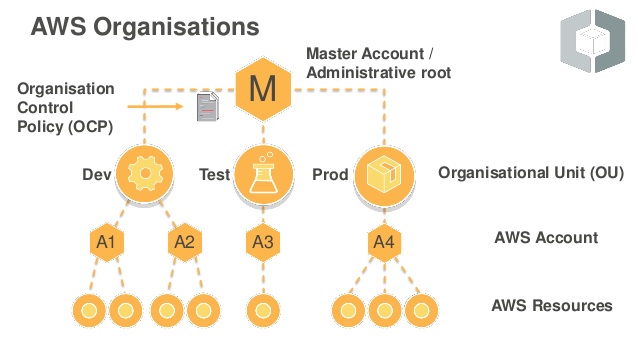
    Organization

    • An entity created to consolidate AWS accounts that can be administered as a single unit.
    • An organization has one management account along with zero or more member accounts.
    • An organization has the functionality that is determined by the feature set that you enable i.e. All features or Consolidated Billing only

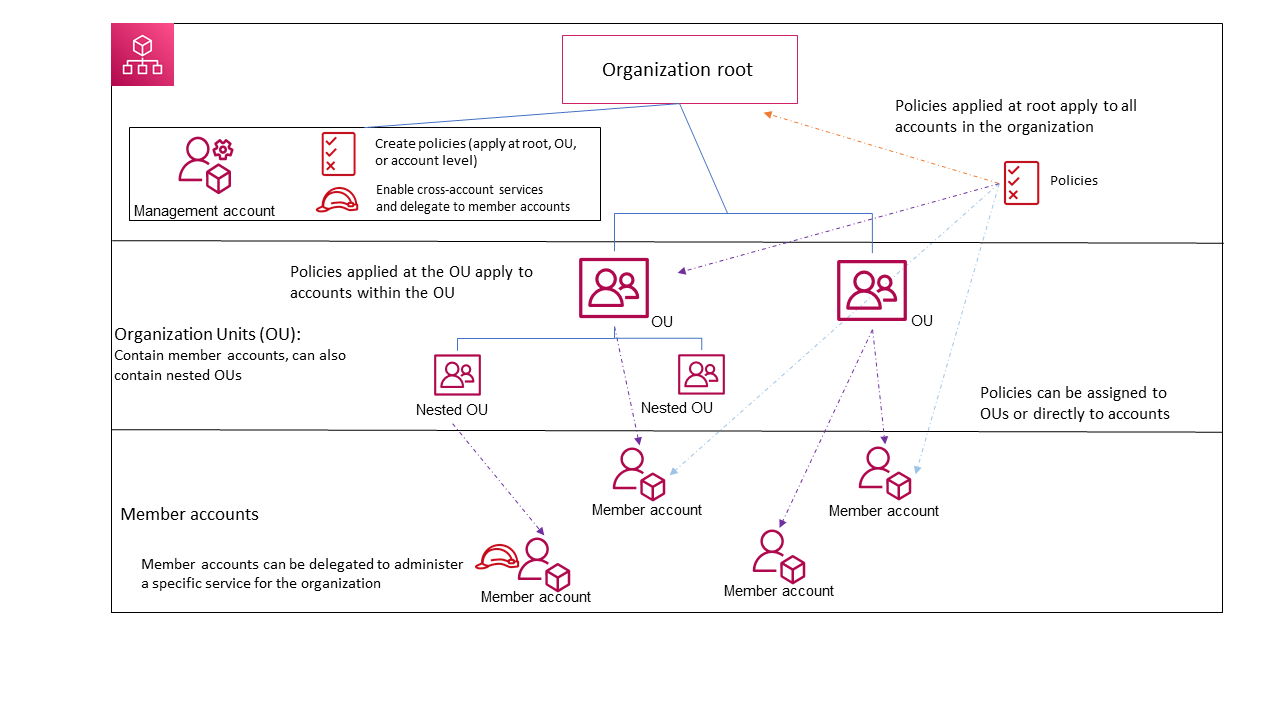
    Root

    • Parent container for all the accounts for the organization.
    • Policy applied to the root is applied to all the organizational units (OUs) and accounts in the organization.
    • There can be only one root currently and AWS Organization automatically creates it when an organization is created

    Organizational Unit (OU)

    • A container for accounts within a root.
    • An OU also can contain other OUs, enabling hierarchy creation that resembles an upside-down tree, with a root at the top and branches of OUs that reach down, ending in accounts that are the leaves of the tree.
    • A policy attached to one of the nodes in the hierarchy flows down and affects all branches (OUs) and leaves (accounts) beneath it.
    • An OU can have exactly one parent, and currently, each account can be a member of exactly one OU.

    Account

    • A standard AWS account that contains AWS resources.
    • Each account can be directly in the root or placed in one of the OUs in the hierarchy.
    • Policy can be attached to an account to apply controls to only that one account.
    • Accounts can be organized in a hierarchical, tree-like structure with a root at the top and organizational units nested under the root.
    • Management account (formerly Master account)
      • Primary account which creates the organization
      • can create new accounts in the organization, invite existing accounts, remove accounts, manage invitations, and apply policies to entities within the organization.
      • has the responsibilities of a payer account and is responsible for paying all charges that are accrued by the member accounts.
      • is not affected by any SCPs or RCPs that are attached to the organization.
      • can centrally manage root email addresses of member accounts.
    • Member account
      • Rest of the accounts within the organization are member accounts.
      • An account can be a member of only one organization at a time.
      • Can be directly transferred to a different organization without going through a standalone phase (2025 feature).

    Invitation

    • Process of asking another account to join an organization.
    • An invitation can be issued only by the organization’s management account and is extended to either the account ID or the email address that is associated with the invited account.
    • Invited account becomes a member account in the organization after it accepts the invitation.
    • Invitations can be sent to existing member accounts as well, to approve the change from supporting only consolidated billing features to supporting all features.
    • Invitations work by accounts exchanging handshakes.

    Handshake

    • A multi-step process of exchanging information between two parties.
    • Primary use in AWS Organizations is to serve as the underlying implementation for invitations.
    • Handshake messages are passed between and responded to by the handshake initiator (management account) and the recipient (member account) in such a way that it ensures that both parties always know what the current status is.

    Available Feature Sets

    Consolidated billing

    • provides shared or consolidated billing functionality which includes pricing benefits for aggregated usage.

    All Features

    • includes all the functionality of consolidated billing and advanced features that give more control over accounts in the organization.
    • allows the management account to have full control over what member accounts can do.
    • invited accounts must approve enabling all features
    • The Management account can apply SCPs and RCPs to restrict the services and actions that users (including the root user) and roles in an account can access, and it can prevent member accounts from leaving the organization
    • Member accounts can’t switch from All features to Consolidated Billing only mode.

    Organization Policy Types

    AWS Organizations offers policy types in two broad categories: Authorization policies and Management policies.

    Authorization Policies

    Authorization policies help centrally manage the security of AWS accounts across an organization.

    Service Control Policies (SCPs)

    • Service Control Policies specify the services and actions that users and roles can use in the accounts that the SCP affects.
    • SCPs are similar to IAM permission policies except that they don’t grant any permissions.
    • SCPs are filters that allow only the specified services and actions to be used in affected accounts.
    • SCPs override the IAM permission policy. So even if a user is granted full administrator permissions with an IAM permission policy, any access that is not explicitly allowed or that is explicitly denied by the SCPs affecting that account is blocked. for e.g., if you assign an SCP that allows only database service access to your “database” account, then any user, group, or role in that account is denied access to any other service’s operations.
    • SCP can be attached to
      • A root, which affects all accounts in the organization
      • An OU, which affects all accounts in that OU and all accounts in any OUs in that OU subtree
      • An individual account
    • Organization’s Management account is not affected by any SCPs that are attached either to it or to any root or OU the management account might be in.
    • Updated SCP Quotas (May 2026): Maximum SCPs per node increased from 5 to 10, and maximum SCP size increased from 5,120 to 10,240 characters.

    Resource Control Policies (RCPs) – Launched November 2024

    • Resource Control Policies (RCPs) are a type of authorization policy that centrally restricts access to AWS resources in the organization.
    • RCPs help establish a data perimeter in the AWS environment and restrict external access to resources at scale.
    • RCPs complement SCPs but work independently — SCPs restrict what principals can do, while RCPs restrict what access resources can grant.
    • RCPs are evaluated when resources are being accessed, irrespective of who is making the API request.
    • Neither SCPs nor RCPs grant any permissions; they only set the maximum permissions available.
    • RCPs do not affect resources in the management account — they only affect resources in member accounts.
    • Supported services at launch: Amazon S3, AWS STS, AWS KMS, Amazon SQS, and AWS Secrets Manager.
    • An AWS-managed policy called RCPFullAWSAccess is automatically attached to every entity when RCPs are enabled.
    • RCP can be attached to the root, an OU, or a specific AWS account.
    • Each RCP can contain up to 5,120 characters, up to 5 RCPs per node, and up to 1,000 RCPs per organization.
    • No additional charges for enabling and using RCPs.

    Management Policies

    Management policies help centrally configure and manage AWS services and their features across an organization.

    Declarative Policies – Launched December 2024

    • Declarative policies help centrally declare and enforce desired configuration for a given AWS service at scale across an organization.
    • Once attached, the configuration is always maintained even when the service adds new features or APIs — no policy updates needed.
    • Prevents non-compliant actions regardless of whether they were invoked using an IAM role or by an AWS service using a service-linked role.
    • Supported services: Amazon EC2, Amazon VPC, and Amazon EBS.
    • Available attributes include: enforcing IMDSv2, serial console access, allowed AMI settings, image block public access, snapshot block public access, and VPC block public access.
    • Provides account status reports to assess readiness before attaching a policy.
    • Supports custom error messages to help end users understand why their action was blocked and how to remediate.
    • Policies can be applied at the organization, OU, or account level.
    • New accounts automatically inherit the declarative policy when they join the organization or OU.

    Backup Policies

    • Allow you to centrally manage and apply backup plans to the AWS resources across an organization’s accounts.
    • Ensures consistent backup strategies across all member accounts.

    Tag Policies

    • Allow you to standardize the tags attached to the AWS resources in an organization’s accounts.
    • Helps maintain consistent tag naming and values for cost allocation and resource management.

    AI Services Opt-out Policies

    • Allow you to control data collection for AWS AI services for all the accounts in an organization.
    • Can opt out of data being used to improve AI/ML services across the organization.

    Chatbot Policies

    • Allow centralized configuration and management of AWS Chatbot settings across the organization.

    Whitelisting vs. Blacklisting (SCPs)

    • Whitelisting and blacklisting are complementary techniques used to apply SCPs to filter the permissions available to accounts.
    • Whitelisting (Allow List)
      • Explicitly specify the access that is allowed.
      • All other access is implicitly blocked or denied.
      • By default, all permissions are whitelisted.
      • AWS Organizations attaches an AWS-managed policy called FullAWSAccess to all roots, OUs, and accounts, which ensures the building of the organizations.
      • For restricting permissions, replace the FullAWSAccess policy with one that allows only the more limited, desired set of permissions.
      • Users and roles in the affected accounts can then exercise only that level of access, even if their IAM policies allow all actions.
      • If you replace the default policy on the root, all accounts in the organization are affected by the restrictions.
      • You can’t add them back at a lower level in the hierarchy because an SCP never grants permissions; it only filters them.
    • Blacklisting (Deny List)
      • The default behavior of AWS Organizations.
      • Explicitly specify the access that is not allowed.
      • Explicit deny of a service action overrides any allow of that action.
      • All other permissions are allowed unless explicitly blocked
      • By default, AWS Organizations attach an AWS-managed policy called FullAWSAccess to all roots, OUs, and accounts. This allows any account to access any service or operation with no AWS Organizations–imposed restrictions.
      • With blacklisting, additional policies are attached that explicitly deny access to the unwanted services and actions

    Organizations Security and Monitoring

    • CloudTrail Integration
      • AWS Organizations logs all API calls as events in CloudTrail.
      • Supports account membership events (2026): AccountJoinedOrganization and AccountDepartedOrganization events provide visibility into organizational membership changes.
      • Helps detect unauthorized activities and potential security incidents.
    • MFA Enforcement for Root Users
      • AWS now requires MFA for root users across all account types (management, member, standalone).
      • MFA was first required for management account root users (May 2024), then standalone accounts (June 2024), and enforced for all (June 2025).

    AWS Certification Exam Practice Questions

    • Questions are collected from Internet and the answers are marked as per my knowledge and understanding (which might differ with yours).
    • AWS services are updated everyday and both the answers and questions might be outdated soon, so research accordingly.
    • AWS exam questions are not updated to keep up the pace with AWS updates, so even if the underlying feature has changed the question might not be updated
    • Open to further feedback, discussion and correction.
    1. An organization that is currently using consolidated billing has recently acquired another company that already has a number of AWS accounts. How could an Administrator ensure that all AWS accounts, from both the existing company and the acquired company, are billed to a single account?
      1. Merge the two companies, AWS accounts by going to the AWS console and selecting the “Merge accounts” option.
      2. Invite the acquired company’s AWS account to join the existing company’s organization using AWS Organizations.
      3. Migrate all AWS resources from the acquired company’s AWS account to the master payer account of the existing company.
      4. Create a new AWS account and set it up as the master payer. Move the AWS resources from both the existing and acquired companies’ AWS accounts to the new account.
    2. Which of the following are the benefits of AWS Organizations? Choose the 2 correct answers:
      1. Centrally manage access polices across multiple AWS accounts.
      2. Automate AWS account creation and management.
      3. Analyze cost across all multiple AWS accounts.
      4. Provide technical help (by AWS) for issues in your AWS account.
    3. A company has several departments with separate AWS accounts. Which feature would allow the company to enable consolidate billing?
      1. AWS Inspector
      2. AWS Shield
      3. AWS Organizations
      4. AWS Lightsail
    4. A security team wants to prevent any external AWS account from accessing S3 buckets within their organization. Which Organizations policy type should they use?
      1. Service Control Policies (SCPs)
      2. Resource Control Policies (RCPs)
      3. Tag Policies
      4. Backup Policies
    5. A company wants to enforce that all EC2 instances across their organization use IMDSv2, and ensure this remains enforced even when new APIs are introduced. Which AWS Organizations feature should they use?
      1. Service Control Policies (SCPs)
      2. Resource Control Policies (RCPs)
      3. Declarative Policies
      4. AI Services Opt-out Policies
    6. Which statement correctly describes the difference between SCPs and RCPs in AWS Organizations?
      1. SCPs grant permissions while RCPs deny permissions.
      2. SCPs restrict what principals can do, while RCPs restrict what access resources can grant.
      3. RCPs affect the management account while SCPs do not.
      4. SCPs and RCPs are the same policy type with different names.
    7. A company wants to centrally remove root user credentials from all member accounts in their organization. Which feature enables this?
      1. Service Control Policies (SCPs)
      2. AWS IAM Access Analyzer
      3. Centralized Root Access Management in AWS Organizations
      4. AWS Config Rules
    8. Which of the following are management policy types in AWS Organizations? (Choose 3)
      1. Backup Policies
      2. Service Control Policies
      3. Tag Policies
      4. Resource Control Policies
      5. Declarative Policies

    References