AWS Directory Services
- AWS Directory Services is a managed service offering, providing directories that contain information about the organization, including users, groups, computers, and other resources.
- AWS Directory Services provides multiple ways including
- Simple AD – a standalone directory service powered by Samba 4
- AD Connector – acts as a proxy to use On-Premise Microsoft Active Directory with other AWS services.
- AWS Managed Microsoft AD (Standard Edition) – fully managed Microsoft Active Directory for up to 30,000 objects
- AWS Managed Microsoft AD (Enterprise Edition) – fully managed Microsoft Active Directory for up to 500,000 objects with multi-region support
- AWS Managed Microsoft AD (Hybrid Edition) – extends an existing self-managed AD domain to AWS (launched August 2025)
- AWS Managed Microsoft AD is powered by Windows Server 2019 and creates a highly available pair of domain controllers across different Availability Zones.
What’s New in AWS Directory Service (2024-2026)
- Hybrid Edition (Aug 2025) – New edition that extends existing on-premises or multi-cloud AD domain to AWS Managed Microsoft AD, automatically handling replication and maintenance between environments.
- Directory Service Data APIs (2025) – Perform CRUD operations on users and groups directly through AWS CLI, APIs, and the AWS Management Console without deploying dedicated management instances.
- IPv6 Support (Oct 2025) – Dual-stack (IPv4 and IPv6) configurations for Managed Microsoft AD, AD Connector, and Simple AD. Existing IPv4-only directories can be upgraded to dual-stack.
- API-Driven Edition Upgrades (Oct 2025) – Upgrade Managed Microsoft AD from Standard to Enterprise Edition programmatically via the
UpdateDirectorySetupAPI without support tickets. - Increased Directory Sharing Limits (Aug 2025) – Standard Edition: 5 → 25 accounts; Enterprise Edition: 125 → 500 accounts.
- Multi-Region Replication for Opt-In Regions (Apr 2026) – Multi-region replication now supports Opt-In regions in addition to default regions.
- Amazon Cloud Directory – No longer open to new customers as of November 7, 2025. Alternatives include Amazon DynamoDB and Amazon Neptune.
Simple AD
- is a Microsoft Active Directory compatible directory from AWS Directory Service that is powered by Samba 4.
- is the least expensive option and the best choice if there are 5,000 or fewer users & don’t need the more advanced Microsoft Active Directory features.
- supports commonly used Active Directory features such as user accounts, group memberships, domain-joining EC2 instances running Linux and Windows, Kerberos-based single sign-on (SSO), and group policies.
- does not support features like DNS dynamic update, schema extensions, multi-factor authentication, communication over LDAPS, PowerShell AD cmdlets, and the transfer of FSMO roles
- provides daily automated snapshots to enable point-in-time recovery
- Trust relationships between Simple AD and other Active Directory domains cannot be set up.
- does not support MFA, RDS SQL Server, or AWS IAM Identity Center (formerly AWS SSO).
- supports dual-stack (IPv4 and IPv6) network configurations (Oct 2025)
- Available in two sizes:
- Small – supports up to 500 users (approximately 2,000 objects)
- Large – supports up to 5,000 users (approximately 20,000 objects)
AD Connector
- helps connect to an existing on-premises Active Directory to AWS
- is the best choice to leverage an existing on-premises directory with AWS services
- requires VPN or Direct Connect connection
- is a proxy service for connecting on-premises Microsoft Active Directory to AWS without requiring complex directory synchronization technologies or the cost and complexity of hosting a federation infrastructure
- forwards sign-in requests to the Active Directory domain controllers for authentication and provides the ability for applications to query the directory for data
- enables consistent enforcement of existing security policies, such as password expiration, password history, and account lockouts, whether users are accessing resources on-premises or in the AWS cloud
- supports AWS IAM Identity Center (formerly AWS SSO) integration for centralized access management
- supports dual-stack (IPv4 and IPv6) network configurations (Oct 2025)
- can be upgraded from Small to Large, but cannot be downgraded
Microsoft Active Directory (Standard & Enterprise Editions)
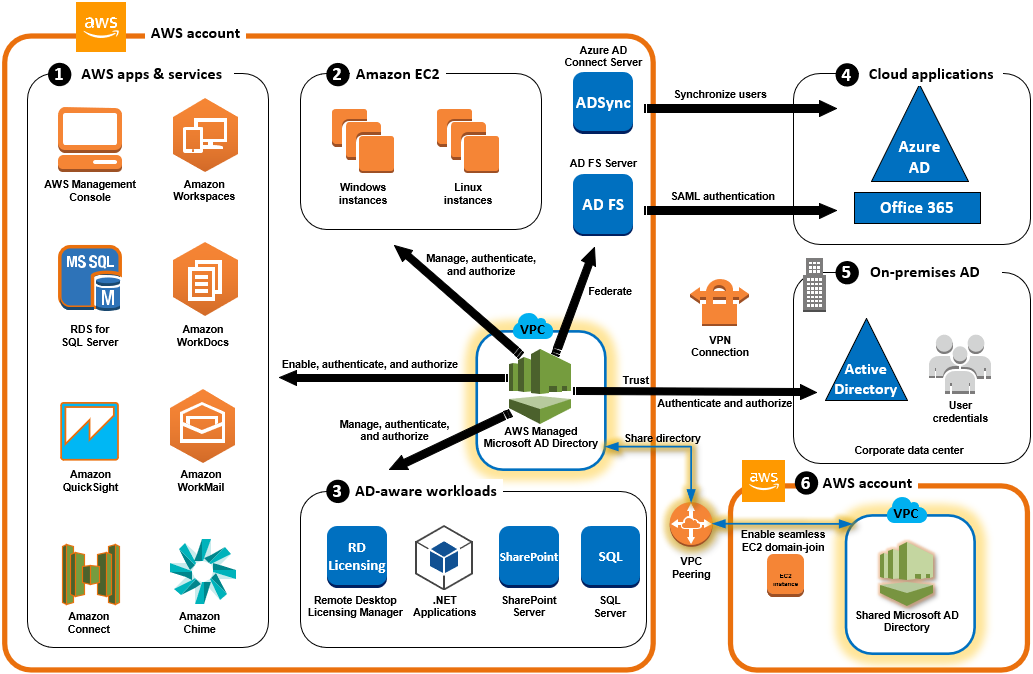
- is a feature-rich managed Microsoft Active Directory hosted on AWS, powered by Windows Server 2019
- Standard Edition – supports up to 30,000 AD objects, up to 25 account shares
- Enterprise Edition – supports up to 500,000 AD objects, up to 500 account shares, and multi-region replication
- supports trust relationship (forest trust) set up between an AWS-hosted directory and on-premises directories providing users and groups with access to resources in either domain, using single sign-on (SSO) without the need to synchronize or replicate the users, groups, or passwords.
- requires a VPN or Direct Connect connection for trust relationships with on-premises AD.
- provides much of the functionality offered by Microsoft Active Directory plus integration with AWS applications.
- provides a highly available pair of domain controllers running in different AZs connected to the VPC in a Region of your choice.
- supports MFA by integrating with an existing RADIUS-based MFA infrastructure to provide an additional layer of security when users access AWS applications.
- automatically configures and manages host monitoring and recovery, data replication, snapshots, and software updates.
- supports RDS for SQL Server, AWS Workspaces, Quicksight, WorkDocs, Amazon Connect, etc.
- integrates with AWS IAM Identity Center (formerly AWS SSO) for centralized multi-account access management.
- supports Multi-Region Replication (Enterprise Edition only) – automatically replicates directory data including users, groups, Group Policy Objects, and schema across multiple AWS Regions.
- supports API-driven edition upgrades – upgrade from Standard to Enterprise Edition via the
UpdateDirectorySetupAPI without support tickets (Oct 2025). - supports dual-stack (IPv4 and IPv6) network configurations (Oct 2025)
AWS Managed Microsoft AD (Hybrid Edition)
- Launched in August 2025 as a new edition of AWS Managed Microsoft AD.
- Extends an existing self-managed Active Directory domain to AWS, whether hosted on-premises, on AWS, or in a multi-cloud environment.
- Automatically handles replication and maintenance between your existing AD environments and AWS.
- Creates an integrated identity environment that spans on-premises, AWS, and multi-cloud infrastructure while maintaining a single source of identity.
- Provides a simpler way to migrate AD-dependent workloads to the cloud while preserving existing AD data, identity, and access infrastructure.
- Supports native Active Directory schema extensions (e.g., for deploying Microsoft Exchange Server).
- Unlike trust-based approaches, Hybrid Edition provides a unified AD deployment rather than separate forests with trust relationships.
- Best suited when you want to extend (not replicate) your existing domain to AWS with full schema and data preservation.
Directory Service Data (User & Group Management APIs)
- AWS Directory Service Data enables CRUD (Create, Read, Update, Delete) operations on users and groups directly through AWS CLI, APIs, and the AWS Management Console.
- Eliminates the need to deploy dedicated management EC2 instances to manage directory users and groups.
- Supports operations including
CreateUser,CreateGroup,UpdateUser,DeleteUser,ListUsers,ListGroups, and membership management. - Enables automation of identity lifecycle management and enhances security in AWS environments.
- Available at no additional cost for AWS Managed Microsoft AD customers.
- Write operations are limited to the organizational unit (OU) of your AWS Managed Microsoft AD.
AWS Directory Services Comparison
| Feature | Simple AD | AD Connector | Managed Microsoft AD (Standard/Enterprise) | Managed Microsoft AD (Hybrid) |
|---|---|---|---|---|
| Type | Standalone (Samba 4) | Proxy to on-premises AD | Fully managed AD in AWS | Extends existing AD to AWS |
| Trust Relationships | Not supported | N/A (proxy) | Supported (forest trust) | Not needed (same domain) |
| MFA | Not supported | Supported (RADIUS) | Supported (RADIUS) | Supported (RADIUS) |
| IAM Identity Center | Not supported | Supported | Supported | Supported |
| Multi-Region Replication | Not supported | Not supported | Enterprise Edition only | Not supported |
| IPv6 (Dual-stack) | Supported | Supported | Supported | Supported |
| Schema Extensions | Not supported | N/A (proxy) | Supported | Supported (native) |
| VPN/DX Required | No | Yes | Yes (for trust to on-premises) | Yes |
| Best For | Small orgs, ≤5,000 users, basic AD | Leveraging existing on-premises AD | Full AD features in AWS, >5,000 users | Extending existing AD domain to AWS |
Microsoft AD Connectivity Options
- If the VGW is used to connect to the On-Premise AD is not stable or has connectivity issues, the following options can be explored
- Simple AD
-
lower cost, low scale, basic AD compatible, or LDAP compatibility
- provides a standalone instance for the Microsoft AD in AWS
- No single point of Authentication or Authorization, as a separate copy is maintained
- trust relationships cannot be set up between Simple AD and other Active Directory domains
-
- AWS Managed Microsoft AD (Hybrid Edition) (New – 2025)
- extends existing on-premises AD domain directly to AWS
- automatically handles replication between environments
- maintains a single source of identity across on-premises and AWS
- requires VPN or Direct Connect for connectivity to on-premises
- Read-only Domain Controllers (RODCs)
- works out as a Read-only Active Directory
- holds a copy of the Active Directory Domain Service (AD DS) database and responds to authentication requests.
- are typically deployed in locations where physical security cannot be guaranteed.
- they cannot be written to by applications or other servers.
- helps maintain a single point to authentication & authorization controls, however, needs to be synced.
- Writable Domain Controllers
- are expensive to setup
- operate in a multi-master model; changes can be made on any writable server in the forest, and those changes are replicated to servers throughout the entire forest
- Simple AD
AWS Certification Exam Practice Questions
- Questions are collected from Internet and the answers are marked as per my knowledge and understanding (which might differ with yours).
- AWS services are updated everyday and both the answers and questions might be outdated soon, so research accordingly.
- AWS exam questions are not updated to keep up the pace with AWS updates, so even if the underlying feature has changed the question might not be updated
- Open to further feedback, discussion and correction.
- The majority of your Infrastructure is on-premises and you have a small footprint on AWS. Your company has decided to roll out a new application that is heavily dependent on low latency connectivity to LDAP for authentication. Your security policy requires minimal changes to the company’s existing application user management processes. What option would you implement to successfully launch this application?
- Create a second, independent LDAP server in AWS for your application to use for authentication (independent would not work for authentication as its a separate copy)
- Establish a VPN connection so your applications can authenticate against your existing on-premises LDAP servers (not a low latency solution)
- Establish a VPN connection between your data center and AWS create an LDAP replica on AWS and configure your application to use the LDAP replica for authentication (RODCs low latency and minimal setup)
- Create a second LDAP domain on AWS establish a VPN connection to establish a trust relationship between your new and existing domains and use the new domain for authentication (Not minimal effort)
- A company is preparing to give AWS Management Console access to developers Company policy mandates identity federation and role-based access control. Roles are currently assigned using groups in the corporate Active Directory. What combination of the following will give developers access to the AWS console? (Select 2) Choose 2 answers
- AWS Directory Service AD Connector (for Corporate Active directory)
- AWS Directory Service Simple AD
- AWS Identity and Access Management groups
- AWS Identity and Access Management roles
- AWS Identity and Access Management users
- An Enterprise customer is starting their migration to the cloud, their main reason for migrating is agility, and they want to make their internal Microsoft Active Directory available to any applications running on AWS; this is so internal users only have to remember one set of credentials and as a central point of user control for leavers and joiners. How could they make their Active Directory secure, and highly available, with minimal on-premises infrastructure changes, in the most cost and time-efficient way? Choose the most appropriate
- Using Amazon Elastic Compute Cloud (EC2), they would create a DMZ using a security group; within the security group they could provision two smaller Amazon EC2 instances that are running Openswan for resilient IPSEC tunnels, and two larger instances that are domain controllers; they would use multiple Availability Zones (Whats Openswan? Refer Implementation)
- Using VPC, they could create an extension to their data center and make use of resilient hardware IPSEC tunnels; they could then have two domain controller instances that are joined to their existing domain and reside within different subnets, in different Availability Zones (highly available with 2 AZ’s, secure with VPN connection and minimal changes)
- Within the customer’s existing infrastructure, they could provision new hardware to run Active Directory Federation Services; this would present Active Directory as a SAML2 endpoint on the internet; any new application on AWS could be written to authenticate using SAML2 (not minimal on-premises hardware changes)
- The customer could create a stand-alone VPC with its own Active Directory Domain Controllers; two domain controller instances could be configured, one in each Availability Zone; new applications would authenticate with those domain controllers (not a central location, but a copy)
- A company needs to deploy virtual desktops to its customers in a virtual private cloud, leveraging existing security controls. Which set of AWS services and features will meet the company’s requirements?
- Virtual Private Network connection. AWS Directory Services, and ClassicLink (ClassicLink allows you to link an EC2-Classic instance to a VPC in your account, within the same region)
- Virtual Private Network connection. AWS Directory Services, and Amazon Workspaces (WorkSpaces for Virtual desktops, and AWS Directory Services to authenticate to an existing on-premises AD through VPN)
- AWS Directory Service, Amazon Workspaces, and AWS Identity and Access Management (AD service needs a VPN connection to interact with an On-premise AD directory)
- Amazon Elastic Compute Cloud, and AWS Identity and Access Management (Need WorkSpaces for virtual desktops)
- An Enterprise customer is starting their migration to the cloud, their main reason for migrating is agility and they want to make their internal Microsoft active directory available to any applications running on AWS, this is so internal users only have to remember one set of credentials and as a central point of user control for leavers and joiners. How could they make their active directory secure and highly available with minimal on-premises infrastructure changes in the most cost and time-efficient way? Choose the most appropriate:
- Using Amazon EC2, they could create a DMZ using a security group, within the security group they could provision two smaller Amazon EC2 instances that are running Openswan for resilient IPSEC tunnels and two larger instances that are domain controllers, they would use multiple availability zones.
- Using VPC, they could create an extension to their data center and make use of resilient hardware IPSEC tunnels, they could then have two domain controller instances that are joined to their existing domain and reside within different subnets in different availability zones.
- Within the customer’s existing infrastructure, they could provision new hardware to run active directory federation services, this would present active directory as a SAML2 endpoint on the internet and any new application on AWS could be written to authenticate using SAML2 (not a minimal change to the existing infrastructure)
- The customer could create a stand alone VPC with its own active directory domain controllers, two domain controller instances could be configured, one in each availability zone, new applications would authenticate with those domain controllers. (Standalone cannot use the same security)
- You run a 2000-engineer organization. You are about to begin using AWS at a large scale for the first time. You want to integrate with your existing identity management system running on Microsoft Active Directory because your organization is a power-user of Active Directory. How should you manage your AWS identities in the simplest manner?
- Use a large AWS Directory Service Simple AD.
- Use a large AWS Directory Service AD Connector. (AD Connector can be used as power-user of Microsoft Active Directory. Simple AD only works with a subset of AD functionality)
- Use a Sync Domain running on AWS Directory Service.
- Use an AWS Directory Sync Domain running on AWS Lambda.
- A company wants to extend its on-premises Active Directory to AWS with minimal changes to its existing identity infrastructure while maintaining a unified directory across both environments. They need full schema support and automatic replication. Which solution best meets these requirements?
- Set up AWS Managed Microsoft AD with a forest trust to the on-premises AD (Trust creates separate forests, not a unified directory)
- Use AD Connector to proxy authentication to on-premises AD (Proxy only, no directory extension or replication)
- Use AWS Managed Microsoft AD (Hybrid Edition) to extend the existing domain to AWS (Hybrid Edition extends the existing domain with automatic replication and full schema support)
- Deploy self-managed domain controllers on EC2 instances (Not a managed solution, requires manual maintenance)
- A company uses AWS Managed Microsoft AD and wants to automate user provisioning and deprovisioning without deploying management EC2 instances. Which approach should they use?
- Use PowerShell AD cmdlets on a Windows bastion host
- Configure LDAP tools on an EC2 instance connected to the directory
- Use AWS Directory Service Data APIs to perform CRUD operations on users and groups (Directory Service Data APIs enable user/group management via CLI, APIs, and Console without additional infrastructure)
- Use AWS Lambda with custom LDAP libraries to manage users
- An organization needs a managed Active Directory in AWS that supports multi-region replication for global workloads. Which configuration meets this requirement?
- AWS Managed Microsoft AD Standard Edition with multi-region enabled
- AWS Managed Microsoft AD Enterprise Edition with multi-region replication (Multi-region replication is only supported in Enterprise Edition)
- Simple AD deployed in multiple regions with cross-region VPC peering
- AD Connector in each region pointing to the same on-premises AD