Kubernetes Resources
📝 Last Updated: June 2026. Updated to reflect Kubernetes v1.36 (latest stable). Key updates include Gateway API as the successor to Ingress, native Sidecar Containers (GA), In-Place Pod Resize (GA), Dynamic Resource Allocation (GA), and User Namespaces (GA).
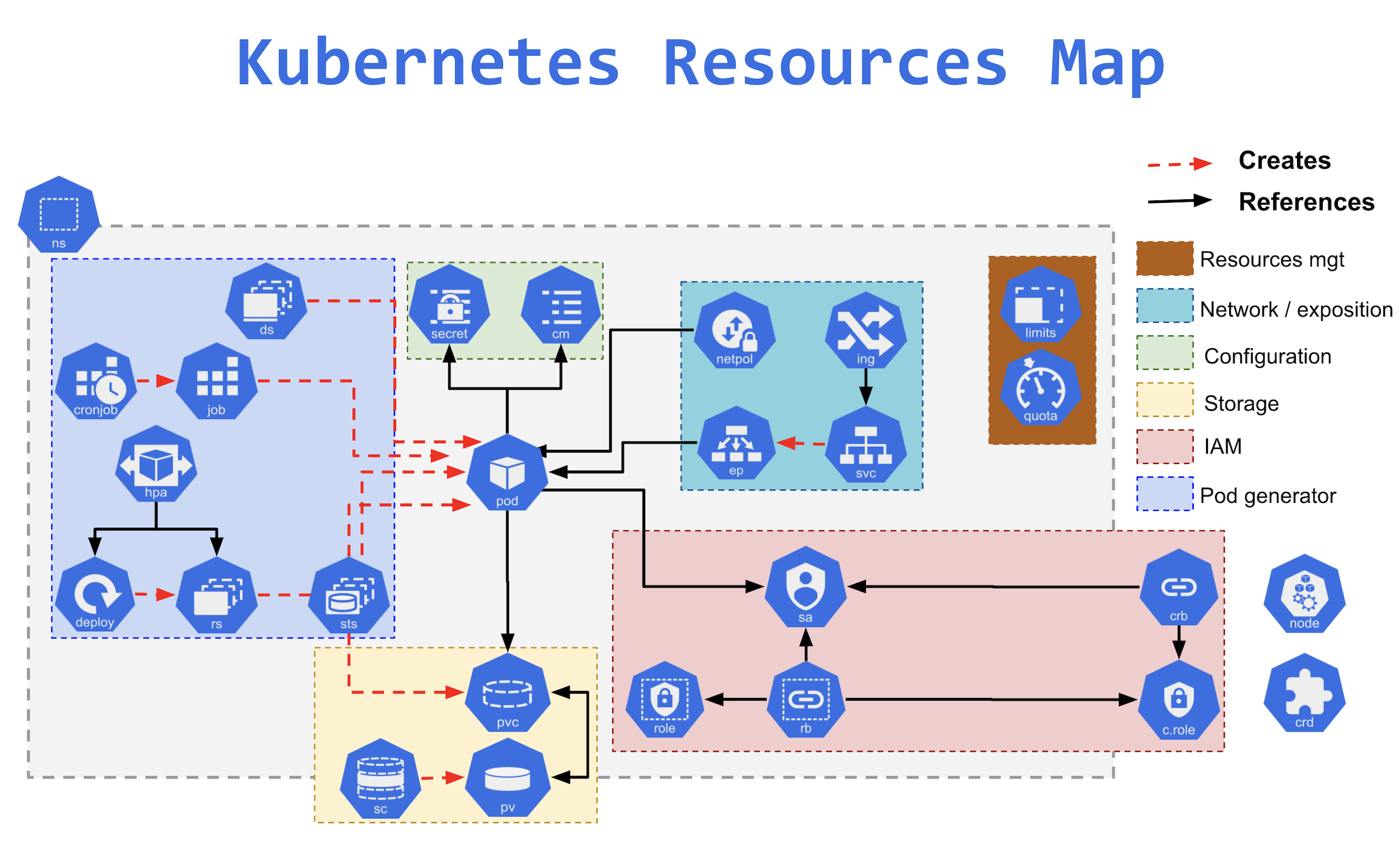
- Namespaces provide a mechanism for isolating groups of resources within a single cluster.
- Namespace-based scoping is applicable only for namespaced objects (e.g. Deployments, Services, etc) and not for cluster-wide objects (e.g. StorageClass, Nodes, PersistentVolumes, etc).
- Names of resources need to be unique within a namespace, but not across namespaces.
- Kubernetes starts with four initial namespaces:
default– default namespace for objects with no other namespace.kube-system– namespace for objects created by the Kubernetes system.kube-public– namespace is created automatically and is readable by all users (including those not authenticated).kube-node-lease– namespace holds Lease objects associated with each node. Node leases allow the kubelet to send heartbeats so that the control plane can detect node failure.
- Resource Quotas can be defined for each namespace to limit the resources consumed.
- Resources within the namespaces can refer to each other with their service names.
- Resources across namespace can be reached using the full DNS
<<service_name>>.<<namespace_name>>.svc.cluster.local
User Namespaces (GA in v1.36)
- User Namespaces graduated to General Availability in Kubernetes v1.36 (April 2026).
- User Namespaces provide enhanced security isolation by remapping container UIDs/GIDs to unprivileged ranges on the host.
- Enabled by setting
hostUsers: falsein the Pod spec — UID 0 inside the container maps to a non-root UID on the host. - If a container process escapes the sandbox, it carries no administrative power over the node.
- Critical for multi-tenant clusters where workloads from different teams share nodes.
- Currently a Linux-only feature.
Practice Namespace Exercises
Pods
- A Kubernetes pod is a group of containers and is the smallest unit that Kubernetes administers.
- Pods have a single IP address applied to every container within the pod.
- Pods are always co-located and co-scheduled and run in a shared context.
- Containers in a pod share the same resources such as memory and storage.
- Shared context allows the individual Linux containers inside a pod to be treated collectively as a single application as if all the containerized processes were running together on the same host in more traditional workloads.
Sidecar Containers (GA in v1.33)
- Native sidecar container support graduated to GA in Kubernetes v1.33 (April 2025).
- Sidecar containers are implemented as restartable init containers by setting
restartPolicy: Alwayson an init container. - Sidecars start before regular containers and remain running for the lifetime of the Pod.
- Solves long-standing issues with classic sidecar patterns:
- Sidecars no longer prevent Job completion.
- Guaranteed startup ordering — sidecars are ready before app containers start.
- Clean shutdown ordering — sidecars terminate after app containers.
- Common use cases: service mesh proxies (Istio/Envoy), log collectors, monitoring agents.
In-Place Pod Vertical Scaling (GA in v1.35)
- In-Place Pod Resize graduated to Stable/GA in Kubernetes v1.35 (December 2025).
- Allows changing CPU and memory requests/limits for running containers without restarting the Pod.
- Eliminates the need to delete and recreate pods just to adjust resource allocation.
- VPA (Vertical Pod Autoscaler) 1.2+ supports the
InPlaceOrRecreateupdate mode to leverage this feature. - In v1.36, in-place vertical scaling was extended to pod-level resources (beta).
Practice Pod Exercises
ReplicaSet
- ReplicaSet ensures to maintain a stable set of replica Pods running at any given time. It helps guarantee the availability of a specified number of identical Pods.
- ReplicaSet includes the pod definition template, a selector to match the pods, and a number of replicas.
- ReplicaSet then fulfills its purpose by creating and deleting Pods as needed to reach the desired replica number using the Pod template.
- It is recommended to use Deployments instead of directly using ReplicaSets, as they help manage ReplicaSets and provide declarative updates to Pods.
Practice ReplicaSet Exercises
Deployment
- Deployment provides declarative updates for Pods and ReplicaSets.
- Deployments describe the number of desired identical pod replicas to run and the preferred update strategy used when updating the deployment.
- A Deployment runs multiple replicas of your application and automatically replaces any instances that fail or become unresponsive.
- Deployments represent a set of multiple, identical Pods with no unique identities.
- Deployments are well-suited for stateless applications that use ReadOnlyMany or ReadWriteMany volumes mounted on multiple replicas but are not well-suited for workloads that use ReadWriteOnce volumes. Use StatefulSets instead.

Practice Deployment Exercises
Services
- Service is an abstraction over the pods, and essentially, the only interface the various application consumers interact with.
- The lifetime of an individual pod cannot be relied upon; everything from their IP addresses to their very existence is prone to change.
- Kubernetes doesn’t treat its pods as unique, long-running instances; if a pod encounters an issue and dies, it’s Kubernetes’ job to replace it so that the application doesn’t experience any downtime.
- As pods are replaced, their internal names and IPs might change.
- A service exposes a single machine name or IP address mapped to pods whose underlying names and numbers are unreliable.
- A service ensures that, to the outside network, everything appears to be unchanged.
Practice Services Exercises
Ingress
⚠️ Ingress NGINX Controller Retired (March 2026)
The Ingress NGINX Controller was officially retired on March 24, 2026. The GitHub repository is now archived (read-only). No further security patches, bug fixes, or feature updates will be released.
Migration Path: Use the Gateway API as the successor. The ingress2gateway 1.0 tool helps automate migration.
Note: The Ingress API resource itself is not removed from Kubernetes, but the most widely-used controller (ingress-nginx) is no longer maintained. Other Ingress controllers (Traefik, HAProxy, etc.) continue independently.
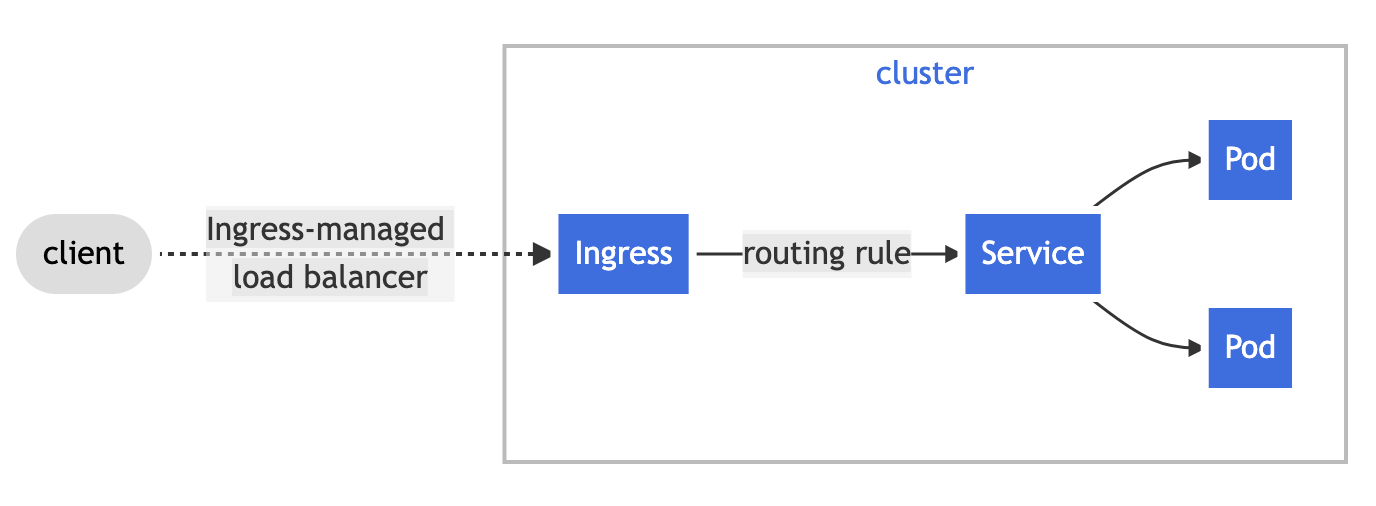
- Ingress exposes HTTP and HTTPS routes from outside the cluster to services within the cluster.
- Traffic routing is controlled by rules defined on the Ingress resource.
- An Ingress may be configured to give Services externally-reachable URLs, load balance traffic, terminate SSL/TLS and offer name-based virtual hosting.
- An Ingress controller is responsible for fulfilling the Ingress, usually with a load balancer, though it may also configure your edge router or additional frontends to help handle the traffic.
- An Ingress with no rules sends all traffic to a single default backend.
- Important: Gateway API is the recommended successor to the Ingress API for new deployments (see Gateway API section below).
Practice Ingress Exercises
Gateway API (Successor to Ingress)
- Gateway API is the official successor to the Ingress API, designed by SIG-Network to address Ingress limitations.
- Gateway API v1.5 (2026) has moved core features to Stable status.
- Key advantages over Ingress:
- Role-oriented: Separates infrastructure concerns (GatewayClass, Gateway) from application routing (HTTPRoute, GRPCRoute).
- Expressive: Native support for header-based matching, traffic weighting, request mirroring, CORS, retry budgets without annotations.
- Portable: Consistent behavior across implementations (no vendor-specific annotations).
- Extensible: Custom resources can be linked at various layers of the API.
- Multi-protocol: Supports HTTP, HTTPS, gRPC, TCP, TLS, and UDP routing.
- Core resources:
GatewayClass– Defines a class of Gateways (managed by infrastructure provider).Gateway– Requests a load balancer with specific listeners (managed by cluster operator).HTTPRoute– Defines HTTP routing rules (managed by application developer).GRPCRoute,TCPRoute,TLSRoute,UDPRoute– Protocol-specific routes.
- Supports cross-namespace references, enabling multi-team workflows.
- Gateway API Inference Extension (2025): Enables AI/ML model serving traffic management natively.
- Migration from Ingress: Use the
ingress2gatewayCLI tool (v1.0 released March 2026). - Implementations include: Istio, Envoy Gateway, Cilium, Traefik, Kong, NGINX Gateway Fabric, and others.
DaemonSet
- A DaemonSet ensures that all (or some) Nodes run a copy of a Pod.
- DaemonSet ensures pods are added to the newly created nodes and garbage collected as nodes are removed.
- Some typical uses of a DaemonSet are:
- running a cluster storage daemon on every node
- running a logs collection daemon on every node
- running a node monitoring daemon on every node
Refer DaemonSet Exercises
StatefulSet
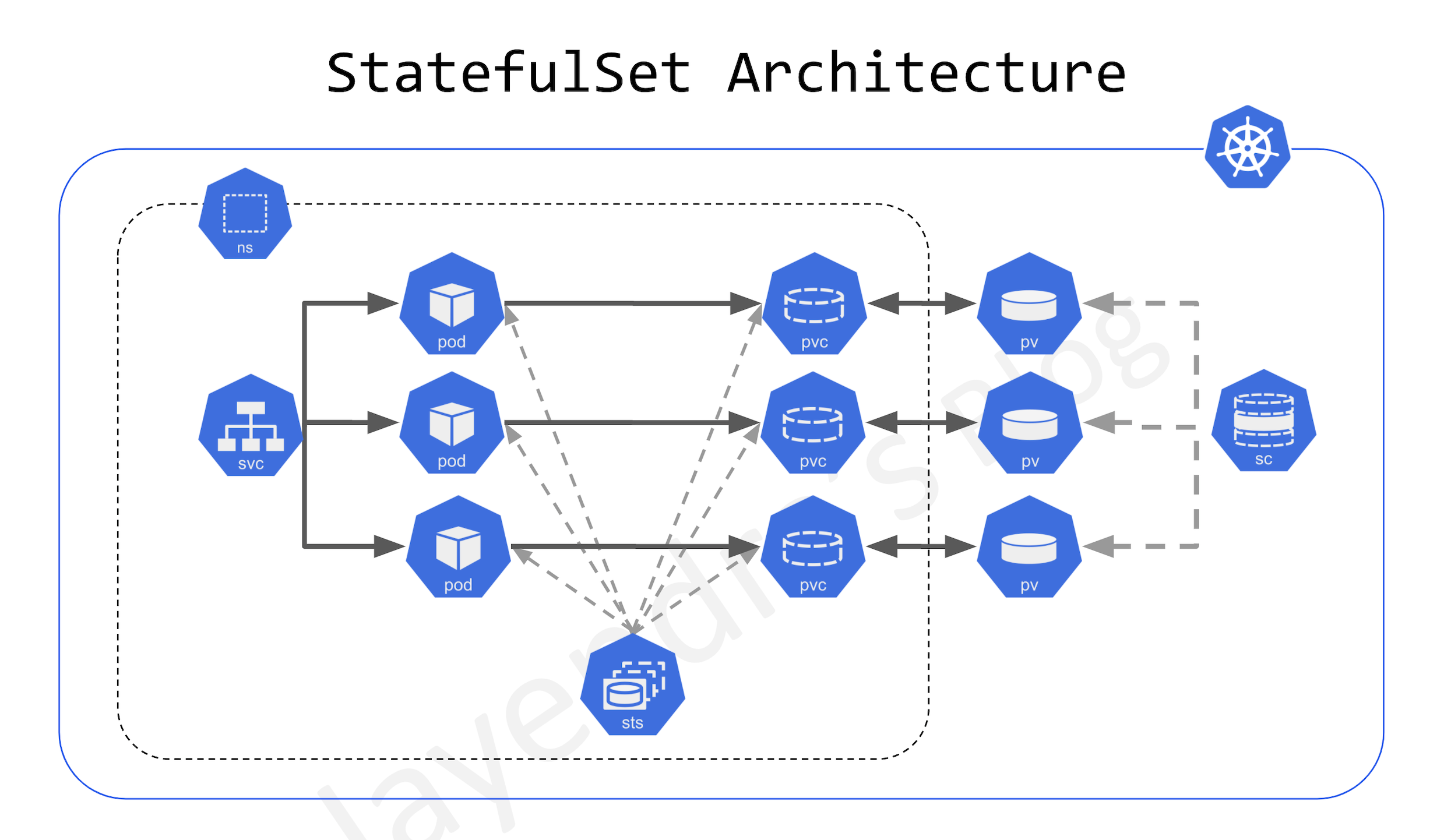
- StatefulSet is ideal for stateful applications using ReadWriteOnce volumes.
- StatefulSets are designed to deploy stateful applications and clustered applications that save data to persistent storage, such as persistent disks.
- StatefulSets represent a set of Pods with unique, persistent identities and stable hostnames that Kubernetes maintains regardless of where they are scheduled.
- State information and other resilient data for any given StatefulSet Pod are maintained in persistent disk storage associated with the StatefulSet.
- StatefulSets use an ordinal index for the identity and ordering of their Pods. By default, StatefulSet Pods are deployed in sequential order and are terminated in reverse ordinal order.
- StatefulSets are suitable for deploying Kafka, MySQL, Redis, ZooKeeper, and other applications needing unique, persistent identities and stable hostnames.
ConfigMaps
- ConfigMap helps to store non-confidential data in key-value pairs.
- Pods can consume ConfigMaps as environment variables, command-line arguments, or as configuration files in a volume.
- ConfigMap helps decouple environment-specific configuration from the container images so that the applications are easily portable.
- ConfigMap does not provide secrecy or encryption. If the data you want to store are confidential, use a Secret rather than a ConfigMap, or use additional (third party) tools to keep your data private.
- A ConfigMap is not designed to hold large chunks of data and cannot exceed 1 MiB.
- ConfigMap can be configured on a container inside a Pod as
- Inside a container command and args
- Environment variables for a container
- Add a file in read-only volume, for the application to read
- Write code to run inside the Pod that uses the Kubernetes API to read a ConfigMap
- ConfigMap can be configured to be immutable as it helps
- protect from accidental (or unwanted) updates that could cause applications outages
- improve performance of the cluster by significantly reducing the load on
kube-apiserver, by closing watches for ConfigMaps marked as immutable.
- Once a ConfigMap is marked as immutable, it is not possible to revert this change nor to mutate the contents of the data or the binaryData field. The ConfigMap needs to be deleted and recreated.
Practice ConfigMaps Exercises
Secrets
- Secret provides a container for sensitive data such as a password without putting the information in a Pod specification or in a container image.
- Secrets are similar to ConfigMaps but are specifically intended to hold confidential data.
- Secrets are not really encrypted but only base64 encoded.
- Secrets are, by default, stored unencrypted in the API server’s underlying data store (etcd). Anyone with API access can retrieve or modify a Secret, and so can anyone with access to etcd. Additionally, anyone who is authorized to create a Pod in a namespace can use that access to read any Secret in that namespace; this includes indirect access such as the ability to create a Deployment.
- To safeguard secrets, take at least the following steps:
- Enable Encryption at Rest for Secrets.
- Enable or configure RBAC rules that restrict reading data in Secrets.
Practice Secrets Exercises
Jobs & Cron Jobs
- Job creates one or more Pods and will continue to retry execution of the Pods until a specified number of them successfully terminate.
- As pods successfully complete, the Job tracks the successful completions.
- When a specified number of successful completions is reached, the task (ie, Job) is complete.
- Deleting a Job will clean up the Pods it created. Suspending a Job will delete its active Pods until the Job is resumed again.
- A job can run multiple Pods in parallel using
Parallelismfield. - A CronJob creates Jobs on a repeating schedule.
- Pod Replacement Policy for Jobs (GA in v1.34): Provides fine-grained control over when replacement Pods are created, enabling better resource management for batch workloads.
Practice Jobs Exercises
Volumes
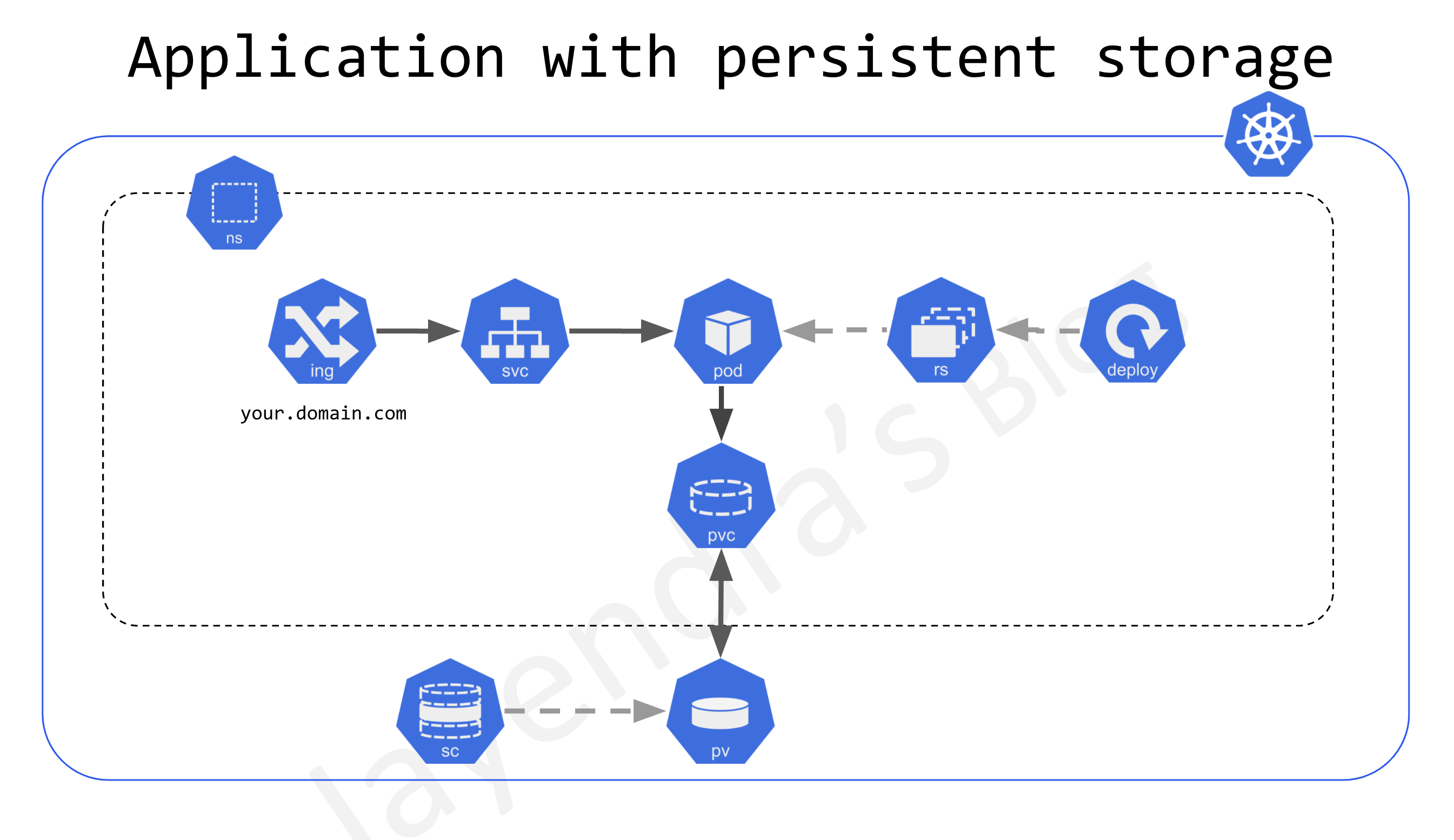
- Container on-disk files are ephemeral and lost if the container crashes.
- Kubernetes supports Persistent volumes that exist beyond the lifetime of a pod. When a pod ceases to exist, Kubernetes destroys ephemeral volumes; however, Kubernetes does not destroy persistent volumes.
- Persistent Volumes is supported using API resources
- PersistentVolume (PV)
- is a piece of storage in the cluster that has been provisioned by an administrator or dynamically provisioned using Storage Classes.
- is a cluster-level resource and not bound to a namespace
- are volume plugins like Volumes, but have a lifecycle independent of any individual pod that uses the PV.
- PersistentVolumeClaim (PVC)
- is a request for storage by a user.
- is similar to a Pod.
- Pods consume node resources and PVCs consume PV resources.
- Pods can request specific levels of resources (CPU and Memory).
- Claims can request specific size and access modes (e.g., they can be mounted ReadWriteOnce, ReadOnlyMany, ReadWriteMany, or ReadWriteOncePod, see AccessModes).
- PersistentVolume (PV)
- Access Modes:
ReadWriteOnce (RWO)– mounted read-write by a single node.ReadOnlyMany (ROX)– mounted read-only by many nodes.ReadWriteMany (RWX)– mounted read-write by many nodes.ReadWriteOncePod (RWOP)– (GA since v1.29) mounted read-write by exactly one pod. Stricter than RWO — ensures exclusive access at the pod level, critical for databases requiring single-writer guarantees.
- Persistent Volumes can be provisioned
- Statically – where the cluster administrator creates the PVs which is available for use by cluster users
- Dynamically using StorageClasses where the cluster may try to dynamically provision a volume especially for the PVC.
- VolumeAttributesClass (GA in v1.34): Allows modifying volume attributes (e.g., IOPS, throughput) after provisioning without recreating the PVC.
- Volume Group Snapshots (v1beta2 in v1.34): Enables consistent snapshots across multiple volumes simultaneously.
Practice Volumes Exercises
Labels & Annotations
- Labels and Annotations attach metadata to objects in Kubernetes.
- Labels
- are key/value pairs that can be attached to Kubernetes objects such as Pods and ReplicaSets.
- can be arbitrary and are useful for attaching identifying information to Kubernetes objects.
- provide the foundation for grouping objects and can be used to organize and to select subsets of objects.
- are used in conjunction with selectors to identify groups of related resources.
- Annotations
- provide a storage mechanism that resembles labels
- are key/value pairs designed to hold non-identifying information that can be leveraged by tools and libraries.
Practice Labels & Annotations Exercises
Nodes
- A Kubernetes node manages and runs pods; it’s the machine (whether virtualized or physical) that performs the given work.
- Just as pods collect individual containers that operate together, a node collects entire pods that function together.
- When you’re operating at scale, you want to be able to hand work over to a node whose pods are free to take it.
Practice Nodes Exercises
Dynamic Resource Allocation (DRA)
- Dynamic Resource Allocation (DRA) graduated to GA in Kubernetes v1.34 (September 2025).
- DRA is the next-generation approach for scheduling and managing hardware resources (GPUs, FPGAs, NPUs, custom accelerators) in Kubernetes.
- Unlike traditional device plugins that use simple integer counts (e.g.,
nvidia.com/gpu: 1), DRA allows:- Fine-grained GPU partitioning and time-slicing.
- Device-specific configuration (MIG profiles, memory sizes).
- Topology-aware scheduling for multi-GPU workloads.
- Vendor-defined
DeviceClassresources for standardized device types.
- At KubeCon Europe 2026, NVIDIA donated its DRA driver for GPUs and Google donated its DRA driver for TPUs to the CNCF.
- Essential for AI/ML workloads requiring optimal GPU placement and resource efficiency.
Autoscaling
- Horizontal Pod Autoscaler (HPA):
- Automatically scales the number of Pod replicas based on observed CPU, memory, or custom/external metrics.
- Scale-to-Zero (alpha in v1.36): HPA can now scale deployments down to zero replicas when using external metrics, without requiring KEDA or Knative.
- Vertical Pod Autoscaler (VPA):
- Automatically adjusts CPU and memory requests/limits based on observed usage.
- With In-Place Pod Resize (GA in v1.35), VPA can now update resources without restarting pods using the
InPlaceOrRecreatemode.
Practice Questions (Updated 2026)
- What is the official successor to the Kubernetes Ingress API for traffic routing?
- A. Service Mesh
- B. Gateway API
- C. Istio Virtual Service
- D. Network Policy
Show Answer
Answer: B – Gateway API is the official successor to Ingress, offering role-oriented routing, multi-protocol support, and vendor-neutral configuration.
- Which Kubernetes feature allows modifying Pod CPU and memory without restarting the Pod?
- A. Pod Disruption Budget
- B. Resource Quotas
- C. In-Place Pod Resize
- D. Vertical Pod Autoscaler recreate mode
Show Answer
Answer: C – In-Place Pod Resize (GA in v1.35) allows changing CPU and memory requests/limits for running containers without pod restart.
- How are native sidecar containers defined in Kubernetes v1.33+?
- A. Using a separate sidecar spec field
- B. As init containers with
restartPolicy: Always - C. Using annotations on regular containers
- D. As a special container type in the pod spec
Show Answer
Answer: B – Native sidecars are implemented as restartable init containers with
restartPolicy: Always. - What PersistentVolume access mode ensures exclusive read-write access by exactly one pod?
- A. ReadWriteOnce
- B. ReadWriteMany
- C. ReadWriteOncePod
- D. ReadOnlyMany
Show Answer
Answer: C – ReadWriteOncePod (RWOP), GA since v1.29, provides pod-level exclusive access that is stricter than ReadWriteOnce (node-level).
- What happened to the Ingress NGINX Controller in March 2026?
- A. It was upgraded to v2.0
- B. It was retired and archived with no further updates
- C. It was moved to a commercial license
- D. It was merged into the Gateway API project
Show Answer
Answer: B – The Ingress NGINX Controller was officially retired on March 24, 2026. The repository was archived with no further releases, bug fixes, or security patches.
- What is Dynamic Resource Allocation (DRA) primarily used for in Kubernetes?
- A. Allocating network bandwidth
- B. Managing CPU cores exclusively
- C. Fine-grained scheduling and management of hardware accelerators like GPUs
- D. Dynamic storage provisioning
Show Answer
Answer: C – DRA (GA in v1.34) enables fine-grained scheduling of GPUs, FPGAs, NPUs, and custom accelerators with topology-awareness and device-specific configuration.
- What does setting
hostUsers: falsein a Pod spec enable?- A. Disables user authentication
- B. Enables User Namespace isolation, mapping container root to non-root on host
- C. Prevents the pod from accessing host users
- D. Blocks service account mounting
Show Answer
Answer: B – User Namespaces (GA in v1.36) remap container UIDs to unprivileged host UIDs, so container root has no host privileges.
- Which Gateway API resource is managed by application developers to define HTTP routing rules?
- A. GatewayClass
- B. Gateway
- C. HTTPRoute
- D. ReferenceGrant
Show Answer
Answer: C – HTTPRoute defines HTTP routing rules and is designed for application developers, while GatewayClass is for infrastructure providers and Gateway is for cluster operators.