AWS IAM – Identity Access Management
🆕 Major Updates (2024-2026)
- MFA Now Mandatory for Root Users – AWS enforces MFA for root users across all account types (June 2025). Supports FIDO2 passkeys and up to 8 MFA devices per user.
- Centralized Root Access Management – New capability to centrally manage root credentials across AWS Organizations member accounts (November 2024).
- IAM Roles Anywhere – Enables temporary credentials for hybrid, on-premises, and multi-cloud workloads using X.509 certificates.
- IAM Identity Center – Recommended service for workforce access (formerly AWS SSO). Supports multi-Region replication.
- Increased IAM Quotas (May 2026) – Roles per account up to 10,000; managed policies up to 10,000; role trust policy up to 8,192 characters.
- SMS MFA Discontinued – AWS ended support for enabling SMS-based MFA. Use FIDO2 passkeys or virtual/hardware MFA devices instead.
- AWS IAM – Identity and Access Management is a web service that helps you securely control access to AWS resources for your users.
- IAM is used to control
- Identity – who can use your AWS resources (authentication)
- Access – what resources they can use and in what ways (authorization)
- IAM can also keep the account credentials private.
- With IAM, multiple users can be created under the umbrella of the AWS account or temporary access can be enabled through identity federation with the corporate directory or third-party providers.
- IAM also enables access to resources across AWS accounts.
IAM Features
- Shared access to your AWS account
- Grant other people permission to administer and use resources in your AWS account without having to share your password or access key.
- Granular permissions
- Each user can be granted a different set of granular permissions as required to perform their job
- Secure access to AWS resources for applications that run on EC2
- can help provide applications running on EC2 instance temporary credentials that they need in order to access other AWS resources
- Identity federation
- allows users to access AWS resources, without requiring the user to have accounts with AWS, by providing temporary credentials for e.g. through corporate network or Google or Amazon authentication
- Identity information for assurance
- CloudTrail can be used to receive log records that include information about those who made requests for resources in the account.
- PCI DSS Compliance
- supports the processing, storage, and transmission of credit card data by a merchant or service provider, and has been validated as being Payment Card Industry Data Security Standard (PCI DSS) compliant
- Integrated with many AWS services
- integrates with almost all the AWS services
- Eventually Consistent
- is eventually consistent and achieves high availability by replicating data across multiple servers within Amazon’s data centers around the world.
- Changes made to IAM would be eventually consistent and hence would take some time to reflect
- Free to use
- is offered at no additional charge and charges are applied only for use of other AWS products by your IAM users.
- AWS Security Token Service
- provides STS which is an included feature of the AWS account offered at no additional charge.
- AWS charges only for the use of other AWS services accessed by the AWS STS temporary security credentials.
Identities
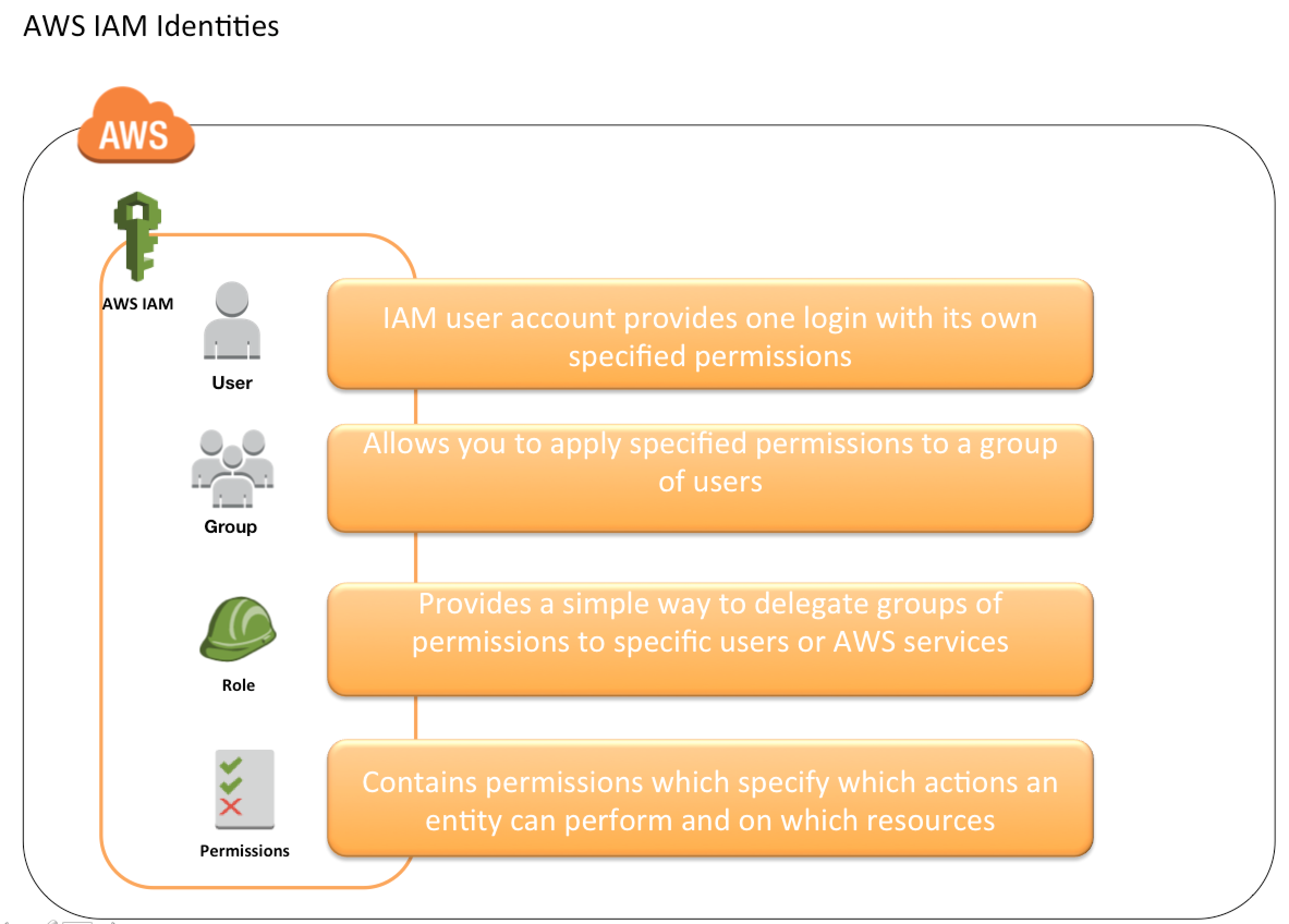
IAM identities determine who can access and help to provide authentication for people and processes in your AWS account
Account Root User
- Root Account Credentials are the email address and password with which you sign in to the AWS account.
- Root Credentials has full unrestricted access to AWS account including the account security credentials which include sensitive information
- IAM Best Practice – Do not use or share the Root account once the AWS account is created, instead create a separate user with admin privilege
- An Administrator account can be created for all the activities which also have full access to the AWS account except for the accounts security credentials, billing information, and ability to change the password.
- ⚠️ MFA is now mandatory for root users across all account types (enforced June 2025). Users must register MFA within 35 days of first sign-in if MFA is not already enabled.
- Centralized Root Access Management (November 2024) – For AWS Organizations, you can now centrally manage root credentials, remove long-term root credentials from member accounts, and perform privileged root-only tasks using short-lived sessions without standing root credentials.
IAM Users
- IAM user represents the person or service who uses the access to interact with AWS.
- IAM Best Practice – Create Individual Users, do not share credentials.
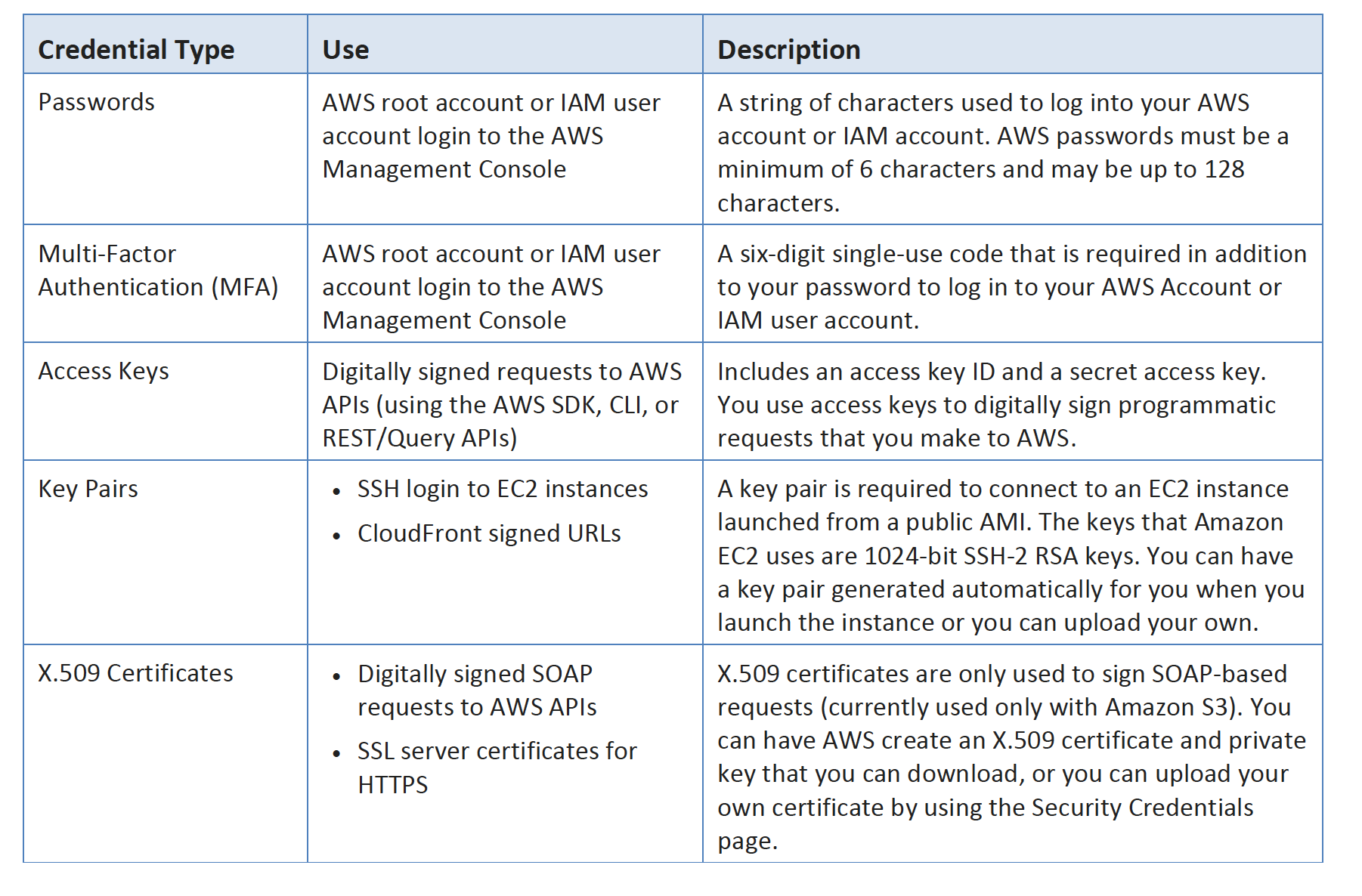
- User credentials can consist of the following
- Password to access AWS services through AWS Management Console
- Access Key/Secret Access Key to access AWS services through API, CLI, or SDK
- A user starts with no permissions and is not authorized to perform any AWS actions on any AWS resources and should be granted permissions as per the job function requirement
- IAM Best Practice – Grant Least Privilege
- Each user is associated with one and only one AWS account.
- A user cannot be renamed from the AWS management console and has to be done from CLI or SDK tools.
- IAM handles the renaming of user w.r.t unique id, groups, and policies where the user was mentioned as a principal. However, you need to handle the renaming in the policies where the user was mentioned as a resource
IAM Groups
- IAM group is a collection of IAM users
- Groups can be used to specify permissions for a collection of users sharing the same job function making it easier to manage
- IAM Best Practice – Use groups to assign permissions to IAM Users
- A group is not truly an identity because it cannot be identified as a Principal in an access policy. It is only a way to attach policies to multiple users at one time
- A group can have multiple users, while a user can belong to multiple groups (10 max)
- Groups cannot be nested and can only have users within it
- AWS does not provide any default group to hold all users in it and if one is required it should be created with all users assigned to it.
- IAM handles the renaming of a group name or path w.r.t to policies attached to the group, unique ids, and users within the group. However, IAM does not update the policies where the group is mentioned as a resource and must be handled manually
- Deletion of the groups requires you to detach users and managed policies and delete any inline policies before deleting the group. With the AWS management console, the deletion and detachment are taken care of.
IAM Roles
- IAM role is very similar to a user, in that it is an identity with permission policies that determine what the identity can and cannot do in AWS.
- IAM role is not intended to be uniquely associated with a particular user, group, or service and is intended to be assumable by anyone who needs it.
- Role does not have any static credentials (password or access keys) associated with it and whoever assumes the role is provided with dynamic temporary credentials.
- Role helps in access delegation to grant permissions to someone that allows access to resources that you control.
- Roles can help to prevent accidental access to or modification of sensitive resources.
- Modification of a Role can be done anytime and the changes are reflected across all the entities associated with the Role immediately.
- IAM Role plays a very important role in the following scenarios
- Services like EC2 instances running an application that needs to access other AWS services.
- Cross-Account access – Allowing users from different AWS accounts to have access to AWS resources in a different account, instead of having to create users.
- Identity Providers & Federation
- Company uses a Corporate Authentication mechanism and doesn’t want the User to authenticate twice or create duplicate users in AWS
- Applications allowing login through external authentication mechanisms e.g. Amazon, Facebook, Google, etc
- Hybrid/On-premises Workloads – Using IAM Roles Anywhere to provide temporary credentials to workloads running outside AWS.
- Role can be assumed by
- IAM user within the same AWS account
- IAM user from a different AWS account
- AWS services such as EC2, EMR to interact with other services
- An external user authenticated by an external identity provider (IdP) service that is compatible with SAML 2.0 or OpenID Connect (OIDC), or a custom-built identity broker.
- Workloads outside AWS using IAM Roles Anywhere with X.509 certificates issued by a trusted Certificate Authority (CA).
- Role involves defining two policies
- Trust policy
- Trust policy defines – who can assume the role
- Trust policy involves setting up a trust between the account that owns the resource (trusting account) and the account that owns the user that needs access to the resources (trusted account).
- Role trust policy maximum length: 8,192 characters (increased from 4,096 in May 2026)
- Permissions policy
- Permissions policy defines – what they can access
- Permissions policy determines authorization, which grants the user of the role with the needed permissions to carry out the desired tasks on the resource
- Trust policy
- Federation is creating a trust relationship between an external Identity Provider (IdP) and AWS.
- Users can also sign in to an enterprise identity system that is compatible with SAML
- Users can sign in to a web identity provider, such as Login with Amazon, Facebook, Google, or any IdP that is compatible with OpenID connect (OIDC).
- When using OIDC and SAML 2.0 to configure a trust relationship between these external identity providers and AWS, the user is assigned to an IAM role and receives temporary credentials that enable the user to access AWS resources.
- IAM Best Practice – Use roles for applications running on EC2 instances
- IAM Best Practice – Delegate using roles instead of sharing credentials
IAM Roles Anywhere
- IAM Roles Anywhere enables workloads running outside of AWS (on-premises, hybrid, multi-cloud) to obtain temporary AWS credentials using X.509 certificates.
- Eliminates the need for long-term access keys for external workloads.
- Uses the same IAM roles and policies configured for AWS workloads.
- Requires a trusted Certificate Authority (CA) registered as a trust anchor in IAM Roles Anywhere.
- Supports temporary credential validity periods from 1 hour (default) up to 12 hours.
- Use cases include:
- On-premises servers accessing S3, DynamoDB, or other AWS services
- CI/CD pipelines running outside AWS (e.g., Azure DevOps, Jenkins)
- On-premises Kubernetes clusters needing AWS API access
- Hybrid workloads using AWS KMS for encryption
- Refer: IAM Roles Anywhere Documentation
Multi-Factor Authentication – MFA
- For increased security and to help protect the AWS resources, Multi-Factor authentication can be configured
- IAM Best Practice – Enable MFA on Root accounts and privilege users
- ⚠️ MFA is now enforced (mandatory) for root users across all account types as of June 2025.
- AWS supports up to 8 MFA devices per root and IAM user.
- Multi-Factor Authentication can be configured using
- FIDO2 Passkeys (Recommended)
- AWS supports FIDO2 passkeys as a phishing-resistant MFA method (launched June 2024)
- Based on public key cryptography, passkeys are more secure than passwords and traditional MFA
- Synced passkeys can be used across devices (e.g., Apple iCloud Keychain, Google Password Manager)
- Device-bound passkeys (FIDO2 security keys) are tied to a specific hardware device
- Hardware MFA device
- Physical device that generates a six-digit numeric code based upon a time-synchronized one-time password algorithm
- Virtual MFA device
- Software app (e.g., Google Authenticator, Authy) that generates TOTP codes
- AWS Root user or IAM user can be assigned a virtual MFA device
SMS text message-based- ⚠️ DISCONTINUED – AWS ended support for enabling SMS multi-factor authentication. Existing SMS MFA configurations may still function but new enablement is not supported. Migrate to FIDO2 passkeys or virtual/hardware MFA devices.
- FIDO2 Passkeys (Recommended)
- MFA needs to be enabled on the Root user and IAM user separately as they are distinct entities.
- Enabling MFA on Root does not enable it for all other users
- MFA protection can be enabled for service API’s calls using
"Condition": {"Bool": {"aws:MultiFactorAuthPresent": "true"}}and is available only if the service supports temporary security credentials.
IAM Access Management
Refer Blog Post @ IAM Policy and Permissions
IAM Identity Center (formerly AWS SSO)
- IAM Identity Center is the recommended service for managing workforce access to AWS accounts and applications.
- Provides centralized single sign-on access to multiple AWS accounts and business applications.
- Supports connecting existing identity sources (Active Directory, Okta, Azure AD, etc.) or using a built-in directory.
- Key features:
- Multi-Region Replication – Supports replication of workforce identities and permission sets across Regions for improved resiliency.
- Permission Sets – Define access levels that can be assigned to users/groups across multiple accounts.
- Temporary Credentials – Issues short-lived credentials automatically; no long-term access keys needed.
- AWS Managed Applications – Provides workforce access to services like Amazon Q Developer without separate IAM federation.
- IAM Identity Center configures and maintains permissions for accounts automatically without requiring setup in individual accounts.
- Refer: IAM Identity Center Documentation
IAM Credential Report
- IAM allows you to generate and download a credential report that lists all users in the account and the status of their various credentials, including passwords, access keys, and MFA devices.
- Credential report can be used to assist in auditing and compliance efforts
- Credential report can be used to audit the effects of credential lifecycle requirements, such as password and access key rotation.
- IAM Best Practice – Perform Audits and Remove all unused users and credentials
- Credential report is generated as often as once every four hours. If the existing report was generated in less than four hours, the same is available for download. If more than four hours, IAM generates and downloads a new report.
IAM Access Analyzer
- IAM Access Analyzer helps
- identify resources in the organization and accounts that are shared with an external entity.
- validate IAM policies against policy grammar and best practices.
- generate IAM policies based on access activity in your CloudTrail logs.
- Analyzer Types:
- External Access Analyzer – Identifies resources shared with external principals (other accounts, root users, anonymous access). Uses automated reasoning (Zelkova) for mathematical proof of access.
- Internal Access Analyzer – Identifies which principals within your organization or account have access to selected resources.
- Unused Access Analyzer (paid feature, launched re:Invent 2023) – Identifies unused IAM roles, unused access keys, unused console passwords, and principals with unused service/action-level permissions. Provides a centralized dashboard and guided revocation recommendations.
- Custom Policy Checks – Uses automated reasoning to check policies against your security standards before deployment. Includes:
CheckNoNewAccess– Verifies a new policy doesn’t grant more access than an existing policy.CheckAccessNotGranted– Verifies specific access is not granted by a policy.CheckNoPublicAccess– Verifies a resource policy doesn’t grant public access.
- Guided Revocation (2024) – Provides actionable guidance to help developers revoke unused permissions, roles, and access keys.
- Refer: IAM Access Analyzer Documentation
IAM Quotas (Updated May 2026)
- Key IAM resource quotas (default / maximum requestable):
- Users per account: 5,000 (hard limit)
- Groups per account: 300 / 500
- Roles per account: 1,000 / 10,000 (increased from 5,000 in May 2026)
- Customer managed policies per account: 1,500 / 10,000 (increased from 5,000)
- Instance profiles per account: 1,000 / 10,000 (increased from 5,000)
- Managed policies per role: 10 / 25 (increased from 20)
- Managed policies per user: 10 / 20
- Managed policies per group: 10 (hard limit)
- Groups per user: 10 (hard limit)
- Role trust policy length: 2,048 / 8,192 characters (increased from 4,096)
- OpenID Connect providers per account: 100 / 700 (increased from 100)
- Quota increases can be requested via Service Quotas in US East (N. Virginia).
- Refer: IAM and AWS STS Quotas
AWS Certification Exam Practice Questions
- Questions are collected from Internet and the answers are marked as per my knowledge and understanding (which might differ with yours).
- AWS services are updated everyday and both the answers and questions might be outdated soon, so research accordingly.
- AWS exam questions are not updated to keep up the pace with AWS updates, so even if the underlying feature has changed the question might not be updated
- Open to further feedback, discussion and correction.
- Which service enables AWS customers to manage users and permissions in AWS?
- AWS Access Control Service (ACS)
- AWS Identity and Access Management (IAM)
- AWS Identity Manager (AIM)
- IAM provides several policy templates you can use to automatically assign permissions to the groups you create. The _____ policy template gives the Admins group permission to access all account resources, except your AWS account information
- Read Only Access
- Power User Access
- AWS Cloud Formation Read Only Access
- Administrator Access
- Every user you create in the IAM system starts with _________.
- Partial permissions
- Full permissions
- No permissions
- Groups can’t _____.
- be nested more than 3 levels
- be nested at all
- be nested more than 4 levels
- be nested more than 2 levels
- The _____ service is targeted at organizations with multiple users or systems that use AWS products such as Amazon EC2, Amazon SimpleDB, and the AWS Management Console.
- Amazon RDS
- AWS Integrity Management
- AWS Identity and Access Management
- Amazon EMR
- An AWS customer is deploying an application that is composed of an AutoScaling group of EC2 Instances. The customers security policy requires that every outbound connection from these instances to any other service within the customers Virtual Private Cloud must be authenticated using a unique x.509 certificate that contains the specific instanceid. In addition an x.509 certificates must be designed by the customer’s Key management service in order to be trusted for authentication. Which of the following configurations will support these requirements?
- Configure an IAM Role that grants access to an Amazon S3 object containing a signed certificate and configure the Auto Scaling group to launch instances with this role. Have the instances bootstrap get the certificate from Amazon S3 upon first boot.
- Embed a certificate into the Amazon Machine Image that is used by the Auto Scaling group. Have the launched instances generate a certificate signature request with the instance’s assigned instance-id to the Key management service for signature.
- Configure the Auto Scaling group to send an SNS notification of the launch of a new instance to the trusted key management service. Have the Key management service generate a signed certificate and send it directly to the newly launched instance.
- Configure the launched instances to generate a new certificate upon first boot. Have the Key management service poll the AutoScaling group for associated instances and send new instances a certificate signature that contains the specific instance-id.
- When assessing an organization AWS use of AWS API access credentials which of the following three credentials should be evaluated? Choose 3 answers
- Key pairs
- Console passwords
- Access keys
- Signing certificates
- Security Group memberships (required for EC2 instance access)
- An organization has created 50 IAM users. The organization wants that each user can change their password but cannot change their access keys. How can the organization achieve this?
- The organization has to create a special password policy and attach it to each user
- The root account owner has to use CLI which forces each IAM user to change their password on first login
- By default each IAM user can modify their passwords
- Root account owner can set the policy from the IAM console under the password policy screen
- An organization has created 50 IAM users. The organization has introduced a new policy which will change the access of an IAM user. How can the organization implement this effectively so that there is no need to apply the policy at the individual user level?
- Use the IAM groups and add users as per their role to different groups and apply policy to group
- The user can create a policy and apply it to multiple users in a single go with the AWS CLI
- Add each user to the IAM role as per their organization role to achieve effective policy setup
- Use the IAM role and implement access at the role level
- Your organization’s security policy requires that all privileged users either use frequently rotated passwords or one-time access credentials in addition to username/password. Which two of the following options would allow an organization to enforce this policy for AWS users? Choose 2 answers
- Configure multi-factor authentication for privileged IAM users
- Create IAM users for privileged accounts (can set password policy)
- Implement identity federation between your organization’s Identity provider leveraging the IAM Security Token Service
- Enable the IAM single-use password policy option for privileged users (no such option the password expiration can be set from 1 to 1095 days)
- Your organization is preparing for a security assessment of your use of AWS. In preparation for this assessment, which two IAM best practices should you consider implementing? Choose 2 answers
- Create individual IAM users for everyone in your organization
- Configure MFA on the root account and for privileged IAM users
- Assign IAM users and groups configured with policies granting least privilege access
- Ensure all users have been assigned and are frequently rotating a password, access ID/secret key, and X.509 certificate
- A company needs to deploy services to an AWS region which they have not previously used. The company currently has an AWS identity and Access Management (IAM) role for the Amazon EC2 instances, which permits the instance to have access to Amazon DynamoDB. The company wants their EC2 instances in the new region to have the same privileges. How should the company achieve this?
- Create a new IAM role and associated policies within the new region
- Assign the existing IAM role to the Amazon EC2 instances in the new region
- Copy the IAM role and associated policies to the new region and attach it to the instances
- Create an Amazon Machine Image (AMI) of the instance and copy it to the desired region using the AMI Copy feature
- After creating a new IAM user which of the following must be done before they can successfully make API calls?
- Add a password to the user.
- Enable Multi-Factor Authentication for the user.
- Assign a Password Policy to the user.
- Create a set of Access Keys for the user
- An organization is planning to create a user with IAM. They are trying to understand the limitations of IAM so that they can plan accordingly. Which of the below mentioned statements is not true with respect to the limitations of IAM?
- One IAM user can be a part of a maximum of 5 groups (Incorrect – the limit is 10 groups per user. Refer link)
- Organization can create 100 groups per AWS account (Note: default is now 300, max 500)
- One AWS account can have a maximum of 5000 IAM users
- One AWS account can have 250 roles (Note: default is now 1,000, max 10,000)
- One IAM user can be a part of a maximum of 5 groups (Incorrect – the limit is 10 groups per user. Refer link)
- Within the IAM service a GROUP is regarded as a:
- A collection of AWS accounts
- It’s the group of EC2 machines that gain the permissions specified in the GROUP.
- There’s no GROUP in IAM, but only USERS and RESOURCES.
- A collection of users.
- Is there a limit to the number of groups you can have?
- Yes for all users except root
- No
- Yes unless special permission granted
- Yes for all users
- What is the default maximum number of MFA devices in use per AWS account (at the root account level)?
- 1 (Note: As of 2024, AWS supports up to 8 MFA devices per root and IAM user)
- 5
- 15
- 10
- When you use the AWS Management Console to delete an IAM user, IAM also deletes any signing certificates and any access keys belonging to the user.
- FALSE
- This is configurable
- TRUE
- You are setting up a blog on AWS. In which of the following scenarios will you need AWS credentials? (Choose 3)
- Sign in to the AWS management console to launch an Amazon EC2 instance
- Sign in to the running instance to instance some software (needs ssh keys)
- Launch an Amazon RDS instance
- Log into your blog’s content management system to write a blog post (need to authenticate using blog authentication)
- Post pictures to your blog on Amazon S3
- An organization has 500 employees. The organization wants to set up AWS access for each department. Which of the below mentioned options is a possible solution?
- Create IAM roles based on the permission and assign users to each role
- Create IAM users and provide individual permission to each
- Create IAM groups based on the permission and assign IAM users to the groups
- It is not possible to manage more than 100 IAM users with AWS
- An organization has hosted an application on the EC2 instances. There will be multiple users connecting to the instance for setup and configuration of application. The organization is planning to implement certain security best practices. Which of the below mentioned pointers will not help the organization achieve better security arrangement?
- Apply the latest patch of OS and always keep it updated.
- Allow only IAM users to connect with the EC2 instances with their own secret access key. (Refer link)
- Disable the password-based login for all the users. All the users should use their own keys to connect with the instance securely.
- Create a procedure to revoke the access rights of the individual user when they are not required to connect to EC2 instance anymore for the purpose of application configuration.
- A company wants to provide temporary AWS credentials to on-premises servers so they can access S3 buckets without storing long-term access keys. Which AWS service should they use?
- AWS STS AssumeRole
- IAM Identity Center
- IAM Roles Anywhere
- AWS Cognito Identity Pools
- Which IAM Access Analyzer feature helps identify IAM roles and users with permissions that are granted but never used?
- External Access Analyzer
- Policy Generation
- Unused Access Analyzer
- Custom Policy Checks
- What is the recommended AWS service for managing workforce single sign-on access to multiple AWS accounts?
- Amazon Cognito
- IAM Identity Center
- AWS Directory Service
- IAM Users with Federation
- Which MFA method does AWS recommend as the most phishing-resistant option for securing IAM users?
- Virtual MFA device (TOTP)
- Hardware MFA token
- SMS-based MFA
- FIDO2 Passkeys
- An organization using AWS Organizations wants to eliminate standing root credentials in member accounts while retaining the ability to perform root-only privileged actions when needed. Which feature should they enable?
- IAM Identity Center
- AWS Control Tower
- Centralized Root Access Management
- Service Control Policies