Google Cloud Identity and Access Management – IAM
- Google Cloud Identity and Access Management – IAM lets administrators authorize who can take what action on which resources
- IAM provides a unified view into security policy across the entire organization, with built-in auditing to ease compliance processes.
- IAM manages access control by defining who (identity) has what access (role) for which resource
IAM Components
IAM manages access control by defining who (identity) has what access (role) for which resource
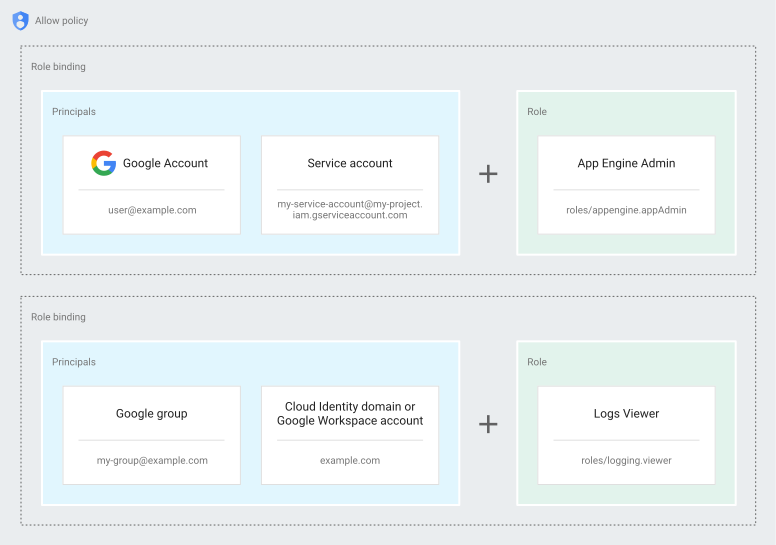
Principal (formerly Member)
- A principal (previously referred to as member) can be a Google Account (for end users), a service account (for apps and virtual machines), a Google group, or a Google Workspace or Cloud Identity domain that can access a resource.
- Identity of a principal is an email address associated with a user, service account, or Google group; or a domain name associated with Google Workspace or Cloud Identity domains.
- Note: Google Cloud documentation now uses the term “principal” instead of “member.” Some APIs still use the term “member.”
Role
- Permission to access a resource isn’t granted directly to the end user
- A role is a collection of permissions and is granted to authenticated principals
- Permissions are represented in the form service.resource.verb for e.g. compute.instances.list
- Permissions determine what operations are allowed on a resource.
- Role granted to a principal grants all the permissions that the role contains
- GCP supports different role types
- Basic or Primitive roles
- Roles historically available in the Google Cloud Console. Also, referred to as primitive roles
- Roles are Owner, Editor, and Viewer.
- Provide broad level of permissions and not recommended for production use
- Predefined roles
- Roles that give fine-grained granular access control
- Roles are created and maintained by Google and automatically updated as necessary, such as when Google Cloud adds new features or services.
- Custom roles
- Roles created to tailor permissions to the needs of the organization, when predefined roles don’t meet the needs.
- Custom roles are not maintained by Google; when new permissions, features, or services are added to Google Cloud, the custom roles will not be updated automatically.
- Custom roles can only be created at the organization level or project level (not at the folder level).
- Basic or Primitive roles
IAM Policy Types
- IAM offers several types of policies to control resource access:
- Allow Policies
- Grant principals access to resources by binding principals to roles
- Allow policies are attached to a resource and inherited by descendants
- Each resource can have only one allow policy attached to it
- The effective allow policy for a resource is the union of the policy set on that resource and the policies inherited from higher up in the hierarchy
- Deny Policies (GA since November 2022)
- Ensure that principals cannot use specific permissions, regardless of the roles they are granted
- Deny policies are evaluated before allow policies
- Attached to a project, folder, or organization and inherited by descendants
- Each resource can have up to 500 deny policies attached to it
- Use the IAM v2 API to manage deny policies
- Act as guardrails to prevent privilege escalation and limit blast radius of credentials
- Principal Access Boundary (PAB) Policies
- Restrict the resources that a principal is eligible to access
- Even if a principal has a role granting access to a resource, the PAB policy can make the principal ineligible
- PAB policies are always children of the organization
- Each principal set can have up to 10 PAB policies bound to it
- Use the IAM v3 API to manage PAB policies
- Allow Policies
- Policy Evaluation Order:
- Principal Access Boundary policies — check if principal is eligible to access the resource
- Deny policies — check if the permission is explicitly denied
- Allow policies — check if the principal has the required permission
- If any policy indicates the principal shouldn’t access the resource, IAM prevents access
IAM Allow Policy (formerly IAM Policy)
- IAM allow policy binds one or more principals to a role.
- An allow policy defines and enforces what roles are granted to which principals, and this policy is attached to a resource.
- Allow policy attached to the resource defines who (principal) has what type of access (role) on the resource
- Allow policy can be set at any level in the resource hierarchy: organization level, folder level, project level, or resource level.
- IAM Policy inheritance is transitive and resources inherit the policies of all of their parent resources.
- The effective policy for a resource is the union of the policy set on that resource and the policies inherited from higher up in the hierarchy.
- Basically Permissions -> Roles -> (Allow Policy) -> Principals
- When an authenticated principal attempts to access a resource, IAM checks the resource’s policies to determine whether the action is permitted.
- A child resource cannot restrict access granted on its parent (allow policies are additive)
IAM Conditions
- IAM Conditions allow defining conditional, attribute-based access control for Google Cloud resources.
- Conditions are specified in the role bindings of an allow policy
- When a condition exists, the access is granted only if the condition expression evaluates to
true - Condition attributes include:
- Date/time — configure temporary (expiring) access
- Resource attributes — resource type, resource name, resource service
- Request attributes — access levels, IP address/device attributes (via Access Context Manager)
- Tags — conditions based on resource tags
- Conditions are written using Common Expression Language (CEL)
Service Accounts
- A service account is a special kind of account used by an application or a virtual machine (VM) instance, not a person.
- Applications use service accounts to make authorized API calls, authorized as either the service account itself, or as Google Workspace or Cloud Identity users through domain-wide delegation.
- is identified by its email address, which is unique to the account.
- does not have passwords, and cannot log in via browsers or cookies.
- are associated with private/public RSA key-pairs that are used for authentication to Google.
- Other users or service accounts cannot impersonate a service account unless explicitly granted permission.
- are not members of the Google Workspace domain, unlike user accounts.
- users need to be granted
serviceAccountUserrole to be able to use service accounts - are both a principal (who) and a resource (what)
- Services accounts are granted permissions to a resource (what)
- Users are granted the
serviceAccountUserrole (who)
- Service accounts are used in scenarios such as:
- Running workloads on virtual machines (VMs).
- Running workloads on on-premises workstations or data centers that call Google APIs.
- Running workloads which are not tied to the lifecycle of a human user.
- Service Account Keys
- Each service account is associated with two sets of public/private RSA key pairs that are used to authenticate to Google:
- Google-managed keys
- Google-managed key pairs imply that Google stores both the public and private portion of the key, rotates them regularly (each key can be used for signing a maximum of two weeks), and the private key is always held in escrow and is never directly accessible.
- IAM provides APIs to use these keys to sign on behalf of the service account.
- User-managed keys.
- User-managed key pairs imply that you own both the public and private portions of a key pair.
- User-managed key pairs (also known as “external” keys) can be created and used from outside of Google Cloud.
- Google only stores the public portion of a user-managed key.
- The creator is responsible for the security of the private key and other management operations such as key rotation
- Best Practice: Avoid user-managed service account keys when possible. Use Workload Identity Federation or attached service accounts instead.
- Service Account Types
- Default service accounts
- Google Cloud creates user-managed service accounts when you enable or use some Google Cloud services that enable the service to deploy jobs that access other Google Cloud resources.
- For applications running in a Google Cloud environment that has a default service account, the application can use the credentials for the default service account to call Google Cloud APIs.
- User-managed service accounts
- User-managed service accounts are created in the project using the IAM API, the Cloud Console, or the
gcloudcommand-line tool. - Creator is responsible for managing and securing these accounts
- User-managed service accounts are created in the project using the IAM API, the Cloud Console, or the
- Service agents
- Service agents are Google-managed service accounts that allow services to access resources on your behalf
- Service agents are created automatically and managed entirely by Google Cloud
- Default service accounts
- Service Account Permissions
- Service account permissions are controlled by IAM roles and Access Scopes
- IAM Roles
- restricts access to APIs based on the IAM roles that are granted to the service account.
- are account-specific
- Access scopes
- potentially further limit access to API methods when authenticating through OAuth
- apply on a per-instance basis
- only apply for the default service accounts
- are the legacy method of specifying permissions for the instance
- IAM Roles
- Best practice is to set the full
cloud-platformaccess scope on the instance, then securely limit the service account’s access using IAM roles
- Service account permissions are controlled by IAM roles and Access Scopes
- Service Account, if accidentally deleted, can be recovered if the time gap is less than 30 days and a service account by the same name wasn’t created
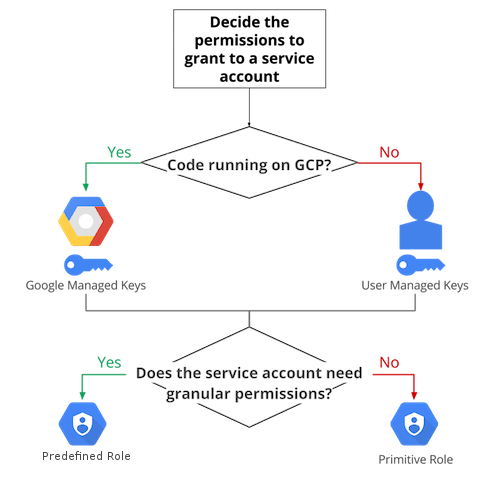
IAM User vs Service Account Decision Tree
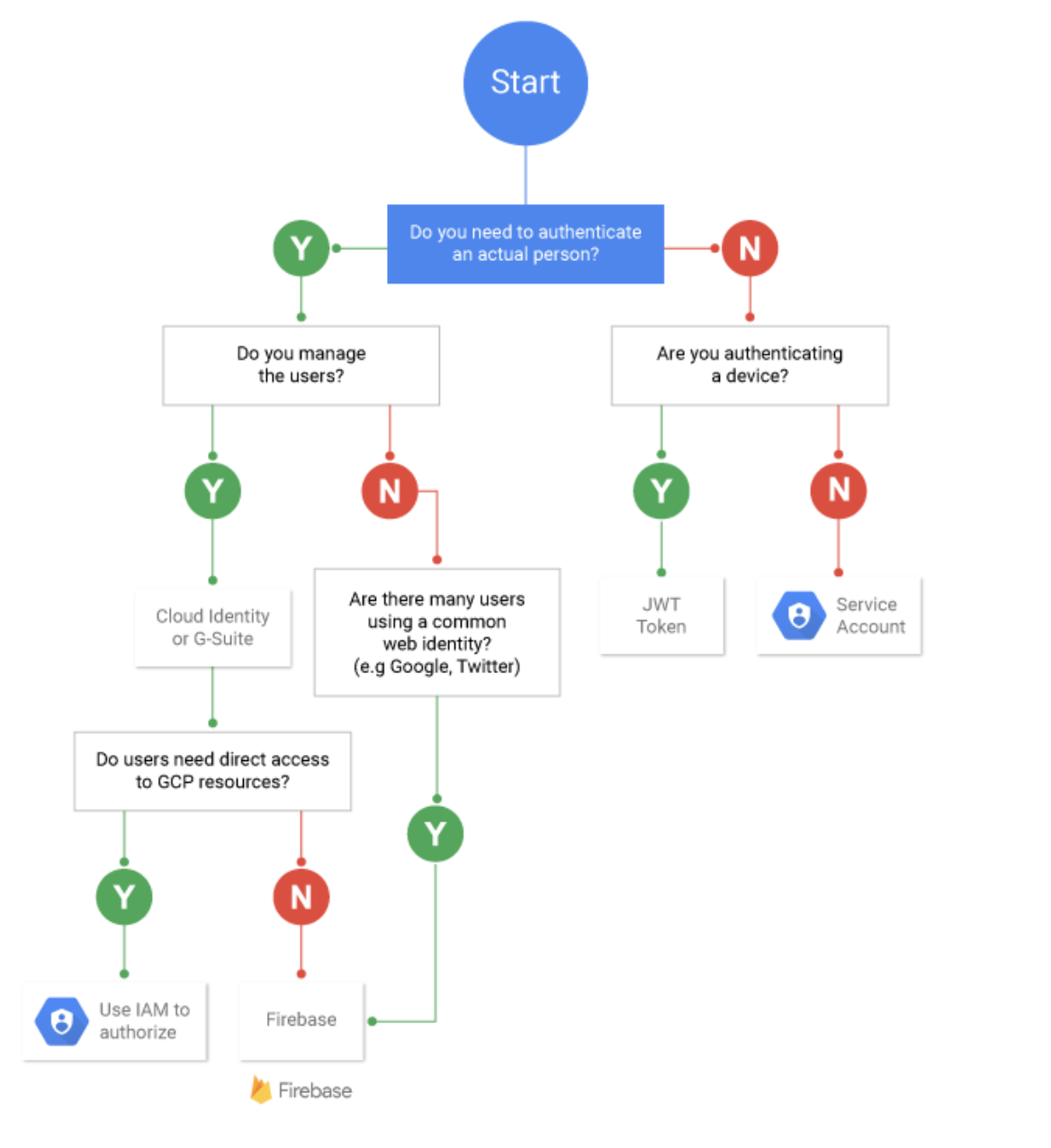
Workload Identity Federation
- Using Workload Identity Federation, on-premises or multi-cloud workloads can be granted access to GCP resources, without using a service account key.
- Workload Identity Federation can be used with AWS, Azure, or with any identity provider that supports OpenID Connect (OIDC), SAML 2.0, or X.509 certificates.
- With Workload Identity Federation, IAM can be used to grant external identities IAM roles, including the ability to impersonate service accounts using short-lived access tokens, and eliminates the maintenance and security burden associated with service account keys.
- External workloads exchange environment-specific credentials (e.g., AWS instance profiles, Azure managed identities) for short-lived Google Cloud credentials.
- Workload Identity Federation for GKE (previously called Workload Identity)
- All GKE clusters have Workload Identity Federation enabled by default
- Allows GKE workloads to authenticate to Google Cloud APIs using Kubernetes service accounts
- Provides per-pod identity without requiring node-level service account keys
- Deeper integration into Google Cloud’s IAM platform since the 2024 rename
Workforce Identity Federation
- Workforce Identity Federation lets you use an external identity provider (IdP) to authenticate your workforce — employees, partners, and contractors — to access Google Cloud resources using single sign-on (SSO).
- Unlike Workload Identity Federation (for workloads/applications), Workforce Identity Federation is for human users.
- Supports multiple identity protocols:
- OpenID Connect (OIDC)
- SAML 2.0
- Supports multiple identity providers per pool including Okta, Microsoft Entra ID (Azure AD), Ping Identity, and Active Directory Federation Services.
- Eliminates the need to synchronize users to Cloud Identity — the external IdP remains the source of truth.
- Users can access Google Cloud Console, gcloud CLI, and APIs using their corporate credentials.
- Available as a no-cost feature.
Agent Identity
- Agent Identity is generally available (GA) as of April 2026 and provides a strongly attested, cryptographic identity for each AI agent.
- Based on the SPIFFE standard, it provides a per-agent identity tied to the lifecycle of the resource hosting the agent.
- Agents can securely authenticate to MCP servers, cloud resources, endpoints, and other agents — acting either on their own behalf or on behalf of an end user.
- Agent Identity is a more secure principal than service accounts because it is tied to the lifecycle of the agent resource.
- Agent Identity Auth Manager (Preview) helps securely authenticate agents to third-party services using:
- 3-legged OAuth
- 2-legged OAuth
- API keys
- Supported on Vertex AI Agent Engine Runtime and Gemini Enterprise Agent Platform.
Privileged Access Manager (PAM)
- Privileged Access Manager (PAM) is a Google Cloud native, managed solution to secure, manage, and audit privileged access.
- PAM enables just-in-time (JIT) temporary privilege elevation — shifting from always-on standing privileges to on-demand access.
- Key concepts:
- Entitlements — define what roles can be temporarily granted, to which principals, for how long, and with what approval requirements
- Grants — time-bound access requests approved against entitlements
- Approvals — optional workflow requiring designated approvers before access is granted
- PAM grants time-bound access by adding a conditional IAM role binding to a resource’s policy, automatically revoking after expiration.
- Use cases:
- Emergency access for incident responders
- Controlled access to sensitive resources with approvals and justifications
- Scheduled maintenance access (grants can be scheduled up to 7 days in advance)
- IAM Recommender can now recommend transitioning excessive permanent role bindings to PAM entitlements (Preview, May 2026).
IAM Best Practices
- IAM focuses on who, providing the ability to authorize users and groups to take action on specific resources based on permissions.
- Use Predefined over primitive roles
- provide granular access and roles at the smallest scope to users to control what they can access
- Control access to resources
- enforce the principle of least privilege by ensuring that principals have only the permissions that they actually need.
- Use Deny policies as guardrails
- Set deny rules at the organization or folder level to prevent sensitive actions regardless of allow policies
- Delegate responsibility with groups and service accounts
- use groups for users requiring the same responsibilities and assigning IAM roles to the groups rather than to individual users
- use service accounts for server-to-server interactions.
- rotate service account keys for user-managed service accounts, or better yet, use Workload Identity Federation to avoid keys entirely
- Use Privileged Access Manager for just-in-time access instead of permanent high-privilege role assignments
- Understand IAM Policy Inheritance
- a child resource cannot restrict access granted on its parent
- Define an Organization Policy
- Use Organization Policy Service to get centralized and programmatic control over the organization’s cloud resources.
- An organization policy focuses on what, providing the ability to set restrictions on specific resources to determine how they can be configured and used
- All descendants of a resource inherit its policies by default.
- A base set of constraints can be defined that apply to all elements in the hierarchy by attaching a policy to the top-level Organization node.
- Custom organization policies can be set on child nodes, which overwrite or merge with the inherited policy.
- Federate identity provider with Google Cloud
- Use Workforce Identity Federation to let employees access Google Cloud with corporate credentials without provisioning Cloud Identity accounts
- Use Workload Identity Federation for external workloads to eliminate service account keys
- Avoid user-managed service account keys
- Use attached service accounts, Workload Identity Federation, or service account impersonation instead
- If keys are unavoidable, rotate them regularly and use Organization Policy to restrict key creation
IAM Recommender
- IAM recommender helps enforce the principle of least privilege by ensuring that principals have only the permissions that they actually need.
- IAM uses Recommender to compare project-level role grants with the permissions that each principal used during the past 90 days.
- Depending on the usage of the principal and permissions provided, IAM recommender recommends a less permissive role or to revoke the role.
- IAM recommender never suggests a change that increases a principal’s level of access.
- IAM recommender also uses machine learning to identify permissions in a principal’s current role that the principal is likely to need in the future, even if the principal did not use those permissions in the past 90 days.
- IAM recommender does not apply recommendations automatically, but the recommendations should be reviewed and then applied or dismissed.
- New (2026): IAM Recommender can now recommend transitioning from permanent role bindings to temporary, on-demand entitlements in Privileged Access Manager (PAM) for excessive permissions on Google groups (Preview).
- IAM recommender does not evaluate
- Role grants made at the folder or organization level
- Role grants made below the project level; that is, role grants on service-specific resources within a project
- Conditional role grants
- Role grants for Google-managed service accounts
- Access controls that are separate from IAM
IAM Audit Logging
- Google Cloud services write audit logs to help answer the questions, “Who did what, where, and when?”
- Cloud projects contain only the audit logs for resources that are directly within the project. Other entities, such as folders, organizations, and Cloud Billing accounts, contain the audit logs for the entity itself.
- IAM writes Admin Activity audit logs, which record operations that modify the configuration or metadata of a resource. Admin Activity audit logs cannot be disabled
- IAM writes Data Access audit logs if explicitly enabled. Data Access audit logs contain API calls that read the configuration or metadata of resources, as well as user-driven API calls that create, modify, or read user-provided resource data.
- IAM doesn’t write System Event audit logs.
- IAM doesn’t write Policy Denied audit logs.
- Cloud Audit Logs provides the following audit logs for each Cloud project, folder, and organization:
- Admin Activity audit logs
- Data Access audit logs
- System Event audit logs
- Policy Denied audit logs
- IAM Audit Logs can be exported to Cloud Storage for long term retention
GCP Certification Exam Practice Questions
- Questions are collected from Internet and the answers are marked as per my knowledge and understanding (which might differ with yours).
- GCP services are updated everyday and both the answers and questions might be outdated soon, so research accordingly.
- GCP exam questions are not updated to keep up the pace with GCP updates, so even if the underlying feature has changed the question might not be updated
- Open to further feedback, discussion and correction.
- You built an application on your development laptop that uses Google Cloud services. Your application uses Application Default Credentials for authentication and works fine on your development laptop. You want to migrate this application to a Compute Engine virtual machine (VM) and set up authentication using Google-recommended practices and minimal changes. What should you do?
- Assign appropriate access for Google services to the service account used by the Compute Engine VM.
- Create a service account with appropriate access for Google services, and configure the application to use this account.
- Store credentials for service accounts with appropriate access for Google services in a config file, and deploy this config file with your application.
- Store credentials for your user account with appropriate access for Google services in a config file, and deploy this config file with your application.
- You need to set up permissions for a set of Compute Engine instances to enable them to write data into a particular Cloud Storage bucket. What should you do following Google-recommended practices?
- Create a service account with an access scope. Use the access scope https://www.googleapis.com/auth/devstorage.write_o….
- Create a service account with an access scope. Use the access scope https://www.googleapis.com/auth/cloud-platform.
- Create a service account and add it to the IAM role storage.objectCreator for that bucket.
- Create a service account and add it to the IAM role storage.objectAdmin for that bucket.
- Your organization has workloads running on AWS EC2 instances that need to access Google Cloud Storage. You want to follow security best practices and avoid managing long-lived credentials. What should you do?
- Create a service account key and store it securely on the EC2 instances.
- Configure Workload Identity Federation to allow EC2 instances to exchange their AWS credentials for short-lived Google Cloud access tokens.
- Create a VPN connection between AWS and GCP and use internal service accounts.
- Store Google Cloud credentials in AWS Secrets Manager and retrieve them at runtime.
- You want to ensure that no principal in your organization can delete Cloud Storage buckets in production projects, regardless of their IAM roles. What should you do?
- Remove the storage.admin role from all users in the production projects.
- Use Organization Policy to restrict bucket deletion.
- Create an IAM deny policy at the folder level that denies the storage.buckets.delete permission for all principals.
- Use VPC Service Controls to prevent bucket access.
- A developer needs temporary elevated access to deploy a critical fix to production. You want to grant time-limited access with an approval workflow. What Google Cloud native solution should you use?
- Create a custom role and set an expiration date manually.
- Use IAM Conditions with a time-based expression.
- Use Privileged Access Manager (PAM) to create an entitlement with approval requirements.
- Grant the role and set a calendar reminder to revoke it later.
- Your company uses Okta as its identity provider and wants employees to access Google Cloud Console without creating Cloud Identity accounts. What should you configure?
- Workload Identity Federation with Okta as the provider.
- Cloud Identity sync with Okta using SCIM.
- Workforce Identity Federation with Okta as the OIDC provider.
- Service account impersonation with Okta tokens.
See also: Google Cloud Identity Services Cheat Sheet