S3 Glacier – Instant, Flexible & Deep Archive Compared [2026]

AWS S3 Glacier Storage Classes

AWS S3 Glacier

⚠️ Important Update: Amazon Glacier (Vault-Based Service) No Longer Accepts New Customers

As of December 15, 2025, the original standalone vault-based Amazon Glacier service stopped accepting new customers. Existing customers can continue using it normally with no requirement to migrate data.

Amazon Glacier (vault-based) is distinct from the S3 Glacier storage classes. The S3 Glacier storage classes (Instant Retrieval, Flexible Retrieval, Deep Archive) accessed via the Amazon S3 API remain fully available and are the recommended approach for new archival workloads.

Migration Options for Vault-Based Glacier Users:

  • S3 Glacier is a storage service optimized for archival, infrequently used data, or “cold data.”
  • S3 Glacier is an extremely secure, durable, and low-cost storage service for data archiving and long-term backup.
  • provides average annual durability of 99.999999999% (11 9’s) for an archive.
  • redundantly stores data in multiple facilities and on multiple devices within each facility.
  • synchronously stores the data across multiple facilities before returning SUCCESS on uploading archives, to enhance durability.
  • performs regular, systematic data integrity checks and is built to be automatically self-healing.
  • enables customers to offload the administrative burdens of operating and scaling storage to AWS, without having to worry about capacity planning, hardware provisioning, data replication, hardware failure detection, recovery, or time-consuming hardware migrations.
  • offers a range of storage classes and patterns
    • S3 Glacier Instant Retrieval
      • Use for archiving data that is rarely accessed and requires milliseconds retrieval.
      • Minimum storage duration: 90 days
      • Designed for 99.9% availability
    • S3 Glacier Flexible Retrieval (formerly the S3 Glacier storage class)
      • Use for archives where portions of the data might need to be retrieved in minutes.
      • offers a range of data retrievals options where the retrieval time varies from minutes to hours.
        • Expedited retrieval: 1-5 mins
        • Standard retrieval: 3-5 hours
        • Bulk retrieval: 5-12 hours (free)
    • S3 Glacier Deep Archive
      • Use for archiving data that rarely needs to be accessed.
      • Retrieval options:
        • Standard retrieval: within 12 hours
        • Bulk retrieval: within 48 hours
    • S3 Glacier Flexible Retrieval and S3 Glacier Deep Archive objects are not available for real-time access.
  • is a great storage choice when low storage cost is paramount, with data rarely retrieved, and retrieval latency is acceptable. S3 should be used if applications require fast, frequent real-time access to the data.
  • can store virtually any kind of data in any format.
  • allows interaction through AWS Management Console, Command Line Interface CLI, and SDKs or REST-based APIs.
    • AWS Management console can only be used to create and delete vaults.
    • Rest of the operations to upload, download data, and create jobs for retrieval need CLI, SDK, or REST-based APIs.
  • Use cases include
    • Digital media archives
    • Data that must be retained for regulatory compliance
    • Financial and healthcare records
    • Raw genomic sequence data
    • Long-term database backups

S3 Glacier Storage Classes
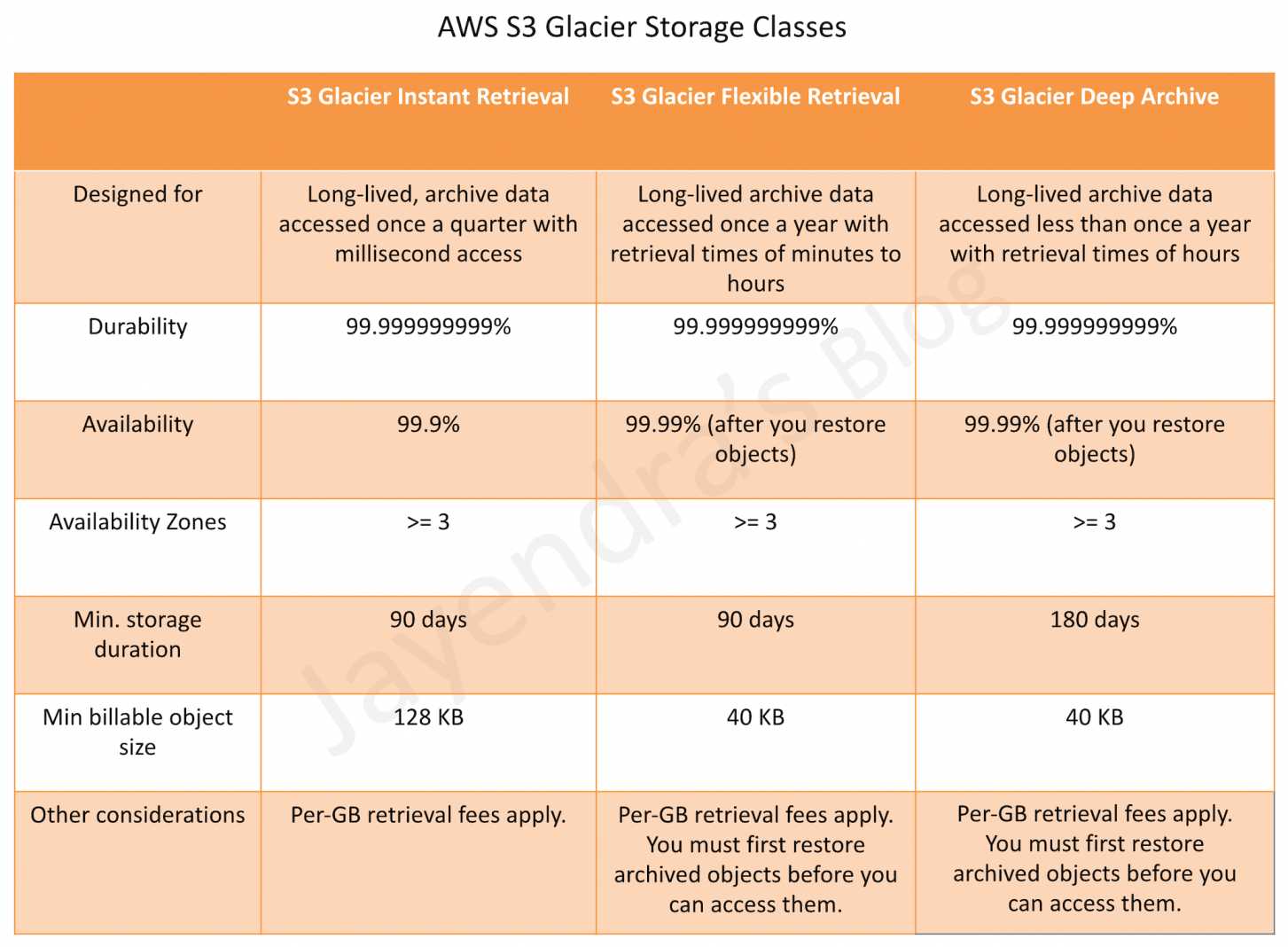
AWS S3 Glacier Storage Classes

S3 Glacier Instant Retrieval

  • Use for archiving data that is rarely accessed and requires milliseconds retrieval.
  • Delivers the same low latency and high throughput performance as the S3 Standard and S3 Standard-IA storage classes.
  • Data has a minimum storage duration period of 90 days.
  • Has a minimum object size of 128 KB.
  • Designed for 99.999999999% (11 nines) of data durability and 99.9% availability by redundantly storing data across multiple physically separated AWS Availability Zones.
  • Ideal for storing data like medical images, genomic sequences, satellite images, news media assets, and user-generated content that require milliseconds access but are accessed once per quarter.

S3 Glacier Flexible Retrieval (S3 Glacier Storage Class)

  • Use for archives where portions of the data might need to be retrieved in minutes.
  • Data has a minimum storage duration period of 90 days and can be accessed in as little as 1-5 minutes by using an expedited retrieval.
  • You can request free Bulk retrievals in 5-12 hours.
  • Requires 40 KB of additional metadata per object (32 KB charged at Glacier Flexible Retrieval rate + 8 KB charged at S3 Standard rate).
  • S3 supports restore requests at a rate of up to 1,000 transactions per second, per AWS account.
  • Faster Restores with S3 Batch Operations (2023): Standard tier retrievals using S3 Batch Operations are up to 85% faster at no additional cost. Restores begin returning objects within minutes.

S3 Glacier Deep Archive

  • Use for archiving data that rarely needs to be accessed.
  • S3 Glacier Deep Archive is the lowest cost storage option in AWS.
  • Data stored has a minimum storage duration period of 180 days.
  • Requires 40 KB of additional metadata per object (32 KB charged at Deep Archive rate + 8 KB charged at S3 Standard rate).
  • Retrieval options:
    • Standard retrieval: within 12 hours
    • Bulk retrieval: within 48 hours
  • Expedited retrieval is not available for Deep Archive.
  • S3 supports restore requests at a rate of up to 1,000 transactions per second, per AWS account.

S3 Glacier vs. S3 Intelligent-Tiering Archive Access

  • S3 Intelligent-Tiering includes optional Archive Access and Deep Archive Access tiers that provide automatic archival with no retrieval charges when data is accessed.
  • S3 Intelligent-Tiering Archive Access tier has the same performance as S3 Glacier Flexible Retrieval.
  • S3 Intelligent-Tiering Deep Archive Access tier has the same performance as S3 Glacier Deep Archive.
  • Use S3 Intelligent-Tiering if access patterns are unknown or changing; use S3 Glacier storage classes for known archival workloads with defined retention.

S3 Glacier Flexible Data Retrievals Options

Glacier provides three options for retrieving data with varying access times and costs: Expedited, Standard, and Bulk retrievals.

Expedited Retrievals

  • Expedited retrievals allow quick access to the data when occasional urgent requests for a subset of archives are required.
  • Data accessed are typically made available within 1-5 minutes.
  • There are two types of Expedited retrievals: On-Demand and Provisioned.
    • On-Demand requests are like EC2 On-Demand instances and are available the vast majority of the time.
    • Provisioned requests are guaranteed to be available when needed.
  • Available for S3 Glacier Flexible Retrieval only (not available for Deep Archive).

Standard Retrievals

  • Standard retrievals allow access to any of the archives within several hours.
  • Standard retrievals typically complete within 3-5 hours for S3 Glacier Flexible Retrieval.
  • Standard retrievals typically complete within 12 hours for S3 Glacier Deep Archive.

Bulk Retrievals

  • Bulk retrievals are Glacier’s lowest-cost retrieval option, enabling retrieval of large amounts, even petabytes, of data inexpensively in a day.
  • Bulk retrievals typically complete within 5-12 hours for S3 Glacier Flexible Retrieval (free of charge).
  • Bulk retrievals typically complete within 48 hours for S3 Glacier Deep Archive.

S3 Batch Operations for Glacier Restores

  • S3 Batch Operations can be used to restore large numbers of archived objects at scale with a few clicks in the S3 console or a single API request.
  • 85% faster Standard tier restores (2023): S3 Glacier Flexible Retrieval Standard tier restores using S3 Batch Operations are up to 85% faster at no additional cost. Objects begin to be returned within minutes.
  • S3 automatically optimizes Batch Operations restore jobs for fastest retrieval throughput (no need to manually optimize inventory reports with Athena as of July 2024).
  • Supports restoring billions of objects containing petabytes of data.
  • Supports on-demand manifest generation that filters objects based on prefix, suffix, and last modified date for targeted restores.
  • 10x throughput improvement (2022): S3 Glacier restores now support up to 1,000 MB/s throughput when retrieving large volumes of archived data at no additional cost.
  • Objects larger than 5 TB typically finish within 48 hours with up to 300 MB/s retrieval throughput.

S3 Glacier Data Model

  • Glacier data model core concepts include vaults and archives and also include job and notification configuration resources

Vault

  • A vault is a container for storing archives.
  • Each vault resource has a unique address, which comprises the region the vault was created and the unique vault name within the region and account for e.g. https://glacier.us-west-2.amazonaws.com/111122223333/vaults/examplevault
  • Vault allows the storage of an unlimited number of archives.
  • Glacier supports various vault operations which are region-specific.
  • An AWS account can create up to 1,000 vaults per region.
  • Note: The vault-based Glacier service stopped accepting new customers on December 15, 2025. For new workloads, use S3 Glacier storage classes via the S3 API.

Archive

  • An archive can be any data such as a photo, video, or document and is a base unit of storage in Glacier.
  • Each archive has a unique ID and an optional description, which can only be specified during the upload of an archive.
  • Glacier assigns the archive an ID, which is unique in the AWS region in which it is stored.
  • An archive can be uploaded in a single request. While for large archives, Glacier provides a multipart upload API that enables uploading an archive in parts.
  • An Archive can be up to 40TB.

Jobs

  • A Job is required to retrieve an Archive and vault inventory list
  • Data retrieval requests are asynchronous operations, are queued and some jobs can take about four hours to complete.
  • A job is first initiated and then the output of the job is downloaded after the job is completed.
  • Vault inventory jobs need the vault name.
  • Data retrieval jobs need both the vault name and the archive id, with an optional description
  • A vault can have multiple jobs in progress at any point in time and can be identified by Job ID, assigned when is it created for tracking
  • Glacier maintains job information such as job type, description, creation date, completion date, and job status and can be queried
  • After the job completes, the job output can be downloaded in full or partially by specifying a byte range.

Notification Configuration

  • As the jobs are asynchronous, Glacier supports a notification mechanism to an SNS topic when the job completes
  • SNS topic for notification can either be specified with each individual job request or with the vault
  • Glacier stores the notification configuration as a JSON document

Glacier Supported Operations

Vault Operations

  • Glacier provides operations to create and delete vaults.
  • A vault can be deleted only if there are no archives in the vault as of the last computed inventory and there have been no writes to the vault since the last inventory (as the inventory is prepared periodically)
  • Vault Inventory
    • Vault inventory helps retrieve a list of archives in a vault with information such as archive ID, creation date, and size for each archive
    • Inventory for each vault is prepared periodically, every 24 hours
    • Vault inventory is updated approximately once a day, starting on the day the first archive is uploaded to the vault.
    • When a vault inventory job is, Glacier returns the last inventory it generated, which is a point-in-time snapshot and not real-time data.
  • Vault Metadata or Description can also be obtained for a specific vault or for all vaults in a region, which provides information such as
    • creation date,
    • number of archives in the vault,
    • total size in bytes used by all the archives in the vault,
    • and the date the vault inventory was generated
  • S3 Glacier also provides operations to set, retrieve, and delete a notification configuration on the vault. Notifications can be used to identify vault events.

Archive Operations

  • S3 Glacier provides operations to upload, download and delete archives.
  • All archive operations must either be done using AWS CLI or SDK. It cannot be done using AWS Management Console.
  • An existing archive cannot be updated, it has to be deleted and uploaded.

Archive Upload

  • An archive can be uploaded in a single operation (1 byte to up to 4 GB in size) or in parts referred to as Multipart upload (40 TB)
  • Multipart Upload helps to
    • improve the upload experience for larger archives.
    • upload archives in parts, independently, parallelly and in any order
    • faster recovery by needing to upload only the part that failed upload and not the entire archive.
    • upload archives without even knowing the size
    • upload archives from 1 byte to about 40,000 GB (10,000 parts * 4 GB) in size
  • To upload existing data to Glacier, consider using the following options:
    • AWS DataSync – for online data transfers to AWS
    • AWS Data Transfer Terminal – secure physical locations where you can bring storage devices for high-speed upload (100 GbE connections) to AWS, replacing the deprecated AWS Snowball Edge service for new customers
    Note: AWS Snowball Edge is no longer available to new customers as of November 7, 2025. AWS Import/Export was the original predecessor service that was deprecated years ago.
  • Glacier returns a response that includes an archive ID that is unique in the region in which the archive is stored.
  • Glacier does not support any additional metadata information apart from an optional description. Any additional metadata information required should be maintained on the client side.
    ✅ New (June 2026): S3 Annotations — For objects stored in S3 using Glacier storage classes, S3 Annotations now allows attaching up to 1GB of rich, queryable metadata (JSON, XML, YAML) per object without retrieving the object. Annotations can be added, modified, and queried (via Amazon Athena) independently of the object’s storage class, eliminating the need for external metadata management.

Archive Download

  • Downloading an archive is an asynchronous operation and is the 2 step process
    • Initiate an archive retrieval job
      • When a Job is initiated, a job ID is returned as a part of the response.
      • Job is executed asynchronously and the output can be downloaded after the job completes.
      • A job can be initiated to download the entire archive or a portion of the archive.
    • After the job completes, download the bytes
      • An archive can be downloaded as all the bytes or a specific byte range to download only a portion of the output
      • Downloading the archive in chunks helps in the event of a download failure, as only that part needs to be downloaded
      • Job completion status can be checked by
        • Check status explicitly (Not Recommended)
          • periodically poll the describe job operation request to obtain job information
        • Completion notification
          • An SNS topic can be specified, when the job is initiated or with the vault, to be used to notify job completion

About Range Retrievals

  • S3 Glacier allows retrieving an archive either in whole (default) or a range, or a portion.
  • Range retrievals need a range to be provided that is megabyte aligned.
  • Glacier returns a checksum in the response which can be used to verify if any errors in the download by comparing it with the checksum computed on the client side.
  • Specifying a range of bytes can be helpful when:
    • Control bandwidth costs
      • Glacier allows retrieval of up to 5 percent of the average monthly storage (pro-rated daily) for free each month
      • Scheduling range retrievals can help in two ways.
        • meet the monthly free allowance of 5 percent by spreading out the data requested
        • if the amount of data retrieved doesn’t meet the free allowance percentage, scheduling range retrievals enable a reduction of the peak retrieval rate, which determines the retrieval fees.
    • Manage your data downloads
      • Glacier allows retrieved data to be downloaded for 24 hours after the retrieval request completes
      • Only portions of the archive can be retrieved so that the schedule of downloads can be managed within the given download window.
    • Retrieve a targeted part of a large archive
      • Retrieving an archive in a range can be useful if an archive is uploaded as an aggregate of multiple individual files, and only a few files need to be retrieved

Archive Deletion

  • An archive can be deleted from the vault only one at a time
  • This operation is idempotent. Deleting an already-deleted archive does not result in an error
  • AWS applies a pro-rated charge for items that are deleted prior to the minimum storage duration (90 days for Glacier Flexible Retrieval, 180 days for Deep Archive), as it is meant for long-term storage

Archive Update

  • An existing archive cannot be updated and must be deleted and re-uploaded, which would be assigned a new archive id

S3 Glacier Vault Lock

  • S3 Glacier Vault Lock helps deploy and enforce compliance controls for individual S3 Glacier vaults with a vault lock policy.
  • Specify controls such as “write once read many” (WORM) can be enforced using a vault lock policy and the policy can be locked for future edits.
  • Once locked, the policy can no longer be changed.
  • S3 Object Lock provides similar WORM protection for objects stored in S3 buckets (including those using S3 Glacier storage classes via lifecycle policies).
    • S3 Object Lock supports both Governance mode (users with special permissions can override) and Compliance mode (no one can override, including root account).
    • S3 Object Lock can be enabled on existing buckets (since November 2023).
    • For new workloads, S3 Object Lock is the recommended approach for WORM compliance on S3 Glacier storage classes.

S3 Glacier Security

  • S3 Glacier supports data in transit encryption using TLS (Transport Layer Security).
  • All data is encrypted on the server side with Glacier handling key management and key protection. It uses AES-256, one of the strongest block ciphers available.
  • S3 Glacier storage classes also support SSE-KMS and SSE-C encryption options when accessed through S3 API.
  • Security and compliance of S3 Glacier are assessed by third-party auditors as part of multiple AWS compliance programs including SOC, HIPAA, PCI DSS, FedRAMP, etc.

S3 Glacier Select (Deprecated)

⚠️ S3 Glacier Select is no longer available to new customers as of July 25, 2024. Existing customers can continue using the feature. For new workloads, use Amazon Athena, S3 Object Lambda, or client-side filtering to query archived data.
  • S3 Glacier Select allowed running SQL queries directly against Glacier data without needing to restore the entire archive.
  • Alternatives for querying archived data:
    • Amazon Athena – serverless query service that can query data in S3 including restored archives
    • S3 Object Lambda – transform data as it’s being retrieved
    • Amazon EMR – simplified access to S3 Glacier for big data processing (2024 enhancement)

AWS Certification Exam Practice Questions

  • Questions are collected from Internet and the answers are marked as per my knowledge and understanding (which might differ with yours).
  • AWS services are updated everyday and both the answers and questions might be outdated soon, so research accordingly.
  • AWS exam questions are not updated to keep up the pace with AWS updates, so even if the underlying feature has changed the question might not be updated
  • Open to further feedback, discussion and correction.
  1. What is Amazon Glacier?
    1. You mean Amazon “Iceberg”: it’s a low-cost storage service.
    2. A security tool that allows to “freeze” an EBS volume and perform computer forensics on it.
    3. A low-cost storage service that provides secure and durable storage for data archiving and backup
    4. It’s a security tool that allows to “freeze” an EC2 instance and perform computer forensics on it.
  2. Amazon Glacier is designed for: (Choose 2 answers)
    1. Active database storage
    2. Infrequently accessed data
    3. Data archives
    4. Frequently accessed data
    5. Cached session data
  3. An organization is generating digital policy files which are required by the admins for verification. Once the files are verified they may not be required in the future unless there is some compliance issue. If the organization wants to save them in a cost effective way, which is the best possible solution?
    1. AWS RRS
    2. AWS S3
    3. AWS RDS
    4. AWS Glacier
  4. A user has moved an object to Glacier using the life cycle rules. The user requests to restore the archive after 6 months. When the restore request is completed the user accesses that archive. Which of the below mentioned statements is not true in this condition?
    1. The archive will be available as an object for the duration specified by the user during the restoration request
    2. The restored object’s storage class will be RRS (After the object is restored the storage class still remains GLACIER. Read more)
    3. The user can modify the restoration period only by issuing a new restore request with the updated period
    4. The user needs to pay storage for both RRS (restored) and Glacier (Archive) Rates
  5. To meet regulatory requirements, a pharmaceuticals company needs to archive data after a drug trial test is concluded. Each drug trial test may generate up to several thousands of files, with compressed file sizes ranging from 1 byte to 100MB. Once archived, data rarely needs to be restored, and on the rare occasion when restoration is needed, the company has 24 hours to restore specific files that match certain metadata. Searches must be possible by numeric file ID, drug name, participant names, date ranges, and other metadata. Which is the most cost-effective architectural approach that can meet the requirements?
    1. Store individual files in Amazon Glacier, using the file ID as the archive name. When restoring data, query the Amazon Glacier vault for files matching the search criteria. (Individual files are expensive and does not allow searching by participant names etc)
    2. Store individual files in Amazon S3, and store search metadata in an Amazon Relational Database Service (RDS) multi-AZ database. Create a lifecycle rule to move the data to Amazon Glacier after a certain number of days. When restoring data, query the Amazon RDS database for files matching the search criteria, and move the files matching the search criteria back to S3 Standard class. (As the data is not needed can be stored to Glacier directly and the data need not be moved back to S3 standard)
    3. Store individual files in Amazon Glacier, and store the search metadata in an Amazon RDS multi-AZ database. When restoring data, query the Amazon RDS database for files matching the search criteria, and retrieve the archive name that matches the file ID returned from the database query. (Individual files and Multi-AZ is expensive)
    4. First, compress and then concatenate all files for a completed drug trial test into a single Amazon Glacier archive. Store the associated byte ranges for the compressed files along with other search metadata in an Amazon RDS database with regular snapshotting. When restoring data, query the database for files that match the search criteria, and create restored files from the retrieved byte ranges.
    5. Store individual compressed files and search metadata in Amazon Simple Storage Service (S3). Create a lifecycle rule to move the data to Amazon Glacier, after a certain number of days. When restoring data, query the Amazon S3 bucket for files matching the search criteria, and retrieve the file to S3 reduced redundancy in order to move it back to S3 Standard class. (Once the data is moved from S3 to Glacier the metadata is lost, as Glacier does not have metadata and must be maintained externally)
  6. A user is uploading archives to Glacier. The user is trying to understand key Glacier resources. Which of the below mentioned options is not a Glacier resource?
    1. Notification configuration
    2. Archive ID
    3. Job
    4. Archive
  7. A company needs to archive 50TB of on-premises data to AWS for long-term retention. The data is rarely accessed but must be retrievable within 12 hours when needed. Which combination provides the MOST cost-effective solution? (Choose 2)
    1. Use AWS DataSync to transfer data to S3 Standard, then lifecycle to S3 Glacier Instant Retrieval
    2. Use AWS DataSync to transfer data to S3, then lifecycle to S3 Glacier Deep Archive
    3. Use S3 Batch Operations for restoring multiple archived objects at scale
    4. Use S3 Glacier Select to query archived data directly
    5. Use AWS Snowball Edge for the initial data transfer

    (S3 Glacier Deep Archive provides 12-hour standard retrieval and is the lowest cost. S3 Batch Operations enables efficient large-scale restores. Glacier Select is deprecated for new customers. Snowball Edge is no longer available to new customers.)

  8. An organization wants to implement WORM (Write Once Read Many) protection for compliance on their archived data stored in S3 Glacier storage classes. Which approach should they use?
    1. S3 Glacier Vault Lock only
    2. S3 Object Lock in Compliance mode
    3. S3 bucket policy with deny delete
    4. IAM policy restricting delete operations

    (For objects in S3 using Glacier storage classes (via lifecycle), S3 Object Lock in Compliance mode is the recommended approach. Vault Lock applies to the legacy vault-based Glacier service. Bucket policies and IAM policies can be modified by administrators.)
References

S3 Storage Classes Explained – Standard, IA, Glacier & When to Use

S3 Storage Classes Performance

AWS S3 Storage Classes

  • AWS S3 offers a range of S3 Storage Classes to match the use case scenario and performance access requirements.
  • S3 storage classes are designed to sustain the concurrent loss of data in one or two facilities.
  • S3 storage classes allow lifecycle management for automatic transition of objects for cost savings.
  • All S3 storage classes provide the same durability, first-byte latency, and support SSL encryption of data in transit, and data encryption at rest.
  • S3 also regularly verifies the integrity of the data using checksums and provides the auto-healing capability.
  • S3 currently offers the following storage classes: S3 Standard, S3 Express One Zone, S3 Intelligent-Tiering, S3 Standard-IA, S3 One Zone-IA, S3 Glacier Instant Retrieval, S3 Glacier Flexible Retrieval, and S3 Glacier Deep Archive.

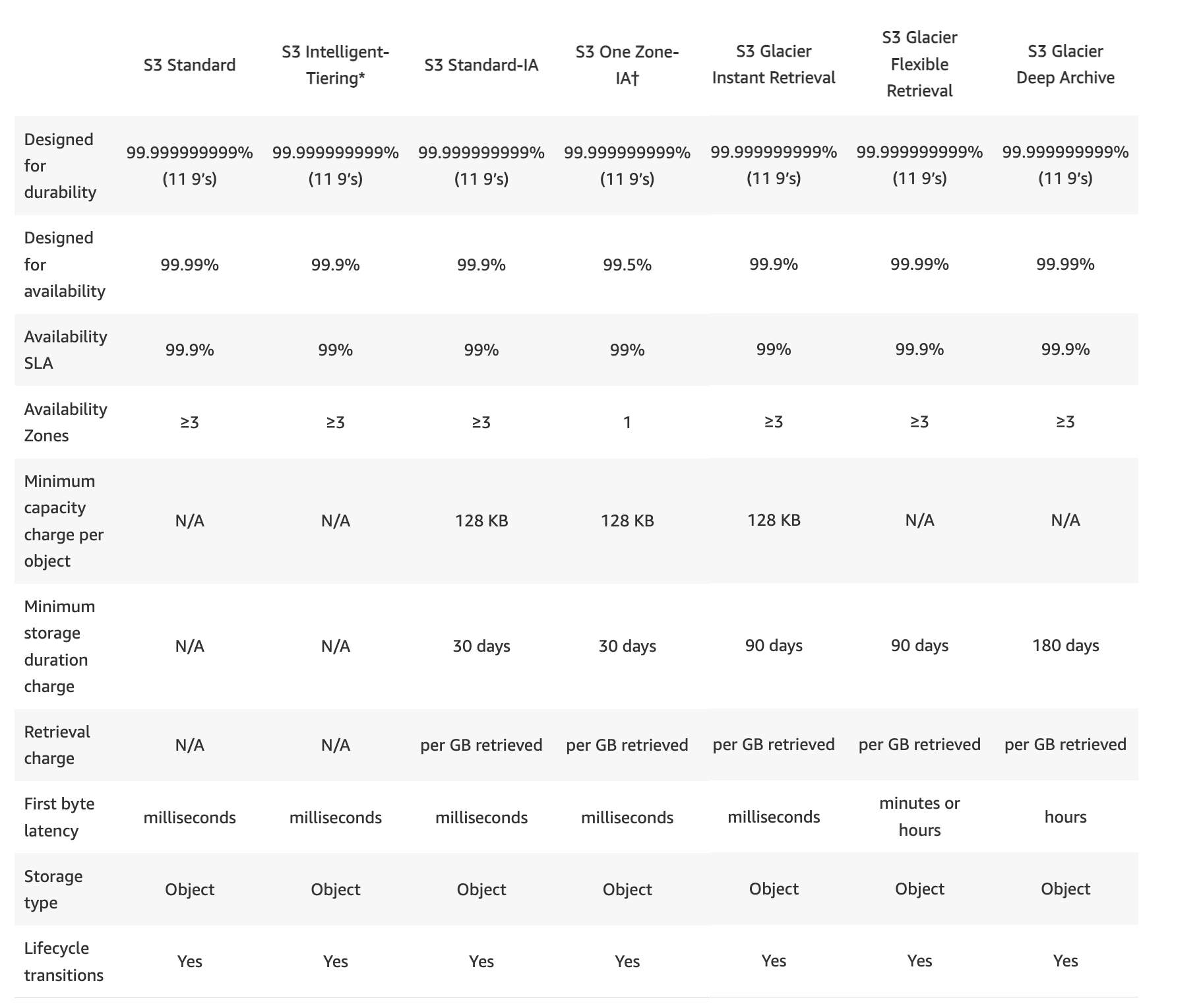
S3 Storage Classes Comparison

S3 Storage Classes Performance

S3 Standard

  • STANDARD is the default storage class, if none specified during upload
  • Low latency and high throughput performance
  • Designed for 99.999999999% i.e. 11 9’s Durability of objects across AZs
  • Designed for 99.99% availability over a given year
  • Resilient against events that impact an entire Availability Zone and is designed to sustain the loss of data in two facilities
  • Stores data redundantly across a minimum of 3 Availability Zones
  • Ideal for performance-sensitive use cases and frequently accessed data
  • S3 Standard is appropriate for a wide variety of use cases, including cloud applications, dynamic websites, content distribution, mobile and gaming applications, and big data analytics.
  • No minimum storage duration and no minimum billable object size

S3 Express One Zone

  • S3 Express One Zone is a high-performance, single-Availability Zone storage class purpose-built to deliver consistent single-digit millisecond data access for latency-sensitive applications.
  • Delivers data access speed up to 10x faster and request costs up to 50% lower than S3 Standard.
  • Supports up to 2 million GET transactions per second (TPS) and up to 200,000 PUT TPS per directory bucket.
  • Stores data in a single Availability Zone that you choose, enabling co-location with compute resources (EC2, EKS, ECS) for lowest latency.
  • Uses directory buckets (different from general purpose buckets).
  • Designed for 99.999999999% i.e. 11 9’s Durability within a single AZ
  • Designed for 99.95% availability
  • No minimum storage duration and no minimum billable object size
  • Data is not resilient to the physical loss of the Availability Zone.
  • Ideal for ML training, interactive analytics, media content creation, high-performance computing (HPC), and financial modeling.
  • Supports appending data to existing objects without downloading and re-uploading.
  • Pricing Update (April 2025): AWS reduced storage prices by 31%, PUT request prices by 55%, GET request prices by 85%, and data upload/retrieval per-byte charges by 60%.

S3 Intelligent Tiering (S3 Intelligent-Tiering)

  • S3 Intelligent Tiering storage class is designed to optimize storage costs by automatically moving data to the most cost-effective storage access tier, without performance impact or operational overhead.
  • S3 Intelligent-Tiering is the only cloud storage class that delivers automatic cost savings by moving data on a granular object level between access tiers when access patterns change.
  • S3 Intelligent-Tiering automatically stores objects in three automatic low-latency access tiers:
    • Frequent Access tier (automatic) – Default tier for newly uploaded objects. Provides low latency and high throughput.
    • Infrequent Access tier (automatic) – Objects not accessed for 30 consecutive days are moved here.
    • Archive Instant Access tier (automatic) – Objects not accessed for 90 consecutive days are moved here. Provides millisecond access and high throughput, with up to 68% lower cost vs. Frequent Access.
  • Additionally offers two optional asynchronous archive access tiers (must be activated):
    • Archive Access tier (optional) – For data that can be accessed asynchronously. Objects not accessed for a minimum of 90 consecutive days (configurable up to 730 days). Retrieval: 3-5 hours (standard).
    • Deep Archive Access tier (optional) – Objects not accessed for a minimum of 180 consecutive days (configurable up to 730 days). Retrieval: within 12 hours.
  • No retrieval fees when using the S3 Intelligent-Tiering storage class.
  • If an object in the Infrequent Access tier or Archive Instant Access tier is accessed, it is automatically moved back to the Frequent Access tier.
  • No additional fees apply when objects are moved between access tiers.
  • For a small monthly monitoring and automation fee per object, S3 monitors access patterns and moves objects automatically.
  • No minimum storage duration charge.
  • Objects smaller than 128 KB are not monitored and not eligible for auto-tiering; they are always stored in the Frequent Access tier. No monitoring and automation charge applies to objects smaller than 128 KB.
  • Designed for 99.999999999% i.e. 11 9’s Durability of objects across AZs
  • Designed for 99.9% availability over a given year
  • Ideal when you want to optimize storage costs for data with unknown or changing access patterns.

S3 Standard-Infrequent Access (S3 Standard-IA)

  • S3 Standard-Infrequent Access storage class is optimized for long-lived and less frequently accessed data. for e.g. for backups and older data where access is limited, but the use case still demands high performance
  • Ideal for use for the primary or only copy of data that can’t be recreated.
  • Data stored redundantly across multiple geographically separated AZs and are resilient to the loss of an Availability Zone.
  • Offers greater availability and resiliency than the ONEZONE_IA class.
  • Objects are available for real-time access.
  • Suitable for objects larger than 128 KB (smaller objects are charged for 128 KB only) kept for at least 30 days (charged for minimum 30 days)
  • Same low latency and high throughput performance of Standard
  • Designed for 99.999999999% i.e. 11 9’s Durability of objects across AZs
  • Designed for 99.9% availability over a given year
  • S3 charges a per-GB retrieval fee for these objects, so they are most suitable for infrequently accessed data.

S3 One Zone-Infrequent Access (S3 One Zone-IA)

  • S3 One Zone-Infrequent Access storage class is designed for long-lived and infrequently accessed data, but available for millisecond access (similar to the STANDARD and STANDARD_IA storage class).
  • Ideal when the data can be recreated if the AZ fails, and for object replicas when setting cross-region replication (CRR).
  • Objects are available for real-time access.
  • Suitable for objects greater than 128 KB (smaller objects are charged for 128 KB only) kept for at least 30 days (charged for a minimum of 30 days)
  • Stores the object data in only one AZ, which makes it less expensive than Standard-Infrequent Access
  • Data is not resilient to the physical loss of the AZ resulting from disasters, such as earthquakes and floods.
  • One Zone-Infrequent Access storage class is as durable as Standard-Infrequent Access, but it is less available and less resilient.
  • Designed for 99.999999999% i.e. 11 9’s Durability of objects in a single AZ
  • Designed for 99.5% availability over a given year
  • S3 charges a retrieval fee for these objects, so they are most suitable for infrequently accessed data.
  • Can also be used in directory buckets within AWS Local Zones for data residency and isolation use cases.

Reduced Redundancy Storage – RRS (Not Recommended)

⚠️ NOT RECOMMENDED – EFFECTIVELY DEPRECATED

AWS recommends NOT using Reduced Redundancy Storage (RRS). The S3 Standard storage class is more cost-effective. RRS no longer participates in AWS pricing discounts, making it more expensive than S3 Standard while providing lower durability (99.99% vs 99.999999999%).

Recommendation: Use S3 Standard for all use cases previously served by RRS. For infrequently accessed reproducible data, use S3 One Zone-IA instead.

  • NOTE – AWS recommends not to use this storage class. The STANDARD storage class is more cost-effective. RRS is effectively deprecated – it costs more than S3 Standard and offers lower durability.
  • Reduced Redundancy Storage (RRS) storage class is designed for non-critical, reproducible data stored at lower levels of redundancy than the STANDARD storage class
  • Designed for durability of 99.99% of objects (average annual expected loss of 0.01% of objects)
  • Designed for 99.99% availability over a given year
  • RRS does not replicate objects as many times as S3 standard storage and is designed to sustain the loss of data in a single facility.
  • If an RRS object is lost, S3 returns a 405 error on requests made to that object
  • S3 can send an event notification, configured on the bucket, to alert a user or start a workflow when it detects that an RRS object is lost

S3 Glacier Instant Retrieval

  • Use for archiving data that is rarely accessed (approximately once per quarter) and requires milliseconds retrieval.
  • Delivers the same low latency and high throughput performance as S3 Standard and S3 Standard-IA.
  • Provides up to 68% lower storage cost compared to S3 Standard-IA for data accessed once per quarter.
  • Storage class has a minimum storage duration period of 90 days
  • Minimum billable object size of 128 KB
  • Per-GB retrieval fees apply.
  • Designed for 99.999999999% i.e. 11 9’s Durability of objects across AZs
  • Designed for 99.9% availability
  • Ideal for medical images, news media assets, genomic sequences, satellite images, and user-generated content archives.

S3 Glacier Flexible Retrieval (formerly S3 Glacier)

  • S3 Glacier Flexible Retrieval storage class is suitable for low-cost data archiving where data access is infrequent and retrieval time of minutes to hours is acceptable.
  • Storage class has a minimum storage duration period of 90 days
  • Requires 40 KB of additional metadata per archived object (32 KB at Glacier rate + 8 KB at Standard rate).
  • Provides configurable retrieval times, from minutes to hours
    • Expedited retrieval: 1-5 mins
    • Standard retrieval: 3-5 hours
    • Bulk retrieval: 5-12 hours (free)
  • Objects in this storage class are managed through S3 (not through the separate Glacier service)
  • For accessing Glacier Flexible Retrieval objects,
    • the object must be restored which can take anywhere between minutes to hours
    • objects are only available for the time period (the number of days) specified during the restoration request
    • object’s storage class remains GLACIER
    • charges are levied for both the archive (GLACIER rate) and the copy restored temporarily
  • Vault Lock feature enforces compliance via a lockable policy.
  • Designed for 99.999999999% i.e. 11 9’s Durability of objects across AZs
  • Designed for 99.99% availability (after objects are restored)

S3 Glacier Deep Archive

  • Glacier Deep Archive storage class provides the lowest-cost data archiving where data access is infrequent and retrieval time of hours is acceptable.
  • Has a minimum storage duration period of 180 days.
  • Requires 40 KB of additional metadata per archived object (32 KB at Deep Archive rate + 8 KB at Standard rate).
  • Retrieval options:
    • Standard retrieval: within 12 hours
    • Bulk retrieval: within 48 hours
  • Supports long-term retention and digital preservation for data that may be accessed once or twice a year
  • Designed for 99.999999999% i.e. 11 9’s Durability of objects across AZs
  • Designed for 99.99% availability (after objects are restored)
  • Ideal alternative to magnetic tape libraries
  • Suitable for regulatory compliance archives, healthcare and life sciences data, financial services records, and media asset archiving.

S3 on Outposts

  • S3 on Outposts provides a storage class called S3 Outposts (OUTPOSTS) for on-premises object storage.
  • Allows creating S3 buckets on AWS Outposts resources for local data access, local data processing, and data residency requirements.
  • Uses the same S3 API operations and features as in AWS Regions, including access policies, encryption, and tagging.
  • Objects stored in S3 Outposts are always encrypted using SSE-S3 (can also use SSE-C).
  • Does not support SSE-KMS.
  • Capacity options: 26 TB, 48 TB, 96 TB, 240 TB, or 380 TB per Outpost.

S3 Analytics – S3 Storage Classes Analysis

  • S3 Analytics – Storage Class Analysis helps analyze storage access patterns to decide when to transition the right data to the right storage class.
  • S3 Analytics feature observes data access patterns to help determine when to transition less frequently accessed STANDARD storage to the STANDARD_IA (IA, for infrequent access) storage class.
  • Storage Class Analysis can be configured to analyze all the objects in a bucket or filters to group objects.
  • Results can help inform S3 Lifecycle policies and S3 Intelligent-Tiering configurations.

S3 Storage Classes – Key Differences Summary

Storage Class Designed For Availability AZs Min Duration Retrieval Fee
S3 Standard Frequently accessed data 99.99% ≥ 3 None None
S3 Express One Zone Latency-sensitive (single-digit ms) 99.95% 1 None None
S3 Intelligent-Tiering Unknown/changing access patterns 99.9% ≥ 3 None None
S3 Standard-IA Infrequent access, millisecond retrieval 99.9% ≥ 3 30 days Per-GB
S3 One Zone-IA Recreatable, infrequent access 99.5% 1 30 days Per-GB
S3 Glacier Instant Retrieval Archive, once/quarter, ms retrieval 99.9% ≥ 3 90 days Per-GB
S3 Glacier Flexible Retrieval Archive, once/year, min-to-hour retrieval 99.99%* ≥ 3 90 days Per-GB
S3 Glacier Deep Archive Long-term archive, hours retrieval 99.99%* ≥ 3 180 days Per-GB

* Availability is 99.99% after objects are restored.

All storage classes provide 99.999999999% (11 nines) durability.

📖 Related: AWS S3 vs EBS vs EFS – Complete Storage Comparison Guide

AWS Certification Exam Practice Questions

  • Questions are collected from Internet and the answers are marked as per my knowledge and understanding (which might differ with yours).
  • AWS services are updated everyday and both the answers and questions might be outdated soon, so research accordingly.
  • AWS exam questions are not updated to keep up the pace with AWS updates, so even if the underlying feature has changed the question might not be updated
  • Open to further feedback, discussion and correction.
  1. What does RRS stand for when talking about S3?
    1. Redundancy Removal System
    2. Relational Rights Storage
    3. Regional Rights Standard
    4. Reduced Redundancy Storage
  2. What is the durability of S3 RRS?
    1. 99.99%
    2. 99.95%
    3. 99.995%
    4. 99.999999999%
  3. What is the Reduced Redundancy option in Amazon S3?
    1. Less redundancy for a lower cost
    2. It doesn’t exist in Amazon S3, but in Amazon EBS.
    3. It allows you to destroy any copy of your files outside a specific jurisdiction.
    4. It doesn’t exist at all

    Note: While the answer above was correct historically, RRS is now more expensive than S3 Standard and AWS recommends against using it.

  4. An application is generating a log file every 5 minutes. The log file is not critical but may be required only for verification in case of some major issue. The file should be accessible over the internet whenever required. Which of the below mentioned options is a best possible storage solution for it?
    1. AWS S3
    2. AWS Glacier
    3. AWS RDS
    4. AWS S3 RRS (Reduced Redundancy Storage (RRS) is an Amazon S3 storage option that enables customers to store noncritical, reproducible data at lower levels of redundancy than Amazon S3’s standard storage. RRS is designed to sustain the loss of data in a single facility.)

    Note: This question is outdated. Today the best answer would be S3 Standard or S3 One Zone-IA, as RRS is more expensive than S3 Standard and not recommended.

  5. A user has moved an object to Glacier using the life cycle rules. The user requests to restore the archive after 6 months. When the restore request is completed the user accesses that archive. Which of the below mentioned statements is not true in this condition?
    1. The archive will be available as an object for the duration specified by the user during the restoration request
    2. The restored object’s storage class will be RRS (After the object is restored the storage class still remains GLACIER. Read more)
    3. The user can modify the restoration period only by issuing a new restore request with the updated period
    4. The user needs to pay storage for both RRS (restored) and Glacier (Archive) Rates
  6. Your department creates regular analytics reports from your company’s log files. All log data is collected in Amazon S3 and processed by daily Amazon Elastic Map Reduce (EMR) jobs that generate daily PDF reports and aggregated tables in CSV format for an Amazon Redshift data warehouse. Your CFO requests that you optimize the cost structure for this system. Which of the following alternatives will lower costs without compromising average performance of the system or data integrity for the raw data? [PROFESSIONAL]
    1. Use reduced redundancy storage (RRS) for PDF and CSV data in Amazon S3. Add Spot instances to Amazon EMR jobs. Use Reserved Instances for Amazon Redshift. (Spot instances impacts performance)
    2. Use reduced redundancy storage (RRS) for all data in S3. Use a combination of Spot instances and Reserved Instances for Amazon EMR jobs. Use Reserved instances for Amazon Redshift (Combination of the Spot and reserved with guarantee performance and help reduce cost. Also, RRS would reduce cost and guarantee data integrity, which is different from data durability )
    3. Use reduced redundancy storage (RRS) for all data in Amazon S3. Add Spot Instances to Amazon EMR jobs. Use Reserved Instances for Amazon Redshift (Spot instances impacts performance)
    4. Use reduced redundancy storage (RRS) for PDF and CSV data in S3. Add Spot Instances to EMR jobs. Use Spot Instances for Amazon Redshift. (Spot instances impacts performance)

    Note: This question is outdated. RRS is now more expensive than S3 Standard. Modern approach would use S3 Standard or S3 Intelligent-Tiering.

  7. Which of the below mentioned options can be a good use case for storing content in AWS RRS?
    1. Storing mission critical data Files
    2. Storing infrequently used log files
    3. Storing a video file which is not reproducible
    4. Storing image thumbnails

    Note: RRS is no longer recommended. For reproducible data like thumbnails, use S3 Standard or S3 One Zone-IA.

  8. A newspaper organization has an on-premises application which allows the public to search its back catalogue and retrieve individual newspaper pages via a website written in Java. They have scanned the old newspapers into JPEGs (approx. 17TB) and used Optical Character Recognition (OCR) to populate a commercial search product. The hosting platform and software is now end of life and the organization wants to migrate its archive to AWS and produce a cost efficient architecture and still be designed for availability and durability. Which is the most appropriate? [PROFESSIONAL]
    1. Use S3 with reduced redundancy to store and serve the scanned files, install the commercial search application on EC2 Instances and configure with auto-scaling and an Elastic Load Balancer. (RRS impacts durability and commercial search would add to cost)
    2. Model the environment using CloudFormation. Use an EC2 instance running Apache webserver and an open source search application, stripe multiple standard EBS volumes together to store the JPEGs and search index. (Using EBS is not cost effective for storing files)
    3. Use S3 with standard redundancy to store and serve the scanned files, use CloudSearch for query processing, and use Elastic Beanstalk to host the website across multiple availability zones. (Standard S3 and Elastic Beanstalk provides availability and durability, Standard S3 and CloudSearch provides cost effective storage and search)
    4. Use a single-AZ RDS MySQL instance to store the search index and the JPEG images use an EC2 instance to serve the website and translate user queries into SQL. (RDS is not ideal and cost effective to store files, Single AZ impacts availability)
    5. Use a CloudFront download distribution to serve the JPEGs to the end users and Install the current commercial search product, along with a Java Container for the website on EC2 instances and use Route53 with DNS round-robin. (CloudFront needs a source and using commercial search product is not cost effective)
  9. A research scientist is planning for the one-time launch of an Elastic MapReduce cluster and is encouraged by her manager to minimize the costs. The cluster is designed to ingest 200TB of genomics data with a total of 100 Amazon EC2 instances and is expected to run for around four hours. The resulting data set must be stored temporarily until archived into an Amazon RDS Oracle instance. Which option will help save the most money while meeting requirements? [PROFESSIONAL]
    1. Store ingest and output files in Amazon S3. Deploy on-demand for the master and core nodes and spot for the task nodes.
    2. Optimize by deploying a combination of on-demand, RI and spot-pricing models for the master, core and task nodes. Store ingest and output files in Amazon S3 with a lifecycle policy that archives them to Amazon Glacier. (Master and Core must be RI or On Demand. Cannot be Spot)
    3. Store the ingest files in Amazon S3 RRS and store the output files in S3. Deploy Reserved Instances for the master and core nodes and on-demand for the task nodes. (Need better durability for ingest file. Spot instances can be used for task nodes for cost saving.)
    4. Deploy on-demand master, core and task nodes and store ingest and output files in Amazon S3 RRS (Input must be in S3 standard)
  10. A company stores rarely accessed medical images in S3. The images are accessed approximately once per quarter but must be available with millisecond latency when needed. Which storage class is most cost-effective?
    1. S3 Standard
    2. S3 Standard-IA
    3. S3 Glacier Instant Retrieval (S3 Glacier Instant Retrieval is designed for rarely accessed data (once per quarter) requiring millisecond access, with up to 68% lower cost than S3 Standard-IA.)
    4. S3 Glacier Flexible Retrieval
  11. A data lake has objects with unpredictable access patterns. Some objects are accessed frequently for a few weeks, then not again for months. Which storage class provides the best automatic cost optimization without operational overhead?
    1. S3 Standard with lifecycle policies to S3 Standard-IA
    2. S3 Intelligent-Tiering (S3 Intelligent-Tiering automatically moves objects between Frequent Access, Infrequent Access, and Archive Instant Access tiers based on access patterns, with no retrieval fees and no operational overhead.)
    3. S3 One Zone-IA
    4. S3 Glacier Flexible Retrieval
  12. An AI/ML team needs to store training datasets that are accessed thousands of times per second during model training. The datasets are in the same Availability Zone as their compute cluster. Which storage class provides the best performance?
    1. S3 Standard
    2. S3 One Zone-IA
    3. S3 Express One Zone (S3 Express One Zone provides single-digit millisecond data access, up to 10x faster than S3 Standard, and can be co-located in the same AZ as compute resources. It supports up to 2M GET TPS per directory bucket.)
    4. S3 Standard with Transfer Acceleration
  13. How many automatic access tiers does S3 Intelligent-Tiering provide? (Select TWO correct statements)
    1. Two automatic tiers: Frequent Access and Infrequent Access
    2. Three automatic tiers: Frequent Access, Infrequent Access, and Archive Instant Access
    3. Two optional archive tiers must be activated: Archive Access and Deep Archive Access
    4. Objects smaller than 128 KB are automatically tiered between all tiers
    5. Archive Instant Access tier requires manual activation
  14. A company needs to archive compliance data that must be retained for 7 years and is almost never accessed. When accessed, a retrieval time of 12 hours is acceptable. Which is the most cost-effective storage class?
    1. S3 Glacier Instant Retrieval
    2. S3 Glacier Flexible Retrieval
    3. S3 Glacier Deep Archive (S3 Glacier Deep Archive provides the lowest-cost storage for data that is rarely accessed and where a retrieval time of 12 hours (standard) or 48 hours (bulk) is acceptable. It has a 180-day minimum storage duration.)
    4. S3 Standard-IA

AWS Storage Options – S3 & Glacier

📋 Post Updated: June 2026

This post has been updated to reflect the current AWS S3 storage classes (8 classes as of 2025), the deprecation of standalone Amazon Glacier vaults, S3 Glacier storage class renaming, removal of S3 Reduced Redundancy Storage (RRS) recommendation, and new S3 capabilities including S3 Tables, S3 Vectors, and S3 Express One Zone.

Amazon S3

  • highly-scalable, reliable, and low-latency data storage infrastructure at very low costs.
  • provides a simple web services interface that can be used to store and retrieve any amount of data, at any time, from within Amazon EC2 or from anywhere on the web.
  • allows you to write, read, and delete objects containing from 1 byte to 5 terabytes of data each.
  • number of objects you can store in an Amazon S3 bucket is virtually unlimited.
  • highly secure, supporting encryption at rest and in transit, and providing multiple mechanisms to provide fine-grained control of access to Amazon S3 resources.
  • as of January 5, 2023, all new objects are automatically encrypted with SSE-S3 (server-side encryption with S3 managed keys) at no additional cost.
  • highly scalable, allowing concurrent read or write access to Amazon S3 data by many separate clients or application threads.
  • provides data lifecycle management capabilities, allowing users to define rules to automatically transition data between storage classes (including S3 Glacier classes) or delete data at end of life.
  • stores data redundantly across a minimum of 3 Availability Zones by default (except One Zone classes), providing built-in resilience against widespread disaster.

S3 Storage Classes

Amazon S3 offers 8 storage classes designed for different access patterns and cost requirements:

  • S3 Standard – General-purpose storage for frequently accessed data. High throughput and low latency.
  • S3 Intelligent-Tiering – Automatic cost optimization by moving data between access tiers (Frequent, Infrequent, Archive Instant Access) based on changing access patterns, with no retrieval charges or operational overhead.
  • S3 Standard-Infrequent Access (S3 Standard-IA) – For data accessed less frequently but requiring rapid access when needed. Lower storage cost with per-GB retrieval charge.
  • S3 One Zone-Infrequent Access (S3 One Zone-IA) – Lower-cost option for infrequently accessed data that does not require multi-AZ resilience. Replaces the legacy Reduced Redundancy Storage (RRS).
  • S3 Express One Zone – Single-digit millisecond data access with up to 10x faster performance and 80% lower request costs than S3 Standard. Data stored in a single Availability Zone. Ideal for latency-sensitive applications like ML training and analytics.
  • S3 Glacier Instant Retrieval – Lowest-cost storage for long-lived data rarely accessed (once per quarter) that requires millisecond retrieval. 68% lower cost than S3 Standard-IA.
  • S3 Glacier Flexible Retrieval (formerly S3 Glacier) – For archive data accessed once or twice per year. Retrieval options: Expedited (1-5 minutes), Standard (3-5 hours), or free Bulk (5-12 hours). Minimum 90-day storage.
  • S3 Glacier Deep Archive – Lowest-cost storage class for long-term archive and digital preservation. Retrieval: Standard (within 12 hours) or Bulk (within 48 hours). Minimum 180-day storage.

Ideal Use Cases

  • Storage & Distribution of static web content and media
    • frequently used to host static websites and provides a highly-available and highly-scalable solution for websites with only static content, including HTML files, images, videos, and client-side scripts such as JavaScript
    • works well for fast growing websites hosting data intensive, user-generated content, such as video and photo sharing sites as no storage provisioning is required
    • content can either be directly served from Amazon S3 since each object in Amazon S3 has a unique HTTP URL address
    • can also act as an Origin store for the Content Delivery Network (CDN) such as Amazon CloudFront
    • it works particularly well for hosting web content with extremely spiky bandwidth demands because of S3’s elasticity
  • Data Store for Large Objects
    • can be paired with RDS or NoSQL database and used to store large objects for e.g. file or objects, while the associated metadata for e.g. name, tags, comments etc. can be stored in RDS or NoSQL database where it can be indexed and queried providing faster access to relevant data
  • Data store for computation and large-scale analytics
    • commonly used as a data store for computation and large-scale analytics, such as analyzing financial transactions, clickstream analytics, and media transcoding.
    • data can be accessed from multiple computing nodes concurrently without being constrained by a single connection because of its horizontal scalability
    • S3 Tables (launched Dec 2024) provides storage optimized for tabular data in Apache Iceberg format, with up to 3x faster query throughput for analytics workloads
  • Backup and Archival of critical data
    • used as a highly durable, scalable, and secure solution for backup and archival of critical data, and to provide disaster recovery solutions for business continuity.
    • stores objects redundantly on multiple devices across multiple facilities, it provides the highly-durable storage infrastructure needed for these scenarios.
    • it’s versioning capability is available to protect critical data from inadvertent deletion
  • AI and Machine Learning
    • S3 Vectors (GA Dec 2025) provides native vector storage with subsecond query performance for AI embeddings, reducing costs up to 90% compared to dedicated vector databases
    • integrated with Amazon Bedrock Knowledge Bases for retrieval augmented generation (RAG) workloads
  • Data Lakes
    • S3 serves as the foundation for building data lakes, with native integration with analytics services like Amazon Athena, Amazon EMR, and Amazon Redshift Spectrum
    • Mountpoint for Amazon S3 (GA Aug 2023) allows mounting S3 buckets as local file systems on Linux compute instances for high-throughput workloads

Anti-Patterns

Amazon S3 has following Anti-Patterns where it is not an optimal solution

  • Dynamic website hosting
    • While Amazon S3 is ideal for hosting static websites, dynamic websites requiring server side interaction, scripting or database interaction cannot be hosted and should rather be hosted on Amazon EC2 or AWS Lambda with API Gateway
  • Rapidly Changing Data
    • Data that needs to updated frequently might be better served by a storage solution with lower read/write latencies, such as Amazon EBS volumes, RDS, or DynamoDB.
  • File System Requirements
    • Amazon S3 uses a flat namespace and isn’t meant to serve as a standalone, POSIX-compliant file system. However, by using delimiters (commonly the ‘/’ character) you can emulate hierarchical folder structures within a bucket.
    • NOTE: Mountpoint for Amazon S3 provides file system access for read-heavy workloads, but is not a full POSIX file system. For full POSIX compliance, consider Amazon EFS or Amazon FSx.

Performance

  • Access to Amazon S3 from within Amazon EC2 in the same region is fast.
  • Amazon S3 is designed so that server-side latencies are insignificant relative to Internet latencies.
  • Amazon S3 automatically scales to high request rates — your application can achieve at least 3,500 PUT/COPY/POST/DELETE and 5,500 GET/HEAD requests per second per partitioned prefix in a bucket. There are no limits to the number of prefixes in a bucket.
  • If Amazon S3 is accessed using multiple threads, multiple applications, or multiple clients concurrently, total Amazon S3 aggregate throughput will typically scale to rates that far exceed what any single server can generate or consume.
  • S3 Express One Zone provides single-digit millisecond latency and up to 10x faster performance than S3 Standard for latency-sensitive workloads.
  • S3 Transfer Acceleration enables fast, easy, and secure transfers of files over long distances between your client and an S3 bucket using CloudFront’s globally distributed edge locations.

Durability & Availability

  • Amazon S3 storage provides the highest level of data durability and availability, by automatically and synchronously storing your data across a minimum of three Availability Zones within the selected geographical region
  • Amazon S3 is designed to sustain the concurrent loss of data in two facilities, making it very well-suited to serve as the primary data storage for mission-critical data.
  • Amazon S3 is designed for 99.999999999% (11 nines) durability per object and 99.99% availability over a one-year period.
  • Amazon S3 data can be protected from unintended deletions or overwrites using Versioning.
  • Versioning can be enabled with MFA (Multi Factor Authentication) Delete on the bucket, which would require two forms of authentication to delete an object
  • S3 Object Lock provides write-once-read-many (WORM) protection to prevent objects from being deleted or overwritten for a fixed period or indefinitely (Governance or Compliance mode).
  • For Non Critical and Reproducible data, S3 Reduced Redundancy Storage (RRS) was previously available but is no longer recommended. Use S3 One Zone-IA instead for non-critical, reproducible data at lower cost with 99.5% availability.

Cost Model

  • With Amazon S3, you pay only for what you use and there is no minimum fee.
  • Amazon S3 pricing components include: storage (per GB per month, varies by storage class), data transfer out (per GB per month), requests and data retrievals (per n thousand requests per month), and optional management/analytics features.
  • S3 Intelligent-Tiering has a small monthly monitoring and automation charge per object but no retrieval fees, making it ideal for data with unknown or changing access patterns.

Scalability & Elasticity

  • Amazon S3 has been designed to offer a very high level of scalability and elasticity automatically
  • Amazon S3 supports a virtually unlimited number of files in any bucket
  • Amazon S3 bucket can store a virtually unlimited number of bytes
  • Amazon S3 allows you to store any number of objects (files) in a single bucket, and Amazon S3 will automatically manage scaling and distributing redundant copies of your information across multiple AZs in the same region, all using Amazon’s high-performance infrastructure.

Security & Access Management

  • Default Encryption: Since January 5, 2023, all new objects are automatically encrypted with SSE-S3. Options include SSE-S3, SSE-KMS (AWS KMS keys), SSE-C (customer-provided keys), and client-side encryption.
  • SSE-C Disabled by Default: As of April 2026, SSE-C is disabled by default on all new S3 general purpose buckets for improved security.
  • S3 Access Points: Simplify managing data access at scale by creating named access points with distinct permissions and network controls for different applications or teams.
  • S3 Block Public Access: Bucket-level and account-level settings to prevent public access.
  • Bucket Policies & ACLs: Fine-grained access control using IAM policies, bucket policies, and (legacy) Access Control Lists.
  • VPC Endpoints: Access S3 privately from within a VPC without traversing the public internet.

Interfaces

  • Amazon S3 provides standards-based REST APIs for both management and data operations.
  • NOTE – SOAP support over HTTP was deprecated. New Amazon S3 features are not supported for SOAP. Use the REST API or the AWS SDKs.
  • Amazon S3 provides SDKs in multiple languages (Java, Python, .NET, Go, JavaScript/TypeScript, PHP, Ruby, and more) that wrap the underlying APIs
  • AWS CLI provides high-level S3 file commands (ls, cp, mv, sync, etc.) with support for parallel transfers and recursive operations.
  • AWS Management Console provides a web-based interface for managing S3 buckets and objects
  • Mountpoint for Amazon S3 – open-source file client that mounts S3 buckets as local file systems on Linux, optimized for high-throughput read-heavy workloads (GA August 2023).
  • All interfaces provide the ability to store Amazon S3 objects in uniquely-named buckets, with each object identified by a unique Object key within that bucket.

S3 Data Query & Analytics

  • Amazon Athena – Serverless query service to analyze data in S3 using standard SQL without loading data into a database.
  • S3 Tables (Dec 2024) – Fully managed Apache Iceberg tables optimized for analytics, with up to 3x faster query throughput. Supports Intelligent-Tiering and replication.
  • S3 Vectors (GA Dec 2025) – Native vector storage and query for AI embeddings with subsecond performance, up to 2 billion vectors per index.
  • S3 Storage Lens – Cloud storage analytics providing organization-wide visibility into object storage usage, activity, and cost optimization recommendations.
  • S3 Select – Closed to new customers as of July 25, 2024. Use Amazon Athena, S3 Object Lambda, or client-side filtering as alternatives.

Amazon S3 Glacier

⚠️ Standalone Amazon Glacier Vaults – No Longer Available to New Customers

As of December 15, 2025, the original standalone vault-based Amazon Glacier service stopped accepting new customers. Existing customers can continue using it, but no migration is required.

Recommendation: Use the S3 Glacier storage classes (Instant Retrieval, Flexible Retrieval, Deep Archive) which are fully integrated with Amazon S3 and provide the same low-cost archival storage with better management capabilities.

AWS provides a Data Transfer from Amazon S3 Glacier Vaults to Amazon S3 guidance for migrating existing vault data to S3 buckets.

Amazon S3 Glacier storage classes provide extremely low-cost storage for data archival and long-term backup:

  • S3 Glacier Instant Retrieval – Millisecond access for archive data accessed once per quarter. Up to 68% lower cost than S3 Standard-IA. Minimum 90-day storage.
  • S3 Glacier Flexible Retrieval (formerly S3 Glacier) – For archive data accessed once or twice per year. Retrieval options:
    • Expedited: 1-5 minutes
    • Standard: 3-5 hours
    • Bulk: 5-12 hours (free)

    Minimum 90-day storage duration.

  • S3 Glacier Deep Archive – Lowest-cost storage for data retained for 7-10+ years. Retrieval options:
    • Standard: Within 12 hours
    • Bulk: Within 48 hours

    Minimum 180-day storage duration.

Ideal Usage Patterns

  • Amazon S3 Glacier classes are ideally suited for long-term archival storage for infrequently accessed data including:
    • Offsite enterprise information archiving
    • Media asset preservation
    • Research and scientific data retention
    • Digital preservation and magnetic tape replacement
    • Regulatory and compliance archives
    • Healthcare records, financial records retention
  • S3 Glacier Instant Retrieval is ideal for data like medical images, news media assets, or user-generated content archives that need millisecond access but are rarely retrieved.

Anti-Patterns

Amazon S3 Glacier storage classes have following Anti-Patterns where they are not an optimal solution

  • Rapidly changing data
    • Data that must be updated very frequently should use a storage solution with lower read/write latencies such as Amazon EBS, DynamoDB, or S3 Standard
  • Real time access (Flexible Retrieval and Deep Archive)
    • Data stored in Glacier Flexible Retrieval or Deep Archive cannot be accessed in real time and requires a restore request with retrieval times from minutes to hours. If immediate access is needed, use S3 Standard, S3 Glacier Instant Retrieval, or S3 Intelligent-Tiering.
  • Short-lived data
    • Glacier classes have minimum storage duration charges (90 days for Instant/Flexible, 180 days for Deep Archive). Data deleted before the minimum is charged for the remainder.

Performance

  • S3 Glacier Instant Retrieval: Millisecond access time, same performance as S3 Standard-IA.
  • S3 Glacier Flexible Retrieval: Expedited (1-5 min), Standard (3-5 hours), Bulk (5-12 hours, free).
  • S3 Glacier Deep Archive: Standard (within 12 hours), Bulk (within 48 hours).

Durability and Availability

  • All S3 Glacier storage classes redundantly store data across a minimum of three Availability Zones
  • Designed to provide 99.999999999% (11 nines) durability per object
  • Data is synchronously stored across multiple facilities before returning SUCCESS on upload.
  • Regular, systematic data integrity checks are performed and the system is built to be automatically self-healing.

Cost Model

  • S3 Glacier pricing components include: storage (per GB per month), data transfer out (per GB per month), requests (per thousand requests per month), and data retrievals (per GB retrieved).
  • S3 Glacier Flexible Retrieval Bulk retrievals are free.
  • Early deletion charges apply if objects are deleted before the minimum storage duration (90 days for Instant/Flexible, 180 days for Deep Archive).
  • S3 Glacier Deep Archive offers storage starting at approximately $0.00099 per GB per month (lowest cost in the cloud).

Scalability & Elasticity

  • Individual objects can be up to 5 TB in size.
  • There is no limit to the total amount of data stored — Amazon S3 Glacier scales automatically from gigabytes to petabytes.

Interfaces & Lifecycle Integration

  • S3 Glacier storage classes are fully managed through the Amazon S3 APIs and console — objects are transitioned to Glacier classes via S3 Lifecycle policies or direct PUT with storage class specification.
  • S3 Lifecycle policies can automatically transition objects from S3 Standard → S3 Standard-IA → S3 Glacier Instant Retrieval → S3 Glacier Flexible Retrieval → S3 Glacier Deep Archive based on age.
  • Restoring objects from Glacier Flexible Retrieval or Deep Archive creates a temporary copy in S3 Standard for a specified retention period; the archived object remains in Glacier.
  • S3 Batch Operations can restore archived objects at scale across millions of objects.
  • Objects in S3 Glacier classes are managed through S3 APIs — they appear in S3 bucket listings and can be managed with standard S3 tools.
  • For data migration into AWS at scale, use the AWS Snow Family (Snowball Edge, Snowcone) for physical data transport. AWS Import/Export (legacy disk-based service) has been replaced by the Snow Family.

AWS Certification Exam Practice Questions

  • Questions are collected from Internet and the answers are marked as per my knowledge and understanding (which might differ with yours).
  • AWS services are updated everyday and both the answers and questions might be outdated soon, so research accordingly.
  • AWS exam questions are not updated to keep up the pace with AWS updates, so even if the underlying feature has changed the question might not be updated
  • Open to further feedback, discussion and correction.
  1. You want to pass queue messages that are 1GB each. How should you achieve this?
    1. Use Kinesis as a buffer stream for message bodies. Store the checkpoint id for the placement in the Kinesis Stream in SQS.
    2. Use the Amazon SQS Extended Client Library for Java and Amazon S3 as a storage mechanism for message bodies. (Amazon SQS messages with Amazon S3 can be useful for storing and retrieving messages with a message size of up to 2 GB. To manage Amazon SQS messages with Amazon S3, use the Amazon SQS Extended Client Library for Java. Refer link)
    3. Use SQS’s support for message partitioning and multi-part uploads on Amazon S3.
    4. Use AWS EFS as a shared pool storage medium. Store filesystem pointers to the files on disk in the SQS message bodies.
  2. Company ABCD has recently launched an online commerce site for bicycles on AWS. They have a “Product” DynamoDB table that stores details for each bicycle, such as, manufacturer, color, price, quantity and size to display in the online store. Due to customer demand, they want to include an image for each bicycle along with the existing details. Which approach below provides the least impact to provisioned throughput on the “Product” table?
    1. Serialize the image and store it in multiple DynamoDB tables
    2. Create an “Images” DynamoDB table to store the Image with a foreign key constraint to the “Product” table
    3. Add an image data type to the “Product” table to store the images in binary format
    4. Store the images in Amazon S3 and add an S3 URL pointer to the “Product” table item for each image
  3. A company has 500 TB of archival data that must be retained for 10 years for regulatory compliance. The data is rarely accessed but must be retrievable within 12 hours when needed. Which S3 storage class is the MOST cost-effective?
    1. S3 Standard-IA
    2. S3 Glacier Instant Retrieval
    3. S3 Glacier Flexible Retrieval
    4. S3 Glacier Deep Archive (For data retained 7-10+ years with retrieval within 12 hours, Deep Archive provides the lowest cost at approximately $0.00099/GB/month with Standard retrieval within 12 hours.)
  4. A media company stores user-uploaded photos that are frequently accessed for the first 30 days, occasionally accessed for the next 90 days, and rarely accessed after that. They want to minimize storage costs without operational overhead. Which solution is MOST appropriate?
    1. Store in S3 Standard and create lifecycle rules to transition to S3 Standard-IA after 30 days and S3 Glacier Flexible Retrieval after 120 days
    2. Store in S3 Intelligent-Tiering which automatically moves objects between Frequent, Infrequent, and Archive Instant Access tiers based on access patterns (S3 Intelligent-Tiering eliminates operational overhead by automatically optimizing costs based on changing access patterns with no retrieval charges.)
    3. Store in S3 One Zone-IA with lifecycle rules
    4. Store in S3 Standard and manually move objects between storage classes
  5. An organization needs to query CSV data stored in S3 without provisioning any infrastructure. The data is several terabytes and they need to run ad-hoc SQL queries. Which AWS service should they use?
    1. Amazon RDS
    2. Amazon Redshift
    3. Amazon Athena (Amazon Athena is a serverless query service that can run SQL queries directly against data in S3 without loading it into a database. It’s ideal for ad-hoc queries on S3 data.)
    4. S3 Select
  6. A healthcare company needs to store patient records in S3 that cannot be deleted or modified for 7 years due to compliance regulations. Which S3 feature should they use?
    1. S3 Versioning with MFA Delete
    2. S3 Bucket Policy denying delete operations
    3. S3 Object Lock in Compliance mode with a 7-year retention period (S3 Object Lock in Compliance mode provides WORM protection that cannot be overridden by any user, including the root account, ensuring objects cannot be deleted or overwritten for the retention period.)
    4. S3 Glacier Vault Lock
  7. A machine learning team needs to store and query billions of vector embeddings from their AI models with subsecond performance. Which AWS service is purpose-built for this use case?
    1. Amazon OpenSearch Service
    2. Amazon DynamoDB
    3. Amazon S3 with Athena
    4. Amazon S3 Vectors (S3 Vectors provides native vector storage and query capabilities with subsecond performance, supporting up to 2 billion vectors per index, purpose-built for AI embedding workloads at S3’s low cost.)

References