Google Cloud Identity
- Cloud Identity is an Identity as a Service (IDaaS) solution that helps centrally manage the users and groups.
- can be configured to federate identities between Google and other identity providers, such as Active Directory and Microsoft Entra ID (formerly Azure Active Directory).
- also gives more control over the accounts that are used in the organization.
- Cloud Identity account is created for each of your users and groups and IAM can be used to manage access to Google Cloud resources for each Cloud Identity account.
- Cloud Identity is available in two editions:
- Cloud Identity Free – Core identity, basic endpoint management, and user/group management at no cost.
- Cloud Identity Premium – Adds advanced endpoint management, enterprise security features, context-aware access, and application management.
Mandatory Multi-Factor Authentication (MFA)
- Google Cloud enforced mandatory multi-factor authentication (MFA) for all Google Cloud users during 2025.
- All users signing into the Google Cloud Console, Firebase Console, and gCloud CLI are required to enable MFA.
- MFA supports multiple second-factor methods including security keys, Google Authenticator, phone-based verification, and passkeys.
- This requirement applies to all Google Cloud accounts, including those managed through Cloud Identity.
Google Cloud Identity Management
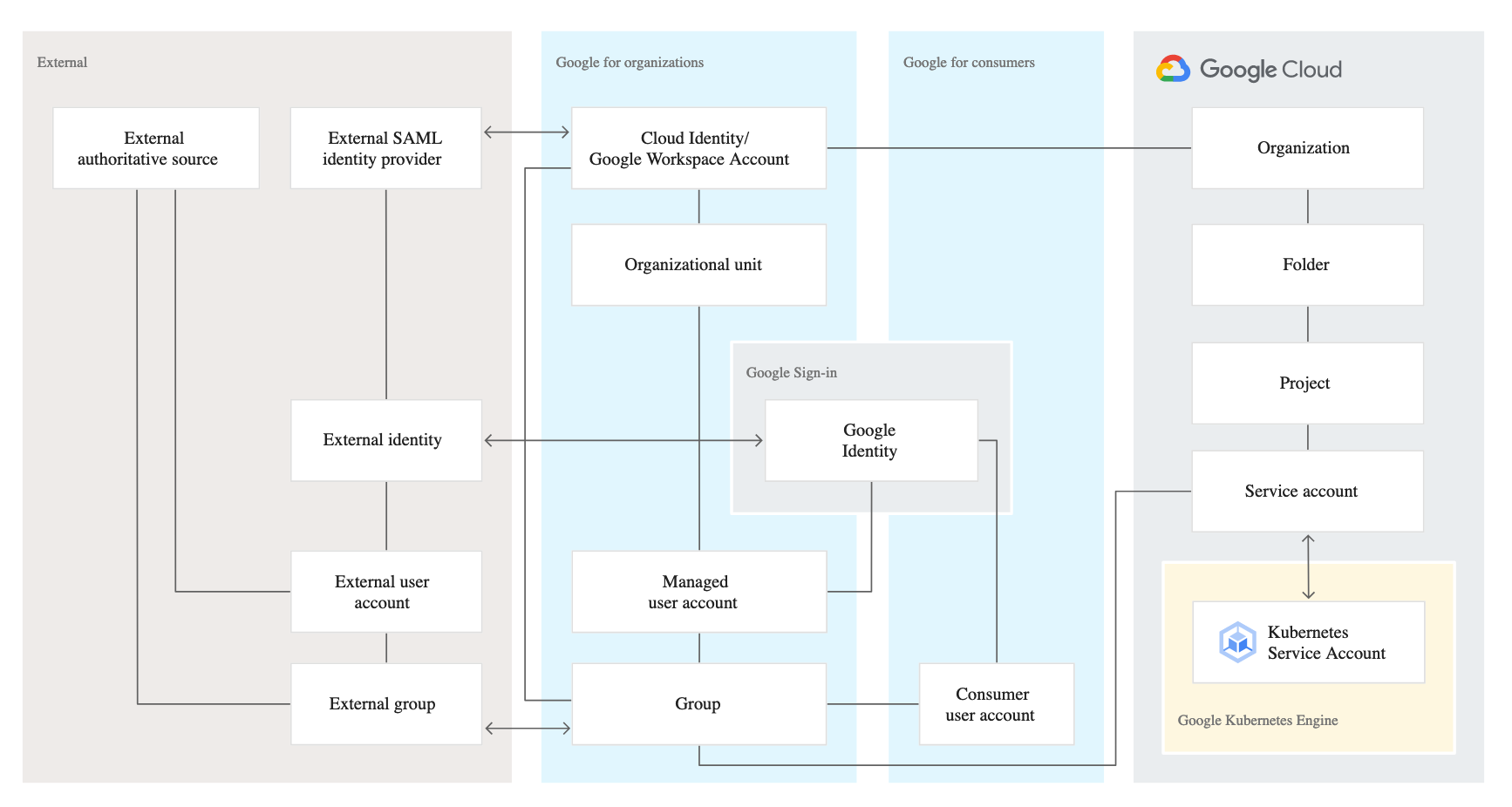
- Google identity is related to a number of other entities that are all relevant in the context of managing identities:
- Google for consumers contains the entities that are relevant for consumer-focused usage of Google services such as Gmail.
- Google for organizations contains entities managed by Cloud Identity or Google Workspace. These entities are the most relevant for managing corporate identities.
- Google Cloud contains entities that are specific to Google Cloud.
- External contains entities that are relevant if you integrate Google with an external Identity Provider (IdP).
- A Cloud Identity or Google Workspace account is the top-level container for users, groups, configuration, and data.
- A Cloud Identity or Google Workspace account is created when a company signs up for Cloud Identity or Google Workspace and corresponds to the notion of a tenant.
- Cloud Identity or Google Workspace account federation with an external IdP enables employees to use their existing identity and credentials to sign in to Google services.
- External IdP is the source of truth and the sole system for authentication and provides a SSO experience for the employees across applications.
- With single sign-on enabled, Cloud Identity or Google Workspace relays authentication decisions to the SAML IdP.
- In SAML terms, Cloud Identity or Google Workspace acts as a service provider that trusts the SAML IdP to verify a user’s identity on its behalf.
- Each Cloud Identity or Google Workspace account can refer to at most one external IdP.
Single Sign-on – SSO
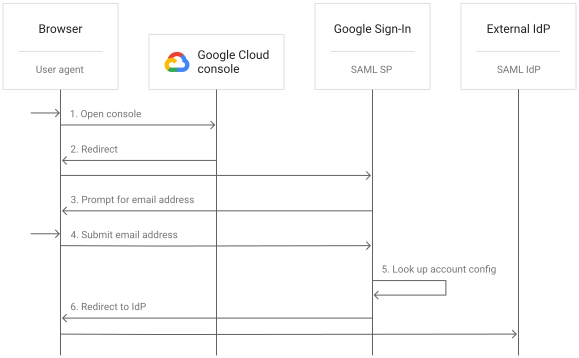
- Cloud Identity or Google Workspace account can be configured to use a single sign-on (SSO).
- With SSO enabled, users are redirected to an external identity provider (IdP) for authentication.
- Using SSO can provide several advantages:
- better experience for users because they can use their existing credentials to authenticate and don’t have to enter credentials as often.
- existing IdP remains the system of record for authenticating users.
- don’t need to synchronize passwords to Cloud Identity or Google Workspace.
- Cloud Identity and Google Workspace support Security Assertion Markup Language (SAML) 2.0 for single sign-on.
- SAML is an open standard for exchanging authentication and authorization data between a SAML IdP and SAML service providers.
- With SSO for Cloud Identity or Google Workspace, the external IdP is the SAML IdP and Google is the SAML service provider.
- Google implements SAML 2.0 HTTP Redirect binding.
Workforce Identity Federation
- Workforce Identity Federation is an alternative approach to Cloud Identity federation that allows external IdP users to access Google Cloud resources without provisioning identities in Cloud Identity.
- Uses an identity federation approach instead of directory synchronization — no need for GCDS or Directory Sync.
- Supports both OpenID Connect (OIDC) and SAML 2.0 protocols.
- Works with identity providers including Microsoft Entra ID (formerly Azure AD), Active Directory Federation Services (AD FS), Okta, and Ping Identity.
- Key features:
- Workforce Identity Pools – manage groups of workforce identities and control their access to Google Cloud resources.
- Attribute-based access control – uses attributes (claims/assertions) from the external IdP to determine the scope of access.
- Multiple providers per pool – supports multiple IdPs within a single workforce identity pool.
- Syncless authentication – no need to synchronize user accounts to Cloud Identity.
- Workforce Identity Federation is available as a no-cost feature.
- Supports access to Google Cloud Console, gCloud CLI, and Google Cloud APIs.
- Helps address regulatory and compliance requirements by leveraging existing identity investments.
- Use Workforce Identity Federation when:
- You want to avoid provisioning and managing user accounts in Cloud Identity.
- You need to onboard partners, contractors, or external workforce quickly.
- You want to use OIDC (not just SAML) for federation.
- Use Cloud Identity federation when:
- You need access to Google Workspace services (Gmail, Calendar, Drive).
- You need full Google managed account lifecycle management.
- You require endpoint management capabilities.
Federating Google Cloud with Active Directory
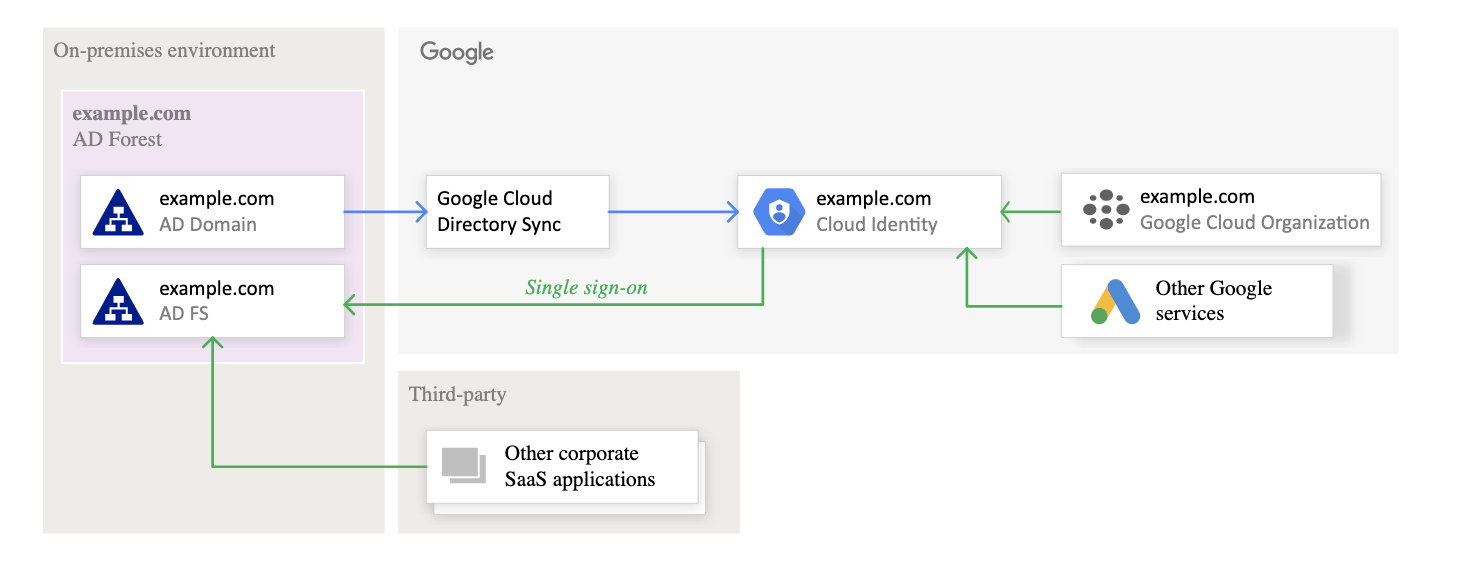
- Federating user identities between Google Cloud and existing identity management systems helps automate the maintenance of Google identities and tie their lifecycle to existing users in Active Directory.
- Federation can be supported using the following tools:
- Google Cloud Directory Sync (GCDS)
- is a free Google-provided tool that implements the synchronization process from Active Directory or LDAP server to Google Domain.
- communicates with Google Cloud over Secure Sockets Layer (SSL) and usually runs in the existing computing environment.
- requires on-premises software installation.
- supports all LDAP-compliant directories, including Active Directory and OpenLDAP.
- Directory Sync (Cloud-based) — Public Beta
- is a newer, cloud-based version of GCDS that requires no on-premises software installation.
- currently supports Microsoft Entra ID (formerly Azure AD) as the external directory source.
- synchronizes users and groups directly from the cloud — no hardware or software installation required.
- recommended for organizations looking for a simpler, fully managed sync solution.
- can be used alongside GCDS (GCDS for shared contacts, Directory Sync for users/groups).
- Microsoft Entra ID (formerly Azure AD) Provisioning
- uses SCIM-based automatic provisioning to sync users from Microsoft Entra ID to Cloud Identity or Google Workspace.
- provides single sign-on between Microsoft Entra ID and Cloud Identity.
- Active Directory Federation Services (AD FS)
- is provided by Microsoft as part of Windows Server.
- helps use Active Directory for federated authentication.
- runs within the existing computing environment.
- Google Cloud Directory Sync (GCDS)
POSIX Groups Deprecation
⚠️ Deprecation Notice: Cloud Identity POSIX groups were deprecated on September 26, 2024. As of that date, no new POSIX groups can be created. Existing POSIX groups were removed on or after September 26, 2025.
Migration: Use Linux groups with OS Login as the replacement for managing POSIX group information for VM access.
Context-Aware Access
- Context-Aware Access (available with Cloud Identity Premium) allows defining access policies based on attributes like user identity, device state, network location, and IP address.
- Integrates with Identity-Aware Proxy (IAP) to enforce the BeyondCorp zero-trust security model.
- Key capabilities:
- Define access policies for Google Cloud resources based on device posture and network context.
- Control session length and reauthentication methods for ongoing access.
- Enforce policies when accessing Google Cloud Console and gCloud CLI.
- Requires Chrome Enterprise Premium license for device attribute-based access levels.
- Works with Endpoint Verification to assess device security posture before granting access.
GCP Certification Exam Practice Questions
- Questions are collected from Internet and the answers are marked as per my knowledge and understanding (which might differ with yours).
- GCP services are updated everyday and both the answers and questions might be outdated soon, so research accordingly.
- GCP exam questions are not updated to keep up the pace with GCP updates, so even if the underlying feature has changed the question might not be updated
- Open to further feedback, discussion and correction.
- Your organization has user identities in Active Directory. Your organization wants to use Active Directory as its source of truth for identities. Your organization wants to have full control over the Google accounts used by employees for all Google services, including your Google Cloud Platform (GCP) organization. What should you do?
- Use Google Cloud Directory Sync (GCDS) to synchronize users into Cloud Identity.
- Use the Cloud Identity APIs and write a script to synchronize users to Cloud Identity.
- Export users from Active Directory as a CSV and import them to Cloud Identity via the Admin Console.
- Ask each employee to create a Google account using self signup. Require that each employee use their company email address and password.
- Your company has a single sign-on (SSO) identity provider that supports Security Assertion Markup Language (SAML) integration with service providers. Your company has users in Cloud Identity. You would like users to authenticate using your company’s SSO provider. What should you do?
- In Cloud Identity, set up SSO with Google as an identity provider to access custom SAML apps.
- In Cloud Identity, set up SSO with a third-party identity provider with Google as a service provider.
- Obtain OAuth 2.0 credentials, configure the user consent screen, and set up OAuth 2.0 for Mobile & Desktop Apps.
- Obtain OAuth 2.0 credentials, configure the user consent screen, and set up OAuth 2.0 for Web Server Applications.
- Your organization uses Microsoft Entra ID (formerly Azure AD) for identity management. You need to enable employees to access Google Cloud resources without provisioning individual accounts in Cloud Identity. You want to minimize administrative overhead. What should you do?
- Use GCDS to synchronize users from Active Directory to Cloud Identity and configure SSO.
- Create individual Cloud Identity accounts for each employee and use SAML SSO.
- Configure Workforce Identity Federation with a workforce identity pool using your Microsoft Entra ID as the OIDC provider.
- Export users from Microsoft Entra ID and import them to Cloud Identity via CSV.
- Your company wants to synchronize user and group information from Microsoft Entra ID to Cloud Identity without installing any on-premises software. Which solution should you use?
- Google Cloud Directory Sync (GCDS)
- Active Directory Federation Services (AD FS)
- Directory Sync (cloud-based)
- Workforce Identity Federation
- You need to grant temporary contractors access to specific Google Cloud projects. The contractors already have accounts in your organization’s Okta identity provider. You want to avoid creating Cloud Identity accounts for them. What is the recommended approach?
- Create guest accounts in Cloud Identity for each contractor.
- Share service account keys with the contractors.
- Set up Workforce Identity Federation with Okta as the identity provider and use IAM to grant access to specific projects.
- Create Google consumer accounts for each contractor and grant them access.