AWS High Availability & Fault Tolerance Architecture
📅 Content Update – June 2025
This post has been updated to reflect modern AWS HA/FT services and best practices including AWS Resilience Hub, Application Recovery Controller (ARC), Fault Injection Service (FIS), Multi-AZ DB Clusters, DynamoDB Global Tables with Multi-Region Strong Consistency (MRSC), and current ELB types (ALB/NLB/GWLB).
- Amazon Web Services provides services and infrastructure to build reliable, fault-tolerant, and highly available systems in the cloud.
- Fault-tolerance defines the ability for a system to remain in operation even if some of the components used to build the system fail.
- Most of the higher-level services, such as S3, DynamoDB, SQS, and ELB, have been built with fault tolerance and high availability in mind.
- Services that provide basic infrastructure, such as EC2 and EBS, provide specific features, such as availability zones, elastic IP addresses, and snapshots, that a fault-tolerant and highly available system must take advantage of and use correctly.
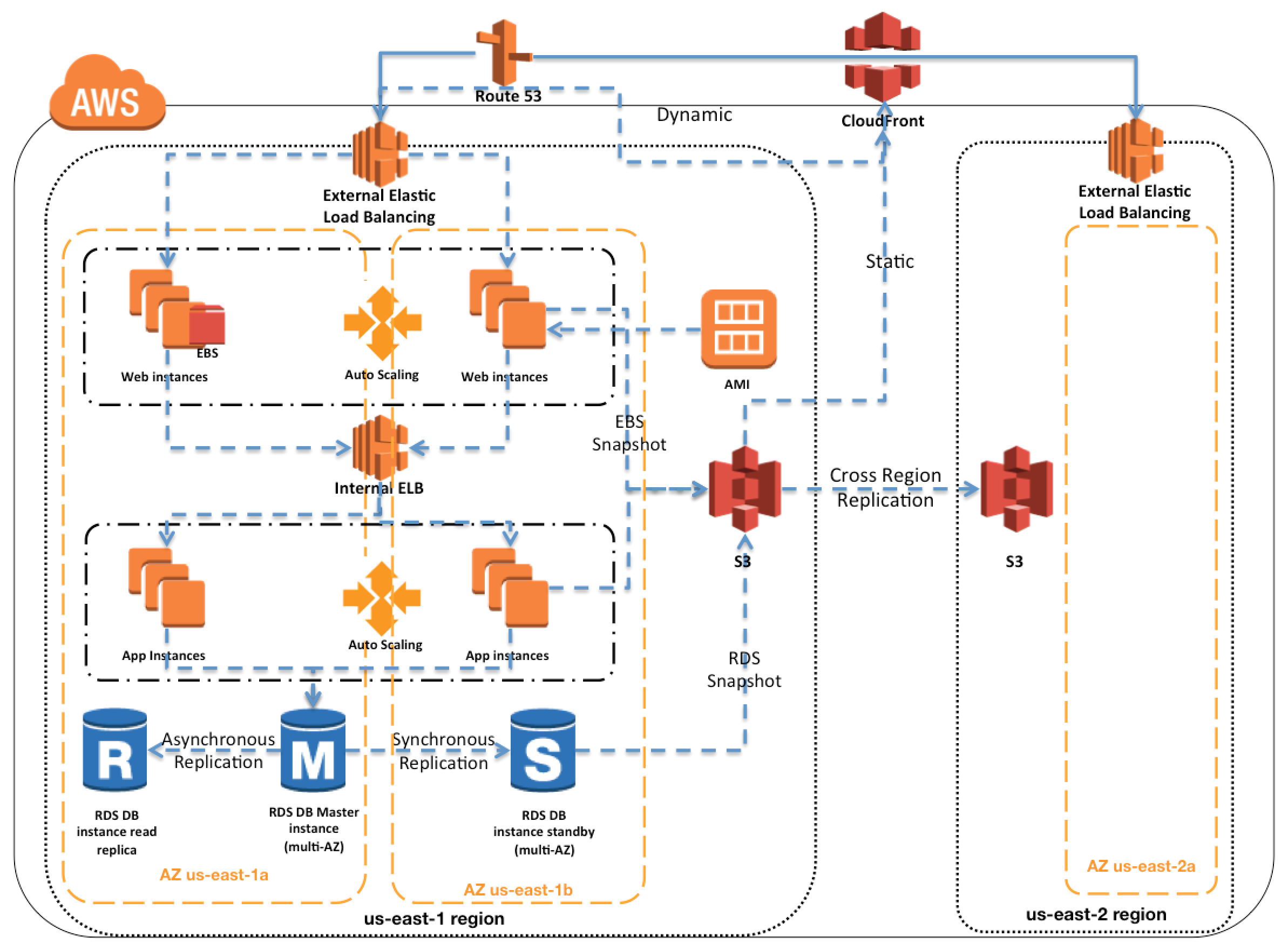
NOTE: Topic mainly for Professional Exam Only
Regions & Availability Zones
- Amazon Web Services are available in geographic Regions and with multiple Availability Zones (AZs) within a region, which provide easy access to redundant deployment locations.
- AZs are distinct geographical locations that are engineered to be insulated from failures in other AZs.
- Regions and AZs help achieve greater fault tolerance by distributing the application geographically and help build multi-site solutions.
- AZs provide inexpensive, low latency network connectivity to other Availability Zones in the same Region. All traffic between AZs is encrypted.
- By placing EC2 instances in multiple AZs, an application can be protected from failure at a single data center.
- It is important to run independent application stacks in more than one AZ, either in the same region or in another region, so that if one zone fails, the application in the other zone can continue to run.
- AWS recommends deploying production workloads across at least 3 AZs for optimal fault isolation and static stability.
Amazon Machine Image – AMIs
- EC2 is a web service within Amazon Web Services that provides computing resources.
- Amazon Machine Image (AMI) provides a Template that can be used to define the service instances.
- Template basically contains a software configuration (i.e., OS, application server, and applications) and is applied to an instance type.
- AMI can either contain all the softwares, applications and the code bundled or can be configured to have a bootstrap script (user data) to install the same on startup.
- A single AMI can be used to create server resources of different instance types and start creating new instances or replacing failed instances.
- EC2 Image Builder can automate the creation, testing, and distribution of AMIs across regions, enabling faster recovery through pre-built golden images.
Auto Scaling
- Auto Scaling helps to automatically scale EC2 capacity up or down based on defined rules.
- Auto Scaling also enables addition of more instances in response to an increasing load; and when those instances are no longer needed, they will be automatically terminated.
- Auto Scaling enables terminating server instances at will, knowing that replacement instances will be automatically launched.
- Auto Scaling can work across multiple AZs within an AWS Region.
- Predictive Scaling uses machine learning to proactively scale out ASGs ahead of anticipated demand spikes, improving availability and reducing the need for over-provisioning.
- Target Tracking Scaling policies provide a simplified way to configure dynamic scaling based on a specific metric target (e.g., average CPU utilization at 50%).
- Auto Scaling groups support warm pools to pre-initialize instances for faster scaling, reducing cold-start times during demand surges.
- Amazon Application Recovery Controller (ARC) supports zonal autoshift with EC2 Auto Scaling, automatically shifting traffic away from impaired AZs.
Elastic Load Balancing – ELB
- Elastic Load Balancing is an effective way to increase the availability of a system and distributes incoming traffic to applications across several EC2 instances.
- ELB supports health checks on hosts, distribution of traffic to EC2 instances across multiple availability zones, and dynamic addition and removal of EC2 hosts from the load-balancing rotation.
- Elastic Load Balancing detects unhealthy instances within its pool and automatically reroutes traffic to healthy instances, until the unhealthy instances have been restored seamlessly using Auto Scaling.
- Auto Scaling and Elastic Load Balancing are an ideal combination – while ELB gives a single DNS name for addressing, Auto Scaling ensures there is always the right number of healthy EC2 instances to accept requests.
- ELB can be used to balance across instances in multiple AZs of a region.
ELB Types
- Application Load Balancer (ALB) – Layer 7 (HTTP/HTTPS); supports path-based routing, host-based routing, mutual TLS authentication (2023), one-click AWS WAF integration, URL and host header rewrites (2025), Automatic Target Weights, and LCU Capacity Reservation for handling sharp traffic spikes.
- Network Load Balancer (NLB) – Layer 4 (TCP/UDP/TLS); ultra-low latency, static IPs per AZ, weighted target groups for blue/green deployments, and subnet removal/addition capability (2025).
- Gateway Load Balancer (GWLB) – Layer 3 gateway + Layer 4 load balancer; used to deploy, scale, and manage third-party virtual network appliances (firewalls, IDS/IPS).
- Classic Load Balancer (CLB) – Previous generation; deprecated for new workloads. AWS recommends migrating to ALB or NLB. CLBs in EC2-Classic were retired in August 2022.
Elastic IPs – EIPs
- Elastic IP addresses are public static IP addresses that can be mapped programmatically between instances within a region.
- EIPs are associated with the AWS account and not with a specific instance or lifetime of an instance.
- Elastic IP addresses can be used for instances and services that require consistent endpoints, such as master databases, central file servers, and EC2-hosted load balancers.
- Elastic IP addresses can be used to work around host or availability zone failures by quickly remapping the address to another running instance or a replacement instance that was just started.
Reserved Instances & Savings Plans
- Reserved Instances help reserve and guarantee computing capacity is available at a lower cost always.
- Savings Plans provide a more flexible pricing model with up to 72% savings in exchange for committing to a consistent amount of compute usage (measured in $/hour) over a 1 or 3-year term.
- On-Demand Capacity Reservations (ODCRs) ensure EC2 capacity is available in a specific AZ when needed for HA without requiring a term commitment.
Elastic Block Store – EBS
- Elastic Block Store (EBS) offers persistent off-instance storage volumes that persist independently from the life of an instance and are about an order of magnitude more durable than on-instance storage.
- EBS volumes store data redundantly and are automatically replicated within a single availability zone.
- EBS helps in failover scenarios where if an EC2 instance fails and needs to be replaced, the EBS volume can be attached to the new EC2 instance.
- Valuable data should never be stored only on instance (ephemeral) storage without proper backups, replication, or the ability to re-create the data.
- EBS Multi-Attach (for io1/io2 volumes) allows a single volume to be attached to up to 16 Nitro-based instances within the same AZ for shared storage HA scenarios.
EBS Snapshots
- EBS volumes are highly reliable, but to further mitigate the possibility of a failure and increase durability, point-in-time Snapshots can be created to store data on volumes in S3, which is then replicated to multiple AZs.
- Snapshots can be used to create new EBS volumes, which are an exact replica of the original volume at the time the snapshot was taken.
- Snapshots provide an effective way to deal with disk failures or other host-level issues, as well as with problems affecting an AZ.
- Snapshots are incremental and back up only changes since the previous snapshot, so it is advisable to hold on to recent snapshots.
- Snapshots are tied to the region, while EBS volumes are tied to a single AZ.
- EBS Snapshots Archive provides up to 75% lower storage costs for snapshots stored 90+ days and rarely accessed.
- Fast Snapshot Restore (FSR) eliminates the need for initializing volumes from snapshots, enabling full-performance volumes immediately upon creation for faster failover.
Relational Database Service – RDS
- RDS makes it easy to run relational databases in the cloud.
- RDS Multi-AZ instance deployments provision a synchronous standby replica in a different AZ, providing high availability and automatic failover protection.
- In case of a failover scenario, the standby is promoted to be the primary seamlessly and will handle the database operations.
- RDS Multi-AZ DB Cluster deployments (for MySQL and PostgreSQL) provide a primary instance and two readable standby instances across 3 AZs. This offers improved write latency, faster failover (typically under 35 seconds), and the standby instances can serve read traffic.
- Automated backups, enabled by default, provide point-in-time recovery for the database instance.
- RDS will back up your database and transaction logs and store both for a user-specified retention period.
- In addition to the automated backups, manual RDS backups can also be performed which are retained until explicitly deleted.
- Backups help recover from higher-level faults such as unintentional data modification, either by operator error or by bugs in the application.
- RDS Read Replicas provide read-only replicas of the database and the ability to scale out beyond the capacity of a single database deployment for read-heavy database workloads.
- RDS Read Replicas is a scalability and not a High Availability solution. However, cross-region Read Replicas can be manually promoted for disaster recovery.
- Amazon RDS now supports ENA Express for Multi-AZ replication (2026), using Scalable Reliable Datagram (SRD) to improve replication performance by distributing traffic across multiple network paths.
Simple Storage Service – S3
- S3 provides highly durable (99.999999999% / 11 9s), fault-tolerant and redundant object store.
- S3 stores objects redundantly on multiple devices across multiple facilities in an S3 Region.
- S3 is a great storage solution for somewhat static or slow-changing objects, such as images, videos, and other static media.
- S3 also supports edge caching and streaming of these assets by interacting with the Amazon CloudFront service.
- S3 Cross-Region Replication (CRR) automatically replicates objects to a bucket in another region, enabling disaster recovery and low-latency access for globally distributed users.
- S3 Express One Zone delivers up to 10x faster performance with single-digit millisecond latency for frequently accessed data, but note it stores data in a single AZ (not suitable as the sole copy for fault tolerance).
Simple Queue Service – SQS
- Simple Queue Service (SQS) is a highly reliable distributed messaging system that can serve as the backbone of a fault-tolerant application.
- SQS is engineered to provide “at least once” delivery of all messages in standard queues. FIFO queues provide exactly-once processing and strict message ordering.
- Messages sent to a queue are retained for up to 4 days (by default, can be extended up to 14 days) or until they are read and deleted by the application.
- Messages can be polled by multiple workers and processed, while SQS takes care that a request is processed by only one worker at a time using a configurable time interval called visibility timeout.
- If the number of messages in a queue starts to grow or if the average time to process a message becomes too high, workers can be scaled upwards by simply adding additional EC2 instances.
- Dead-letter queues (DLQs) capture messages that cannot be processed successfully. DLQ redrive allows moving messages back to source queues for reprocessing.
- FIFO queues support up to 70,000 messages per second with high throughput mode and up to 120K in-flight messages (increased from 20K in November 2024).
Route 53
- Amazon Route 53 is a highly available and scalable DNS web service.
- Queries for the domain are automatically routed to the nearest DNS server and thus are answered with the best possible performance.
- Route 53 resolves requests for your domain name (for example, www.example.com) to your Elastic Load Balancer, as well as your zone apex record (example.com).
- Route 53 supports multiple routing policies for HA: Failover (active-passive), Latency-based, Weighted, Geolocation, Geoproximity (expanded to public/private hosted zones in 2024), and Multivalue Answer.
- Route 53 health checks can monitor endpoint health and trigger DNS failover automatically.
- Route 53 Accelerated Recovery (2026) ensures customers can continue making DNS changes even during regional AWS outages, providing greater predictability for mission-critical applications.
CloudFront
- CloudFront can be used to deliver website content, including dynamic, static and streaming content using a global network of edge locations.
- Requests for your content are automatically routed to the nearest edge location, so content is delivered with the best possible performance.
- CloudFront is optimized to work with other Amazon Web Services, like S3 and EC2.
- CloudFront also works seamlessly with any non-AWS origin server, which stores the original, definitive versions of your files.
- CloudFront Functions run lightweight JavaScript at edge locations for request/response customization. Lambda@Edge provides full compute capabilities at Regional Edge Caches.
- VPC Origins allow CloudFront to fetch content directly from private resources within a VPC without exposing them to the public internet.
- Origin Shield acts as an additional caching layer to reduce the load on origins and improve cache hit ratios for multi-region architectures.
DynamoDB Global Tables
- DynamoDB Global Tables provide a fully managed, multi-Region, multi-active database solution for globally distributed applications.
- Global Tables automatically replicate data across your choice of AWS Regions. Every replica table in every Region can accept both reads and writes.
- Changes made to an item in one Region are typically replicated to all other replica Regions within a second.
- Multi-Region Strong Consistency (MRSC), generally available since June 2025, provides zero RPO (Recovery Point Objective) by enabling strongly consistent reads from any Region. This is the highest level of application resilience for DynamoDB.
- Global Tables now support cross-account replication (2026), enabling multi-account multi-region architectures.
- Global Tables replace the previous cross-region replication approach (DynamoDB Streams-based) with a fully managed, zero-administration solution.
AWS Resilience Hub
- AWS Resilience Hub is a central location to define, track, and manage the resilience of applications.
- It enables you to define resilience goals (RTO/RPO), assess your resilience posture against those goals, and implement recommendations based on the AWS Well-Architected Framework.
- Resilience Hub performs automated resilience assessments and identifies gaps in your architecture, such as missing Multi-AZ deployments or lack of backup strategies.
- Integrates with AWS Fault Injection Service (FIS) to run chaos experiments directly from the Resilience Hub console.
- The next generation of Resilience Hub (GA May 2026) uses generative AI to provide a structured resilience journey for SRE and development teams.
AWS Fault Injection Service (FIS)
- AWS FIS is a managed chaos engineering service that enables you to perform controlled fault injection experiments on your AWS workloads.
- FIS helps simulate real-world failures (AZ disruptions, instance failures, network degradation, API throttling) to validate fault tolerance of your architecture.
- Supports actions targeting EC2, ECS, EKS, RDS, Lambda functions (native integration since October 2024), and more.
- Amazon.com ran 733 AWS FIS experiments to prepare for Prime Day 2024.
- Experiments can be generated using natural language through Amazon Bedrock integration (2025).
Amazon Application Recovery Controller (ARC)
- ARC helps manage and coordinate recovery for applications across AWS Regions and Availability Zones.
- Zonal Shift allows you to quickly shift traffic for a resource (ALB, NLB, EKS, Auto Scaling group) away from an impaired AZ to healthy AZs.
- Zonal Autoshift enables AWS to automatically shift traffic away from an AZ when internal telemetry detects a potential impairment — without manual intervention.
- Routing Controls provide manual override capabilities for cross-region failover of applications.
- Zonal shift and zonal autoshift are available at no additional cost.
- Supported resources include ALB, NLB, EC2 Auto Scaling groups, EKS clusters, and Karpenter (2026).
AWS Certification Exam Practice Questions
- AWS services are updated everyday and both the answers and questions might be outdated soon, so research accordingly.
- AWS exam questions are not updated to keep up the pace with AWS updates, so even if the underlying feature has changed the question might not be updated.
- Open to further feedback, discussion and correction.
- You are moving an existing traditional system to AWS, and during the migration discover that there is a master server which is a single point of failure. Having examined the implementation of the master server you realize there is not enough time during migration to re-engineer it to be highly available, though you do discover that it stores its state in a local MySQL database. In order to minimize down-time you select RDS to replace the local database and configure master to use it, what steps would best allow you to create a self-healing architecture[PROFESSIONAL]
- Migrate the local database into multi-AZ RDS database. Place master node into a multi-AZ auto-scaling group with a minimum of one and maximum of one with health checks.
- Replicate the local database into a RDS read replica. Place master node into a Cross-Zone ELB with a minimum of one and maximum of one with health checks. (Read Replica does not provide HA and write capability and ELB does not have feature for Min and Max 1 and Cross Zone allows just the equal distribution of load across instances)
- Migrate the local database into multi-AZ RDS database. Place master node into a Cross-Zone ELB with a minimum of one and maximum of one with health checks. (ELB does not have feature for Min and Max 1 and Cross Zone allows just the equal distribution of load across instances)
- Replicate the local database into a RDS read replica. Place master node into a multi-AZ auto-scaling group with a minimum of one and maximum of one with health checks. (Read Replica does not provide HA and write capability)
- You are designing Internet connectivity for your VPC. The Web servers must be available on the Internet. The application must have a highly available architecture. Which alternatives should you consider? (Choose 2 answers)
- Configure a NAT instance in your VPC. Create a default route via the NAT instance and associate it with all subnets. Configure a DNS A record that points to the NAT instance public IP address (NAT is for internet connectivity for instances in private subnet)
- Configure a CloudFront distribution and configure the origin to point to the private IP addresses of your Web servers. Configure a Route53 CNAME record to your CloudFront distribution.
- Place all your web servers behind ELB. Configure a Route53 CNAME to point to the ELB DNS name.
- Assign EIPs to all web servers. Configure a Route53 record set with all EIPs. With health checks and DNS failover.
- When deploying a highly available 2-tier web application on AWS, which combination of AWS services meets the requirements? 1. AWS Direct Connect 2. Amazon Route 53 3. AWS Storage Gateway 4. Elastic Load Balancing 4. Amazon EC2 5. Auto scaling 6. Amazon VPC 7. AWS Cloud Trail [PROFESSIONAL]
- 2,4,5 and 6
- 3,4,5 and 8
- 1 through 8
- 1,3,5 and 7
- 1,2,5 and 6
- Company A has hired you to assist with the migration of an interactive website that allows registered users to rate local restaurants. Updates to the ratings are displayed on the home page, and ratings are updated in real time. Although the website is not very popular today, the company anticipates that It will grow rapidly over the next few weeks. They want the site to be highly available. The current architecture consists of a single Windows Server 2008 R2 web server and a MySQL database running on Linux. Both reside inside an on-premises hypervisor. What would be the most efficient way to transfer the application to AWS, ensuring performance and high-availability? [PROFESSIONAL]
- Export web files to an Amazon S3 bucket in us-west-1. Run the website directly out of Amazon S3. Launch a multi-AZ MySQL Amazon RDS instance in us-west-1a. Import the data into Amazon RDS from the latest MySQL backup. Use Route 53 and create an alias record pointing to the elastic load balancer. (Its an Interactive website, although it can be implemented using Javascript SDK, its a migration and the application would need changes. Also no use of ELB if hosted on S3)
- Launch two Windows Server 2008 R2 instances in us-west-1b and two in us-west-1a. Copy the web files from on premises web server to each Amazon EC2 web server, using Amazon S3 as the repository. Launch a multi-AZ MySQL Amazon RDS instance in us-west-2a. Import the data into Amazon RDS from the latest MySQL backup. Create an elastic load balancer to front your web servers. Use Route 53 and create an alias record pointing to the elastic load balancer. (Although RDS instance is in a different region which will impact performance, this is the only option that works.)
- Use AWS VM Import/Export to create an Amazon Elastic Compute Cloud (EC2) Amazon Machine Image (AMI) of the web server. Configure Auto Scaling to launch two web servers in us-west-1a and two in us-west-1b. Launch a Multi-AZ MySQL Amazon Relational Database Service (RDS) instance in us-west-1b. Import the data into Amazon RDS from the latest MySQL backup. Use Amazon Route 53 to create a hosted zone and point an A record to the elastic load balancer. (does not create a load balancer)
- Use AWS VM Import/Export to create an Amazon EC2 AMI of the web server. Configure auto-scaling to launch two web servers in us-west-1a and two in us-west-1b. Launch a multi-AZ MySQL Amazon RDS instance in us-west-1a. Import the data into Amazon RDS from the latest MySQL backup. Create an elastic load balancer to front your web servers. Use Amazon Route 53 and create an A record pointing to the elastic load balancer. (Need to create an aliased record without which the Route 53 pointing to ELB would not work)
- Your company runs a customer facing event registration site. This site is built with a 3-tier architecture with web and application tier servers and a MySQL database. The application requires 6 web tier servers and 6 application tier servers for normal operation, but can run on a minimum of 65% server capacity and a single MySQL database. When deploying this application in a region with three availability zones (AZs) which architecture provides high availability? [PROFESSIONAL]
- A web tier deployed across 2 AZs with 3 EC2 (Elastic Compute Cloud) instances in each AZ inside an Auto Scaling Group behind an ELB (elastic load balancer), and an application tier deployed across 2 AZs with 3 EC2 instances in each AZ inside an Auto Scaling Group behind an ELB. and one RDS (Relational Database Service) instance deployed with read replicas in the other AZ.
- A web tier deployed across 3 AZs with 2 EC2 (Elastic Compute Cloud) instances in each AZ inside an Auto Scaling Group behind an ELB (elastic load balancer) and an application tier deployed across 3 AZs with 2 EC2 instances in each AZ inside an Auto Scaling Group behind an ELB and one RDS (Relational Database Service) Instance deployed with read replicas in the two other AZs.
- A web tier deployed across 2 AZs with 3 EC2 (Elastic Compute Cloud) instances in each AZ inside an Auto Scaling Group behind an ELB (elastic load balancer) and an application tier deployed across 2 AZs with 3 EC2 instances m each AZ inside an Auto Scaling Group behind an ELB and a Multi-AZ RDS (Relational Database Service) deployment.
- A web tier deployed across 3 AZs with 2 EC2 (Elastic Compute Cloud) instances in each AZ Inside an Auto Scaling Group behind an ELB (elastic load balancer). And an application tier deployed across 3 AZs with 2 EC2 instances in each AZ inside an Auto Scaling Group behind an ELB. And a Multi-AZ RDS (Relational Database services) deployment.
- For a 3-tier, customer facing, inclement weather site utilizing a MySQL database running in a Region which has two AZs which architecture provides fault tolerance within the region for the application that minimally requires 6 web tier servers and 6 application tier servers running in the web and application tiers and one MySQL database? [PROFESSIONAL]
- A web tier deployed across 2 AZs with 6 EC2 (Elastic Compute Cloud) instances in each AZ inside an Auto Scaling Group behind an ELB (elastic load balancer), and an application tier deployed across 2 AZs with 6 EC2 instances in each AZ inside an Auto Scaling Group behind an ELB. and a Multi-AZ RDS (Relational Database Service) deployment. (As it needs Fault Tolerance with minimal 6 servers always available)
- A web tier deployed across 2 AZs with 3 EC2 (Elastic Compute Cloud) instances in each A2 inside an Auto Scaling Group behind an ELB (elastic load balancer) and an application tier deployed across 2 AZs with 3 EC2 instances in each AZ inside an Auto Scaling Group behind an ELB and a Multi-AZ RDS (Relational Database Service) deployment.
- A web tier deployed across 2 AZs with 3 EC2 (Elastic Compute Cloud) instances in each AZ inside an Auto Scaling Group behind an ELB (elastic load balancer) and an application tier deployed across 2 AZs with 6 EC2 instances in each AZ inside an Auto Scaling Group behind an ELB and one RDS (Relational Database Service) Instance deployed with read replicas in the other AZs.
- A web tier deployed across 1 AZs with 6 EC2 (Elastic Compute Cloud) instances in each AZ Inside an Auto Scaling Group behind an ELB (elastic load balancer). And an application tier deployed in the same AZs with 6 EC2 instances inside an Auto scaling group behind an ELB and a Multi-AZ RDS (Relational Database services) deployment, with 6 stopped web tier EC2 instances and 6 stopped application tier EC2 instances all in the other AZ ready to be started if any of the running instances in the first AZ fails.
- You are designing a system which needs, at minimum, 8 m4.large instances operating to service traffic. When designing a system for high availability in the us-east-1 region, which has 6 Availability Zones, you company needs to be able to handle death of a full availability zone. How should you distribute the servers, to save as much cost as possible, assuming all of the EC2 nodes are properly linked to an ELB? Your VPC account can utilize us-east-1’s AZ’s a through f, inclusive.
- 3 servers in each of AZ’s a through d, inclusive.
- 8 servers in each of AZ’s a and b.
- 2 servers in each of AZ’s a through e, inclusive. (You need to design for N+1 redundancy on Availability Zones. ZONE_COUNT = (REQUIRED_INSTANCES / INSTANCE_COUNT_PER_ZONE) + 1. To minimize cost, spread the instances across as many possible zones as you can. By using a though e, you are allocating 5 zones. Using 2 instances, you have 10 total instances. If a single zone fails, you have 4 zones left, with 2 instances each, for a total of 8 instances. By spreading out as much as possible, you have increased cost by only 25% and significantly de-risked an availability zone failure. Refer link)
- 4 servers in each of AZ’s a through c, inclusive.
- You need your API backed by DynamoDB to stay online during a total regional AWS failure. You can tolerate a couple minutes of lag or slowness during a large failure event, but the system should recover with normal operation after those few minutes. What is a good approach? [PROFESSIONAL]
- Set up DynamoDB Global Tables in a multi-active configuration across two regions. Create an Auto Scaling Group behind an ELB in each of the two regions. Add a Route53 Latency DNS Record with DNS Failover, using the ELBs in the two regions as the resource records. (Use DynamoDB Global Tables (multi-active replication) with two ELBs and ASGs with Route53 Failover and Latency DNS. Note: DynamoDB Global Tables now also support Multi-Region Strong Consistency (MRSC) for zero RPO since June 2025.)
- Set up a DynamoDB Multi-Region table. Create an Auto Scaling Group behind an ELB in each of the two regions DynamoDB is running in. Add a Route53 Latency DNS Record with DNS Failover, using the ELBs in the two regions as the resource records. (This is now essentially correct with DynamoDB Global Tables being the multi-region solution. However at the time of the question, this option was considered incorrect.)
- Set up a DynamoDB Multi-Region table. Create a cross-region ELB pointing to a cross-region Auto Scaling Group, and direct a Route53 Latency DNS Record with DNS Failover to the cross-region ELB. (No such thing as Cross Region ELB or cross-region ASG)
- Set up DynamoDB cross-region replication in a master-standby configuration, with a single standby in another region. Create a cross-region ELB pointing to a cross-region Auto Scaling Group, and direct a Route53 Latency DNS Record with DNS Failover to the cross-region ELB. (No such thing as cross-region ELB or cross-region ASG)
- You are putting together a WordPress site for a local charity and you are using a combination of Route53, Elastic Load Balancers, EC2 & RDS. You launch your EC2 instance, download WordPress and setup the configuration files connection string so that it can communicate to RDS. When you browse to your URL however, nothing happens. Which of the following could NOT be the cause of this.
- You have forgotten to open port 80/443 on your security group in which the EC2 instance is placed.
- Your elastic load balancer has a health check, which is checking a webpage that does not exist; therefore your EC2 instance is not in service.
- You have not configured an ALIAS for your A record to point to your elastic load balancer
- You have locked port 22 down to your specific IP address therefore users cannot access your site using HTTP/HTTPS
- A development team that is currently doing a nightly six-hour build which is lengthening over time on-premises with a large and mostly under utilized server would like to transition to a continuous integration model of development on AWS with multiple builds triggered within the same day. However, they are concerned about cost, security and how to integrate with existing on-premises applications such as their LDAP and email servers, which cannot move off-premises. The development environment needs a source code repository; a project management system with a MySQL database resources for performing the builds and a storage location for QA to pick up builds from. What AWS services combination would you recommend to meet the development team’s requirements? [PROFESSIONAL]
- A Bastion host Amazon EC2 instance running a VPN server for access from on-premises, Amazon EC2 for the source code repository with attached Amazon EBS volumes, Amazon EC2 and Amazon RDS MySQL for the project management system, EIP for the source code repository and project management system, Amazon SQS for a build queue, An Amazon Auto Scaling group of Amazon EC2 instances for performing builds and Amazon Simple Email Service for sending the build output. (Bastion is not for VPN connectivity also SES should not be used)
- An AWS Storage Gateway for connecting on-premises software applications with cloud-based storage securely, Amazon EC2 for the resource code repository with attached Amazon EBS volumes, Amazon EC2 and Amazon RDS MySQL for the project management system, EIPs for the source code repository and project management system, Amazon Simple Notification Service for a notification initiated build, An Auto Scaling group of Amazon EC2 instances for performing builds and Amazon S3 for the build output. (Storage Gateway does not provide secure connectivity, still needs VPN. SNS alone cannot handle builds)
- An AWS Storage Gateway for connecting on-premises software applications with cloud-based storage securely, Amazon EC2 for the resource code repository with attached Amazon EBS volumes, Amazon EC2 and Amazon RDS MySQL for the project management system, EIPs for the source code repository and project management system, Amazon SQS for a build queue, An Amazon Elastic Map Reduce (EMR) cluster of Amazon EC2 instances for performing builds and Amazon CloudFront for the build output. (Storage Gateway does not provide secure connectivity, still needs VPN. EMR is not ideal for performing builds as it needs normal EC2 instances)
- A VPC with a VPN Gateway back to their on-premises servers, Amazon EC2 for the source-code repository with attached Amazon EBS volumes, Amazon EC2 and Amazon RDS MySQL for the project management system, EIPs for the source code repository and project management system, SQS for a build queue, An Auto Scaling group of EC2 instances for performing builds and S3 for the build output. (VPN gateway is required for secure connectivity. SQS for build queue and EC2 for builds)
- Which of the following AWS services and features are essential for building a modern, highly available fault-tolerant architecture? (Choose 3) [NEW – 2025]
- Amazon Application Recovery Controller (ARC) with zonal autoshift
- AWS CloudTrail
- AWS Fault Injection Service (FIS) for resilience testing
- RDS Multi-AZ DB Cluster with readable standbys
- Amazon Inspector
- A company needs its DynamoDB-backed application to survive a complete regional failure with zero data loss (zero RPO). Which approach best achieves this requirement? [NEW – 2025]
- Use DynamoDB Streams to replicate data to another region manually.
- Use DynamoDB point-in-time recovery (PITR) with cross-region backups.
- Use DynamoDB Global Tables with Multi-Region Strong Consistency (MRSC). (MRSC, GA since June 2025, enables zero RPO with strongly consistent reads from any region.)
- Use DynamoDB On-Demand backup and restore to a secondary region.
- An application runs behind an Application Load Balancer across 3 AZs. During an AZ impairment detected by AWS, what feature can automatically redirect traffic away from the affected AZ without manual intervention? [NEW – 2025]
- Route 53 health check failover
- ALB Cross-Zone load balancing
- Amazon Application Recovery Controller (ARC) zonal autoshift (ARC zonal autoshift automatically shifts traffic away from an impaired AZ when AWS internal telemetry detects issues, without requiring manual intervention.)
- Auto Scaling AZ rebalancing