Google Cloud Data Encryption
- Encryption is a process that takes legible data as input (often called plaintext) and transforms it into an output (often called ciphertext) that reveals little or no information about the plaintext
- Encryption can be used to protect data in three states:
- Encryption at Rest protects the data from a system compromise or data exfiltration by encrypting data while stored.
- Encryption in Transit: protects the data if communications are intercepted while data moves between the site and the cloud provider or between two services.
- Encryption in Use: protects the data when it is being used by servers to run computations, using hardware-based Trusted Execution Environments (TEEs) such as Confidential Computing.
Encryption at Rest
- Google uses several layers of encryption to protect customer data at rest.
- All customer content stored at rest is encrypted, without any action required from the customer, using one or more encryption mechanisms.
- All data stored in Google Cloud is encrypted at the storage level using AES-256
- Google encrypts data prior to it being written to disk.
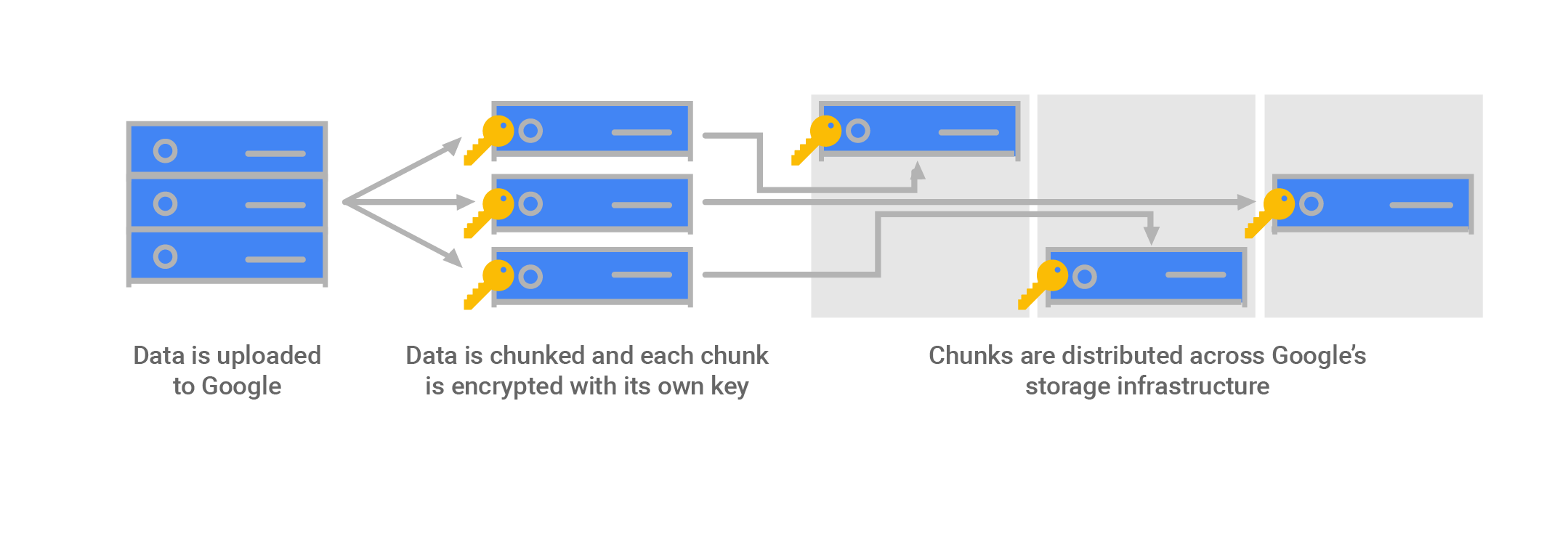
Google Cloud Default Encryption
- Data for storage is split into chunks
- Each chunk is encrypted with a unique Data Encryption Key (DEK)
- Two chunks will not have the same encryption key, even if they are part of the same Cloud Storage object, owned by the same customer, or stored on the same machine
- If a chunk of data is updated, it is encrypted with a new key, rather than by reusing the existing key
- Data encryption keys are stored with the data because of the high volume of keys at Google, and the need for low latency and high availability
- Backups are encrypted using a separate DEK
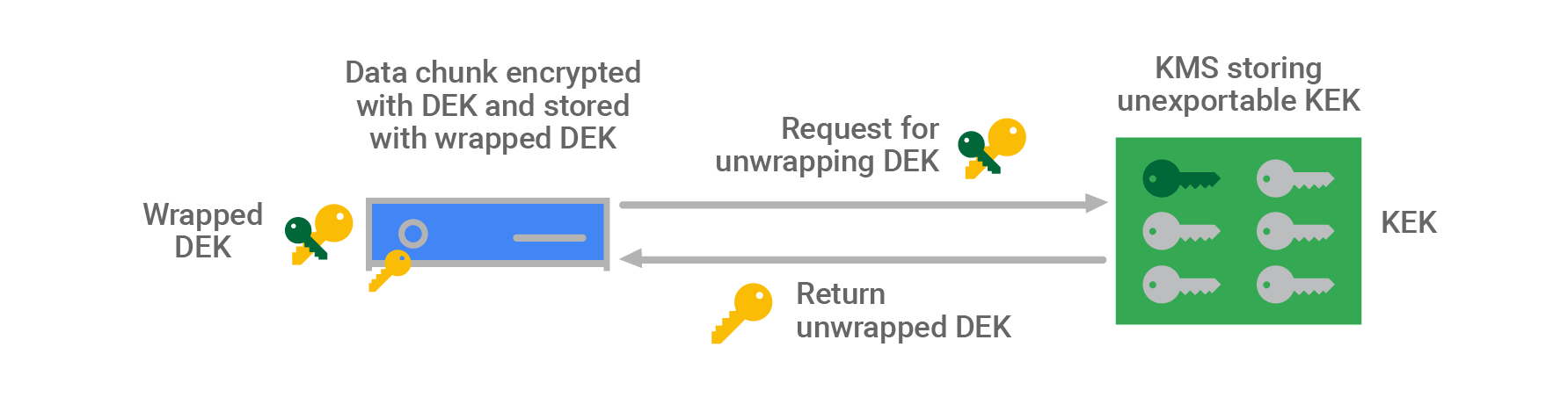
- Data encryption keys are encrypted with (“wrapped” by) Key Encryption Keys (KEK) also referred to as Envelope Encryption
- KEKs are stored centrally inside Google’s Key Management Service (KMS)
- Having a smaller number of KEKs than DEKs and using a central KMS makes storing and encrypting data at Google scale manageable, and allows tracking and controlling data access from a central point.
- KEKs are not exportable from Google’s KMS by design; all encryption and decryption with these keys must be done within KMS
- KMS can automatically rotate KEKs at regular time intervals
- KMS maintains an active key with a set of historical keys for decryption
- Google uses a common cryptographic library, Tink, which incorporates the FIPS 140-2 validated module, BoringCrypto, to implement encryption consistently across almost all Google Cloud products.
Google Cloud Default Decryption
- Service makes a call to the storage system for the data it needs.
- The storage system identifies the chunks in which that data is stored (the chunk IDs) and where they are stored.
- For each chunk, the storage system pulls the wrapped DEK stored with that chunk and sends it to KMS for unwrapping.
- The storage system verifies that the identified job is allowed to access that data chunk based on a job identifier, and using the chunk ID
- KMS verifies that the storage system is authorized both to use the KEK associated with the service and to unwrap that specific DEK.
- KMS passes the unwrapped DEK back to the storage system, which decrypts the data chunk and passes it to the service.
Cloud Key Management Service (Cloud KMS)
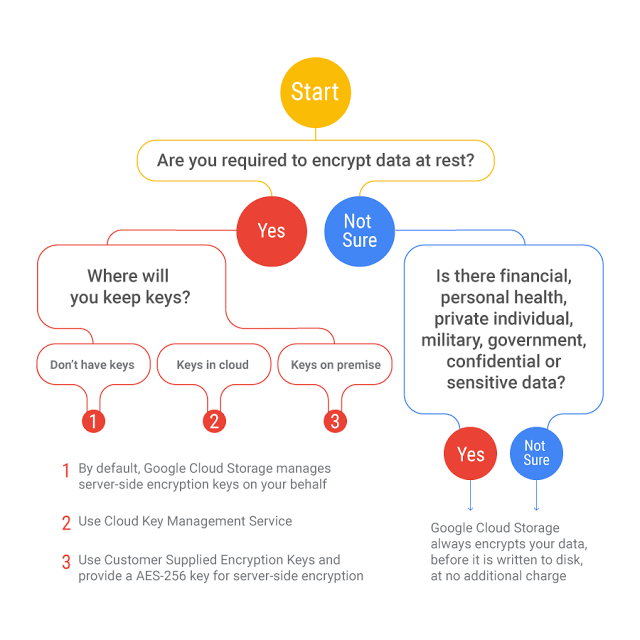
- Cloud KMS helps centralize management of encryption keys
- Google’s Key Management Service is redundant and globally distributed.
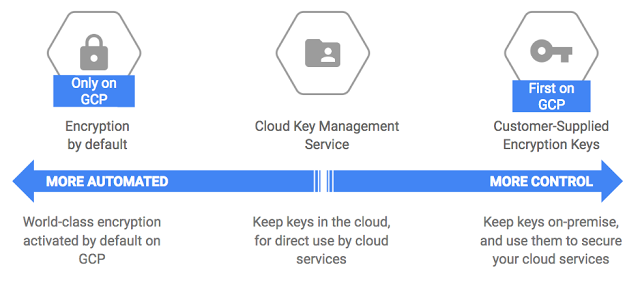
- Cloud KMS allows the customer to manage the encryption keys (CMEK)
- A CMEK or Customer Managed Encryption Key can be used in both server-side encryption (SSE) and client-side encryption (CSE).
- CMEK key can be used with KMS encrypt/decrypt and also be attached to a bucket, GCE disk, etc.
- CMEK supports importing your own key material, which is useful for migrations.
- Cloud KMS supports multiple protection levels:
- SOFTWARE – cryptographic operations performed in software (FIPS 140-3 Level 1 validated)
- HSM (Multi-tenant) – keys stored in Google-owned FIPS 140-2 Level 3 validated Hardware Security Modules
- HSM_SINGLE_TENANT – keys stored in dedicated HSM partitions exclusively for a single customer (introduced 2025)
- EXTERNAL – keys generated and stored in an external key management system, accessed over the internet
- EXTERNAL_VPC – keys in an external system accessed over a VPC network for better availability
- Cloud KMS now supports permanent key deletion (GA, Feb 2026) – allows deleting CryptoKeys and CryptoKeyVersions permanently. Deleted key names cannot be reused.
Cloud KMS Autokey
- Cloud KMS Autokey (GA, 2024) simplifies creating and using CMEKs by automating provisioning and assignment.
- Autokey automatically creates key rings, keys, and service accounts on demand when resources are created.
- Eliminates the need to pre-plan and provision keys before they are needed.
- Incorporates recommended best practices for key management automatically, including key rotation, separation of duties, and appropriate key granularity.
- Supported services include Cloud Storage, Compute Engine, BigQuery, Cloud Run, Secret Manager, and more.
- Autokey reduces operational toil for teams managing CMEK at scale.
Post-Quantum Cryptography in Cloud KMS
- Cloud KMS now supports quantum-safe digital signatures (Preview, Feb 2025) using NIST post-quantum standards:
- ML-DSA-65 (FIPS 204) – Module-Lattice-Based Digital Signature Algorithm
- SLH-DSA-SHA2-128s (FIPS 205) – Stateless Hash-Based Digital Signature Algorithm
- Cloud KMS supports post-quantum Key Encapsulation Mechanisms (KEMs) (Preview, 2025):
- ML-KEM-768 and ML-KEM-1024 – Module-Lattice-Based Key Encapsulation
- KEM-XWING – hybrid key encapsulation combining X25519 and ML-KEM
- These capabilities protect against “Harvest Now, Decrypt Later” attacks where adversaries capture encrypted data today intending to decrypt it with future quantum computers.
- Google Cloud network encryption already uses ML-KEM by default for all internal cryptographic key exchanges, protecting customer workloads automatically.
Single-Tenant Cloud HSM
- Single-Tenant Cloud HSM (introduced 2025) provides dedicated HSM partitions exclusively for a single customer.
- Designed for workloads requiring FIPS 140-2 Level 3 validation with cryptographic isolation from other customers.
- Each instance is a dedicated cluster of HSM partitions distributed across multiple zones within a region for high availability.
- Instance administrators have administrative control over the instance.
- Keys can be generated by Google or imported into the single-tenant instance.
- Useful for highly regulated industries (financial services, healthcare, government) requiring exclusive hardware isolation.
Cloud External Key Manager (Cloud EKM)
- Cloud EKM allows using encryption keys managed in a supported external key management partner service.
- Two connectivity options:
- EKM over the internet (EXTERNAL protection level) – keys accessed via the internet
- EKM over VPC (EXTERNAL_VPC protection level) – keys accessed over a VPC network for better availability and security
- Google Cloud never accesses external key material.
- Supported by many CMEK-integrated services.
- Organization policies can restrict key creation to only EXTERNAL or EXTERNAL_VPC types for compliance requirements.
Customer-Supplied Encryption Keys (CSEKs)
- Customer-Supplied Encryption Keys (CSEK) allows you to supply your own encryption keys. Google uses the key to protect the Google-generated keys used to encrypt and decrypt your data.
- CSEK is supported only by Cloud Storage and Compute Engine.
- CSEK Encryption
- User provides a raw CSEK as part of an API call.
- The key is transmitted from the Google front end to the storage system’s memory
- This key is used as the Key Encryption Key (KEK) in Google Cloud Storage for the data.
- CSEK Decryption
- Raw CSEK is used to unwrap wrapped chunk keys, to create raw chunk keys in memory.
- These are used to decrypt data chunks stored in the storage systems.
- These keys are used as the data encryption keys (DEK) in Google Cloud Storage for your data.
- Raw CSEK, CSEK-derived keys, and raw chunk/disk keys are never stored on disk unencrypted.
- Raw chunk/disk keys are stored wrapped with CSEK-derived keys, and with Google keys where automatic restart is used. Google does not permanently store your keys on its servers.
Encryption in Transit
- Google applies several security measures to help ensure the authenticity, integrity, and privacy of data in transit.
- Authentication: data source verification, either a human or a process, and destination.
- Integrity: ensures data sent arrives at its destination unaltered.
- Encryption: ensures data is unintelligible to keep it private.
- Data in transit inside a physical boundary controlled by or on behalf of Google is generally authenticated but not necessarily encrypted.
- Data is encrypted and authenticated in transit at one or more network layers when it moves outside physical boundaries not controlled by Google or on behalf of Google.
- Depending on the connection that is being made, Google applies default protections to data in transit for e.g., communications are secured between the user and the Google Front End (GFE) using TLS.
- Google Cloud customers with additional requirements for encryption of data over WAN can choose to implement further protections for data as it moves from a user to an application or VM to VM. These protections include IPSec tunnels, Gmail S/MIME, managed SSL certificates, and service mesh mTLS.
- Google uses Application Layer Transport Security (ALTS) for mutual authentication and transport encryption of RPC communications within Google’s infrastructure.
- Google Cloud network encryption now uses post-quantum key exchange (ML-KEM) by default to protect data in transit between Google facilities.
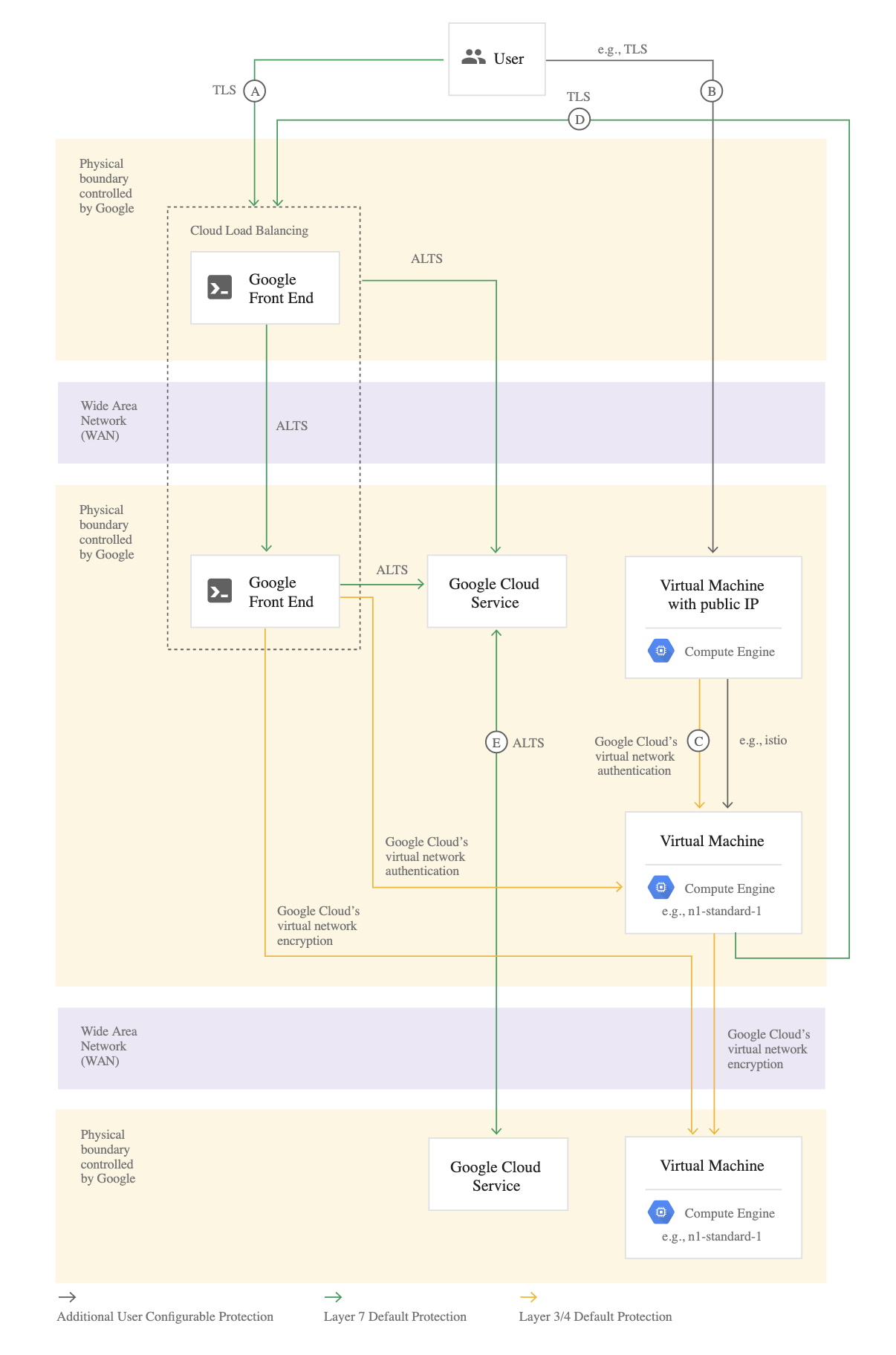
- [Connection A] – User to Google Front End
- Google accepts requests from around the world using a globally distributed system called the Google Front End (GFE)
- GFE terminates traffic for incoming HTTP(S), TCP, and TLS proxy traffic, provides DDoS attack countermeasures, and routes and load balances traffic to the Google Cloud services themselves.
- User requests to customer applications can be routed through a Google Cloud HTTP(S) or TCP/SSL Proxy Load Balancer external load balancer
- Google automatically encrypts traffic between GFEs and the backends load balancers that reside within VPC networks
- Certificate Manager provides automated provisioning and management of TLS certificates for load balancers, including Google-managed certificates with automatic renewal.
- [Connection B] – User to customer application hosted on Google Cloud
- Cloud VPN or Interconnect can help secure a direct connection to a VM using an external IP or network load balancer IP. As the connection does not go through GFE, it’s not encrypted by default.
- [Connection C] – Virtual Machine to Virtual Machine
- VM to VM connections are encrypted if they leave a physical boundary, and are authenticated within the physical boundary.
- VM to VM traffic, using external IP addresses, is not encrypted by default, and its security is provided at the user’s discretion
- [Connection D] – Virtual Machine to Google Cloud Service
- Connectivity to Google APIs and services can be protected using Private Google Access or Private Service Connect
- From the VM to the GFE, Google Cloud services support protecting these connections with TLS by default
- [Connection E] – Google Cloud Service to Google Cloud Service
- Routing from one Google service to another takes place on Google Cloud network backbone and may require routing traffic outside of physical boundaries controlled by or on behalf of Google
- Connections between these services are encrypted if they leave a physical boundary, and authenticated within the physical boundary.
Encryption in Use – Confidential Computing
- Confidential Computing protects data while it is being processed using hardware-based Trusted Execution Environments (TEEs).
- Encrypts data in memory, ensuring even the cloud provider cannot access data during processing.
- Confidential VMs encrypt the memory contents of virtual machines using:
- AMD SEV (Secure Encrypted Virtualization) – N2D machine series
- AMD SEV-SNP (Secure Nested Paging) – provides additional memory integrity protection
- Intel TDX (Trust Domain Extensions) – GA on C3 machine series (Sept 2024), creates isolated trust domains
- Confidential VMs with NVIDIA H100 GPUs (Preview, Oct 2024) – protects AI/ML workloads with GPU-level TEEs, ensuring data remains protected throughout the entire processing pipeline.
- Confidential GKE Nodes – extends Confidential Computing to Kubernetes workloads.
- Confidential Space – enables multi-party computation where multiple organizations can collaborate on data without exposing raw data to each other.
- Supports remote attestation for verifying the integrity of the execution environment.
- Enables encryption of data across its entire lifecycle: at rest, in transit, and in use.
GCP Certification Exam Practice Questions
- Questions are collected from Internet and the answers are marked as per my knowledge and understanding (which might differ with yours).
- GCP services are updated everyday and both the answers and questions might be outdated soon, so research accordingly.
- GCP exam questions are not updated to keep up the pace with GCP updates, so even if the underlying feature has changed the question might not be updated
- Open to further feedback, discussion and correction.
- Your organization requires that encryption keys used in Google Cloud must never be accessible to Google. Which encryption option should you use?
- Google default encryption
- Customer-Managed Encryption Keys (CMEK)
- Customer-Supplied Encryption Keys (CSEK)
- Cloud External Key Manager (Cloud EKM)
Answer: d. Cloud EKM keys are stored in an external key management system and Google Cloud never accesses the key material.
- A financial services company needs dedicated HSM hardware that is not shared with other customers. Which Cloud KMS protection level should they select?
- SOFTWARE
- HSM (Multi-tenant)
- HSM_SINGLE_TENANT
- EXTERNAL_VPC
Answer: c. Single-Tenant Cloud HSM provides dedicated HSM partitions exclusively for a single customer with cryptographic isolation.
- Your security team is concerned about “Harvest Now, Decrypt Later” attacks from future quantum computers. Which Cloud KMS feature addresses this?
- AES-256 symmetric encryption
- Cloud HSM with FIPS 140-2 Level 3
- Post-quantum Key Encapsulation Mechanisms (KEMs)
- Customer-Supplied Encryption Keys
Answer: c. Post-quantum KEMs (ML-KEM-768, ML-KEM-1024, KEM-XWING) are designed to protect against future quantum computing threats.
- Which of the following is true about Cloud KMS Autokey? (Select TWO)
- It creates key rings and keys on demand when resources are created
- It only works with Cloud Storage
- It requires manual provisioning of service accounts
- It incorporates recommended best practices for key management automatically
- It replaces Cloud EKM
Answer: a, d. Autokey automates key provisioning on demand and follows recommended best practices automatically.
- Which Google Cloud technology protects data while it is being processed in memory?
- Cloud KMS with CMEK
- Confidential Computing with Confidential VMs
- Customer-Supplied Encryption Keys
- Cloud Armor
Answer: b. Confidential VMs use hardware-based TEEs (AMD SEV, AMD SEV-SNP, Intel TDX) to encrypt data in memory during processing.
- Your organization wants to automate TLS certificate lifecycle management for load balancers. Which service should you use?
- Cloud KMS
- Certificate Manager
- Cloud Armor
- Secret Manager
Answer: b. Certificate Manager provides automated provisioning, management, and renewal of TLS certificates for Google Cloud load balancers.
References
- Google Cloud Default Encryption at Rest
- Google Cloud Encryption in Transit
- Cloud KMS Overview
- Cloud KMS Protection Levels
- Cloud KMS Autokey Overview
- Single-Tenant Cloud HSM
- Cloud External Key Manager
- Post-Quantum Digital Signatures in Cloud KMS
- Confidential Computing
- Customer-Supplied Encryption Keys