DynamoDB Backup and Restore provides fully automated on-demand backup, restore, and point-in-time recovery for data protection and archiving.
On-demand backup allows the creation of full backups of DynamoDB table for data archiving, helping you meet corporate and governmental regulatory requirements.
All backups are automatically encrypted, cataloged, and easily discoverable.
Backups can be created for tables from a few megabytes to hundreds of terabytes of data, with no impact on performance and availability of production applications.
On-demand Backups
DynamoDB on-demand backup helps create full backups of the tables for long-term retention, and archiving for regulatory compliance needs.
On-demand backups create a snapshot of the table that DynamoDB stores and manages.
Backup and restore actions run with no impact on table performance or availability.
Backups process in seconds regardless of the size of the tables.
Backups are preserved regardless of table deletion and retained until they are explicitly deleted.
On-demand backups are cataloged, and discoverable.
Charged based on the size and duration of the backups.
Can restore the entire DynamoDB table to the exact state it was in when the backup was created.
Creating On-demand Backups
On-demand backups can be created using two methods:
DynamoDB Native Backup
Can be used to backup and restore DynamoDB tables.
Create backups via AWS Management Console, AWS CLI, or API.
Limitation: DynamoDB on-demand backups cannot be copied to a different account or Region.
Suitable for simple backup and restore within the same account and region.
AWS Backup (Recommended)
AWS Backup is a fully managed data protection service that makes it easy to centralize and automate backups across AWS services, in the cloud, and on-premises.
Provides enhanced backup features beyond native DynamoDB backups.
Key Advantages:
Centralized Management: Configure backup schedules & policies and monitor activity for AWS resources and on-premises workloads in one place.
Cross-Region Backup: Copy on-demand backups across AWS Regions.
Independent Encryption: Encryption using an AWS KMS key that is independent of the DynamoDB table encryption key.
Vault Lock (WORM): Apply write-once-read-many (WORM) setting for backups using AWS Backup Vault Lock policy for compliance.
Cost Allocation Tags: Add cost allocation tags to on-demand backups for better cost tracking.
Cold Storage Tier: Transition on-demand backups to cold storage for lower costs (requires opting in to advanced features).
Automated Backup Plans: Create scheduled backup plans with retention policies.
Cross-Region and Cross-Account Restore
DynamoDB table data can be restored across AWS Regions such that the restored table is created in a different Region from where the source table resides.
Cross-Region restores are supported between:
AWS commercial Regions
AWS China Regions
AWS GovCloud (US) Regions
Cross-Account Backup and Restore: Using AWS Backup, backups can be copied across AWS accounts for disaster recovery or data migration scenarios.
Pricing: Pay for data transfer out of the source Region and for restoring to a new table in the destination Region.
PITR – Point-In-Time Recovery
DynamoDB point-in-time recovery – PITR enables automatic, continuous, incremental backup of the table with per-second granularity.
PITR backups are fully managed by DynamoDB.
PITR helps protect against accidental writes and deletes.
PITR can back up tables with hundreds of terabytes of data with no impact on the performance or availability of the production applications.
Configurable Recovery Period (January 2025)
Announced in January 2025, DynamoDB now supports a configurable recovery period for PITR.
Recovery period can be set to any value between 1 and 35 days on a per-table basis.
Default: Recovery period is 35 days if not explicitly configured.
Can restore to any given second from within the configured recovery period.
Use Cases:
Shorter retention (e.g., 7 days) for cost optimization when long-term recovery is not needed.
Compliance requirements that mandate specific retention periods.
Development/test environments where shorter recovery windows are acceptable.
Pricing Impact: Shortening the recovery period has no impact on PITR pricing because the price is based on the size of table and local secondary indexes, not the retention period.
PITR Restore Capabilities
Can restore to any point in time between EarliestRestorableDateTime and LatestRestorableDateTime.
LatestRestorableDateTime is typically five minutes before the current time.
PITR-enabled tables that were deleted can be recovered in the preceding 35 days (or configured retention period) and restored to their state just before they were deleted.
Restored table is created as a new, independent table (not part of the original global table if applicable).
PITR with Global Tables
Can enable point-in-time recovery on each local replica of a global table.
When restoring a global table replica, the backup restores to an independent table that is not part of the global table.
If using Global Tables version 2019.11.21 (Current), a new global table can be created from the restored table.
PITR Considerations
If PITR is disabled and later re-enabled on a table, the start time for recovery is reset.
After re-enabling, can only immediately restore using the LatestRestorableDateTime.
AWS CloudTrail logs all console and API actions for PITR for auditing and compliance.
PITR can be enabled or disabled at any time without impacting table performance.
Backup and Restore Best Practices
Use AWS Backup for Production: Leverage AWS Backup for centralized management, cross-region/cross-account capabilities, and advanced features.
Enable PITR for Critical Tables: Always enable PITR for production tables to protect against accidental data loss.
Configure Appropriate Retention: Set PITR retention period based on recovery requirements and compliance needs.
Test Restore Procedures: Regularly test backup restoration to ensure recovery processes work as expected.
Use Vault Lock for Compliance: Apply AWS Backup Vault Lock for immutable backups when required by regulations.
Implement Cross-Region Backups: Copy critical backups to another region for disaster recovery.
Tag Backups: Use cost allocation tags to track backup costs by project, environment, or team.
Automate Backup Plans: Create scheduled backup plans with AWS Backup for consistent data protection.
Monitor Backup Status: Use CloudWatch and AWS Backup monitoring to track backup success and failures.
Consider Cold Storage: Transition long-term backups to cold storage tier for cost savings.
AWS Certification Exam Practice Questions
Questions are collected from Internet and the answers are marked as per my knowledge and understanding (which might differ with yours).
AWS services are updated everyday and both the answers and questions might be outdated soon, so research accordingly.
AWS exam questions are not updated to keep up the pace with AWS updates, so even if the underlying feature has changed the question might not be updated
Open to further feedback, discussion and correction.
A sysops engineer must create nightly backups of an Amazon DynamoDB table. Which backup methodology should the database specialist use to MINIMIZE management overhead?
Install the AWS CLI on an Amazon EC2 instance. Write a CLI command that creates a backup of the DynamoDB table. Create a scheduled job or task that runs the command on a nightly basis.
Create an AWS Lambda function that creates a backup of the DynamoDB table. Create an Amazon CloudWatch Events rule that runs the Lambda function on a nightly basis.
Create a backup plan using AWS Backup, specify a backup frequency of every 24 hours, and give the plan a nightly backup window.
Configure DynamoDB backup and restore for an on-demand backup frequency of every 24 hours.
A company needs to copy DynamoDB table backups to a different AWS account for disaster recovery purposes. What is the BEST solution?
Use DynamoDB native backup and manually export/import data to the other account.
Use AWS Backup to create backups and copy them across accounts after enabling advanced features and cross-account backup.
Enable PITR and restore the table in the other account.
Use AWS Data Pipeline to copy data between accounts.
A company wants to protect a DynamoDB table against accidental deletions with the ability to recover data from any point in the last 7 days. What should a solutions architect recommend?
Create daily on-demand backups and retain them for 7 days.
Enable PITR with a recovery period configured to 7 days.
Use AWS Backup with a 7-day retention policy.
Enable DynamoDB Streams and store data in S3 for 7 days.
A company needs to restore a DynamoDB table to a different AWS Region. The table is currently in us-east-1 and needs to be restored to eu-west-1. What is the correct approach?
Enable PITR and restore directly to eu-west-1.
Use DynamoDB native backup and restore to eu-west-1.
Create a backup and perform a cross-Region restore to eu-west-1.
Create a Global Table with a replica in eu-west-1.
A company has enabled PITR on a DynamoDB table with a 35-day retention period. They want to reduce costs by shortening the retention to 14 days. What will be the impact on PITR pricing?
PITR costs will be reduced by approximately 60%.
PITR costs will be reduced proportionally to the retention period.
There will be no impact on PITR pricing as it is based on table size, not retention period.
PITR costs will increase due to more frequent backup cycles.
Which of the following are advantages of using AWS Backup over DynamoDB native backups? (Select THREE)
Cross-account backup and restore capabilities
Faster backup creation time
Ability to transition backups to cold storage tier
Lower backup storage costs
Centralized backup management across multiple AWS services
Automatic PITR enablement
A DynamoDB table with PITR enabled was accidentally deleted. How long does the company have to recover the table?
7 days from deletion
24 hours from deletion
Up to 35 days (or the configured retention period) from deletion
DynamoDB Global Tables is a fully managed, multi-active, cross-region replication capability of DynamoDB to support data access locality and regional fault tolerance for database workloads.
DynamoDB Streams provides a time-ordered sequence of item-level changes made to data in a table.
DynamoDB Triggers (just like database triggers) are a feature that allows the execution of custom actions based on item-level updates on a table.
DynamoDB Accelerator – DAX is a fully managed, highly available, in-memory cache for DynamoDB that delivers up to a 10x performance improvement – from ms to µs – even at millions of requests per second.
DynamoDB Zero-ETL Integrations provide seamless data replication to analytics services like Amazon Redshift, Amazon OpenSearch Service, and Amazon SageMaker Lakehouse without building ETL pipelines.
VPC Gateway Endpoints provide private access to DynamoDB from within a VPC without the need for an internet gateway or NAT gateway.
DynamoDB Warm Throughput provides visibility into the throughput your tables and indexes can instantly support and allows pre-warming for anticipated traffic spikes.
DynamoDB Secondary indexes on a table allow efficient access to data with attributes other than the primary key.
Global secondary index – an index with a partition key and a sort key that can be different from those on the base table.
Local secondary index – an index that has the same partition key as the base table, but a different sort key.
DynamoDB TTL
DynamoDB Time to Live (TTL) enables a per-item timestamp to determine when an item is no longer needed.
After the date and time of the specified timestamp, DynamoDB deletes the item from the table without consuming any write throughput.
DynamoDB TTL is provided at no extra cost and can help reduce data storage by retaining only required data.
Items that are deleted from the table are also removed from any local secondary index and global secondary index in the same way as a DeleteItem operation.
DynamoDB typically deletes expired items within a few days of their expiration. Items with valid, expired TTL attributes may still be updated, including changing or removing their TTL attributes, while pending deletion.
DynamoDB Stream tracks the delete operation as a system delete and not a regular delete.
TTL is useful if the stored items lose relevance after a specific time. for e.g.
Remove user or sensor data after a year of inactivity in an application
Archive expired items to an S3 data lake via DynamoDB Streams and AWS Lambda.
Retain sensitive data for a certain amount of time according to contractual or regulatory obligations.
DynamoDB Global Tables
DynamoDB Global Tables is a fully managed, serverless, multi-active, cross-region replication capability of DynamoDB to support data access locality and regional fault tolerance for database workloads.
Applications can perform reads and writes to DynamoDB in AWS regions around the world, with changes in any region propagated to every region where a table is replicated.
Global Tables help in building applications to take advantage of data locality to reduce overall latency.
Global Tables provides up to 99.999% availability and increased application resiliency.
Global Tables uses the Last Write Wins approach for conflict resolution.
Global Tables requires DynamoDB streams enabled with New and Old image settings.
Global Tables supports both same-account and multi-account replication models (multi-account GA Feb 2026).
Global Tables – Multi-Region Strong Consistency (MRSC)
DynamoDB Global Tables now supports Multi-Region Strong Consistency (MRSC), generally available as of June 2025.
MRSC enables applications to always read the latest data from any Region, achieving zero Recovery Point Objective (RPO).
Provides the highest level of application resilience, removing the need to manage strongly consistent replication manually.
Ideal for global applications with strict consistency requirements such as user profile management, inventory tracking, and financial transaction processing.
Available in: US East (N. Virginia), US East (Ohio), US West (Oregon), Europe (Ireland, London, Paris, Frankfurt), Asia Pacific (Tokyo, Seoul, Osaka).
Note: Global tables configured for MRSC do not support the multi-account model.
Global Tables – Multi-Region Eventual Consistency (MREC)
Default replication mode providing eventual consistency for cross-region reads.
Supports strong consistency for same-region reads.
Supports both same-account and multi-account replication models.
Global Tables – Multi-Account Replication
DynamoDB Global Tables now supports replication across multiple AWS accounts (GA Feb 2026).
Adds account-level isolation for stronger resiliency and limits the impact of misconfigurations, security incidents, or account-level issues.
Multi-account global tables replicate data across AWS Regions and accounts, providing the same active-active functionality as same-account global tables.
Both models support multi-Region writes, asynchronous replication, last-writer-wins conflict resolution, and the same billing model.
They differ in how accounts, permissions, encryption, and table governance are managed.
Multi-account global tables support only Multi-Region Eventual Consistency (MREC), not MRSC.
Global Tables – Pricing (Nov 2024 Update)
Effective November 1, 2024, DynamoDB reduced global tables pricing by up to 67% for on-demand tables (replicated write pricing).
For provisioned capacity tables, replicated write pricing was reduced by 33%.
After the price reduction, replicated write cost (rWCU/rWRU) is now priced identically to standard single-region WCU/WRU.
Global Tables – AWS FIS Integration
DynamoDB supports an AWS Fault Injection Service (FIS) action to pause global table replication (April 2024).
Enables simulation and observation of application response to Regional replication pauses.
Helps fine-tune monitoring and recovery processes for improved resiliency and availability.
DynamoDB Streams provides a time-ordered sequence of item-level changes made to data in a table.
DynamoDB Streams stores the data for the last 24 hours, after which they are erased.
DynamoDB Streams maintains an ordered sequence of the events per item however, sequence across items is not maintained.
Example
For e.g., suppose that you have a DynamoDB table tracking high scores for a game and that each item in the table represents an individual player. If you make the following three updates in this order:
Update 1: Change Player 1’s high score to 100 points
Update 2: Change Player 2’s high score to 50 points
Update 3: Change Player 1’s high score to 125 points
DynamoDB Streams will maintain the order for Player 1 score events. However, it would not maintain order across the players. So Player 2 score event is not guaranteed between the 2 Player 1 events
DynamoDB Streams APIs help developers consume updates and receive the item-level data before and after items are changed.
DynamoDB Streams allow reads at up to twice the rate of the provisioned write capacity of the DynamoDB table.
DynamoDB Streams have to be enabled on a per-table basis.
DynamoDB streams support Encryption at rest to encrypt the data.
DynamoDB Streams is designed for No Duplicates so that every update made to the table will be represented exactly once in the stream.
DynamoDB Streams writes stream records in near-real time so that applications can consume these streams and take action based on the contents.
DynamoDB streams can be used for multi-region replication to keep other data stores up-to-date with the latest changes to DynamoDB or to take actions based on the changes made to the table
DynamoDB Streams now supports resource-based policies (March 2024), enabling cross-account stream access without complex IAM role configurations.
DynamoDB Streams supports AWS PrivateLink interface endpoints (December 2024), enabling private access to streams over private IP addresses within a VPC.
DynamoDB Streams vs Kinesis Data Streams for DynamoDB
DynamoDB offers two streaming models for change data capture (CDC):
DynamoDB Streams – Built-in, 24-hour retention, tightly integrated with DynamoDB, ideal for Lambda triggers and event-driven architectures.
Kinesis Data Streams for DynamoDB – More flexible retention (up to 365 days), higher throughput, supports multiple consumers, ideal for complex downstream processing pipelines.
Kinesis Data Streams captures item-level modifications and replicates them to a Kinesis data stream, allowing continuous capture and storage of terabytes of data per hour.
Choose DynamoDB Streams for simpler use cases (Lambda triggers, Global Tables). Choose Kinesis Data Streams for higher throughput, longer retention, or multiple consumers.
DynamoDB Triggers
DynamoDB Triggers (just like database triggers) are a feature that allows the execution of custom actions based on item-level updates on a table.
DynamoDB triggers can be used in scenarios like sending notifications, updating an aggregate table, and connecting DynamoDB tables to other data sources.
DynamoDB Trigger flow
Custom logic for a DynamoDB trigger is stored in an AWS Lambda function as code.
A trigger for a given table can be created by associating an AWS Lambda function to the stream (via DynamoDB Streams) on a table.
When the table is updated, the updates are published to DynamoDB Streams.
In turn, AWS Lambda reads the updates from the associated stream and executes the code in the function.
DynamoDB Backup and Restore
DynamoDB on-demand backup helps create full backups of the tables for long-term retention, and archiving for regulatory compliance needs.
Backup and restore actions run with no impact on table performance or availability.
Backups are preserved regardless of table deletion and retained until they are explicitly deleted.
On-demand backups are cataloged, and discoverable.
On-demand backups can be created using
DynamoDB
DynamoDB on-demand backups cannot be copied to a different account or Region.
is a fully managed data protection service that makes it easy to centralize and automate backups across AWS services, in the cloud, and on-premises
provides enhanced backup features
can configure backup schedule, policies and monitor activity for the AWS resources and on-premises workloads in one place.
can copy the on-demand backups across AWS accounts and Regions,
encryption using an AWS KMS key that is independent of the DynamoDB table encryption key.
apply write-once-read-many (WORM) setting for the backups using the AWS Backup Vault Lock policy.
add cost allocation tags to on-demand backups, and
transition on-demand backups to cold storage for lower costs.
DynamoDB PITR – Point-In-Time Recovery
DynamoDB point-in-time recovery – PITR enables automatic, continuous, incremental backup of the table with per-second granularity.
PITR helps protect against accidental writes and deletes.
PITR can back up tables with hundreds of terabytes of data with no impact on the performance or availability of the production applications.
PITR-enabled tables that were deleted can be recovered in the preceding 35 days and restored to their state just before they were deleted.
Configurable Recovery Period (Jan 2025): PITR now supports configurable recovery periods. You can set the PITR period for each table between 1 to 35 days (default remains 35 days). This helps meet data compliance and regulatory requirements that need shorter retention periods.
Shortening the RecoveryPeriodInDays has no impact on PITR pricing because the price is based on the size of table and local secondary indexes.
DynamoDB Table Deletion Protection
DynamoDB supports table deletion protection (March 2023) to prevent accidental deletion during regular maintenance operations.
When deletion protection is enabled, the table cannot be deleted via the AWS Management Console, AWS CLI, or API calls unless the feature is explicitly disabled first.
Authorized administrators can set the deletion protection property when creating new tables or managing existing tables.
Complements other protection strategies like IAM policies, CloudFormation deletion policies, and PITR.
DynamoDB Import and Export
Export to S3
DynamoDB supports full and incremental exports to Amazon S3 from tables with PITR enabled.
Full Export: Exports the complete table data at any point in time within the PITR recovery window.
Incremental Export (Sep 2023): Exports only data that was inserted, updated, or deleted between two specified points in time. Enables efficient CDC pipelines without full table exports.
Exports do not affect the read capacity or availability of the table.
Data can be exported in DynamoDB JSON or Amazon Ion format.
Export per-second granularity for any point in the last 35 days (configurable with PITR recovery period).
Import from S3
DynamoDB Import allows importing data from an Amazon S3 bucket to a new DynamoDB table.
Supports up to 50,000 S3 objects in a single bulk import (increased from previous limits in March 2024).
Removes the need to consolidate S3 objects prior to running a bulk import.
DynamoDB Zero-ETL Integrations
DynamoDB offers zero-ETL integrations that seamlessly replicate data to analytics services without building or managing ETL pipelines.
Zero-ETL with Amazon Redshift (GA Oct 2024)
Automatically replicates DynamoDB tables into Amazon Redshift within minutes of data being written.
Enables SQL queries and analytics on DynamoDB data without complex ETL processes.
Supports Amazon Redshift Serverless workgroups or provisioned clusters using RA3 instance types.
Data replication begins within a few minutes of changes being written to DynamoDB.
Zero-ETL with Amazon OpenSearch Service (GA Jul 2024)
Provides near real-time data replication from DynamoDB to OpenSearch Service using the DynamoDB plugin for OpenSearch Ingestion.
Uses DynamoDB export to S3 for initial snapshot loading, then DynamoDB Streams for real-time change replication.
Enables powerful full-text search, vector search, and complex analytics on DynamoDB data.
Fully managed, code-free solution for seamless data synchronization.
Zero-ETL with Amazon SageMaker Lakehouse (Dec 2024)
Automates extracting and loading data from DynamoDB tables into SageMaker Lakehouse.
Enables analytics and ML workloads using integrated access control and Apache Iceberg for data interoperability.
Zero-ETL with Amazon S3 Tables (Jul 2025)
AWS Glue supports zero-ETL integrations from DynamoDB to S3 Table-backed data lakes.
Efficiently extracts and loads data for analysis in S3 Tables.
DynamoDB Warm Throughput
DynamoDB warm throughput (November 2024) provides visibility into the number of read and write operations your tables and indexes can readily handle.
Pre-warming allows proactively increasing the warm throughput value to meet anticipated future traffic demands.
Warm throughput values are available for all provisioned and on-demand tables and indexes at no cost.
Pre-warming your table’s throughput incurs a charge.
Warm throughput is not a maximum limit; it represents a minimum throughput the table can handle instantly.
DynamoDB dynamically increases warm throughput as applications grow, offering consistent performance at any scale.
Ideal for anticipated traffic spikes such as product launches, flash sales, or planned events.
Pre-warming is an asynchronous operation; you can carry out other table updates while pre-warming is in progress.
DynamoDB Configurable Maximum Throughput
DynamoDB supports configurable maximum throughput for on-demand tables (May 2024).
Allows optionally setting maximum read or write (or both) throughput for individual on-demand tables and associated secondary indexes.
Requests exceeding the maximum throughput are automatically throttled.
Provides predictable cost management and protection against accidental surging in consumed resources.
Safeguards downstream services with fixed capacity from potential overloading.
Maximum throughput values can be modified as needed based on application requirements.
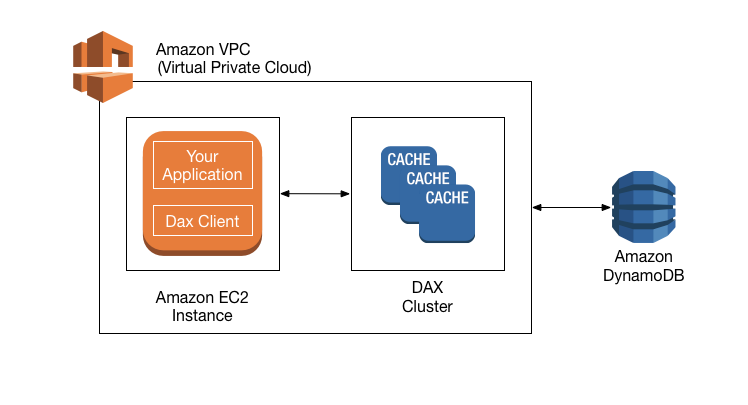
DynamoDB Accelerator (DAX) is a fully managed, highly available, in-memory cache for DynamoDB that delivers up to a 10x performance improvement – from milliseconds to microseconds – even at millions of requests per second.
DAX is intended for high-performance read applications. As a write-through cache, DAX writes directly so that the writes are immediately reflected in the item cache.
DAX as a managed service handles the cache invalidation, data population, or cluster management.
DAX provides API-compatible with DynamoDB. Therefore, it requires only minimal functional changes to use with an existing application.
DAX saves costs by reducing the read load (RCU) on DynamoDB.
DAX helps prevent hot partitions.
DAX only supports eventual consistency, and strong consistency requests are passed-through to DynamoDB.
DAX is fault-tolerant and scalable.
DAX cluster has a primary node and zero or more read-replica nodes. Upon a failure for a primary node, DAX will automatically failover and elect a new primary. For scaling, add or remove read replicas.
DAX supports server-side encryption.
DAX also supports encryption in transit, ensuring that all requests and responses between the application and the cluster are encrypted by TLS, and connections to the cluster can be authenticated by verification of a cluster x509 certificate.
DAX now supports R7i instances (April 2025), powered by 4th Gen Intel Xeon Scalable processors, with instance sizes up to 24xlarge and DDR5 memory.
DAX now supports AWS PrivateLink (October 2025), enabling secure access to DAX management APIs (CreateCluster, DescribeClusters, DeleteCluster) over private IP addresses within a VPC.
DAX SDK for JavaScript version 3 is now available (March 2025).
DynamoDB Security Features
Resource-Based Policies (March 2024)
DynamoDB supports resource-based policies for tables, indexes, and streams.
Allows specifying IAM principals and their permitted actions directly on DynamoDB resources.
Simplifies cross-account access control without requiring complex IAM role assumptions.
Integrates with AWS IAM Access Analyzer and Block Public Access capabilities.
Available in all AWS commercial Regions and GovCloud at no additional cost.
Attribute-Based Access Control – ABAC (Nov 2024 GA)
DynamoDB supports ABAC for tables and indexes.
ABAC defines access permissions based on tags attached to users, roles, and AWS resources.
Uses tag-based conditions in IAM policies to allow or deny specific actions.
Automatically applies tag-based permissions to new employees and changing resource structures without rewriting policies.
AWS PrivateLink (March 2024)
DynamoDB supports AWS PrivateLink (Interface VPC Endpoints) for private connectivity without public IP addresses.
Compatible with AWS Direct Connect and AWS VPN for end-to-end private network connectivity.
Eliminates the need for internet gateway or firewall rule configuration for DynamoDB access from on-premises.
Supports FIPS 140-3 compliant interface VPC endpoints and Streams endpoints (Dec 2024).
VPC Endpoints
DynamoDB supports both Gateway endpoints and Interface endpoints (PrivateLink):
Gateway Endpoints: Free, adds route table entries to direct traffic to DynamoDB. Ideal for VPC-to-DynamoDB access with no additional cost.
Interface Endpoints (PrivateLink): Creates an ENI with private IP. Supports Direct Connect and VPN. Has per-hour and per-GB costs. Ideal for on-premises-to-DynamoDB access.
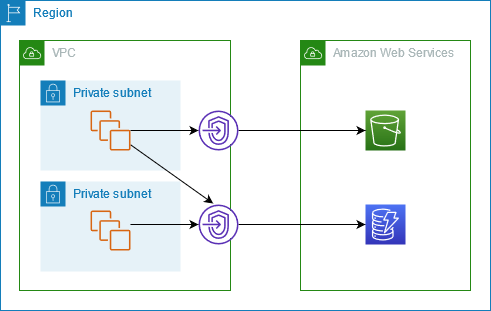
VPC Gateway endpoints for DynamoDB improve privacy and security, especially those dealing with sensitive workloads with compliance and audit requirements, by enabling private access to DynamoDB from within a VPC without the need for an internet gateway or NAT gateway.
VPC endpoints for DynamoDB support IAM policies to simplify DynamoDB access control, where access can be restricted to a specific VPC endpoint.
VPC endpoints can be created only for Amazon DynamoDB tables in the same AWS Region as the VPC.
DynamoDB Streams can be accessed using Interface endpoints (PrivateLink) only, not Gateway endpoints.
DynamoDB Pricing Updates (Nov 2024)
Effective November 1, 2024, DynamoDB reduced on-demand throughput pricing by 50%.
Global tables pricing reduced by up to 67% for on-demand and 33% for provisioned.
DynamoDB offers two table classes:
DynamoDB Standard: Default table class, optimized for balanced throughput and storage costs.
DynamoDB Standard-IA: Reduces storage costs by up to 60% ($0.10/GB vs $0.25/GB) for infrequently accessed data. Higher read/write costs (~25% higher).
Standard-IA is ideal when storage is the dominant cost and access patterns are infrequent.
AWS Certification Exam Practice Questions
Questions are collected from Internet and the answers are marked as per my knowledge and understanding (which might differ with yours).
AWS services are updated everyday and both the answers and questions might be outdated soon, so research accordingly.
AWS exam questions are not updated to keep up the pace with AWS updates, so even if the underlying feature has changed the question might not be updated
Open to further feedback, discussion and correction.
What are the services supported by VPC endpoints, using Gateway endpoint type? Choose 2 answers
Amazon S3
Amazon EFS
Amazon DynamoDB
Amazon Glacier
Amazon SQS
A company has setup an application in AWS that interacts with DynamoDB. DynamoDB is currently responding in milliseconds, but the application response guidelines require it to respond within microseconds. How can the performance of DynamoDB be further improved? [SAA-C01]
Use ElastiCache in front of DynamoDB
Use DynamoDB inbuilt caching
Use DynamoDB Accelerator
Use RDS with ElastiCache instead
A company runs a global application that requires strong consistency for reads across all regions. Which DynamoDB feature should be used?
DynamoDB Streams with Lambda replication
DynamoDB Global Tables with eventual consistency
DynamoDB Global Tables with Multi-Region Strong Consistency (MRSC)
DynamoDB with ElastiCache in each region
A company needs to run analytics on DynamoDB data using SQL queries without building ETL pipelines. Which solution requires the least operational overhead?
Export DynamoDB to S3 and query with Athena
Use DynamoDB Streams to replicate to Aurora
Use DynamoDB zero-ETL integration with Amazon Redshift
Use AWS Glue to copy data to Redshift nightly
A company anticipates a major traffic spike during a product launch and wants to ensure their DynamoDB on-demand table can handle the increased load immediately. What feature should they use?
Switch to provisioned capacity mode
Enable DynamoDB Auto Scaling
Pre-warm the table using warm throughput
Add a DAX cluster
A company needs to grant a partner account access to specific DynamoDB tables without creating IAM roles in the partner account. What is the most efficient approach?
Create a cross-account IAM role
Use DynamoDB resource-based policies
Share tables using AWS RAM
Replicate data to the partner account
A company wants to configure DynamoDB PITR with a 7-day recovery window to comply with data minimization regulations. Is this possible?
No, PITR always retains 35 days of backups
Yes, PITR now supports configurable recovery periods between 1-35 days
No, you must use on-demand backups for shorter retention
Yes, but only with AWS Backup
Which DynamoDB streaming option provides retention of up to 365 days and supports multiple consumers? [SAA-C03]