EC2 Instance Lifecycle Overview
- EC2 instance lifecycle determines how an EC2 instance transitions through different states from the moment it is launched to its termination
EC2 Instance Lifecycle
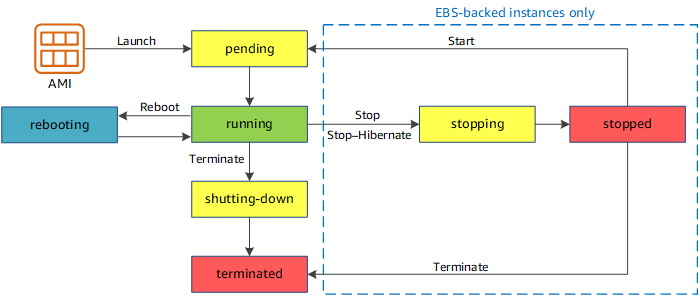
Instance Launch
- Pending
- When the instance is first launched it enters into the pending state
- Running
- After the instance is launched, it enters into the running state
- Charges are incurred for each second, with a one-minute minimum, that the instance is running, even if the instance remains idle
Instance Start & Stop (EBS-backed instances only)
- Only an EBS-backed instance can be stopped and started.
- Instance store-backed instance cannot be stopped and started.
- An instance can be stopped & started in case the instance fails a status check or is not running as expected
- Stop
- After the instance is stopped, it enters in stopping state and then to stopped state.
- Charges are only incurred for the EBS storage and not for the instance usage or data transfer.
- While the instance is stopped, its root volume can be treated like any other volume, and modified for e.g. repair file system problems or update software or change the instance type, user data, EBS optimization attributes, etc
- Volume can be detached from the stopped instance, and attached to a running instance, modified, detached from the running instance, and then reattached to the stopped instance. It should be reattached using the storage device name that’s specified as the root device in the block device mapping for the instance.
- Start
- When the instance is started, it enters into pending state and then into running
- An instance, when stopped and started, is moved to a new host computer (though in some cases, it remains on the current host)
- Any data on an instance store volume (not root volume) would be lost while data on the EBS volume persists
- EC2 instance retains its private IP address as well as the Elastic IP address.
- If the instance has an IPv6 address, it retains its IPv6 address.
- However, the public IP address, if assigned instead of the Elastic IP address, would be released
- For each transition of an instance from
stoppedtorunning, charges per second are incurred when the instance is running, with a minimum of one minute every time the instance is started
Instance Stop Protection
- Stop protection (
DisableApiStopattribute) can be enabled to prevent an instance from being accidentally stopped. - Stop protection also prevents accidental termination when using the console, AWS CLI, or API.
- However, it does not automatically set the
DisableApiTerminationattribute. - Can be enabled at launch, while the instance is running, or while it is stopped.
- Stop protection does not prevent:
- Stopping an instance by initiating a shutdown from the OS (e.g.,
shutdownorpoweroffcommand) - AWS from stopping the instance when there is a scheduled event
- Amazon EC2 Auto Scaling from terminating an instance when unhealthy or during scale-in events
- Stopping an instance by initiating a shutdown from the OS (e.g.,
- Cannot be enabled for instance store root volume instances or Spot Instances.
Instance Hibernate
- Instance hibernation signals the operating system to perform hibernation (suspend-to-disk), which saves the contents from the instance memory (RAM) to the EBS root volume
- Instance’s EBS root volume and any attached EBS data volumes are persisted, including the saved contents of the RAM.
- Any EC2 instance store volumes remain attached to the instance, but the data on the instance store volumes is lost.
- When the instance is restarted, the EBS root volume is restored to its previous state and the RAM contents are reloaded. Previously attached data volumes are reattached and the instance retains its instance ID.
- After the instance is hibernated, it enters in stopping state and then to stopped state.
- Billing Note: Unlike a regular stop, you are billed while the instance is in the
stoppingstate during hibernation. You stop incurring charges once the instance is in thestoppedstate. - When the instance is restarted
- It enters the
pendingstate and the instance is moved to a new host computer (though in some cases, it remains on the current host). - EBS root volume is restored to its previous state
- RAM contents are reloaded
- Processes that were previously running on the instance are resumed
- Previously attached data volumes are reattached and the instance retains its instance ID
- Instance retains private IPv4 addresses and any IPv6 addresses
- Instance retains its Elastic IP address
- Instance releases its Public IPv4 address and would get a new one
- It enters the
- Hibernation prerequisites
- Supported instance families (significantly expanded):
- General purpose: M3, M4, M5, M5a, M5ad, M5d, M6a, M6g, M6gd, M6i, M6id, M6idn, M6in, M7a, M7g, M7gd, M7i, M7i-flex, M8a, M8azn, M8g, M8gb, M8gd, M8gn, M8i, M8i-flex, M8in, M8idn, M8ib, M8idb, M9g, M9gd, T2, T3, T3a, T4g
- Compute optimized: C3, C4, C5, C5d, C6a, C6g, C6gd, C6gn, C6i, C6id, C6in, C7a, C7g, C7gd, C7gn, C7i, C7i-flex, C8a, C8g, C8gb, C8gd, C8gn, C8i, C8i-flex, C8in, C8ib
- Memory optimized: R3, R4, R5, R5a, R5ad, R5d, R6a, R6g, R6gd, R6idn, R6in, R7a, R7g, R7gd, R7i, R7iz, R8a, R8g, R8gb, R8gd, R8gn, R8i, R8i-flex, R8in, R8idn, R8ib, R8idb, X2gd, X8aedz, X8i
- Storage optimized: I3, I3en, I4g, I7i, I7ie, I8g, I8ge, Im4gn, Is4gen
- Instance RAM size – Linux: must be less than 150 GiB; Windows: must be less than or equal to 16 GiB.
- Instance size – not supported for bare metal instances.
- Supported AMIs must be an HVM AMI that supports hibernation (includes AL2023, Amazon Linux 2, Ubuntu 20.04/22.04, RHEL 8/9, Windows Server 2012-2022)
- Graviton support (added July 2024): Hibernation is now supported on AWS Graviton-based instances (M6g, M7g, M8g, M9g, C6g, C7g, C8g, R6g, R7g, R8g, T4g, etc.)
- Root volume type – must be EBS volume and not instance store
- EBS root volume size – must be large enough to store the RAM contents
- EBS root volume MUST be encrypted to ensure the protection of sensitive content that is in memory at the time of hibernation
- EBS volume type – must be General Purpose SSD (gp2 or gp3) or Provisioned IOPS SSD (io1 or io2)
- Enable hibernation at launch, as changing it is not supported on an existing instance
- Purchasing options – On-Demand Instances and Spot Instances are supported. For Spot Instances, only Amazon EC2 can hibernate them (upon interruption).
- Supported instance families (significantly expanded):
- Limitations or Unsupported Actions
- Changing the instance type or size of a hibernated instance
- Creating snapshots or AMIs from hibernated instances or instances for which hibernation is enabled
- The data on any instance store volumes is lost
- Can’t hibernate a Linux instance that has more than 150 GiB of RAM.
- Can’t hibernate a Windows instance that has more than 16 GiB of RAM.
- Can’t hibernate an instance that is in an Auto Scaling group or used by Amazon ECS. If the instance is in an Auto Scaling group and is hibernated, the EC2 Auto Scaling service marks the stopped instance as unhealthy, and may terminate it and launch a replacement instance.
- An instance cannot be hibernated for more than 60 days.
- Auto Scaling Warm Pools with Hibernation
- EC2 Auto Scaling Warm Pools support hibernation as a pool state, allowing pre-initialized instances to be hibernated and quickly resumed when scaling out.
- This is available in all commercial regions and AWS GovCloud (US) Regions (added Feb 2024).
- Helps achieve faster scale-out by maintaining pre-warmed instances in a hibernated state.
Instance Reboot
- Both EBS-backed and Instance store-backed instances can be rebooted
- An instance remains on the same host computer and maintains its public DNS name, private IP address
- Data on the EBS and Instance store volume is also retained
- Rebooting an instance doesn’t start a new instance billing period; per-second billing continues without a further one-minute minimum charge.
- AWS recommends using EC2 to reboot the instance instead of running the operating system reboot command from the instance as it performs a hard reboot if the instance does not cleanly shut down within four minutes also creates an API record in CloudTrail if enabled.
Instance Retirement
- An instance is scheduled to be retired when AWS detects an irreparable failure of the underlying hardware hosting the instance.
- When an instance reaches its scheduled retirement date, it is stopped or terminated by AWS.
- If the instance root device is an EBS volume, the instance is stopped and can be started again at any time.
- If the instance root device is an instance store volume, the instance is terminated, and cannot be used again.
- AWS sends notifications (via email and AWS Health Dashboard) about scheduled retirements in advance.
Instance Termination
- An instance can be terminated, and it enters into the shutting-down, and then the terminated state
- After an instance is terminated, it can’t be connected and no charges are incurred
- Instance Shutdown behavior
- Each EBS-backed instance supports the
InstanceInitiatedShutdownBehaviorattribute which determines whether the instance would be stopped or terminated when a shutdown command is initiated from the instance itself for e.g. shutdown, halt or poweroff command in linux - Default behavior for the instance to be stopped.
- A shutdown command for an Instance store-backed instance will always terminate the instance
- Each EBS-backed instance supports the
- Termination protection
- Termination protection (
DisableApiTerminationattribute) can be enabled on the instance to prevent it from being accidentally terminated DisableApiTerminationfrom the Console, CLI or API.- Instance can be terminated through EC2 CLI.
- Termination protection does not work for instances when
- part of an Autoscaling group
- launched as Spot instances
- terminating an instance by initiating shutdown from the instance (if
InstanceInitiatedShutdownBehavioris set to terminate)
- Termination protection (
- Data persistence
- EBS volume has a
DeleteOnTerminationattribute which determines whether the volumes would be persisted or deleted when an instance they are associated with are terminated - Data on Instance store volume data does not persist
- Default is to delete the root device volume and preserve any other EBS volumes. i.e.
- Data on EBS root volumes have the
DeleteOnTerminationflag set to true and would be deleted by default - Additional EBS volumes attached have the
DeleteOnTerminationflag set to false are not deleted but just detached from the instance
- Data on EBS root volumes have the
- EBS volume has a
Replace Root Volume
- EC2 supports replacing the root volume of a running instance without stopping it.
- The replacement volume can be based on the original launch snapshot, a different snapshot, or a new AMI.
- Use cases include:
- Restoring the root volume to its initial launch state
- Quick OS patching or application updates
- Troubleshooting boot issues without losing instance store data or networking configuration
- The instance retains its instance ID, private IP addresses, Elastic IP addresses, instance store data, and network interface attachments.
- EC2 Auto Scaling also supports a ReplaceRootVolume strategy within instance refresh (announced Nov 2025).
Simplified Automatic Recovery
- If AWS detects that an instance is unavailable due to an underlying hardware or software issue (system status check failure), simplified automatic recovery can automatically restore instance availability.
- The instance is moved from the host with the underlying issue to a different host.
- The recovered instance retains its instance ID, private IP addresses, Elastic IP addresses, and all instance metadata.
- Simplified automatic recovery is enabled by default on supported instance types (most Nitro-based instances).
- Does not recover instances that fail an instance status check (only system status check failures).
Instance State Change Notifications
- Amazon EC2 sends EC2 Instance State-change Notification events to Amazon EventBridge when an instance changes state (e.g., pending, running, stopping, stopped, shutting-down, terminated).
- You can create EventBridge rules to trigger actions (Lambda functions, SNS notifications, etc.) based on specific state changes.
- Useful for automation, monitoring, and alerting on instance lifecycle events.
AWS Certification Exam Practice Questions
- Questions are collected from Internet and the answers are marked as per my knowledge and understanding (which might differ with yours).
- AWS services are updated everyday and both the answers and questions might be outdated soon, so research accordingly.
- AWS exam questions are not updated to keep up the pace with AWS updates, so even if the underlying feature has changed the question might not be updated
- Open to further feedback, discussion and correction.
- What does Amazon EC2 provide?
- Virtual servers in the Cloud
- A platform to run code (Java, PHP, Python), paying on an hourly basis.
- Computer Clusters in the Cloud.
- Physical servers, remotely managed by the customer.
- A user has enabled termination protection on an EC2 instance. The user has also set Instance initiated shutdown behavior to terminate. When the user shuts down the instance from the OS, what will happen?
- The OS will shutdown but the instance will not be terminated due to protection
- It will terminate the instance
- It will not allow the user to shutdown the instance from the OS
- It is not possible to set the termination protection when an Instance initiated shutdown is set to Terminate
- A user has launched an EC2 instance and deployed a production application in it. The user wants to prohibit any mistakes from the production team to avoid accidental termination. How can the user achieve this?
- The user can the set DisableApiTermination attribute to avoid accidental termination
- It is not possible to avoid accidental termination
- The user can set the Deletion termination flag to avoid accidental termination
- The user can set the InstanceInitiatedShutdownBehavior flag to avoid accidental termination
- You have been doing a lot of testing of your VPC Network by deliberately failing EC2 instances to test whether instances are failing over properly. Your customer who will be paying the AWS bill for all this asks you if he being charged for all these instances. You try to explain to him how the billing works on EC2 instances to the best of your knowledge. What would be an appropriate response to give to the customer in regards to this?
- Billing commences when Amazon EC2 AMI instance is completely up and billing ends as soon as the instance starts to shutdown.
- Billing commences when Amazon EC2 initiates the boot sequence of an AMI instance and billing ends when the instance shuts down.
- Billing only commences only after 1 hour of uptime and billing ends when the instance terminates.
- Billing commences when Amazon EC2 initiates the boot sequence of an AMI instance and billing ends as soon as the instance starts to shutdown.
- A company wants to prevent EC2 instances running critical databases from being accidentally stopped by developers. Which feature should they use?
- DisableApiTermination attribute
- InstanceInitiatedShutdownBehavior attribute
- DisableApiStop attribute (Stop Protection)
- EC2 instance store volumes
- Which of the following is true about EC2 instance hibernation? (Select TWO)
- Instance store volume data is preserved during hibernation
- The EBS root volume must be encrypted
- Hibernation can be enabled on an existing running instance
- RAM contents are saved to the EBS root volume
- An instance can be hibernated for up to 90 days
- A team wants to use EC2 hibernation with their Graviton-based M7g instances running Amazon Linux 2. Which statement is correct?
- Hibernation is not supported on Graviton-based instances
- Hibernation is supported on Graviton-based instances including M7g (added July 2024)
- Hibernation on Graviton requires instance store root volumes
- Hibernation on Graviton only supports Windows AMIs
- An application running on an EC2 instance experiences a system status check failure due to underlying hardware issues. If simplified automatic recovery is enabled, what happens?
- The instance is terminated and a new one is launched
- The instance remains on the same host and is rebooted
- The instance is moved to a different host while retaining its instance ID, IP addresses, and metadata
- The instance enters a stopped state and requires manual restart